This Grandmother’s reaction when she tried virtual reality for the first time is priceless!

Google Cardboard is the most recent toy from Google. For those of you unacquainted with the device, it’s basically a cardboard visor that allows you to enjoy virtual reality apps directly on your smartphone. But, how would an older person who has never experienced virtual reality react?

This is the latest YouTube sensation starring Marie, an 88-year-old lady trying out a rollercoaster-simulator for the first time on Google Cardboard. We won’t spoil it for you, so just watch her priceless reaction of pure joy and shock!

Can’t see the video? Click here.

How do the older members of your family react to the latest technology? Let us know your experiences!

The real Darth Vader lives in Ukraine: this is his life

Darth Vader isn’t just the name of Star Wars’ most infamous villain: it’s also the real name of a Ukranian citizen who just so happens to dress and act like the charismatic Sith himself.

Being such a Star Wars fan, Darth Mykolaiovych Vader (his complete name) decided to officially change his birth name for a name that would certainly make George Lucas proud.

But Darth doesn’t just boast the same name of the legendary bad guy – in fact his entire life revolves around Star Wars, so much so that he even put himself forward for his city’s mayoral elections (in his alter ego’s attire) along with the support of fellow enthusiasts of the galactic saga (also dressed appropriately). Although not elected as mayor, his party received 15 out of the total 42 votes….it wasn’t a bad start!

Valentyn Ogirenko, a journalist for Reuters has dedicated an extensive report to Darth Mykolaiovych Vader, which shows his daily life as a Sith. Here you can see all of the photos, but we’ll leave you with some of our favorites below.

Darth doesn’t neglect his daily chores!

Darth is a handy with his hands and is practically a professional when it comes to needlework.

He’s a big animal lover and the proud owner of a Golden Retriever.

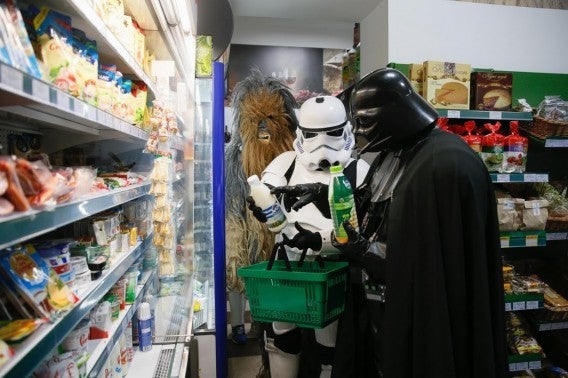
Doing a bit of food shopping with his friends.

Darth is an exemplary citizen who cares deeply for the elderly.

At the end of a long day, Darth is known to relax and read a book in his bedroom.

How to add text on a PDF

Do you need to fill out a PDF form or add comments or text to an already created PDF document? In this video tutorial we’ll show you how to do it.

How to add text on a PDF por softonic-en

To add text, first you will need to have Adobe Reader installed on your computer. If you don’t have it, you’ll find a link to the Adobe homepage here.

Once Adobe Reader is installed, open the program and click on “File” and on “Open…” to look for the document to which you want to add text.

When the document you want to edit is open, click on the “Tools” tab next to “Home”.

Now, to fill out a form or sign a document select “Fill & Sign”. This option will allow you to add text on a PDF form by clicking on the place you want to type something. You’ll even be able to change the font size.

You can also add your signature to the document by selecting a scanned image or by drawing it with your mouse or on a graphic tablet. You might as well just type your name and surname.

If you need to add comments to the document, select “Comment”. With this option you will be able to make comments as well as underline or highlight segments of text.

And, once you’ve edited the document remember to click on “Save”.

Farewell to Gmail? Google surprises you with this potential replacement

Farewell to Gmail? During this week, speculation has emerged: Does Google intend to replace its email service with a “new” service?

If you have recently logged into Gmail using your mobile phone, it is possible that the application has redirected to Inbox instead of the long lived Gmail.  “Thank you for using Inbox””, reads the message showed up to many users. “To make things easier, we’ve updated Gmail to redirect you here”.

Actually, Inbox is not a new service. It debuted last year. Google describes it as “the inbox that works for you”; analyzes your emails to group them so that it is easy to distinguish the most important from the crap, for example. In this article we give you more details about Inbox.

Does that mean you cannot use Gmail? No way. Inbox allows you to go back to Gmail and you can even disable this option.

However, we as journalists like alarm triggering and apparently we have concluded that this move means that Google wants to replace Gmail with Inbox.

“Gmail is still alive and great”, said one presenter from Google about it (though, what else do you expect him to say?). “We want to provide a seamless way for Inbox users to reach the service via Gmail.com without memorizing a new URL. The optional redirection provides an easy access. And if you don’t needed it, you can disabled it in settings”.

Would you like Google to replace or modernize Gmail?

Source: Independent

5 must have apps for Star Wars fans

Episode 7 is nearly here. We are all begin to feel the Force Awaken within us, even the most cynical old Star Wars fan is finding it hard to contain their excitement. Which is why this week’s show is dedicated to 5 Apps from everyone’s favorite far off galaxy.

Star Wars

Confusingly this week’s first Star Wars app is just called Star Wars (iOS|Android). This is an official fan portal produced by Disney, which provides everything you could possibly want to know about the movies. With access to all of the latest Star Wars news, multimedia content, events, and announcements, this is an essential download for fans who need to be in the know.

Star Wars: Galaxy of Heroes

There is a significant overlap between gamers and fans of Star Wars, so it should come as no surprise that we have a game on our list this week. Star Wars: Galaxy of Heroes (iOS|Android) is a turn-based RPG that has you collect and upgrade characters from the light and dark sides of the force to battle through two campaigns and online multiplayer.

Jedi Lightsaber|Force Saber of Light

There is nothing more iconic, desired, or fetishized in Star Wars than the Lightsaber. Learning to lift an aircraft with your minds would be a cool bonus to being a Jedi, but the real reason for signing up to the Jedi academy, purging yourself of emotion, and living in what looks like a drafty building, is to get your hand on this elegant weapon. Luckily, iOS users can now download Jedi Lightsaber without any of these obstacles, while Android users can grab Force Saber of Light.

Star Wars Wikia

Need to know everything about Star Wars? Even that extended universe stuff that Lucas came out and declared was no longer canon? Then you need a Star Wars Wikia app (iOS|Android). These apps are keys to a vast repository of fan curated content, ensuring you can find answers to every comic, novel, and gaming related question you have – the perfect solution to all of your Star Wars related arguments.

Star Wars: Scene Maker

Star Wars: Scene Maker (iOS) has you recreating and changing your favorite scenes from the movies. By selecting the backdrop, characters, vehicles, weapons, items, and even quotes, you can build incredible Star Wars diorama. Personally we got a kick from remaking the Battle of Endor with the Ewoks removed… turns out the little furballs didn’t help much, the Rebels still won.

That’s it for this week’s show, and by the next time you see us we will be in a world where Force Awakens is already out. I hope you have your tickets… apparently its quite popular.

Related Stories

Top 5 video editing apps

Top 3 iOS games of 2015

The three worst Star Wars games ever

Follow me on Twitter: @DoFuss

How does the Internet know where we are

It’s subtle, but most of you would have noticed that many websites we visit seem to know exactly where we are, and which language and version of content to deliver to you. Type google.com while in New York and you’ll get routed to google.com. But if you were in Toronto, Mexico City or Paris, google.ca, google.com.mx and google.fr appear respectively. How does this happen?

Your IP Address

You, and every computer in the world, are given a numerical IP address, very much like a street address to identify where you are accessing the Internet from. To find out your IP address, click here. This is probably the first thing a website uses to determine your location and decide which version of their content they should deliver to you.

Your Internet Service Provider

And the second culprit is your Internet Service Provider (ISP). Whenever you ask for a website, your ISP sends a request to a server, and the server recognizes where the ISP is from (e.g. Comcast from the U.S., or Sky from the UK). It then sends back the version of the website that has been created for that region.

It’s your GPS

You might not realize that it might be your device that’s broadcasting your location. If you are accessing the internet on your smartphone or tablet, the GPS or Location Services (as Apple calls it) could be set up to inform the web browser where you are at that moment.

Cache and Cookies

Cache and cookies are the little bits of information that stays on your computer every time you visit a website. For instance, if you last visited Google got directed to ‘Google.co.uk’, your web browser will remember that, and the next time you ask for Google, the UK version of Google will automatically appear.

While some people may feel that detecting their location might be an invasion into their privacy, it must be acknowledged that there are some perks to having location specific and relevant content delivered automatically to you. What do you think?

How to save passwords in Avast

Avast just added an interesting new feature with its 2016 update that allows you to save the passwords of web pages you visit regularly. These are the main advantages of this new functionality:

–  You just need to remember one password to access all your favorite sites.

– When you fill out a form it will autocomplete with the stored information you previously provided.

– It allows you to sync all of your passwords on all of your devices.

– You can create unique and highly secure passwords for each account.

In this video tutorial we will explain the steps you need to follow to enable and configure this feature.

    How to save passwords in Avast por softonic-en

  1. First, open Avast, click on “Passwords” and then on “Overview“.
  2. On “Overview” select “Check my passwords” and then on “Continue”. Avast will now ask you to type a password. This password will be the primary and the one that allows you to access your profile, which will save you time when accessing your web pages, forms, etc. It’s very important to choose a password that is easy to remember because if you forget it, Avast won’t be able to retrieve it.
  3. As you type the password, Avast will tell you if it’s weak, medium, or strong. We recommend you to choose a password that has capital letters, numbers, and special characters to make as safe as possible. If you want to check if you have correctly entered your password please click on the eye icon.
  4. Once the password is entered click on “Create Main Password“.
  5. When that’s done, select your default browser and install the Avast Passwords extension. Click on “Open now” and allow the installation of the extension.
  6. Now Avast Passwords is enabled and running on the browser you’ve selected. Avast recommends you to delete the passwords that were previously saved on the browser.If you want to do so, mark this box and click on “Start Using Avast passwords” to complete the process.

And that’s it! This new feature will allow you to forget all your passwords for good.

Top 3 iOS games of 2015

Navigating the App Store can be a nightmare, with a new influx of games every week making it near impossible to keep up. So, once a year, we like to pause, look back, and pick out our favorites to help you make sure that you haven’t missed anything you shouldn’t have.

Prune

As always, each of our Click-Swipe-Play editors have had a single choice, a fact that worked perfectly for me because it meant no one could argue with me about my choice of plant grooming game. That game is Prune, a zen little puzzler that has you loping the branches off trees to encourage them to grow towards the light.

Yes, it all sounds easy, but within a few rounds it adds in enough complexity to have you pondering how any tree has ever grown while you try to coax your plant through narrow paths towards the sun.

Football Manager Touch 2016

Maria’s choice was the recently released Football Manager Touch 2016 for iPad, a tactile take to the classic soccer management formula. This year’s installment is the first time that the series has really embraced the touch interface, making the mobile version as full featured as its desktop teammate.

The touch elements allow you to handle all of the games complexities – having you manage signings, training, dealing with the press, and every other aspect of your club with ease. In fact, the only downside of Football Manager Touch 2016 is that it’s so complex you’ll need a newer iPad to handle it.

Legend of Grimrock

Our final choice comes from Dani, who has decided on the mobile port of Legend of Grimrock. Originally a PC and Mac title, this turn-based, first-person RPG took some classic game design elements and mixed them with modern visuals and systems to create something that feels fresh on mobile.

The game has you trying to navigate your way down through the mountain prison of Grimrock. If you can reach its exit, you can go free – but your captors know there is little change of this due to the dangers that stalk the jails halls. And they are not wrong, because this game offers some real old-school challenge as you manage your team, one square at a time, down through the depths.

That is our pick of iOS games for 2015, but do check back next week for our Android list because many of those games were also in contention here. I will see you then.

Related Stories

2015’s PC and console games of the year

The three best spy games

The three worst Star Wars games ever

Follow me on Twitter: @DoFuss

Facebook reveals its 20 most popular check-ins of 2015: wish you were there?

Facebook recently revealed its 20 most-visitied places in the world (by number of check ins). Ready to get jealous? Let’s take a closer look!

20. Expo Milano 2015

19. FC Barcelona Camp Nou

18. Puerto de Santa Mónica

17. Madison Square Garden

16. Hollywood Walk of Fame

15. Parque Ibirapuera in Brazil

14. Marina Bay Sands in Singapore

13. Gardens by the Bay, in Singapore

12. Warner Bros. Studios Tour London, the Harry Potter studios.

11. Beta Carrero World, Brazil  (the largest theme park in Latin America).

10. Central Park, New York City.

9. The Louvre, Paris.

8. Yosemite National Park, California.

7. The Grand Canyon, Arizona.

6. Siam Paragon shopping mall in Thailand.

5. Niagra Falls, Border of Ontario and New York.

4. The Eiffel Tower, Paris.

3. Times Square, New York City.

2. Universal Studios, Florida.

1. Disney World, Florida.

Get ready for a new kind of browser

1stBrowser is a new browser from SIEN. Built on the Chromium open source code, it has a familiar and intuitive interface. But, more importantly, it builds in everything you could want from your default web-tool – personalization, security, and flexible, one-click downloads.

In the interest of disclosure, please be aware that this article is sponsored by SIEN for 1stBrowser.

Personalization

SIEN is still working hard to deliver everything you could possibly want in 1stBrowser. But their ambition is already paying off, with a great many fantastic features already in place, and more promised by the end of 2015.

If you have used Chrome, you can use the same login and instantly sync your settings. From here you are ready to make your browser look exactly how you want it to.
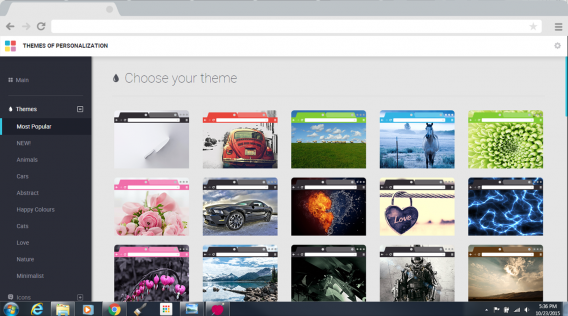
Select a theme

The Personalization Button is in the top-right corner of the screen, next to the browsers settings menu. A quick click of this delivers you to all of 1stBrowser’s theme and personalization options. Here you can alter the color of your title bar, the theme, and wallpaper of empty pages. They have a good selection of default options ready for you, which offer a total overhaul to the bland grey interface of Chrome.

Themes range from puppies to cars, with almost everything in-between. You can also change 1stBrowsers default icon to something that stands out on your desktop and taskbar.
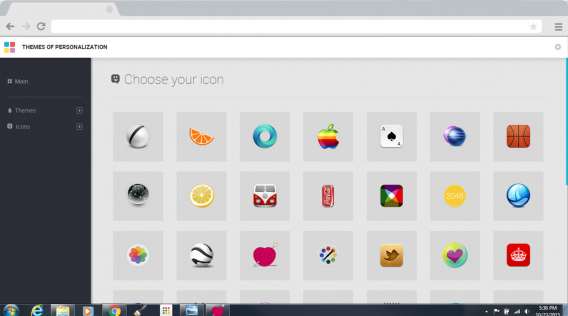
Pick an icon

But SIEN is not finished yet. Soon they will be offering the ability to add wallpapers with parallax scrolling to give the illusion of motion to your pages. Combine this with support for user generated content, and you should see the range of customization options really takeoff.

1stBrowser also makes your browsing experience seamlessly tailored to your needs. Standard navigation options – such as bookmarks and favorites – are soon to be joined by geolocation and time filters, so your favorite pages will be organized depending on whether you are at work, home, or on the move.

Media downloader and gallery

If you want more than just a pretty face, 1stBrowser also comes with lots of built in tools that practically improve your browsing experience. And none is more valuable than its Media Downloader.
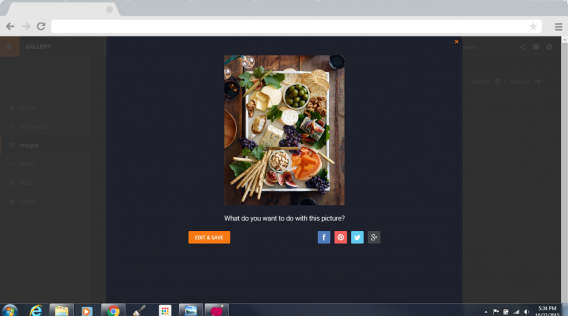
Download any image

Again indicated by a convenient button in the top-right corner of the screen, the Media Downloader is your one-stop-shop to download and save everything you enjoy online. Simply rolling over a video or an image causes a button to appear, giving you the option to download it.

It is wonderfully simple, and only helped by the downloader’s further options. Clicking on a video lets you choose between downloading the video or just the audio. Image downloads are similarly versatile, allowing you to apply filters to the picture before it ever reaches your hard drive.
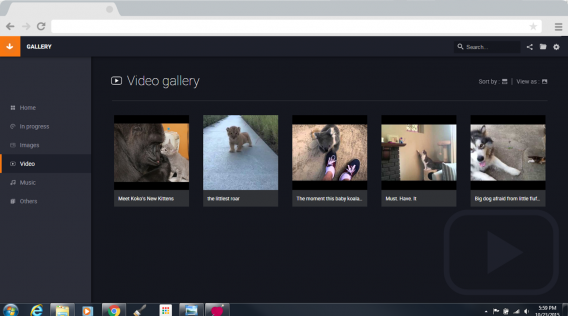
Download video

Your downloaded media is then all saved and filed away in 1stBrowser’s attractive Media Manager, so you can always find it quickly.

Still not enough? Well, SIEN agrees it seems, and they have plans to further extend these features by the end of the year. Future updates are set to include playlists, the ability to sync your downloads with other devices, and a download booster so you can download files more efficiently.
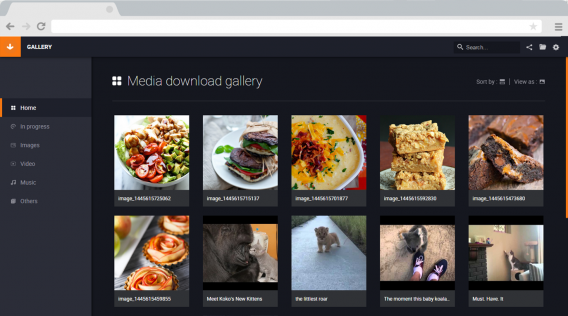
Media Manager

Feel secure

But for many people, what they really want while online is privacy and security. And, here again, SIEN it trying to provide everything you need to stay safe.

The prevalence of Malware and Adware is enough scare anyone, and it can be hard to ignore the feeling that you have been compromised by some unnoticed malicious file.

1stBrowser is to implement protection from both of these threats. This means any files you download or links you click will be checked, and the appropriate measures taken to prevent them infecting or damaging your device.The addition of an Adblocker further adds to this protection, hiding advertising and preventing you from unwittingly clicking on links.
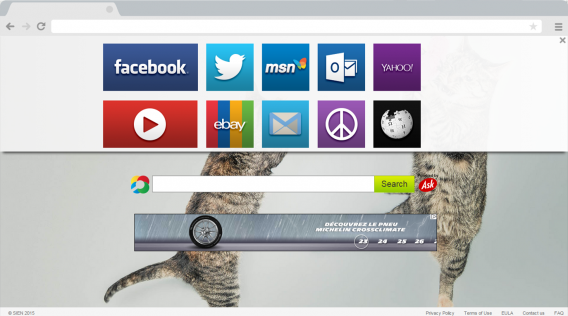
Safe browsing, now with kittens

While some of these features are yet to implemented in 1stBrowser, they should all be ready to keep you safe and protected from any cyber-threats by the end of the year.

It may not be the first browser you download, but – with all of its built-in features that SIEN is dedicated to improving and expanding – it could be the last.


Download 1stBrowser