Burning ISO Files in NERO Burning ROM

Nero Burning ROM provides the ability to create a disc using an .iso file based on your current system’s configuration. You may be wondering why this is important; well, in a nutshell, Nero Burning ROM can back up all of the important components of your computer, allowing you to restore things to the way they were before a catastrophic incident occurred. No more re-configuring and no more restoring. With a disc, you can simply get back to the operating system you were used to in the event that something goes wrong.

How to Create a Disc Using an ISO File and Nero Burning ROM

The first thing you’ll need in order to use Nero Burning ROM to create a disc is an .iso file. These files function like CDs and DVDs on your system through Nero Burning ROM without the need for a physical disc; however, they can be used to make physical discs. Once you have the .iso file you want to use to create your disc, you’ll need to mount the .iso file to a virtual drive. This can be done using free programs like Daemon Tools Lite.

After you mount the .iso file, it will likely act just as a disc would act, meaning you may be asked to install the software contained within the .iso. You can ignore this and just click on Cancel. Next, open the virtual drive that contains the mounted .iso and copy all of the files to a new folder on your desktop or to any location that you’ll remember on your computer.

Now, open Nero Burning ROM and select the CD-ROM Boot option. When you copied the files out of your .iso, an .ima file should have been created in the folder where you moved the files. This .ima file is what you’ll want to select when prompted to Select an Image File in the Boot tab. You should also enable advanced settings and select No Emulation on the drop-down menu. Also, it would be a good idea to change the number of sectors to four.

In the ISO tab, make sure all of your options are selected, then move to the Label tab. Here, you’ll enter in the name of the disc. Keep in mind that some require specific names in order to run. Now you’re ready to burn your disc. In the Burn tab, select New and navigate to the files you copied on the original .iso file. Select all, drag to the burn list and click on the Burn icon.

Take a look at more you can do with NERO by clicking this link!

Three Dark Souls III alternatives

OMG Dark Souls III is here! What I am trying to say is, “let’s make this quick so I can get back to the finale of From Software’s Gothic styled, hack-and-slash trilogy“. The last seven days has had me so excited to play that I actually started digging through my games to find something similar in the hope they may sate my Dark Souls desires. Here are my three favorite.

Wayward Souls (iOS|Android)

If you want some Souls action on-the-go then you have a few options (none of which are Slashy Souls). My personal favorite is Wayward Souls – a 16-bit styled, top-down, action RPG that is filled with challenge and drips atmosphere.

Wayward Souls

With a range of characters to pick from, you have to edit your play style depending on class and abilities. On your quest you collect coins that can be shared between all of your characters to level them up and gain access to their unique skills and upgrades. Expect to hurl plenty of spells as a magic users and focus on sheer power as a brawler – but always keep an eye on your stamina/mana otherwise things can go bad fast.

Not quite Dark Souls to go, but close enough and a great interpretation of its vibe for the small screen.

Dragon’s Dogma: Dark Arisen (Windows)

Dragon’s Dogma: Dark Arisen is Capcom’s gritty medieval action game. The look and world design should be instantly recognizable to Souls players, with every area feeling interconnected and dripping with mood.

Dragons Dogma

But it is the combat that really resonates. In Dragon’s Dogma learning the animation of both your own attacks and those of your enemies are vital to surviving every fight. You must see your foe’s tells, and know exactly how long your own strikes are in order to duck in and out from between attacks. Again, Souls fans should find this familiar, but Capcom has added the ability to climb over the huge beasts as you fight to better target their weaknesses.

Add to this a faster pace of play, along with a more clearly explained story, and you have a game that should prove a good palate cleanser when Dark Souls III gets a bit too much.

Salt and Sanctuary (Windows)

Last this week we have a game that isn’t actually out yet on PC… but it is coming, it’s great, and it basically Dark Souls reinterpreted as a 2D platformer – right down to the HUD and controls being almost identical.

Salt and Sanctuary

The game is Salt and Sanctuary, and it is the latest game from Ska Studios. Maintaining the developers signature slapdash charcoal visual style, it instantly sets a perfect tone for its dark uncertain fiction that makes no secret of its inspiration. It is a feeling that the game embraces whole heatedly, with the writing also managing to keep the characters, story, and motivations vague until the end.

It isn’t perfect, if only because the 2D perspective makes it hard to orientate yourself, but Salt and Sanctuary will be a must.

Right, I am off to play more Dark Souls III. I’ll see you next week I’m able to peel myself out of my chair.

Related Stories

Three amazing games featuring time powers

The three best driving simulators

3 WWE games to prepare for WrestleMania

Follow me on Twitter: @DoFuss

iOS 9.3.1 has a secret that could save you a lot of battery

Apple recently launched iOS version 9.3.1 – the update that was supposed to fix all those problems that surfaced from version 9.3.

Yes, it worked, however, this new update holds a special secret that our friends at 9to5Mac have recently discovered.
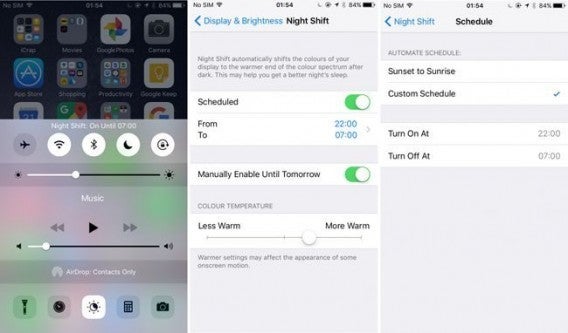
Basically, iOS 9.3.1 has the ability to simultaneously run the Night Shift Mode as well as keeping the Low Battery Mode activated (something which many of you will know was impossible in 9.3). This means that we can save loads of battery power when not using our devices.

Here’s how you do it:

1. Activate the Battery Saving Mode in Settings > Battery

2. Open Siri and say “Activate Night Shift” (Siri will tell you that in order to do this, he’ll have to turn off Low Power Mode).

3. Say “yes”, and before Siri can answer, click the power button. You will then hear Siri’s confirmation.

4. To finish, open the iPhone. If you have completed step 3 correctly, you’ll see that your device is in both Night Shift Mode and Low Battery Mode.
This trick is more of a flaw in Apple’s design, so the likelihood that it will be around forever is not looking too promising!



Google Calendar wants to bring out the best in you

Google Calendar for Android is a popular and great tool for creating reminders and setting appointments. But now, Google has gone one step further and introduced “Goals” – a new feature that aims to help you be the best that you can be. Sounds deep huh?

The new “Goals” option allows users to create objectives for basically anything, and will do its best to make sure they darn-well do them! This can include anything from setting some time aside to read, doing a fitness routine – basically any activity you’d like to spend more time doing!

In order to set a goal, just click the “+” button on the app and select the option “Goal”. You’ll then have to answer a few simple questions (pretty straight forward). After doing so, Google will look for holes in your schedule where you can devote a bit of time to doing said activity, as well as send you a few notifications to give you a little bit of much-needed encouragement.

You can get a better idea of how Goals works in this video:

At the moment, it seems that this new option has not been made available on all handsets. If you find you don’t have this option, fear not, you will do soon!

Sharing files with your friends on Facebook Messenger for iOS is now much easier!

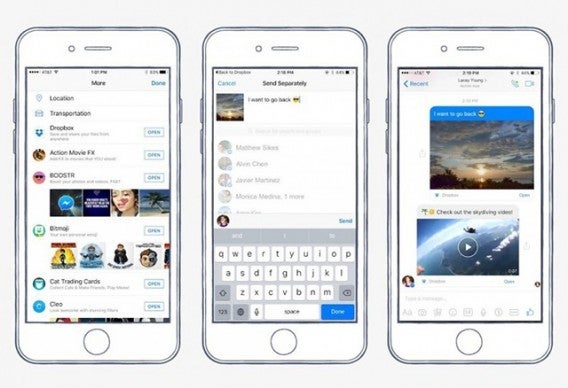
Facebook Messenger just introduced a Dropbox integration for the iOS version of the app. This means that you don’t have to leave messenger in order to share what you have stored in the cloud with contacts. Dropbox is one of the most popular platforms for storing photos, videos, documents and other files, so this new colaboration is practically a match made in heaven!

In order to share files from Dropbox directly with whoever you’re talking to in a chat, you first need to make sure you have the Dropbox app installed on the same device, and that it is linked to a particular account. When you open a chat with one of your contacts on Facebook Messenger, simply click the “More” option and look for the Dropbox icon.

If you haven’t yet found this option on your iOS device, fear not, it’s definitely on its way and should be with you in a matter of days!

Facebook wants to get rid of usernames and passwords

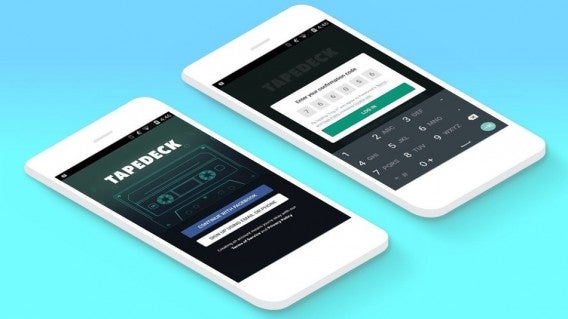
During the F8 (Facebook Developer Conference) earlier this week, the company announced the launch of Account Kit – a tool which app developers can use to allow their users to register to their services/platform using an email or phone number.

Could this mean the end for usernames and passwords?

Account Kit is designed in order to offer developers an easy way for users to create accounts without having to log into their Facebook account. It’s simple: the app sends a confirmation code to the registered email address or phone number that was first introduced when the user created the account.

Although we’re sure that Facebook prefers users to use their login when registering with other applications, however Account Kit reduces that tedious feeling we get when we have to create a new account for a new app. So how does Facebook benefit from this? Well, basically it encourages developers to work more using their tools and platforms.

Account Kit is now available for iOS, Android , standard web and mobile web.

Source: Mashable

The Windows Blue Screen of Death has changed forever!

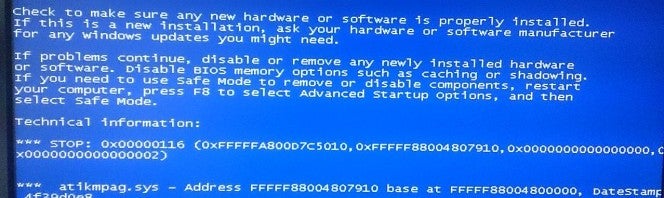
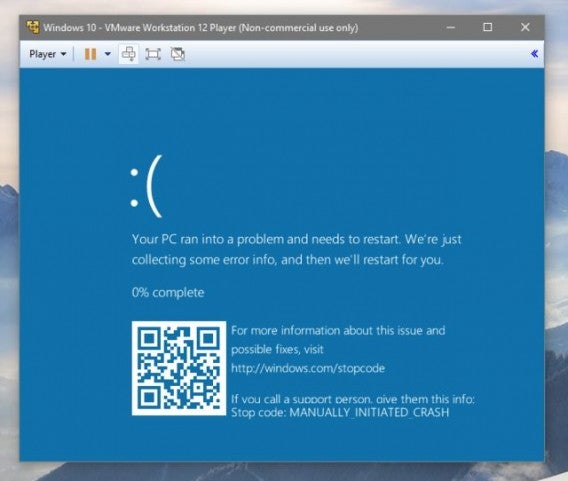
Microsoft plans to update the famous “Blue Screen of Death” in order to make it more useful for its users.

A Reddit user recently uploaded a picture of the new BSoD for Windows 10, which shows that we may be seeing the last of the usual blue screen we’ve grown accustomed to over the years. Although it hasn’t yet been launched officially, it is at least in the testing phases. The big difference you’ll notice (from the photo below), is the implementation of a QR code, which can be scanned in order to learn more about the current problem with your PC.

If you can remember, Microsoft already updated the blue screen by adding that sad-face emoji. If we don’t count that (and we don’t think we should), this is the first time Microsoft has made any significant alteration to that legendary screen!

We’re guessing you’ll be seeing the new Blue Screen of Death following Windows 10’s Anniversary Update scheduled for late summer this year.

Source: Mashable

Facebook Messenger launches Chatbots – but are they a good idea?

It’s official – “Chatbots” have arrived to Facebook Messenger, and are already in use for certain brands. The news was announced on Tuesday during the F8 Conference, but what does it mean?

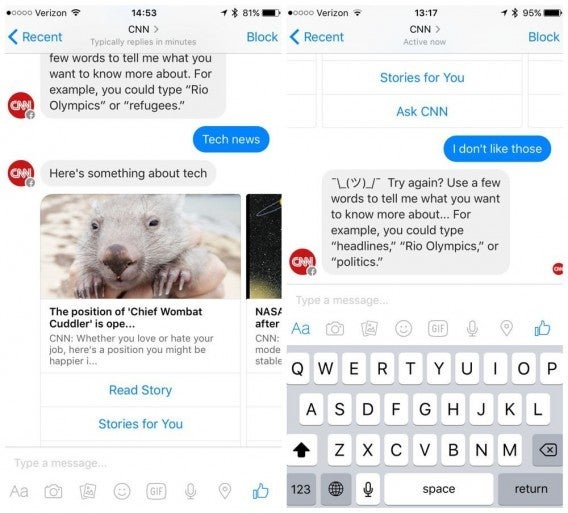
A chatbot is an application that has the ability to mimic human behavior. In the context of Facebook Messenger, it’s like a “robot user” that automatically responds to any question you may ask it. From now on, Messenger will allow companies and organizations to implement their own chatbots, in order to reach out to customers when they’re in need of help.

This means that soon, you’ll be using this platform to order the right flowers you need from a florist, or even confirm your order with Burger King – the possibilities really are endless. Other uses may also include being able to get regular weather or news updates when you need them, from your preferred source. Imagine Siri or Cortana with a bit more selection!

As you can see from the picture above, the new chatbots give fairly generic answers, which are not yet customized to our preferences – but don’t forget – this is only the beginning of something that could be big, big, BIG!

One more step for the presence of brands on Facebook

Do you think chatbots are another form of advertising for companies? Well, you should know that Messenger is also looking into ways to incorporate ads within the application. This means that the brands you follow on the social network will be able to send you direct information that they deem relevant to you. Seems intrusive huh? Well not to worry, because just like Instagram, you will also be able to block the content you don’t want to receive.

Source: Mashable

Do you use WhatsApp behind the wheel? This new app could help the police convict you

If you happen to be using WhatsApp (or any other messaging application for that matter) just before a car accident, the police may be able to find out and potentially take action. At least that’s what the creators of “textalyzer” are – a new tool intended to help the authorities figure out if mobile distraction could have been the cause of the accident – are saying.

Although the “textalyzer” is not yet operational, it is currently waiting to be legislated in New York. If approved, and proves to be successful, we can surely expect to see it reach other corners of the globe in time.

The tool itself has the ability to respect the privacy of its users. The textalyzer does not read conversations, contacts, phone numbers – it only has the ability to detect whether or not you have used your mobile just before an accident has taken place.

Source: The Guardian

Google wants you to control your Android with your voice

Google has announced the launch of a new application that allows you control your Android with your voice. Google Voice Access is an app intended for users that may have difficulty using the touch-screen system, simply because of problems such as paralysis, tremors, etc.

Although Google Voice Access is is still in its testing stages, it’s expected that Google plan to launch it this year. The company doesn’t believe that it will take long to release, as the testing has proved successful so far.

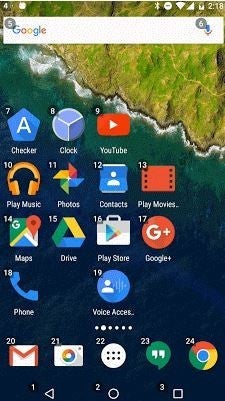
The application allows you to command your Android using your voice, giving you the ability to use commands like “click next” and “scroll up”, etc, providing a much easier interface for those who find it necessary. As you’ll see from the screen shot below, apps will start to work on a numerical system, for quick and easy user access:

Stay tuned for more information!