6 Quick and Easy ways to Kill Off your Computer

Want to destroy your computer in record time? Feel like having thousands of viruses infect your Operating System? Interested in losing your most valuable data FOREVER? You’ve come to the right place: the only guide in the world on how to kill off your PC. Follow any of these steps to increase your chances of losing your PC, or follow them all for good measure.

Warning: Don’t even think about doing the opposite of what I say below. In that case, you’d be increasing your computer’s security, and we don’t want that, do we!

1. Every time you see a link, click on it

Has a window unexpectedly opened in your browser with two dozen links and buttons with the word “FREE”? Then don’t leave a single link unclicked.

trustedoffer-virus

Got a WhatsApp message with a link that one of your contacts sent you without any explanation? Don’t waste time checking if it’s spam: click, click, click.

whatsapp_scam_gift_card-1024x958

Click everywhere and your computer will experience trouble in record time.

2. Open all email attachments

Every day you get a ton of emails. So there’s a good chance that one of them has a document with malware waiting to finish off your Operating System. So, open ALL attachments. Especially if they’re from the government or your phone company saying that they’ve mysteriously lost your information and need you to fill out a form.

MailGuard_Macro_Word_Doc_Email_Scam_Sample-1

Don’t get discouraged if after opening all the files, you don’t find a single harmful one. Go to your Spam folder. Ta-da! There you’ll find even more email! And they’re 100% more deadly and suspicious than those in your inbox. So go ahead, open all the files you find inside. One of them will have the desired effect.

3. Reinstall Windows Vista

Since April 11, 2017, Windows Vista has stopped receiving technical support from Microsoft. This means the legendary Operating System has stopped receiving security updates or patches…

Microsoft explains the advantages of now using Windows Vista in its official statement: “If you continue to use Windows Vista now that support has ended, your computer will still work but it might become more vulnerable to security risks and viruses. Internet Explorer 9 is no longer supported, so if your Windows Vista PC is connected to the Internet and you use Internet Explorer 9 to surf the web, you might be exposing your PC to additional threats.”

hasta-la-vista-baby

Now you know: reinstall Windows Vista and browse using IE 9.

In general, this will work if you reinstall any program or Operating System that no longer has official technical support. This way you’ll increase your chances of finishing off your computer, since this software won’t be ready for modern malware.

4. Uninstall recent updates to Windows 10

Got Windows 10 and no way to return to Windows Vista? I’ve got bad news: security updates are often automatic these days. Dammit! Why can’t we go back to the era when we could postpone updates and become more exposed to viruses?

The good news is that there’s a way to uninstall the latest updates to Windows 10. Follow this path: Settings – Updates and Security – Windows Updates – Advanced Options – View Update History – Uninstall Updates.

A window with all installed Windows updates to date will pop up. You know what? I was going to tell you to delete only the most recent updates. Forget about it: delete them ALL. Don’t leave a single one untouched. Hopefully, after an extreme browsing session, you’ll have malware that couldn’t harm an updated Windows 10 but, with your outdated Operating System, can infect it and do some damage.

1366_2000

By the way, this step is key for uninstalling updates to Windows 10 that are giving you trouble. Sometimes, security patches aren’t released perfectly or are incompatible with the Operating System or some other program. In this case, it’s best to uninstall or disable the update until Microsoft makes a patch for the patch. But I doubt this advice will help you since you want to mess up your PC, not help it.

5. Use some of these weak and popular passwords

According to Keeper Security, a password management company, these were the most used passwords in 2016:

  1. 123456
  2. 123456789
  3. qwerty
  4. 12345678
  5. 111111
  6. 1234567890
  7. 1234567
  8. password
  9. 123123
  10. 987654321

Go on, use any of them. Not only are they popular, but they’re also more likely to be hacked. Don’t use complex and strong passwords. That’s out of the question!

Weak-Password

Ah, and don’t even think about making the mistake of using a different password for each one of your accounts. What are you playing at? Making it difficult to hack or infect your computer or accounts? No, sir. What we want is the complete opposite, so use “123456” or something similar for all your accounts, from Facebook to your Operating System login.

6. Get rid of any kind of “Plan B”

What’s the point of prematurely destroying your Operating System if you have a backup copy of it?

For starters, don’t even think about making backup copies of your most valuable documents, photos or files… Don’t upload them to any cloud server or make duplicates on an external hard drive. Otherwise, it will be impossible to experience a complete and utter loss.

Next, make sure you have the system restore option disabled. This option has the nerve to make restore points for your OS from time to time, so that, if there’s a problem, you can restore it to a point when it was working correctly. Just awful.

The good news is that this option is disabled by default on Windows 10, but just in case, it’s better to make sure. Follow this path: File Explorer – This Computer – Properties – System Protection – the drive where your Operating System is located – Configure.

83OZRE1vQtbb

On the following screen, you can check if this offensive option is enabled or not.

Know a more effective way to kill off your computer? Leave a comment below about your experience!

Sources used for the writing of this article: Lifewire, Computer Tutor Florida, Super User Blog, Microsoft Blog, Xataka Windows, Trucos Windows, Huffington Post

Water and salt: all you need to charge your smartphone

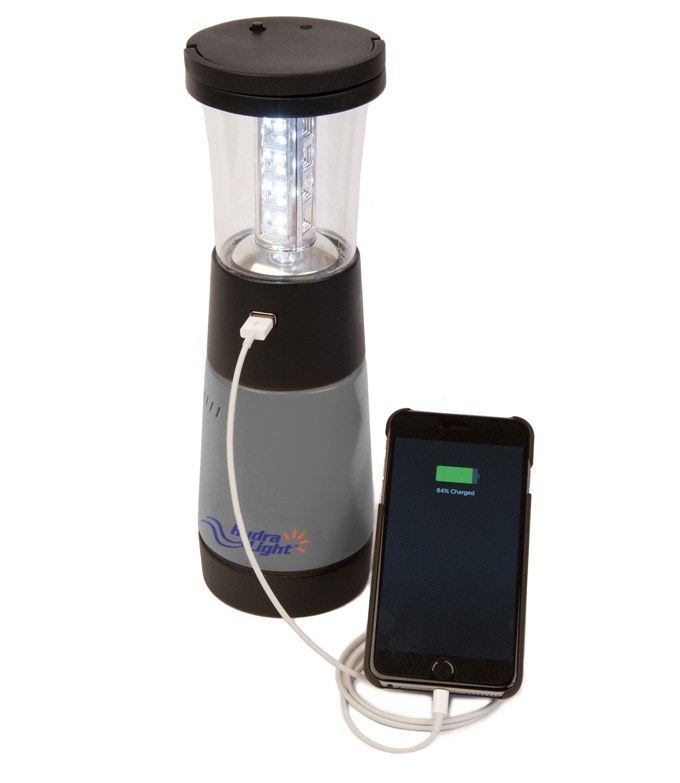
Can you imagine charging your cell phone with water and salt? This will soon be possible thanks to Hydra-Light, a revolutionary technology that has popped up on Kickstarter.

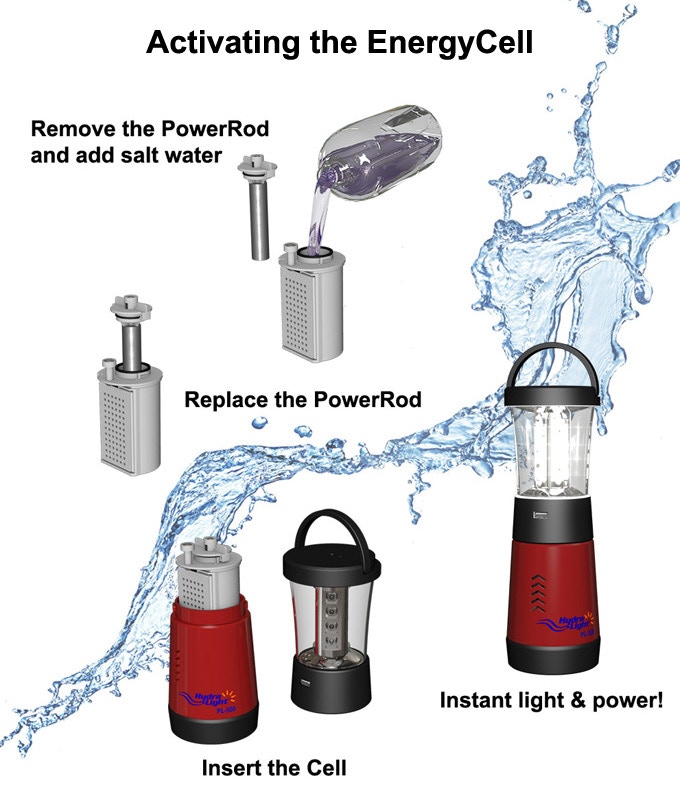
This technology involves a patent that gets rid of battery use. This invention has a carbon battery and a metal cylinder called the “PowerRod.” To use it, all you have to do is take out the PowerRod and fill the battery casing with salt water, or regular water with cooking salt.

0d429bd91c2271ebed7945e28458f502_original

The PowerRod’s contact with salt water generates electricity, which can help power a light or charge any device with USB, including your phone.

Hydra-Light has several formats (lanterns, street lamps, batteries) that can be fitted to your needs.

75da56f40837e63da7006747721088df_original

This invention is revolutionary for a few reasons: for one, it encourages the use of sustainable energy and also, it could be a life-saver in moments when other sources of electricity are scarce. Imagine how useful it would be for those who go hiking in the mountains for days.

If you’re interested in getting a Hydra-Light (starting from $38) or you want to know more about the project, you can go to the Kickstarter page, where it’s already received the necessary backing to become a reality.

New YouTube feature takes on WhatsApp

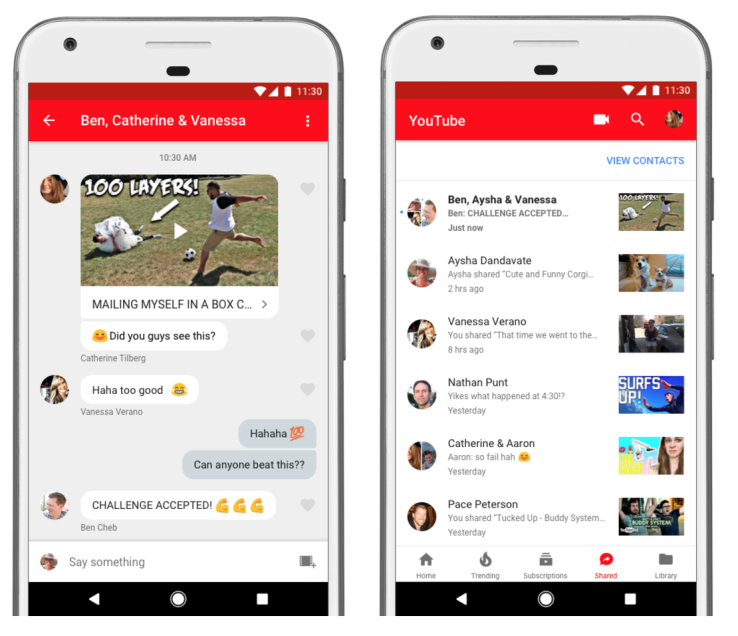
YouTube for smartphone has recently been adding improvements and updates. After announcing that soon they’ll include playback speed, now they’ve surprised us with a new, more intriguing option: an internal chat system.

This chat, available for YouTube iOS and Android apps, will be enabled when we share a video with one or more of our friends. So, if we see a video that we like and decide to share it with some of our contacts, the app will generate a specific chat window for that video, where we can privately comment on whatever we want. It looks like this:

screen-shot-2017-08-07-at-1-28-59-pm

Once the chat is started, using it is like any other app (WhatsApp, Messenger…) but without as many additional features as competitor apps. We’ll have to settle for clicking “Like” on our friends’ comments and sharing other YouTube videos.

With that in mind, YT’s idea with this chat system isn’t to replace your favorite messaging apps, but to keep you longer on YouTube, since you won’t go to other apps to share videos with your friends (as you know, one fun video leads to another… and you can spend hours without leaving the app!).

If you don’t yet have this option on your YouTube app, don’t worry: Google is staggering implementation for all accounts.


Going back to school just got safer with Tile

The first day of school is just around the corner. Kids and teens will go back to their school, institute or university with backpacks, laptops and other valuable items that, in the hustle and bustle of everyday life, are easy to lose.

Luckily, Tile is the solution for these forgetful kids (and grown-ups!). A Tile is the most convenient and affordable way to track our prized possessions, avoid unwanted losses and prevent theft.

The Tile family serves your family

So, what exactly is Tile? Nothing less than a small device with a Bluetooth connection that remains active 24 hours a day, 365 days a year. Attach it to anything that you care about and you’ll always be able to locate it.

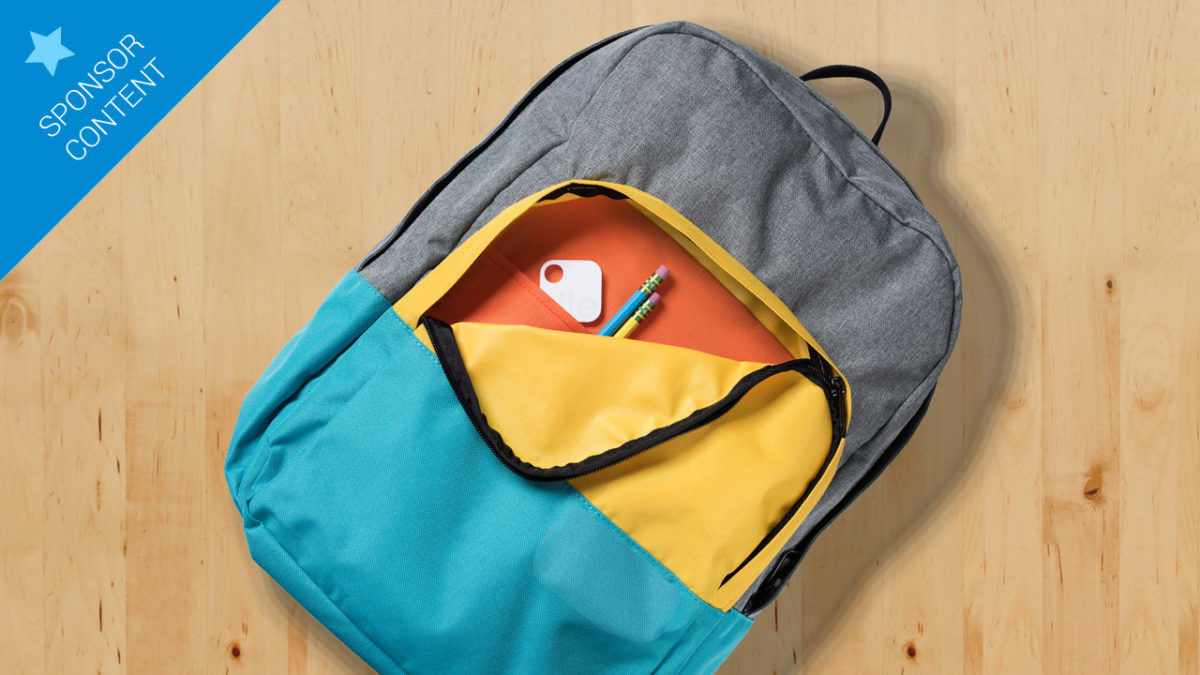
For example, for kids, it would be a great idea to attach a Tile to their school bag or the basic items that they use for class (laptop, homework folder…). This way, your kids will never lose their school work again.

MATE_VERSATILITY_1366_2x

Tile isn’t just useful for the little ones, its possibilities are endless. For adults, it can be used for keeping track of any item. We recommend sticking it to a laptop or tablet so you never ever lose it.

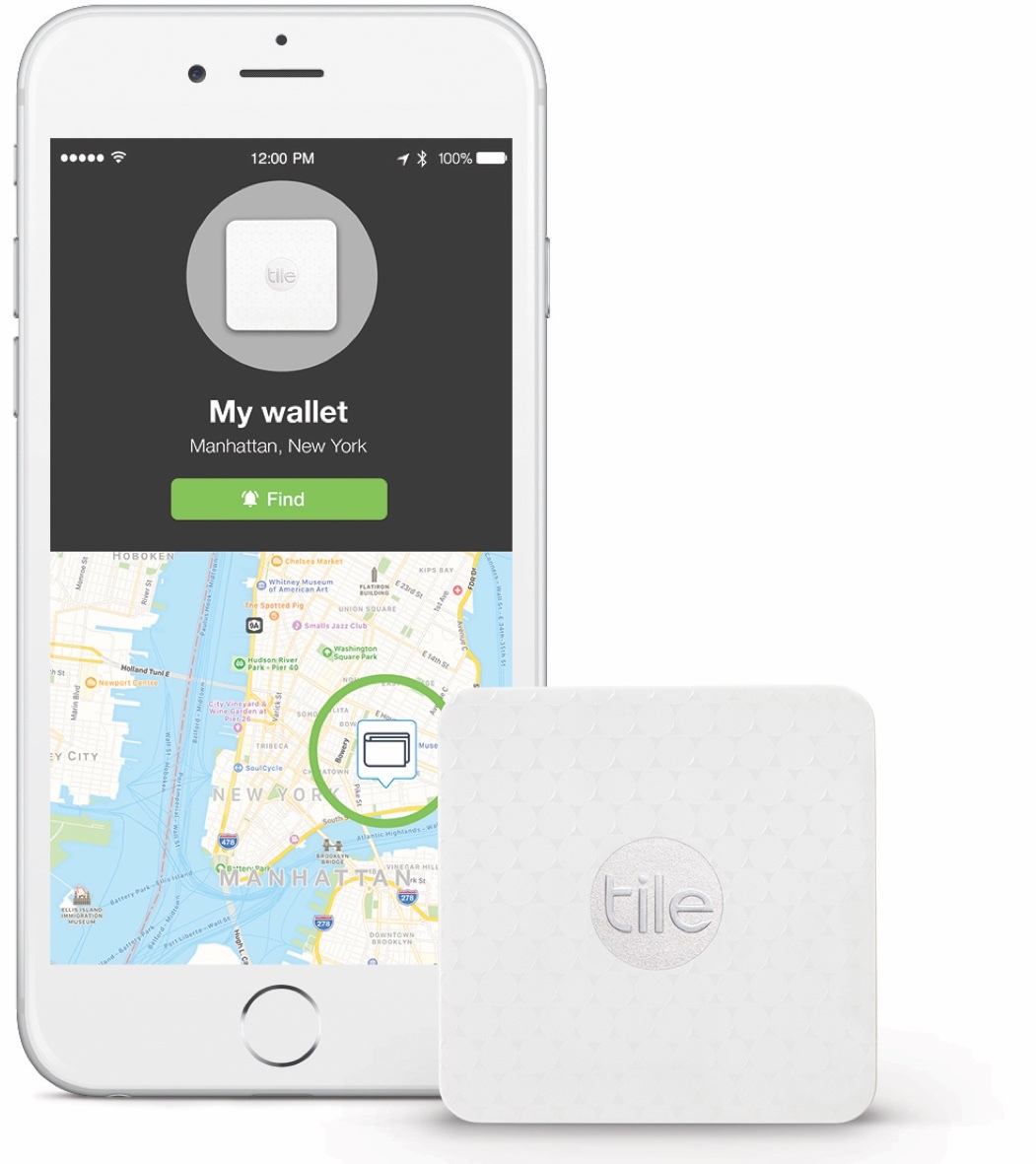
The Tile app not only tells you where your prized possession is, it also can be used to make the Tile in question ring so you can find it within short distances. Who hasn’t forgotten their keys in the laundry, between the sofa cushions or in another nook and cranny? With Tile, finding them will take a matter of seconds.

Tile also works in the opposite direction. So, a Tile gadget can be used to find your cell phone. Just configure your Tile to make your phone ring when you push a button. Your phone will ring even if it’s on silent.

40890_iPhone_Tile_Slim_US

A Tile for everyone

MATE_1366_2xTile comes in two models, perfect for every situation. On the one hand, we have the Tile Mate, the Tile with a keyring format, which your kids will love. The keyring makes it perfect for hanging on any bag, backpack, jacket zipper or even bicycle or camera. Its size is so small that you’ll forget it’s there except for when you need it.
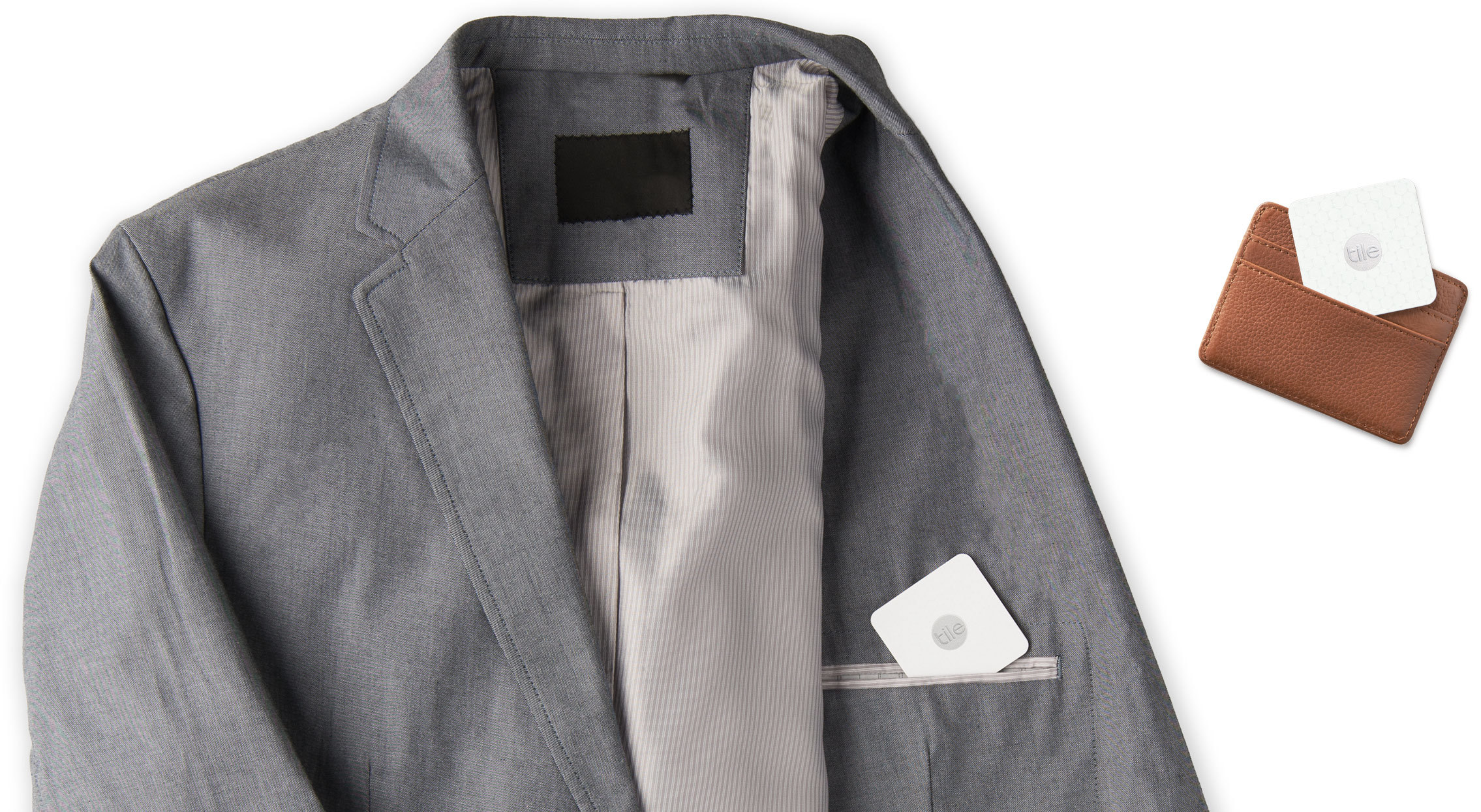
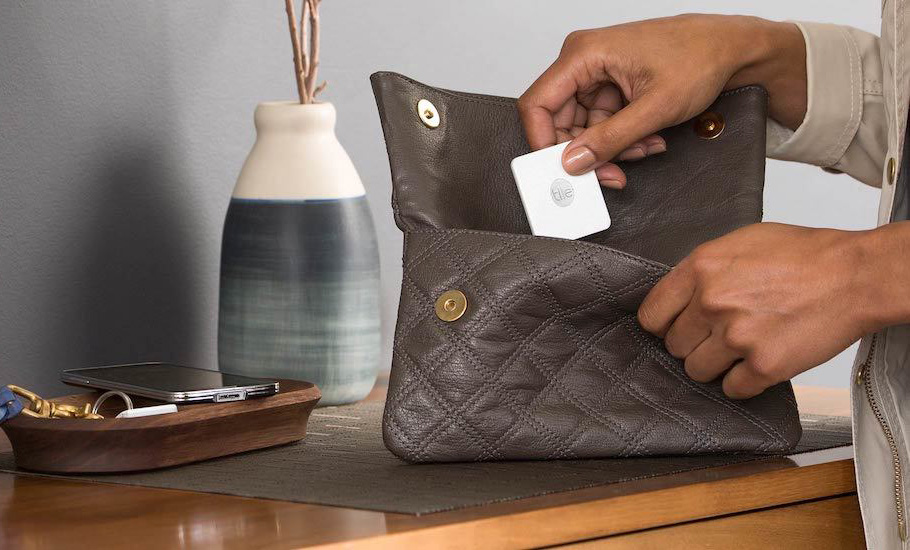

On the other hand, we have Tile Slim, a somewhat larger but narrower model (thick as 2 credit cards). Slim is perfect for sticking to your laptop computer or tablet, always carrying in your wallet or even placing in your car.

SLIM_VERSATILITY_1366_2x-1

When Tile is updated, you are too

Both models, Mate and Slim, come with special adhesives that you can stick on any surface and that are water-resistant. Also, you won’t have to worry about short battery life: Tile batteries last for a year, no surprises, and when they’re running low, you’ll be notified and encouraged to update your devices with the ReTile program.

ReTile means that you’ll have a new Tile one year later at a low cost, the previous Tile will become recycled, and you’ll have the latest version of Tile.

tile-wallet

Get a Tile for you and your kids today

On the website, you can see the different Tile purchase options with discounts of up to 50%.

For instance, from 27th August to 9th September you can get a Tile Slim 4-pack for only $70, which is half of its original price!

Are you more of a Tile Mate fan, a Tile Slim fan, or both? Whatever your preferences, you’ll find an offer that fits your needs. Also, if you become a big Tile lover, you can buy great accessories to enhance your experience.

GO TO THE TILE WEBSITE NOW

How to make your PC start up Faster

If your PC is taking a long time to boot up then there are a few things that you can do to speed up the process. Rather than having to replace Old Faithful these simple tips might be able to make your PC boot up much quicker.

Tips for a faster PC Boot up

1. Delete any unnecessary processes booting automatically

The key to a fast start up is RAM. Your computer has a finite amount of RAM and can only use it to run so many programs. This means that if you’re computer has to start 10 programs at once and doesn’t have enough RAM to do it you’ll have to wait as it launches them one by one.

This problem usually arises when you install new programs and don’t uncheck the “Boot when you turn on your PC” option. Before no time you have all sorts of programs you’re not going to use booting up whenever you turn on your computer.

To remove unnecessary programs from the boot up process go to Start>>All Programs>>Startup. This will show you all the programs that boot up automatically whenever you turn on your computer. Delete whatever you don’t need from the list and then it’ll only open whenever you decide to open it.

2. Keep your Desktop Neat and Tidy

This one won’t have as big an effect as removing unnecessary startup programs but every little helps. Again this one is down to the amount of RAM your computer has. Although the Desktop is similar to a folder, everything on it has to load when you boot up your computer. Reducing the amount of things on your desktop will reduce the strain being placed on your computer’s RAM whenever you turn it on.

These days you don’t really need to have any items on your desktop. The taskbars at the bottom of Macs and PCs can easily accommodate all of your most frequently used apps and programs.

3. Increase the RAM

With RAM being a common theme up to now a fairly commonsense way of improving your computer’s start up time is to increase the amount of RAM available to handle the process. This one, however, costs money and may not even be possible so I’ve only added it to remind you that is an option. If you think that this is the only way you’ll be able to get your computer to boot up faster, first you need to check your computer’s RAM compatibility before you move forward.

4. Remove Viruses and Malware

It might not be the programs that you’ve installed that are slowing your computer down. It might be a malicious piece of code that installed itself without your knowing when you were innocently surfing the internet. Get yourself a reputable antivirus program and a malware protection program and run a couple of deep scans. These should root out any malicious programs and wipe them from your PC. As a bonus, if you’re using Windows 10, you might not even need to download any programs at all. Just run a Windows Defender scan and see what comes up.

5. Clear out Temporary Files

There are plenty of apps available for mobile phones that call themselves names like speed booster and one of the main things that they do is clear out the phone’s cache of all old data that is no longer necessary.

On your PC you’ll find most of these in your internet browser. To remove them, simply open it up and click History. From there you’ll be able to delete your browsing history including the cache. Once you do this you’ll be surprised at how much space gets cleared up and how much quicker you computer boots up.


Via: Mashable, WhatvWant, Komando

How to take 360º Photos on Facebook

Facebook has a cool new option that allows you to take 360 degree photos. Users can then view these photos by moving their phone around. They work a bit like panoramic photos but are a bit nicer. Until now you needed a 3rd party app to take these types of photos but now you can do them in the Facebook app. Like with their WhatsApp updates Facebook didn’t make too much noise about this new feature so let’s have a look at it in greater detail.

How to take 360º photos and update them to Facebook

1. Install the latest version of Facebook on Android or iOS

You’ll need the most up to date version of the Facebook (Android) or (iPhone) app to take 360º photos. If you can’t find the feature on your version of Facebook, check your updates to see if any are pending or need authorization.

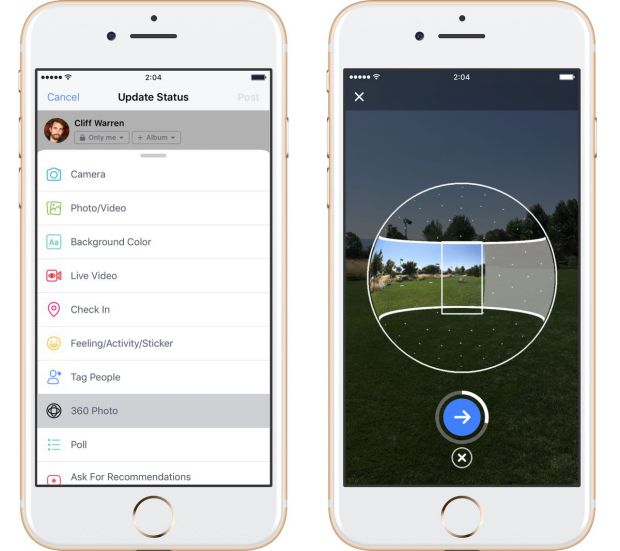
2. Select the 360º Photo option on your Profile

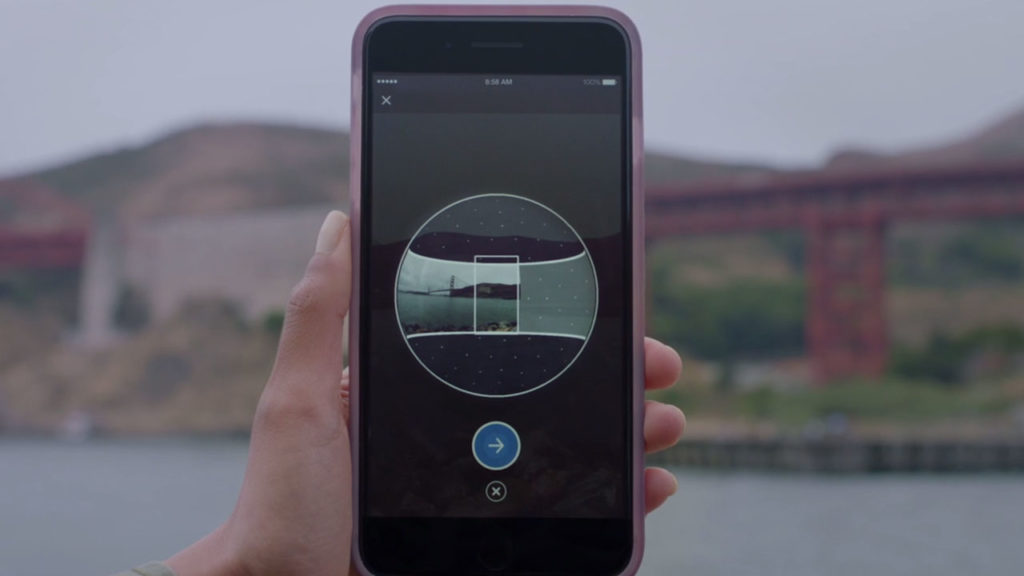
Then you need to go to Update Status in your profile and scroll down. Just below Tag People you should see the option for 360º Photo.

facebook-fotos-360-app

3. Press the Blue Button and Start Spinning

This bit works just like taking a panoramic photo except that you’ll perform a full 360º turn before the camera stops snapping. Remember to try and hold the camera as steady as possible without moving it up or down.

4. Share your 360º Photo

Once you’ve finished taking your full 360º photo all that is left to do is share it.

Please bear in mind that this is still an experimental feature so it might not work as perfectly as you’d like straight away.

What do you think of this new Facebook feature?

All the best gadgets and technology from movies and TV in real life

If you could only pick one piece of iconic futuristic technology from TV and Movies to have in real life, what would it be? Would you pick the Lightsaber from Star Wars or the Transporter from Star Trek or would you go for something a little more nuanced like the neutralizer from Men in Black?

Well, as technology these days is developing at a staggering rate it turns out you might not have to choose. We’re well on the way to developing some of the world’s favorite fictional gadgets. Let us have a look then at some of the…

Best Gadgets from Film and TV in Real Life

1. Hover Board (Back to the Future 2)

All the best Gadgets and Technology from Movies and TV in Real Life Hover_board_(hovering)

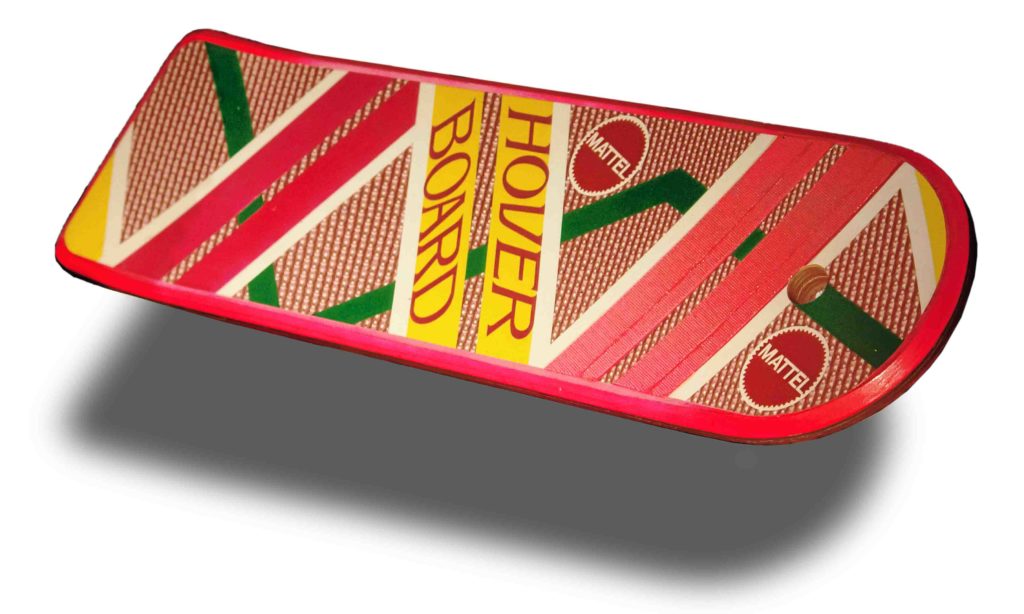
The Biff bashing Hover Board from Back to the Future 2 captured the world’s imagination on an epic scale. We all waited patiently for 2015 to come around and then huffed and puffed when all we got where those 2 wheel wastes of time that you see full grown idiots or spoilt obese kids riding round on. Tut tut. Fortunately, however, 2 companies have been working on proper hoverboards and their progress is extremely promising.

The Arx Pax, developed by Hendo Hover, harnesses electromagnetic energy to enable it to float smoothly above the ground. The bad news is that it only works on a specialized surface that helps to provide the lift and the hoverboard concept is only a proof of concept. This didn’t stop Tony Hawk getting in on the action and putting the Arx Pax through its paces.

The other company who’ve made inroads into hoverboard technology is luxury car make Lexus. Again, however, the Lexus hoverboard needed a special surface to help provide it with lift and was never released to consumers. It also required liquid nitrogen to keep it cool whilst in use Close but no cigar I’m afraid.

2. The Neuralizer (MIB)

All the best Gadgets and Technology from Movies and TV in Real Life neuralizer

How handy would it be to wipe somebody’s short term memory. Whether you’re sustaining a global conspiracy to suppress the fact that aliens live among us or simply want your teacher to forget about that homework they gave you The Neuralizer from Men In Black would be a nifty gadget to have indeed.

We’re going to swerve the ethical and legal implications of wiping somebody’s memory by concentrating on the fact that the current technology only works on genetically modified mice. Scientists at UC Davis discovered that if they used a fiber optic cable to beam light into the brains of GM mice they were able to delete specific memories.

What’s more, scientists at University of California at San Diego discovered that they were able to implant, remove and then re-implant specific memories. This is all incredible news but knowing that this type of stuff is possible makes me very scared about every time I’ve ever had or will ever have déjà vu.

3. The Transporter (Star Trek)

All the best Gadgets and Technology from Movies and TV in Real Life trek-transporters

If you thought somebody playing with your memories being the underlying cause of deja vu is dark wait until you hear about modern day transporters. Of course, Star Trek is set in a utopian future that sees a world united in its mission to discover all the secrets of the universe but the real world isn’t quite like that is it.

In the real world transporters don’t allow you to magically hop from one place to another. In the real world they employ a method known as destructive scanning. They destroy whatever is being “transported” bit by bit so that they can get a complete scan of the object. Those scan schematics are then sent to the new location where they’re 3D printed. All you’re getting is a copy. Still want to get transported?

4. The Replicator (Star Trek)

All the best Gadgets and Technology from Movies and TV in Real Life replicatorI think we need to lighten things up a little so how about we look at a machine that magically makes food appear. Let’s have a look at the Replicator from Star Trek. Now it might be hard to imagine that we’re actually working on something that makes any meal materialize but this age that we live in really is full of wonders. Or is it?


Well, first off we need to fall back on to 3D printing. The closest thing NASA are working on is 3D printed food implements and food growing aids, which will hopefully help astronauts when they’re landing in around 30 years time. They won’t be replicating the food, just the tools that’ll help them grow and cook it.

All the best Gadgets and Technology from Movies and TV in Real Life genie food replicator
Source: genie.cooking Only talking baout Genie’s flavors makes me wary

Oh but we’re not done yet because a little food startup of only 10 people has marketed a device called “The Genie” which they claim can make a meal in only a minute. With claims of Chicken Curry, Miso Ramen soup and even oozing chocolate fondants on the menu, it seems like the future is now.

The catch is that it appears to be no more than a posh Cup Noodle machine that makes everything out of freeze-dried foodstuffs. These are sold in simple pods that you need to install into Genie before you can chow down. Pfffft.

6. The Holodeck (Star Trek)

All the best Gadgets and Technology from Movies and TV in Real Life holodeckNow it is time for something that is a little more mind blowing. Star Trek’s Holodeck allows users to create immersive photo realistic worlds for them to then spend their leisure time in. Believe it or not, with the help of decent sized backpack and a headset we’re pretty close to having that right now.

VR Theme Parks have begun cropping up around the world. There are various types but the versions that have been created by Nomadic VR and Anvio VR are the VR Theme Parks that most resemble Star Trek’s Holodeck. Anvio have basically produced a 200 square meter holodeck so that you and your friends can go and let loose blowing away hordes of the undead. Mind Blowing.

7. The Computer (Star Trek)

OK so we’re getting stuck on Star Trek gadgets here but with a grand total of 14 movies and a whopping 726 episodes is it any wonder that most of the gadgets we’re featuring are coming from where no man has gone before?

The Computer in Star Trek of course isn’t limited to just Star Trek, computers run across most, if not all, Sci-Fi franchises. What we’re talking about here is the voice activated AI computer that characters used to freely interact with. Today’s versions like Alexa, Google Home and even Siri on your iPhone are the most completely realized gadgets in the series.

They can even cheer you up if you’re having a rough day and we’ve come so far that amateurs are even mocking up their own fully holographic versions.

8. Lightsaber (Star Wars)

Is the Lightsaber the most iconic fictional gadget of all time? If you think so then I’m afraid I’ve got some bad news for you. We’re nowhere near developing anything like it. All we have so far are ridiculously dangerous flame throwers that aren’t good for much more than lighting cigarettes and burning yourself.

Worse news comes if we speak to Particle Physicists about the realms of possibility. Don Lincoln, writing for Scientific American, tells us that in order to burn through steel like they do in the movies Lightsabers would require a battery big enough to power 14,000 households. They’d also burn your own hand right off and would pass right through each other, which means epic Lightsaber battles would not be possible.

What are your favorite gadgets from film an TV? If we’ve missed out one that you’d like to see featured let us know in the comments. If we get enough we’ll run another feature covering all of the gadgets posted.


This article was written with help from: Mashable, Acclaim Mag, Occupy Corporatism, The Guardian, IFL Science, Reuters, Popular Mechanics and The Independent

Related Links

What is a spoiler?

Choosing the Right Size for Movies in Format Factory

A Movie Theater in Your Pocket: KMPlayer Goes Mobile

How to Add Effects in Windows Movie Maker

Getting Started: Tips and Tricks for Windows Movie Maker

Make it Perfect: Editing Tips for Windows Movie Maker

3 Smartphone Lighting Tips for Windows Movie Maker


WhatsApp Improves its Voice Message Feature

Voice messages are one of the most practical features on WhatsApp and the most popular with WhatsApp users. By using voice messages, you avoid having to write long text paragraphs or spending money on calls. WA is aware of this success, which is why voice messages will soon get key updates.

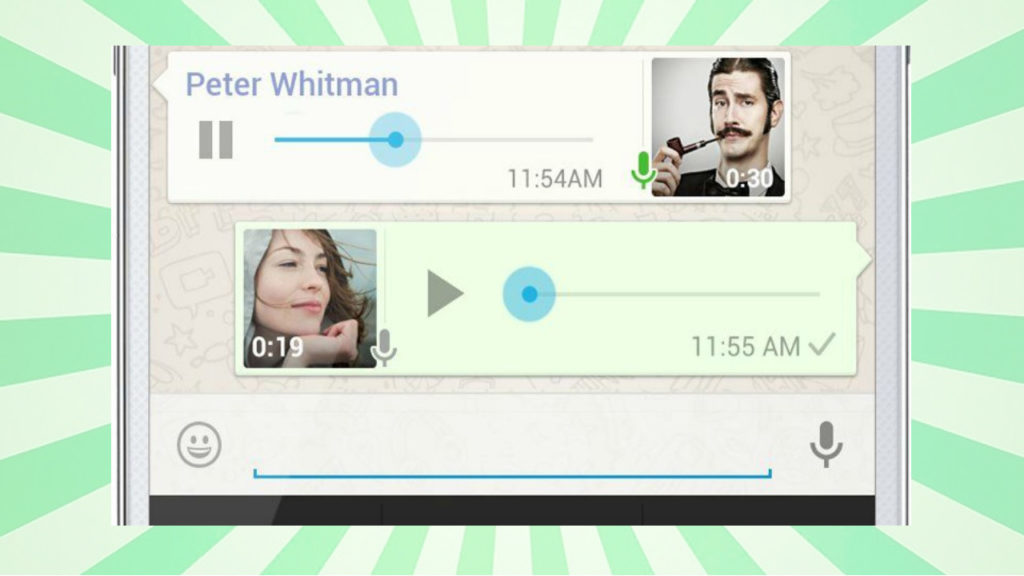
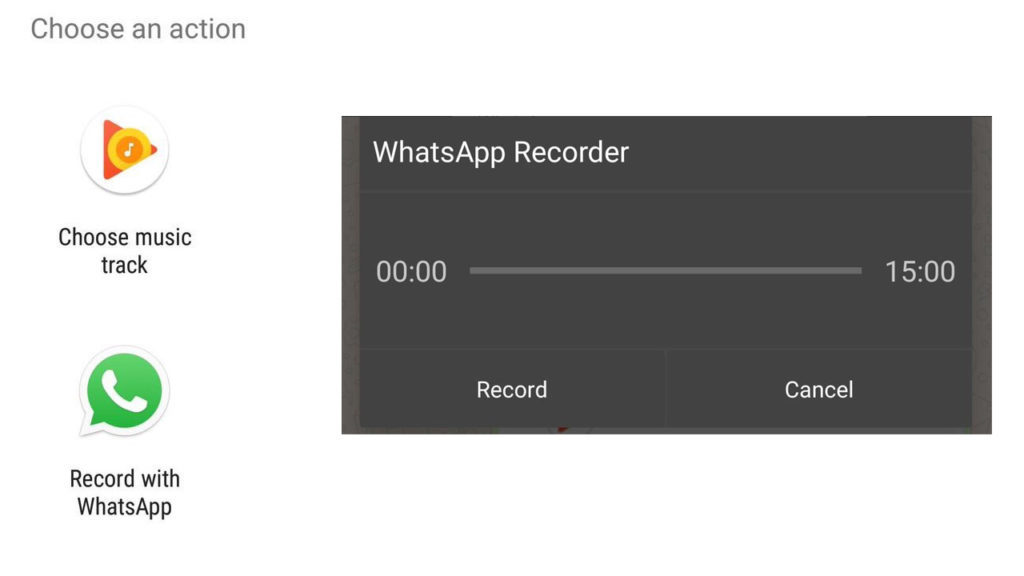
Now we can send voice messages without having to hold down the Rec button. That’s not all: we can record them in the background, without having WhatsApp open, and while we do other things on our phones. This could be very useful for commenting on something we’re looking at on our phones, or simply for multi-tasking while recording the message.

These background messages can last a staggering 15 minutes. So, get ready to send endless audios to your annoying friend… then you’ll become the annoying one!

warecorder-1024x576

As usual, these updates aren’t yet available to the general public. For now, they’re only on the beta version of Android, which WaBetaInfo – official leakers of WhatsApp’s news – has already tried out.

Source: WaBetaInfo

WhatsApp Payments is now here

The latest beta version of WhatsApp includes WhatsApp Payments, the user-to-user payment feature.

Just start up the new beta version and you’ll see a screen to accept the terms and conditions of this feature. If you accept, you can make peer-to-peer bank transfers.

Transfers are carried out through UPI, a company that has its own bank transfer app, UPI Money Transfer.

For now, we don’t know when WhatsApp Payments will arrive for the current version of WhatsApp. WhatsApp isn’t keen on giving specific dates: they’ll simply launch their new feature without making too much noise about it.

WhatsApp Payments isn’t a casual update. There are more and more apps for transferring money between friends and more and more social media networks and messaging systems that include this kind of feature.

If WhatsApp wants to continue being a leading app, they have no choice but to satisfy the public’s demands.

Will you use WhatsApp Payments when it launches for the current version? What other features would you like to have available?

Sources: Andro4All, TopesdeGama

This Extension lets you Disconnect from Everything Happening on Twitter (that you don’t want to know about)

It’s mid-August and insufferably hot. What better way to deal with the heat than to disconnect from everything around you and recharge your batteries before September starts? If you’re one of those people who can’t spend even a half hour without looking at your phone and seeing notifications from your social networks, we’ve got the perfect tool to help you forget about Twitter.

It’s ok if you want to disconnect, but but you don’t want to neglect your Twitter profile or miss out on all the news. For this, you’ve got Mute. This extension lets you mute any words currently trending on the social network.

Unlike the official Mute feature on Twitter, Mute shows you the 100 most used words on Twitter, so you can mute everything going viral and anything the world is talking about right now. The ranking is based on Twitter user voting.

Enabling it is as easy as going to Mute and typing in your Twitter account. There, you’ll see a list of the most used words on Twitter at the time (not hashtags, just words). From there, you decide if you want to know about it, or not. Select the words that you want to block and all the tweets that have that keyword or come from that user will be automatically muted. Brilliant, right?

Now you can have a mojito on the beach without worrying about what the president has said, who won the last football match, or encountering the same arguments as always. Get ready to enjoy your break!