New Facebook Feature Aims to Help Increase Blood Donations in India

The whole world, including India, has a problem with a shortage of safe blood. There aren’t enough people donating blood to cover everyone in need and families are often forced to find donors on their own.

Facebook has noticed this this and have decided to take action on their end. Their research suggests that if people are more informed about the issue they are more willing to help. That would also make the job much easier for people who are in need of blood donors.

Via: Facebook

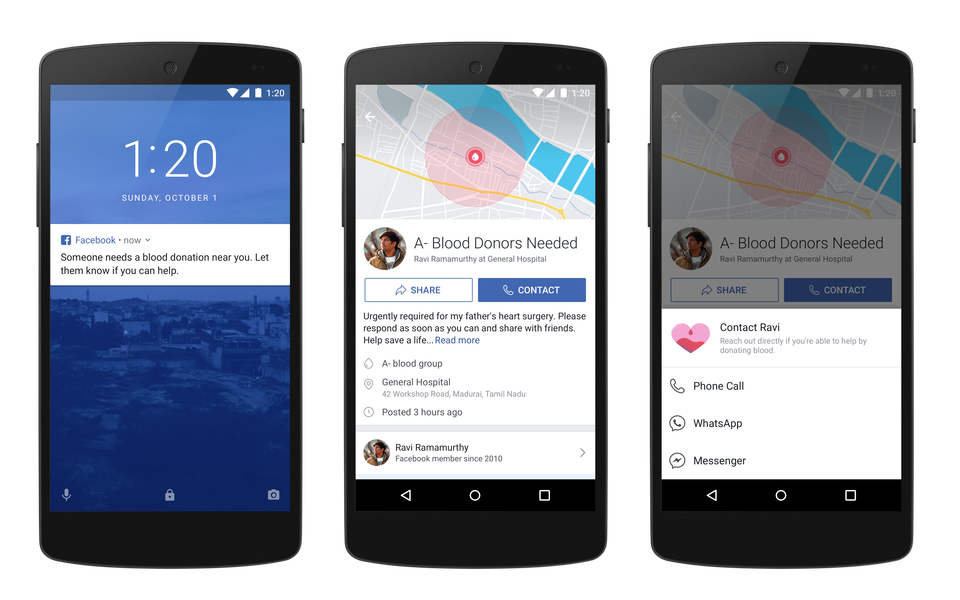
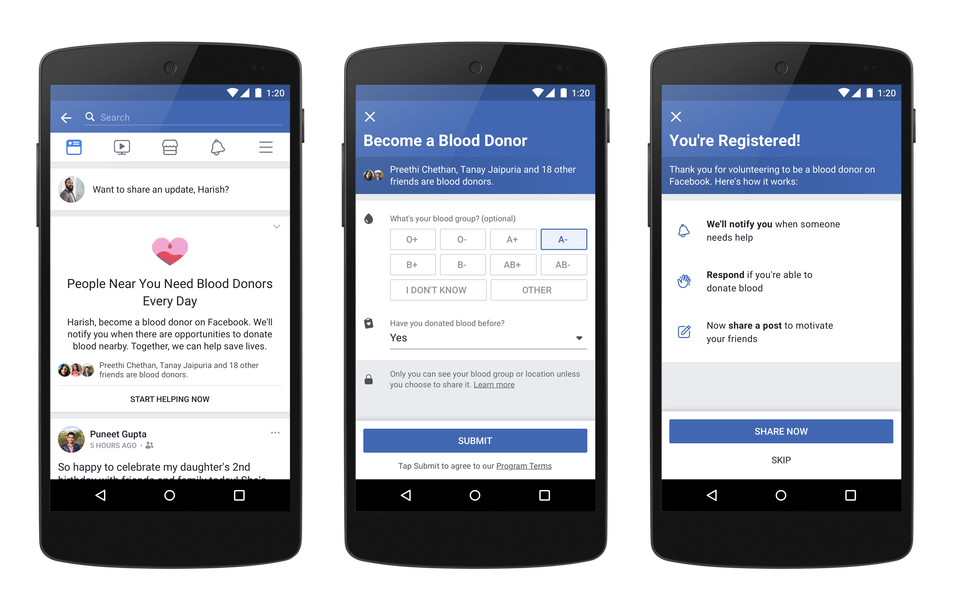
From October 1st National Blood Donor Day users in India will have had the chance to try out this new feature from Facebook. They will be able to sign up as blood donors. All information will be private by default but users will have control over that and will be able to share their donor status with their friends if they choose to. This feature will first be available on Android and mobile web.

Via: Facebook

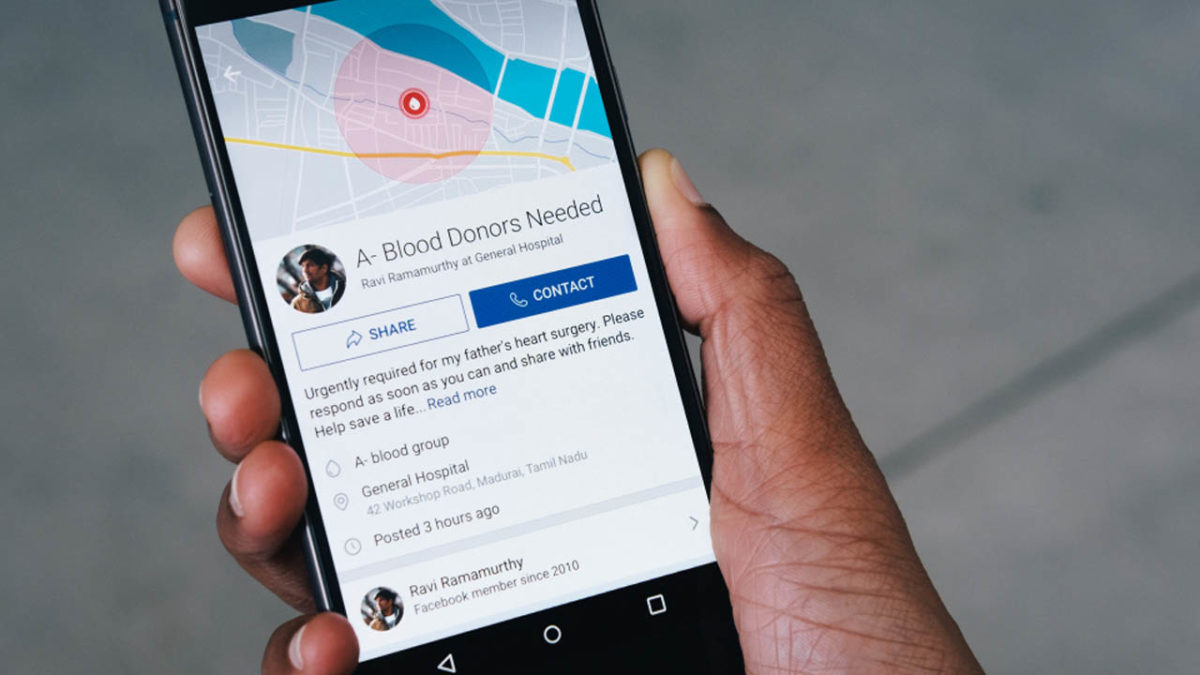
Blood banks and people looking for donors will also find this feature very helpful. They will have an option to create a special type of post with all the information donors need and Facebook will automatically notify people that fit the profile. The donors can then contact the person who needs blood via WhatsApp, Messenger or a simple phone call. Profile privacy will be kept safe unless the donor wants it to be available.

We love this project because it has a lot of potential to become a global thing and help solve so many problems, not to mention, potentially save millions of lives.

Via: Facebook

The Easiest Way to Get 100% Free Phone Service – FreedomPop UK

Are you still paying for calls, texts, and data? ?

Then STOP!

FreedomPop, the world’s first and only free mobile service, lets you chat, text, and surf for free.

No contract, no gotchas, no fuss.

For those of you who waste valuable minutes and data each month, their Basic 200 plan could put some extra cash in your pocket.

Here’s how it works.

FreedomPop’s 100% Free Plan

You get…

  •      FREE – 200 minutes
  •      FREE – 200 texts
  •      FREE – 200 MB data

Without…

  •      A fixed term contract – you can change your plan or cancel at any time
  •      Big international calling costs  – get 100 international calling minutes for just 99p (allows you to call 50+ countries)

So, if you’re paying for a bigger usage allowance but using less, the 100% Free plan could knock a chunk out of your monthly expenses.

Special Deal Today ?

FreedomPop is promoting a new plan that offers even more savings to consumers.  You can get unlimited minutes, texts messages, & 4GB data for only £8.99/month!  This is a 54% savings from their traditional rate.  This deal is a FreedomPop Extended Plan, so users get billed for 6 months of service at a time

As an extra bonus for this deal, the first month’s service is 100% free.  Just pay 1p for the SIM activation and you’re all set.  Also included in the deal is FreedomPop’s Premier Service, which is a bundle of their most popular value-added services including Data Rollover, Usage Alerts, & VPN.  There are no contracts or commitments, so you can cancel service at any time.

How do you get one?

For just a 1p activation , FreedomPop send you a SIM to pop into your phone.

They only support iOS and Android at the moment, so make sure your phone is compatible.

Then, once you’ve inserted and activated the SIM, download the FreedomPop app (iOS or Android) to make calls, text, or surf online for absolutely free, up to your monthly limit.

It’s also worth pointing out that if you don’t need the data allowance, you don’t need the SIM. Simply download the app and enjoy the free minutes and texts straight away.

Why do you need an app?

FreedomPop is a unique mobile phone operators. For phone calls, they use both traditional cellular voice, as well as VoIP (Voice over Internet Protocol). Most phone calls will go through the normal cellular network unless you’re in an area with poor coverage, in which case your phone will attempt a VoIP call.  VoIP is cheaper than transmitting over the cellular network and is one of the reasons FreedomPop can offer a free service, but it does mean you need to go through the app to make or receive calls.  VoIP calling also allows you to make calls over WiFi, which can come in handy if you’re stuck inside a building with a low cellular signal.

FreedomPop also needs a 3G or 4G signal. In the UK, FreedomPop uses Three’s network which covers 97% of the UK. You can check Three’s coverage tool to ensure you won’t be left without a connection.

The app is simple and intuitive, and lets you see how much you’ve used of your monthly allowance – useful if you want to stay within the free limit. You can also view FreedomPop’s other services, most of which are paid-for extras such as unlimited data, and turn them on or off as you like.

For all this free stuff, you’d be forgiven for thinking there might be a catch. But thankfully there aren’t any. Justpay f 1p  (UK price) for the SIM, shipping, and activation. For low users, this makes FreedomPop an absolute steal.


The Easiest Way to Get 100% Free Phone Service – FreedomPop US

You can now stop paying for data, calls, and texts

There’s no catch, no strings, and no reason not to jump on board.

FreedomPop, the nation’s first and only 100% FREE mobile phone service, lets you chat, text, and surf the web for free.

No contract. No commitment. Cancel anytime.

For those of you paying for more minutes and data than you need every month, try their 100% FREE Basic plan, and you’ll be able to put some extra cash back in your pocket.

Here’s how it works.

FreedomPop’s 100% FREE Basic Plan

You get…

  •      FREE – 200 minutes
  •      FREE – 500 texts
  •      FREE – 200 MB data

EVERY MONTH

And with…

  •      No contracts – downgrade to their 100% FREE basic plan anytime or cancel anytime
  •      No international calling costs  – you’ll receive free international calling from over 60 countries

So, if you’re paying for more than you need, FreedomPop can help you save!

? Limited Time Offer: ?

Try FreedomPop for 30-days RISK-FREE

FreedomPop is promoting a new plan that offers even more savings!

Get Unlimited Talk, Text, and 2GB LTE for only $12.99 with a 100% FREE 1-mo trial. As a bonus, get the SIM card FREE with $0.99 activation. After your trial, continue and just pay $77.94 for 6-months, which is ONLY $12.99/mo or downgrade to their 100% FREE Basic Plan anytime.

 ?How do you get one?

  1. Get your FREE 3-in-1 SIM Kit for just a $0.99 activation HERE


  1. FreedomPop sends you a SIM to pop into your phone. (They only support iOS and Android at the moment, so make sure your phone is compatible.)


  1. Activate the SIM for only $0.99 and then you’re on your way to making calls, sending texts, and surfing the web for 100% FREE.  

Sounds too good to be true? Well, believe it! Save more by only paying $0.99 for the SIM activation now!

Try FreedomPop with a 30-day money back guarantee


This is why you should always pay for a VPN

There are many reasons why you should use a VPN. There is security, for example. A VPN can stop even your Internet Service Provider (ISP) from monitoring your online traffic and strong VPNs can even block the government and shady cyber-criminals from knowing your browsing habits. Another reason is speed. ISPs have the power to throttle your access to the internet but VPNs can prevent them from doing this. VPNs put you in charge of your connection to the internet.

With so much at stake then, it is clear that you need a VPN, if you take your security seriously. To go one further, however, if you’re serious about your secuirty, it is important that you don’t take chances with free VPNs. Here is why:

Why you should pay for a VPN:

1. Your security is a premium issue

Almost all free VPNs use a very old and outdated protocol called PPTP (Point-to-Point-Tunnelling-Protocol). It’s super easy to set up, but infamous for its security flawssome of which were discovered back in 1998 by Bruce Schneier, tech blogger and IBM Resilient’s CTO. You don’t need much fancy software or hardware to do it either – anyone with a laptop and evil intent can have a go.

Paid-for VPNs use a selection of far more robust protocols, such as HMA! Pro VPN, VyprVPN, and Zenmate VPN.  I don’t know about you, but I’d rather pay a little upfront than expose all my data (and dollars) to some opportunistic hacker.

HMA! PRO VPN DOWNLOAD NOW
10
Hide My Ass! Pro VPN is a fantastic VPN app that has earned a good reputation thanks to the myriad of options available: speed, broadband and unlimited server changes; the most secure protocols, compatibility with any service (including Netflix) and up to 5 connections per license.
VyprVPN DOWNLOAD NOW
10
Another highly recommended option is VyprVPN, a service backed by the Swiss company Golden Frog, seasoned experts in the tech world who advocate for an open internet. VyprVPN boasts of 73 servers in 64 countries, with a NAT firewall that gives you an extra security layer
Zenmate DOWNLOAD NOW
10
Zenmate is another great option for secure browsing. This VPN doesn’t store any of your data and uses the latest encryption systems.

2. Then there’s the slow connection speeds

Everyone loves free stuff, so chances are your free VPN will have hundreds of thousands (or even millions) of subscribers, each with their own drain on bandwidth. And because free VPNs don’t charge a fee, they’re less likely to have the servers to cope with demand, and that’ll slow your connection.

It’s also increasingly common for free VPNs to share servers with other providers. While this saves them money, it could slow your internet access during busy times. Paid-for VPNs can usually afford their own servers and can optimise them to work with their network, apps, and hardware. 

3. That leads us nicely to the third problem with free VPNs – your privacy

Since you’re not paying for their service, they’ve got to make money another way. This could be in the form of annoying adverts, or worse, selling your usage data to third parties. Scarily, not all VPNs tell you about this. Just finding out whether they’ll log your use is hard enough – it’s normally buried somewhere in your terms and conditions.

A 2016 review of VPN services for Android devices concluded that 75% of those studied tracked your data – whether they said they would or not. While they won’t always sell this data on, you won’t know for sure, and a free VPN has to make money somehow. You might want to check out that VPN you’ve been thinking of on this comparison table from That One Privacy Site.

Finally, free VPNs won’t have as many servers, in as many countries, and as many support staff operating them. You’ll have fewer options to mimic geolocation, and fewer people to talk to (if any!) when things go wrong.

So it makes sense to choose a well-reviewed, well-respected, and honest VPN provider that charges you a fair price for a good service. We’ve put together a list of our favourites to help you choose. And while they might not be free, I’m sure you’ll agree they’re worth spending on.

Other VPNs to take into consideration

Hotspot Shield Download
8
Panda VPN Download
8
Avira Phantom VPN Pro Download
8
Avast SecureLine VPN Download
8


5 reasons why you need a VPN

A VPN (Virtual Private Network) is a must for the internet-savvy and security-conscious.

What is a VPN?

A VPN is your own private access to the internet. Like a digital security guard, it keeps everything you do private, anonymous, and encrypted.

All internet traffic, whether you’re browsing the web, uploading a document, or downloading a film, can go through your VPN.

Here are 5 reasons why you need a VPN:

1. A VPN protects you from cybercrime

A VPN protects you from cybercrime in two ways:

  • It encrypts all the data between you and the internet
  • It hides your IP address

When you download a webpage, your router or modem makes a request for it through your internet service provider (ISP), which then sends that request to the server that holds it (which could be anywhere else in the world). For this to work, networking devices like routers and servers are given IP addresses, which lets the internet know where to send information.

The problem is, having your IP address known to the internet makes you more vulnerable to hacking; and because the data being sent between your router and the internet isn’t encrypted, it’s easier for cybercriminals to see.

This is especially dangerous when you’re using a public wifi spot, such as that found in a coffee shop. Hackers exploit these open connections to access your data, but with a VPN, this is much harder to do as the VPN both hides your IP address and encrypts your data.

Since all data goes to the VPN server first, potential hackers see the VPN server’s IP address and not your own. As all the data is encrypted, you’re even more protected.

HMA! PRO VPN DOWNLOAD NOW
10
Hide My Ass! Pro VPN is a fantastic VPN app that has earned a good reputation thanks to the myriad of options available: speed, broadband and unlimited server changes; the most secure protocols, compatibility with any service (including Netflix) and up to 5 connections per license.
VyprVPN DOWNLOAD NOW
10
Another highly recommended option is VyprVPN, a service backed by the Swiss company Golden Frog, seasoned experts in the tech world who advocate for an open internet. VyprVPN boasts of 73 servers in 64 countries, with a NAT firewall that gives you an extra security layer
Zenmate DOWNLOAD NOW
10
Zenmate is another great option for secure browsing. This VPN doesn’t store any of your data and uses the latest encryption systems.

2. A VPN lets you enjoy worldwide content

A VPN lets you trick the internet into thinking you’re browsing from another country. It does this by connecting you to servers it owns throughout the world. So, if you want to stream content that’s only streamable in the USA, but you’re on holiday in the UK, you can route your request through one of your VPN’s American servers

3. A VPN lets you access better prices

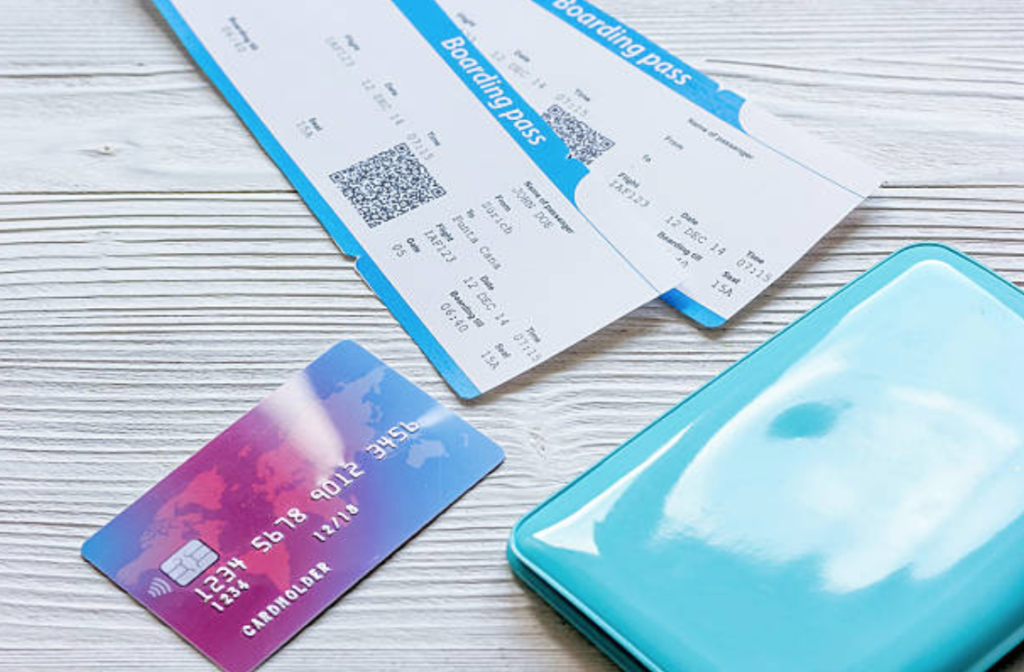
Some websites, specifically flight booking sites, might charge you more or less depending on where you’re browsing from. There are also rumors that some airlines change pricing depending on whether you’ve made the same search several times.

By using a VPN, you can change the IP address to that of another country and see if this affects your prices. You can also change the IP address if you’ve searched for the same flight a few times – even to somewhere local – and see if that makes a difference. You might be surprised to save $100s.

It does come with a warning, though: if a condition of purchase is that you live in the same country you’re browsing from, it’s best to err on the side of caution and use a local IP address.
4. A VPN lets you browse unrestricted

Some countries and governments don’t want you to access certain sites. Sometimes for good reason, but at other times, just overzealous censorship. The internet’s free and open nature is its most powerful asset, so restricting it for frivolous reasons is unfair, and in some cases, might infringe on your human rights.

By allowing you to effectively choose your browsing location, you can select countries which are less restrictive than your own. Letting you enjoy the internet’s heart bounty by unlocking all of its doors.

5. A VPN prevents your ISP from throttling your internet speed

ISPs collect data on your browsing history by monitoring your IP address and the sites it visits. Now, they do this for good reason – for monitoring and managing internet traffic to make the internet more efficient. But there’s a darker side to this, too.

Knowing which sites use the most bandwidth means they can throttle your internet speed at busy times. Many do this with torrent traffic, but also less clandestine activities such as watching Netflix. If Netflix, HBO, or iPlayer is taking up too much bandwidth, your ISP can reduce your speed to free up capacity for other things.

A VPN stops your ISP from throttling your speed because your ISP won’t know which sites you’re visiting. Now this advantage does come at a price. Because all your data is encrypted before going to your ISP, and incoming traffic from the VPN server requires decryption for you to see it, this does slow down your connection a bit. How much depends on the VPN you’ve chosen, how good its encryption is, and which of its worldwide servers you’ve chosen (the closer the better in most cases).  Click Here to learn more about VPN Unlimited.

Most of the time speed isn’t an issue – especially with a paid-for VPN. Make sure though that you select the right VPN for you depending on what you need it for. For example, if you’re a gamer you might want to acces to the multiplayer servers available in certain countries. We put together a list of our favorites to help you choose which VPN is right for you.
Best Alternatives to AIM: AOL Instant Messenger

AOL Instant Messenger (AIM), which was one of the first and most successful instant messaging services, is set to close on December 15th. This will be sad news for many, as AIM was one of the first ever tools for socializing over the internet. Apparently, AIM is a casualty of the evolving way people communicate online. This means that as more people communicate via smartphone than desktop-based instant messaging services, AIM is being squeezed out of the market.

The good news is that there are plenty of great alternatives to AIM, so let’s check out a few of them now.

Top 5 Alternatives AOL Instant Messaging

AIM launched in 1997, and by 2001 it reached 100 million simultaneous users. It offered a desktop instant messaging environment that went beyond mere one-to-one text communication; it also allowed group chats and media sharing, features that all of these alternatives share.

1. WhatsApp

WhatsApp is, of course, a mobile messaging service, but the introduction of WhatsApp web and the desktop WhatsApp app makes the behemoth the ideal replacement for AIM. Unfortunately, AOL has told us that you won’t be able to export your buddy list, so you should start making note of all the contacts you want to keep and add them to your phone’s contact list ASAP. You have until December 15th to do so.

2. Hangouts

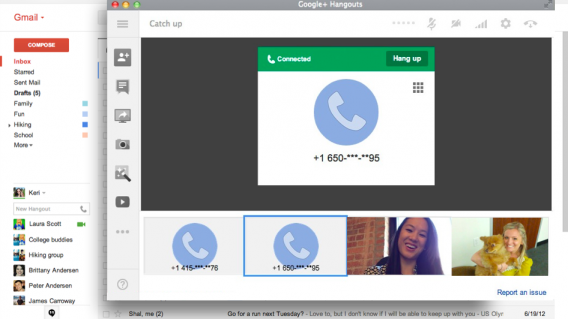
google hangouts calling

Hangouts, which used to be Google Talk, is an IM, video and VoIP program developed by Google. Hangouts is another one of those direct competitors to AIM that could be seen as a nail in its coffin. It is compatible across Windows, Mac, Android, iOS and even Linux.

3. Skype

Skype is another biggy that does it all. In addition to sending instant messages, you can send video messages, share files, make voice and video calls, and even pay a little extra to make calls to landline and mobile phones.

4. Viber

Viber, like WhatsApp, began its life on mobile but grew to include a standalone desktop app. It offers many of the same types of service as Skype, but also gives users access to stickers, emojis and even a drawing tool that allows you to send scribbles and more to your friends.

5. Telegram

Long before WhatsApp got involved in desktop messaging, Telegram was already on the case. Telegram specializes in security, with user privacy being of the utmost importance. In addition to its privacy and encryption features, Telegram has a strong set of enables users to send video and audio files as well as integrating well with other social networks like Twitter and Instagram.

Did you use AOL Instant Messenger? How do you feel about it closing down and what other messaging service will you use in its place? Let us know in the comments.


Via: AOL, Fortune and The Guardian

How to have infinite Gmail addresses with only one account

Did you know that you can write the same Gmail address in different ways? This trick, which very few people know about, helps you have several accounts for online services (Facebook, Instagram, Twitter…) without having to create a new email account every time, and without all that hassle.

How many ways can you get “new” email addresses that are actually the same one? We’ll tell you below!

Trick 1: add dots to your username

Gmail doesn’t count dots (.) as characters in usernames. So, if your email is mrsoftonic@gmail.com, you can add one or more dots and Google will continue to identify it as the same address.

mr.softonic@gmail.com

m.r.softonic.@gmail.com

mr.sof.tonic@gmail.com

m.r.s.o.f.t.o.n.i.c@gmail.com

They look different, right? Nope, Gmail recognizes all these addresses as the same and all mail sent to these addresses will arrive in the same inbox.

Trick 2: Add extra words to your username

Gmail doesn’t just turn a blind eye to dots but also lets you add words to your normal email address. The only thing you have to do is add a plus symbol (+) after your normal username and then add the word you want. For example:

mrsoftonic+news@gmail.com

mrsoftonic+articles@gmail.com

mrsoftonic+family@gmail.com

mrsoftonic+handsome@gmail.com

It’s that simple. Make as many nicknames as you want!

any-device

Trick 3: combine both tricks

Want an even weirder email address? Gmail lets you combine trick 1 and trick 2 with no limits.

mr.softonic+handsome@gmail.com

m.r.s.o.f.t.o.n.i.c+handsome@gmail.com

etc, etc, etc…

It’s time to get creative!

Use this trick to avoid creating excess email accounts

Admit it, you’ve created several email accounts in order to use a service under different names… or create trial accounts for certain paid services. Take it easy, we all do it when we’re broke, and this trick is perfect for this.


This article was originally published in August 2017

Have You Ever Seen a Smartphone Explode?

After the exploding Galaxy Note 7 controversy last year, Samsung would like everybody to forget the fact that, for a while there, their smartphones were exploding. A day wouldn’t go by without new reports of an exploding Galaxy Note 7, but we never got to see what it looked like beyond a few GIFs made using GTA 5 mods.

via GIPHY

That is, until now. Some pretty hairy CCTV footage has been posted on YouTube, and what´s worse for Samsung, this video isn’t of a Note 7 but of another Samsung model, the Samsung Galaxy Grand Duos.

Despite the fact that the Samsung Galaxy Note 8 has launched to rave reviews, it looks like Samsung’s exploding phone legacy will be hanging around Samsung’s neck for a little while longer at least.

It is important to note that any phone could theoretically explode if it was exposed to factors like excess heat, 3rd party batteries or chargers, and damage to handset or battery.

What do you think? Would you consider buying a Samsung smartphone in the future, or do you worry that it might explode? Let us know in the comments.


Celebrate Avast 2018’s New Features and Win

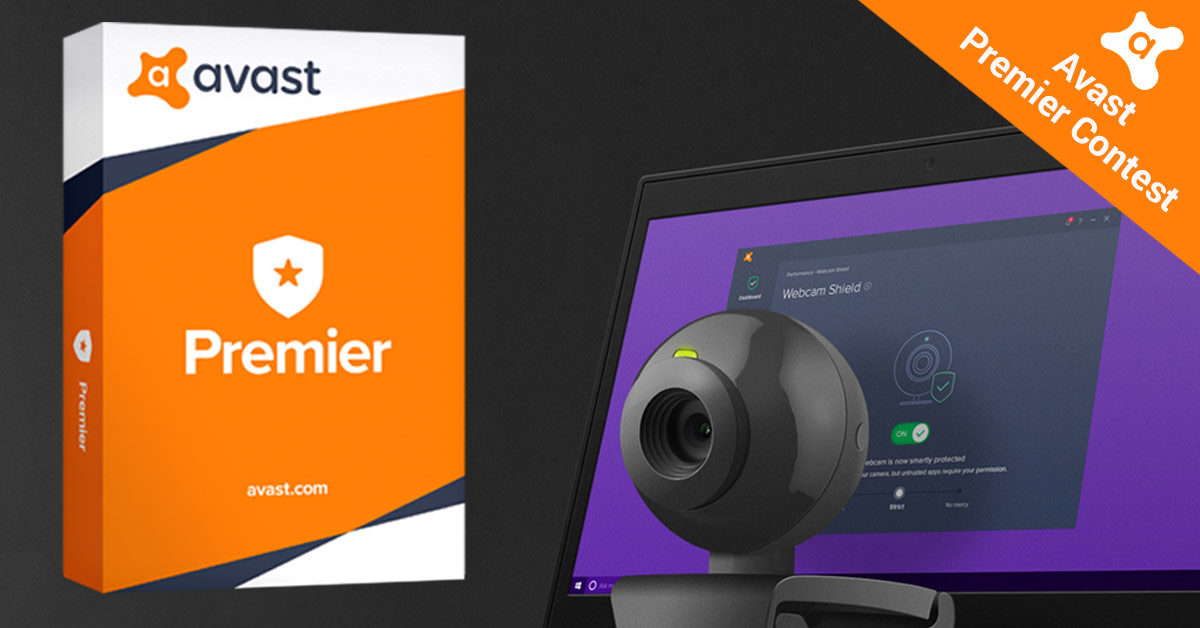
Avast has just unveiled their 2018 security suite. To celebrate, we’re giving away 100 licenses for Avast Premier. Each license will give full access to Avast Premier’s premium features for one year and is worth $79. Avast Premier comes packed with all of the new features Avast is introducing this year, including the Webcam Shield feature.

How to Enter

1. Follow us on Facebook

Head over to our Facebook page and click like.

2. Stay tuned

On October 9th we’ll launch a question on our Facebook page related to Avast’s new security suite.

3. Leave a comment

You have until October 23rd to leave your answer to the question.

Good luck. Hopefully you’ll be one of the 100 lucky winners who get to take home a year-long license for Avast Premier.

To learn more about Avast 2018’s capabilities, check out our article about all of the updated features.

When the final date of the contest has passed, we’ll notify the winners to tell them how to claim their prize. For the terms and conditions, click here.


Halloween: 14 Fantastic and Cheap Products You Need

Halloween is the most sinister holiday in our calendars, but it is also one of our favorites. Costumes, candy and kids running around having fun. What could be better?

If you’re looking to get into the Halloween spirit but don’t want to spend all sorts of money on something that you’re only going to use once a year, read on. We’re going to go through some of the coolest yet cheapest Halloween goodies you can get your hands on. You can buy all of these online at Aliexpress.

Prices may be subject to minor fluctuations.

Decorations

Decorate your doorbell

To welcome all of your trick or treaters, why not add this scary little bat to your doorbell? It’s easy to apply and remove, and it will show everybody who comes to your house just how serious you are about All Hallow’s Eve.

Price $1.00

Buy it Here

Decorate your Wall

Why stop at your doorbell? You can get scary decorative vinyl for all your walls, and at $1 a piece there isn’t much stopping you from really going for it this year.

Price $1.00

Buy it Here

LED lights and lanterns (Pumpkins, Ghosts etc.)

These strips of lights are perfect for turning your home into a haunted house experience. You’ll really be able to get spines tingling with these hanging up. Each strip is 1.8m long and comes with ten lights. Check out the designs now.

Price $2.40 – $3.77

Buy it Here

LED lights and lanterns (Eyes)

If you want something a little more sinister than a few friendly pumpkins or ghosts, this strip of ten eyeball lights is for you. Creepy!
Price $3.85


Buy it Here

20 Colorful Ghost Lights

These aren’t quite as scary as the eyes – they’re more adorable than anything else – but that doesn’t mean there isn’t a place for them in your Halloween. Most of the costumes you’ll be seeing will be adorable, so why not rig your house with adorable multi-colored ghosts, too?

Price: $4.00

Buy it Here

Paper Lanterns

These classics will never get old. They come adorned with spiderwebs, skeletons, and ghosts. What makes these even better is that they’re illuminated by LED lamps, so there is no risk of burning your house down.

Price: $1.60

Buy it Here

Plain LED Lights

If all of the Halloween lights are a bit much for you, maybe you’d be interested in these super cheap strips of plain LED lights. They come either 5m or 10m long and can be used all year round.

Price: $3.50 – $5.50

Buy it Here

Projector (Halloween, Christmas etc.)

Think about when Gotham needs Batman and you’ll begin to understand what this cool little projector is capable of. You can use it create huge scary images for your Halloween party or even beautiful snowy vistas at Christmas time.

Price: $37.99

Buy it Here

Kit yourself out for Halloween

LED Gloves

These glowing fingers are the coolest. You can use them if you’re dressing up as a skeleton, but they’ll make pretty much any costume look better.

Price: $7.25


Buy it Here

iPhone Cases (Witches, Pumpkins etc.)

When you can get a case for your phone for less than $2, there is nothing stopping you from having a holiday-specific case. These cases are perfect for Halloween.

Price: $1.90

Buy it Now

iPhone Cases (Black Cats)

Everybody loves cats, so who wouldn’t want a black cat cover for their iPhone at Halloween? When you consider the price of these, it is hard to justify not getting yourself one.

Price: $0.80 – $1.30

Buy it Here

For the kitchen

Mini Bat Molds

These little molds are perfect for making little cakes or big ice cubes. Either way, it is the little things that make the biggest difference, and these little beauties will set you apart this Halloween.

Price: $0.60

Buy it Here

Mini Skeleton, Pumpkin and Ghost Molds

These are a little bigger than the bat molds, so we probably won’t be making ice cubes that will fit into our Bloody Marys (if anybody knows of a more ghoulish cocktail I want to know about it), but they will help you make some pretty special Halloween cakes.

Price: $1.90

Buy it Here

Brain Mold

Yes, this is it. The ultimate Halloween party prop. A jello mold in the shape of a brain. With this as the centerpiece on your table, your Halloween party will be remembered for years to come.

Price: $3.65

Buy it Here