How to avoid sharing compromising moments on Facebook

It’s very likely that you’re reading this article with your Facebook account open. The social network, created by Mark Zuckerberg, is arguably the most important in the world. According to figures reported this past summer, Facebook already has more than 2 billion users; in other words, one in four people on this planet has an account. 

Despite this incredible figure, the data also says that very few people know how to make the most of their Facebook account. What does this mean? For one, they don’t take basic actions to protect their security and avoid sharing compromising moments on the social network.

We’ll show you three simple tricks to keep your Facebook account secure and hopefully humiliation-free. The rest is up to you.

Who can see my stuff

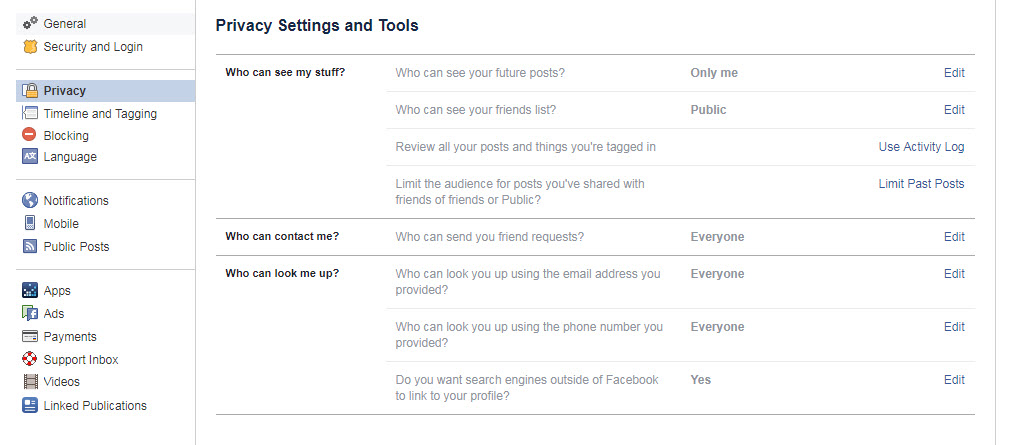
The first thing is to go to the tab that appears on the right of the question mark and click on Settings. Once there, the insides of Facebook will be at our disposal via a page that shows your privacy on the social network. Yes, the first section there is the most important of all.
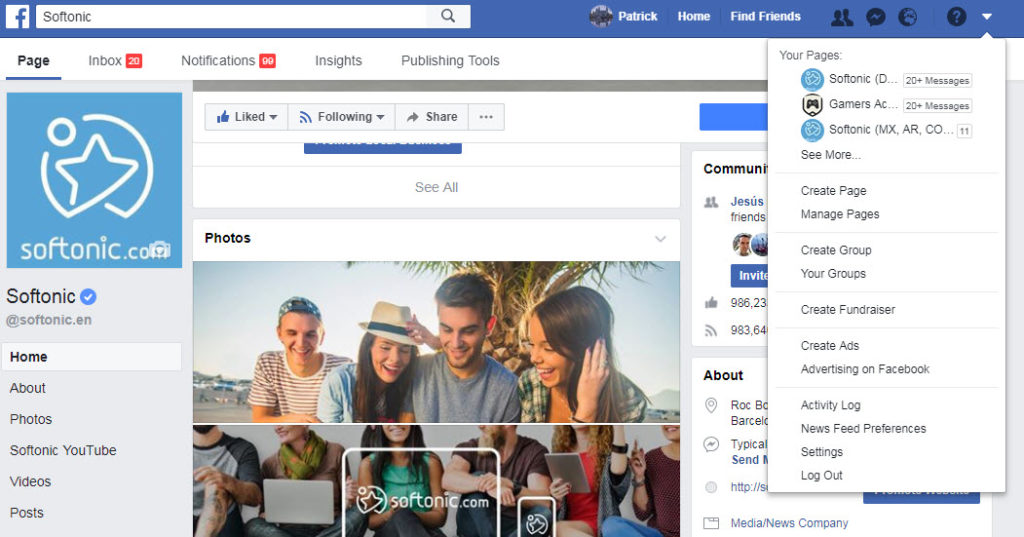
Mind you, the first section you should click on is: Who can see my stuff? Our advice is to simply select just Friends. This way, all your content will be protected from the eyes of those who want to spy on your account (they won’t be able to access your photos or posts).

On the other hand, in case you don’t like to get friend requests, changing the settings of Who can send you friend requests? is another section you should keep in mind.
Timeline and tagging

We’ve already restricted access to just our friends. Now it’s time to avoid sharing awkward moments on our account, because even friends don’t want to see that.
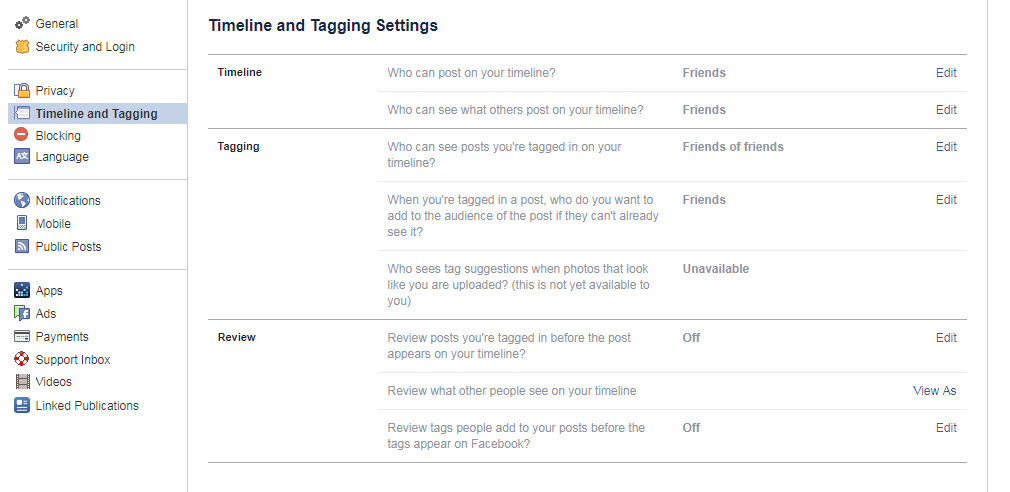
In the section Timeline and tagging, we have a wide range of options to avoid having posts that we’re tagged in appear on our personal profile. So, let’s give a typical practical example: A friend uploads a photo of you drinking a beer, and you don’t want your coworkers to see it, especially your boss.

To prevent this, you only need to go to the Tagging section and change the subsection Who can see posts you’re tagged in on your timeline? Choose the one that best fits your needs and say bye-bye to trouble.

Review

The last trick is on this same screen in the Review section. If you look carefully, you’ll see a section called Review posts you’re tagged in before the post appears on your timeline? As the question suggests, this is a preliminary step to tagging (as we mentioned before). So, if you don’t want to be so strict about people seeing your tagged photos, you can always enable manual review to decide which posts go through your personal filter.

This is a recommended feature if you want some photos you’re tagged in to be visible to your friends. So, if you’re popular, get ready for a barrage of notifications!

The 5 best lock patterns for your Android phone

Do you have an Android phone right now? If so, it’s likely you’ve unlocked your screen using a lock pattern. Only you know the combination of the nine movements maximum that give you access to all the information available on your device, so creating a good one is a must.

Many use something simple and accessible to prevent them from forgetting it, but others are creative about making amusing patterns. In this tutorial, we’ll show you five great, simple lock patterns for your Android cell phone.

5 tips to prevent security issues with your phone Read Now

Pattern 1

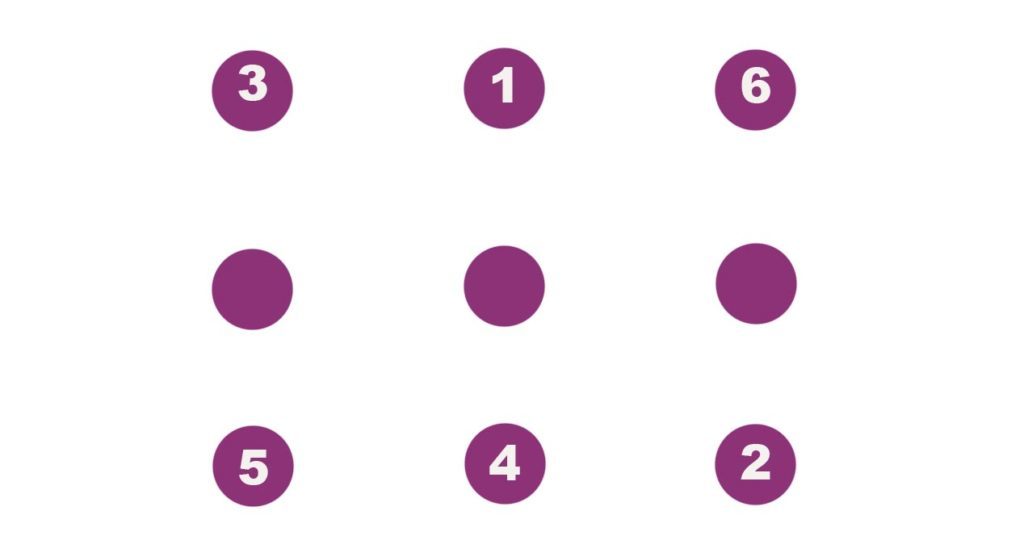
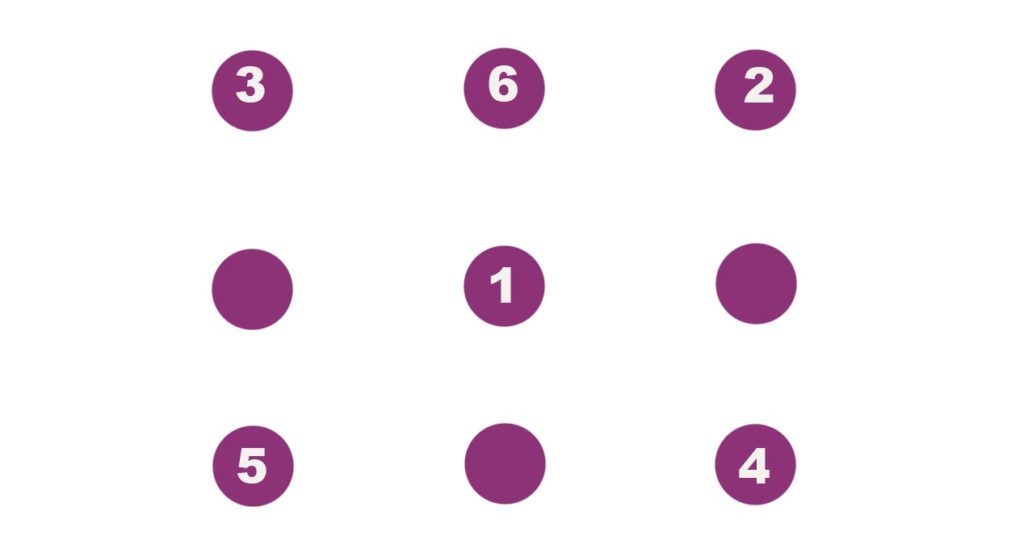
In general, people often resort to very basic patterns to unlock their cell phones, but this means that security is considerably reduced. The first lock pattern involves an easy, but uncommon combination. Point 1 starts in the upper middle and goes to 2, in the lower right-hand corner. Then we cross the screen to 3, back down to 4 in the lower middle, left to 5 and to the upper right-hand corner at 6.

Pattern 2

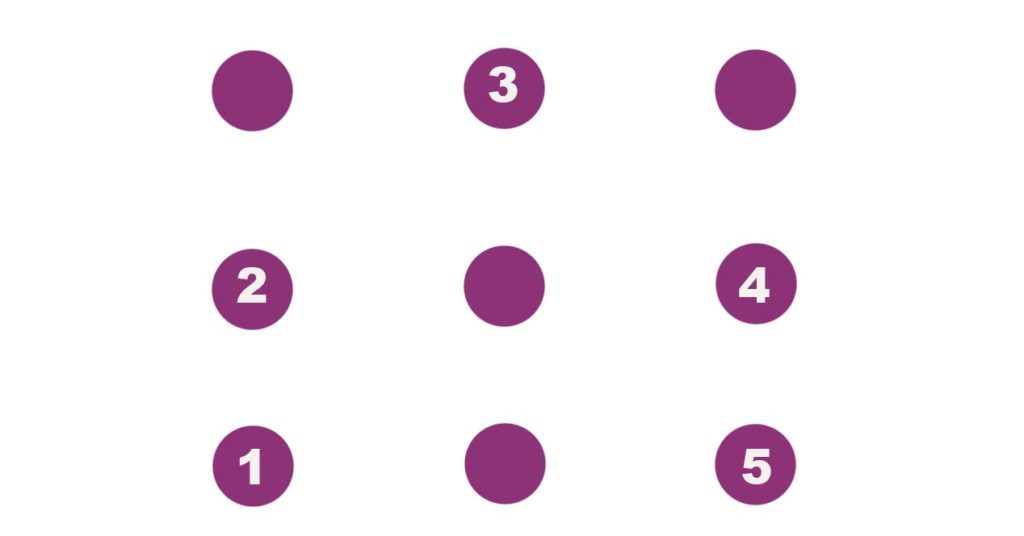
This is one of the most classic patterns, which we’re taught when we’re little: a house. The most accessible way is to start from the lower left-hand corner at 1, go up to square 2, again to 3 in the upper middle, then down to the right middle at 4, and finally to the lower right-hand corner at 5. Our house drawing, on our Android.

Pattern 3

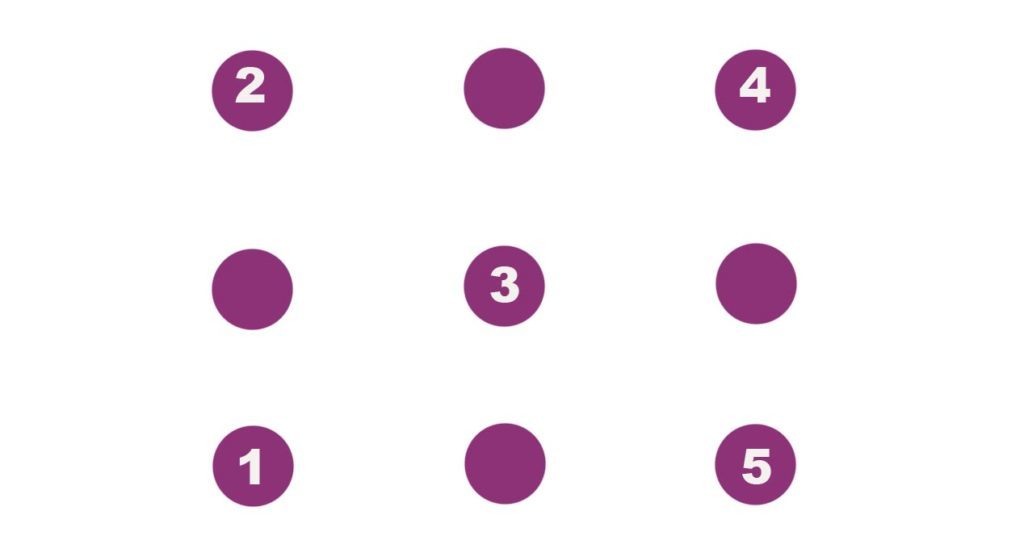
Do you like Mario Bros? In case you haven’t noticed, this pattern makes the letter “M,” one of the easiest lock patterns to make. It’s as simple as starting in the lower left-hand corner at 1, going up to the upper left-hand corner at 2, going right to the middle at 3, going back up to the upper right-hand corner at 4 and finishing in the lower right-hand corner at 5.

Pattern 4

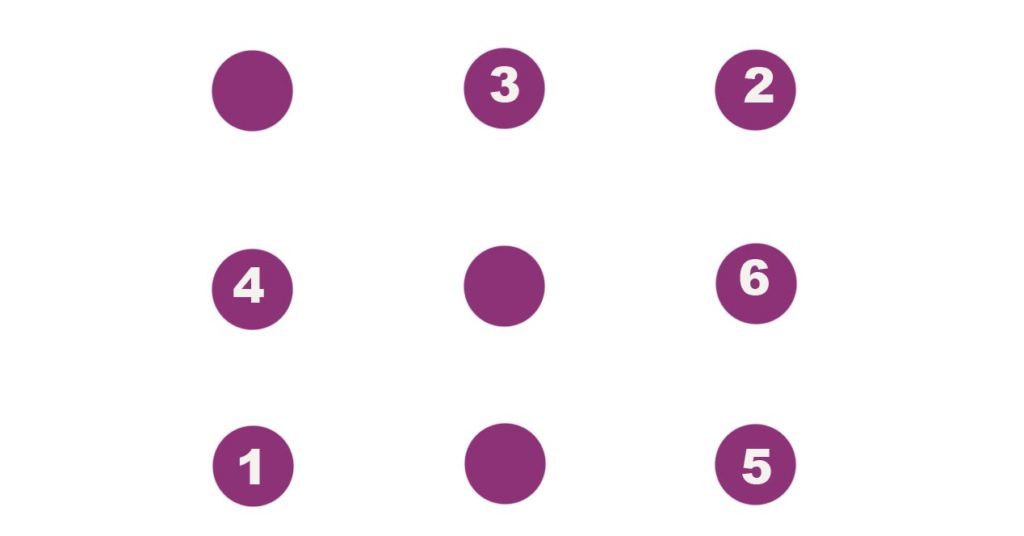
We’ve enjoyed starting in the lower left-hand corner, so we’ll start from there again. Now, from 1 we’ll go to the upper right-hand corner at 2, to the upper middle at 3, down to the left middle, over to the lower right-hand corner at 5, and finish by going up to the right middle at 6.

Pattern 5

We’ll wrap up with what we think is the most difficult pattern of all, because of the twists and turns. We’ll start in the middle at 1 and go to the upper right-hand corner at 2, then to the upper left-hand corner at 3, go down to the lower right-hand corner at 4, go over to the lower left-hand corner at 5, and head up to the upper middle at 6. We’ve made different triangles on the screen, so if somebody was looking over our shoulder, they wouldn’t know where we started.

What about you, which one do you like best? Don’t miss the chance to post your own combinations in the comments. We haven’t shown the most difficult ones, but rather a mix of nice patterns and more complex ones.

WhatsApp will soon notify you when you’re mentioned in a group chat

When WhatsApp adds a new feature or two it doesn’t make a big announcement or kick up much of a fuss. We count on independent blogs to keep us updated with all the cool new features that come to increasingly popular messaging app. One of our favorite such blogs is WABetainfo and they’ve just released data on the latest beta version of WhatsApp.

8 tricks to strengthen your WhatsApp security Click Here to Read

It was WABetainfo that first let us now about the mentions feature, which allowed friends to tag their friends in group chats. This is an incredibly useful feature because group chats can quickly get out of hand and messages specifically meant for you can easily get lost. According to WABetainfo, WhatsApp will soon add to the mentions feature.

The latest beta version of WhatsApp for Android shows in-app notifications for all mentions in group chats. These aren’t notifications like you receive for normal messages, they’ll only be visible inside WhatsApp itself. Whenever you open a group chat you’ll see a numbered notification that’ll tell you how many times you’ve been mentioned in the chat. Tapping the notification will take you to the first mention and then after that you can keep tapping to go through every mention.

As always with these beta features there are no details about when we can expect to see them rolled out across all of WhatsApp so all we can do is wait and see whether we’ll get to use the features in the future.

What do you think, would mentions notifications be a useful feature?

Follow me on Twitter: @PatrickDevaney_

Via: WABetainfo

Does Google have a Spectre fix that doesn’t slow down PCs?

When the Spectre and Meltdown vulnerabilities hit last week, major tech firms have been falling over each other trying to get their fixes out there. The problem so far is that all fixes that have been pushed by Microsoft and Intel have actually slowed down the computers that have received them. Google isn’t happy with this situation and the search giant thinks it can close up the vulnerabilities without affecting processor performance.

6 quick and easy tricks to speed up your computer Read Now

With Google’s fix to the Variant 2 of the Spectre attack, Google uses software patches to address the problem, rather than just disabling the affected CPU features. Variant 2 is considered the toughest Spectre issue to fix without affecting performance and Google claim that their patch has a negligent impact on performance. In fact, in a security blog post, Retpoline, the name of Google’s software-implemented patch, is claimed have no or little impact:

“Retpoline sequences are a software construct which allow indirect branches to be isolated from speculative execution. This may be applied to protect sensitive binaries (such as operating system or hypervisor implementations) from branch target injection attacks against their indirect branches.”

Google believes that Retpoline based protection is the best performing for Variant 2 Spectre issues on current hardware. Google hopes that by sharing their findings publicly they’ll be adopted industry-wide. Watch this space.

Please tell us your experiences with Meltdown and Spectre in the comments below.

Follow me on Twitter: @PatrickDevaney_

Via: Google (2) and Lifehacker

Google can now match your selfies to famous portraits

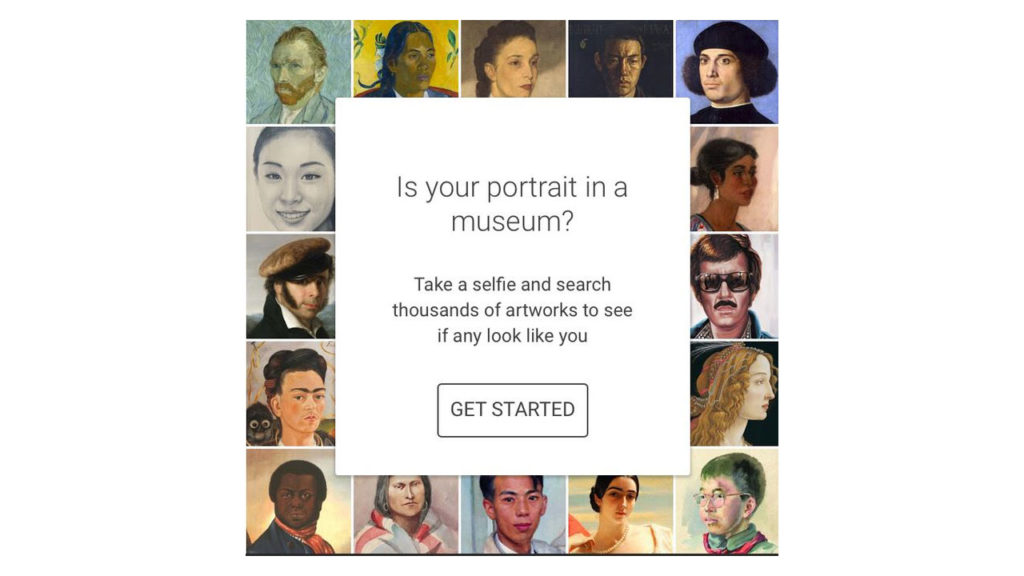
Which famous painting do you look like the most? Google Arts & Culture App will answer this strange question for you . The app has been updated with a new function that will scan your selfies and then search for the masterpiece most similar. Who knows, maybe you have the same smile as the famous Mona Lisa!

This simple addition to the app has rocketed the Google Arts & Culture App to number one in the free app downloads of the Google Play Store, at least in the United States.

Google Arts & Culture Download Now
8

Thanks to this, Twitter has been inundated with photos of people checking out the app.

The strange thing is that the app first debuted back in 2016. The app gave virtual tours of thousands of museums and art galleries all over the world. Despite this interesting premise, the Google Arts and Culture App is almost unknown, which meant Google had to add this gimmicky update to help it gain some traction.

Google Arts & Culture Download Now
8

Do you think you’ll give the app a go? If you do, let us know the results in the comments below.

Follow me on Twitter: @PatrickDevaney_


Via: ReCode

60 infected apps removed from Google Play Store for displaying pornographic ads to children

Google have moved quickly to remove 60 apps, many aimed at children, from the Google Play Store because they were infected with malware. Israel-based researchers, working for Check Point Software Technologies, discovered the malware and alerted Google of the apps that contained it. Google acted fast to get the apps out of the Play Store, saying:

“We have removed the apps from Play, disabled the developers’ accounts and will continue to show strong warnings to anyone that has installed them. We appreciate Check Point’s work to help keep users safe.”

Unfortunately, according to Check Point the affected apps had been downloaded between three to seven million times.

5 tips to prevent security issues with your phone Read Now

The malware, dubbed AdultSwine by Check Point, would display pornographic advertisements on the infected handsets and encourage users to download fake security programs. Clicking links could force users to pay for false services. On top of trying to scare users, AdultSwine would also steal credentials and security data from the infected handsets.

According to Check Point, infected users who input details on the fake ads, including ads offering free iPhones, would end up being charged for services they didn’t ask for or receive. Finding ads for porn in kid’s games is bad enough, but if you add the intimidation tactics and the stealing of confidential info, this becomes a particularly malicious piece of malware.

Follow me on Twitter: @PatrickDevaney_


Via: Check PointEconomic Times, Digital Trends and The Verge

The Spectre and Meltdown security updates will slow down your Windows PC

Has your PC been working a little slower recently? It could be that your PC is suffering from one of the side effects of Microsoft’s recent update, designed to close up the Spectre and Meltdown vulnerabilities. For those unaware, Meltdown and Spectre are the two recently discovered security breaches that affect almost all processors.

Click Here to learn all you need to know about Meltdown and Spectre

Microsoft has warned that the patches will affect the performance of Windows computers. Here is the summary of what Microsoft have discovered so far:

“With Windows 10 on newer silicon (2016-era PCs with Skylake, Kabylake or newer CPU), benchmarks show single-digit slowdowns, but we don’t expect most users to notice a change because these percentages are reflected in milliseconds.

With Windows 10 on older silicon (2015-era PCs with Haswell or older CPU), some benchmarks show more significant slowdowns, and we expect that some users will notice a decrease in system performance.

With Windows 8 and Windows 7 on older silicon (2015-era PCs with Haswell or older CPU), we expect most users to notice a decrease in system performance.

Windows Server on any silicon, especially in any IO-intensive application, shows a more significant performance impact when you enable the mitigations to isolate untrusted code within a Windows Server instance. This is why you want to be careful to evaluate the risk of untrusted code for each Windows Server instance, and balance the security versus performance tradeoff for your environment.”

What this all means is that if your PC is from before 2015 you’ll see a negative effect on performance. According to The Register this effect could be anything between 2 and 14% of overall performance.

As it is the processors that are effected most this slowdown will most be experienced whenever they’re in use, like for web browsing or if you’re doing more complex tasks. Unfortunately, for now at least, Microsoft hasn’t come up with any other solutions to deal with the Meltdown and Spectre problem.

If your PC is running a little slower you can check out the solutions below to try and bring a bit of speed back into your life.

5 tips and 3 programs for cleaning up your PC and making it good as new

6 quick and easy tricks to speed up your computer

5 Tricks to Speed up Windows 10 Start Time

Follow me on Twitter: @PatrickDevaney_

Pokémon Go will end support for iPhones and iPads that can’t update to iOS 11

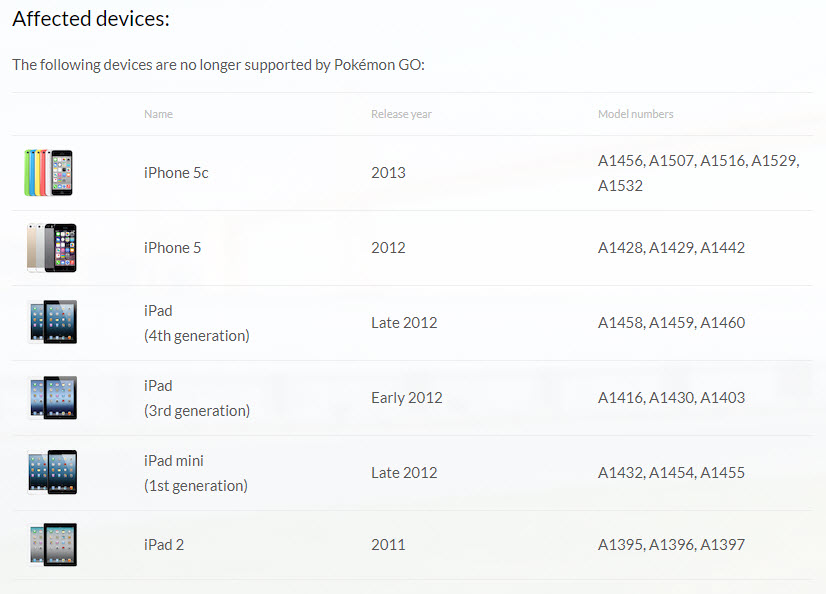
If you’re a Pokémon Go player in iOS and you can’t upgrade to iOS 11 you’re in a for a nasty surprise. Niantic have announced that following an upcoming update it’ll no longer be supporting Pokémon Go on devices that aren’t capable of upgrading to iOS 11. Niantic said:

“This change is a result of improvements to Pokémon GO that push the application beyond the capabilities of the operating systems on such devices.”

For those affected this rather nasty change will come into effect on 28th February 2018. Users with iPhones or iPads that can’t upgrade will no longer be able to access their Pokémon Go accounts from that device and will need to switch to a supported device to continue playing Pokémon Go. A pretty harsh announcement just after Christmas, as most kids will have just seen their best chance of a new mobile pass them by.

Niantic have been held back somewhat by support for older devices as Apple’s new ARKit technology offers some really interesting possibilities going into the future. It is bad news for those who won’t make the cut but for anybody still playing Pokémon Go on a newer device there could be some exciting times ahead.

Pokémon Go Download Now
8


Via: Niantic and BGR

Pizza Hut want to take us back to the future

The Consumer Electronics Show in Las Vegas always introduces us to some weird and wonderful inventions. This year is no different as we’ve seen the world’s first consumer sex robot and even a $16,0000 robot that’ll fold your laundry for you. Our favorite so far, however, is the collaboration between Toyota and Pizza Hut. They’ve given us a concept design for an autonomous van that’ll not only deliver pizzas but could also make them too.

The e-Palette marks exciting new directions for both Pizza Hut and Toyota. US Pizza Hut President Artie Starrs said:

“We are focused on technology-based solutions that enable our team members and drivers to deliver even better customer experiences… With Toyota, we are excited to be partnering with an undisputed leader in human mobility with a reputation for innovation, reliability and efficiency, as we define the pizza delivery experience of the future.”

Pizza Hut are looking to the future and feel that Toyota are the perfect partner to help them get there. For Toyota the e-Palette will not just be something that delivers pizzas. They say that each vehicle can reconfigured and repurposed in only 24 hours. Toyota also have plans for partnerships with other big names including Amazon and Uber. They hope to have an autonomous vehicle showcase at the 2020 Olympic Games in Tokyo, with American testing to start soon after.

The future is literally just around the corner then. Pizza Hut will begin recording delivery data from the human drivers this year in a bid to improve their algorithm before the e-palette hits the streets.

If this all seems a little familiar to you it might be because we’ve already seen this concept in action in the 4th series of Black Mirror. Obviously here is your spoiler alert but if you’ve already seen the episode in question you can check out the similarities below.

Follow me on Twitter: @PatrickDevaney_


Via: TNW

Image via: Back to the Future Wiki


Amazon’s Alexa is getting some cool updates

This year’s Consumer Electronics Show in Las Vegas has seen its fair share highs and lows. Highs include Razer’s Project Linda, which will see Razer’s new mobile phone power a full 13” laptop and lows have included a robot that repeatedly ignored the presenter during a demo. Mostly, all the announcements just pass us by but Amazon’s announcements about Alexa have caught our eye.

Amazon have announced that they’re opening up Alexa to developers who plan to add it wearables and peripherals like headphones. A company, called Vuzix, has taken this announcement and ran with it, announcing a pair of Alexa powered smart glasses. Alexa will be able to answer user requests visually and provide responses to queries ranging from stock prices to sports scores. The smart glasses will start out at $1,000 a pair but Vuzix CEO, Paul Travers, says the price is to decrease to $500 by next year.

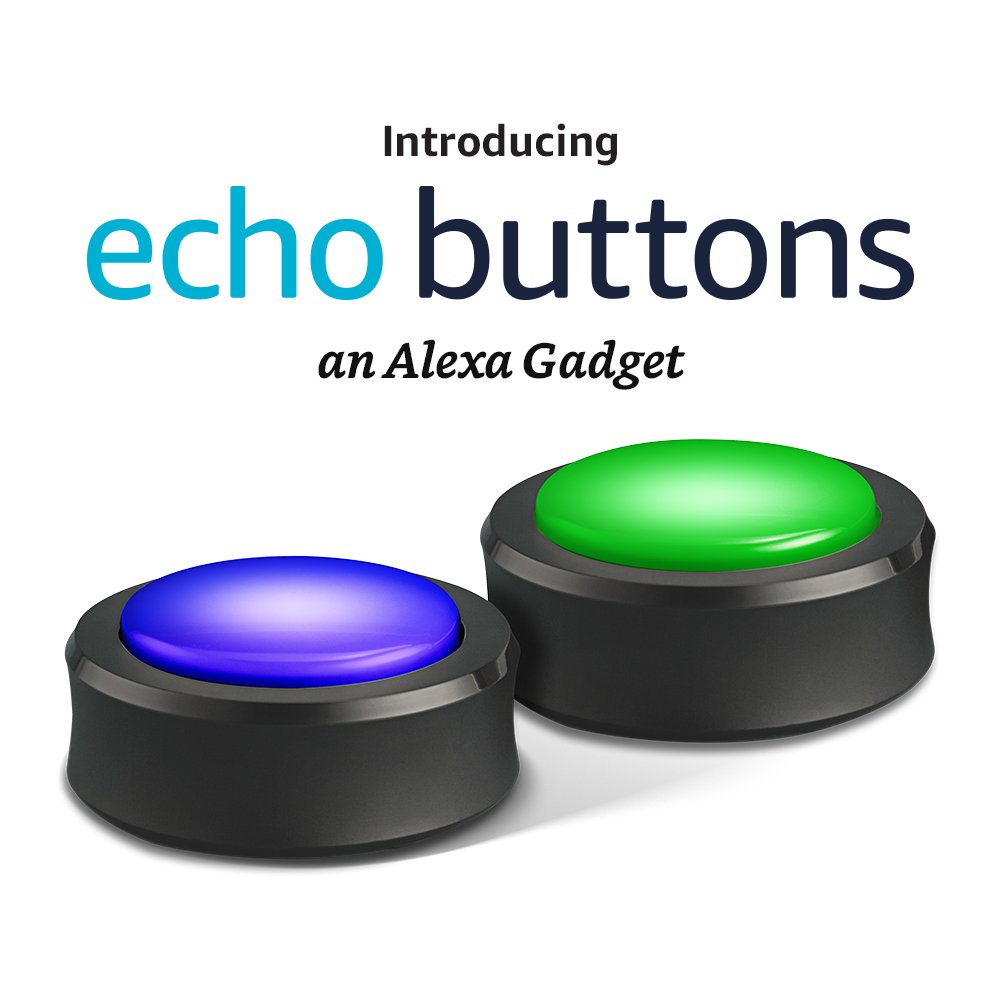
Another cool update regards Amazon’s Echo Buttons. For those not familiar with Echo Buttons, they’re sold in pairs and can be used with Alexa like you users buzzers on a gameshow. Playing Alexa’s trivia sees Alexa acting like a host with the quickest to buzz getting to answer the questions she asks. Amazon have since announced that’ll also be opening up Echo Buttons to developers, which means we can expect to see more cool Alexa powered applications taking example of Echo Buttons’ functionality. Watch this space.

Follow me on Twitter: @PatrickDevaney_

Via: Bloomberg and Endgadget