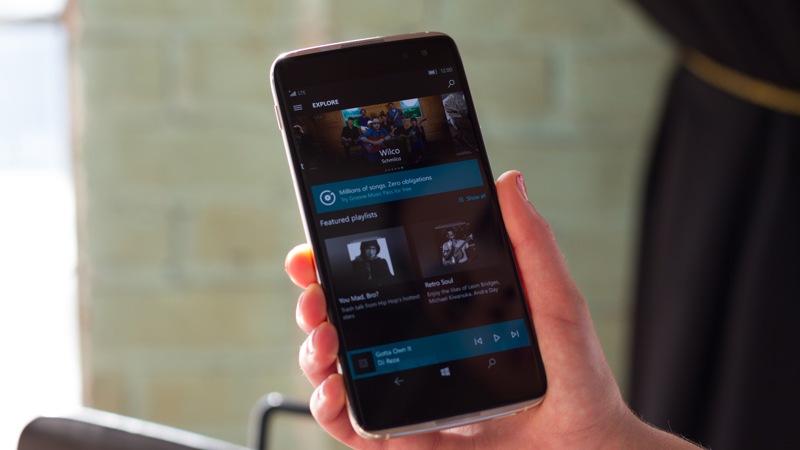
Microsoft have been selling the Alcatel Idol 4S as part of a VR bundle that includes a VR headset for a while now. The powerful Qualcomm Snapdragon 820 processor, Adreno 530 graphics chip, huge 4GB memory and gorgeous 5.5” full AMOLED screen make it a perfect headset to use as the powerhouse in a mobile VR setup.
Due to the powerful specs it offers, however, the Idol 4S can be so much more and makes an excellent smartphone for anybody looking to get the most bang for their buck. The Idol 4S also sports 64GB of internal memory and a fantastic 21 MP main camera. What is even more amazing is that for the next month Microsoft are going to be selling the handset on its own, without the VR headset for only $99. That kind of power being offered by a reliable brand for such a small price can’t be found elsewhere.
The Idol 4S comes loaded with the Windows 10 operating system, which offers some really innovative features like the Cortana assistant and Windows Continuum. Continuum allows users to hook up the mobile to a monitor, keyboard, and mouse so that users can use the Idol 4S much like they would a PC. This incredibly useful, especially when you consider the powerful specs and that the phone comes loaded with microsoft Office and Outlook.
With all things considered the Alcatel Idol 4S offers uses a huge amount of functionality for a tiny price.
Today marked the end of Microsoft’s mainstream support for its Windows 8 and Windows 8.1 operating systems. This doesn’t mean Windows 8 and 8.1 are as dead as Windows XP just yet as users running Windows 8 or 8.1 will continue to receive security updates until January 10th 2023.
Of course, Windows 10 is still much better than Windows 8 and 8.1 in terms of features, usability, and security so if you really want the best operating system that Windows can offer it’d still be best to update to Windows 10, even if your Windows 8 operating system is still receiving security updates.
Microsoft's Windows 10 operating system (OS) marks a major turning point for the company. Microsoft hopes to make a fresh start and move on from the much-maligned Windows 8. There are a whole raft of major changes and minor tweaks in Windows 10, all designed to make the experience feel more complete - whether you are using it on a computer, tablet, or phone.
On the Roblox platform, content designers use the scripting language known as Lua to engineer their games. Lua is a lightweight programming language that can be embedded into games, and it also allows Roblox players to create interactive content within their own individual games.
We’ll go through the basics of Lua here, and then we’ll give you some recommended resources so you can really get started creating your very own functional Roblox game.
A script is a series of instructions that a program follows to producea desired output. In order for the program to give these instructions, you must instruct the program in words it can understand – in the case of Roblox, the program understands Lua – so that it can carry out your instructions.
Think of it in the context of a television show – the actors read from the script, which is effectively instructions handed down to them by the show’s producers, to produce the desired output: a television show. Writing a script in Roblox is exactly the same as this; you are writing a script that the program reads and then acts accordingly.
The most challenging part of learning a new programming language is figuring out where to begin. Each developer has her own method, but starting with the very basics can’t hurt, especially if you are completely new to programming.
Lua is a very powerful language. To give you an idea of what you can do with it – and to show you some code in practice – we’re going to create a brick (or a part in Roblox speak) that kills your player when it is touched.
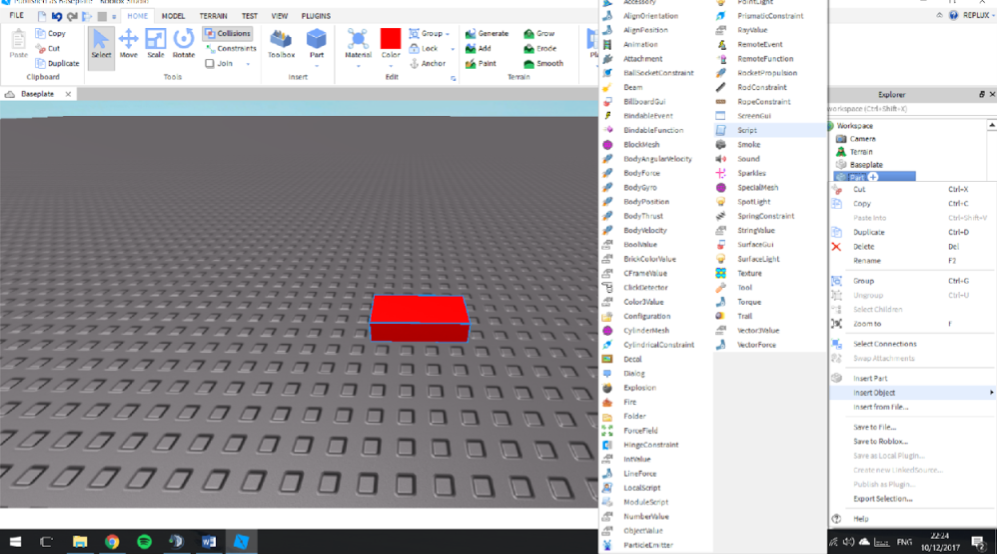
Fire up Roblox Studio and navigate to your place. When you have loaded in, insert a part using the Part tool and then highlight it.
At the moment, this is a regular part that does nothing. But with a little scripting magic, we can turn it into a deadly brick that, when touched, instantly kills your player!
Now, to add a script to your part:
Highlight the part (or model or object).
In the Explorer on the right-hand side of Roblox Studio, right-click the highlighted Part.
Navigate to Insert Object and then press Script.
This will open a new tab called Script, which will contain the following code:
print(“Hello world!”)
Hello world! is a simple program used to display the text Hello world in an output; it is the method used by all programming languages to illustrate the basic syntax of the individual programming language in question. For this tutorial, you can ignore this and delete it from your script
5. In the now-empty script file, type the following line of code:
function onTouched(part)
This is called a Touched event and is used to detect when a Humanoid (Roblox character) limb comes into contact with the part. When the Humanoid limb touches the part, the Touched event “fires” and executes the rest of the code.
We must now define a player to kill. That player will be the Humanoid that touched the brick. Type the following code:
local player = part.Parent:findFirstChild(“Humanoid”)
This line of code tells the script to define the player as the Humanoid that touched the part.
Note: Don’t worry about what part.Parent:findFirstChild means, as this is something you will learn in time. In basic terms, the Parent is the part, and the Child is the Humanoid Roblox character; the player becomes the Child of the Parent when his or her Humanoid touches it. The script then stores the player locally until all the script’s events are carried out.
Finally, we need to tell the script that when the part is touched, it must cause the player to die:
if player~=nil then wait (0.001)
player.Health = 0 end end script.Parent.Touched:connect(onTouched)
First, we use an if statement to check that the player ~= nil. In other words, the script is checking that “player” exists. In Lua, ~= means “does not equal” or “is not equal to.” If player ~= nil, then a Humanoid must have touched the brick, and the rest of the script can be carried out.
The script then pauses for a very brief moment before killing “player” by setting its health to 0. We then use end to stop the script; if we did not do this then the script would loop and kill the player repeatedly.
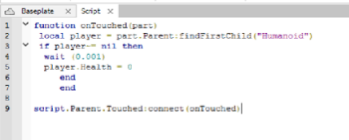
Your script file should look like this:
Test out your code by pressing the Play button and walking into the deadly part. If you’ve done everything correctly, your character should meet its demise:
Congratulations, you’ve executed your first script!
Where to go from here
The purpose of this article is to give you a practical example of Lua in action. It is a very simple, user-friendly language that is versatile and great for people who are completely new to programming.
The Roblox Wiki has some fantastic resources to give you more on the basics of Lua scripting. If you’re serious about developing a game on the Roblox platform, it might be worth investing in a beginners’ book such as this one by Douglas Snipp. The official Roblox YouTube channel even has a video series that takes you through the basics. And there are plenty of other videos out there aimed at developing basic skills to an intermediate or advanced level.
Learning a programming language is no easy feat, and there is no proven way to do it. Everybody has their own learning methods and styles, and you need to find out what suits you as an individual. But if you take time to look at the above resources and learn from them, you will be able to find your comfort zone and take it from there. Good luck!
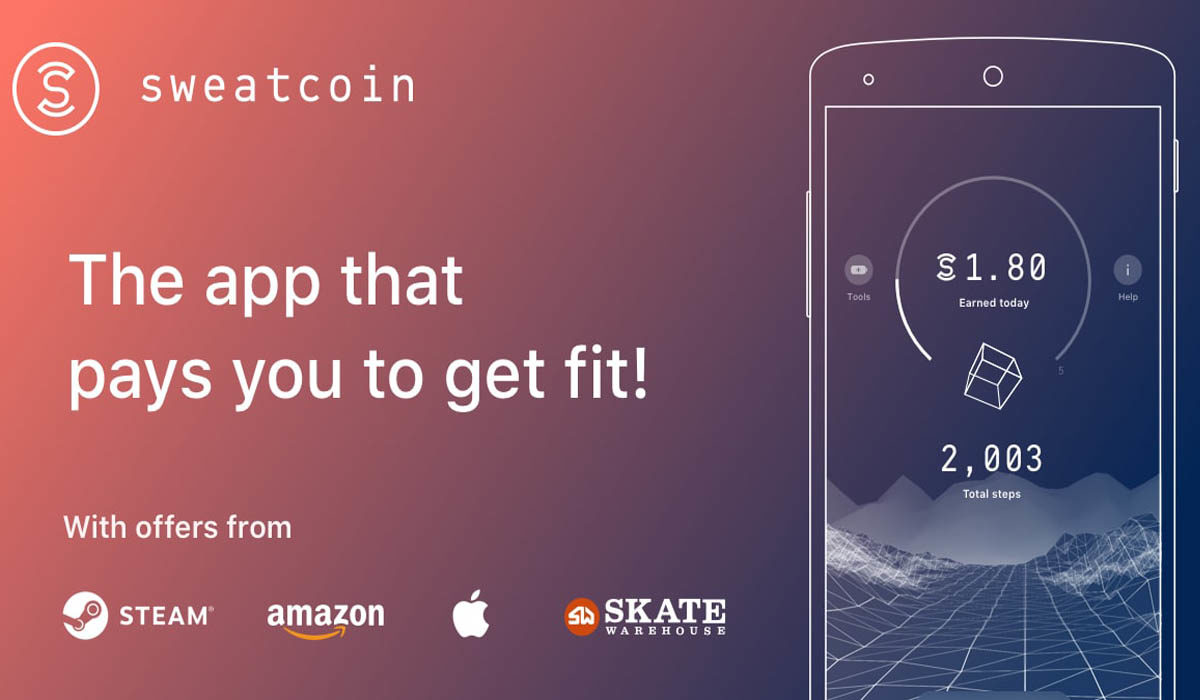
Christmas and new year have come and gone and we’re stuck in January wondering what the hell happened with a vague determination to make it better this time around. Well if your new year’s resolutions involved losing weight, getting fit, or being better with money you might be interested in a new cryptocurrency called Sweatcoin.
The Sweatcoin Android and iOS apps take your steps and convert them into a digital currency called Sweatcoins that can then be used to buy things via the app. Sweatcoins can even be turned into PayPal gift cards, which means they can be spent pretty much anywhere.
The problem is that, in an effort to prevent fraud, the app needs to track the user’s GPS location. In fact, the permissions required before your steps will qualify for Sweatcoin conversion are pretty extensive. Version 1.10.1 can access:
Identity
read your own contact card
Contacts
read your contacts
Location
approximate location (network-based)
precise location (GPS and network-based)
Phone
read phone status and identity
Photos/Media/Files
read the contents of your USB storage
modify or delete the contents of your USB storage
modify or delete the contents of your USB storage
Storage
read the contents of your USB storage
modify or delete the contents of your USB storage
modify or delete the contents of your USB storage
Camera
take pictures and videos
Wi-Fi connection information
view Wi-Fi connections
Device ID & call information
read phone status and identity
Other
receive data from Internet
view network connections, full network access, run at startup, draw over other apps, control vibration, prevent device from sleeping
The constant GPS tracking will also raise battery life issues. There is a battery-saving mode but this explicitly states that some steps might be lost, which is as good as money down the drain. So just how much are steps worth in Sweatcoins?
For every 1,000 steps travelled, users will get 0.95 Sweatcoins, which means you’ll make just shy of 10 Sweatcoins a day if the app registers all of your steps. You can use your coins to buy things from Graze snacks for 80 Sweatcoins to an iPhone X for 20,000 Sweatcoins. It has been estimated that about 65% of all steps will be registered, which means it’ll take users about 3,000 days to accrue enough Sweatcoins for an iPhone X.
There is a catch to be taken into account and that is the different types of accounts that users need to sign up to. The Mover account is free and allows users to earn 5 Sweatcoins a day. After that, incremental increases in Sweatcoins paid per month unlock different accounts that allow users to earn more Sweatcoins each day, all the way up to the Breaker account, which costs 30 Sweatcoins a month but allows users to earn 20 Sweatcoins a day. Technically all the accounts are free but accrued coins will disappear if users stop using the app.
All in all, Sweatcoins seem like a great incentive to get yourself moving and are particularly exciting if the app is used in conjunction with games like Pokémon Go. As Niantic has promised us a Harry Potter version later this year it could be worth signing up to Sweatcoin now if you think you’ll be playing Harry Potter Go when it comes out.
Those eagle-eyed WhatsApp watchers over WABetainfo have noticed that the latest beta version of the eponymous instant messaging app has added Facebook style stickers and group calling.
The new stickers will be available to use in group-chats. We’ve known that group calls would be coming to WhatsApp for a while now but the beta has given us the first chance to see it in action. It looks like group video calls could also be on the way.
Another new introduction will be a quick switch button for transferring between voice and video calls. If the button is pressed the person at the other end of the line will receive a request asking them to convert the call. If the recipient doesn’t want to convert the call they’ll have to reject the request as WhatsApp will automatically convert the call if no response is sent. This feature won’t work on the new group voice calls.
A new craze is coming to your mobile in 2018. A craze that is both fun and gives you the chance to win some big cash prizes. This craze is real time quiz apps that allow you to compete against other users and also offer the winners lucrative prizes.
The biggest of these real time quiz apps is HQ Trivia for the iPhone but there are others on the horizon and with a recently launched beta version of HQ Trivia on Android, soon millions of us will be logging in to compete for a share of the top prize. Let’s have a look at these apps in a little more detail.
HQ - Live Trivia is an app that allows you to pit your wits against a range of trivia questions tackling various different subjects. Join in with literally thousands of other players and compete to find out who will be the trivia champion of the day. There are prizes to be won, but only if you keep your wits about you and manage to answer the questions correctly!
If you’ve ever watched a TV gameshow you’ll have a fairly good idea about these real time quiz apps work. HQ Trivia replaces the studio audience with thousands of players on their respective smartphones and everybody has a chance to win. Everyday at 3pm and 9pm Eastern Time in the USa host takes the players through 12 multiple-choice questions. Anybody who gets all 12 questions right will get a share of the prize pot for that quiz. A wrong answer, however, will see you eliminated from the game. The prizes can be big. HQ’s shared jackpot on it’s NYE quiz was $18,000.
HQ isn’t the only offering but it is both the first and the biggest. Other live quiz apps include The Q on Android and Showtime, which is geared towards Indian audiences. Going forward into 2018 all of these apps will need to address a number of issues as they’re not your average trivia or quiz apps. Technical issues are front and center. As the number of users increases so does pressure on the servers being used by the apps. On HQ’s big NYE quiz a whopping 459,000 people logged in to play and most of them didn’t even get to see any questions and were left with the host merely entertaining them for thirteen minutes. This highlights another potential problem for apps, the hosts themselves. Gameshow hosts play a huge part in making them entertaining and engaging for their audiences. Hosts need to be entertaining, quick-witted, and most of-all not annoying.
With potential problems to address there is no guarantee that live quiz apps will end up being any more than just another fad app that’ll soon fade away. This is unlikely, however, as it’d be wise to look at the success of TV gameshows to gage potential rather than apps that have landed with a big splash and then faded away. Interactive gameshows with real prizes certainly have an appeal and if you consider the broad demographics, from retirees to stay at home parents, that tune in daily to quiz shows there are a lot of people who’ll be intrigued by this new format. If there is demand the technical issues will be overcome and there is no reason to think that this is the only quiz format we’ll see either.
HQ - Live Trivia is an app that allows you to pit your wits against a range of trivia questions tackling various different subjects. Join in with literally thousands of other players and compete to find out who will be the trivia champion of the day. There are prizes to be won, but only if you keep your wits about you and manage to answer the questions correctly!
Moving forward then, HQ is sitting at the forefront, the app recently logged over 1,000,000 users for a single quiz, of what could end up being a brand new genre of interactive media. Now, the app doesn’t make any money and doesn’t even feature any ads. All of the prize money comes from venture capital, with investors hoping the game will become big enough for brands to pay to be associated with it.
There is certainly a lot of promise but investors should be wary of the fact that the people behind HQ Trivia also founded Vine, which recently shut down due to the fact it wasn’t making any money. For the rest of us, however, the fact that short looped videos are still all over the internet should be another indicator that maybe live quiz apps are here to stay and we’ll be seeing lots more of them going into 2018. We’ll just have to wait and see and, in the meantime, maybe try and win some money.
Let us know if you’ve played a live quiz app or if you plan on doing so in the future in the comments section below.
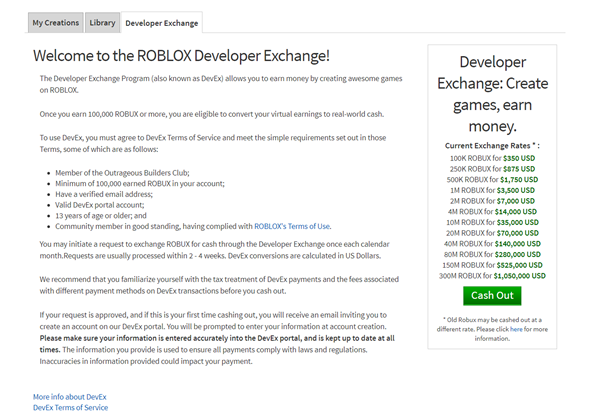
For years, Roblox has given young video game developers a chance to make big money through its platform. Launched in 2013, Roblox’s Developer Exchange, or DevEx, lets its content creators cash out the Roblox virtual currency – Robux – into real, tangible money through microtransactions.
There are Roblox game developers earning thousands, and a few earning millions, providing its very best developers with a full-time income and Roblox-based design studios to go along with it.
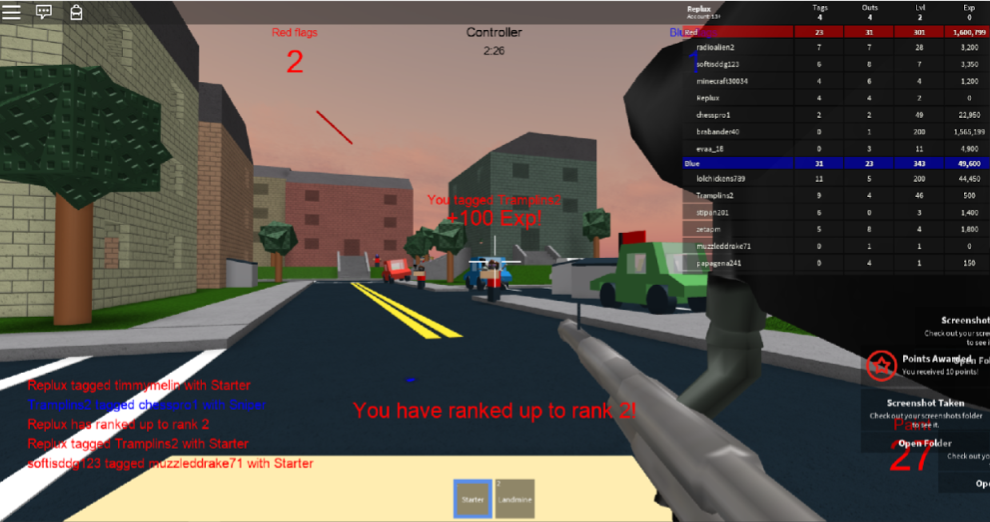
Although we’re taught to be skeptical when it comes to claims of making lots of cash online, this is one of the very few genuine cases where you can cash in on a successful game. Josh Correira was one of Roblox’s early success stories. As a freshman in high school, he brought in thousands of dollars a month from his popular Roblox game Paintball!, which is exactly what it sounds like – players are divided into two teams and battle each other in a paintball arena.
Roblox player Josh Correira – Daxter33 – was one of the platform’s early DevEx success stories.
How DevEx works
The way Roblox pays its creators is very simple. Content creators make their games and can charge players for in-game items, paid in Robux, which is then converted into US dollars and then sent to the content creator using a payment system called Tipalti. The money can be withdrawn to PayPal or a different payment processing service. A cut of the revenue goes to Roblox to support the platform.
It’s not only game developers who are the big money makers here; players can also create and sell items like clothing and accessories. However, having a popular game and selling in-game content is definitely the quicker way of earning Robux.
That sounds great – but how do I get started?!
Since the purpose of DevEx is to reward the most dedicated members of the community, you have to earn the right to sell your goods with DevEx. If you meet the following requirements, you’re eligible to join DevEx:
Have a minimum of 100,000 Robux in your account (earned from your own content)
Be in good standing within the community and have continuously complied with Roblox’s Terms of Use
Be at least 13 years old and have a verified email address
When you meet all of these requirements, a Cash Out button automatically displays on your account. Simply click this button to get started.
Roblox will also make you complete a tax form before you can be paid, even if you don’t pay any taxes (for example, if you are a minor).
Accumulating 100,000 Robux may sound like a huge undertaking – remember, it must come from your own, original content – but if you create some truly amazing content you could earn that in a matter of days, or hours. Roblox is a truly powerful platform, and if you have the skills to create something spectacular, you can benefit hugely from DevEx.
Roblox Studio is a powerful tool that enables you to develop and release your very own game on the Roblox platform. Using Roblox Studio, you can build structures using bricks and other items, import 3D models and textures, and add scripts that make your game functional.
Before you can begin making the next Roblox blockbuster, you need to download and install Roblox by clicking here; this will also install the Studio.
We strongly recommend learning how to use the Roblox platform (particularly how to create your own basic place) before starting your first project, and the Roblox Wiki is an amazing resource for this. If you’re ready, fire up Roblox Studio! If you would like to do some reading before diving in, here is a great article to get you started.
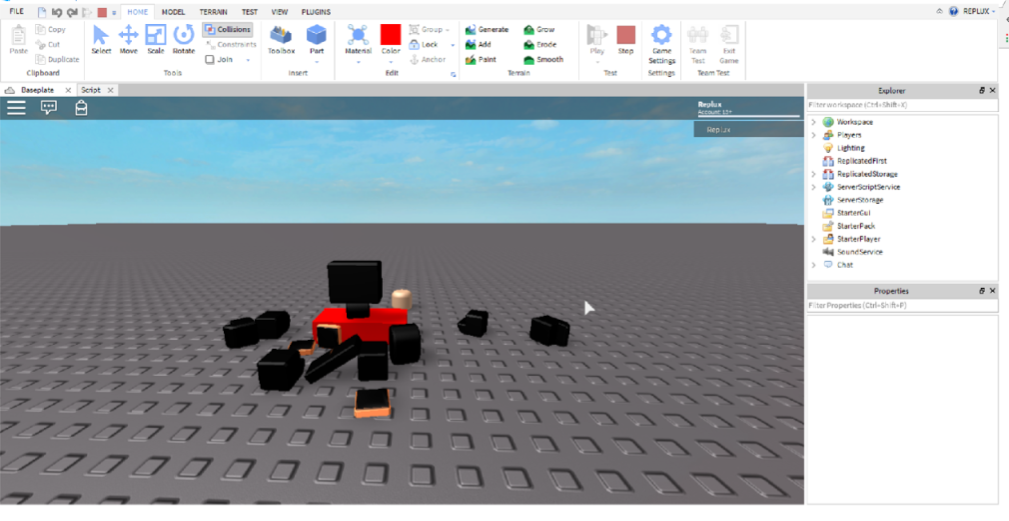
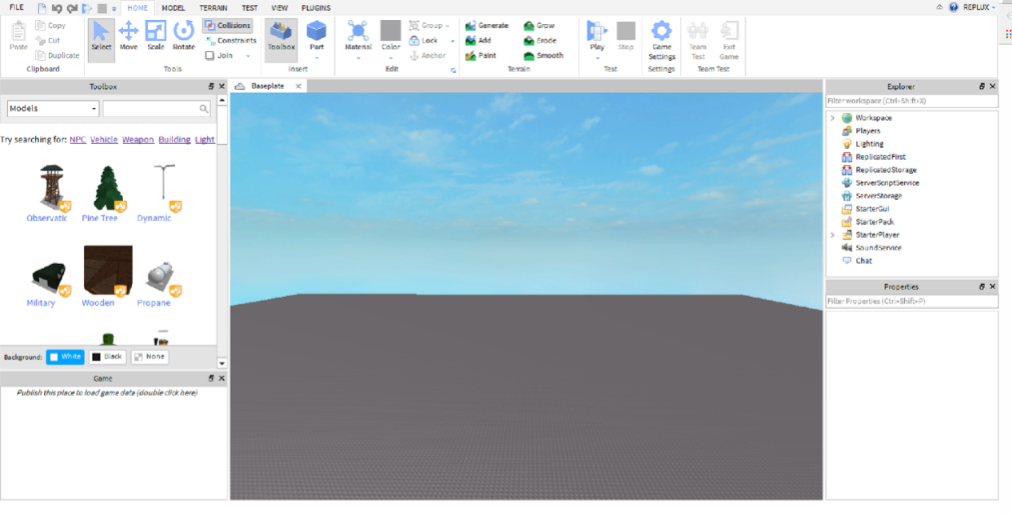
When it has loaded, don’t be overwhelmed. Although Roblox Studio looks complicated, it is fairly simple when you get the hang of it. To get going, select File and then New, which will generate your future game. It will be completely barren, but think of it as a blank canvas! You should see something like this:
Note the Explorer and Properties panels on the right. These are very useful and should be kept pinned to the interface. The Properties tab is especially useful; it allows you to modify the properties of individual blocks and models.
For now, focus on playing around with the interface and read some of the tutorials available on Roblox Wiki to get to grips with the Studio; it is not quite as simple as jumping in and creating an amazing game.
Building structures
Now, here comes the fun part! The most integral part of creating and publishing your own game is actually building it. If you’ve ever played Minecraft, you will breeze through learning how to build on Roblox. For those of you who haven’t, it is quite simple – Roblox Studio makes it as easy as possible. Check out this video for some guidance:
You can build anything in Roblox Studio: houses, trees, cars… the possibilities are endless and only limited by your imagination. Let’s start off simple and build a tree. This demonstrates just how easy it is to turn simple blocks into functional objects.
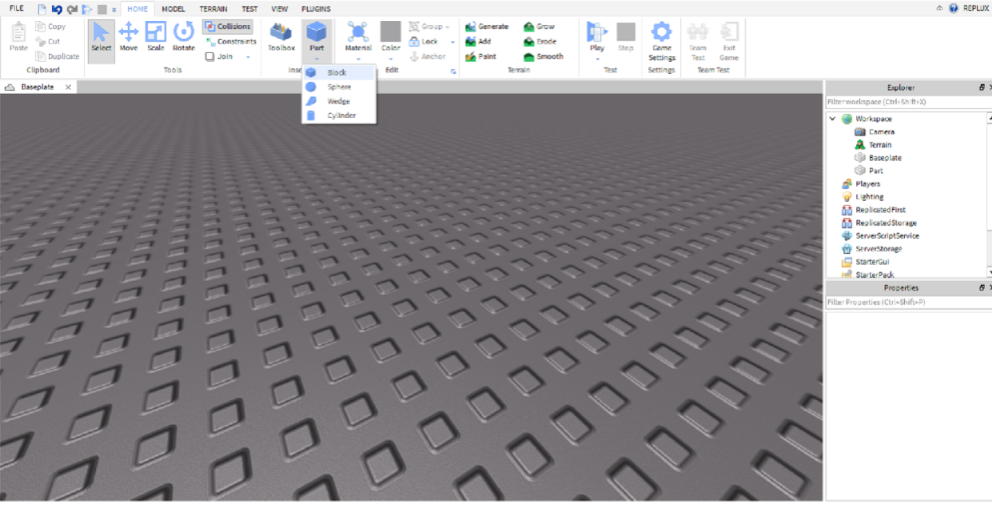
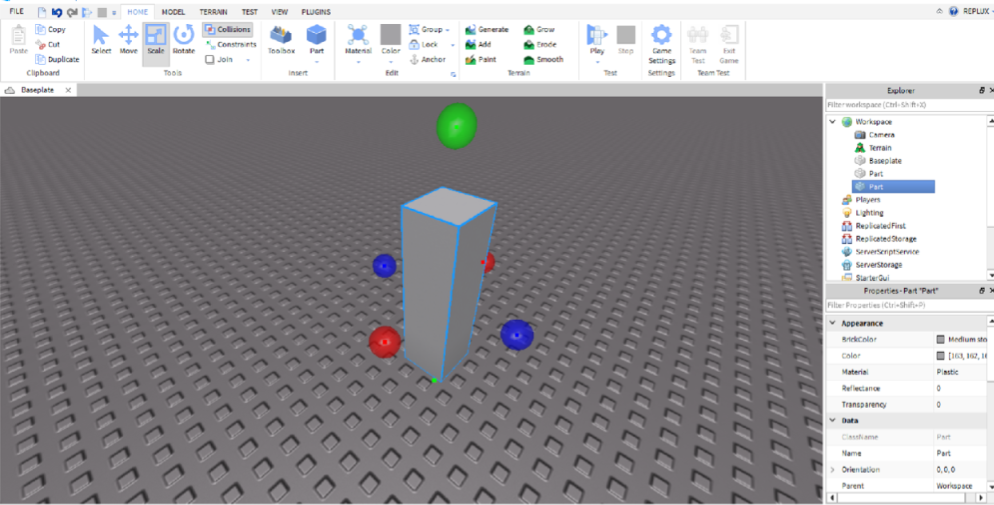
Step 1. Let’s begin by inserting a part to use as the tree trunk. Click Part and then Block, which will spawn a rectangular brick.
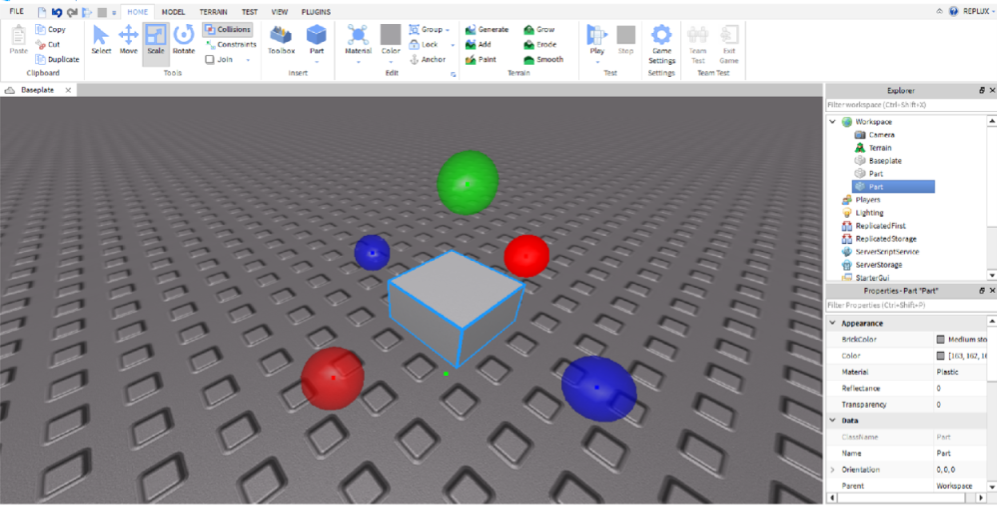
Step 2. Click the block and press the Scale button to resize the brick into a square. Hint: click on the red blob and drag to scale the length.
Step 3. Afterwards, we need to make the block tall. Click the green blob and drag it upward.
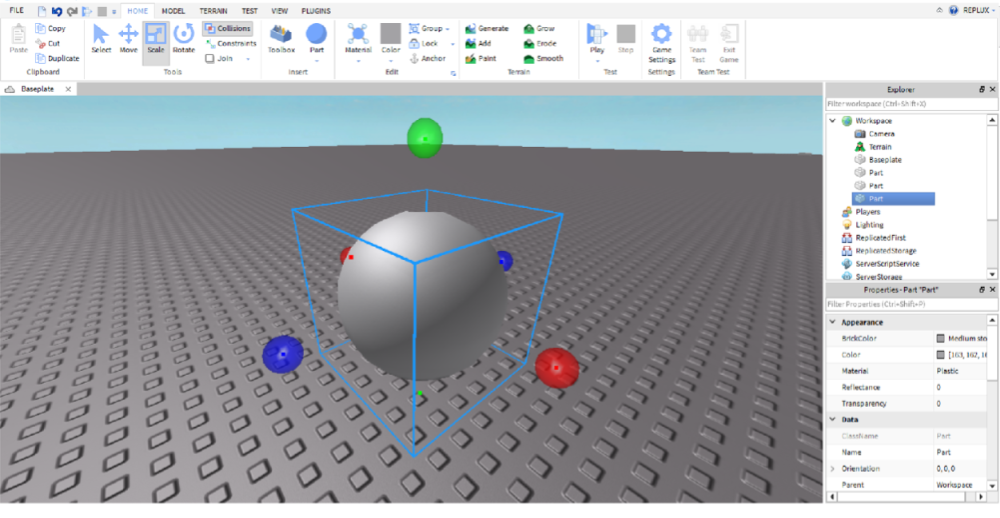
Step 4. Now make a sphere by using the Part tool and make it larger by using the Scale tool, just like we did for the tree trunk.
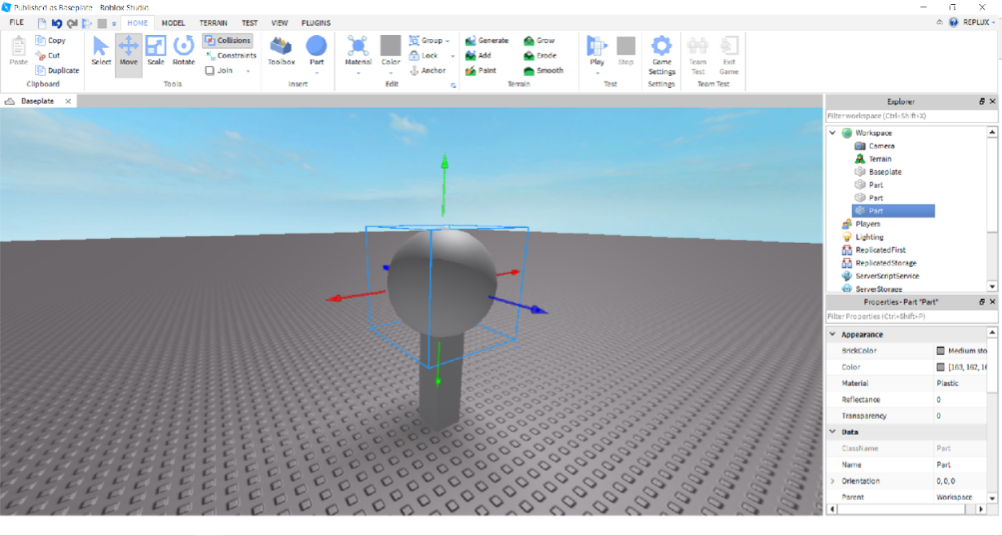
Step 5. Use the Move tool to – you guessed it – move the sphere on top of the trunk.
It looks a bit boring, doesn’t it? Not to worry, though, because on Roblox Studio you can change the texture and color of any object to your liking. This is done using the Color and Material tools.
To change the tree trunk, click the part and then select the Color tool. You can use any color you like… personally, I recommend brown! Then to alter the texture, click the Material tool and then choose Wood. Repeat this for the sphere, but choose the Grass material.
When playing the game, you will notice that the top of the tree, the Sphere, can be knocked off by players. To stop this from happening, select the Sphere and then click the Anchor button to lock it in place. You can anchor the trunk as well, to make sure that it does not get knocked over, either!
Scripting and programming
So, you’ve been working hard, and you have built a beautiful game map ready to be published. But you have a problem… it looks great, but it doesn’t do anything. It’s not functional. In Roblox, scripts make games work. They make stuff move, control the game and make cool things happen, and you are the person who writes the script which makes these things happen.
There are many resources available to help you get started with scripting. First stop, as you have probably guessed, is the Roblox Wiki – it’s always a great choice, because it’s an official and authorized Roblox resource that is edited by the Roblox team, and it has many comprehensive tutorials available to help you learn Roblox-style Lua. I recommend reading this beginner’s guide to scripting, which will teach you the basics and help you start making things happen.
It may seem daunting, but Roblux Lua is a very easy-to-learn, lightweight language. It is very easy to pick up, and thousands of Roblox content creators have proven that; Roblox Studio is a great place to start if you’re a new game designer due to its relatively simple scripting language, comprehensive editor, and helpful community. There is much to learn, but in the long run it can be very rewarding. Best of luck!
Analysts discovered a new security alert yesterday, which shows that most computer processors have a design flaw. The design flaw enables malicious lines of code to enter a PC’s operating system kernel and can steal data like passwords or even information from the programs installed on the machine.
These two alerts, known as Meltdown and Spectre, can affect the vast majority of PCs. Meltdown goes after Intel processors and Spectre takes down ARM and AMD chips. All though Meltdown and Spectre sounds like the name of a show you’d see on The Cartoon Network, the deadly duo represent a real threat and pose some serious questions. Is your PC in danger? What can you do about it? Today, we’re here to talk you through both.
What exactly is Meltdown and Spectre?
We’re not talking about a Bond movie here, rather a vulnerability that affects PC processor chips. They sneak into the kernel (the core of the operating system), which is a habitually blocked off place. This then allows any user with minimal knowledge to access the data of any account or service the PC uses.
Anybody who has used an infected PC could be vulnerable. Researchers have shown that Meltdown and Spectre can read the kernel’s memory and even the physical memory of an infected system. They can then force, normally secure applications, to share sensitive data.
Is my PC affected?
Almost certainly. This vulnerability affects all Intel chips manufactured from 1995 onwards. ARM chips are a little less likely to be vulnerable (although it can affect Android phones), and although AMD are saying that their chips are not vulnerable to attack, researchers are saying otherwise. Apple have also that all Macs, Macbooks and iPhones have been affected.
So, the first thing you can do to check if your PC is affected is download the tool that Intel has made available to users, the Intel-SA-00086 Detection Tool, which you can download here.
After downloading the tool you’ll find the file DiscoveryToolGUI. Execute it (give the software administrator permissions, if needed) and then you’ll be able to find out if your PC has been hit.
For now this tool works for Windows as well as for Linux. Although some Mac computers are vulnerable, there is still no compatible tool to check your Mac.
How can I fix my PC if it has been hit?
Did the tool tell you your system was vulnerable? If so, don’t panic! Microsoft has already announced that they have released a security update for all their computers. If you have automatic updates enabled in Windows you will end up installing the update pretty quickly. If not, go to the Windows Settings section and check for a new update: if you do not have it yet, stay calm, it’s coming. You can find out more about this patch on Microsoft’s official page.
Of course, Microsoft warns that this update may cause certain performance problems like the appearance of blue screens (especially if you have an antivirus installed), but also provides the solution to these problems.
In the event that the vulnerability affects your smartphone, Google has confirmed that the latest Android security update, from January 2, has already solved the problem, and that they are also working on a solution that will be implemented on Chrome 64 and Chrome OS.
If you are a Mac user, the next macOS update, 10.12.2, should solve the problem.
If you still have doubts, we recommend that you enter the official website of Meltdown and Spectre, where the researchers who discovered vulnerability are posting all the relevant information.
Steam is a platform for online games that lets you download the latest from the world of video games as they are released – an indispensable tool adopted by many publishers.The Steam client also maintains a social dimension, allowing you to share a lot of information and content with a very active community. The forums can help you find interest groups or partners for casual gaming. You can also connect with friends to discuss or start a game.
If you play on your PC, you already have an account created. Moreover, we predict that you have a huge amount of titles in your library. As you know, every game has its own notifications and you have to personalize them to your liking. However, there are general invites or messages that are from Stream, and they can be removed if need be.
Inside Steam
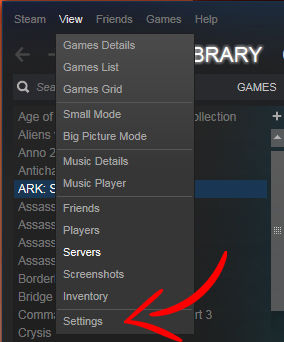
The first thing you must do is open Steam (elementary, my dear Watson). Once you’re at the main page, head to the upper section where it says View and click on that tab. Of all the fields that come up, the one we’re interested in is the last, which is called Settings. Go ahead and click on it so it opens a new tab.
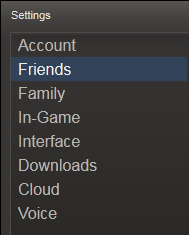
Once here, you’ve got all the Steam platform options at your fingertips. What interests you? Well the first thing we recommend is that you start with the subtitle Friends. There you can see several fields related to notifications and we recommend removing them to enjoy a pleasant gaming experience: When any friend joins a game, When any friend comes online, For group events and announcements, When you receive a message and Flash window when you receive a message. Mostly, beyond the text messages, the Play a sound may be the most annoying of all, so don’t hesitate for a second to remove it from your Steam settings (it’s even unpleasant, let’s not kid ourselves).
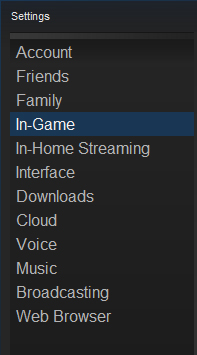
The next subtitle you should check out is In-Game. Here you won’t find many fields for notifications, just When a screenshot is taken. Do we recommend disabling it? Well, it all depends on whether you use that feature a lot or not. In our case, and given that we take a lot of screenshots, we’ll leave it activated for both message and sound. But we repeat: you always have the last word here, so don’t forget it.
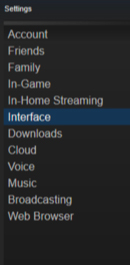
The last subtitle within Parameters is Interface. Here you can remove Display Steam URL address bar when available and Notify me about additions or changes to my games, new releases and upcoming releases. Also, and this is advice from the Softonic team, take away this option: Run Steam when my computers starts. All programs that are loaded when turning on your PC slow down the process. Steam, specifically, consumes lots of resources, so uncheck this option as quickly as possible.
Now that you’ve got all these little tricks, we recommend that you take a look at the rest of the subtitles that appear within “Parameters.” Making the most of the platform is always in your hands.