Top 6 Telegram channels for offers

Telegram provides more features than simply chatting with your friends and family. You can video call them, or even share fun stickers and emojis. One of the top ways you can use the app is by joining channels, especially if you’re looking for the best deals for items you really desire.

Telegram DOWNLOAD

If you’re like us and want some discounts, here are the best Telegram channels for offers on a variety of items. We’ve tested to make sure each link works and the deals are relevant. Let us know if you join any of them and manage to realize some savings.

How to join a Telegram channel

Befpre we hit the list of the top Telegram channels for offers, we should probably let you know how to join them if you haven’t connected to one as yet. If you’re on your phone reading this article, clicking on the link will take you to your Telegram app and show you the channel.

From your PC, you’ll see a small window appear asking if you have Telegram installed and if you’d like to open the channel on the desktop app. If you agree, the desktop app will open, showing you the channel.

In both situations, the Telegram channel won’t appear on your list of contacts until you head to the bottom and select “Join Channel.” The same applies if you read our list of best Telegram English channels and choose to join one of them.

The top Telegram channels for offers and deals

Mad For Deals

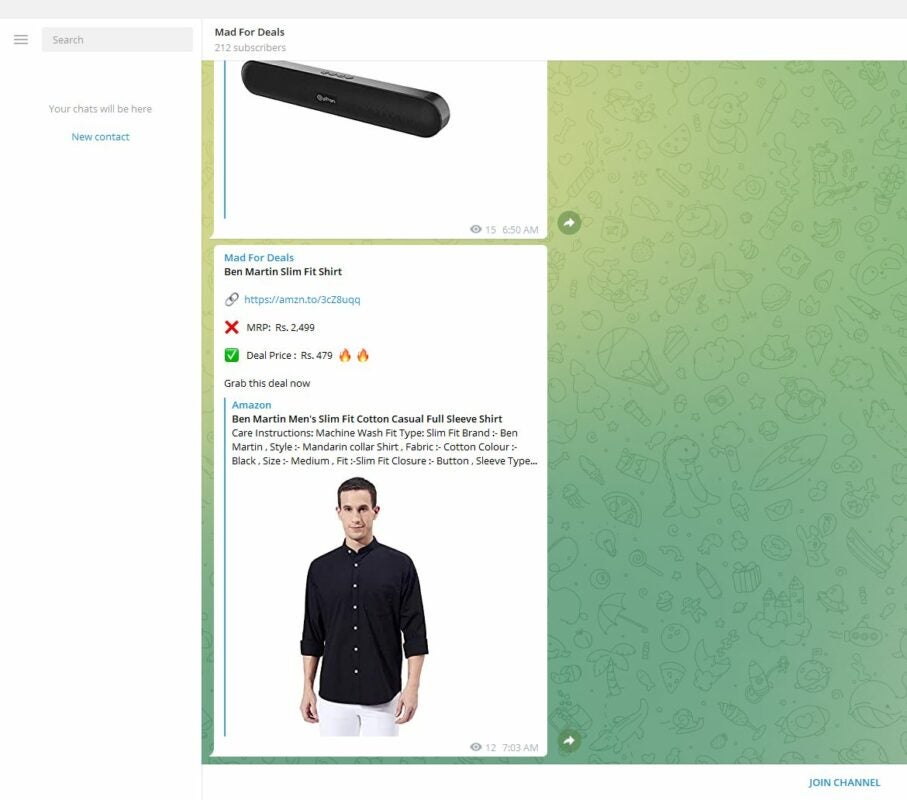
This Telegram channel is ideal if you’re looking for offers, discounts, coupons, vouchers, and so on. Some of the top eCommerce sites are on the group, and they’re continuously posting about specials they have on offer. There are also special codes for if you subscribe to any packages or sites.

For the most part, the products link to Amazon products with promotional codes. You’ll see clothing, PC hardware, mobile accessories, and so much more. To access the deal, all you need to do is click on the link and login to your account.
Top 6 Telegram channels for offers

Shopzone4u

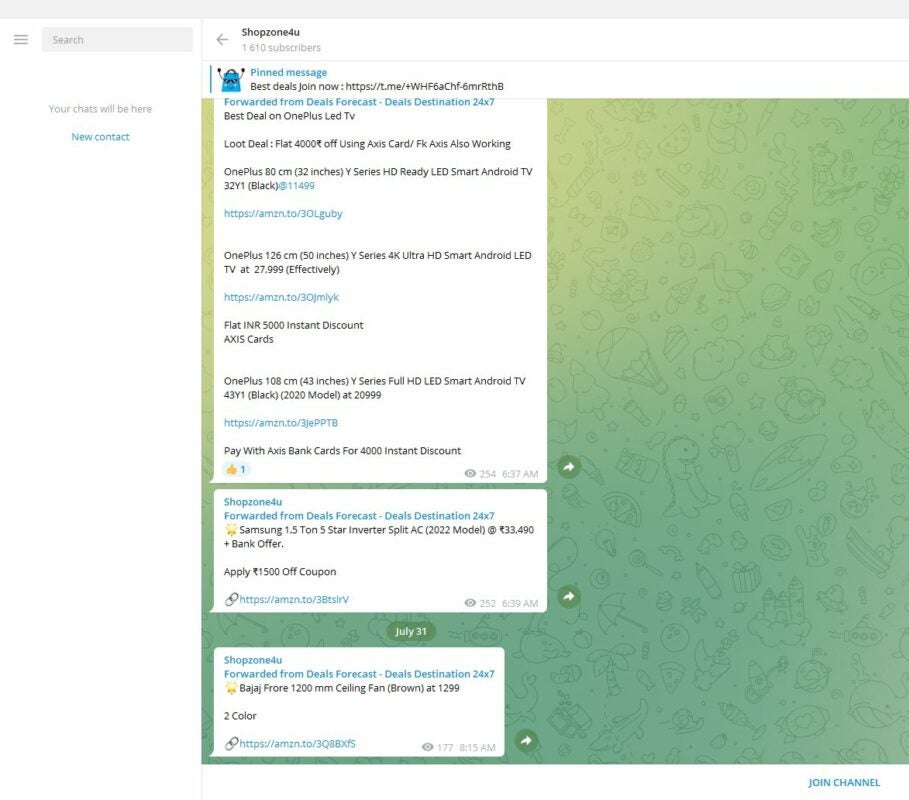
Here’s a massive Telegram channel with over 15,000 subscribers and plenty of offers. Not only is there a variety of products, but you’ll also see different types of deals. For instance, there are daily top offers, cashback rewards, flash sales, discount details, and so much more.

The large subscription base is even more impressive when you see how many people view the daily offers on Telegram. It makes it also an incredible opportunity for businesses to join and promote their products. There’s very little that isn’t advertised, with the product range including televisions, cellphones, toys, clothing, furniture, and more. Once again, most of the catalog is from Amazon.
Top 6 Telegram channels for offers

DesiDime

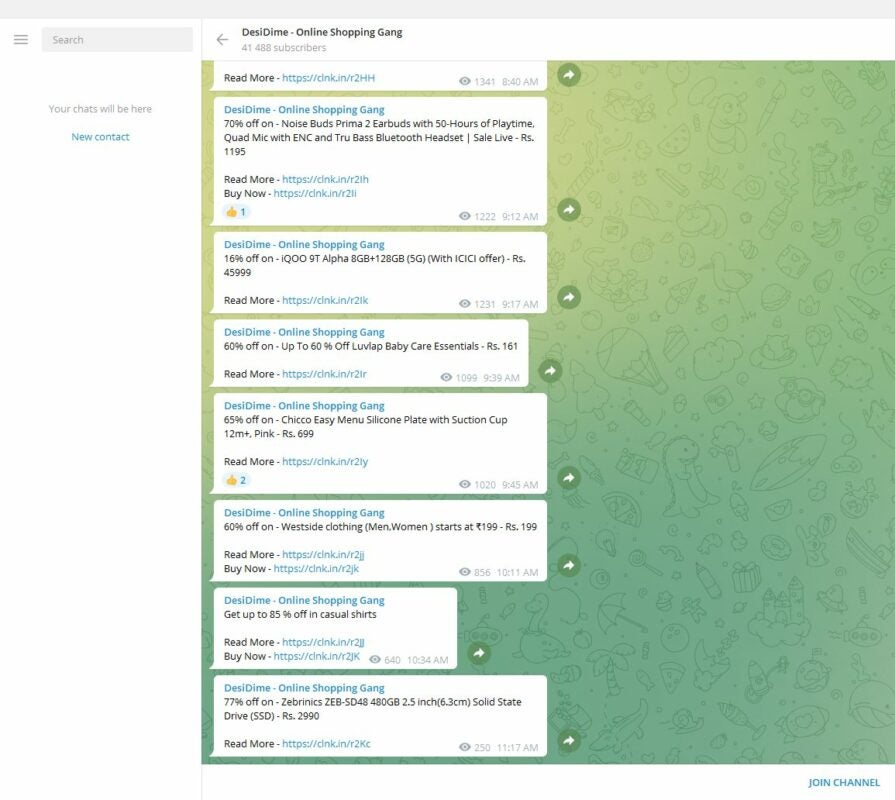
This Telegram channel has over 40,000 subscribers, and the channel is busy daily with the latest offers. DesiDime actually has a website that offers deals from various eCommerce sites, including Amazon. On the Telegram channel, the links redirect to these offers on the company’s site, so be prepared to click several times.

There are no standard products listed in the channel, so you can expect anything that’s trending for that day. While there are many flash deals and product discounts, some of them only apply to a specific user. It’s helpful to click on the link to the site and then check the comments.
Top 6 Telegram channels for offers

eLoot India

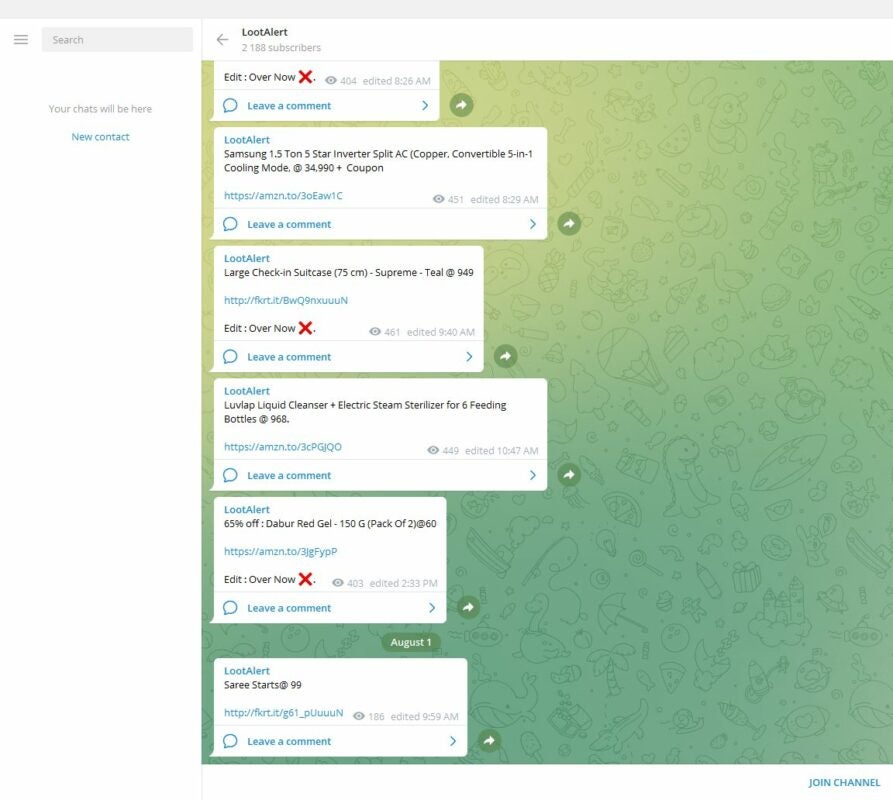
Better known as LootAlert, this Telegram channel has plenty of daily offers to keep you busy. There are small items, such as toothpaste and soap in bulk, to massive electronic products, like Smart TVs. What makes this group stand out from the rest is that they have a better variety of eCommerce sources, such as Flipkart and Amazon. 
Top 6 Telegram channels for offers

CouponMoto – Coupon codes, Offers & Deals

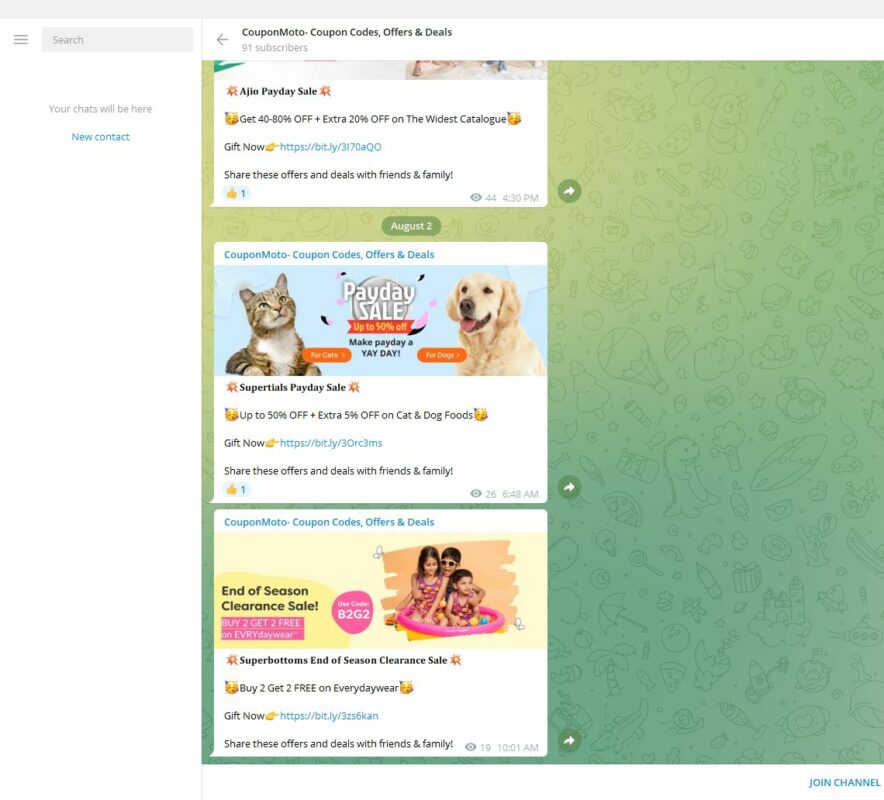
CouponMoto has an online store that links to other shops for discounts and deals. Besides Amazon and Flipkart, you’ll also see offers from Samsung, Genoise, and more. There’s also a variety of products, and you can purchase electronics, clothing, travel tickets, and others.

These discounts translate to the Telegram channel, keeping you up to date with the latest offers. You’ll also see what other sales are coming up within the week so you can plan accordingly.
Top 6 Telegram channels for offers

TheFreebieGuy

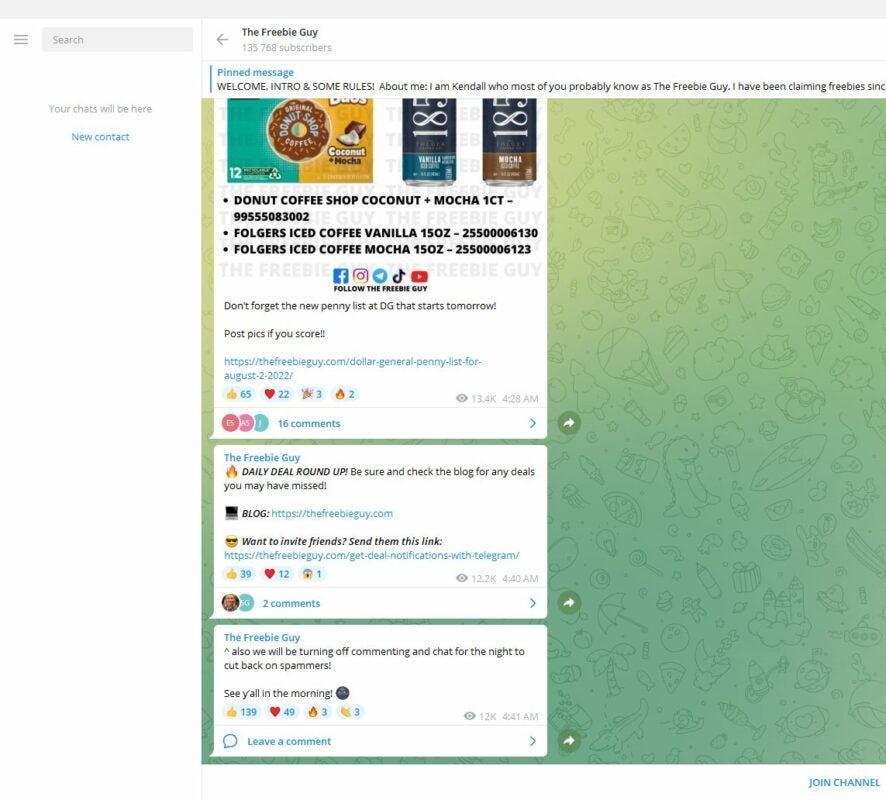
When you head to this Telegram channel, the first thing you’ll notice is that thousands of subscribers comment and react to the posts by the admin. That’s how popular this channel is. There’s a site connected to it, which is where you can read more about the promoted products.

What makes this channel stand out from the others is that TheFreebieGuy sometimes gives products or even cash away for nothing. It provides support to its community, and always finds the best deals depending on what the users are looking for.

Top 6 Telegram channels for offers

Amazon lowers carbon intensity but not climate pollution

If you’re fond of using your Amazon Appstore, you may be devastated to know how much you’re indirectly contributing to climate pollution. It’s not your fault, though. As Amazon builds new warehouses and facilities worldwide, it continues to pump millions of metric tons of carbon dioxide into the air, despite its promise to lower greenhouse gas emissions.

Amazon Appstore DOWNLOAD

Amazon released a new sustainability report that discussed the annual latest greenhouse gas emissions. The metric tons of carbon dioxide emitted in 2021 came to 71.54 million, which is massive. To paint a picture, you’d need 180 power plants powered by gas annually to meet the same amount. 

Many sustainability companies have been keeping an eye on these figures, as Amazon made a statement in 2019 that it would strive for net-zero emissions by 2040. While we don’t have the exact roadmap for how it plans to do so, that leaves plenty of years for it to continue polluting the environment.

At the time that Amazon made the Climate Pledge, it tried to rope in other businesses to also lower their greenhouse gas emissions. It was like shifting the focus to others, hoping that we’d see that no one else is wanting to make any change. However, there’s a tiny silver lining somewhere within the Amazon pollution cloud.

Amazon lowers carbon intensity but not climate pollution

The carbon intensity has dropped by 1.9%. What this means is that, for every dollar you spend on an Amazon product, there are fewer emissions than before. It’s a small amount, and it doesn’t even begin to compare to the climate pollution still caused by Amazon facilities.

The moral of the story is, don’t make promises for things that you’re not sure you’ll be able to keep. Despite all its efforts, the emissions keep rising due to more facilities being built. Some officials in the company are blaming it on last year’s pandemic shopping.

Spotify adds separate Shuffle and Play buttons at a Premium cost

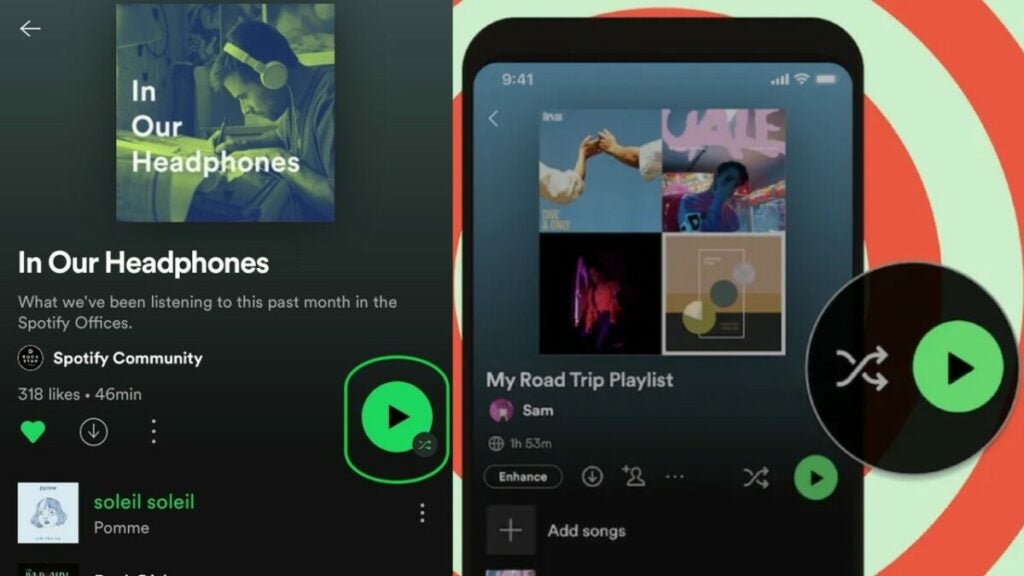
Ask and you shall receive. After several complaints from users, Spotify has finally given in and made separate Shuffle and Play buttons at the top of the interface. If you don’t see the Shuffle icon when you update the app, that’s probably because you don’t have the Premium subscription. That’s right; you need to pay for the new button.

Spotify DOWNLOAD

The new update isn’t a new concept. Users have been complaining for months now that the Play/Shuffle combination wasn’t working properly for them. The single button was used to switch between shuffle and play, but it wouldn’t always toggle properly. Also, this feature was missing in the desktop version with only a Play feature.

To quell the concerns, Spotify has announced that a new update will feature both the Play and Shuffle buttons separately. However, you’ll only see the Play button if you don’t have a Premium subscription. Why would you pay for a silly little button, you may ask?

Spotify adds separate Shuffle and Play buttons at a Premium cost

According to Shopify, the company sees it as an advanced function to the standard Play feature. Standard users can play the songs in the normal order, but the Premium version upgrades it so you can change the order. Still, it’s odd to pay for a feature that other music apps like YouTube Music offers for free.

It’s not too difficult to follow the train of thought here. Spotify saw a need in the community, followed by someone saying there’s an opportunity here to get more Premium subscribers. 630 complaints = 630 potentially new subscribers = more money for the company. Either that, or the guy developing the button wanted royalties for it.

At least we’ll see Spotify upgrade the audiobook feature soon. Based on the above movement, don’t be surprised if some Premium options appear there, too.

Spotify is ramping up its audiobook operation READ MORE

How to create and send customized screen captures with LightShot

LightShot is a free screenshot tool for Windows, macOS, and Ubuntu users. The program lets you create, customize, and quickly deliver your screenshot files to users in a swift and fluid series of steps. After just one click, LightShot will upload your screenshot to the cloud before returning an original, sharable URL.

LightShot Download

Over the past few decades, virtually every new operating system arrives equipped with at least one built-in screenshot tool. However, the primary upside of LightShot is that the application lets you share photos, images, portions of a webpage, and any other visible content on your screen with a unique URL. In this tutorial, we’ll show you how simple it is to create and send screenshots with this free software application from LightShot.

  1. Download the LightShot program

    Start by downloading a version of the LightShot application that works with your preferred browser

    LightShot is a fantastic, no-cost screenshot tool that helps users create screen captures and deliver them to the cloud. This streamlined access to the cloud simplifies the process of sharing your screen grabs with friends and colleagues online. This solution is ideal for students and professionals who need to record a lot of valuable information quickly from their desktop screens.

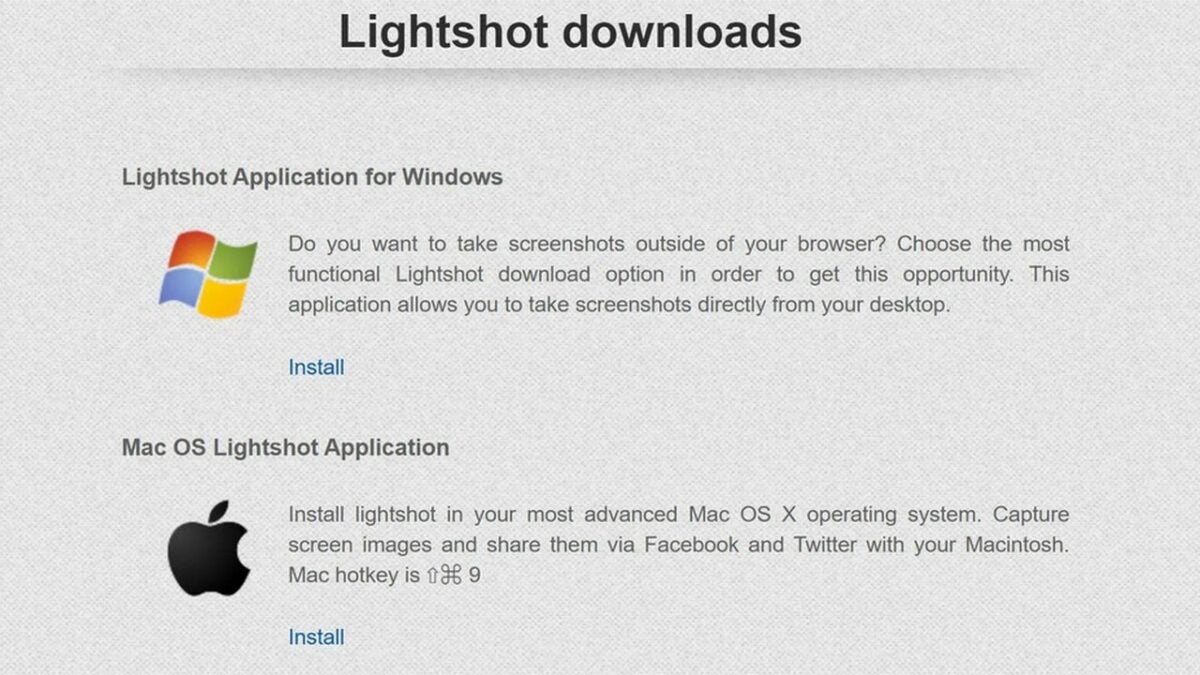
    To get started, download the program that enables LightShot on your preferred browser. For example, you can add LightShot as an extension on Chrome. The app also works with macOS, IE, Firefox, and Opera. And, after a prolonged and much-anticipated release date, you can finally enjoy LightShot on your Android devices now, as well. After installing LightShot, start using the Print Screen feature on your keyboard to launch and use the application on your Windows device. If you’ve downloaded LightShot on a Mac and the computer lacks the Print Screen keyboard button, press Command, Shift, and 3 simultaneously to perform the same function.

  2. Start taking screenshots

    Lightshot is easy-to-use and lets you begin taking and sharing your screenshots immediately after installing the software

    Once you’ve installed the specific version of LightShot required by your operating system, clicked through the setup file, and chosen your preferred language, you’re ready to start taking screenshots. To launch the LightShot program, press the Function button and PrntScr/PrtSC, or press Command, Shift, and 3 all at once on macOS.

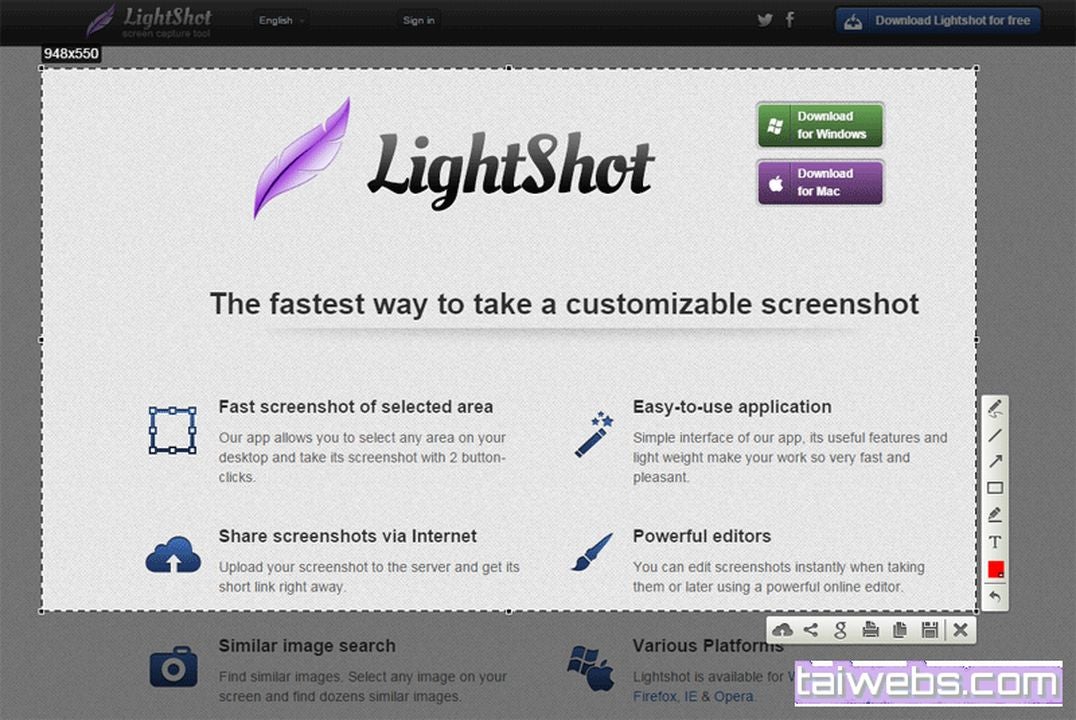
    You’ll notice the screen turn dark, whereby the LightShot application prompts your mouse to select a portion of the screen you wish to capture. When you drag your mouse to choose the screen section you want to capture, these areas brighten and preview your final screenshot. You’ll also find a sizable list of menu options along the bottom and right-hand sides of your frame. These icons represent LightShot’s various tools and features, each giving you several useful options, including saving your file, printing the screenshot image, and uploading it to the cloud.

    LightShot offers several free tools that allow you to highlight specific text or mark up other elements within a screen. Here are the basic editing tools and features you’ll discover in LightShot:

    • Pen
    • Text
    • Marker
    • Arrow
    • Rectangle
    • Line

    After you’ve made your screenshot selection, a floating menu appears. This prompt invites you to perform additional actions like inserting an arrow, drawing a straight line, and overlaying texts to highlight specific areas of the screen capture. When you’re ready to save, click the floppy disk icon at the bottom of your frame.

    JPG is the default file format for saving LightShot screen captures. Desktop users can copy and paste it into another platform like Microsoft Paint to continue editing the file and then print it directly from the same secondary application. You can also print from LightShot itself by clicking the Printer icon. Alternately, try locating the saved JPG, usually found under My Documents by default, and right-click on Print to open your printer settings and print the JPG file.

  3. Upload your LightShot screen grabs

    To upload your images to the cloud and generate a clickable URL, press the cloud icon. Share your images to popular sharing sites by choosing the share symbol to the right of of the cloud icon

    Every screenshot you take with the LightShot app can be uploaded online or to the cloud. If you want to share your screenshots instantly, ensure that you’re logged in to the appropriate app. LightShot lets you sign in via your Facebook or Google accounts. When you select the Upload icon from the menu, you’ll be presented with a few screenshot sharing options like Facebook, Twitter, VK, and Pinterest.

    The LightShot screen capture tool offers seamless integration with the major social sharing platforms and can even give you samples of similar-looking images found across Google. Once you upload your screenshots to the cloud, the program provides a shareable link. However, from a security perspective, remember that every image is public. The application does not require authentication or a LightShot account to view your uploads. While the app is a fast and convenient solution suitable for most purposes, exercise the appropriate caution when using LightShot to handle confidential materials.

LightShot makes screen capture sharing easy

LightShot is a simple, easy-to-use screenshot tool that makes sharing your images as simple as pressing a hotkey. LightShot gives you a few different options for image-sharing, either through a clickable link or a direct channel to your preferred social sharing platforms. The application is free and intuitive enough for anyone to start using it right away. For a comprehensive review of Snagit, another free screenshot tool, have a look at this recent article.

How to keep your computer safe with K7 Total Security

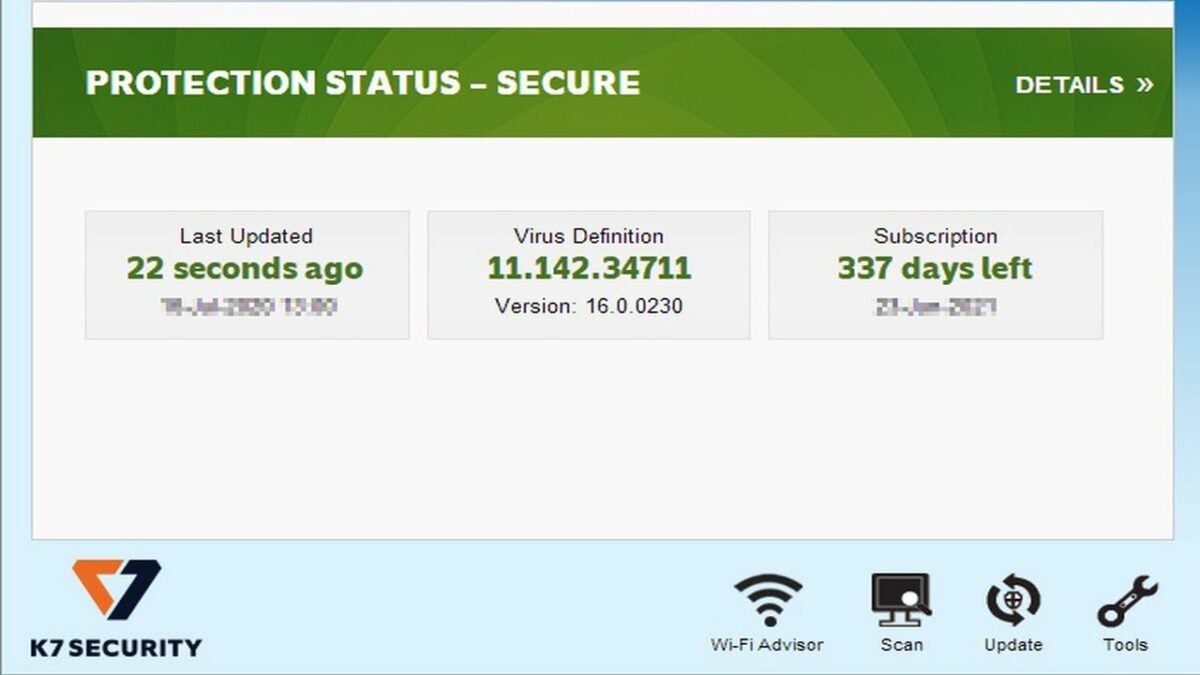
K7 Total Security is a suite of privacy and security software with a broad range of digital well-being monitors and controls. It comes with its own virus detection algorithm, hard drive cleanup tools, and a parental control cockpit that aim to keep you safe and in control of your computer without sacrificing system speed.

The comprehensive K7 protection platform includes features that guard against:

  • Viruses
  • Malware
  • Malicious websites
  • Identity theft
  • Ransomware
  • Spyware
  • Spam

Besides its speed, it also performs well on malware detection and false alarm tests, routinely catching more than 99.9% of malware while generating a less than 0.05% false alarm rate for legitimate programs.

This guide to K7 Total Security for PC will show you how to use the suite to perform anti-malware scans, manage your kids’ computer use with its parental controls, and restore wrongfully quarantined files and folders.

K7 Total Security Download
  1. How to scan your computer for threats with K7

    K7’s system tray menu

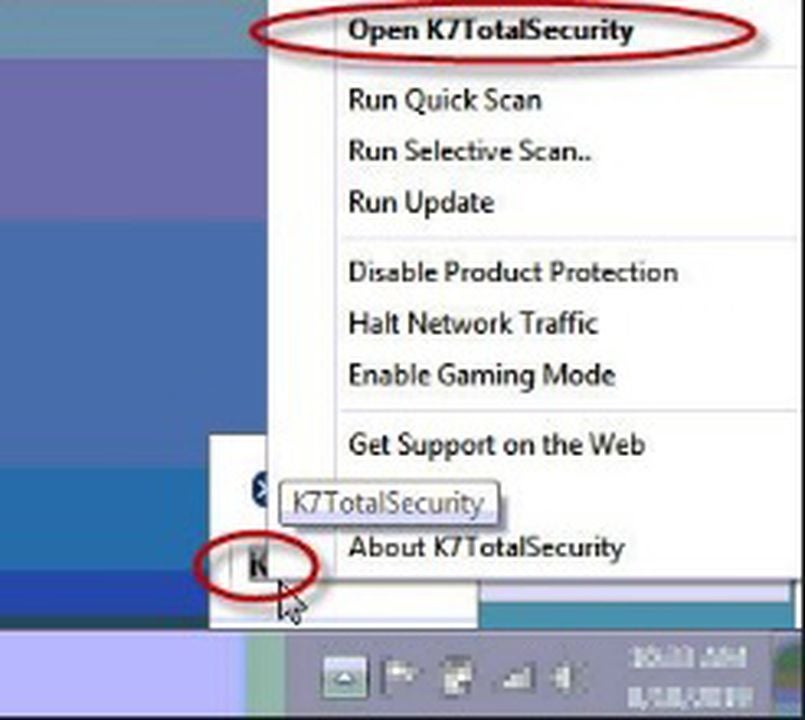
    Once you’ve installed and activated the K7 Total Security antivirus suite on your PC, find its icon in your system tray. The icon shows K7 in black letters on a gray background.

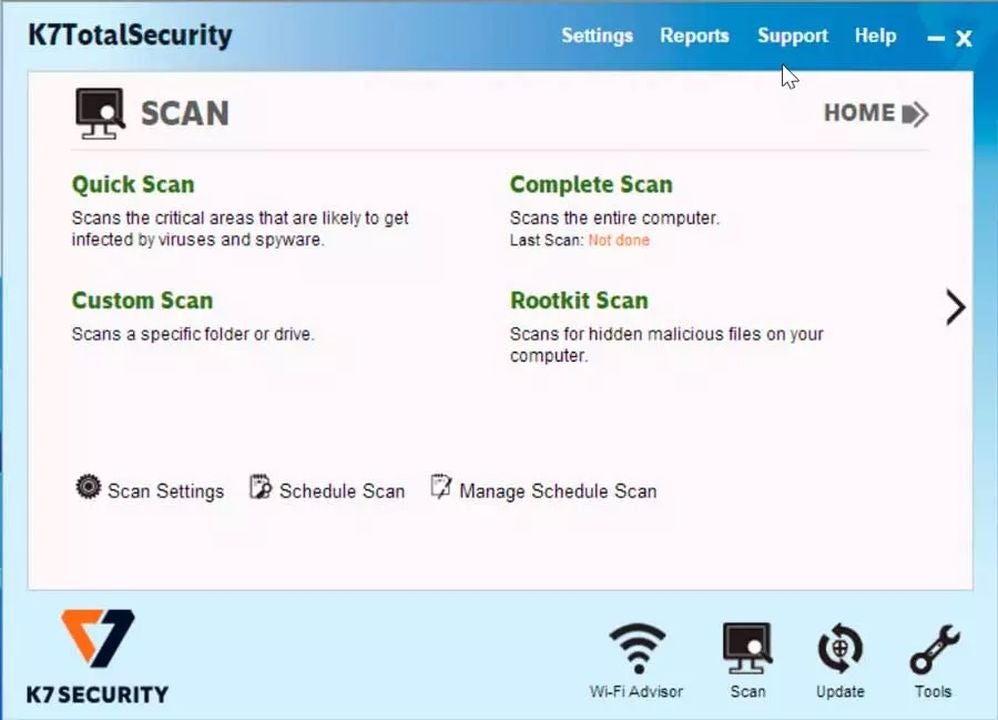
    Right-click on the icon, and select Open K7TotalSecurity to go to the program’s main menu. Click on the Scan icon in the bottom right corner.

    K7 gives you four basic scans you can perform:

    • Quick Scan
    • Complete Scan
    • Custom Scan
    • Rootkit Scan

    The Quick Scan takes about a second to check your system files for malware. The Complete Scan checks all your files, folders, and apps for malware, which can take a few hours on machines with lots of files. The Custom Scan lets you select which folders you want to check for traces of infection. The Rootkit Scan looks for deep infections and hidden threats in your firmware, boot sectors, operating system, and kernels.

  2. How to schedule a scan

    Scan your system with K7 Security

    You can schedule an automatic scan to run when you’re away from your computer by selecting Schedule Scan at the lower center of the Scan menu. Choose the kind of scan you want to perform and the time and date to perform it. You can also automate the scan to run on a daily, weekly, or monthly basis.

  3. How to scan USB drives automatically

    K7’s Settings menu

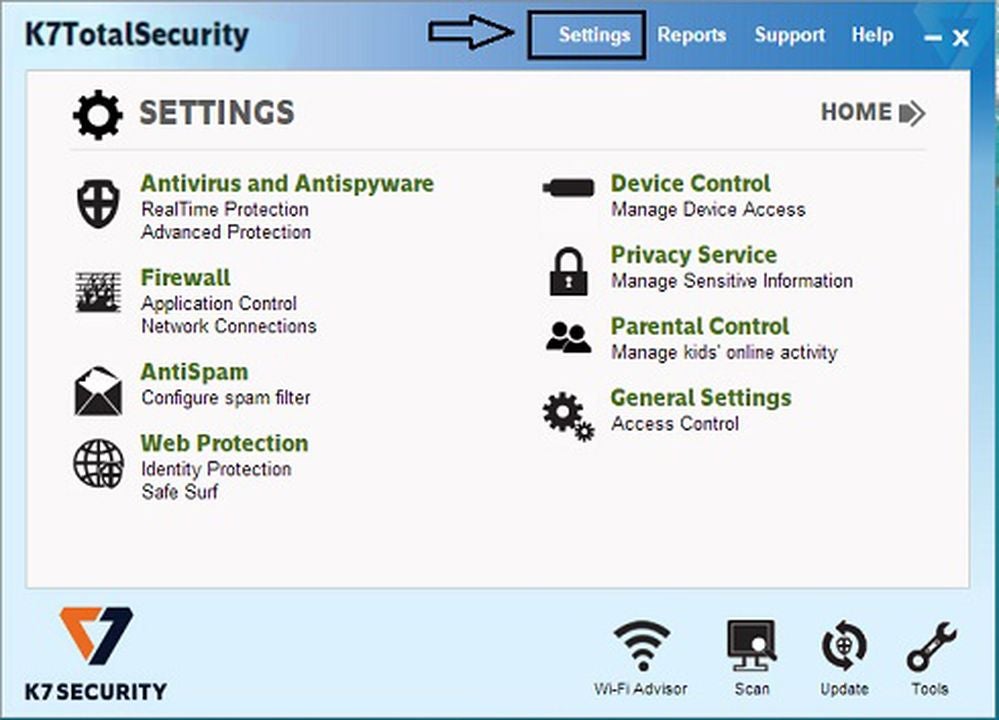
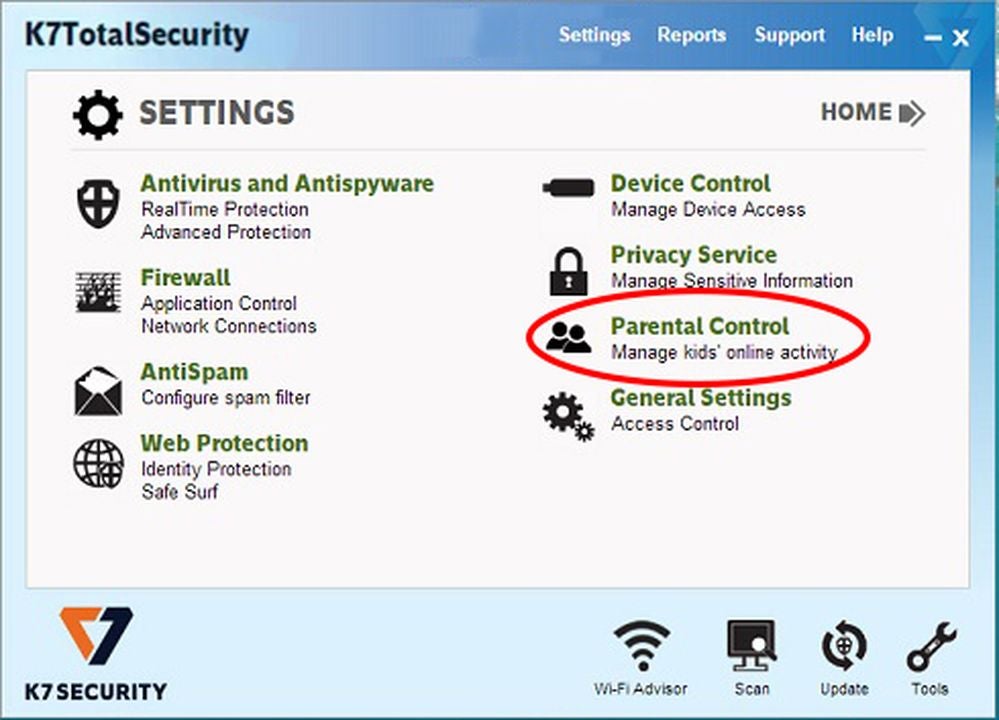
    Go to K7’s Settings menu by clicking on Settings at the top middle of the program’s main menu.

    Click on Device Control at the top right of the Settings menu.

    USB access is enabled by default. Look for the option labeled Scan for viruses as soon as the device is connected. Click the box to enable automatic USB scanning. Directly below it, you can choose whether you want K7 to ask for your permission before it starts scanning any USB drive you insert or whether it can just run automatically.

  4. How to use K7’s parental control

    Access K7’s Parental Control menu

    K7 lets you set different access permissions for different users of your computer.

    In the Settings menu, click on Parental Control at the center right. Click on the Web Filter button in the Customize section at the bottom of the Parental Control menu.

    You’ll see two tabs, one labeled Websites Allowed and the other labeled Websites Blocked. You can choose whether to create a blacklist of websites you don’t want certain users to access or make a whitelist of sites they can access and block the rest.

  5. How to find and restore files K7 has quarantined

    K7’s Quarantine Manager

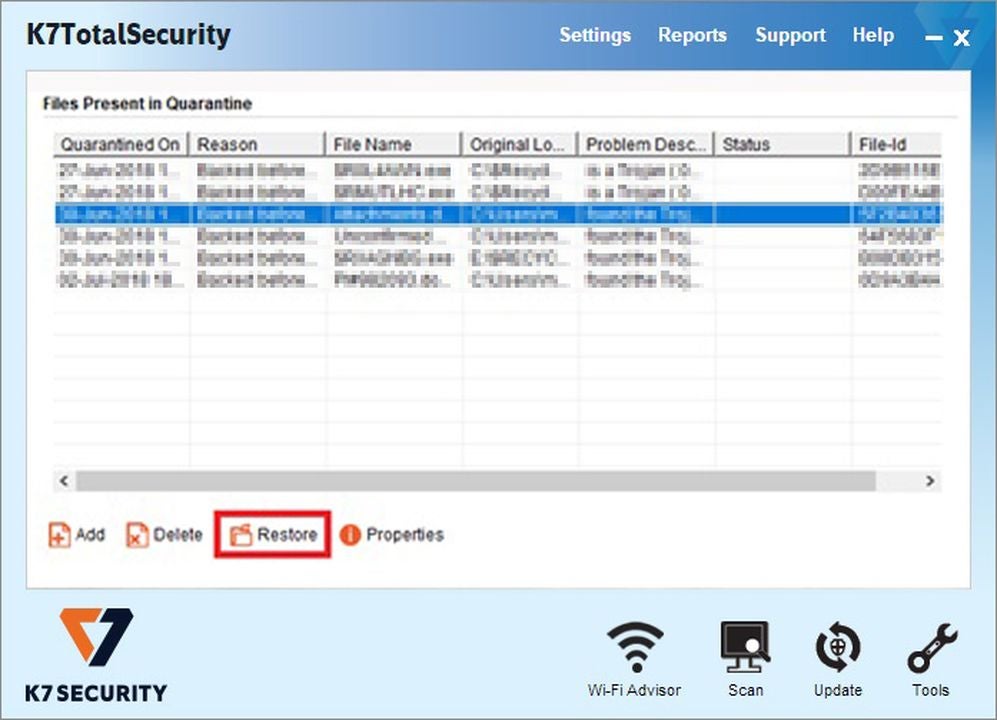
    K7 automatically places files it deems suspicious into its quarantine folder where they can’t affect your system. If a file you need mysteriously disappears into quarantine, you can restore it from the Quarantine Manager console.

    Click on the Reports button at the top right of K7’s main menu. In the Reports menu, click on the first option, Quarantine Manager.

    You’ll see a list of quarantined files, some of which might be dangerous. Select only files you know are safe, and click the Restore button on the bottom left. K7 will display a warning message prompting you to confirm you want to restore the files. Click Yes.

Try K7 Total Security for free for your first month

You can check out the K7 Total Security trial version for free for 30 days to see if it runs as fast as advertised and make sure the suite is right for you. If you’d like to compare K7 to our other top-rated antivirus programs, have a look at our Essential Security and Privacy apps for Windows page.

It’s about time: Facebook will no longer follow an algorithm

It only took a few years of complaining before Facebook finally gave in to the complaints. Where once was a feed based on an algorithm of what you might like to see, you can now view news feeds in reverse-chronological order, as they call it nowadays. However, there will still be a section where you’ll be bombarded with videos and content in a TikTok-like fashion.

Facebook DOWNLOAD

There have been plenty of debates on the best way forward for Facebook news feeds. In the beginning, you had simply seen them as they appeared. You had seen plenty of posts from groups and pages, but that meant missing out on what your friends and family were up to.

When Facebook fixed this issue in 2015, it didn’t go as expected. You saw the most arbitrary posts appear at the top as if it was the most exciting thing to ever happen on planet earth. Oh look, ma, these ants are cute. Step forward a few years, and post-engagement became a thing. So when your family and all their cousins commented on a terrible post by your aunt’s cousin’s daughter’s boyfriend, you and the entire family saw it on the feed right at the top.

Facebook will no longer follow an algorithm 2

Enter the new Facebook algorithm that’s meant to show you feeds that should mean a lot to you based on your online behavior. That means seeing adverts for the latest games or toys, simply because you wrote an article about it on WordPress. It also means A.I. getting your personality completely wrong and sharing feeds that you just don’t care about. 

In an effort to calm the masses, Facebook is now giving you two choices, much like Twitter did. You can go to the home page and see videos and curated content, or click on your news feed and see posts from family and friends in reverse chronological order. It’s not a solution, but simply the company deferring the choice back to you.

At least Meta has agreed to start sharing revenue for licensed music, which I feel is a positive contribution.

Instagram rolls back “TikTok changes” after complaints

If you’ve been staying up late to scroll through your Instagram at 2 am again, you may have noticed how much Instagram is changing. There has been such a heavy focus on sharing people’s videos, even from profiles you don’t follow, that celebrities like Kylie Jenner have actually complained about it. Adam Mosseri is now taking a step back and rethinking the strategy.

Instagram DOWNLOAD

In case you missed it, we posted last week about how Mosseri stated we should expect more videos on Instagram. He wasn’t kidding, as our feeds have flooded with Reels and videos from people we don’t follow or even care about. Head to Twitter, and even celebrities are saying it’s trying too hard to be the next TikTok.

Sadly, I have to agree. We’re all using Instagram because we love sharing our photos and building a portfolio, such as me with my novels, games, and bonsais. If the platform continues as it does, that means we all have to learn how to make fantastic videos instead, which is something I’m not even vaguely interested in doing.

Sure, the Reels and videos on Instagram aren’t bad. We all enjoy seeing some hilarious footage now and again. However, we don’t want it forced on us like TikTok groupies. There’s a reason some of us don’t bother with that video platform and remain posting images on IG instead. 

Mosseri mentioned on Platformer that he’s glad they took the risk. They learnt a valuable lesson, one they can take back to the boardroom to rethink their strategy. It’s good to know they actually listen to their followers, even if we have to wait for celebrities to speak up before they do.

WhatsApp refuses to lower any of its security restrictions for governments

Wouldn’t it be great if the government could track down child abusers on chat apps like WhatsApp, and then have them arrested, making your child safer? How would you feel if the cost of that protection means you’ll lose your privacy, as all your chats and direct messages will be scanned by the government? That’s the latest discussion that ensued on BBC with WhatsApp owner, Will Cathcart.

WhatsApp DOWNLOAD

It’s not a secret that the U.S. government has been trying to make a stand against sexual offenders on chat apps like WhatsApp. According to them, that’s where child abusers do most of their dirty work. In a discussion with BBC, Will Cathcart outlined how the government asked to be allowed to scan direct messages and images to find these offenders.

While Cathcart understands the proposed purpose of the request, WhatsApp refuses to weaken security protocols and invade everyone’s privacy due to child abusers. That means that even innocent people’s messages are no longer safe, and you won’t be able to keep your grandma’s sponge cake recipe from the government anymore.

There was mention of a term called “client-side scanning.” What it effectively involves is WhatsApp’s people doing the scanning, and then reporting child abusers to the government. While that’s all good and well, it still means that everyone’s privacy is being invaded. If WhatsApp has to do it for one country, they need to do it worldwide.

WhatsApp refuses to lower any of its security restrictions for governments

Can you imagine how that would open the doors to other requests? Companies wanting to scan employee discussions, and the government wanting to see what people’s thoughts are on the upcoming voting polls. It’s ironic how everyone actually believed the government was already spying on their chats and running to VPNs, when it seems the government actually has no sight on your chats at all.

In more positive news, WhatsApp is bringing Waveforms forms to the PC beta version, so you’ll be able to have lengthy voice conversations about how the government wants to take away your WhatsApp privacy rights.

Meta brings Waveforms to WhatsApp Beta READ MORE

Google says that Stadia is here to stay, despite rumors

There have been rumors running amok on social media lately that Google Stadia is on its last legs and about to vanish forever. For those that love the great games available on it, the news sent them all into dismay and shock. A representative of Google stepped forward with a Tweet to confidently inform everyone that it’s not true.

Google Stadia DOWNLOAD

According to some social media trolls, whose names will go unmentioned to prevent more fame heading their way, Google held meetings to discuss Stadia’s future. The statements mentioned old coworkers and that Stadia would sing its last song later this year. The giant tech company decided to head to Twitter to calm everyone’s concerns.

Apparently, more is coming to Stadia and Stadia Pro, so you can throw any talk of the platform vanishing out the window. While the rumor doesn’t even have many sources, it’s crazy how wildly it spread over Twitter and Reddit. It once again points to how unhealthy these social media portals can be when used incorrectly. 

It’s like those fake news posts that a famous celebrity has died, causing the said celebrity to raise an eyebrow while sipping champagne in a bubble bath during his/her vacation in Spain. The hilarious part is that the posters of the fake news don’t even care when they’ve been proved wrong. They simply continue to spout nonsense with no concrete evidence to receive thousands of likes, retweets, and comments.

The point is that Google Stadia is here to stay, in whichever form comes next for the gaming platform. It’s not the first time these concerns have been raised, as we saw a similar situation in January this year when Google assured us that Stadia still has a bright future ahead.

Google assures that Stadia has a great future READ MORE

TikTok has become a search engine for Gen Z

While TikTok launched as a platform for short videos, it seems today’s teenagers are using it as a search engine. When Gen Z users want to know where the best local clubs are or what music is trending, they’re no longer relying on Google or its Maps tool. Instead, they’re looking at what everyone else is recommending on TikTok and Instagram.

TikTok DOWNLOAD

Prabhakar Raghavan is a senior vice president for the Google Search tool. According to a discussion held at Brainstorm Tech, recent surveys conducted in the United States with teens between the ages of 18 and 24, platforms like TikTok and Instagram provide more relevant information than Google for the modern age. They’re most helpful when looking for new recipes or DIY projects.

I understand where they’re coming from. When I’m looking for bonsai images or styling ideas, I rely on Pinterest. For gaming news and reviews, I turn to reliable platforms or game news sites, such as Softonic, Steam, and Epic Games. For the most part, Google becomes a garble of accumulated content that you have to sift through for valuable information.

TikTok has become a search engine for Gen Z

Each social media platform has its benefits and purposes. When you’re wanting to promote or share something, you’re more likely to do so on places like Twitter or LinkedIn, depending on the topic. And for Gen Z, the place to look for the best restaurants or diners to eat is apparently TikTok and not Google Maps. Go figure.

It feels like only yesterday that governments were analyzing TikTok’s security protocols, and now, it’s one of the top social search engines. Of course, it’s too early for it to spell the doom of Google. After all, we’re sure the company will use this information in its favor to find new ways to boost its algorithms or searches.

Governments are scrutinizing TikTok’s data READ MORE