Many of you will remember when Nvidia announced G-Assist as an April Fools’ joke in 2017. They were jesting about an AI assistant that could play your game for you while you ran to the door to pick up your pizza.
Now, seven years later, G-Assist returns as a real demo of a powerful GeForce AI assistant, which Nvidia may bring to life for game developers and RTX GPU owners.
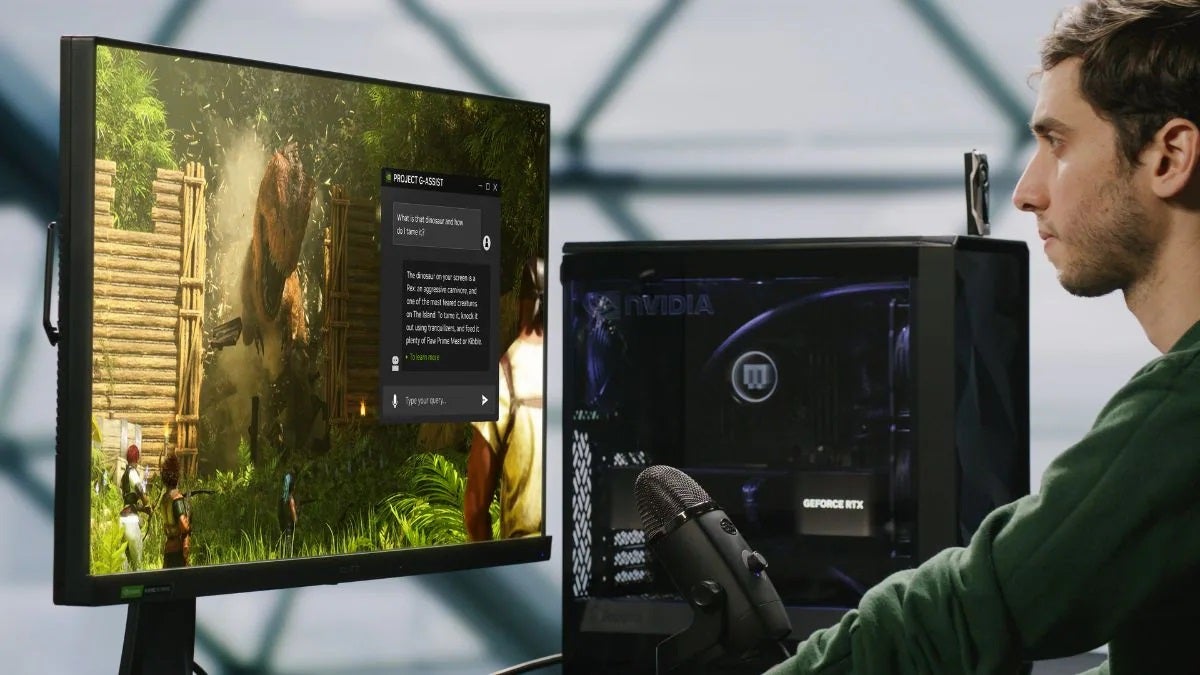
The G-Assist project is currently just a technical demonstration, but it gives a brief glimpse of how an AI assistant could guide you through PC games and even configure optimal settings for your gaming computer based on your needs.
How Nvidia’s G-Assist, the chatbot of the future, will work
In a demonstration, Nvidia shows G-Assist answering voice questions like “what is the next weapon in the game and where can I find the materials to build it?”, in the game ARK: Survival Ascended.
The assistant is even capable of understanding what happens on the screen while you play, so it can self-adapt based on the number of skill points you have in a game and help you progress.
? Project G-Assist: Your AI Assistant for Games & Apps ? RTX AI Creator Advancements ? New DLSS games ? SFF-Ready Enthusiast GeForce Cards & Cases ? Latest on NVIDIA App & Game Pass Reward
Nvidia’s AI assistant can also optimize and adjust PC settings, even providing PC latency graphics and frames per second of the preceding 60 seconds.
For example, it can scan your system and recognize if you’re only playing at 60 Hz when your monitor supports 240 Hz. You can also ask for recommendations to improve game performance, achieve a 60 fps performance goal, or even overclock the GPU.
The potential is very big, but until G-Assist is an application that we can download and play with, we maintain the right to question the hype of AI (generative AI tends to make mistakes).
Science fiction has become the golden goose of streaming platforms. All streaming services are currently competing to have the best science fiction series or movie of the year. Although Apple TV+ seems to be winning by a landslide, other platforms like Netflix and Amazon Prime Video are not giving up so easily.
Now, Netflix has added a science fiction movie to its catalog that makes the platform stand out. It is the most acclaimed science fiction movie of 2023, and this was demonstrated with its Oscar for Best Special Effects. We are talking about ‘Godzilla: Minus One,’ the Japanese gem about the monster that has become, on its own, the best movie in Godzilla’s history.
The Devastation of World War II
With a budget of less than 15 million dollars, the film became an international milestone that, in addition to multiplying its investment by a lot, made it to the Oscars from Japan—achieving something that very few Japanese have achieved before.
‘Godzilla: Minus One’ places us where every good Godzilla story should start: in Japan in 1945. Near the end of World War II, we closely follow kamikaze pilot Kōichi Shikishima (Ryunosuke Kamiki), who, instead of carrying out his suicidal mission, decides to crash-land on Odo Island. With the country on the brink of surrender, a 50-meter reptilian monster emerges, emitting atomic radiation.
This event forces the pilot to confront not only the horrors of war, but also a radical change in the life of his community, which comes together to survive the threat of the monster. Throughout its 125-minute duration, the film not only presents impressive scenes of destruction, but also a touching human plot that pays tribute to Godzilla’s original symbolism as a social critique.
Since it was confirmed that ‘The Office’ was going to have a new series, skeptics began to speculate about its failure. Undoubtedly, the series starring Steve Carell, Rainn Wilson, and John Krasinski was so successful that everyone believes it is totally irreplaceable. However, the path this new series is taking makes us believe that, in the end, they can make it work.
After confirming some of the actors who will be part of the cast of this new series, the title of the new series and its provisional synopsis have been confirmed. Finally, it will not be a reboot or a continuation, but a completely new spin-off. In this way, despite maintaining the spirit and form, we can expect something completely different that will surprise all the fans.
This is how ‘The Paper,’ the spin-off of ‘The Office,’ will be
The title of ‘The Office’ spin-off will be ‘The Paper’—something that makes a lot of sense if we pay attention to its plot. The story will follow the same documentary team that appeared in the original ‘The Office,’ but this time they will cover a place somewhat different than a mundane office: the newsroom of a local newspaper in the American Midwest… and its volunteer reporters.
In this way, it can be expected that the characters will be even crazier and funnier than those in the original ‘The Office.’ After all, while the previous ones were in the office for work, this time they will be there by their own will… and who in their right mind would work for a local newspaper for free? (as a precarious journalist who has experienced all kinds of situations, I just had flashbacks of Vietnam). Anyway, we will soon discover more details about ‘The Paper,’ but everything seems to indicate that it can surprise us with a cast of charismatic characters.
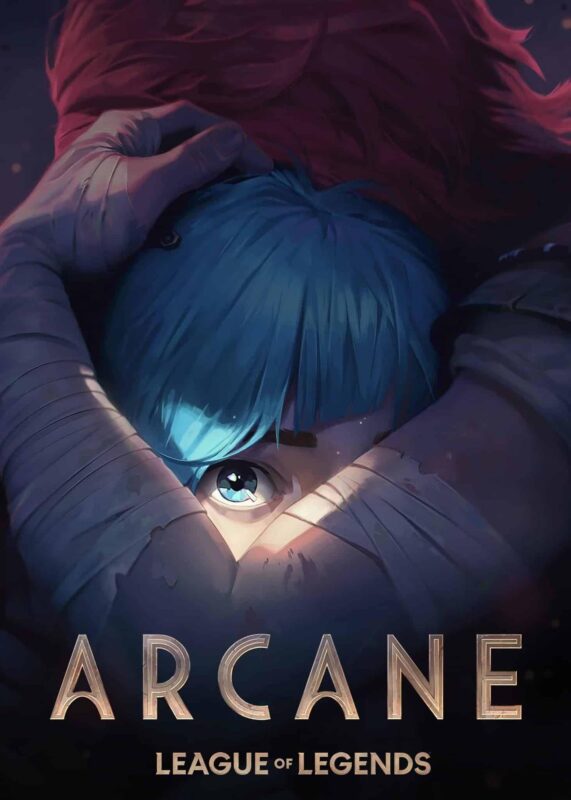
We now know when the second season of Arcane will premiere: in November of this year. Netflix has just released a poster that shows an eerie image about this new round of episodes, which also includes the date of the premiere. Undoubtedly, everything seems to suggest that Season 2 will have even more action than its predecessor.
“First poster for Season 2 of Arcane. It will premiere in November on Netflix.”
In the poster, we can see Jinx holding her sister Vi close to her chest, a complete reversal of what we saw in the first season, clearly showing the transformation in roles which they have undergone in the previous episodes.
A storm is coming
But what does this poster really mean? First, it’s clear that the protagonists of the League of Legends series will remain the same, even as we continue to explore the Champions’ story from other perspectives. Additionally, it also indicates that the drama and action will be even more stimulating in these new episodes, offering viewers even more of this series that has become unforgettable to all its fans.
The live action One Piece became one of Netflix’s most prominent releases last year, becoming the most-watched series of the second semester on the platform. Undoubtedly, the show has exceeded both Netflix’s and fans’ expectations, which led to the quick confirmation of a second season.
Now, there is speculation about whether the third season will be filmed together with the second, and everything seems to indicate that it will. All this comes from Brashaad Mayweather, who played Patty in the first season of One Piece. In an interview, the actor said that they will film the two seasons consecutively.
Will they cover the entire Arabasta arc?
“We’ll see if they do that because they’re filming two seasons, the second and third, back-to-back soon. So we’ll see what happens,” Mayweather said without flinching. Although nothing has been confirmed, everything seems to suggest that they will go in that direction. In fact, it makes a lot of sense, since that way they could cover the entire arc of Arabasta, which the Straw Hat crew will encounter next. We expect to have more information soon.
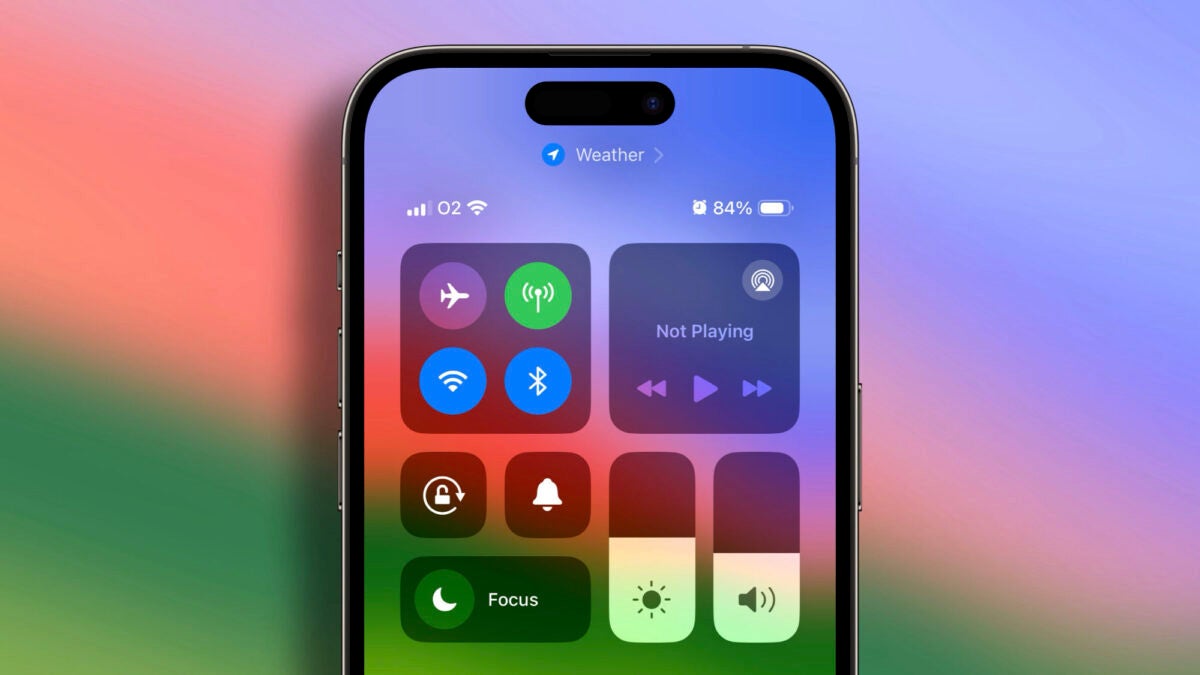
The upcoming iOS 18 promises to be one of Apple’s most significant updates, with a strong focus on artificial intelligence capabilities, but it will not neglect small details, redesigns, and changes in the interface of our iPhones. According to Mark Gurman in his Power On newsletter, one of the main novelties will be a redesign of the iPhone’s Control Center. A redesign will include an update to the music widget and HomeKit controls.
Home and music playback controls are the primary targets
Since the launch of the iPhone X in 2017, the Control Center has not undergone major changes. The current interface displays audio controls in a small 2×2 box in the upper right corner of the screen. It is true that we can control playback from other parts of the system, but it is also true that the Control Center is probably where we go most often. And that’s where we will see the changes Apple is preparing for iOS 18.
Perhaps a larger playback section? Options to connect other headphones or speakers more conveniently? We will have to wait until next week to find out, but it is clear from what Gurman tells us, there’s a world of possibilities.
A world of possibilities if we add that Gurman also talks about a redesign of the Home app section. Currently, iOS automatically selects six accessories to display in the Home section of the Control Center. If we want to access others, we can press and hold the Home button to reveal a reduced version of the application. Again, we do not know the changes that Apple plans to introduce, but the ability to choose which HomeKit accessories and in what order they appear in the Control Center would be really interesting.
If we start from there, and as has often been commented on in the past, the redesign of the Control Center could also include greater customization. We can already choose and place which buttons and functions are at the bottom, but the top section never changes. Will we see a widget system similar to the one that came to the iPhone home screen with iOS 17? Again, we will have to wait, but with Gurman’s statements, we are closer than ever to something like that becoming a reality.
Beyond all the news in the field of AI, details like these show us that Apple will take care of all sections of the system. With a new ‘Now Playing’ music widget and improvements in HomeKit controls, we will have even more convenient and easy access to two services we often use. And if we also see greater customization in the rest of the Control Center, even better. In a week we will find out and enjoy all the news.
Contrary to what many might believe, content creation is not as simple as it appears. Developing a brand identity and effectively conveying our ideas to the audience demands extensive hours, dedication, and perseverance on our part. However, it’s a reality that not everyone has the luxury of extra time to create stunning graphics and visuals. Fortunately, Adobe Express is here to address this issue.
Whether it’s a video, a post, or a poster, Adobe Express can handle it all, quite literally. Plus, there’s no need to be a graphic design expert: with Adobe Express, we can create high-quality images and videos, regardless of our skill level. Not only that, it could also be exported as a PDF, so we can take advantage of being available to anyone using Adobe Acrobat (that of course is included in the Creative Cloud subscription).
Next, we’ll introduce you to Adobe Express’s most exciting features and guide you through creating an Instagram post from scratch.
What is Adobe Express?
Adobe Express is fundamentally a web and mobile application (available for Android and iOS) that enables us to design graphics, images and edit videos for social media and other projects. It stands as the perfect solution for those in need of quickly creating professional-looking visuals.
One of Adobe Express’s key strengths is its exceptional ease of use. Adobe has poured considerable effort into crafting an intuitive app for graphic design enthusiasts. Yet, it doesn’t overlook more advanced users. Industry professionals will find Adobe Express a valuable tool to streamline workflow and simplify basic tasks.
What can we do with Adobe Express?
With Adobe Express, the possibilities span wide: Instagram stories, TikTok videos, brochures, posters, business cards, presentations… the list is extensive. Moreover, Adobe Express enables us to engage in collaborative projects and even import files from Photoshop and Illustrator, though this feature is currently exclusive to the web application.
As you can see, it’s an all-encompassing app. Adobe Express’s features give us the leverage to assemble and edit our content from a single location. Whether dealing with photos, PDF files, or videos, Express grants access to advanced editing tools, including Adobe’s generative AI, Firefly.
Discover the Quick Actions of Adobe Express
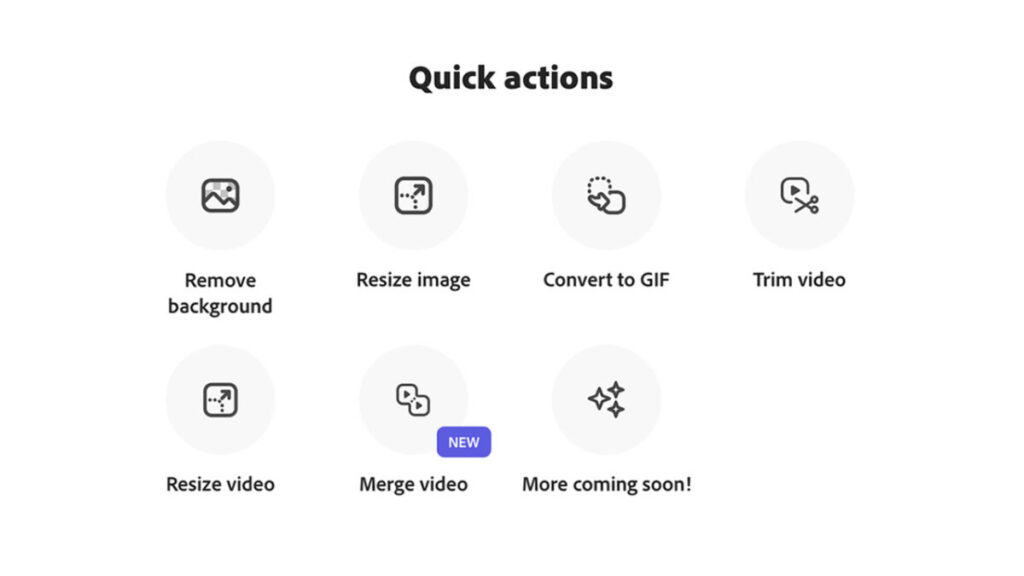
Who hasn’t dreamed of having a magical button that instantly does what we want? In this scenario, Adobe Express’s Quick Actions would function somewhat similarly. Through them, we can edit images, videos, and documents with just a few taps on our device. Currently, Adobe Express allows us to perform the following Quick Actions:
Remove the background from an image: Upload a photo and remove the background instantly. The outcome is even better if the main subject has clear edges without overlapping elements. Afterward, you can save the file as a PNG with a transparent background and continue editing it later.
Resize an image: Upload an image (regardless of whether it’s a JPG or PNG) and select a template size based on your needs. If none of the predefined sizes fit, you always have the option to customize it.
Convert a video to GIF: Upload a video from your device and then choose a size suitable for the platform where you’ll use it. Videos to be converted can be up to one hour long.
Trim the duration of a video: Pick a video and trim it by sliding the control to the desired spot.
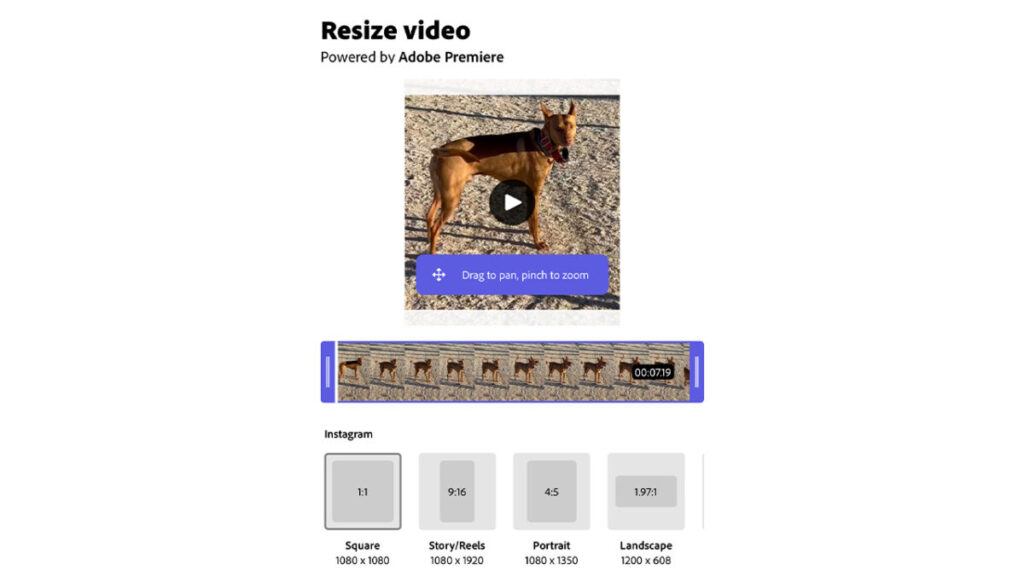
Resize a video: This works similarly to resizing an image. Select the video you want to resize and then choose from the predefined sizes available.
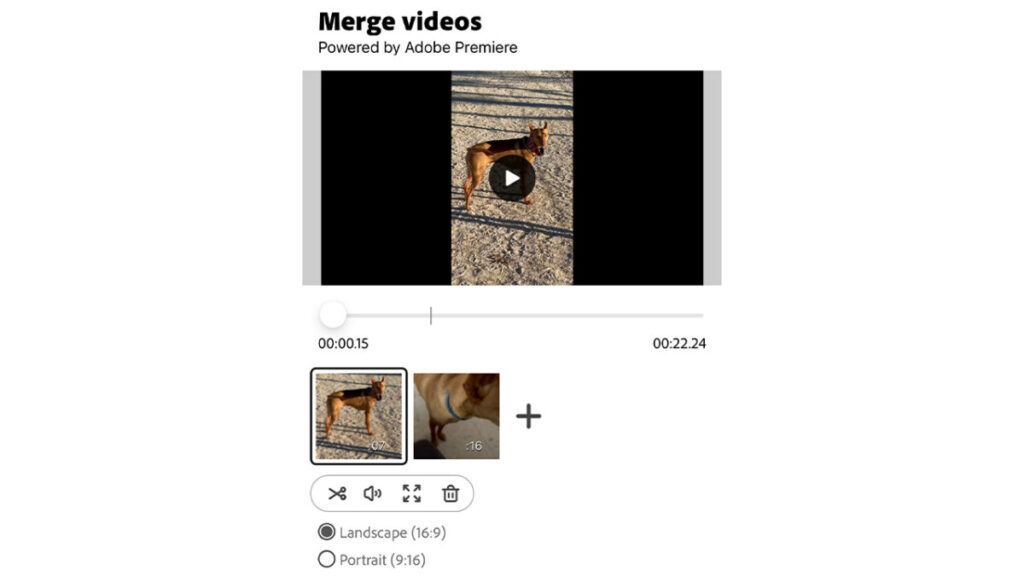
Combine multiple videos into one: Simply select the videos you wish to merge; Adobe Express will take care of the rest. The application allows you to adjust the length of the cuts.
Let’s Create an Instagram Post from Scratch
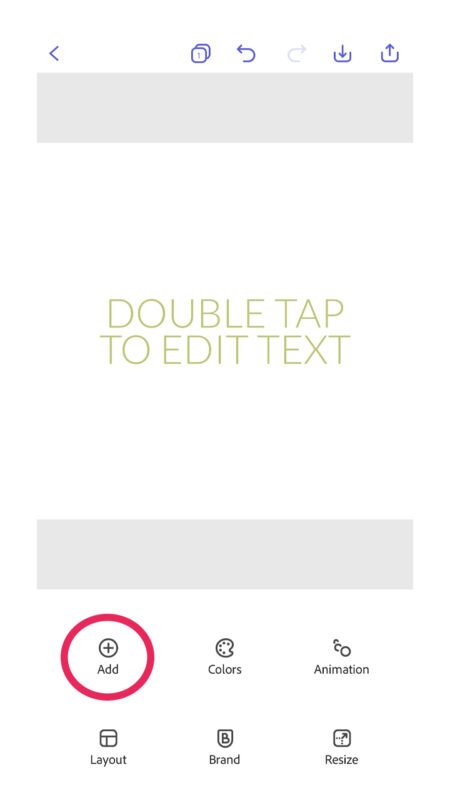
When we access Adobe Express on our mobile device, the first thing we encounter is the home interface. Starting from the top, we see a series of pre-defined size options. Swipe through them to view all the available choices.
For this instance, we’ll create an Instagram post. Adobe Express provides a specific shortcut for this purpose, named Instagram Post. Selecting this creates an editable file with the ideal dimensions for an Instagram post. This is where the magic begins.
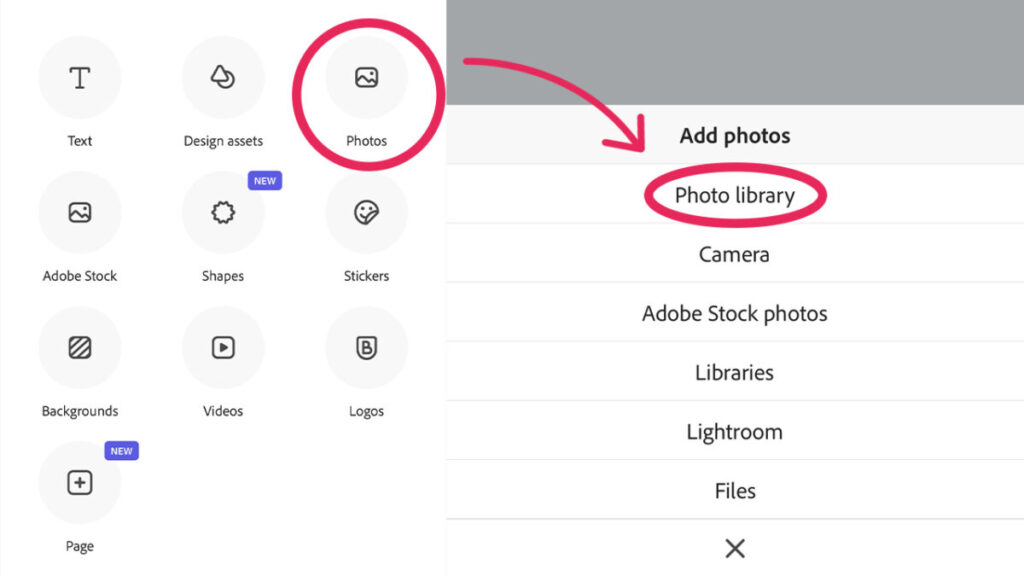
Among the various options, one of the most crucial is Add. Tapping on it allows us to add text, photos, images from Adobe Stock, shapes, stickers, or even videos. You can add more images whenever needed and position them as desired. Remember, you can change the layer order by selecting Order.
To continue with our example, we’ll tap on Photos and then Photo Library. Here, you’ll see that it’s not necessary for the files you use to all come from your phone’s gallery. Adobe Express also allows you to add photos taken on the spot with your mobile camera and even access Lightroom.
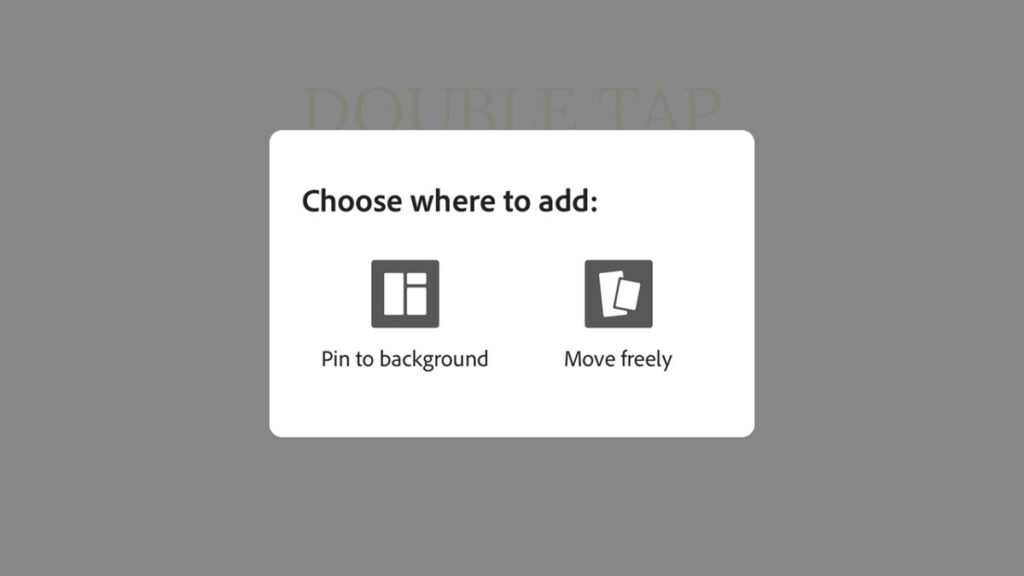
Once you’ve selected an image, Adobe Express offers us a choice between Pin to background or Move freely. The first option locks the image in place so it doesn’t move while we edit or add elements to it. The latter allows us to move it freely.
Next, we proceed to edit the text. To change it, simply tap on it and type whatever you deem appropriate. If you want to delete the text, tap on it again and select Edit. There, you’ll find the option to Delete.
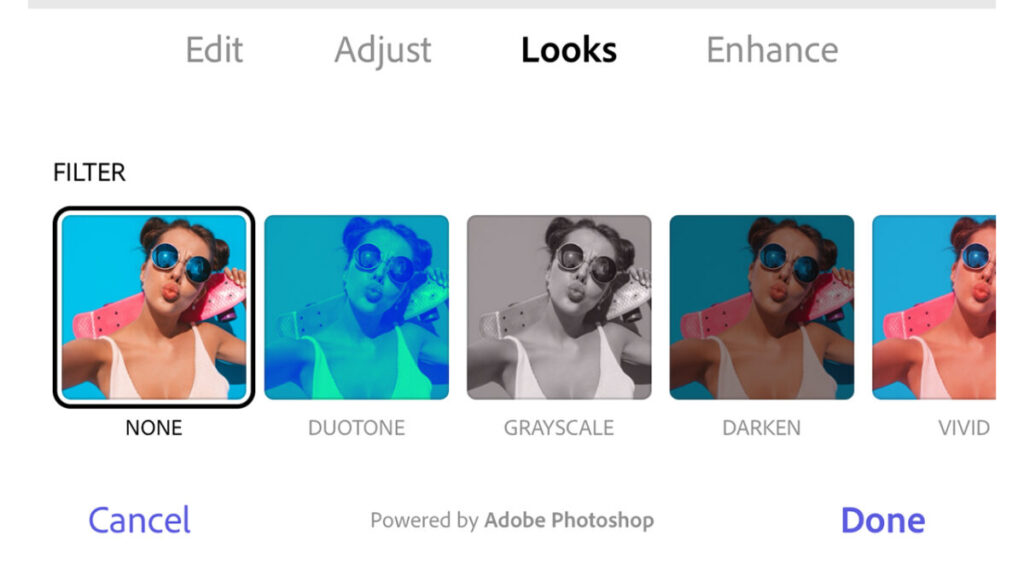
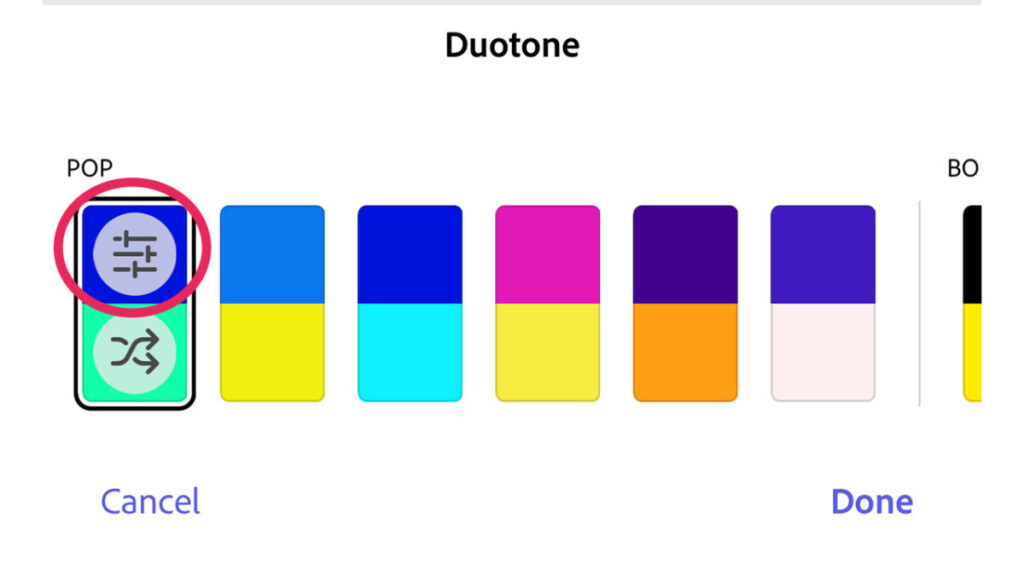
Then, tap on the photo or image you uploaded earlier to edit it. Adobe Express allows us to adjust its scale, flip it, and position it as we like within the file’s limited frames. It also offers the option to add filters through Looks. Some filters, like Duotone, can be customized to change the shadows and highlights, for example.
The Edit option also allows you, among other things, to remove the background of an image. Doing so is very easy: tap on Remove background and watch as your image’s background is instantly erased.
Now, you have several paths to choose from. To alter the general colors of the image, head to Colors. There, you can experiment with the effects of different palettes shown. You can also customize the colors by selecting a palette and adjusting the sliders, as shown here.
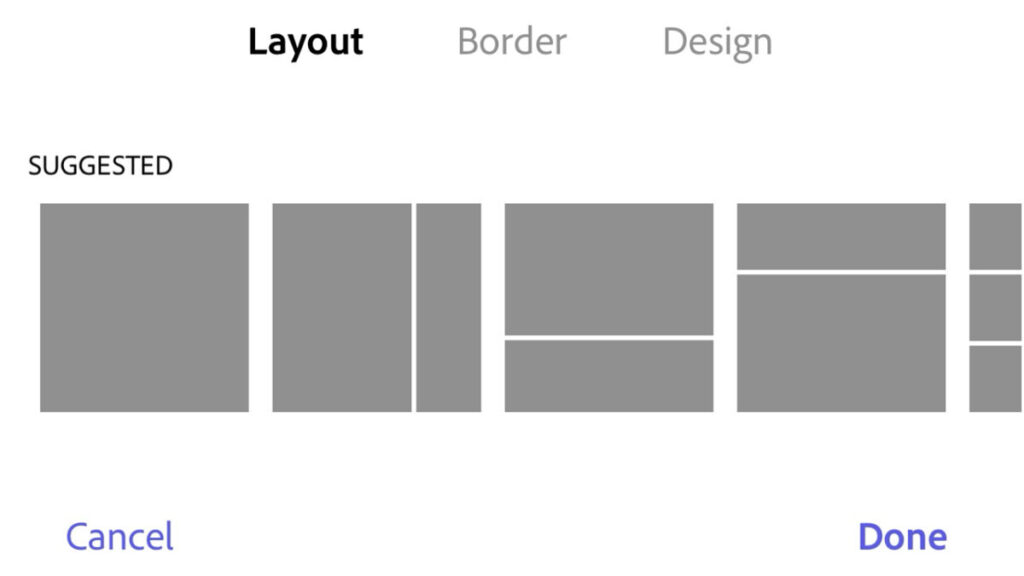
If we wanted to add more images in a collage style, we would go to the Layout option. Adobe Express has several predefined designs to put two, three, or more images together, in a simple yet functional style. There’s also the Border option, useful for adding a sort of frame to the image.
Lastly, you’ll see the Design option. Through Design, we can alter our project with various predefined graphic styles. If you enjoy experimenting with different effects, this can be a very interesting feature for you.
Adobe Express also allows you to integrate text animations. By tapping on Animation, we’ll see various options to bring our text to life, whether with typewriter effects or even color variations.
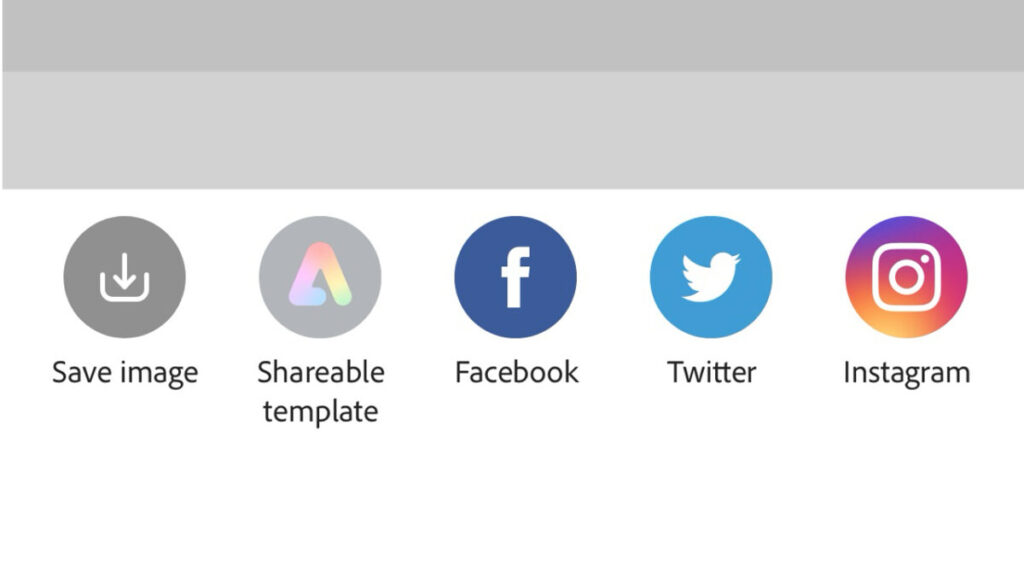
Well, we’ve concluded editing our post, so what now? We have two paths to choose from: we can either save the image on our device or share it directly. For the first option, we’ll press the download icon, located in the top right corner. Then, choose Images and subsequently, Download. After finishing, the image will be saved on our device.
The other option we have is Share. Through Share, we can directly upload the image to a social network, share a link with the image, or send it via email.
Is Adobe Express Free?
Adobe offers users the option to use Adobe Express completely free of charge or alternatively, to pay for a monthly subscription. Included in its free plan are all the main features we’ve discussed throughout this piece, without any time limit. Among other things, these include:
25 generative credits per month.
A limited collection of copyright-free photos, videos, and music from Adobe Stock.
10 PDF Quick Actions per month.
About 1,000 fonts from Adobe Fonts.
Limited templates.
On the other hand, the premium plan that is also included with the Creative Cloud subscription, offers the following:
250 generative credits per month.
Unlimited PDF Quick Actions.
All premium templates.
The entire Adobe Stock collection.
Brand Kit with various logos, colors, and fonts.
Over 25,000 licensed fonts from Adobe Fonts.
100 GB of cloud storage, enough to save about 15 hours of video footage.
As you can see, Adobe Express can help enhance the quality of your work and streamline your creative process. No matter your level of experience, use Adobe Express to take control of your content from a single place.
Ticketmaster has confirmed that a significant data breach has occurred—it was reported last week that over 500 million users were affected. This is like the entire population of North America (Mexico, United States, and Canada).
Live Nation, the entertainment giant that owns Ticketmaster, has confirmed the existence of “unauthorized activity” on its platform, in a leak carried out by the well-known hacker group ShinyHunters.
The group demands a one-time payment of $500,000 for the acquired data, which includes names, email addresses, order history, phone numbers, and some financial details such as partial credit card numbers and card expiration dates.
Ticketmaster has been hit by a cyber attack which has allegedly compromised the data of 560 MILLION customers (names, numbers, card details, etc)
Hackers are reportedly demanding $500,000 in exchange for keeping the stolen data sealed or are offering to sell it on the dark web. pic.twitter.com/XmkqFv7U7V
In a statement to the US Securities and Exchange Commission, Live Nation states that the leak occurred on May 20th, and also confirms that “a criminal actor offered for sale through the dark web what supposedly was user data from the company” on May 27th.
Until now, Live Nation had not made any comments about the leak. Ticketmaster did not confirm the leak, but informed shareholders on May 31st.
What’s happening now with Ticketmaster?
Live Nation wrote in its statement that the company is working to mitigate risks for users and the company itself, cooperating with security forces in the process.
Live Nation said it is “assessing the risks” associated with the breach, and does not believe that the incident will have a material impact on its business and operations at the time of the presentation.
Last week, the Australian government confirmed that it is assisting Ticketmaster in resolving the issue, while US authorities are speaking with Ticketmaster to understand the matter.
The stolen data was hosted on Snowflake, a cloud storage and analytics company that issued its own statement yesterday addressing “an increase in cyber threat activity.”
The company also stated that it is conducting an investigation and has “promptly notified the limited number of customers” believed to have been affected by the hackers.
As reported by the BBC, the magnitude of this attack is one of the largest in history, if the figures published by ShinyHunters are correct.
Ticketmaster is currently fighting an antitrust lawsuit filed by the US Department of Justice, which claims that its parent company Live Nation relies on “illegal and anticompetitive conduct to exert its monopolistic control over the live events industry in the United States.”
Update
Snowflake has sent us the following comment:
“We have not identified any evidence to suggest that a vulnerability, a misconfiguration, or a breach of the Snowflake platform caused this activity.“
There is no doubt that Amazon Prime Video has one of the most diverse catalogs of all current streaming platforms. Among the great original series it brings each year, the movies it collects from the biggest theater releases, and the formats it integrates, it is undoubtedly becoming one of the most attractive VOD services. And, among all its productions, some of the most striking belong to the trendy genre: science fiction.
Recently, all platforms have been challenging each other to have the largest catalog of science fiction movies and series. For now, it seems that Apple TV+ is taking the lead, but Netflix is closely following and Prime Video itself is also stepping up its game with all kinds of innovative proposals.
Now, among its catalog, it is highlighting a suffocating film that mixes science fiction, thriller, and horror in a way that only other films like Buried, Hush, or Nowhere have achieved before. The title of the film is Meander, it dates back to 2020 – a good year for suffocation, for sure – and its director is the French Mathieu Turi, who already has experience in the genre with films like The Depp Dark.
An overwhelming movie with a great final plot twist
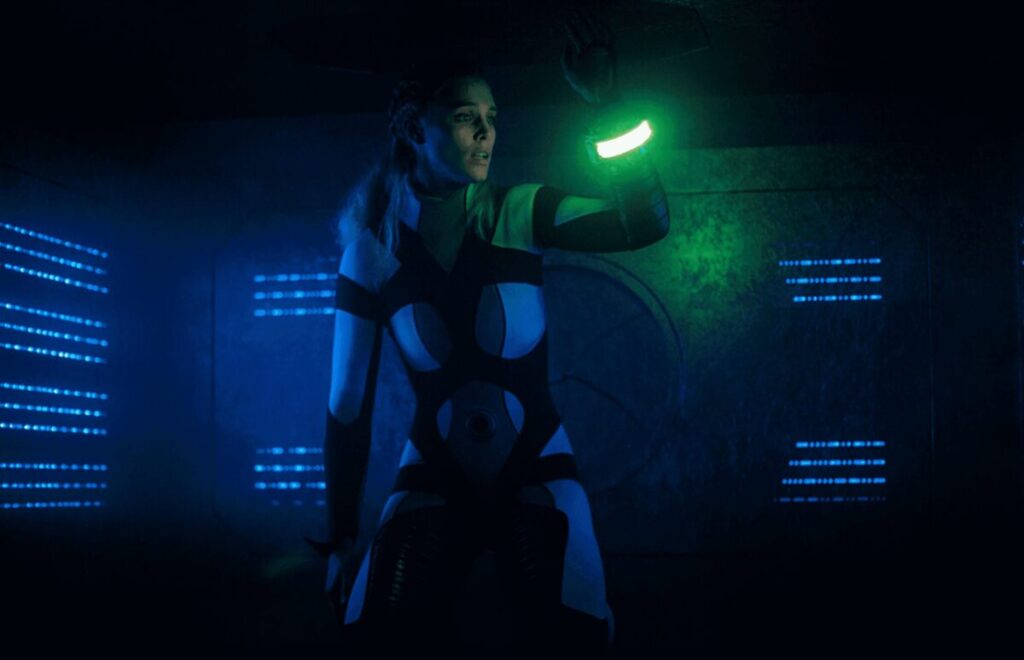
The movie takes us into the life of Lisa, played by Gaia Weiss (The Gentlemen, Vikings), who presents herself as a woman devastated by the recent loss of her daughter. One night, after making an impulsive self-destructive decision, she accepts a ride from a stranger in a car. She soon realizes that the man has sinister intentions and, after an altercation, loses consciousness.
When she wakes up, Lisa finds herself in a strange environment: a narrow metal tube. She discovers that she is wearing a bracelet on her wrist that displays a countdown timer. She has no idea where she is or how she got there. Soon she realizes that she must navigate through the maze of tunnels to survive, as the place is filled with deadly traps and mechanisms that activate periodically.
As Lisa progresses, she faces numerous challenges that test her physical and mental endurance. She must overcome deadly traps such as incinerators, compressors, and chambers filled with toxic gas. Throughout her odyssey, she finds messages and clues that guide her and give her hope, but also confuse her about the true nature of her imprisonment.
The tube seems to react to her actions and thoughts, which leads her to question if she is in an advanced technological test, an alien experiment or something even more sinister. Throughout the movie, Lisa confronts her worst fears and painful memories, which seem to physically manifest in the labyrinth.
Although I’m not going to give any spoilers, the climax of the movie reveals that there is much more behind this apparent deadly trap. Undoubtedly, it is one of those twists that leave you with your mouth open, and that gives the movie a new unexpected meaning. Combined with the great performance of the lead actress, this is undoubtedly the most interesting aspect of Meander.
The film had its premiere at the Sitges International Fantastic Film Festival and Horror, and since then it has first been shown in theaters and later included in the catalog of Amazon Prime Video, where it has shone again. Although the reviews are quite mixed and not all genre fans seem to like it, it is a very entertaining film to watch on the platform, and undoubtedly a very daring bet in its direction.
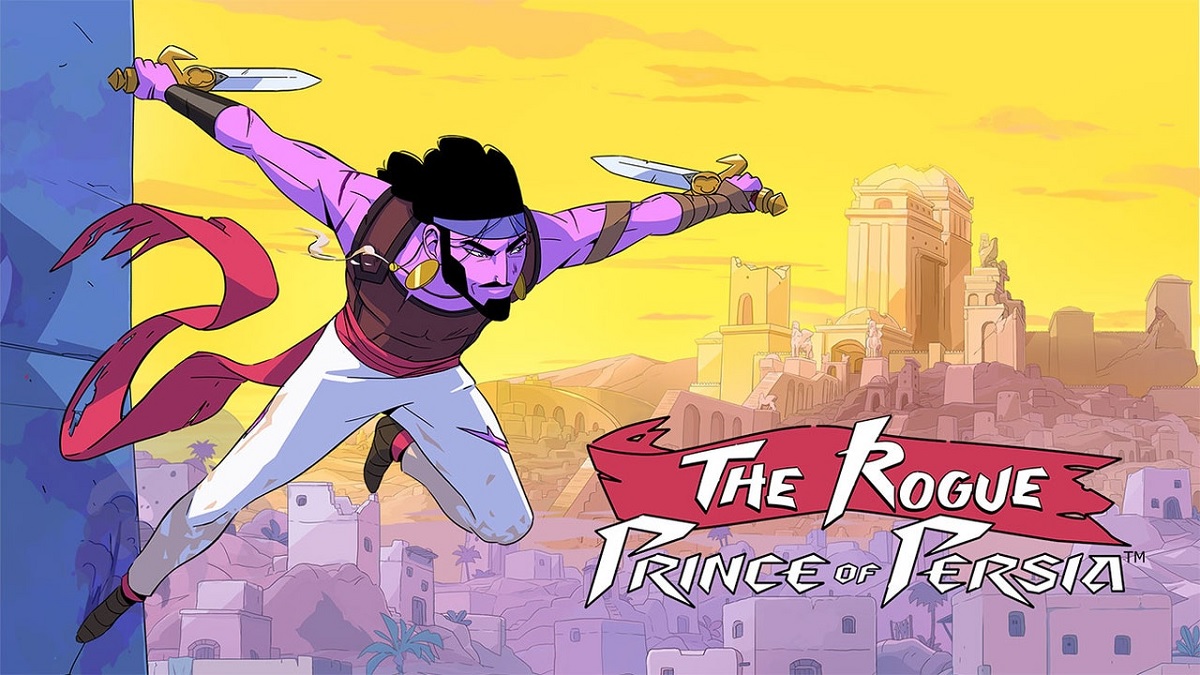
The new adventure developed by Evil Empire is being released in early access for PC.
Who would have thought that lovers of Prince of Persia would have such a good 2024 when it comes to the prince. After almost a decade and a half without any news from him – except for a few minor games – this year we have had the opportunity to enjoy two titles from the saga.
The first one has been Prince of Persia: The Lost Crown, a metroidvania released at the beginning of the year that has made it into the top of the best games of this 2024 -and no wonder: it’s amazing!-. And in second place, The Rogue Prince of Persia, a recently released title that we are going to tell you everything you need to know about today.
Behind the name of this new Prince of Persia lies a game that combines more than ever the main concepts that have characterized the saga throughout its life: platforming and the ability to go back in time when necessary. To achieve all this, the title embraces, in turn, a genre perfect for this purpose such as the roguelite.
The approach in this type of games is already known: we advance through different screens and die frequently. However, when the “game over” sign appears, we don’t start from scratch, but some of the upgrades or items remain with us.
Taking into account that the Prince of Persia saga has a prince who can travel back in time, a genre like this suits him perfectly. To top it off, if we add that behind the development is Evil Empire, creators of the incredible Dead Cells and that they know a lot about this genre, the formula is clearly a winner.
The objective is to guide the prince in his fight against an army of Huns completely corrupted by dark shamanic magic. It’s about exploring a new interpretation of Persia while mastering parkour, performing stunts, discovering new weapons, using talismans with special effects, and much more. Advance, die, improve. The three points that structure the entire work.
What is the price of The Rogue Prince of Persia?
This is one of the best points that The Rogue Prince of Persia release has: its price. The Ubisoft and Evil Empire video game is available on the market for only 19.99 euros on PC. However, the price has a catch, as the game is released in early access.
What is an early access?
An early access or early access is a video game that is not yet finished and will undergo changes. Developers take advantage of the potential of early access for players to provide as much feedback as possible about their work, as it is subject to modifications and is still in development.
In exchange for offering a video game that is not yet finished, the title is released at a lower price to the market. The best part? When the game is finished, the price can indeed go up – in fact, it is common – but players who trusted the early access will not have to pay anything.
The time a video game spends in early access can vary greatly, from months to even years.
Will The Rogue Prince of Persia be released on consoles?
As you may have noticed, this new installment of Prince of Persia is only available for PC. This has a very simple explanation, which is none other than the aforementioned early access.
Generally, when version 1.0 of the game is already obtained, that is, it is finished and out of early access, development studios prepare to release the corresponding console versions. This happens in most cases with successful big games, so you don’t have to worry about anything: unless there is a catastrophe, The Rogue Prince of Persia will also come to consoles, just in due time.
That’s all you need to know about The Rogue Prince of Persia. Remember one thing: if you’re interested in it, buy it now and you’ll save some money for when it’s complete in the future.