{
"de-DE": "Ich bin Journalist mit über 30 Jahren Erfahrung in Videospielen und Technologie. Obwohl Videospiele schon immer mein Fachgebiet waren, habe ich begonnen, auch die komplexen Strukturen von Projektmanagement-Tools wie Asana sowie die Automatisierungen mit Make.com und N8N zu entdecken und zu genießen.",
"en-US": "I’m a journalist with more than 30 years of experience in video games and technology. Although my specialty has always been video games, I’ve recently started enjoying exploring the intricacies of project-management tools like Asana, as well as automations with Make.com and N8N.",
"es-ES": "Soy periodista con más de 30 años de experiencia en videojuegos y tecnología. Aunque mi especialidad siempre ha sido el videojuego, he empezado a disfrutar también de descubrir los laberintos de los programas de project management como Asana y las automatizaciones de make.com y de N8N",
"fr-FR": "Je suis journaliste avec plus de 30 ans d’expérience dans le jeu vidéo et la technologie. Bien que ma spécialité ait toujours été le jeu vidéo, j’ai commencé à prendre plaisir à explorer également les méandres des outils de gestion de projet comme Asana, ainsi que les automatisations avec Make.com et N8N.",
"it-IT": "Sono un giornalista con oltre 30 anni di esperienza nei videogiochi e nella tecnologia. Anche se la mia specialità è sempre stata il videogame, ho iniziato a divertirmi anche a scoprire i meccanismi degli strumenti di project management come Asana e delle automazioni con Make.com e N8N.",
"ja-JP": "",
"nl-NL": "Ik ben een journalist met meer dan 30 jaar ervaring in videogames en technologie. Hoewel videogames altijd mijn specialiteit zijn geweest, ben ik ook begonnen te genieten van het verkennen van de ingewikkelde wereld van projectmanagementtools zoals Asana en van automatiseringen met Make.com en N8N.",
"pl-PL": "Jestem dziennikarzem z ponad 30-letnim doświadczeniem w grach wideo i technologii. Choć moją specjalizacją zawsze były gry wideo, ostatnio zacząłem również czerpać przyjemność z odkrywania zawiłości narzędzi do zarządzania projektami, takich jak Asana, oraz automatyzacji w Make.com i N8N.",
"pt-BR": "Sou jornalista com mais de 30 anos de experiência em videogames e tecnologia. Embora meu foco sempre tenha sido os videogames, recentemente passei a gostar de explorar também os labirintos de ferramentas de gestão de projetos como o Asana e das automações com Make.com e N8N.",
"social": {
"email": "jesus.bosque@softonic.com",
"facebook": "",
"twitter": "",
"linkedin": ""
}
}
Ariel, Eric, Tritón or Sebastián are in the live action trailer, are you ready to see it?
Ready to dive into the depths of the ocean? The trailer for “The Little Mermaid” will take you on a journey of intense emotions! Who could imagine Javier Bardem as Triton?
Remember the original trailer, or even the celebratory one? Yes, the soft and melancholic background music enveloped you in a dreamy atmosphere but at the same time the story is going to take you through an emotional roller coaster.
Let’s remember the story: meet Ariel, the little mermaid who is obsessed with the human world. But it’s not just an obsession, it’s a desperate longing to experience something beyond the walls of her underwater kingdom. And when she meets Prince Eric, after a daring rescue, that longing becomes a true obsession.
It must be said that the underwater scenes will take your breath away. They have managed to create an impressive underwater world full of life. But this is not just a love story, there is a villain in the mix: Ursula, the evil sea witch who is willing to do anything to get her hands on Ariel’s gift:her voice.
And if there’s one thing this true-to-life remake has going for it, it’s the music. Songs like the iconic “Part of Your World” are present. And the music intensifies as the romance between the two characters progresses.
Will this new version of “The Little Mermaid” succeed with new actors and a King Triton known to Spanish viewers? A good question that we will know from May. And now we leave you with the final trailer for the movie:
Some of the links added in the article are part of affiliate campaigns and may represent benefits for Softonic.
5 Essential Apps to survive an event that is occurring more frequently in the world.
A ice storm has arrived. The power has gone out. Your worst nightmare has come true, but you may be surprised to find that the best tool of all is available to you: your smartphone.
The first piece of advice any expert will give you is “stay calm.” Panicking is a mistake, and fortunately, today we have an excellent tool in our pockets: our smartphones.
Thanks to your mobile device, you have the ability to anticipate any extreme weather event such as an ice storm, or even to stay informed about any power outages resulting from these weather conditions.
At Softonic, we have compiled a list of 5 essential apps in the event of an ice storm.
This app provides accurate and updated weather forecasts, which will help you plan ahead. It also offers weather alerts and real-time updates on weather conditions.
The perfect app if you can’t avoid going out. Remember, if you have to drive during a snow and ice storm, it’s best to slow down and increase the distance between vehicles, or even stop and consult this app. It will send you specific alerts for weather hazards, including snowstorms that you may not be aware of.
This app goes beyond its basic functionality and is related to the American Red Cross, as it also includes useful information on how to prepare for a snowstorm. It also has safety tips and emergency procedures. But the most useful feature is that it includes a GPS function to find shelters and emergency resources.
You will definitely need this app. It allows you to send emergency alerts to a predefined contact list, and not only that, it also has a location tracking feature to help rescue teams locate you in case of an emergency. In the midst of a snowstorm, it will be especially useful. In addition to what experts advise to take advantage of the snow: melt snow to obtain drinking water.
Stay calm: Try not to panic and stay calm. Evaluate your current situation and think about how you can stay safe.
Find shelter: If you are on the road, look for shelter at a gas station, restaurant, or nearby store. If you are at home, make sure you have an adequate supply of food, water, and blankets to keep warm.
Drive with caution: If you have to drive during a snow and ice storm, make sure to slow down and increase the distance between vehicles. Use winter tires or tire chains if you have them.
Wear layers of clothing: If you don’t have adequate winter clothing, wear layers of clothing to stay warm. Use moisture-wicking base layers, mid-layers to keep you warm, and an outer layer to protect you from wind and moisture.
Take advantage of the snow: If you are stuck in a place with no supplies, you can melt snow to obtain drinking water. However, you must make sure to melt it properly to remove any bacteria or contaminants.
Netflix confirmed plans to roll out paid sharing more broadly in the first quarter of 2023 in a recent letter to shareholders. Paid sharing is Netflix’s answer to account sharing.
Netflix customers who share accounts may pay an additional fee to continue doing so. Netflix’s terms of service allow the sharing of the account in a household only unless permitted by the subscription plan.
Households may access Netflix on different devices, provided that the plan supports multiple devices. The company’s Basic plans, with and without ads, allow one stream at a time only. Standard and Premium plans increase the limit to two or four devices at the same time.
The 100 million subscriber problem
Netflix revealed in the shareholder letter that over 100 million subscribers share their accounts with others. Others, in this context, refers to people that do not live in the same household.
Account sharing undermines Netflix’s ability to invest and improve its service according to the letter.
To put the 100 million figure into perspective; Netflix had 230 million subscribers in the fourth quarter of 2022. In other words, almost half of Netflix’s subscribers share the account with others.
Netflix believes that it is losing a lot of money because of account sharing. The company’s answer to that is a new feature that it calls paid sharing.
Netflix Paid Sharing
Netflix launched paid sharing in South America in 2022 as a test. The company noticed a cancel reaction in South America during the rollout of the paid sharing feature.
Near term member growth is affected by this, but Netflix expects to see a growth in overall revenue through the paid sharing program and new accounts created by part of the account borrowers.
The company expects to see similar trends in other regions in which it rolls out paid sharing.
Paid sharing, broken down to its core, is an add-on that Netflix subscribers may add to their subscriptions. It enables them to continue sharing the account.
In South America, paid sharing charges added between $1.70 to $2.99 per month to the subscription. The price may be higher in other regions of the world.
Netflix allows subscribers to watch content while traveling, but only for a period of two weeks. Subscribers receive a notification to add a household for a fee or change the primary household if more than two weeks of external use are noticed.
New Profile Move feature and profile management
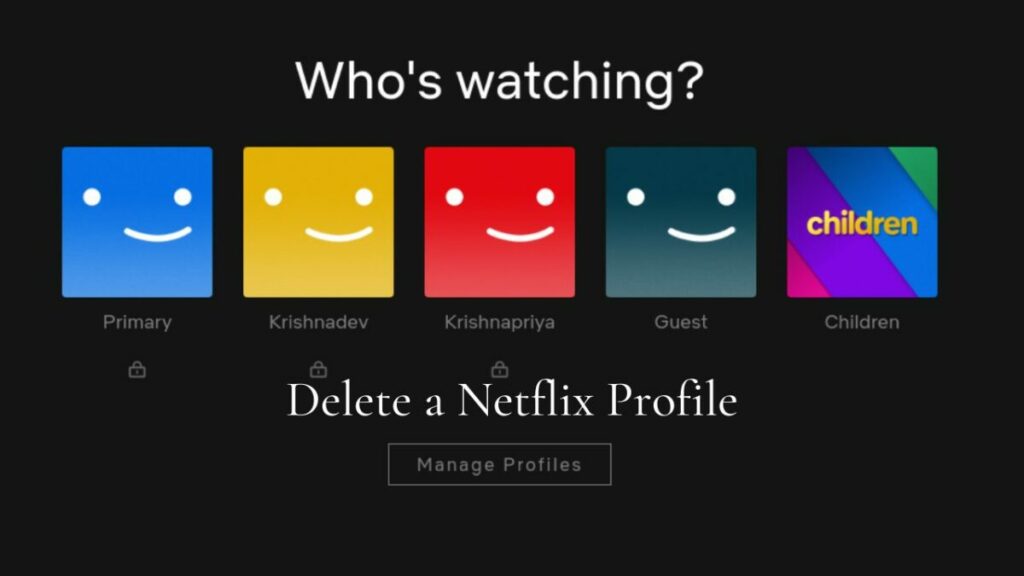
Netflix introduced a new feature to move a profile from one account to another recently. The option enables users to move a profile of a shared account to a new Netflix subscription.
The company hopes that many borrowers, people who use a shared account, will sign-up for Netflix. The profile move feature enables them to continue with their profile, instead of having to start with a blank slate profile.
Another new feature allows Netflix subscribers to see all the devices linked to their account and unlink them. It is a helpful feature to deal with hacked accounts, stolen passwords and when subscribers forgot to log out of their Netflix account while traveling or in public locations.
Outlook
Netflix may lose subscribers and a bit of revenue in the beginning. Streaming costs that Netflix has may go down as well, as fewer streams need to be processed by the company.
It is too early to tell if the gamble will pay off. It depends on the number of borrowers that switch to their own accounts and the number of subscribers willing to pay the paid sharing fee.
Microsoft’s operating system enters its third year in 2023 and it is a crucial one for Microsoft.
Launched at the end of 2021, Windows 11 is now one of two operating systems still in support. The other, Windows 10, reaches end of support in 2025.
Microsoft released the first feature update for Windows 11 in October 2022. The first feature drop, called Moments update, followed a month later.
It was this feature drop, and not the feature update, that introduced the most noticeable change in 2022: tabs in File Explorer.
Microsoft released the first development builds of the next major version of Windows 11 earlier this month already. While it is unclear whether 2023 will see the release of a feature update, it is clear that new features will still be added to the operating system in one form or another.
Frequent Moments updates will introduce new features in Windows 11. The first two will land in the first half of 2023 already, and rumors suggest that Microsoft is working on more for the second half of 2023.
New Windows 11 features in 2023
Microsoft confirmed some planned features officially already and others have appeared in Insider builds. While there is still the chance of delays or even cancellations, most of the features will become a part of Windows 11 eventually.
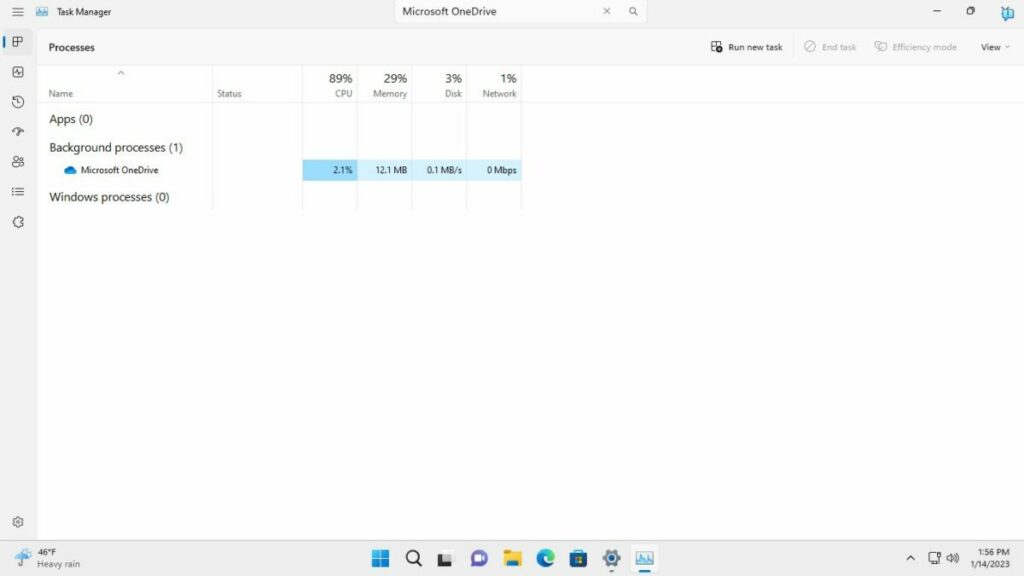
Task Manager Search
Task Manager is an essential tool in Windows 11. The shortcut Ctrl-Shift-Esc, or a right-click on the taskbar and the selection of Task Manager opens the interface.
It lists running processes and their resource usage, provides performance data, has options to manage startup apps, and displays signed-in users.
The process listings may list hundreds of processes, which makes it difficult sometimes to find a specific one. The available sort options help, but an integrated search improves that further.
Instead of having to scroll the entire listing until the desired process is found, users may type part of its name to see it right away.
Energy Recommendations
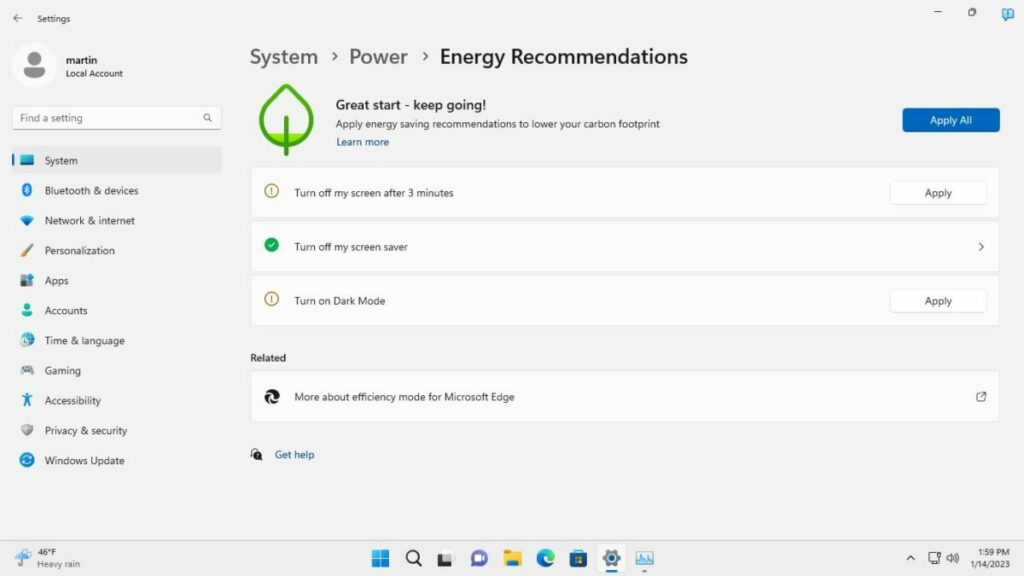
The price of energy increased in most regions of the world in 2022. Windows 11’s upcoming Energy Recommendations feature aims to help reduce the energy hunger of the Windows 11 device.
It does so through recommendations, e.g., to reduce the turn off interval of the screen or enabling dark mode.
Windows 11 users should not expect wonders from the feature, but it may help reduce power usage; this is especially useful on mobile devices on battery.
Tabs in Notepad
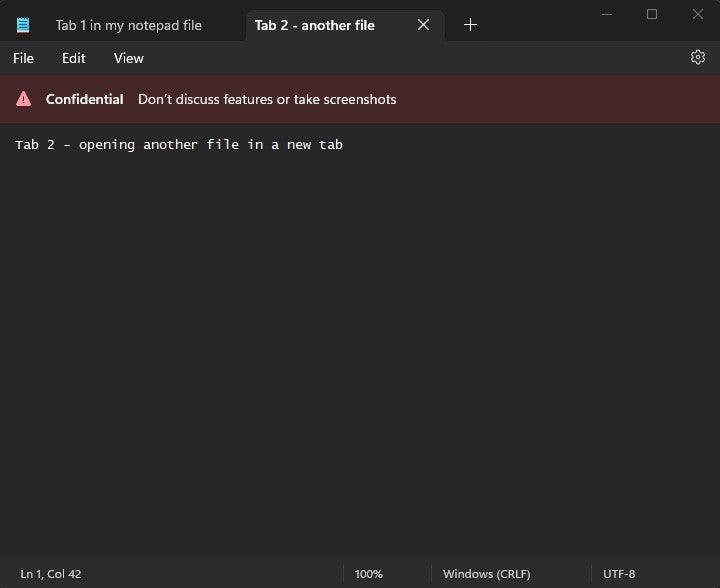
A Microsoft employee leaked the news on Twitter. A posted screenshot showed the default text editor Notepad with a tabbed interface.
Microsoft introduced tabs in File Explorer last year and it seems that the company plans to introduce tabs in more apps in 2023.
Notepad is a prime candidate for tabs. Many third-party text editors, including Notepad++, support tabs.
The feature allows users to load multiple documents in a single window. It is a comfortable feature that will improve Notepad significantly.
There is more
Here is a list of features that will launch in Windows 11 in 2023:
Live Search in File Explorer that returns results as the user types.
A taskbar optimized for tablets.
Changes to the search field in the taskbar.
App Folders on the desktop. These hold multiple links to apps and expand on selection.
Full-screen widgets panel.
New features will be revealed as development progresses in 2023.
WhatsApp is a popular messaging service by Meta, parent company of Facebook. The service is designed to work everywhere, provided that an Internet connection is available on the device.
WhatsApp may be blocked in some regions or environments. Devices connected to a company network may have certain restrictions, and the use of messaging apps like Whatsapp may be one of them.
Similarly, WhatsApp may be blocked temporarily or permanently in certain regions or countries. Governments may block Internet communication temporarily, for example, during election days or demonstrations.
A visit to one of those regions or permanent residency there makes it difficult to use the service. Up until now, use of VPNs could help bypass the block. Now, WhatsApp users have another option at their disposal: proxy servers.
WhatsApp Proxy Server support
WhatsApp announced support for proxy servers this week. Users of the messaging app may use proxies to bypass blocks.
Announcing the news, the company says:
We’re mindful that just as we’ve celebrated the start to 2023 through private texts or calls, there are many people who continue to be denied the ability to reach their loved ones because of internet shutdowns. To help, today we’re launching proxy support for WhatsApp users all over the world. What this means is we’re putting the power into people’s hands to maintain access to WhatsApp if their connection is blocked or disrupted.
Choosing a proxy enables you to connect to WhatsApp through servers set up by volunteers and organizations around the world dedicated to helping people communicate freely.
A proxy server acts as an intermediary server between the user’s device and the target destination. In the case of WhatsApp, traffic is tunneled through the proxy server to communicate with WhatsApp. The bypass works on the condition that the proxy server is not blocked as well.
User messages and data is protected with the same level of privacy and security as direct WhatsApp connections, according to the announcement. The maintainer of the proxy server sees the IP address of the user’s device, however.
It is essential, therefor, that a trusted proxy provider is selected.
Setting up a proxy in WhatsApp
WhatsApp itself does not maintain any proxies. The company recommends that users search on the Internet to find proxy servers by “trusted sources” to use.
Setting up a proxy on Android
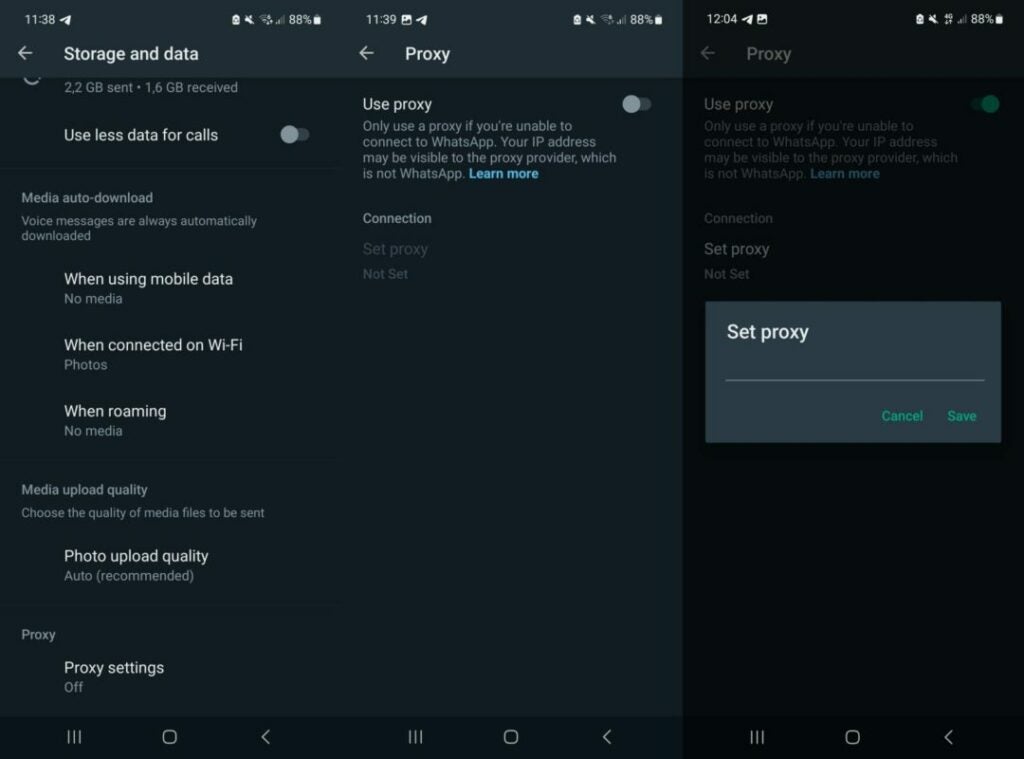
Select the three-dots on the main page and then Settings.
Go to Storage and Data > Proxy.
Select Proxy settings.
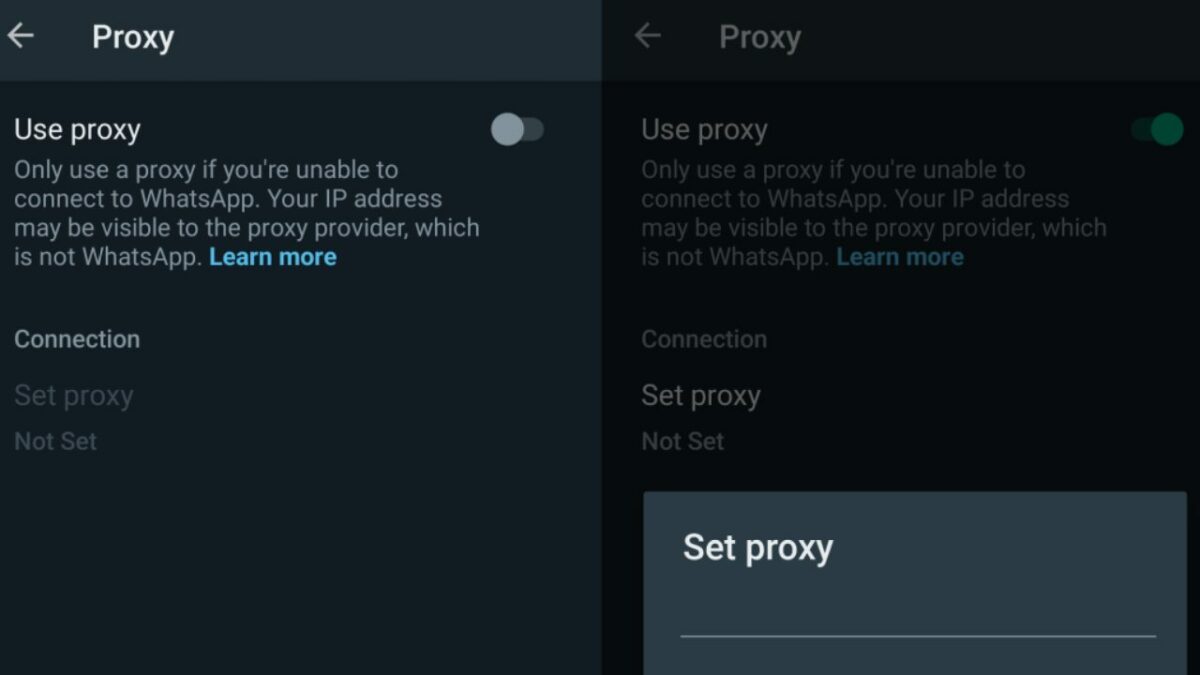
Tap the use proxy preference to set it to ON
Tap on Set Proxy.
Enter the proxy address and tap save to connect.
WhatsApp displays a checkmark if the connect is successful.
Setting up a proxy on iOS
Open the WhatsApp Settings.
Go to Storage and Data > Proxy.
Tap Use Proxy.
Type the proxy address and tap save to connect.
WhatsApp displays a checkmark if the connect is successful.
Verdict
Support for proxy servers adds another access option to WhatsApp. While it may be unnecessary for most users of the server, it may be the only option for some.
Finding a trusted proxy provider can be challenging, on the other hand.
WhatsApp explains how to set up a proxy on GitHub. The instructions are technical, and they require access to a server or computer to run the proxy on.
Korean giant Samsung has shared its new home advances for the Consumer Electronics Show (CES) in 2023. Also known as the Consumer Electronics Fair, it will open its doors to the public on January 5th.
At CES, companies show off new products and technologies related to home automation and the home. In this case, Samsung wanted to go one step further and will show off new smart appliances with a futuristic twist.
This will be done through their Bespoke line, a range of smart home devices. However, on the list of products that Samsung will present at the 2023 CES, one particularly stands out: the Bespoke AI Wall Oven.
As you can guess, it’s an oven with all kinds of extra-fancy features. One of the most striking is the inclusion of an internal AI camera. This can take pictures, detect that you are cooking, make suggestions for that dish, and even live stream. If you’ve ever thought about streaming on Twitch how to make a cake, this is the appliance for you.
However, this is just the tip of the iceberg. The Bespoke AI Wall Oven will allow you to configure every detail of the baking process. It can even alert you if your dish is burning (the best feature of this oven, in my opinion).
According to Samsung, their new smart oven will detect up to 80 different types of dishes. It also has Samsung Health integrated, which will make it easier for you to keep track of your meals.
In addition to their oven, Samsung has presented other appliances that will turn your kitchen into a Star Trek stage. One of them, the Bespoke 4-Door Flex fridge, has 4 doors and a huge 32-inch touchscreen.
If you think about it, it’s basically like having a tablet integrated into your fridge. Through its screen, you will have the possibility to access Internet content and live stream it. The Bespoke 4-Door Flex fridge has a water filtering and refrigeration system, in addition to a series of internal AI-equipped cameras. These will help you identify the food you have and will inform you of the amount of product left.”
Garena Free Fire has new reward codes that allow you to have fabulous free rewards to use within the game. For Today, January 4, 2023, we have a bunch of free codes that will allow you to progress in the game faster than your enemies.
Once you have redeemed the codes, the items you receive will be bound to your account forever. Without further ado, here is the list of Free Fire codes (valid for January 4, 2023):
Free Fire: January 4, 2023 Codes for Free Rewards
FFICJGW9NKYT
FFAC2YXE6RF2
ZYPPXWRWIAHD
FF10617KGUF9
FF11HHGCGK3B
Y6ACLK7KUD1N
W0JJAFV3TU5E
B6IYCTNH4PV3
FF11NJN5YS3E
ZRJAPH294KV5
FF119MB3PFA5
SARG886AV5GR
MCPTFNXZF4TA
WLSGJXS5KFYR
FF1164XNJZ2V
FF11DAKX4WH
YXY3EGTLHGJX
FF11WFNPP956
8F3QZKNTLWBZ
FF10GCGXRNHY
FF9MJ31CXKRG
FFCO8BS5JW2D
How to redeem Garena Free Fire codes?
If you do not know how to redeem these codes, do not worry as the process is quite simple. First, you must go to the official Garena Free Fire page where these codes are redeemed.
Log in with your Facebook, VK, Google, Huawei, Twitter or Apple ID account (remember that you will not be able to claim the prizes with a guest account).
Enter the codes shown above and select the Confirm button to continue.
Once you confirm the redemption of the codes, check the game’s mail, as you will receive confirmation of the gifts there.
Do not despair if you do not see the gifts within your account, they can take up to 24 hours to appear. When you already have them, you only have to enjoy the received gifts.
Garena Free Fire has new reward codes that allow you to have fabulous free rewards to use within the game. Once you have redeemed the codes, the items you receive will be bound to your account forever. Without further ado, here is the list of Free Fire codes (valid for January 3, 2023):
Free Fire: January 3, 2023 Codes for Free Rewards
FFCMCPSJ99S3
MCPW3D28VZD6
ZZZ76NT3PDSH
XZJZE25WEFJJ
V427K98RUCHZ
3IBBMSL7AK8G
J3ZKQ57Z2P2P
GCNVA2PDRGRZ
4ST1ZTBE2RP9
B3G7A22TWDR7X
6KWMFJVMQQYG
FFCMCPSUYUY7E
EYH2W3XK8UPG
UVX9PYZV54AC
How to redeem Garena Free Fire codes?
If you do not know how to redeem these codes, do not worry as the process is quite simple. First, you will need to go to the official Garena Free Fire page where these codes are redeemed.
Log in with your Facebook, VK, Google, Huawei, Twitter or Apple ID account (remember that you will not be able to claim the prizes with a guest account).
Enter the codes shown above and select the Confirm button to continue.
Once you confirm the redemption of the codes, check the game’s mail, as you will receive confirmation of the gifts there.
Do not despair if you do not see the gifts within your account, they can take up to 24 hours to appear. When you already have them, you only have to enjoy the received gifts.
Garena Free Fire has new reward codes that allow you to have fabulous free rewards to use within the game. Once you have redeemed the codes, the items you receive will be bound to your account forever. Without further ado, here is the list of Free Fire codes (valid for January 2, 2023):
Free Fire: January 2, 2023 Codes for Free Rewards
FFCMCPSJ99S3
MCPW3D28VZD6
MCPW2D1U3XA3
FFCMCPSEN5MX
HNC95435FAGJ
6KWMFJVMQQYG
FFCMCPSUYUY7
EEYH2W3XK8UP
GUVX9PYZV54A
CBR43FMAPYEZ
ZNPYFATT3HGS
QFFCMCPSGC9X
ZMCPW2D2WKWF
2ZZZ76NT3PDS
HXZJZE25WEFJ
JV427K98RUCH
3IBBMSL7AK8G
J3ZKQ57Z2P2P
B3G7A22TWDR7
XFF7MUY4ME6S
C8F3QZKNTLWB
ZWEYVGQC3CT8
QGCNVA2PDRGR
Z4ST1ZTBE2RP
9X99TK56XDJ4
How to redeem Garena Free Fire codes?
If you do not know how to redeem these codes, do not worry as the process is quite simple. First, you will need to go to the official Garena Free Fire page where these codes are redeemed.
Log in with your Facebook, VK, Google, Huawei, Twitter or Apple ID account (remember that you will not be able to claim the prizes with a guest account).
Enter the codes shown above and select the Confirm button to continue.
Once you confirm the redemption of the codes, check the game’s mail, as you will receive confirmation of the gifts there.
Do not despair if you do not see the gifts within your account, they can take up to 24 hours to appear. When you already have them, you only have to enjoy the received gifts.
Battery life is one of the most important features of Android devices. The better the device’s battery usage, the longer it is possible to use the device without having to charge it.
Battery and power usage depends on several factors. The battery that is included in the device plays a key role, but so do other factors, for example: installed applications, screen brightness, or use. Playing Android games on full brightness drains battery faster than listening to Spotify in the background.
Data saving, also called data saver by some manufacturers, restricts mobile background data use on Android. Applications may act in the background when they run on Android; this is desired in some cases. Mail and messaging apps may check for new messages, and music apps may continue to play music.
Google separates mobile data from Wi-Fi data.
Background data activity costs power on the other hand, and may not be desirable for all applications. Good news is that it is relatively easy to resolve.
Android includes options to enable data saver in the preferences. Once activated, apps can’t use mobile background data anymore, unless allowed by the user. Power use drops as a consequence, so that the device may be used for longer periods without charging.
The feature blocks mobile data access only. When the device is connected to a wireless hotspot, background data continues to be used by apps.
Enable Data Saver on Android
Data Saver on Samsung devices
Background data saving is not enabled by default. All Android devices support the feature and it is easy to activate.
Open the Settings on the Android device.
The next step depends on the manufacturer:
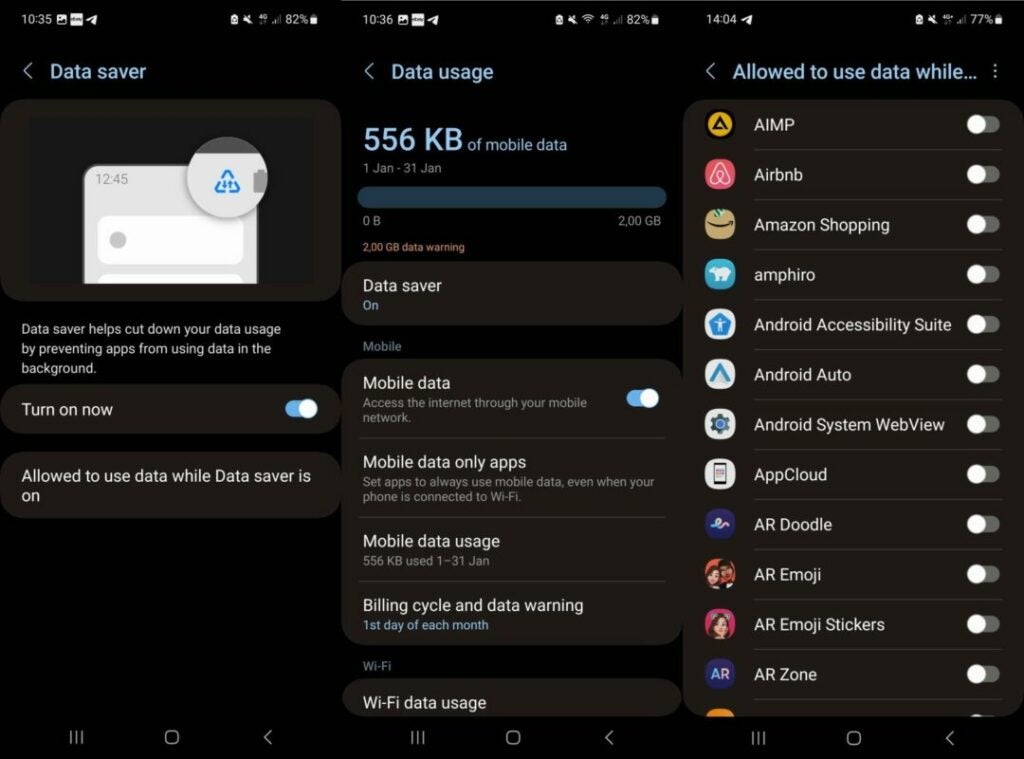
On Samsung devices, select Connections > Data usage.
On stock Android devices, like those made by Google, select Network and Internet > Data Saver.
Activate Data Saver so that it is set to the On state.
Setting the feature to on prevents Android apps from using data while in the background. While that is desirable for most apps, some apps may not function properly without background data access.
Android includes an option to exclude those apps from the restriction. Here is how that is done:
Go back to the Data Saver preference in Settings.
On Samsung devices, select “Allowed to use data while Data saver is on”.
On Google Pixel and other stock Android devices, select “Unrestricted data”.
The list of installed apps is displayed on the next page. Select the apps that may use background data.
Note that you may come back to the setting at any time to add more apps to the list of exclusions or remove them again.
Enabling data saver on Android devices may improve battery life, but it also may have an effect on bandwidth usage. Android devices with data plans benefit from this setting as well, as it reduces data usages while using mobile data.