10 Best Browsers Like Tor for Private and Anonymous Browsing

Find out what are the best browsers like Tor in 2023 in this in-depth comparison of the top market players: Tempest, Brave, Vivaldi, Opera, and more.

The internet has become a central part of our everyday lives. However, as we transition towards an increasingly digital world, protecting our online privacy has never been more critical.

Fortunately, private browsing has evolved rapidly over the years, with several best private browsers like Tor offering an unprecedented level of anonymity and security.

While Tor is one of the most popular browsers for private and anonymous browsing, several alternatives provide similar features and capabilities, which this article reviews to help you choose the best one for your needs.

Discover the top contenders in the browser market for 2023 as we delve into an extensive comparison of leading browsers similar to Tor. This in-depth analysis features Tempest, Brave, Vivaldi, Opera, and other prominent players.

Tempest DOWNLOAD FREE
10

An Overview of the Tor Browser

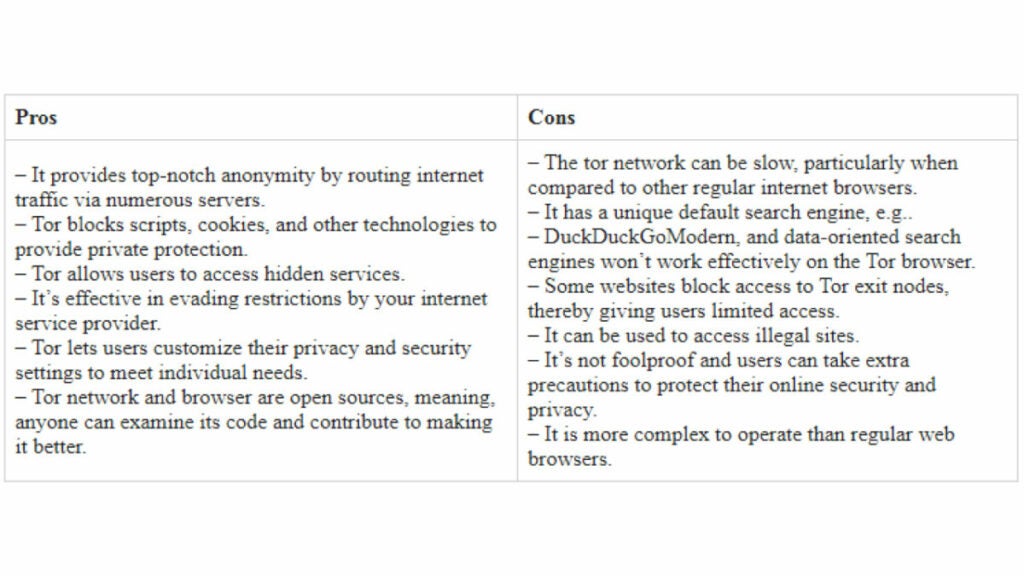
Tor, also known as The Onion Router, is one of the most widely used browsers for anonymous and private browsing. With Tor, every user’s internet traffic is encrypted and routed through multiple servers, obscuring their IP addresses and making their browsing history difficult to trace. Tor provides unparalleled privacy and security, especially for individuals looking to access the dark web.

However, despite its many benefits, Tor has some drawbacks, such as slow browsing speeds and a complicated interface. It’s not ideal for accessing some websites, such as those that require JavaScript to function, and it can often result in captchas or other verification measures, which can be frustrating for users.

If you’re considering Tor, it’s important to evaluate its features and compare them to other browsers that operate similarly. By doing so, you can determine which one best fits your needs and browsing habits, whether you prefer VPN or proxy browsers or secure browsers like Tor.

Best Browsers Like Tor: A Quick Summary

These browsers like Tor browser offer several features that promote private and anonymous browsing.

While each browser has its unique features and advantages, comparing them based on their strengths and weaknesses can help you make an informed decision when searching for the best browsers that operate like Tor.

1. Tempest Browser
Tempest Browser

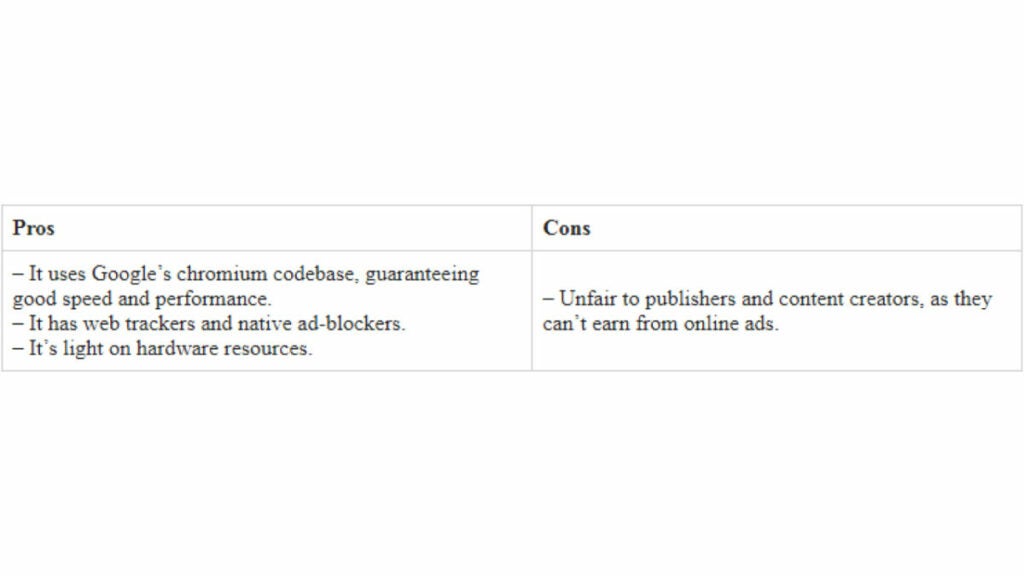
The Tempest Browser is a robust chromium-based browser that offers several privacy features, including ad-blocker, tracker blocker, and a built-in VPN, perfect for those seeking private browsing alternatives to Tor.

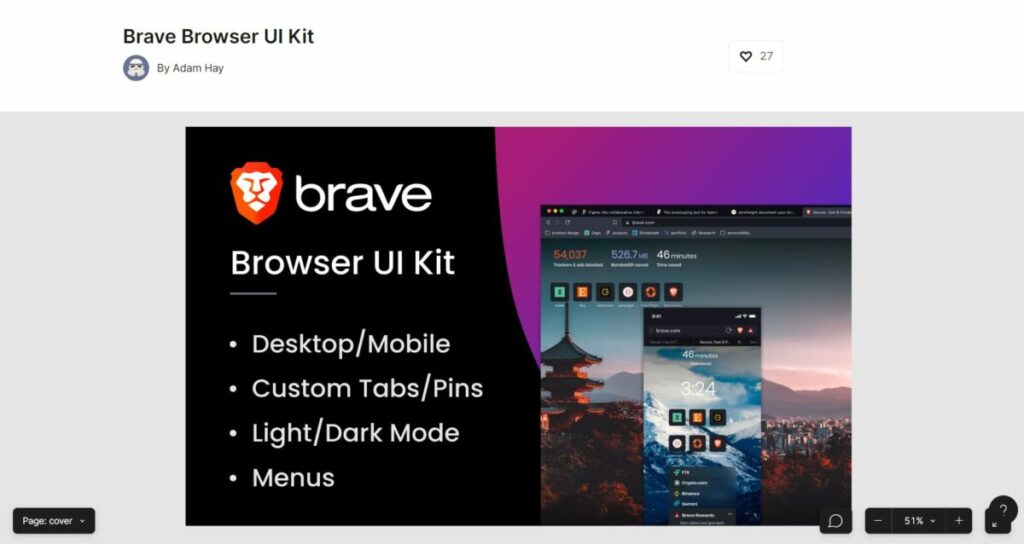
2. Brave Private Browser

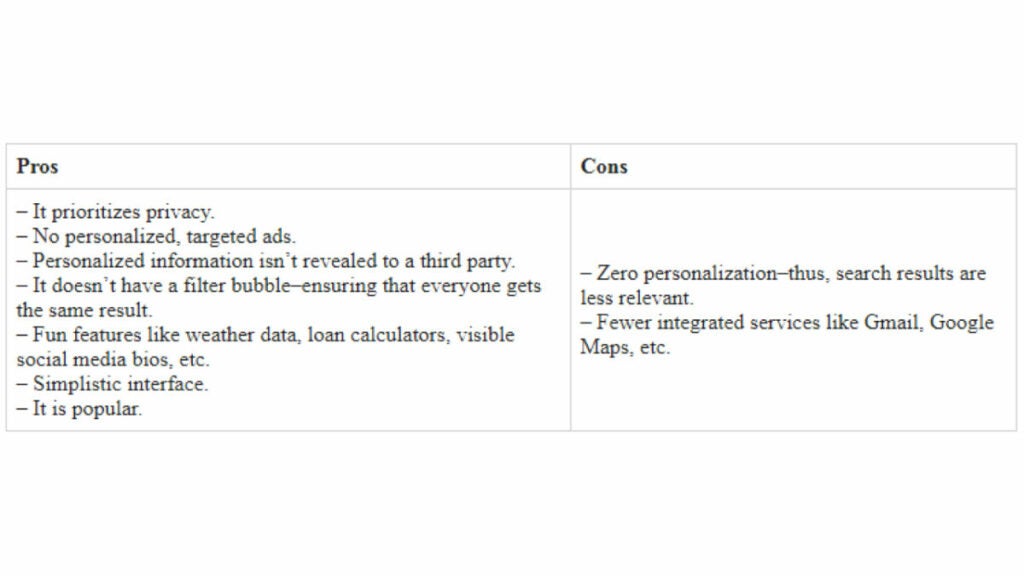
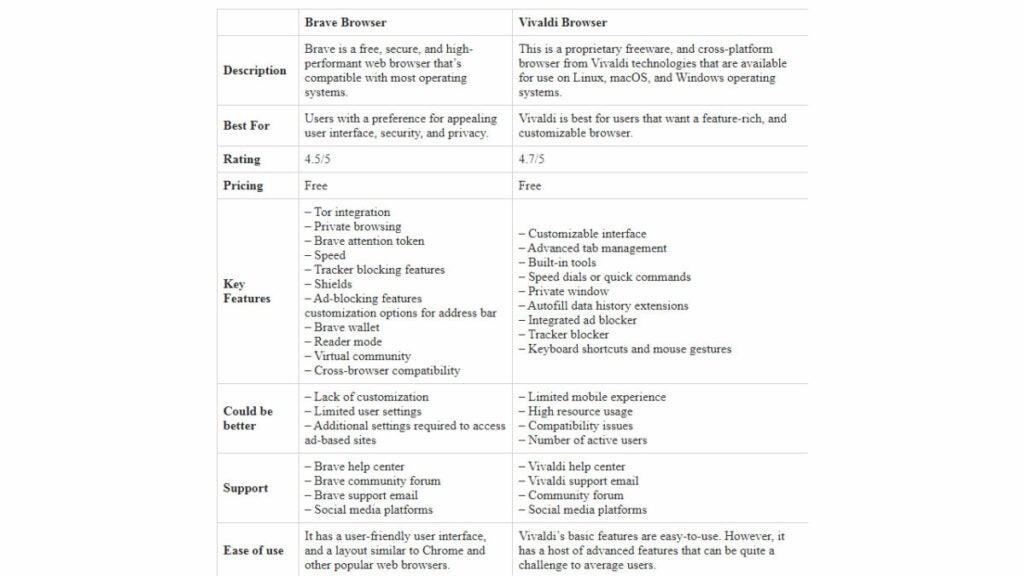
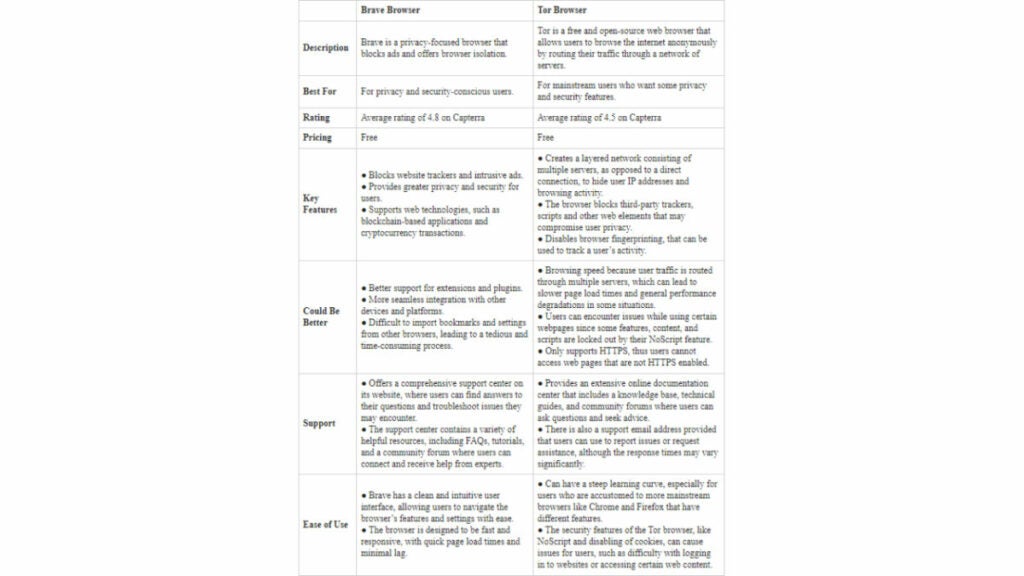
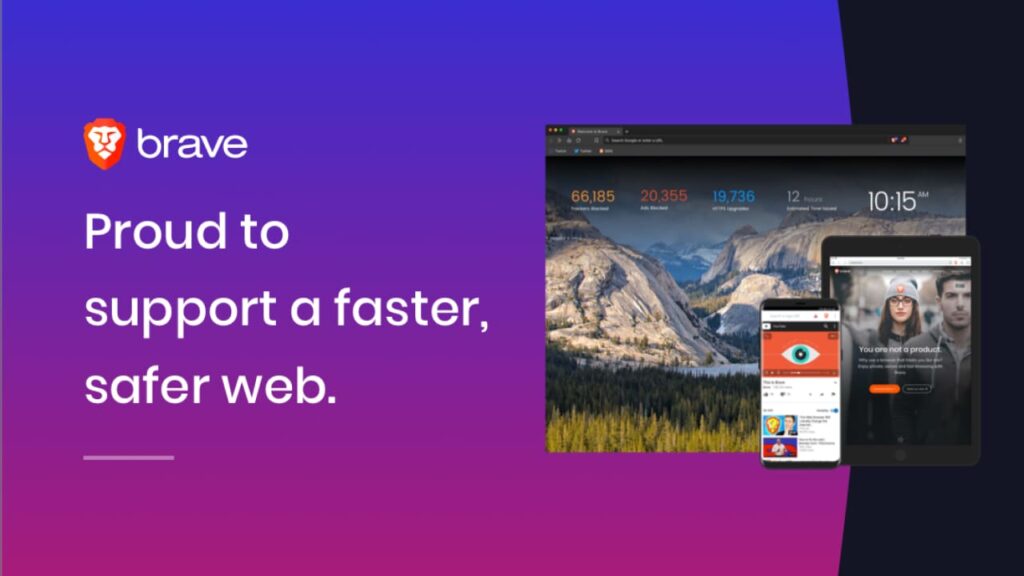
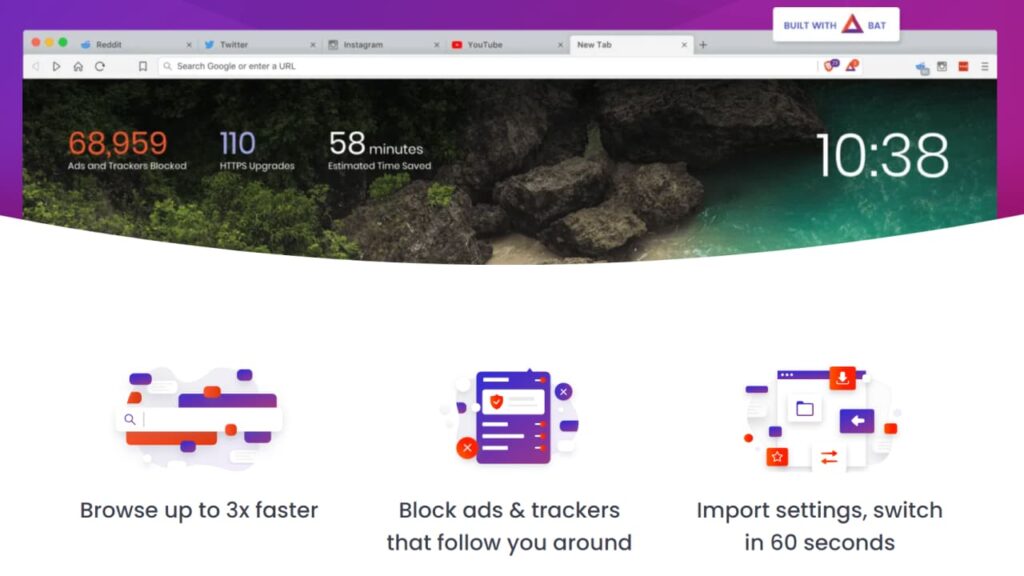
The Brave Browser is an open-source browser that boasts unparalleled privacy features, such as an advanced ad-blocker, tracker blocker, and HTTPS Everywhere integration, ensuring a secure and anonymous browsing experience while also supporting creators through BAT tokens.

3. Vivaldi Browser

The Vivaldi Browser aims to provide users with a customizable and secure browsing experience, offering features like ad-blocking, tracker blocking, encrypted synchronization, and a built-in email client.

4. Opera Browser

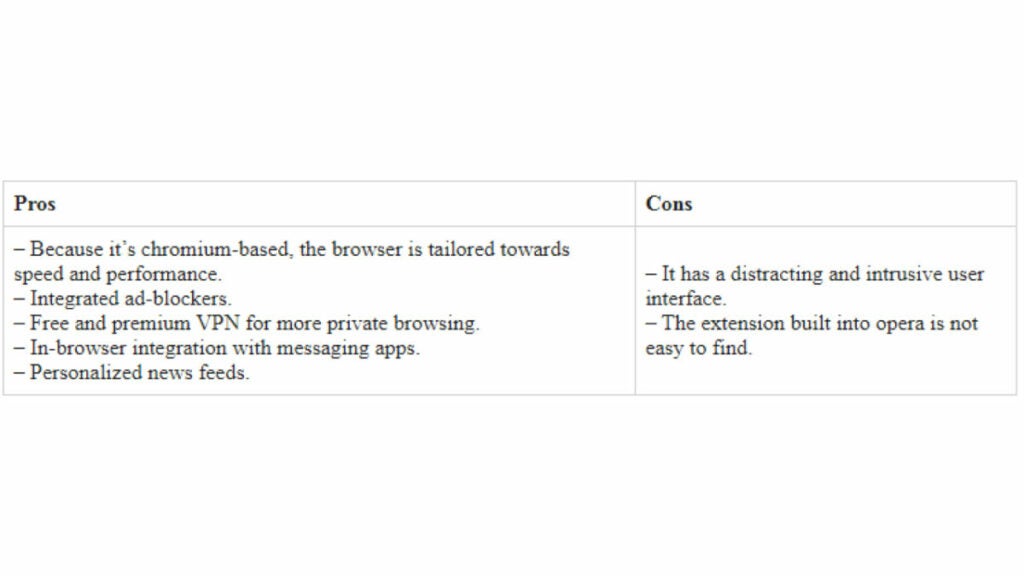
The Opera Browser is a popular Tor alternative that offers several features designed to improve security and privacy, including a built-in VPN, ad-blocker, tracker blocker, and an anti-cryptocurrency mining feature.

5. Epic Browser

The Epic Browser provides users with a private and secure browsing experience, thanks to its ad-blocker, tracker blocker, and encrypted proxy, preventing websites from tracking your online activity and hiding your IP address.

6. Maxthon Browser

With several privacy-focused features, like blocking ads, trackers, and pop-ups, the Maxthon Browser offers a secure browsing experience while also conserving bandwidth and data usage.

7. Waterfox

Built for speed and privacy, the Waterfox browser is a fork of Firefox that offers several features designed for anonymous browsing, including telemetry and fingerprinting protection, blocking all third-party cookies, and offering a range of privacy-focused extensions and themes.

8. Iridium Browser

The Iridium Browser offers users maximum privacy and security by default, including disabling search prediction, blocking third-party cookies, and ensuring a secure connection using HTTPS Everywhere by default.

9. SRWare Iron

Built on the Chromium engine, SRWare Iron offers users a private browsing experience by disabling Google’s data gathering features, blocking data leaks, and removing all useless additional features that may have privacy implications.

10. Pale Moon

The Pale Moon browser is a lightweight and fast browser that offers several privacy features, including ad-blocking, anti-fingerprinting, and anti-tracking features, providing a secure means for anonymous browsing.

Now, here’s a breakdown of each browser listed and explore why it’s an excellent alternative for those seeking a Tor-like browsing experience.

Browser 1: Tempest
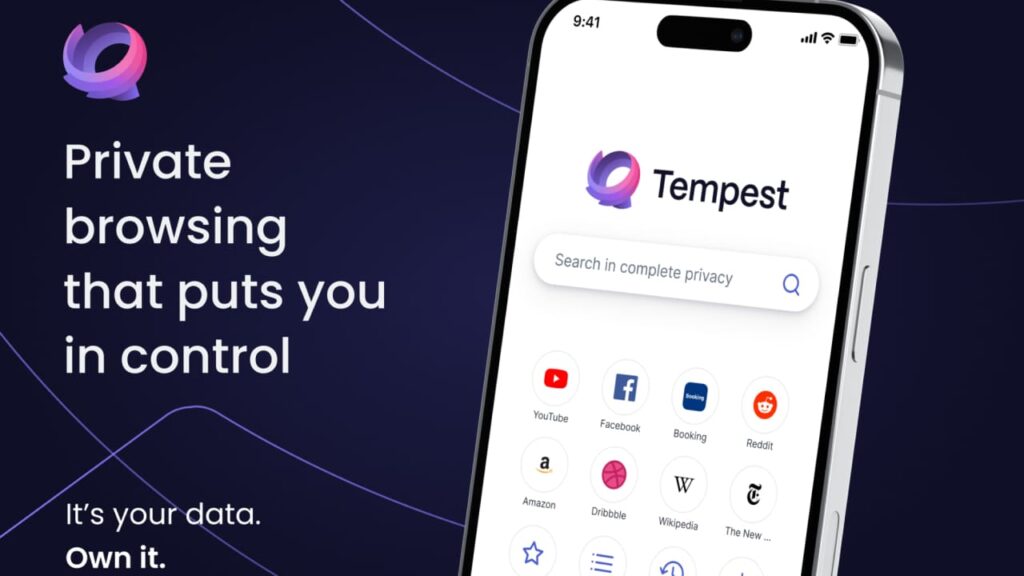
Tempest Browser

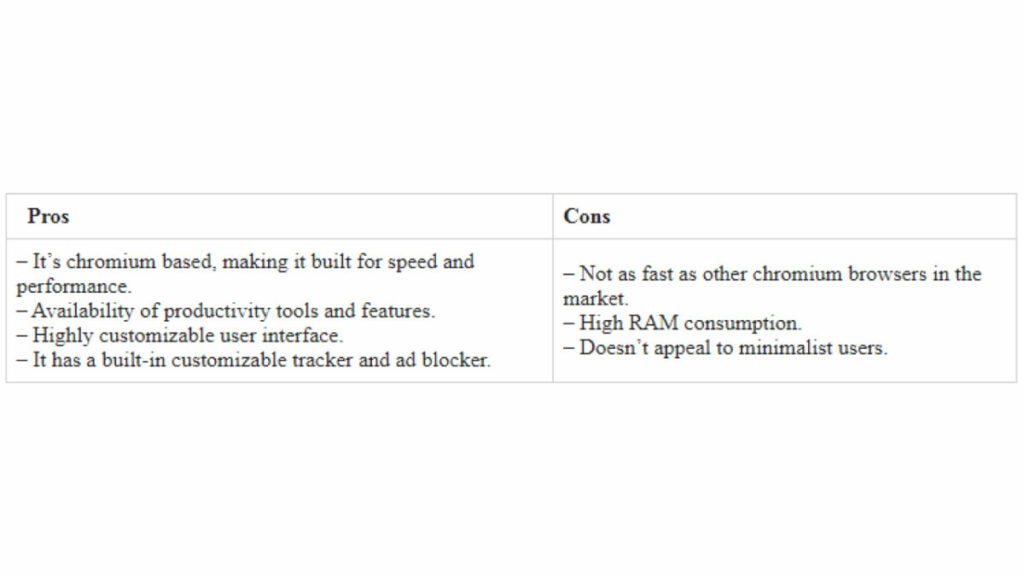
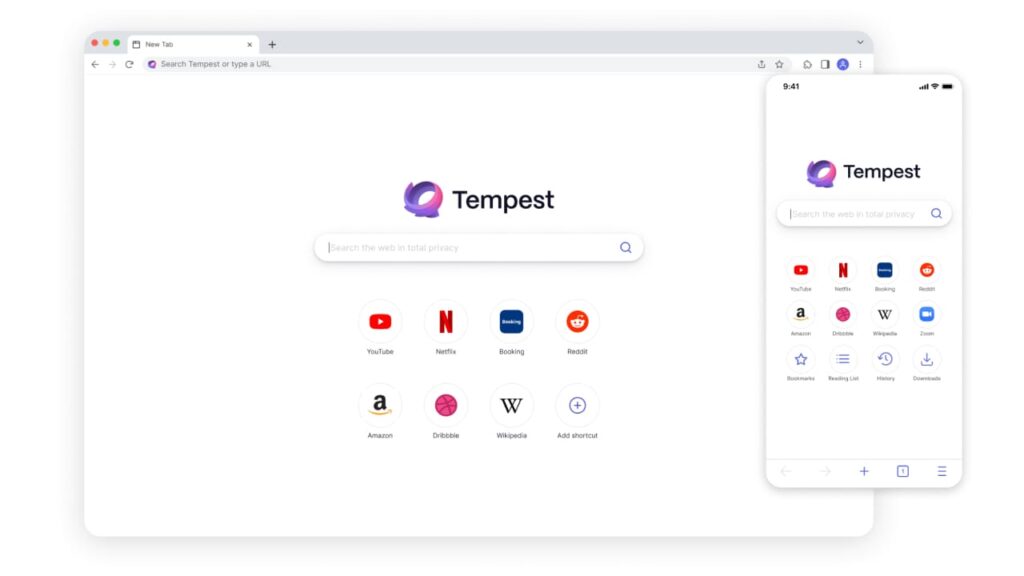
The Tempest Browser is a well-designed and feature-rich chromium-based browser that offers several tools and features designed to ensure users’ privacy and anonymity. It includes a built-in VPN, encrypted sync, and a private browsing mode that blocks trackers, cookies, and scripts.

Best Use Case

Tempest Browser is suitable for individuals who use public Wi-Fi networks regularly and require a secure connection to the internet while browsing. This browser is ideal for users who prioritize online privacy and anonymity. It’s also ideal for those who want to access geo-restricted content from other countries.

Pros

  • Provides an encrypted and secure built-in VPN service to protect your online activities.
  • Allows users to customize their privacy settings, including blocking or allowing cookies, pop-ups, and location tracking.
  • Blocks ads and trackers effectively, keeping your browsing history private.
  • Has a simple, yet intuitive user interface, making it easy to navigate and use for users of all levels.
  • Supports extensions and add-ons from the Chrome Web Store, allowing for additional customization and functionality.
  • Offers fast and reliable performance, allowing for smooth browsing and streaming.
  • Supports multi-platform use, making it accessible on a variety of devices including desktops, laptops, and mobile devices.
  • Provides a no-logs policy to protect your privacy and ensure your data is not collected or shared.

Cons

  • Does not offer unique features that distinguish it from other web browsers like Tor.
  • Limited configuration settings for advanced users.
  • May not work with some websites or services.
  • The VPN service requires a separate subscription.
  • May experience some website loading issues.

Device Performance

Tempest Browser is lightweight and fast, consuming minimal memory and processing power. It’s available for Windows, Mac, and Linux, making it an accessible alternative for users across multiple platforms.It operates smoothly on a variety of devices, including Macs. However, its performance may be slower on older or less powerful devices.

Other Factors to Consider

Tempest Browser operates on the Chromium engine, which is known for being well-optimized and fast. It provides users with several customization options, including the ability to disable JavaScript, block third-party cookies, and use incognito mode regularly. Additionally, the browser is known as being highly secure and private, making it an excellent Tor alternative for individuals concerned about their online privacy.

Overall, Tempest Browser is a fantastic browser for those seeking a private browsing experience that rivals Tor, but with fewer complicated settings to manage. Its built-in VPN and user-friendly interface make it a solid choice for those seeking privacy and security online.

Tempest DOWNLOAD FREE
10

Browser 2: Brave Private Browser

Brave

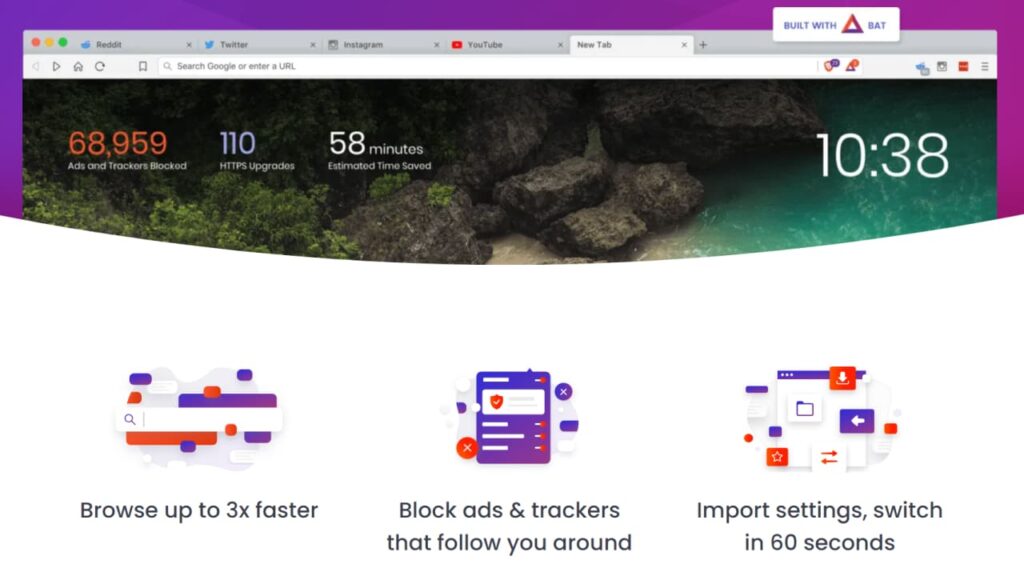
Built on the Chromium engine, the Brave Private Browser is an open-source browser that offers unparalleled privacy and security features, including automatic HTTPS upgrades, anti-fingerprinting, and ad-blocker. The browser also provides users with the option to earn rewards through its Basic Attention Token (BAT) program. It’s available for Windows, macOS, Linux, Android, and iOS.

Best Use Case

Brave Private Browser is an excellent choice for individuals who prioritize privacy and security while browsing, particularly those who are tired of intrusive ads and pop-ups. It is also a good browser for those who want to support their favorite content creators using BAT rewards.

Pros

  • Offers fast browsing speeds and a clean, user-friendly interface.
  • Provides users with an ad-blocker and anti-fingerprinting features.
  • Supports advanced security features, including HTTPS upgrade and auto-blocking of phishing and malware sites.
  • Optional Tor integration for even more privacy.
  • Provides users with control over their privacy and security settings.
  • Integrates a built-in cryptocurrency wallet for earning BAT tokens.

Cons

  • Certain websites may not work properly due to Brave’s aggressive ad and tracker blocking.
  • Some users may prefer a more traditional browser layout and interface, which Brave does not offer.
  • Limited extension library compared to other browsers.
  • Brave Rewards program may not be appealing to all users and some may find it intrusive.
  • No native VPN support.

Device Performance

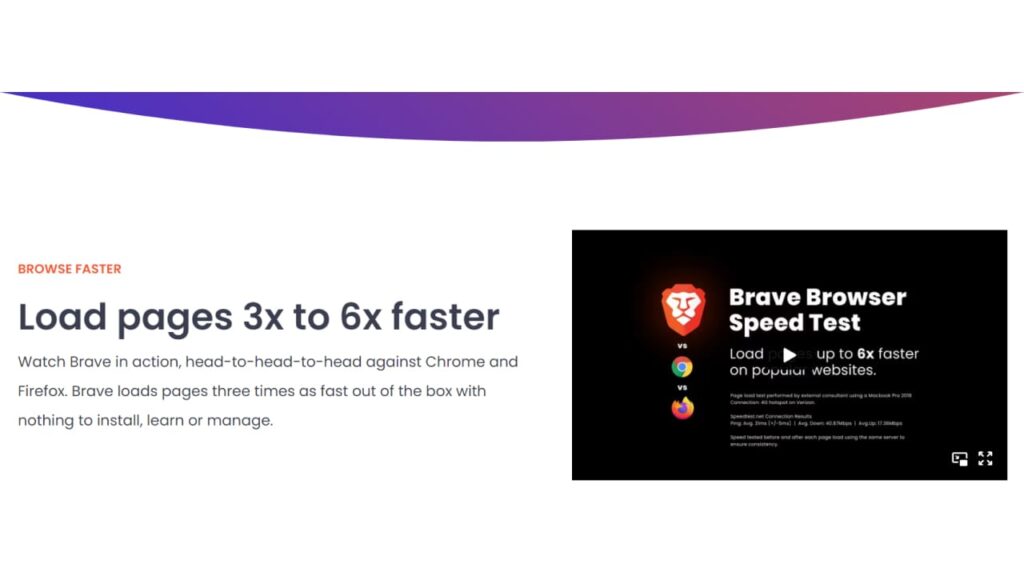
Brave works similarly to most other Chromium-based browsers, delivering a smooth and reliable performance across multiple devices. It runs well on Windows, Linux, macOS, and mobile devices, with good page loading times and minimal resource usage, giving users the flexibility to use it across their favorite platforms. However, some users may experience slower speeds on mobile devices, particularly when using the Tor integration.

Other Factors to Consider

Brave’s aggressive ad-blocking and anti-tracking features are ideal for anyone looking for greater control and privacy during browsing. In addition, the browser provides users with a mobile version of its cryptocurrency wallet, allowing them to track their rewards and donations effortlessly. The BAT rewards system is an excellent incentive for those who want to support their favorite creators, but some users may consider it unnecessary clutter.

Overall, Brave Private Browser is a privacy-focused browser that can rival Tor and other similar users. It’s an excellent browser that offers advanced features and control over your privacy settings, while providing you with a seamless browsing experience.

Browser 3: Vivaldi Browser
Vivaldi Browser

Vivaldi Browser is a secure and private browser that offers features similar to those of Tor. It’s based on the Chromium codebase, offering users a fast and reliable browsing experience without sacrificing their privacy. Vivaldi Browser blocks trackers and ads to provide an anonymous online experience, while also allowing users to customize their browser settings as they see fit.

Best Use Case

Vivaldi Browser is ideal for users who want a secure web browsing experience with a customizable interface. Since it’s based on the Chromium engine, it’s just as compatible with Chrome extensions and themes as other browsers in the same family. It also allows users to adjust various parameters related to their privacy settings, giving them more control over how their data is handled online. It also has several features designed to maximize privacy and security, such as tracking protection, anti-fingerprinting technology, and support for VPNs and proxy servers. Vivaldi supports Tor Onion routing for those who want a more private and anonymous browsing experience.

Pros

  • Based on the Chromium browser, making it compatible with Chrome extensions and themes.
  • Provides advanced privacy features such as tracking protection, anti-fingerprinting technology, and support for proxy servers and VPNs.
  • Supports Tor Onion routing for anonymous browsing.
  • Offers end-to-end encryption for synced data.
  • Supports multiple search engines and custom search engines.

Cons

  • Does not offer any dark web or onion site access.
  • Can sometimes be slower than other popular browsers due to its privacy features.
  • Can be resource intensive, especially on older devices.
  • Lacks some of the advanced privacy features found in other browsers.
  • Limited extension library compared to other popular browsers.

Device Performance

Vivaldi Browser is highly optimized for both desktop and mobile devices, enabling users to enjoy a fast and secure browsing experience regardless of their hardware. It also has a low-memory footprint, making it suitable for low-end devices with limited resources. Vivaldi Browser offers user-friendly features, such as tab stacking and note taking, allowing users to stay organized while browsing the web. Since it’s based on the Chromium engine, it runs just as smoothly as other browsers in the same family.

Other Factors to Consider

Vivaldi Browser is a reliable and secure browser that offers features to maximize user privacy. It also has several customization options, allowing users to adjust their browsing experience according to their needs. It’s open source and regularly updated with new features and bug fixes, ensuring users enjoy an optimal browsing experience at all times. It’s also highly optimized for older computers and low-end devices, allowing users with limited hardware resources to enjoy a secure and private browsing experience without sacrificing performance.

Overall, Vivaldi Browser is a great option for users who want a secure and private browsing experience with plenty of customization options. It’s also highly optimized for both desktop and mobile devices, allowing users to enjoy an anonymous online experience regardless of their hardware.

Browser 4: Opera Browser
Opera Browser is one of the most secure VPN browsers that’s based on the Chromium engine. It offers users a streamlined browsing experience with plenty of features to maximize their privacy and security. Opera Browser comes with an integrated ad blocker, tracker blocker, and anti-fingerprinting protection to ensure users can browse the web anonymously. It also supports proxy servers and Tor Onion routing for those who want additional levels of privacy and security.

Best Use Case

Opera Browser is ideal for users who need a secure and private browser that’s compatible with Chrome extensions, themes, and other popular plugins. Since it’s based on the Chromium engine, it runs just as smoothly as other browsers in the same family.

Pros

  • Offers advanced privacy features, such as tracking protection and anti-fingerprinting technology.
  • Comes with a free VPN that allows users to browse anonymously and access content that is otherwise restricted in their country.
  • Supports Tor Onion routing for anonymous browsing.
  • Offers end-to-end encryption for synced data.
  • Supports multiple search engines and custom search engines.
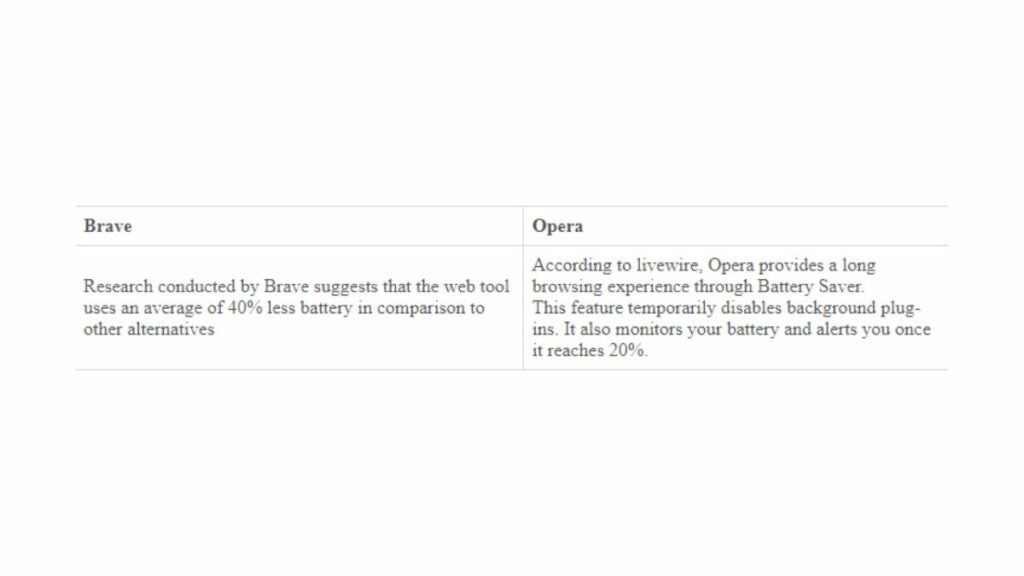
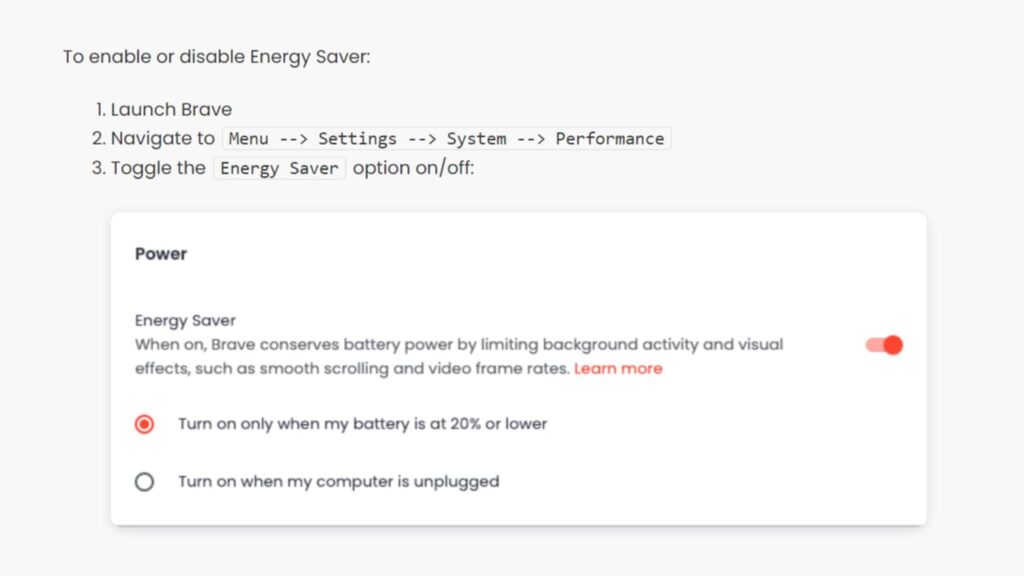
  • Has a battery saver feature that extends the battery life of laptops and mobile devices.

Cons

  • Does not offer any dark web or onion site access.
  • Can sometimes be slower than other popular browsers due to its privacy features.
  • Lacks some of the advanced privacy features found in other browsers.
  • May require a significant amount of resources, particularly on older devices.
  • Limited set of customization options when compared to other browsers.
  • The free VPN only offers three locations to choose from, which may not be enough for some users.
  • Limited extension library compared to other popular browsers.

Device Performance

Opera Browser is optimized for both desktop and mobile devices, allowing users to enjoy a fast and secure browsing experience regardless of their hardware. It’s also lightweight and has a low-memory footprint, making it suitable for low-end devices with limited resources.

Other Factors to Consider

Opera Browser is open source and regularly updated with bug fixes and new features, ensuring users enjoy an optimal browsing experience at all times. It’s also highly optimized for older computers and low-end devices, allowing users with limited hardware resources to enjoy a secure and private browsing experience without sacrificing performance.

Overall, Opera Browser is an excellent choice for users who need a secure and private browser that offers plenty of features to maximize user privacy. It’s also lightweight and highly optimized for both desktop and mobile devices, making it perfect for users with limited hardware resources.

Browser 5: Epic Browser
Epic Browser is a secure and anonymous browser that focuses on user privacy and anonymity. It includes features such as ad-blocker, tracker blocker, and encrypted proxy that ensure users’ online activity is kept private while browsing. The browser is available for Windows and Mac users.

Best Use Case

Epic Browser is ideal for users who prioritize their online privacy and security, especially those who need to access the dark web sites. It’s perfect for anyone who is looking for a browser that offers the same level of privacy and anonymity as Tor. Epic Browser is also suitable for users who frequently use public Wi-Fi hotspots and who want to keep their internet activities private, without having to worry about their personal information being tracked or monitored. It’s also useful for those who want a dark web browser or those who need to access censored websites and online services.

Pros

  • Offers a high level of privacy and anonymity with several built-in tools.
  • Provides users with ad-blocker and tracker blocker to limit intrusive ads and protect against tracking.
  • Uses HTTPS encryption for secure browsing.
  • Includes a built-in encrypted proxy to ensure secure browsing.
  • Designed to be user-friendly, enabling easy navigation and use.
  • Uses Chromium-engine, providing compatibility with several extensions and add-ons.

Cons

  • Limited platform options (available for Windows and MacOS only).
  • No built-in VPN, which enforces further privacy protection.
  • Current user base is relatively small, resulting in limited support resources.
  • Limited selection of add-ons and extensions.
  • Some websites may not work properly due to the built-in privacy features.

Device Performance

Epic Browser offers fast browsing speeds and consumes minimal system resources, making it an excellent option for older and lower-end systems. It’s compatible with Windows and Mac and offers several add-ons and extensions. It has a fast and reliable performance, and is designed to work seamlessly on most devices.

Other Factors to Consider

The browser includes several features that promote anonymity and privacy, including preventing fingerprinting techniques, blocking third-party cookies, and deleting browser history automatically. The browser also comes with a range of default privacy settings, helping users set up and achieve the desired level of anonymity efficiently.

Epic Browser is a relatively new, lesser-known Tor alternative, although it has the potential to match other privacy browsers, especially for users looking for a simple, user-friendly interface with a range of privacy-focused features. With its built-in ad blocker, tracker blocker, and HTTPS encryption, it’s designed to protect your online privacy while allowing you to browse the web securely and anonymously.

Browser 6: Maxthon Browser
Maxthon Browser is a secure and private web browser that offers users an anonymous online experience. It comes with several features designed to maximize user privacy, such as its integrated ad blocker, tracker blocker, and anti-fingerprinting technology. It also supports proxy servers and VPNs for those who want additional levels of privacy and security.

Best Use Case

Maxthon Browser is ideal for users who need a secure and private browsing experience with plenty of customization options. Since it’s based on the Chromium engine, it runs just as smoothly as other browsers in the same family. It also has several features designed to maximize privacy and security, including an integrated ad blocker, tracker blocker, and anti-fingerprinting protection. It supports proxy servers, VPNs, and Tor Onion routing for those who want additional levels of privacy and security.

Pros

  • Offers advanced privacy features such as tracking protection and anti-fingerprinting technology.
  • Comes with a free VPN that allows users to browse anonymously and access content that is otherwise restricted in their country.
  • Supports Tor Onion routing for anonymous browsing.
  • Has a split screen feature that allows users to open two windows side-by-side.
  • Cloud-based syncing across devices.
  • Easy-to-use password manager.
  • Built-in ad blocker and anti-tracking tools.

Cons

  • Does not offer any dark web or onion site access.
  • Limited extension library compared to other browsers.
  • Some users may find the cloud-based syncing intrusive.
  • Uses proprietary technology instead of open source.
  • Limited customization options compared to other browsers.

Device Performance

Maxthon Browser is optimized for both desktop and mobile devices, allowing users to enjoy a fast and secure browsing experience regardless of their hardware. It’s also lightweight and has a low-memory footprint, making it suitable for low-end devices with limited resources.

Other Factors to Consider

Maxthon Browser is regularly updated with bug fixes and new features, ensuring users enjoy an optimal browsing experience at all times. It’s also highly optimized for older computers and low-end devices, allowing users with limited hardware resources to enjoy a secure and private browsing experience without sacrificing performance.

Overall, Maxthon Browser is a fantastic option for those searching for secure and private browsers like Tor. With its range of privacy features and customizable options, it’s a top choice for anyone looking to protect their online privacy.

Browser 7: Waterfox
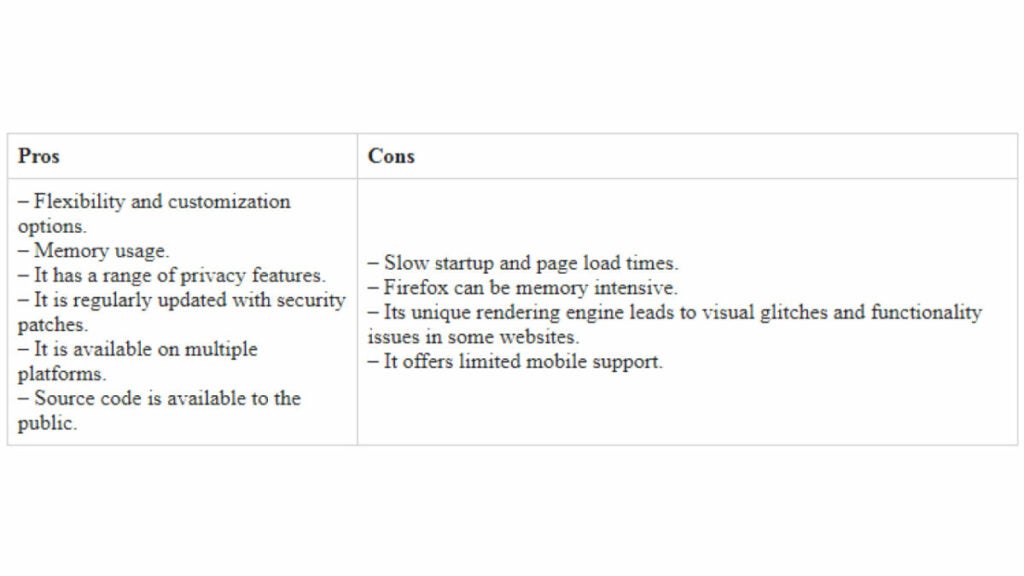
Waterfox is an open-source browser that delivers fast browsing speeds, enhanced privacy, and security features. It is a Firefox browser fork, making it one of the best browsers like Tor to offer advanced privacy protection without compromising performance. It’s designed to offer a faster and more private browsing experience. It comes with several privacy-focused features, such as tracker blocking, cookie management, and DNS over HTTPS. It also supports add-ons and extensions, including those that are compatible with Firefox.

Best Use Case

Waterfox is suitable for users who prefer a highly secure browsing experience and who are comfortable configuring privacy and security settings. It’s ideal for users who want to limit their use of third-party services while browsing and want a browser that prioritizes privacy and security. It’s a great choice for those who want to browse the web anonymously and avoid tracking.

Pros

  • Fast browsing speeds and minimal memory usage compared to other privacy-focused browsers.
  • Provides users with control over privacy settings, including disabling telemetry and blocking third-party cookies.
  • Includes a range of customization options and supports many Firefox add-ons.
  • Provides advanced DNS over HTTPS and tracking prevention features.
  • Supports both VPN and proxy connections.

Cons

  • Some websites may not load correctly due to strict privacy settings.
  • Has limited support resources compared to more well-known alternatives.
  • Lacks some features, such as a built-in VPN and ad-blocker.
  • Not as well-known as other browsers, so some websites may not be optimized for it.

Device Performance

Waterfox is available for Windows, MacOS, and Linux, making it accessible to users across different platforms. The browser is highly optimized, providing fast browsing speeds, making it ideal for users with older and low-end devices.

Other Factors to Consider

Waterfox’s focus on privacy and security makes it one of the best Tor alternatives for those looking for an anonymous and secure browsing experience. The browser offers a range of features to help protect user data, such as disabling telemetry and blocking third-party cookies. It also supports proxy servers and VPNs, allowing users to browse the web securely and anonymously.

Waterfox is a great alternative to Tor for those who want a similar browsing experience without the need for the Tor network. While it’s not exclusively a dark web browser, Waterfox can be used to access .onion sites and other hidden services. Unlike some other anonymous browsers, Waterfox is completely free to use.

Browser 8: Iridium Browser
Iridium Browser is a free, open-source browser that focuses on privacy and security. It’s based on the Chromium codebase, making it compatible with Chrome extensions and themes. While it looks similar to Chrome, Iridium provides more advanced privacy features, such as an ad blocker and tracker blocker. It also supports HTTPS Everywhere to ensure secure browsing.

Best Use Case

Iridium Browser is ideal for users who want to enjoy a secure browsing experience without sacrificing performance or usability. It’s designed for those who need a simple web browser that prioritizes their privacy while offering a fast and reliable browsing experience. It also works well for users who want to customize their browser settings but don’t have the technical skills to do so. It’s an excellent choice for those who want to browse the web without having their data tracked, stored, or sold to third-party advertisers.

Pros

  • Based on the Chromium browser, making it compatible with Chrome extensions and themes.
  • Provides advanced privacy features, such as a tracker blocker and an ad blocker.
  • Supports HTTPS Everywhere to ensure secure browsing.
  • Allows users to customize their privacy settings to their preferences.
  • Provides support for proxy servers and VPNs.
  • Supports Tor Onion routing for anonymous browsing.

Cons

  • Not as well-known as other browsers, so some websites may not be optimized for it.
  • Limited availability of extensions and add-ons compared to other browsers.
  • May not have the same level of performance and speed as other Chromium-based browsers due to the extra privacy and security features.
  • The default settings may not be suitable for all users and some customization may be necessary to optimize performance and privacy.
  • The lack of automatic updates may require manual updates, which can be time-consuming for some users.
  • The browser may not support some websites and web applications that require specific browser configurations.
  • Some users may prefer a more modern and visually appealing interface. 

Device Performance

Iridium Browser is designed to maximize performance on both desktop and mobile devices, ensuring users get a fast, reliable browsing experience regardless of their hardware. This makes it ideal for those who don’t want their browsing speeds and performance sacrificed due to privacy settings. Iridium Browser is highly optimized for older computers and low-end devices, allowing users with limited hardware resources to enjoy a secure and private browsing experience without sacrificing performance. Its performance is similar to that of other Chromium-based browsers, but its privacy features can sometimes slow down browsing speeds.

Other Factors to Consider

Iridium Browser is available for Windows, macOS, and Linux operating systems. It’s also an excellent option for those looking for a VPN or a dark web browser.

The browser is updated regularly to ensure users are always provided with the latest features and security patches. It’s a great alternative to Tor, offering high levels of privacy and anonymity.

Iridium Browser has a dedicated support team that’s available to help users with any of their questions or issues. However, like other secure browsers, it may not always work seamlessly with certain websites or applications.

Overall, if you’re looking for a secure, privacy-focused browser that operates like Tor, Iridium is definitely worth trying out. It’s a great option for those who prioritize online privacy and want to keep their data truly anonymous.

Browser 9: SRWare Iron
SRWare Iron is an open source and feature-rich web browser that offers a secure and private browsing experience. It’s based on the Chromium engine, so it runs just as smoothly as other browsers in the same family. However, it has several features designed to maximize user privacy, such as its integrated ad blocker, tracker blocker, and anti-fingerprinting technology. It supports proxy servers and VPNs for those who want additional levels of privacy and security.

Best Use Case

SRWare Iron is ideal for users who need a secure browsing experience with plenty of customization options. With its built-in ad blocker, tracker blocker, anti-fingerprinting protection, and support for proxy servers and VPNs, it’s a great option for those who value their online privacy.

Pros

  • Offers advanced privacy features, such as tracking protection and anti-fingerprinting technology.
  • Comes with a free VPN that allows users to browse anonymously and access content that is otherwise restricted in their country.
  • Supports Tor Onion routing for anonymous browsing.
  • Has an integrated pop-up blocker and script blocker.
  • Cloud-based sync across devices.
  • Supports extensions from the Chrome Web Store.

Cons

  • Not as widely used as other browsers, so there may be compatibility issues with some websites.
  • Limited extension library compared to other browsers.
  • Cloud-based syncing could be considered intrusive by some users.

Device Performance

SRWare Iron is optimized for both desktop and mobile devices, allowing users to enjoy a fast and secure browsing experience regardless of their hardware. It’s also lightweight and has a low-memory footprint, making it suitable for low-end devices with limited resources.

Other Factors to Consider

SRWare Iron is regularly updated with bug fixes and new features, ensuring users are always up-to-date on the latest security patches. Its open source nature allows users to modify the browser as they see fit.

Overall, SRWare Iron is an excellent choice for those looking for secure and private browsers like Tor. With its range of privacy features and customizable options, it’s a great option for anyone searching for a reliable and secure browser.

Browser 10: Pale Moon

Pale Moon is an open source web browser designed to maximize user privacy while maintaining a lightweight and fast experience. It’s based on the Firefox engine, so it has all the features of a modern browser such as tabbed browsing, bookmarks management, and support for add-ons. It has several features specifically designed to protect user privacy, such as its built-in ad blocking and tracking protection.

Best Use Case

Pale Moon is ideal for users who need a secure and private browsing experience but don’t want to sacrifice performance. With its range of security features and customizable options, it’s a great option for those who value their online privacy.

Pros

  • Offers advanced privacy features, such as ad blocking and tracking protection.
  • Comes with a range of customization options, such as the ability to adjust font sizes and disable animations.
  • Supports Tor Onion routing for anonymous browsing.
  • Has an integrated pop-up blocker and script blocker.
  • Cloud-based sync across devices.
  • Compatible with Firefox extensions.

Cons

  • Due to its lower usage, compatibility problems with certain websites may occur when using this browser.
  • Its extension library has fewer options than other browsers.
  • Cloud-based syncing may be viewed as invasive by certain users.
  • Not as secure as Tor for accessing the dark web.

Device Performance

Pale Moon is optimized for both desktop and mobile devices, allowing users to enjoy a fast and secure browsing experience regardless of their hardware. It’s also lightweight and has a low-memory footprint, making it suitable for low-end devices with limited resources.

Other Factors to Consider

Pale Moon is regularly updated with bug fixes and new features, ensuring users are always up-to-date on the latest security patches. Its open source nature allows users to modify the browser as they see fit.

Overall, Pale Moon is an excellent choice for those looking for secure and private web browsers like Tor. With its range of security features and customizable options, it’s a great option for anyone searching for a reliable and secure browser. If you’re looking for a fast and customizable browser that also offers privacy and security features, Pale Moon is worth considering.

A Summary of the Browsers Like Tor

Here is a summary of the browsers discussed, along with their key features, to help you choose the best browser for your requirements.

1. Tempest Browser
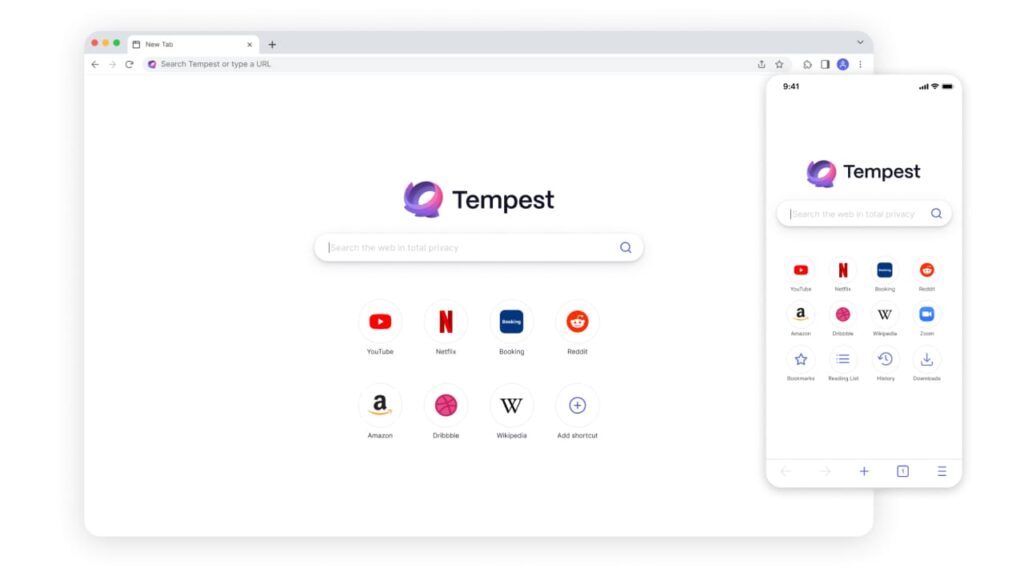
  • Offers several privacy features, including ad-blocker and tracker blocker.
  • Excellent for browsing the dark web anonymously or accessing censored websites and online services.
  • Offers users an encrypted and secure VPN service.
  • Allows users to customize their privacy settings.
  • Can block ads and trackers effectively.
  • Simple yet intuitive user interface.

Tempest DOWNLOAD FREE
10

2. Brave Private Browser

  • ​​Open-source browser that is transparent in its operations and constantly being improved by the community.
  • Blocks trackers and ads by default to prevent online tracking and data collection, enhancing user privacy.
  • Provides options to adjust privacy settings and shield blocking according to the user’s preferences.
  • Has anti-fingerprinting support, which further protects user privacy.
  • Built-in cryptocurrency wallet, which allows users to earn Basic Attention Token (BAT) rewards by opting into privacy-respecting ads.
  • Provides advanced security features, such as HTTPS upgrade and auto-blocking of phishing and malware sites, to keep users safe online.

 3. Vivaldi Browser

  • Offers a range of customization options, including color schemes, user interface options, and keyboard shortcuts.
  • Provides users with immersive visual tools, including a side panel for bookmarks and notes.
  • Offers advanced privacy features, including a tracker blocker, a built-in ad-blocker, and cryptocurrency wallet support.
  • Provides advanced tabs management features that improve the browsing experience.
  • Offers productivity-focused features, such as a split-screen.

4. Opera Browser

  • Offers a built-in VPN, providing users with secure and anonymous browsing capabilities.
  • Includes a built-in ad-blocker, reducing the number of ads and pop-ups users encounter during browsing.
  • Provides anti-crypto mining protection, preventing websites from using a device’s processing power to mine cryptocurrency.
  • Uses Opera Turbo, which compresses webpage data, resulting in faster browsing speeds.
  • Provides users with several user customization options, such as page zooming and sidebar integration.

5. Epic Browser

  • Promotes user privacy and anonymity with built-in ad-blocker, tracker blocker, and encrypted proxy.
  • Ideal for users who require privacy and security while browsing, including those who access the dark web.
  • Designed for ease of use and navigation.
  • Offers fast and efficient browsing speeds and consumes minimal system resources.
  • Current active user base is relatively small, resulting in limited support resources.

6. Maxthon Browser

  • Fast and lightweight browser with minimal memory usage.
  • Offers several privacy features, including ad-blocker, anti-tracking, and anti-cookie tracking.
  • Provides a customizable interface with a range of themes and skins.
  • Offers a built-in note-taking tool and password manager.
  • Supports multi-tab browsing and dual display engines to ensure compatibility with older websites.
  • Offers several cloud-based services for synchronization and sharing across multiple devices.

7. Waterfox

  • Fast browsing speeds and minimal memory usage.
  • Advanced privacy and security settings, including disabling telemetry and blocking third-party cookies.
  • Compatible with Firefox add-ons with a range of customization options.
  • Provides advanced DNS over HTTPS and tracking prevention features.

8. Iridium Browser

  • Disables search prediction and autocomplete to prevent data leaks.
  • Blocks third-party cookies and limits fingerprinting.
  • Offers DNS resolution through a local proxy for further security.
  • Includes extensive script blocking for enhanced privacy.
  • Allows users to import and tweak security settings from other Chromium-based browsers.
  • Uses HTTPS Everywhere by default for secure browsing.
  • Supports popular Chrome extensions for maximum functionality and convenience.

9. SRWare Iron

  • Built on the Chromium engine for compatibility and fast browsing speeds.
  • Provides several privacy-focused features, such as disabling Google data gathering and blocking data leaks.
  • Includes an ad-blocker and anti-tracking features.
  • Supports extensions and add-ons from the Chrome Web Store.
  • Provides users with control over their privacy settings, including the ability to block third-party cookies and prevent fingerprinting.

10. Pale Moon

  • Secure browser that emphasizes speed and efficiency over other features.
  • Based on the Firefox engine, making it a reliable alternative to Tor.
  • Comes with several privacy features that include blocking third-party cookies, ad-blocker, and anti-fingerprinting features.
  • Can customize various settings, including toggling CSS, images, and JavaScript for optimal browsing experience.
  • Lightweight and fast, requiring minimal resources to operate, making it ideal for older and lower-end devices.

There are several private browsers like Tor available, each with its unique features and advantages. While Tor remains a top choice, the ten browsers highlighted provide viable alternatives for users that prioritize privacy and security.
Best Private Browsers for iOS: 2023 Edition

Find out what is the best private browser for iOS in 2023 in our in-depth comparison of the top players: Tempest, Onion, Microsoft Edge, and more.

Privacy has become increasingly important over recent years, particularly as our smartphones have become more and more integrated into our daily lives.

For iPhone and iPad users, their devices hold a wealth of personal information, making it vital that they use a private browser that clears when closed and ensures they are not being tracked. With a host of options available in the market, choosing the best private browser for iOS that suits your needs can be overwhelming.

Find out the most efficient and safest private browsers for iOS in 2023 that offer maximum privacy and security. Whether you’re an iPhone, iPad or iPod Touch user, this article will help you find the best private mobile browser for your iOS device.

In this article, we’re going to explore the best private browsers for iOS in 2023, including Tempest, Onion Browser, Microsoft Edge, and other notable options, aiming to determine which one is considered the best by conducting an in-depth comparison.

Tempest DOWNLOAD FREE
10

Best Private Browser for iOS: A Quick Summary

Many iOS users may ask the question: Is there a private browser for iPhone and iPad?

The answer is a resounding “yes”! With the right private mobile browser for iPhone and iPad, you can browse the web without worrying about your data being tracked or compromised.

With a range of options available, it can be difficult to know which one to choose. Fortunately, this quick summary will help you decide which private mobile browser is right for you.

1. Tempest Browser

This is one of the most private iOS browsers that keeps your activity completely anonymous and all data encrypted. Tempest is designed to protect you from being tracked online and it also blocks third-party trackers, ads, and malware that can compromise your device’s security. Tempest also clears all browsing data when you exit the browser or switch to another app.

2. Onion Browser

This is one of the most secure no tracking browsers for iOS users as it uses the Tor network, which helps keep your identity anonymous while browsing the web. With Onion Browser, you never have to worry about leaving behind a digital footprint as it automatically clears cookies and other web history when you leave a website. It also has an in-built ad blocker and VPN connection.

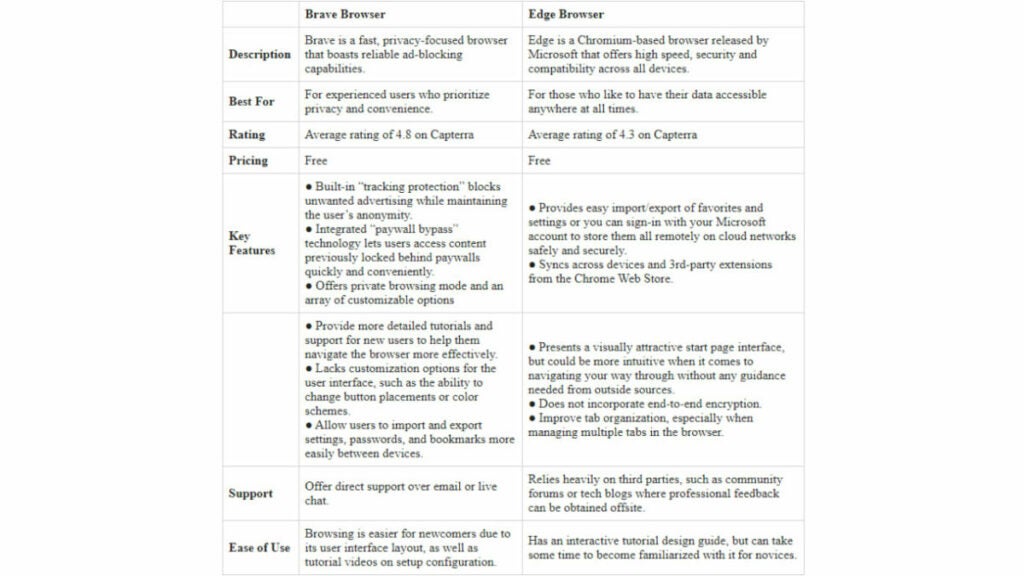
3. Microsoft Edge

This is another private browser for iPads and iPhones and provides strong privacy protection by blocking trackers, cookies, and malicious sites. It also allows you to sync your browsing history across all your devices, making it easy to access your favorite websites wherever you go. It also has an “InPrivate” mode, which means that no data is stored on your device when you close the window after use.

4. Brave Private Browser

This is a fast and secure browser for iOS that has built-in anti-tracking technology and blocks ads and malicious software from accessing your device. It also includes an encrypted proxy feature that can disguise your IP address and location to keep your online identity safe.

5. Opera Browser

This is one of the fastest and most secure browsers for iOS that clears when closed, which means all your information such as browsing history, cookies, and other data will be cleared when you close the window or switch to another app. It ensures that your identity remains anonymous while browsing the web, and it also has an in-built ad blocker, anti-tracking technology, and a built-in VPN connection to keep your data safe from hackers. Its intuitive interface makes it easy to use and navigate through different websites with ease.

6. Aloha Browser

This is one of the best private mobile browsers for iOS devices, as it has a built-in VPN connection that encrypts all your data while you’re browsing the web. It also offers an unlimited ad blocker, custom themes, and private downloads so no one can track what you’re downloading or viewing online. It will also automatically clear your browsing data when you exit the browser.

Now, it’s time to review each of the best private browsers for iOS. Each of these options offers a range of features that can help keep your identity and data secure while browsing the web.

Browser 1: Tempest

Tempest is a private, no tracking browser for iOS, which means that you don’t have to worry about leaving a digital footprint when browsing. It blocks third-party trackers, ads, and malware and clears all data when you switch apps or close the browser window. Tempest was designed with a focus on privacy, ensuring that all your data, history, and passwords are kept secure. It has a user-friendly interface and is quite easy to use, making it a popular choice among iOS users.

Suited for Whom

Tempest is the perfect private mobile browser for iPhone and iPad users who prioritize their privacy, especially those who are concerned about their online safety. The browser’s features are designed explicitly for users looking for more security features than the default Safari browser.

Best Use Case

The most significant use case of Tempest is secure private browsing. If you want a private browser for iOS that has no tracking ability, this browser is the best choice. Tempest also offers ad-blocking features, making browsing faster while consuming less data.

Pros

  • Has an outstanding level of privacy, ensuring complete anonymity and confidentiality from third-party servers.
  • Zero tracking abilities, giving iPhone users much-needed peace of mind when it comes to their online activities.
  • Its ad-blocking capability makes browsing faster and smoother, without any intrusive ads and disruptive pop-ups to hinder browsing and streaming.
  • As a lightweight and fast private mobile browser, Tempest offers a seamless, speedy browsing experience.
  • Its syncing features ensure users can access bookmarks, history, and saved data from any Apple device, providing a high level of convenience.

Cons

  • Does not support Safari extensions, which can hinder users who may depend on these tools for browsing.
  • Compared to other browsers, Tempest has limited browsing options and features. While its focus is primarily on privacy, users may find themselves wanting more in terms of functionality and features.

Device Performance

Tempest is a lightweight private browser for iPhone and iPad that does not consume too many resources. It is fast and responsive, and the browser’s syncing features ensure that everyone can access the same bookmarks, history, and saved data across their Apple devices.

Other Factors to Consider

Tempest is a reliable private mobile browser for iPhone and iPad that offers excellent privacy features, making it a top choice for users looking for more privacy than Apple’s default Safari. The browser is available to download from Apple’s App Store and is compatible with all iOS devices. It’s also free to use, with no need for any subscription fees or in-app purchases.

Tempest provides an excellent level of privacy, making it one of the best private browsers for iOS and ensures private browsing for users.

Tempest DOWNLOAD FREE
10

Browser 2: Onion Browser

Onion Browser is a private browser for iOS that is based on Tor technology. It allows users to surf the internet anonymously, without leaving a trace behind or being tracked by the government or internet service providers.

Suited for Whom

Onion Browser is ideal for iOS users who want an ultra-private browsing experience. It’s also suitable for users who want to avoid being tracked by the government, hackers, or any third party that could potentially access their data.

Best Use Case

It’s perfect for users who want to browse the internet without revealing their real IP address, browsing history, or location. It’s also ideal for users who wish to browse sites that require a high level of privacy or security, such as online banking, online trading, or anonymous email services.

Pros

  • Provides a high level of privacy and anonymity, ensuring complete protection from government surveillance or cybercriminals.
  • As a no tracking browser for iOS, it ensures all browsing activity is kept entirely private, making it ideal for users concerned about their online safety.
  • It has a dark mode and ad-blocker that improves browsing efficiency and reduces distractions.
  • With an easy-to-use interface, it makes it easier for users to navigate and access the web with ease.
  • Based on Tor technology, making it one of the most secure browsers available in the market.

Cons

  • Onion Browser is not as fast or lightweight as other private browsers for iOS.
  • It does not support extensions or plugins for enhanced functionality.
  • Can be slow at times due to its reliance on Tor technology.
  • Limited features compared to other browsers.

Device Performance

Onion Browser is a bit slow, as it routes all traffic through several layers of servers to ensure anonymity. It requires a constant internet connection and may consume more battery life as a result.

Other Factors to Consider

Onion Browser is not a browser that clears when closed, making it necessary to clear cookies and browsing history manually. One of the unique features of Onion Browser is its ability to access the Dark Web, which could create a potentially harmful experience if users are not careful.

Onion Browser is a great option for users who want an ultra-private browsing experience. While it’s not as fast as other browsers, its ability to provide complete anonymity makes it one of the best private browsers for iOS.

Browser 3: Microsoft Edge

Microsoft Edge is a new addition to the private browsers for iOS, making it a top choice for users looking for an efficient and safe mobile browsing experience. This browser is built around the same core technology used by Windows and MacOS, giving it a high level of security. It also offers a range of features designed to protect user privacy, such as tracking prevention, secure password storage, and enhanced security settings.

The Microsoft Edge Private Mode is one of its most powerful tools, as it allows users to browse without leaving any traces of their activity. This mode also offers additional security with its built-in tracking prevention, secure password storage, and enhanced security settings.

Suited for Whom

It’s perfect for those who want a reliable browser with powerful privacy features. As a private mobile phone browser for iPhone, it provides unparalleled protection against tracking and malicious websites while offering superior performance compared to other browsers available in the market.

Best Use Case

For those who are looking to browse the web safely and securely on their iOS devices, there is no better option than the Microsoft Edge Private Mode. With enhanced security settings and powerful privacy features, it offers users unparalleled protection against tracking and malicious websites.

Whether you’re browsing online banking or trading sites, using a VPN service, or simply using social media, Microsoft Edge’s Private Mode provides a secure online experience. With its private browser app for iPhone and iPad, you can enjoy complete privacy without compromising speed or convenience.

Pros

  • Its private mode ensures complete protection from tracking, malicious websites, and other potential threats while remaining easy to use.
  • It provides superior performance compared to other browsers available in the market.
  • It has a range of features designed to protect user privacy, such as tracking prevention, secure password storage, and enhanced security settings.
  • Does not allow access to the Dark Web, making it more suitable for everyday use.

Cons

  • It is not as fast or lightweight as other private browsers for iOS.
  • The browser does not support extensions or plugins for enhanced functionality.

Device Performance

Microsoft Edge private mode stands out among private browsers for iOS. This browser is designed to be incredibly fast and efficient, allowing users to browse the web without lag or delay. With its built-in optimization tools, this private mobile browser for iPhone and iPad can quickly detect and address any issues that might arise while browsing, resulting in a smooth and seamless experience.

Its optimized codebase minimizes the app’s resource usage and battery drain, making it an ideal choice for long periods of use. Ultimately, if you’re looking for a secure yet speedy private browser for iOS that won’t slow down your device or drain your battery life, Microsoft Edge is the perfect option.

Other Factors to Consider

The Microsoft Edge browser is designed to be user-friendly and intuitive, so it’s simple to navigate it. The browser is also compatible with a wide range of websites and apps, ensuring all your favorite sites will be available while you’re browsing privately.

Microsoft Edge is an excellent candidate for the best private browser for iOS in 2023. It offers superior performance, powerful security features, and privacy protection without sacrificing convenience or device performance. It’s perfect for users who want enhanced privacy without needing access to the Dark Web.

Browser 4: Brave Browser

Brave

Brave Browser is considered one of the most private browsers for iPhone and iPad. It’s a great choice for those seeking maximum security and privacy on their iOS devices. Its advanced private browsing mode prevents third-party tracking and cookies, while its built-in ad blocker ensures you’re not exposed to malicious ads or websites.

It even allows users to opt in to message notifications through the app without having to sacrifice their privacy. Brave Browser offers superior performance, powerful security features, and privacy protection without sacrificing speed or convenience.

Suited for Whom

The Brave Browser is a great option for those who crave the ultimate privacy and security while they’re browsing the web. Its advanced features are unlike any other private browser in the market, allowing users to completely mask their activities online. This makes it ideal for anyone looking to avoid being tracked by advertisers or government surveillance.

Best Use Case

The Brave Browser is the perfect choice for those who are looking to browse the web quickly and securely while still enjoying complete privacy protection. With its built-in tools, users can quickly and easily detect and address any potential threats, ensuring their data stays safe at all times. The browser also features enhanced security settings that protect against tracking, malicious websites, and other potential cyber threats.

Its private mode ensures complete anonymity as it clears out all cookies and browsing history when closed. This ensures no one can access your online activity or track what you’re doing online. It also blocks ads, making it suitable for users who want a distraction-free browsing experience.

Pros

  • Its private browsing mode ensures complete protection from tracking and malicious websites, as well as other potential threats.
  • It has powerful built-in optimization tools that allow it to detect and address any issues that might arise while browsing, resulting in a smooth and seamless experience.
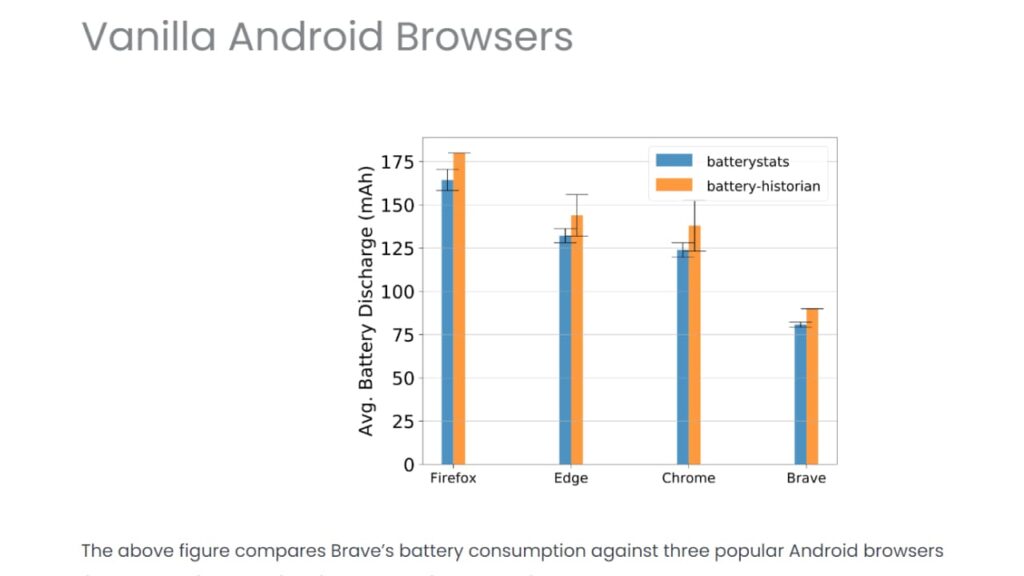
  • Does not slow down your device or drain your battery life.
  • It supports a wide range of websites and apps, ensuring all your favorite sites will be available while you’re browsing privately.

Cons

  • It can be difficult to find your way around the browser’s interface if you’re unfamiliar with it.
  • Can take some time to get used to the many features and settings available.

Device Performance

Brave is an incredibly efficient browser, and its optimized codebase ensures it doesn’t slow down your device or drain its battery life. It also supports a wide range of websites and apps, so you won’t have any trouble accessing all your favorite sites while using the browser. Brave can also be used with a VPN service, which further enhances your security when using this browser.

Other Factors to Consider

Brave’s user-friendly design makes it easy to navigate and quickly get up to speed with all its functions.It offers a range of powerful features, including ad blocking and enhanced security settings that protect against tracking and malicious websites.

With its superior performance, powerful security features, and privacy protection, Brave Browser is a strong candidate for the best private browser for iOS. Since it does not sacrifice speed or convenience, it’s perfect for anyone who wants to browse securely and privately on their iOS devices.

Browser 5: Opera Browser

The Opera Browser for iOS is a private browser that clears browsing data when closed, ensuring no tracking or data retention. With advanced privacy features, including ad-blocker and VPN, the Opera Browser is a top choice for those seeking maximum privacy on their iOS devices.

Suited for Whom

This browser is ideal for anyone who values their privacy and wants to protect their personal data from prying eyes. It’s perfect for those who are concerned about online tracking and data breaches.

Best Use Case

The Opera browser is best suited for those looking for a private mobile browser for iPhone or iPad. It is particularly useful for users who want to ensure that their browsing history and personal data remain private and secure.

The Opera Browser is best used for browsing sensitive content like financial information, personal details, and private research.

Pros

  • Clearing of all data and browsing history when closed.
  • Ad-blocker and VPN included.
  • Advanced privacy features.
  • Easy-to-use interface.
  • No tracking or data retention.
  • Fast browsing speed.

Cons

  • Limited customization options.
  • Users may find the interface too simplified.
  • Some compatibility issues with certain websites.

Device Performance

The Opera browser performs exceptionally well on iOS devices, with a fast browsing speed and smooth user experience. It has excellent device performance and responds quickly to user commands. The browser is also lightweight and does not slow down the device.

Other Factors to Consider

While the Opera browser is one of the most private iOS browsers available, it may not be suitable for users who require more advanced privacy features. Aside from privacy features, it also has a built-in news feed and currency converter. The browser supports multiple tabs and allows users to switch between tabs quickly.

If you’re looking for a private browser for iOS that clears all data and browsing history when closed and offers no tracking capabilities, the Opera browser is an excellent choice. With advanced privacy features, fast performance, and additional functionalities, it’s a browser that will cater to your privacy and browsing needs.

Browser 6: Aloha Browser

aloha logo

Aloha browser is a powerful private browser for iOS that offers a unique set of features, such as ad-blocking, VPN, and private browsing mode that clears browsing data when the app is closed. This browser also provides robust security features to keep your online activity safe and secure.

Suited for Whom

It’s perfect for people who value their privacy and want to protect their online activity from prying eyes. It’s also suitable for users who want to enjoy fast browsing speeds without being bombarded by ads.

Best Use Case

The Aloha browser is best used for browsing sensitive content, accessing location-restricted websites, and ensuring private communication through its encrypted messaging feature. It’s also useful for those who want to block ads and protect their personal data from tracking. 

Pros

  • Offers a built-in VPN service that encrypts your internet connection, making it difficult for anyone to monitor your online activity.
  • Its ad-blocker feature makes browsing the web much faster and less distracting.
  • The browser’s encrypted messaging feature ensures secure communication with anyone.
  • Private browsing mode that clears browsing data when the app is closed.
  • User-friendly interface and easy to navigate.
  • Multiple tabs and customizable home screen for enhanced productivity.

Cons

  • The interface is not as user-friendly as some of its competitors.
  • Can be slow to load pages at times.
  • Limited customization options compared to other private browsers.
  • The VPN service can slow down browsing speeds.

Device Performance

The Aloha browser performs well on iOS devices and does not significantly impact the device’s performance or battery life.

Other Factors to Consider

Aloha browser also offers unique features, such as VR player and media downloader, making it an all-in-one browsing solution for iOS devices.While it’s an excellent private browser for iPad and for iPhone, it’s worth noting that no browser can guarantee 100% privacy.

Overall, the Aloha browser is an excellent choice for anyone who wants to keep their online activity private. With its built-in VPN, ad-blocker, and encrypted messaging feature, it provides a high level of security and speed. However, the slightly less user-friendly interface and potential slowdowns caused by the VPN may be minor drawbacks for some users.

A Summary of the Best Private and Secure Browsers for iOS

The following is a summary of the covered browsers and their main features, which can assist you in determining the most suitable private internet browser for your needs.

1. Tempest Browser

Tempest Browser
  • A lightweight and privacy browser for users who want to secure their online activities.
  • Provides robust security measures to encrypt your data, block ad trackers and cookies, and prevent unauthorized access to your browsing history.
  • Comes with a built-in dark mode option and supports multiple tabs and automatic switching for a seamless browsing experience.
  • It’s 100% free to use, making it an accessible option for anyone looking for a secure but budget-friendly browsing experience.
  • Its lightweight design ensures fast browsing speed and low memory usage, even on lower-end devices.

Tempest DOWNLOAD FREE
10

2. Onion Browser

  • Uses the Tor network to route your traffic through multiple layers of encryption, making it difficult for anyone to track your online movement.
  • Blocks ads and tracking scripts by default, providing you with an uninterrupted browsing experience without any distractions.
  • Does not log any of your browsing information or collect any personally identifiable data, ensuring that your online privacy is protected.
  • Enforces HTTPS encryption for all websites by default, preventing any snooping or tampering with your browsing sessions.
  • User-friendly and easy to navigate, with support for tabbed browsing, bookmarks, and a customizable home page.
  • Includes a dark mode option, which is easy on the eyes and helps to reduce eyestrain, especially in low-light settings.
  • Is an open-source project that is free to use and has a strong community of developers who are committed to ensuring online privacy for everyone.

3. Microsoft Edge

  • Designed for speed and efficiency, with a lightweight design that ensures quick page load times and smooth performance.
  • Ability to sync your browsing data, passwords and preferences across your devices.
  • Offers a private browsing mode, which doesn’t save any browsing history, cookies, or passwords.
  • Integrates with other Microsoft apps.
  • Allows you to choose between different search engines, including Bing, Google, and DuckDuckGo.

4. Brave Private Browser

  • Blocks ads and trackers by default, providing users with a faster and more private browsing experience.
  • Employs many security features to protect user privacy, including blocking third-party cookies, fingerprinting attempts, and JavaScript trackers.
  • Provides a built-in Tor private browsing feature, allowing users to browse the web anonymously and access content that may be blocked in their country.
  • Ensures secure connections to websites by automatically upgrading HTTP connections to HTTPS.
  • Offers a private browsing mode to protect users’ browsing histories, cookies, and other website data.
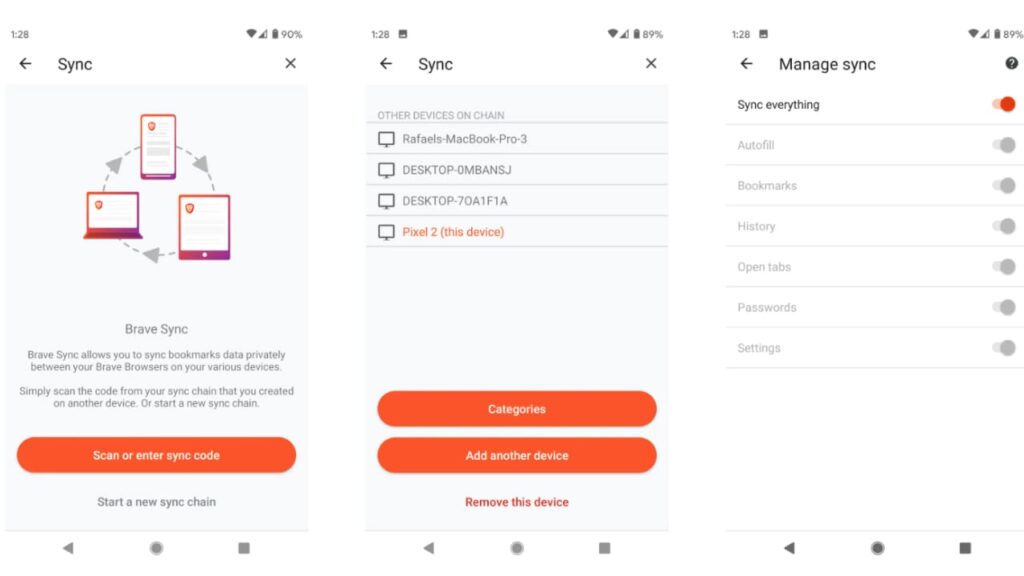
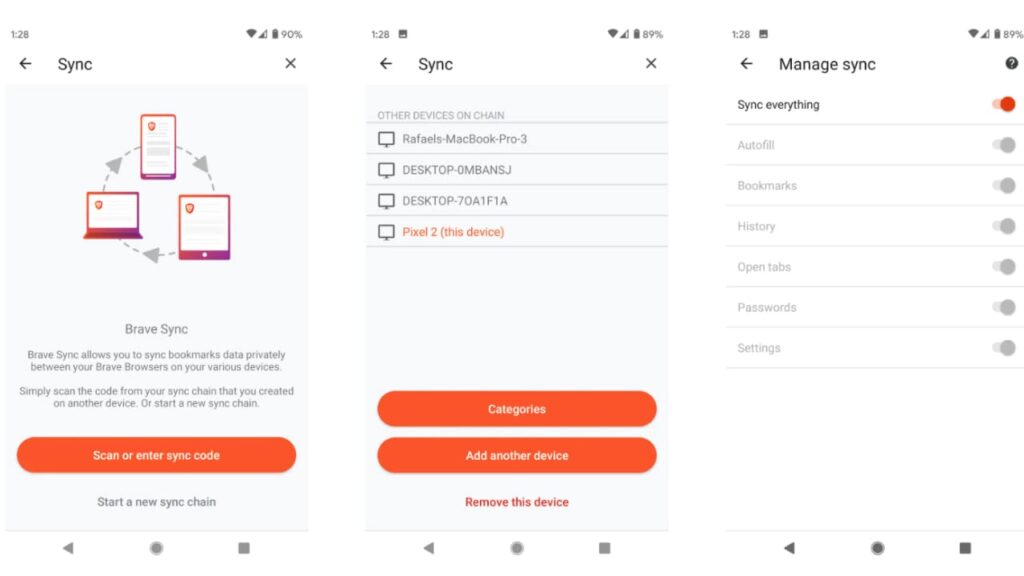
  • Allows users to sync their browsing data, bookmarks, and preferences across multiple devices.
  • Puts user privacy and security first, and regularly works on improving its privacy features and reducing user tracking.

5. Opera Browser

  • Opera browser for iOS offers a free and unlimited VPN feature that can help protect your online privacy, bypass online restrictions, and access geo-blocked content.
  • Comes equipped with an ad blocker that can block annoying ads, pop-ups, and video ads, ensuring an uninterrupted browsing experience.
  • Opera on iOS offers a built-in crypto wallet that allows you to securely store and manage cryptocurrency assets.
  • Its turbo mode can compress web pages and reduce data usage, thereby accelerating browsing on slow or congested networks.
  • Lets you customize the browser’s look and feel with different themes, wallpapers, and icons.
  • Its battery saver can help extend your device’s battery life by reducing the browser’s power consumption.
  • Lets you easily manage and organize tabs, including the ability to search open tabs, preview them, and close multiple tabs at once.
  • Offers a swipe gesture feature for easy navigation between tabs, and it provides easy access to bookmarks, history, and other browsing features.
  • Allows you to sync your browsing data and settings across multiple devices.

6. Aloha Browser

  • Automatically clears your browsing history and cache after your session and does not store any user data or browsing information on the device.
  • Comes with a built-in VPN that allows you to browse anonymously, access restricted content, and protect your data when using public Wi-Fi networks.
  • Includes a powerful ad blocker that can block unwanted ads, pop-ups, and video ads, making for an improved browsing experience.
  • Allows you to stream media content directly from within the app, including videos, music, and movies.
  • Includes a download manager that can easily download and manage large files such as movies, music, and documents.
  • Can customize the browser’s appearance with different themes, and it also allows you to personalize your start pages with quick access icons.
  • Supports multiple tabs and windows, making it easy to browse and switch between different pages without losing your place.
  • Integrates with popular social media platforms like Facebook, Twitter, and LinkedIn, so you can easily share pages and content.

Conclusion

These private browsers for iOS offer unique features for enhancing online privacy and security.

The Tempest Browser offers a lightweight design and robust security features to protect user information, while the Onion Browser stands out for its use of the Tor network to shield user traffic from prying eyes.

Microsoft Edge is an excellent choice for iOS users who prefer a fast and user-friendly browser, and its integration with Microsoft services is a plus.

Brave Browser takes privacy to the next level by blocking ads and trackers by default, while Opera Browser offers a suite of features, including a built-in VPN and battery saver mode, users need to improve their browsing experience.

The Aloha Browser comes equipped with a free VPN, ad blocker, and download manager, making it a popular choice for users prioritizing online privacy.

Choosing the best private browser for iOS depends on your specific needs and preferences. Whether you prioritize speed, robust privacy features, or user-friendly navigation, these six browsers offer something that can meet your demands.

By using any of these browsers, iOS users can enjoy an enhanced browsing experience that prioritizes their online privacy and security.

Best Private Browsers for Android in 2023

Find out what is the best private browser for Android in 2023 in our in-depth comparison of the top market players, including Tempest, Brave, Firefox, and more!

As online privacy breaches become more common, protecting one’s online activity is crucial. For Android users, there are many private browsing apps and lightweight browsers available that offer secure web surfing.

This article explores the best private browser for Android users who want to maintain strong privacy protection, while also having a fast, hassle-free browsing experience.

The good news is that you can find a secure and private browser that offers excellent protection without sacrificing speed or comfort.

We have collected and compared in detail the best Android browsers in this article, such as Tempest, Brave, Firefox, and others.

Best Private Browser for Android: A Quick Summary

Today, it’s essential to maintain stringent privacy measures and choosing the right browser is a key aspect of that. To answer the question: Is there a private browser for Android?, below is a quick summary of the options available.

1. Tempest Browser

Tempest is a private browsing app that provides reliable and secure browsing with an uncluttered interface and strong privacy protection. It boasts powerful privacy features, making it a top choice for anyone seeking a private browsing experience while maintaining total anonymity.

Tempest DOWNLOAD FREE
10

2. Firefox Focus

This browser is widely considered being the best incognito browser for Android users, with its ad-blocking feature and automatic deletion of cookies and browsing history.

3. Brave Private Browser

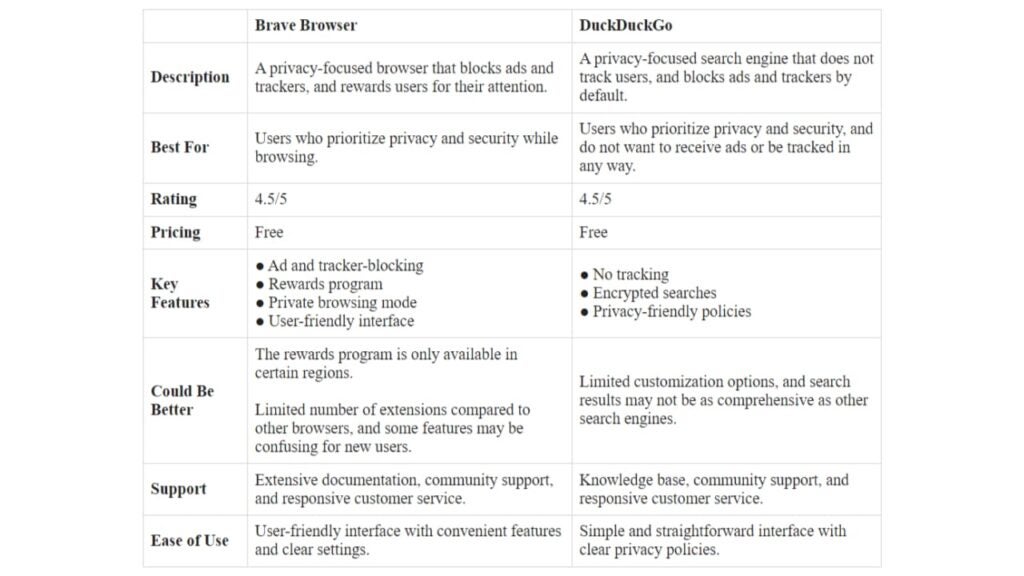
This is a browser for Android with adblock and a focus on user privacy, with its built-in ability to block ads and its vow to never track users or store their data.

4. DuckDuckGo Privacy Browser

This is the best privacy browser for Android users who want comprehensive tracking protection, providing a grade letter rating for each site based on its privacy policy.

5. Ghostery Privacy Browser

This is one of the safest private browsers, with advanced anti-phishing techniques and machine learning-based tracker detection.

6. Aloha Browser

This is a popular free, quick, private browser with a video player, making it the ideal all-in-one solution for browsing and media consumption for Android users looking for a private browsing app.

No matter what your needs are, one of these private internet browsers for Android tablets and phones can provide the solution you want. Whether you’re after a secure browser with built-in privacy features or an app for private browsing that offers additional protection with VPNs, these options make it easy to find the perfect one for your use case.

Browser 1: Tempest

Tempest Browser

Tempest is a relatively new private internet browser for Android tablets, known for its private lightweight design and numerous security features, including fingerprint protection and adblock. The browser also includes a private VPN service for enhanced privacy protection.

Suited for Whom

Tempest is best for Android users looking for a private and secure browsing experience with a lightweight design and numerous security features. It’s an excellent choice for users seeking a robust browsing experience without sacrificing speed or functionality.

Best Use Case

It’s best suited for users striving to protect their data privacy in an era where malware and data breaches are increasingly common. It’s the ideal browser for those who need to access sensitive information online or who want to prevent third parties from tracking their online activities. The private VPN service and advanced security features make it an excellent option for Android users who prioritize their privacy and want a truly private web browser.

Pros

  • Private and secure web browsing with fingerprint protection.
  • Built-in adblocker for an ad-free browsing experience.
  • Multiple tabs are allowed on this private mobile browser.
  • Includes a private VPN for enhanced encryption and protection.
  • Integration with the Tor project to provide further anonymity.

Cons

  • Does not include a built-in password manager.
  • Limited customization options compared to some of its competitors.

Device Performance

Tempest performs exceptionally well in terms of device performance, boasting a fast browsing speed and low memory usage, making it one of the top Android browsers for privacy.

Other Factors to Consider

In addition to its privacy and security features, Tempest also includes several other features to enhance the browsing experience, such as a built-in dark mode and automatic tab switching. The browser is easy to use, making it one of the best free private browsers on the market.

Overall, Tempest is an excellent browser for anyone looking for a private, secure, and reliable browsing experience on their Android device.

Tempest DOWNLOAD FREE
10

Browser 2: Firefox Focus

Firefox Focus is a popular and versatile private browser for Android that’s considered one of the best private internet browsers due to its robust privacy protection features, including blocking of ads and third-party cookies. The browser allows automatic deletion of browsing history, searches, and cookies with a single tap. It has a minimalist user interface to provide users with a distraction-free browsing experience.

Suited for Whom

Firefox Focus is ideal for users looking for an easy-to-use private mobile browser that balances privacy and speed. It’s well-suited to individuals who need speed and private browsing in their day-to-day activities.

Best Use Case

Firefox Focus is perfect for Android users who want a browser for privacy that provides automatic ad-block, faster page loading speeds, and an uncluttered user interface. It’s perfectly suited for daily use and does not compromise on speed.

Pros

  • Automatic deletion of browsing history, searches, and cookies with a single tap.
  • Ad-blocker that blocks third-party cookies.
  • Intuitive and user-friendly interface.
  • Allows users to erase browsing history with a single tap.
  • Can block a wide range of ads and trackers for a better browsing experience.

Cons

  • Limited customization options compared to its competitors.
  • It doesn’t allow for multiple tabs, which is a deal-breaker for some users.
  • Does not support third-party add-ons.

Device Performance

Firefox Focus performs exceptionally well in terms of device performance, boasting a fast browsing speed and low memory usage, making it one of the best private lightweight browsers for enhanced privacy protection.

Other Factors to Consider

Firefox Focus is a perfect choice for Android users who want a private, secure, and easy-to-use web browser that doesn’t compromise on speed. The browser is free and optimized for privacy protection, making it one of the best free private browsers for Android devices. The browser’s minimalist design makes it a perfect match for users who don’t want to spend too much time fiddling with settings and would instead rather focus on browsing.

Overall, Firefox Focus is an excellent choice for Android users seeking a fast, streamlined web browsing experience with robust privacy features. 

Browser 3: Brave Private Browser

Brave

Brave browser is a popular mobile browser known for being fast and user-friendly, with multi-layered privacy protection features, including ad and tracker blocking, fingerprinting protection, and HTTPS Everywhere. The browser also features a shortcut for quick access to private browsing mode.

Suited for Whom

The Brave Private Browser is well-suited for users looking for a private internet browser for Android tablets or phones. It’s a powerful tool that prioritizes their privacy while also delivering fast performance and advanced functionality. It is also suitable for those who want to support content creators through the platform’s built-in revenue sharing model.

Best Use Case

The Brave Private Browser is ideal for users who prioritize their privacy and protection, offering unparalleled security features such as fingerprinting protection and blocking of ads and trackers. Its unique revenue-sharing model is also great for users who want to support content creators while enjoying a fast and user-friendly browsing experience.

Pros

  • Provides multi-layered privacy protection features, such as ad and tracker blocking, fingerprinting protection, and HTTPS Everywhere.
  • Fast browsing speed with optimized battery usage for mobile browsing.
  • Shortcut for quick access to private browsing mode for Android.
  • Built-in ability to support content creators and keep browsing ad-free.
  • Option to sync bookmarks and settings across multiple devices.

Cons

  • Some users may find the content-blocker aggressive.
  • Does not support as many extensions as some other browsers.
  • Has a higher memory usage compared to other browsers.

Device Performance

Brave performs admirably in terms of device performance, utilizing optimization techniques to provide an optimal browsing experience for users on their Android devices.

Other Factors to Consider

The Brave Private Browser’s revenue-sharing model and commitment to user security make it one of the best privacy-focused mobile browsers on the market. The browser is free and user-friendly, making it an excellent option for users who prioritize their privacy, but also want a browser that’s easy to use.

Overall, Brave Private Browser is an excellent choice for privacy-conscious Android users. It offers a secure browsing experience with a unique revenue-sharing model, allowing users to support content creators while not having to worry about intrusive ads and trackers. Brave also provides an optimized performance on Android devices, offering fast speeds and lower memory usage than other browsers.

Browser 4: DuckDuckGo Privacy Browser

DDGO

DuckDuckGo privacy browser is a popular private lightweight browser, designed to provide maximum privacy protection. The browser is known for its comprehensive tracking protection features, encryption of users’ data while browsing, and detailed privacy policy grading system.

Suited for Whom

DuckDuckGo privacy browser is best suited for privacy-conscious Android users looking for comprehensive protection any time they use their device to browse the internet.

Best Use Case

The browser is ideal for anyone who prioritizes protecting their privacy while browsing, particularly when accessing sensitive information or when browsing on public WiFi. It’s also an excellent choice for those looking for a free, quick, private browser with its built-in adblocker.

Pros

  • Comprehensive blocking of third-party trackers, ad networks, and data collectors.
  • Grading system rates websites based on their privacy policy.
  • Encryption of user’s data when browsing.
  • Minimalist and user-friendly design.

Cons

  • Limited customization options compared to some of its competitors.
  • Some websites may not load correctly due to strict privacy controls.
  • Does not offer video playback functionality.

Device Performance

DuckDuckGo privacy browser performs well in terms of device performance, boasting fast browsing speed and low memory usage, making it an excellent choice for privacy-conscious users.

Other Factors to Consider

In addition to its privacy and security features, DuckDuckGo private internet browser also supports multiple tabs for efficient browsing and makes it very easy to erase browsing data with just one tap. Additionally, it supports Android TV and can be used on other Android devices such as smartwatches.

Overall, DuckDuckGo privacy browser is a great choice for privacy-conscious Android users who want comprehensive tracking protection without sacrificing browsing speed or functionality.

Browser 5: Ghostery Privacy Browser

ghostery logo

Ghostery privacy browser is a privacy-focused browser for Android devices that offers advanced anti-tracking and anti-malware features. With its machine learning-based tracker detection, it enhances users’ security and privacy further by protecting them from malicious viruses.

Suited for Whom

Ghostery is well-suited for privacy-conscious users and individuals who want to maintain high levels of data security and safety while browsing the internet on their Android devices.

Best Use Case

Ghostery is the perfect browser for Android users who want a private browsing experience with an emphasis on comprehensive privacy features, including advanced tracker and ad blocking, as well as protection from malicious malware and viruses.

Pros

  • Advanced tracking and ad-blocking capabilities with real-time tracking alerts.
  • Machine learning-based tracker detection.
  • Protection against malicious viruses and malware, enhancing user’s safety.
  • User-friendly interface.
  • Free and easy to use.

Cons

  • Limited customizability options.
  • It may not be as fast compared to some of its competitors.
  • Does not offer video playback functionality.

Device Performance

Ghostery performs exceptionally well in terms of device performance and speed, making it one of the best Android browsers for privacy. It’s lightweight, and memory usage is low, which will help keep your Android device running smoothly.

Other Factors to Consider

Apart from the advanced tracking and ad-blocking features, Ghostery also provides a side-by-side comparison of the trackers blocked on each website. This helps users to keep track of their privacy protection on various websites. Ghostery is easy to navigate with its user-friendly interface and offers a seamless browsing experience.

Overall, If you’re seeking a comprehensive privacy browser for Android devices, the Ghostery privacy browser is one of the best free private mobile browsers to consider.

Browser 6: Aloha Browser

aloha logo

Aloha browser is a free, quick, private browser with a video player that provides users with a one-stop solution for browsing and media consumption. The browser comes with a built-in adblocker and a VPN service, providing users with enhanced privacy protection.

Suited for Whom

The Aloha browser is best suited for Android users who want to use a private VPN browser app along with a media player for streaming videos and consuming other media content.

Best Use Case

Aloha is best used as an all-in-one solution for browsing and media consumption for users looking for a browser for privacy with a built-in video player. The browser’s privacy features make it ideal for those who prioritize their online security, while the video player’s range of supported file formats provides users with an enhanced media consumption experience.

Pros

  • The browser’s video player supports various file formats, providing users with a seamless media playback experience.
  • It comes with anti-phishing and anti-malware features to ensure user safety while browsing.
  • Features a built-in VPN service for added privacy protection.
  • Intuitive and user-friendly interface.
  • Private browsing mode, ad-blocker, and tracker protection.

Cons

  • The VPN service is not available in all regions.
  • The app’s file size could be an issue for low-performance devices.
  • Its streaming performance may not be as good as some of its competitors.

Device Performance

Aloha is a private lightweight browser that provides a fast browsing experience with low-memory usage, making it an ideal choice for users with low-performance devices.

Other Factors to Consider

In addition to the desirable features mentioned above, Aloha also has a private social media browsing mode that enables users to browse popular social networks without tracking. Its ad-blocker and tracker protection features make it one of the best privacy browsers for Android users.

Overall, Aloha is a feature-packed browser for privacy with a video player that offers a great browsing experience, making it an excellent choice for users looking for a private, all-in-one solution for browsing and media consumption on their Android device.

Tempest DOWNLOAD FREE
10

A Summary of the Best Private and Secure Browsers for Android

Below is a summary of the browsers covered and their key features to help you decide which one is the best private internet browser for you.

1. Tempest Browser

  • Lightweight browser designed for users who prioritize their privacy while browsing the web.
  • Known for its robust security features for enhanced privacy and encryption.
  • A built-in dark mode option and allows for multiple tabs and automatic switching for a seamless browsing experience.
  • Entirely free, making it an accessible option for anyone seeking a private, secure, and reliable browsing experience.
  • Lightweight design ensures fast browsing speed and low memory usage.

Tempest DOWNLOAD FREE
10

2. Firefox Focus

  • Built-in privacy protection features, including blocking of ads and third-party cookies.
  • Multiple tabs are allowed on this private mobile browser.
  • Option to erase browsing history, searches, passwords, and cookies with a single tap.
  • Intuitive and user-friendly interface.

3. Brave Private Browser

  • Enhanced tracking protection, including ad and tracker blocking, fingerprinting protection and HTTPS Everywhere.
  • Multi-platform browser, including Android smartphones and tablets.
  • Users can donate to publishers and content creators to stay ad-free while browsing content.
  • Optimized for mobile browsing with an intuitive and user-friendly interface.
  • Lightning-fast browsing speed by reducing page loading time, while also optimizing battery usage on mobile devices.

4. DuckDuckGo Privacy Browser

  • Comprehensive protection against third-party trackers, ad networks, and data collectors, making it a top contender for the best privacy browser for Android.
  • Forces websites to use HTTPS encryption whenever possible to prevent snooping and tampering with your browsing history.
  • Automates cookie blocking to prevent sites from tracking and profiling you, guaranteeing unmatched online privacy.
  • Gives you a grade rating on a website’s privacy policy via a small link in the search results of the DuckDuckGo search engine.
  • Minimalist and user-friendly design with clean and straightforward search results.

5. Ghostery Privacy Browser

  • Provided advanced privacy and security features.
  • Focuses on blocking various trackers, including ad trackers and social media trackers to enhance privacy protection.
  • Provides a privacy score for each website, allowing users to see the level of trustworthiness of the sites they visit.
  • Its user interface is designed to be user-friendly, allowing for easy customization and tweaking of settings.
  • Offers additional features, such as anti-phishing, anti-malware, and a machine learning-based tracker for detection and blocking.
  • Available for free on Android and iOS devices, making it accessible to a broad range of users seeking a safe and private browsing experience.

6. Aloha Browser

  • Privacy-focused browser for Android devices that offers built-in VPN and adblocker.
  • Provides a free, quick and private browser experience for Android tablets and smartphones.
  • Features a video player that allows streaming of various video formats without having to download them.
  • Offers a private social media browsing mode that prevents social networks from tracking your activity.
  • Allows multiple tabs to be open at once for quick switching between pages.
  • Comes with a download manager that allows you to organize your downloads and stop them if needed.
  • User-friendly interface with an intuitive design that makes navigation simple and straightforward.
  • The free version of Aloha Browser offers excellent features, while the premium version adds more privacy options and an ad-free experience.

Conclusion

Finding the best private browser for Android can be challenging given the crowded and competitive market. However, choosing the right browser is essential to secure internet browsing, protecting user data from malware and data breaches while ensuring complete anonymity at all times.

When you choose a browser for privacy and security, it should also provide enhanced tracking protection, fast browsing speed, and a user-friendly interface.

By using the best incognito browser for Android devices, you can avoid being tracked by third parties and protect your privacy.

Overall, the best private browser for Android in 2023 is one that balances privacy and functionality, and these selections have been made based on significant factors like security features, speed, ease of use, and adblock capabilities.

What is the Best Private Browser for 2023?

Find out what is the best private browser in 2023 in our in-depth comparison of the top market players: Brave, Duckduckgo, Opera, Firefox, Vivaldi, and more.

Do you need a website browser that guarantees a private internet surfing experience? 

Private browsers have different tools that let users surf the internet securely by preventing data hacks and breaches by protecting temporary files, cookies, browsing history, and other data related to user browsing sessions. 

In this article, we’ll discuss the best private browsers for 2023, such as Tempest, Firefox and over a dozen others.

Tempest DOWNLOAD FREE
10

Best Private Browser: A Quick Summary 

The best private browser for you depends on your preference. Here’s how each browser stacks against each others: 

  • Tor- Best private browser for anonymity
  • Brave- Best in Ad-blocking 
  • Opera browser- Integrated VPN and data saving
  • Vivaldi- Advanced user features
  • Avast- Best for security and integration with Avast anti-virus
  • Epic Privacy Browser-Best in privacy protection
  • Edge-Integration with Windows and Microsoft services
  • Bromite-Best for good browsing speed on Android
  • Firefox- Best for personalized browsing experience due to multiple customization options. 
  • DuckDuckGo-Best for using the search engine anonymously. 

Now let’s dig into more details on each of the software that made it into this list of best private browsers for 2023. 

Browser 1: Brave 

Brave

Brave is a web browser that was created by Brendan Eich, the lead developer of JavaScript programming language, and Brian Bondy, the co-founder of Mozilla. The platform is a free and open-source browser that helps users browse safer, faster, and securely. 

One of the impressive features of brave is its ad-blocking capabilities. The browser, by default, blocks trackers and ads; thereby improving data privacy, and improving load time.

Let’s delve more into the platform’s features

Key Privacy Features of Brave Browser 

The key features of brave browser entail: 

  • HTTPS Everywhere integration, 
  • Built-in support for Tor (The Onion Router) browsing
  • Fingerprinting protection, 
  • Brave Rewards, 
  • Per-site shield settings, 
  • Configurable global shield defaults. 

To properly consider the prospects of adopting brave as your preferred browser, it’s best to first consider its pros and cons. Let’s discuss this: 

Pros and Cons of Brave Browser

The benefits and drawbacks of using Brave Browser includes: 

Another factor we’ll discuss is its performance: 

Brave’s Performance 

The Brave Browser performs well across all devices. Here are some key insights on its performance:

1. Speed: Brave loads fast due to its in-built blockers that help prevent intrusive ads, thereby, reducing load time. Additionally, the platform also features pre-fetching and background loading to improve speed. 

2. Memory usage: Brave uses less memory than most alternatives, which results in a noticeable user experience for those using small RAM and older devices. “Brave Shields” also reduces memory usage by blocking scripts and other unnecessary elements. 

3. Security: Brave performs well on the security side. The browser reduces the probability of malware attacks and security threats via ad and script blockers. Also, HTTPS Everywhere encrypts data exchange between devices and servers.

Overall, Brave Browser has top-notch performance in terms of speed, security, memory usage, and privacy. However, as with other software, it may experience occasional issues due to bugs, and lags.

Browser 2: DuckDuckGo

DDGO

DuckDuckGo is a search engine that prioritizes data privacy, and avoids personalized search results. The browser differentiates itself from competitors by not tracking users or storing their search history–this improves user privacy. 

Rather than display personalized search result that are determined by user history, the platform ensures that it gives the same information to every user that enters the same keywords. This feature is called “bangs,” it allows users to search websites like YouTube, Amazon, etc.

Let’s discuss the platform’s features

Key Privacy Features of DuckDuckGo

Some features that make DuckDuckGo an effective private browser are: 

  • Private search, 
  • Web tracking protection, 
  • Smarter encryption, 
  • Android app tracking protection, 
  • Burn bar,
  • HTTPS Everywhere, 
  • Email protection. 

What’s next? Let’s discuss their pros and cons: 

Pros and Cons of DuckDuckGo 

How well does DuckDuckGo perform? Let’s discuss this: 

DuckDuckGo’s Performance 

1. Speed: DuckDuckGo is relatively faster than most browsers. Its in-built ad blockers reduce load time. The browser also has a quick startup time. 

The DuckDuckGo browser provides a good experience, with a focus on privacy. It features efficient ad-blockers and a search engine that makes it desirable to users amidst alternatives. Here’s a brief overview of DuckDuckGo’s performance:

2. User Interface: DuckDuckGo has an interactive, clean, and user-friendly interface. Its UI optimizing features entail bookmarks, history, a tab switcher, and a customizable layout.

3. Compatibility: This browser supports most devices, ensuring that it’s compatible with the majority of web applications and websites. 

4. Availability: The browser app is available for download on both Android and iOS devices, making it very accessible to most users.

Another to consider is Opera. Let’s dig right into that: 

Browser 3: Opera 

Opera web browser is a tool that’s known for its security, speed, and features that allow users to sync their browsing history and other data between devices. The browser, which was released in 1995 uses the Blink layout engine and supports all popular types of programming languages. 

Opera is available for all desktop and mobile operating systems. It’s known for impressive speed, security, and a range of impressive features like VPN, battery saver, and built-in ad blocker. 

Let’s further discuss its features:

Key Privacy Features of Opera 

These features enable Opera to be an effective private browser: 

  • Crypto-wallet, for secure payments
  • Secure cross-platform data synchronization, 
  • VPN pros 
  • Ad-blocker
  • HTTPs encryption. 

Let’s break down the pros and cons of this site: 

Pros and Cons of Opera Browser 

Now, let’s discuss its performance: 

Opera’s Performance 

Opera is a fast, feature-packed, and intuitive browser that supports several web technologies, making it suitable for browsing most modern sites. The platform has anti-phishing protection tools, all of which keep users safe online. Let’s break down the article: 


1. Speed: Opera has a good browsing speed, this is particularly noticed when you activate its Turbo-mode, which compresses the images on a site. This feature guarantees good load time when the internet connection is slow. Gamers that want additional protection can opt for Opera GX. 

2. User Interface: Opera has an easily navigable user interface. Its browser is easily customizable; and has a range of extensions, wallpapers, and themes. The platform also has a feature called “Speed Dial,” where users can access their favorite sites quickly.

3. Compatibility:  Opera can work on most operating systems, including iOS, Android, Linux, Mac, and Windows. It’s also suitable for modern browsing websites.

4. Security: Opera has top-notch security features. For example, its built-in VPN encrypts users’ internet traffic and protects their privacy. Thereby, guaranteeing a top-notch secure web browsing experience. 

Browser 4: Vivaldi 

Vivaldi is a cross-platform, freeware, a web browser that is built by Vivaldi Technologies.  The browser is designed for a good personalized browsing experience with advanced options and features. 

One of its stand-out features is its customizable interface. It lets users select from a range of themes to personalize their built-in editor. Users can also stack tabs to manage their pages and windows. 

What’s more? Let’s discuss the key features of Vivaldi. 

Key Privacy Features of Vivaldi

Some key features that make Vivaldi a private browser include: 

  • Private window,
  • It integrates well with tor browser 
  • Tracking blocking features, 
  • Ad-blockers, 
  • Reader mode, 
  • Keyboard shortcuts and mouse gestures.

Now, let’s discuss the pros and cons of Vivaldi. 

Pros and Cons of Vivaldi

Here are the pros and of the Vivaldi browser: 

The pros and cons help you to have a better understanding of Vivaldi, and to make an informed choice. Now let’s discuss the performance of the Vivaldi browser: 

Vivaldi’s Performance

Vivaldi’s customization options and numerous privacy features make it an excellent product for users. It’s also compatible with most websites and supports all major operating systems. Let’s discuss its performance in terms of speed, user interface, security, and compatibility. 

1. Speed: Vivaldi uses the Blink rendering engine, the same as Edge and Chrome; as such, it’s equally as fast as those two. 

For the JavaScript performance, Vivaldi uses the V8 engine, the same as the Google Chrome browser. However, it’s imperative to note that Vivaldi has multiple features running simultaneously that can slow the browser’s speed.

2. User Interface: Vivaldi has a customizable user interface. The platform has a tab-stacking feature that lets users group tabs. They can also view different tabs side-by-side on the same screen. It supports varying themes and lets users create their own. The browser’s interface has a sidebar for quick access to bookmarks, downloads, and history.

3. Compatibility: Vivaldi is compatible with most libraries and frameworks, and it supports all platforms built using JavsScript, CSS, and HTML. However, older browsers with legacy tech stacks may suffer some compatibility issues.

4. Security: Vivaldi is a secure browser with features to protect user data. It has a built-in ad blocker that prevents websites from tracking users. 

It also offers a built-in phishing and malware protection feature, which can warn users if they are about to visit a malicious website. Vivaldi also supports all the latest encryption standards, including HTTPS.

Browser 5: Firefox 

Firefox is an open-source web browser founded in 2004 and is compatible with most web browsers. 

The secure browser has immense compatibility with Linux, macOS, Windows, Android, and iOS. The platform offers several features that include geolocation, spell-checking, and tabbed browsing. 

It also supports a range of extensions and add-ons, allowing users to customize their browsing experience.

Key Privacy Features of Firefox 

Here are the key Firefox features that qualify it to be called an effective private browser: 

  • Enhanced tracking protection, 
  • Content blocking for pop-ups, trackers, and cookies, 
  • Anti-fingerprinting, 
  • DnS-over-HTTPS, 
  • HTTPs-Only mode, 
  • Password manager. 

Let’s discuss its pros and cons: 

Pros and Cons of Firefox

Firefox has a range of pros and cons to consider, these are: 

FireFox’s Performance 

Overall, Firefox is a reliable and feature-rich web browser that provides a fast, secure and customizable browsing experience. 

Its commitment to privacy and security, along with its compatibility with a wide range of operating systems and web standards, makes it a popular choice among users. 

Here’s a breakdown of Firefox’s performance per speed, security, compatibility, and user interface: 

1. Speed: Depending on your workload, Firefox can be fast as it’s optimized to handle content more efficiently than other private browsers. It separates the user interface from the content displayed through its sophisticated architecture. However, it can have a slow load time for sophisticated sites.

2. User Interface: Firefox’s interface is simple and intuitive, making it easy to use and navigate. It features a customization option that lets users personalize their browsing experience by altering themes, rearranging toolbars, and adding extensions.

3. Security: Firefox has remarkably strong security features that include a private browsing mode, regular security updates, built-in malware, and phishing protection. 

It also holds support for HTTPS Everywhere, a tool for encrypting web traffic to prevent transported data from tampering and eavesdropping. 

Another popular private browser we’ll discuss is Tor.

Browser 6: Tor 

The Tor Browser is one built specifically to protect users’ anonymity and privacy by routing internet traffic through the Tor network. 

The Tor network is a decentralized network of servers split around the world to hide users by bouncing them through multiple servers before reaching a final destination. 


For a while, Tor had the bulk of market share amongst users seeming to go anonymous online. However, its complex setup process created a loophole for other challengers to spring up. Tor works adequately due to a host of privacy-enhancing features.

Key Privacy Features of Tor

The top privacy features of Tor are: 

  • Multi-layered routing, 
  • Customizable security settings, 
  • Access to hidden websites and services, 
  • Cookies and scripts blocker, 
  • Encryption, 
  • IP Address anonymity,
  • Anti-fingerprinting.

Other than its privacy features, we’ll also discuss its pros and cons. 

Pros and Cons of Tor Browser 

Here are the benefits and disadvantages of using Tor: 

Tor Performance 

Tor is a specialized browser that provides strong privacy protection. However, its speed, compatibility, and user interface are impacted by its unique architecture. Let’s delve into the crux of this: 

1. Speed: Tor has multiple layers of relays and encryption, which slows down the browsing experience. In addition, the number of relays and the geographical distance between them and users impact performance. 

However, the Tor development team is constantly making effort to increase the network’s speed by optimizing its protocol without compromising on browsing data safety

2. User Interface: Tor has a simplistic and intuitive user interface that both novice and advanced users can use effectively. Firefox browser is its base operational architecture; it then builds on this for better security and privacy. 

3. Compatibility: Due to its privacy-focused design and unique architectures, Tor is not compatible with all online platforms. Some site block access from Tor exit nodes, and some sites are not configurable with the browser’s security settings. In addition, Tor doesn’t work appropriately with sites running on legacy tech stacks.

4. Security: Tor provides strong security protections and privacy, but it’s not 100% effective. Users still need to take precautions to protect their safety and guarantee anonymity. For example, users need to prevent downloading plugins and files from untrusted sources.

Overall, the Tor browser provides a unique and valuable service for users who prioritize privacy and security. Another option to consider is Edge browser: 

Browser 7: Edge 

Edge is a browser that’s created by Microsoft and included as the default browser in all Windows operating systems. It’s available for download on Android, iOS, and macOS devices. Edge is built for speed, convenience, privacy, and security. 

Edge is built with Chromium, which allows it to offer a similar speed to Chrome but with its own features. The browser includes some privacy and security features like phishing protection, password management, and tracking prevention.

Key Privacy Features of Edge 

Some key privacy features that make the Edge a great private browser are: 

  • In-built anti-tracker, 
  • In-Private browsing mode, 
  • Password saver, 
  • Do Not Track feature, 
  • Microsoft Defender SmartScreen, 
  • Cortana. 

Pros and Cons of Edge 

The advantages and disadvantages of Microsoft Edge are.

Edge Performance 

The performance of this private web browser can be evaluated using multiple factors, these include User Interface, Security, Compatibility, and Speed. Let’s elucidate on each of these factors: 

1. Speed: The Microsoft Edge browser is fast, as it features quick startup times, and fast web page load speed. It uses Blink as its rendering engine–the same as Google Chrome, which helps it render pages more efficiently and quickly. Additionally, the browser has a low memory footprint; an important feature for low-end hardware. 

2. User Interface: Microsoft Edge has a clean, and easy-to-use interface. The browser has a simplified toolbar that doesn’t consume too many parts of the real estate, and it offers some features such as a customizable tab page, and the ability to take notes on web pages.

3. Compatibility: Edge is compatible with most websites, which means users can access most sites correctly. However, users may have problems accessing older websites that are designed to work on older versions of internet explorer.

4: Security: Edge has numerous security features aimed at helping to protect users’ privacy and security. The platform features in-built trackers aimed at preventing sites from tracking the activity of users. It also offers protection from phishing attacks and malicious websites.

Tempest DOWNLOAD FREE
10

What’s more? Let us discuss another alternative–the Bromite browser. 

Browser 8: Bromite 

Bromite is a free and open-source browser that’s only available for Android Marshmallow (v6.0, API level 23) and above. The platform is designed to prioritize security and privacy; and various modifications on Chromium for more unique features. 

Bromite’s modifications entail trackers, blocking ads, and other potentially harmful items. Also, the browser provides a range of user interface modification features. Let’s discuss its key privacy features: 

Key Privacy Features of Bromite

Bromite qualifies as a good private browser based on the following features: 

  • Site-specific preferences, 
  • User-agent spoofing, 
  • DNS over HTTPS (DoH), 
  • Third-party Cookie Blocking, 
  • No Referrers, 
  • HTTPS Everywhere, 
  • Ad and tracker blockers. 


To help you understand this browser better, we’ll discuss its pros and cons: 

Pros and Cons of Bromite Browser 

Here are some pros and cons of using the bromite browser: 

Bromite Performance 

Here’s a breakdown of how the Bromite browser performs in terms of compatibility, security, user interface, and speed. Let’s delve into:

1. Speed: Bromite is a chromium-based browser. Among all secure browsers, Bromite is one of the most notable for speed and lightweight, which can provide slower Android devices with a smooth browsing experience. In addition, Bromite has optimization features like tracker blocking, and ad-blockers–both can improve speed by reducing the data you’ll need to fully load a page. 

2. User Interface: Bromite features multiple user interface enhancements that can improve user experience. They include the ability to customize the browser’s interface and night mode. In addition, Bromite is built to be easy to use and navigate. 

3. Compatibility: Bromite is compatible with more than 99.9% of sites on the internet. This is due to its Chromium-based framework. However, bromite is only available for Android devices. 

4. Security: Bromite has many types of privacy and security features aimed at protecting user data from being tracked and intercepted. Features that give bromite browser top-notch security entail HTTPS enforcement, DNS over HTTPS (DoH), third-party cookie blocking, etc. 

Browser 9: Epic Privacy Browser 

This is a secure browser that prioritizes privacy and security for its users. The platform was released in 2010 and is available for download on Linux, macOS, and Windows operating systems. This private browsing software is among the chromium-based browsers, however, it offers additional security for most in its league. 

Key Privacy Features of Epic Browser

The key features that make us consider Epic privacy browser as one of the secure web browsers are: 

  • HTTPS encryption, 
  • Proxy service, 
  • Private browsing, 
  • Cookie protection, 
  • Do Not Track, 
  • Data Encryption

Other than its key features, we’ll also consider the pros and cons of this secure browser: 

Pros and Cons of Epic Browser 

What’s more? Let’s discuss its performance: 

Epic Privacy Browser’s Performance

Here’s a detail of its performance based on security, speed, user interface, and compatibility: 

1. Speed: Epic Privacy Browser uses Chromium engine as its primary architecture. Thus, it guarantees as much speed as Google Chrome. However, it features a range of both in-built and customizable modifications for better speed. 

2. Security: A major selling point of the browser is its focus on security and privacy. It uses HTTPS encryption for all connections and has a built-in proxy service that lets users surf the internet anonymously. 

3. Compatibility: Epic browser is compatible with every website that accepts the Chromium engine. However, some sites with archaic technology might not load appropriately on the browser. 

4. User Interface: Epic privacy browser has a simple and intuitive user interface, ensuring that users can easily access and navigate its features. The browser has numerous customization options that include the ability to change themes, adjust privacy, and customize the toolbar. 

Now that you have a succinct idea of what Epic private browser is, let’s consider another option before you opt for what you think is the best private browser for your organization. 

Browser 10: Avast Secure Browser

Avast secure browser is designed to provide users with a safer and more secure browsing experience. 

Avast uses the chromium browser technology as its core framework, which means it has the same underlying google chrome. However, it has many security and privacy features that are not in the standard chrome browser.

This is one of the most secure browsers in the market, as it is embedded with a host of security features. For example, it features an Anti-fingerprinting mode that provides tracking protection. 

Additionally, the privacy-focused browser includes an extension guard that prevents malicious browser extensions from being installed. Let’s dig deeper into some important features of this secure web browser: 

Key Privacy Features of Avast Secure Browser 

Avast is a truly private browser for the following reasons: 

  • Built-in privacy and security tools like anti-tracking, anti-fingerprinting, and anti-phishing features. 
  • Password manager. 
  • Bank mode, for an additional layer of online privacy when making financial transactions. 
  • Avast Secure Browser that blocks ads and pop-ups by default. 
  • Anti-fingerprinting. 
  • Extension guard. 
  • Flash blocker. 

These are some of the few features of the Avast Secure browser that’s aimed at improving its privacy and making it of the most secure browsers. Let’s also discuss its pros and cons: 

Pros and Cons of Avast

Avast Browser’s Performance 

Here’s a breakdown of its performance based on speed, security, compatibility, and user interface. 

1. Speed: Chromium is its core engine, which is known for good browsing speeds. Additionally, the private secure browser has multiple technologies and website speed tests to optimize load times. 

2. Security: As a security company, Avast ensures that its privacy-oriented browser has various anti-phishing, anti-tracking, and anti-fingerprinting technology. It also prevents man-in-the-middle attacks with its HTTPS encryption technology. 

3. User Interface: The platform has a friendly interface that’s similar to most major browsers such as Google Chrome and Safari browser. It has a taskbar icon for quick access and a dark mode option for nighttime surfing. 

4. Compatibility: Avast is compatible with Mac os, Android, and Windows. It also supports extensions from the Chrome web store, which greatly improves functionality.

Is There a Better Alternative?

With so many excellent private browsers available today, it can be tough to determine which one is the best fit for you.

We’ve covered some of the most popular private browsers, including Tor, Brave, Opera, Vivaldi, Avast, Epic Privacy Browser, Edge, Bromite, Firefox, and DuckDuckGo, each with their own unique features and benefits. However, if you’re searching for more options, here are five more private browsers worth considering.

Tempest

  • Privacy-enhanced web browser that emphasizes safety and security.
  • Blocks ads, trackers, and malware by default, ensuring a clean browsing experience.
  • Combines speed, privacy, and security into a highly user-friendly interface.
  • Includes a unique Blacklist feature that allows users to block specific websites from tracking their activity.
  • Offers strong privacy features, such as HTTPS Everywhere, a feature that forces websites to use secure HTTPS connections.
  • Fast and responsive browsing experience.

Tempest DOWNLOAD FREE
10

Iridium

  • Fast browser that prioritizes user privacy and security.
  • Built-in ad blocker and Google tracking blocker.
  • Includes a range of customizable features, such as night mode and customizable user interface.
  • Incorporates additional security features such as a sandbox function, which helps to isolate web applications to prevent data breaches.
  • Runs on open-source Chromium code.

Waterfox

  • Open-source, privacy-focused web browser.
  • Supports numerous extensions and add-ons, with strong emphasis on speed and performance.
  • Customizable and user-friendly interface designed with privacy in mind.
  • Advanced tracking protection with support for multiple privacy modes.
  • Native support for CSS Grid and variable fonts.
  • Free and open-source browser, based on Mozilla Firefox.
  • Offers enhanced tracking protection and No Telemetry for secure browsing.
  • Focuses on compatibility with older Firefox add-ons and extensions.

Lunascape

  • A triple engine browser that integrates the Webkit, Gecko, and Trident engines for the best browsing experience.
  • Comprehensive ad and pop-up blockers.
  • Supports multiple language and special features, such as thumbnail preview, mouse gestures, and skins.
  • Automatic updates for better enhancements and stability.
  • Supports synchronization across devices.

Pale Moon

  • Lightweight and fast browser, based on Mozilla Firefox.
  • Customizable interface with several pre-installed themes.
  • Highly compatible with Firefox add-ons and extensions.
  • Emphasis on user control and privacy protections with No Telemetry policy and strong cookie controls.

These alternative browsers offer unique features and benefits tailored to different needs. By experimenting with these options, you can find a browser that satisfies your requirements and browsing habits, while ensuring a secure and seamless experience.

Summary

Private browsers offer a way to access the internet in a secure way. In this article, we touched on 10 of the best private browser for 2023. 

Each browser has unique features, thereby providing differing different private browsing experiences. Thus, the most secure browser for you depends on your preference and the intricacy of your browsing habits. 

Brave vs Opera: Which One is Better

Find out which browser is better in our in-depth comparison of Brave vs Opera: speed, performance, CPU and RAM usage, and battery life on different devices

Finding an effective browser can be difficult. Amongst the popular option out there are Brave and Opera. 

Most people require web browsers with top-notch power efficiency, faster page load times, and can guarantee top performance with few extensions. 

In this article, we’ll discuss Opera vs Brave, to help you decide which is the most suitable for your browsing habit. 

If none of these options feel right to you, we’ll also introduce you to Tempest and other great browsers. Read on to improve your web search experience.

Tempest DOWNLOAD FREE
10

Brave vs Opera: Quick Summary

Let us do a quick summary that answers the question “which is better Brave or Opera mini? ” We’ll discuss the difference between the two browsers:

Brave vs Opera table

Both browsers are free to use. However, they have differences in terms of performance, features, and other metrics.

Speed and Performance of Both Web Browsers

Brave Loading

Brave Browser

Brave is known for quick page load and top-notch performance. And according to Brave technologies, it is an average of 3x faster than most browsers.

Since its core framework is based on the Chromium browser engine, the app is highly responsive and fast, especially in terms of page loading times.

It features a built-in ad-blocker that significantly speeds up web browsing by eliminating data required to load and process a page.

Its resource optimization, such as “automatically stop videos from playing when they’re not in use” also help reduces CPU and RAM usage, guaranteeing it a high-performance rate. 

The browser features effective data caching, compression, and saved bandwidth techniques that give Brave Browser a good performance even with slow network connections. 

Opera Browser 

Opera is known for its efficient use of system resources and fast loading times. Its features are designed for speed and performance, making it an ideal browser for users with a preference for those factors.

Opera’s built-in VPN helps to reduce latency and improve performance, especially when accessing pages that are geographically data-capped by network providers. 

Its turbo mode also compresses images and videos on a page, resulting in quicker loading times in areas with slow connections. 

The platform features a speed dial that lets users visit sites they regularly visit faster through the quick access tabs on the homepage. Opera also blocks ads and pop ups better than most chromium-based browsers, thereby ensuring that you can load your favorite websites faster.

Its efficient tab management feature helps users navigate between tabs efficiently in a way that reduces memory usage and improves the overall performance of Opera. 

How to Improve Speed and Performance in Opera Browser 

For optimum speed and performance in Opera, it’s best to do the following:

  • Update Opera: Ensure you regularly update your Opera browser to the latest version to enjoy performance improvements. Doing so ensures you benefit from modifications made to previous versions. 
  • Clear browsing data. Regularly clear your browsing information, including history, cookies, and cache as not doing so increases the size of the app. Clearing browsing data will improve Opera’s performance. 
  • Uninstall unnecessary extensions. Extensions are an additional layer of features for your browser to load. Thus, they’ll reduce your load speed. Disable those you don’t need so as to make your browser faster. 
  • Enable Opera Turbo. This feature compresses data on web pages, reducing the volume of data transferred to the browser and helping to increase its speed. 
  • Disable hardware acceleration. Hardware acceleration uses your device’s GPU to increase the browser’s speed. However, it often leads to complications later, thereby, reducing your phone’s performance and ultimately reducing speed. 

Once you notice reduced performance after activating hardware acceleration for a while, disable it by going to Settings > Advanced > System. Then uncheck the box beside “Use hardware acceleration when available.”

  • Reduce your tabs. Tabs are extra interfaces on the web browser where you can open additional web pages. Try limiting the number of tabs open at a time. 

Verdict: According to Hongkiat, Brave is just as fast as Opera, and even a bit faster in loading an entire web page. 

Security and Privacy 

Brave – Safer Web

Brave vs Opera guarantees security and privacy in a range of ways. Let’s discuss each: 

Brave Browser 

Brave is designed to protect users’ privacy by blocking trackers, restricting the data websites can collect, and offering numerous security features like HTTPS Everywhere, encrypted DNS, and ad-blocking. 

  • Security 

Brave has a host of security features that protect users from phishing and malware breaches. One way it does this is via Google’s Safe Browsing API that’s designed to block access to suspected malicious sites and block crypto-jacking scripts. 

In addition to this, Brave supports 2FA, which prevents unauthorized access to a Brave account. This is alien to other browsers.

  • Privacy 

Brave is highly focused on protecting users’ privacy. It does that by blocking third-party tracking tools through its Brave shields section.

An example is one advertiser used in collecting users’ browser history and habits. Brave prevents fingerprinting, a technique that identifies users based on their browser’s configuration.

Lastly, Brave lets users switch their accounts to private browsing mode–a feature that doesn’t save website cooking or history. Users that want to surf the website anonymously can use Tor integration features in the Brave browser. 

A piece of evidence of its top-notch privacy and security features is its award of the best privacy-focused product in 2019

Opera Browser 

Based on a series of studies by AV-Comparative, Opera has a 94% detection rate for phishing sites. This shows that Opera takes privacy and security seriously. Noteworthy features in Opera that have earned it accolades for its privacy and security are: 

  • Opera flow: It ensures data synchronized between desktop and mobile devices remains safe through its encrypted secure connection.
  • Ad blocker. Open features a built-in ad blocker that prevents intrusive ads from accessing your web pages. This feature offers reduces the probability of malware ads infecting your device.
  • VPN. Opera browser has a free, built-in VPN that provides your device with an additional layer of privacy and security by masking your IP address and encrypting traffic to and from your device.
    Its free VPN is easily accessible within the browser, and you can switch it on and off with just a single click. This is one of the offerings that make Opera stand out in the browser market. You can access this through its settings page.
  • Fraud and Malware Protection. Opera has won numerous awards for being a secure browser, as it’s effective in preventing fraud and malware attacks. It easily detects and blocks shady websites and automated scams online. 
  • Crypto Wallet. It features a built-in cryptocurrency wallet that eases the process of storing and securely managing digital assets within your browser. 

Verdict: With privacy features like Tor software, and DuckDuckGo, Brave matches the prowess of Opera Browser here. However, the tested effectiveness of Opera in preventing online fraud, and malware attacks make us give it this round. 

Tempest DOWNLOAD FREE
10

Brave vs Opera Performance on Different Devices and Unique features

Brave on Different Devices

The performance of Brave and Opera differs based on the device. As such, we’ll carry out a Brave vs Opera comparison to know how each will perform on your computer or mobile device. 

Brave Browser 

Let’s start our comparison by first discussing Brave’s performance on mobile–both iOS and Android. 

Brave Performance on Desktop Devices 

Brave web browser is known for its excellent performance on desktops. Here, we’ll discuss how it performs on MacOS, Windows, and Linux. 

  • Linux

Brave is effective on the Linux desktop version. It works well on all Linux distributions, including CentOS, Fedora, Debian, and Ubuntu. It’s very fast here and supports the latest technologies.

  • Windows 

Brave offers impressive performance on Windows devices. It works well on all windows versions from Windows 7. The browser uses less CPU and memory here compared to other browsers like Firefox and Google Chrome.

  • MacOS 

Brave is designed for optimum effectiveness on macOS, and it works well with all versions. It supports native features like integration with Apple Keychain, and Touch Bar. The software works on all versions of mac- even the latest mac m1 and mac m2.

Brave Performance on Mobile Devices 

Brave is available on both iOS and Android devices, and its performance on these platforms varies based on many factors. Let’s discuss: 

  • Android 

Brave works well on the Android mobile version. It offers faster speed than other browsers, which occurs by protection against search engine ads and trackers that reduce page load time. 

Its interface on Android is intuitive and easy to use, making it a good option for those needing a user-friendly and fast browser. Its privacy features, such as a third-party cookie blocker, guarantee improved online privacy. 

  • iOS 

Brave’s performance here is excellent. However, it has some limitations here due to Apple’s policies. For example, Brave iOS can’t block ads in the same way as in android. 

Opera Browser 

As with Brave browser, Opera also works distinctively differently on Mobile and desktop devices. Let’s delve right into this: 

Opera Performance on Desktop Devices 

Opera is a popular web browser that’s available on computer devices running on macOS, Windows, and Linux. Its performance varies per operating system being used. Here’s how Opera stands per desktop OS: 

  • Linux 

Opera works effectively on all Linux distributions. Its built-in VPN works optimally on Linux, and it aids in protecting user privacy and security. Also, it has an array of extensions, which you can use to customize your browser’s functionality. 

Lastly, Opera has an easy-to-use and intuitive interface, making it a perfect browser for those looking for a perfect combination of ease and functionality. 

  • Windows 

Opera’s low resource usage on Windows makes it very desirable. A stand-out feature here is its batter-saver mode that helps guarantee battery longevity. Also, it offers customization options like the ability to rearrange the toolbar and create shortcuts. 

  • MacOS

Opera integrates perfectly well with multiple Apple native features like Touch Bar, safari, etc. As with Windows, users can also create keyboard shortcuts and rearrange the toolbar here.

Opera Performance on Mobile Devices

Let’s explore how Opera performs on Android and iOS devices: 

  • Android 

One of the key features of Opera in Android is its built-in ad-blocker, which is absent in iOS. 

Opera in android also offers free VPN for protecting users’ privacy and security while surfing the internet. Generally, Opera works effectively here and offers more customization and flexibility. 

  • iOS 

Opera in iOS has multiple restrictions, due to Apple’s multiple laws. For example, a built-in VPN is not available for iOS devices, as users need an Opera VPN app to access this feature. 

Also, User Interface customization options are more limited here as users can only set a custom home page and manage their bookmarks.

Verdict: Brave and Opera differ in terms of performance on numerous platforms. According to RigorousThemes, Opera performs better on MacOS, and Windows while Brave works best on Linux, Android, and iOS. However, performance also varies per device specification. 

Is Brave better than Opera Gx?

According to Slant, Brave is better than Opera Gx. The platform rated Brave as the 6th best browser and Opera GX as 29th. Other browsers make pop up blocking difficult, but Brave lets you do that easily through the settings page.

Although Opera offers similar, it doesn’t guarantee as much user functionality as Brave.

Battery Life 

Here’s a summary of the effect on the battery of these two web browsing tools:

Brave vs Opera table 2

Verdict. A report by RigorousThemes suggests that Brave consumes slightly less RAM compared to Opera. As such, Brave is more power efficient and consumes less battery than Opera. 

Brave vs Opera-Which Works with Google Chrome Extensions?

Both Opera and Brave are chromium-based, meaning, they use the same technology as chrome. This makes both compatible with Google Chrome extensions.

As such, you can easily install your Chrome extensions on Brave and opera.

Is There a Better Alternative?

While Brave and Opera are among the most popular web browsers, they’re not the only browsers available. A variety of alternative browsers offer unique features and benefits that are worth considering. Here are four such alternatives to Brave and Opera.

Tempest

  • High-performance browser designed to prioritize privacy and security.
  • Blocks ads, trackers, and malware by default, ensuring a safer browsing experience.
  • Unique blacklist feature for users to block specific websites from tracking them, providing full control over their online activity.
  • Customizable and user-friendly interface with well-crafted themes to enhance experience and personalization features.
  • Provides a fast and responsive browsing experienc.
  • Available on all major platforms, including Windows, macOS, and Linux.
  • Features a privacy-focused search engine, giving users an additional layer of security while searching.
  • A great browser option for those highly concerned about their privacy and security, while looking for fast browsing capabilities and customization options.

Tempest DOWNLOAD FREE
10

Vivaldi

  • A powerful, highly customizable browser designed for advanced users, particularly power users.
  • Features a flexible interface that allows users to adjust and tailor their browsing experience to their needs.
  • Advanced tab management system that includes features like tab stacking and grouping, making browsing more organized and efficient.
  • Built-in tools for taking notes, screenshots, and monitoring the weather.
  • Provides robust privacy and security features, such as ad-blocking and fingerprinting protection, making it safer to browse online.
  • Available on all major platforms, including Windows, macOS, and Linux.
  • Developer team constantly adds new features and improvements based on user feedback.
  • Ideal for users who value customization, efficiency, and advanced features when browsing the internet.

Mozilla Firefox

  • Free and open-source web browser, developed by Mozilla with the support of a dedicated community.
  • High-level customization features, with a vast range of add-ons, and themes to improve user experience.
  • Built-in security features such as phishing protection and malware detection to keep users safe.
  • Enhanced privacy controls with strict cookie policies and tracking protection, keeping users’ data confidential.
  • Emphasis on user control and ownership, giving the user the power to decide what information to share while browsing the internet.
  • Regular updates ensuring maximum security, privacy, and reliability.
  • Designed to operate efficiently on all devices and operating systems.
  • A web browser that provides comprehensive protection against online threats while offering unparalleled customization and user control.

Tor

  • A free, open-source browser for anonymous internet usage.
  • Uses advanced cryptography to conceal the user’s online activity and identity by routing it through multiple relays.
  • Shields users from surveillance and censorship attempts by hiding their IP address and encrypting their internet traffic.
  • Offers access to the dark web; a hidden part of the internet not indexed by traditional search engines.
  • Enables users to bypass geo-restrictions and access content that may be blocked in certain regions.
  • Built around the Firefox browser for ease of use and familiarity.
  • Provides a fast and responsive browsing experience, taking advantage of the latest web technologies.
  • Regularly updated to maintain maximum security and privacy.
  • Ideal for users who want to browse the web in complete anonymity while staying safe and secure from online threats.

While Brave and Opera are exceptional browsers that offer unique features, they’re not the only options available. With the availability of alternatives such as Tempest, Vivaldi, Firefox, and Tor, users have a greater range of choice and various features to meet their browsing needs.

The vital aspect is to experiment with these browsers and find one that is suitable for your needs while unlocking the best qualities of browsing the internet.

In Summary

Brave loads pages much faster than Opera browser, although its Start Page load slower. However, Opera offers more privacy protection through its in-built VPN tools. Both have ad-blockers and are optimized for good battery life.

As such the question of which is better between Brave vs Opera depends on user preference. Brave is better for users that want privacy, security and speed above anything else. Opera on the other hand is better for those users that want a more feature-rich browser.

Brave Browser vs Vivaldi: Which One is Better

Find out which browser is better in our in-depth comparison of Brave vs Vivaldi: speed, performance, CPU and RAM usage, and battery life on different devices.

Do you need a browser that guarantees a secure browsing experience? 
Private browsing has been the ultimate way to surf the internet without history, temporary files, and cookies being stored on your device. Amongst the multitude of browsers out there, with apt private browsing experiences, are Brave and Vivaldi.

In this article, we’ll discuss Brave vs Vivaldi to educate you on the one that best suits you. 

Are there even better options? Read on to get to know Tempest and other great browsers available on the market.

Tempest DOWNLOAD FREE
10

Browser vs Chrome: Quick Summary

Brave vs Vivaldi

Brave and Vivaldi are both effective. As such, we’ll discuss each type of brother even further so you can make a more informed decision.

Speed and Performance

Brave – Faster Browser

Brave Browser 

Overall, speed and performance are some of the major strengths of the Brave web browser. Brave uses several technologies to speed up browsing, this include fast rendering engines, and Javascript processors. Brave technologies ensure that it loads and renders web pages faster.

For one, it blocks ads by default to reduce the amount of data it’ll have to process in a website. Another way to reduce data consumption is by preventing tracking. This ensures that websites collecting user data can’t track your browsing activity. 

Lastly, the browser’s interface is streamlined and minimalist, featuring fewer menus, buttons, and elements to reduce the amount of real estate Brave users load. Based on these characters, the web browser is rated to be 3X faster than Chrome and other big-tech browsers.

Vivaldi Browser Default Search Engine

As it relates to speed and performance in Brave vs Vivaldi comparison, Vivaldi is generally considered a fast and dependable web browser. The platform uses the same underlying technology as Google chrome, meaning, they have similar security and performance optimization features. 

However, since the web browser is highly customizable, it can perform better than other browsers, especially when you’re running multiple extensions or if you have many tabs open.

That said, Vivaldi has numerous optimization features aimed at improving its speed and performance.

How to Improve Speed and Performance in Vivaldi browser

Here are some ways to improve the performance and speed of the Vivaldi browser: 

  • Disable hardware acceleration. Hardware acceleration is a feature on Vivaldi that uses the computer’s GPU to perform certain tasks such as rendering complex web pages. 

However, hardware acceleration sometimes leads to performance issues in Vivaldi. You can disable this feature by going to Setting> Appearance > Use hardware acceleration when available. 

  • Enable lazy loading. Lazy loading is a feature on the Vivaldi browser that prevent heavy images from opening till they’re needed. That’s the browser won’t load all images on a web page by default. Rather, the browser waits till you scroll to the page where the image is needed. Beyond leading to faster load time, it reduces data consumption. 

To enable lazy loading, go to Settings > Webpages >Lazy load restored tabs. 

  • Adjust Performance Settings. Vivaldi has many performance settings you can alter to improve your website browser’s speed. Access them via Settings > Webpages > Performance.

Overall, Vivaldi’s speed and performance are similar to popular browsers like Firefox, Safari, and Chrome. Although it’s not the fastest browser out there, it can be a great option for power users who desire a great deal of control and flexibility.
Verdict: According to a tech expert, Brave Search is a bit faster than Vivaldi. However, Vivaldi has more features for high-powered browsing.

Security and Privacy 

Brave Privacy

In Brave vs Vivaldi, both have a unique set of features tailored to guarantee security and ensure data privacy. 

Brave Browser

Brave ensures top-notch user privacy and security. Evidence of this is its Golden Kitty award as the best privacy-focused product of 2019. Here are some ways brave fares well in security and privacy: 

  • Ads Auto-blocker. The brave browser blocks adverts by default. Thus, it prevents trackers and unwanted ads from your device. 
  • HTTPS Everywhere. This is a browser extension that encrypts information exchanged between the browser and web pages. HTTPS Everywhere makes it difficult for hackers to intercept communication and steal sensitive data. 
  • Private browsing. This is a hidden browsing mode where your browser doesn’t save cookies or your browser history. Privacy tabs guarantee that online privacy remains secure even if you lost your device.
  • Fingerprint protection. Fingerprinting is a technique for tracking internet users via unique identifiers. Brave prevents fingerprinting by blocking third-party cookies, IP masking, and user-agent spoofing. 
  • Third-party cookie blocking. Brave, by default, blocks third-party cookies. It also offers phishing and malware protection.
  • Automatic HTTPS Upgrades. Brave will automatically upgrade your HTTP connection to HTTPs for better data protection and security.
  • Tor Integration. Its built-in integrated Tor feature lets users surf the web anonymously. Tor hides their IP address and other sensitive information. It guarantees you easy access to tor.
  • Shield. Shields is a tool that lets users customize their security and privacy details. You can adjust this feature to suit the intricacy of your data security. For example, you can adjust your to protect against malware, phishing, etc.

Vivaldi

Vivaldi, just like many web browsers, offers security and privacy features to its product users. Chief among its security and privacy features are: 

  • Encrypted Data Synchronization. Vivaldi lets users synchronize their information across devices using end-to-end data encryption. This ensures that the data transferred can’t be accessed. And where hackers intercept your communication, they can decode it. 
  • Customized Privacy Settings. Vivaldi lets users make settings based on their privacy concerns. This puts the security of the browser into the hands of its user. As such, the decision of trade-offs between security, performance, and speed is at the user’s discretion based on various customization options. 
  • Password Manager. Unlike brave, Vivaldi bookmarks passwords. Thereby, helping to securely store and auto-fill login details. It can also generate strong and unique codes for websites, thereby, helping to safeguard your data on websites. 

Verdict: Brave is primarily built around privacy and security. This, by default, prevents tracking, blocks ads, and ensures standard security protocols are met before it opens a website.

Brave vs Vivaldi Performance on Different Devices

Brave on Different Devices

Both browsers perform distinctively on different devices. To properly understand the best of Brave vs Vivaldi, we’ll discuss their performance on different types of devices and operating systems. 

Brave Browser

There are distinct differences in how brave performs on Desktop and mobile devices. Let’s start with desktop devices. 

Brave’s Performance on Desktop Devices

Brave guarantees quick speed across all desktop devices, irrespective of its operating system. Nevertheless, there are small differences in how they function. 

  • Brave’s Performance on MacOS

Brave works well on the Mac Operating system. However, it consumes more resources here than in other OS. This is because the MaCOS is primarily optimized for graphical processing, as such, it may use more memory and CPU when accessing sites that rely on graphics. Also, you can’t use Brave as a default search engine in Apple.

A major pro here is that Brave integrates excellently well with Mac’s features like Touch Bar, Notification Center, and Siri. 

  • Brave’s Performance on Linux 

Brave performs effectively on Linux, and it’s guaranteed to have the fastest speed here. Since Linux is a lightweight operating system, Brave consumes fewer resources than the other two OS. Additionally, it integrates well the Linux’s desktop environments. 

  • Brave Performance on Windows 

Brave works well on windows. However, its effectiveness depends on the system’s configuration and hardware. As with MacOS, Windows is also optimized for graphical processing, requiring more resources. However, it integrates well with Windows in-built features like Action Center, Cortana, etc. 

Brave’s Performance on Mobile Devices 

Brave has also shown great compatibility with mobile devices. As with any other browser, its mobile version works distinctively on Android and iOS. Let’s compare: 

  • Performance on Android

Brave works effectively on Android, it has been particularly outstanding for its speed and efficient performance. Brave for Android supports ad-blocking, which increases its efficiency. 

  • Performance on iOS

Although it performs well on iOS, the operating system imposes some constraints. For example, iOS doesn’t allow ad blockers, making the web browser slower than Android. Likewise in iOS, you can use this browser as a default search engine.

Tempest DOWNLOAD FREE
10

Vivaldi Browser  

Although Vivaldi is available for a range of operating systems and devices including mobile devices, and desktops. Its performance varies per device type. Let’s dig into that: 

Vivaldi’s Performance on Desktop Devices 

Vivaldi performs exceptionally well on desktop devices, especially in terms of speed and customization. 

The browser works well with a range of operating systems including Mac, Linux, and Windows. Users can also personalize the interface and its features to suit their preferences. Let’s look out at how it performs on MacOS vs Linux vs Windows: 

  • Vivaldi’s Performance on MacOS 

Vivaldi has a native look and feels when you integrate it with the Mac Operating System. It supports Mac’s native features like Apple’s native notification and touch bar. Additionally, the platform has a unique built-in feature for taking screenshots on Mac. 

  • Vivaldi’s Performance on Linux 

Vivaldi works well on Linux and has a customizable interface that users can tweak to suit their preferences. They support Linux’s native features like keyboard shortcuts. You can install Vivaldi on any Linux device with the right package manager. 

  • Vivaldi’s Performance on Windows 

Vivaldi’s user interface on Windows is similar to Google Chrome. What’s more? You can customize it with extensions, and themes. 

Vivaldi’s Performance on Mobile Devices 

Here’s how the web browser stacks on iOS and Android Devices

  • Vivaldi’s Performance on iOS Devices 

Vivaldi provides iOS users with a clean, simple, and interactable interface with many features and customizable elements. 

The platform works well with Safari’s rending engine, meaning, websites with load faster, and more effectively. Features in Vivaldi for iOS include a new tab page management, and the ability to work with external shortcuts. 

However, a major impediment here is that Vivaldi doesn’t support extensions on iOS devices. This is a drawback to iOS users that want to tap into the browser’s high-performance extensions. 

  • Vivaldi on Android Devices 

Vivaldi’s android version guarantees a more customizable experience in comparison to iOS. For example, users can open web pages side by side. They can also add keyboard shortcuts. Vivaldi on Android works well with Chrome’s rendering engine, this allows websites to load quickly. 

A standout feature of Vivaldi for Android is its capacity to synchronize data across devices with a browser or search engine accounts. This makes it easy for users to access browser history and bookmarks, and easily recover saved web pages in the occurrence of a misplaced device.

Compatibility With Google Services

Both brave and Vivaldi can access google services, but Brave guarantees a much better experience because it uses the same rendering engine as the chrome browser. That is a chromium-based browser. One service that differentiates a chromium-based browser from alternatives is phishing and malware protection services from Google.

As such, a comparison of the two browsers shows that Brave users both its in-built protection, Google DNS, and access to chrome extensions. Vivaldi browser on the hand solely relies on its in-built features.

Battery Life 

Here’s a summary of the difference between the battery life of Brave vs Vivaldi web browsers

Brave VS Vivaldi

Verdict: Brave seems to be slightly better than Vivaldi in battery life. This is likely due to Vivaldi’s multiple features that run in the background by default.

Is There a Better Alternative?

While Brave and Vivaldi offer robust features and enhanced security to keep your online activity safe, they’re not the only options available. A variety of alternative browsers offer unique features and benefits worth considering. Here are four such alternatives to Brave and Vivaldi:

Tempest

Tempest Browser
  • High-performance browser designed for privacy and security at its core.
  • Blocks unwanted ads, trackers, and malware to ensure browsing is safe and secure.
  • Unique blacklist feature allows users to block specific websites from tracking them, giving them complete control over their online activities.
  • Highly customizable interface with beautiful themes.
  • Intuitive and user-friendly interface for seamless navigation.
  • Developers have optimized the browser to ensure it delivers the fastest and most responsive browsing experience.
  • A reliable option for those who value speed, performance, control, and privacy when browsing the internet.

Tempest DOWNLOAD FREE
10

Mozilla Firefox

  • Community-driven free open-source browser.
  • Highly customizable interface with a vast range of themes, add-ons, and extensions.
  • Built-in security features to protect against phishing, malware, and other online threats.
  • Robust privacy protection with enhanced tracking protection and strict cookie management policies.
  • Focus on user control and ownership of data.
  • Constantly updated and improved through the contribution of its dedicated user community.
  • An ideal browser for those who want a secure and highly customizable online browsing experience.

Opera

  • Fast, secure, and highly customizable web browser.
  • Built-in ad blocker and VPN for added privacy and security.
  • Crypto wallet integration for easy management of cryptocurrency.
  • Personalized news feed based on your interests to provide relevant content.
  • Energy-efficient browsing with battery saver mode.
  • Operates on chromium technology for better compatibility with web apps and extensions.
  • Free and available on Windows, Mac, Linux, and mobile devices.
  • A great option for those who want a browser that emphasizes privacy, speed, user-friendliness, and versatility. 

Tor

  • Free and open-source browser for anonymous internet usage.
  • Uses multiple layers of encryption to hide the user’s online activity and identity.
  • Prevents trackings, censorship, and surveillance.
  • Offers access to the dark web, which is typically not accessible through regular browsers.
  • Can bypass geo-restrictions to access content that may not be available in certain regions.
  • Based on the Firefox browser for user-friendliness and familiarity.
  • Constantly updated to ensure maximum security and reliability.
  • Ideal for those highly concerned about privacy, anonymity, and bypassing censorship.

Brave and Vivaldi are both excellent browsers that offer innovative features and improved security. However, there are plenty of worthy alternatives available that have a lot to offer, including Tempest, Firefox, Opera, and Tor.

The world of web browsers is diverse, and the right one for you may depend on your individual needs and preferences. By exploring the options available and using them in your day-to-day browsing, you’ll be able to find a browser that best suits your needs while protecting your online activity.

In Summary 

Brave and Vivaldi are two popular types of browsers with differences in target users, and features.

Brave browser blocks ads and trackers by default–a highly desirable feature for privacy-focused users. Brave is also optimized for speed. As such, it’s best for users that prioritize speed and privacy over high-end functionalities. 

Vivaldi is a highly customizable browser with a range of offerings for power users. Vivaldi allows users to customize functionalities, features, and user interfaces. The browser is best for users that want a browser tailored to a specific workflow. 

Brave vs Bromite: Which is Better?

Find out which browser is better in our in-depth comparison of Brave vs Bromite: speed, performance, CPU and RAM usage, and battery life on different devices.

Like most people, are you concerned about privacy and security while browsing, especially when using conventional web browsers like Google Chrome or Firefox?

You may want to consider privacy-enhancing options like Brave and Bromite.

Brave and Bromite are two browsers that have emerged as popular alternatives to traditional browsers for their ad-blocking features and privacy enhancements.

This article compares and contrasts Brave vs Bromite, taking a deep dive into these two privacy-focused web browsers to see which one is better suited for you.

We’re also checking out other options, such as Tempest. Who knows which one is gonna be your favorite.

Tempest DOWNLOAD FREE
10

Brave vs Bromite: Quick Summary

If you’re looking for a privacy browser, Brave and Bromite are two options that focuses on protecting your data.

Speed and performance are crucial factors when choosing a website browser. The next section evaluates the speed and performance of Brave and Bromite, so you decide which one personally suits you better.

Speed and Performance

Brave – Faster Browser

Regarding speed and performance, both Brave and Bromite offer excellent results.

Brave Browser

The Brave browser is recognized for its quick browsing speed and user-friendly interface.

  • Faster loading times of web pages because of blocking of ads, trackers, and other elements.
  • Powered by the Chromium open-source project, which is the same engine that powers Google Chrome.
  • Supports apps, ad-blocking, and HTTPS upgrades to ensure page speed.
  • Uses less storage and system resources, allowing you to install on low-end devices.

Bromite Browser

  • Designed for low power consumption or battery saving feature, and efficient system resource usage.
  • Supports ad-blocking, as well as data privacy features like disabling background activities or WebRTC, resulting in faster load times.
  • Designed for faster page loading times as a result of removing unnecessary code that hampers load times in other Chromium-based browsers.
  • Less prone to lagging or freezing, making it an ideal choice for those who require speedy performance.

Brave and Bromite both score high in terms of speed and performance, going beyond the typical website browser experience.

Bromite stands out for its faster page loading times because of reduced connection attempts to Google services and its low power consumption or battery saving feature.

Ultimately, the decision of which browser to use comes down to your preference. If you’re looking for a privacy-focused web browser with fast page loading times and lots of customization options, Brave is the better choice. But if you want an even faster experience and don’t mind sacrificing some features, then Bromite may be the way to go.

Security and Privacy

Brave Privacy

When you search on the web, security and privacy should be top priorities for any internet user. While conventional browsers like Google Chrome and Firefox are popular, they don’t offer the same level of protection from malicious websites or intrusive tracking. Brave and Bromite have an advantage because they provide heightened security and privacy features.

Brave Browser

  • Blocks ads and tracking cookies that account for enhanced privacy.
  • HTTPS connection upgrade with automatic configuration for added security.
  • Third-party tracking prevention.
  • Fingerprinting and anti-phishing protection.
  • Script blocking for better security.
  • Parental controls.
  • Shields for blocking cross-site trackers and malware.
  • Built-in TOR browsing mode for additional privacy.

Bromite Browser

  • Ad-blocking for increased privacy.
  • Extensive blocking of intrusive elements.
  • Google services and connections are minimized for better privacy.
  • Cookie blocking for better privacy.
  • Removes referrers for better privacy.

In the Brave vs Bromite debate, there is no clear winner. Both browsers have their strengths and weaknesses with security and privacy. The choice of which browser to use comes down to personal preference and what features are most important to you.

If you’re looking for a secure and private browsing experience with lots of customization options, then Brave Browser is probably the best option for you. If you’re after an even faster experience and will sacrifice some features in favor of speed, then Bromite may be the way to go.

Performance on Different Devices

Brave Sync

Both Brave and Bromite are well-equipped to handle heavier tasks with ease. However, one of the main advantages of using either browser is that they offer superior performance on different devices.

Brave Browser

  • Offers fast and speedy performance on all devices and desktop operating systems.
  • Provides desktop versions that use fewer system resources.
  • Available on iOS, Android, Windows, Mac, and Linux.
  • Can export bookmarks, which means you can access them from any location.

Bromite Browser

  • Known for its lightweight nature, that reduces app battery consumption and makes it ideal for use on your phone or tablet.
  • Runs seamlessly on Android devices with minimal leg and battery usage.
  • Provides a fast browsing speed and performance that’s optimized for Android devices.

In summary, both browsers offer a great experience on different devices. Brave is the ideal choice for users who need a secure browser with lots of customization options and fast performance on all platforms. Bromite is better suited for those looking for an even faster experience with fewer features and mainly optimized for Android and mobile devices.

Brave provides fast and speedy browsing on all devices and is compatible with a range of operating systems.

Bromite is built to work seamlessly on Android devices and is specifically designed to reduce battery consumption. While both browsers offer fast browsing speeds, Brave is more versatile in terms of device compatibility.

Battery Life

Brave Battery Safe

When comparing Brave and Bromite, they both are designed to preserve battery life. Brave Browser offers a desktop version that uses fewer system resources compared to other browsers, while Bromite is optimized for mobile devices and reduces battery consumption.

Brave Browser

  • According to several tests, including ones conducted by Brave themselves, the browser’s ad-blocker and other privacy features can help extend the battery life on mobile and desktop devices.
  • Its use of Chromium fork can contribute to increased battery drain, particularly on mobile devices.
  • Its customizability features can potentially lead to a suboptimal experience, as different settings can affect battery consumption to varying degrees.
  • Saves energy by automatically suspending all unneeded tabs in the background.

Bromite Browser

  • Designed to reduce battery consumption on mobile devices by blocking unnecessary connections and trackers.
  • Has a smaller number of browser extensions than other browsers like Brave, which helps to reduce potential battery drain.
  • Its streamlined design and simplified interface allow for faster performance and reduced battery usage.
  • Lightweight nature makes it easier on the device’s processor and long-term battery life.
  • Designed to work seamlessly on Android devices and reduce battery consumption.

In the debate between Brave vs Bromite, both browsers have their place with preserving battery life. Brave is a great option for those looking for an ad-blocking browser with lots of customization options, while Bromite is optimized mainly for mobile devices and offers streamlined performance.

Bromite seems to have a slight edge in battery life, particularly on Android devices. This is because of its reduced feature set and streamlined design, which helps to reduce unnecessary battery drain.

Tempest DOWNLOAD FREE
10

Design of Browsers: How It Impacts Performance and User Experience

Brave UI Kit

Like any software, the design of browsers can have a significant impact on their performance and the user experience.

Brave Browser

  • Streamlined design with a user-friendly interface.
  • Offers a customizable New Tab page.
  • Offers Brave Rewards and BAT Wallet integrated with the browser.
  • Built-in ad-blocker and privacy features reduce resource consumption and enhance performance.
  • Offers a wider range of extensions compared to Bromite.
  • Known for its modern and sleek design that is inspired by Google Chrome.
  • Offers a wide range of customization options, allowing users to choose from different themes and colors.
  • Provides users with the ability to adjust their privacy settings, which can improve desktop performance and user experience.

Bromite Browser

  • Offers a clean and simple design with minimal distractions.
  • The design optimizes performance by utilizing fewer resources, as compared to Brave.
  • Improved anti-phishing and ad-blocking capabilities, reducing the need for user installation of third-party extensions.
  • Has a simpler interface compared to Brave, which makes it easier for users to navigate the browser.
  • Optimized for mobile devices, providing a faster experience on any phone or tablet.
  • Provides fewer features than Brave, but still offers enough customization options for most users.

Brave has comprehensive design development features that include ad-blocking and customizable settings. Bromite has a simplified design that is mainly optimized for devices and is designed to fix battery consumption issues.

Bromite offers a streamlined interface with fewer features than Brave, which helps it offer faster speeds while using less energy. It also helps reduce potential battery drain by limiting the number of extensions available.

While both browsers have their advantages, Brave’s customizable design and support for a wider range of extensions gives it an edge over Bromite. However, the minimalist design of Bromite is well-suited for users who prefer a more lightweight browsing experience that limits battery consumption and maximizes device performance.

Is There a Better Alternative?

Here are a few better alternative privacy-focused web browsers and why they are worth considering.

Tempest

Tempest Browser
  • Privacy-focused, committed to giving user’s more control and keeping their online activity private.
  • Open-source browser built on the Firefox codebase.
  • Built-in ad blockers and cookie tracker blockers.
  • “Forget” button for clearing browsing history quickly.
  • Offers several customization options with themes, extensions, and shortcuts.

Tempest DOWNLOAD FREE
10

Microsoft Edge

  • Pre-installed on any Windows computer.
  • Fast and minimalistic browser design.
  • Includes features to support web browsing such as collections and reading view.
  • Large library of browser extensions.
  • Proprietary security features that improve the security of the browser.

Tor Browser

  • Privacy-oriented browser that routes web traffic through a network of servers to obscure IP addresses and prevent tracking.
  • Free, open-source, and does not retain any browsing information on your device.
  • Difficult to track or trace while in use.
  • Ideal for people who want to browse the internet in incognito mode, without leaving a trace.

Mozilla Firefox

  • Free and open-source browser.
  • Provides excellent privacy and security features by default.
  • Enhanced tracking protection to prevent online tracking.
  • Phishing protection to identify malicious sites.
  • Support for automatically encrypting connections to websites through HTTPS.
  • uBlock Origin for ad-blocking.
  • Comprehensive library of add-ons and extensions available.
  • HTTPS Everywhere for forcing encrypted web connections.

In summary, it’s important to understand your own needs when considering which browser to use. Brave offers a comprehensive design with enhanced privacy and ad-blocking capabilities, while Bromite is a lightweight, mobile-optimized alternative with fewer features but improved battery life. Tempest, Microsoft Edge, Tor Browser, and Mozilla Firefox are all viable alternatives for those looking for an even more tailored browsing experience.

Summary

When considering a privacy browser, Brave and Bromite are top contenders among users who prioritize online privacy.

Both browsers allow users to export bookmarks and import bookmarks, have excellent ad-blocking features, keep regular updates, and are very secure. Brave also includes built-in TOR browsing mode and comes with a built-in cryptocurrency wallet via the Brave Rewards program. Bromite is available in the Play Store and is a favorite among Android users.

While both browsers are excellent in terms of privacy and performance, Brave is more popular among privacy enthusiasts because of its support for multiple platforms and future privacy enhancements.

However, Bromite is a great alternative for those looking for a more lightweight browser with minimal features. Some users prefer Bromite for its battery-saving features, anti-fingerprinting capabilities, and ad-blocking technology.

Both browsers offer similar functionalities, making it challenging to determine a clear winner in the Brave vs Bromite comparison. Choosing which one suits your needs better will depend on what you are looking for in a web browser.

Brave vs Tor: Which is Better?

Find out which browser is better in our in-depth comparison of Brave vs Tor: speed, performance, CPU and RAM usage, and battery life on different devices.

Are you looking for a more private and secure browsing experience? Perhaps you’re tired of mainstream browsers and their vulnerabilities?

If privacy and security are your primary concern, you need to explore Brave and Tor.

While mainstream browsers like Google Chrome and Firefox offer basic privacy features, Tor and Brave take it to another level.

This article attempts to answer the question: Brave vs Tor: Which is Better?

Both are good choices for those who want to protect their online activities, but which one should you choose? To answer this question, the key differences between Brave and Tor need to be explored. Also, remember to check out other interesting options on the web, like Tempest Browser. Let’s do it together.

Tempest DOWNLOAD FREE
10

Brave vs Tor: Quick Summary

When browsing the web, both Brave and Tor offer a host of unique features and benefits, which are summarized in the table below.

Brave VS Tor

The speed and performance of a browser are essential considerations with implications for browsing experience; not only by determining how fast pages load but also by the capability to handle the features of modern websites.

The next section examines the speed and performance features of the Brave and Tor browsers in greater detail to see how they stack up against each other.

Speed and Performance

Brave Loading

Both Brave and Tor offer unique features and benefits, but which one is better in terms of speed and performance?

Brave Browser

Brave is known for its fast browsing speed and intuitive interface. Factors that support fast browsing speed include:

  • Engineered to be speedy, with faster load times and page rendering capabilities, especially since it blocks most advertisements and tracking scripts.
  • Built on a chromium framework, a platform known for speed and optimized web page rendering capabilities. By removing many of Google Chrome’s tracking features, Brave experiences a boost in speed.
  • Blocks ads from third-party trackers and hackers, scripts, and other web elements that slow down page loading times, Brave minimizes the amount of data transfer that occurs during browsing, leading to quicker load times and quicker response times on web pages.
  • With a modern, intuitive interface, Brave has been optimized for browsing on older hardware so it can still perform well, even with older hardware configurations.

Tor Browser

Tor prioritizes anonymity and privacy over speed. Here are some key points to consider:

  • Since Tor routes data through networks of servers to hide user traffic, the browsing speed can be slower compared to typical mainstream browsers, especially for users with a slow internet connection.
  • To further anonymize data, Tor uses multi-layer encryption, leading to higher latency, more time in data transit, and longer loading times for web pages.
  • Tor’s performance is heavily limited by its processing power requirements, so users with older hardware may experience more degradation in functionality compared to newer hardware running the same website browser.
  • Users on mobile devices may experience slower speeds because of their connection type, making load times and page rendering slower, compared to desktop.

In conclusion, for speed and performance, Brave is the clear winner and the go to browser. With Tor’s focus on privacy and security, it’s a safer option for those who require anonymity and censorship resistance. Ultimately, it comes down to what features are most important to you.

Security and Privacy

Brave – Safer Web

Both Brave and Tor browsers prioritize security and privacy, but they do so in different ways. Here are some key points to consider:

Brave Browser

  • Offers blocking of third-party trackers, scripts, and the use of fingerprinting to protect user privacy.
  • Includes encrypted HTTP (HTTPS) network connections to prevent man-in-the-middle attacks.
  • Has anti-phishing features built-in to prevent users from accessing malicious websites.
  • Brave’s shields perform well on blocking trackers, scripts, and fingerprinting, making it a good choice for privacy-focussed users who don’t require complete anonymity.
  • Brave’s BAT cryptocurrency rewards system might pose some privacy risks because of the user’s data being shared with publishers and advertisers in exchange for earning tokens.

Tor Browser

  • Provides anonymous browsing, which safeguards users from being tracked.
  • Secures data transmitted across its network services by routing it via TOR relays, which adds extra layers of encryption for privacy and anonymity.
  • Uses different IP addresses and exit nodes to mask user’s online identity and reduces the risk of user tracking.
  • Uses NoScript, a built-in feature that blocks potentially harmful scripts and ensures that only trusted scripts can be loaded by the browser.

In summary, both browsers have impressive privacy and security features that are highly useful for different audiences. Brave focuses on stopping third-party tracking, while a key Tor feature specializes in complete anonymity on the web. Choosing between them will depend mainly on the security vulnerability that concerns you and what you want to prioritize.

Tempest DOWNLOAD FREE
10

Performance on Different Devices

Brave on Different Devices

When it comes to performance on different devices, there are a few things to consider. Both browsers are available on desktop and mobile platforms, and both offer private windows and browser isolation. 

Here are some key points to consider:

Brave Browser

  • Known for its speed and quick load times, running smoothly on various operating systems, for example, Windows, macOS, Linux, Android, and iOS devices.
  • Utilizes its “Brave Shields” ad-blocker and anti-tracking features to enhance performance and page load times, making it a strong choice for devices with limited processing power.
  • As Brave is a lightweight browser, it runs on older devices without lower resource requirements.

Tor Browser

  • Tor’s multi-layer encryption and data routing can impact performance, typically requiring more processing power and resources compared to other browsers.
  • Given Tor’s heavier resource requirements, it may run slower on older or less powerful devices.
  • Does not place a significant load on the system memory or CPU, and it runs on virtually any device with access to the internet, making it highly adaptable.

In summary, the Brave browser performs better than the Tor browser on most devices, thanks to its unique features that prioritize speed, efficiency, and a smooth browsing experience.

However, users with older or less powerful devices may find Tor to be a better option because of its lower system requirements. Ultimately, opt for a browser that best suits your browsing needs and device capabilities, whether that be speed, security, privacy or a blend of all factors.

Battery Life

Brave Battery Safe

This is a crucial aspect of any web browser, and it’s no different for Brave and Tor. When comparing Brave vs Tor in terms of battery life, there are a few key factors to consider.

Brave Browser

  • Designed to be highly efficient, using fewer resources than most mainstream browsers.
  • By offering various features, such as ad-blocking and tracker blocking, Brave reduces a device’s battery usage compared to non-optimized traditional browsers that have to load web elements that slow down and increase battery consumption.
  • Has a built-in energy-saving mode that improves battery life by stopping background processes, such as video playback and auto-loading of windows or tabs, when the browser is minimized or not in active use.

Tor Browser

  • Since Tor relies on multiple layers of encryption and server routing, it requires more processing and networking power to achieve anonymity, which can negatively affect battery life.
  • Blocks some web elements such as scripts, ads overloading and videos, which can lead to decreased power consumption compared to traditional browsers, but slower page loads.
  • Since the browser may need an internet bandwidth that is steady, any interruption, such as weaker or oscillating internet connectivity, may cause increased battery usage to compensate for slow load or unresponsive web pages in this case.

In summary, Brave has better battery consumption ratings compared to Tor, which usually uses more power through multiple layers of encryption and routing of user data. While Tor blocks certain web elements that can reduce power usage occasionally, its network and encryption heavily limits battery life, such that Brave is the better performing browser for devices on battery mode.

Design of Browsers: How It Impacts Performance and User Experience

Brave Design

When choosing a default browser, there are a lot of factors to consider, including performance and user experience.

While browsers like Google Chrome offer fast browsing speeds, they also track your internet data and offer little in the way of privacy features.

While both Brave and Tor browsers prioritize user privacy, their design approaches differ significantly, affecting both performance and user experience.

Brave Browser

  • Has a clean, minimalist design that emphasizes speed, responsiveness, and ease of use.
  • Its default settings block ads and third-party trackers, resulting in a cleaner browsing experience, faster page load times, and lower resource usage.
  • Allows users to customize the look and feel of the browser, including setting custom themes and rearranging the toolbar.
  • Its customization features are user friendly and simple to navigate.

Tor Browser

  • Has a unique design, similar to Firefox browser, that emphasizes privacy, security, and anonymity over aesthetics.
  • Its default settings block all JavaScripts and third-party cookies, which can affect some web apps and sites with complex functions.
  • Its interface uses colors and graphics to emphasize the anonymity features and alert Tor users when their connection is not protected and/or it detects a leak.
  • May not be aesthetically modern or sleek, but it offers both anonymity and privacy in one place.

With regard to the design of the browsers, both Brave and Tor have a unique approach and a clear purpose. Brave is more focused on ease of use and speed, incorporating functionality to make browsing less taxing on the system. Tor is all about anonymity and privacy, which sometimes results in trade-offs for performance and compatibility with modern design trends.

In terms of performance and user experience, Brave edges out Tor because of its more modern interface and lower resource usage.

Is There a Better Alternative?

When choosing a web browser, there are plenty of options available beyond Brave and Tor. Browsers like Google Chrome and Firefox offer reliable performance and familiar interfaces. For those looking for privacy and security features, there are also options such as using a VPN and browser isolation tools.

There are alternative web browsers that have unique features and benefits and they include:

Tempest

Tempest Browser
  • A privacy-oriented browser that focuses on keeping user data and activities more private and secure.
  • Uses advanced tracking protection elements and adding ad-blockers and fingerprint lockers, making it harder to track the browser or its users than standard browsers by third-party organizations.
  • Comes with built-in VPN support, which can route user traffic through multiple servers, providing a higher degree of security and privacy.

Tempest DOWNLOAD FREE
10

Opera

  • A highly customizable browser that offers many features, such as an integrated VPN and ad blocker.
  • Includes a built-in messaging platform and email client, allowing users to stay connected and organized while browsing.
  • Also features Opera Turbo, which compresses images and files to reduce load times and browsing speeds.

Vivaldi

  • Is an innovative browser designed for power users, with a range of customizability options, including mouse gestures, hotkeys, and tab stacking for efficient browsing.
  • Highly intuitive and easy to use, with a clean and efficient interface that eliminates a lot of clutter on the screen.
  • Includes innovative features like built-in screenshotting and note-taking.

Microsoft Edge

  • Based on the Chromium engine, it offers a fast, modern, and clean browsing experience.
  • Supports a wide range of extensions and comes with many built-in tools and features such as a PDF reader and native support for Windows.
  • Its privacy features include customizable tracking protection, which blocks unwanted or malicious elements on the page.

Mozilla Firefox

  • Is an open-source browser that prioritizes user privacy and security, with a range of customizability features that allow users to tailor their browsing experience to their needs.
  • Uses a host of security and privacy features, like strict anti-tracking protection, a wide array of extensions to customize user privacy preferences, and frequent security updates.
  • Its community-driven development ensures a steady stream of improvements and innovative features that keep the browser up to date with the latest web standards and user needs.

Ultimately, the best browser for you depends on your specific needs and priorities. Whether it’s browsing anonymously, accessing sites censored in your country, or simply browsing the web without being tracked, there are plenty of options available to explore beyond Brave and Tor.

Summary

When choosing between Brave and Tor, it depends on your specific needs and priorities. If you value browser isolation, blocking ads, and a for-profit company model, then Brave may be the better choice for you.

However, if you prioritize anonymity, privacy features, and access to the Tor network, then Tor Browser is the way to go.

Both browsers offer unique features and benefits, such as Brave Rewards and Tor’s onion router, and both prioritize privacy and security. As with any web browser, there are potential security vulnerabilities to be aware of, but both Brave and Tor have multiple layers of protection to keep users safer.
Ultimately, it’s important to weigh the pros and cons and make an informed decision based on your individual needs and priorities. Regardless of which browser you choose, it’s clear that privacy and security features are becoming more important to more people, and you can expect to see continued development and innovation in this space across platforms and devices.

Brave vs Edge: What You Need to Know

Find out which browser is better in our in-depth comparison of Brave vs Edge: speed, performance, CPU and RAM usage, and battery life on different devices.

With so many options available today, your choice of web browser can affect your online experience immensely. Two of the most popular web browsers are Brave and Microsoft Edge, both offering unique takes on the standard web browsing experience.

This article delves into the key features and differences between Brave vs Edge to help you make an informed decision about which you should use as your default web browser.

There are distinct differences in terms of user interface, customization features, and privacy settings that make Brave vs Edge an interesting comparison to explore.

Are there better alternatives to both browsers? Read on to learn how Tempest can be even more helpful for you.

Brave vs Edge: Quick Summary

For web browsers, Brave and Edge stand out as two of the best performing. Below is a comparison table summarizing the essential features of each browser.

Brave VS Edge

Before getting into the specifics of Brave and Microsoft Edge, here’s a brief look at their backgrounds.

Brave is a secure web browser built on the open-source Chromium platform available on the Chrome Web Store, developed by a team of privacy-focused entrepreneurs. Microsoft Edge is the default browser for Windows, offering a seamless browsing experience integrated with Windows security features, while also available on other operating systems.

With both Brave and Microsoft Edge gaining popularity, it’s worth exploring the key points of comparison to decide which one suits your browsing requirements.

One of the crucial features to consider when choosing between Microsoft Edge vs Brave is the security-focused features. Both popular browsers offer sophisticated security features that prioritize keeping your browsing history and data secure.

Edge’s integration with Windows security features and Brave browser’s integrated ad-blocking and tracker-blocking measures reflect the increasing needs and preferences of users towards increased web security.

Both browsers have their advantages and disadvantages, therefore it’s useful to compare them in more depth so you can decide which browser is best for you.

Speed and Performance

Brave – Safer Web

Speed and performance are two of the most important considerations when choosing between Brave vs Microsoft Edge browsers.

Brave Browser

When pitted against each other, Brave software achieved higher ratings with longer pages loading faster than Edge. Its chromium based browsers blitz through sites lightning fast, using an advanced scripting system to deliver web content rapidly.

According to Brave’s speed test results, it performs up to 33% faster than its competitors because its CPU uses less memory, making it a great choice for streaming websites or gaming sites that require near instantaneous loading times.

It uses fewer system resources than Edge, resulting in faster page loads and much shorter loading times for pages with heavy content like video. Additionally, Brave web browser leverages WebRender technology from Firefox, which provides additional improvements in animation speeds and responsiveness of key elements on pages.

Microsoft Edge

Edge also benefits from a select pool of engineering muscle to back up its performance claims. Powered by Microsoft’s proprietary engine, it helps decrease the loading time of web pages significantly compared to earlier versions.

The browser processes complex pages almost immediately and guarantees smooth scrolling with minimal latency issues. Edge offers users solid features, including an integrated search engine panel feature that allows you to quickly access your desired results as soon as you type them into the browser. This significantly cuts down effort and time spent on each task.

In terms of general browsing efficiency, many users attest that Edge is smoother and more productive at satisfying their daily needs during web activity sessions than other competitor browsers in the market today.

Overall, with its strong focus on improving web security, privacy and blocking intrusive ads without compromising on performance and speed, Brave offers an advantaged browsing experience that trumps Edge’s offering.

Security and Privacy

Brave Privacy

Brave and Edge are both designed with the user’s privacy and security in mind.

Brave Browser

Brave utilizes the latest web technology for secure browsing through HTTPS Everywhere, making sure that user browsing data is always protected over the network. It has implemented several additional features, such as tracking prevention, script disabling, and advanced security measures that blocks ads and trackers, which also helps to protect against viruses, malware, phishing attacks, and malicious content.

Brave’s innovative approach offers more granular control over privacy and security than Microsoft Edge. Using a specialized Tor browser that allows for anonymous browsing of a webpage, Brave can protect against IP address tracking, which keeps independent actors from gathering information on a user’s online activity.

In addition, Brave blocks ads from third-party sites from running malicious scripts that could access local files or monitor keystrokes. While Microsoft Edge provides effective protection against threats like phishing, its security focused features lack the level of control offered by Brave’s Tor integration.

Microsoft Edge

Edge offers advanced settings that give users control over their privacy, including built in ad blocker and password protection. It’s also designed to detect potential threats while keeping its users’ online activities private.

Edge allows users to choose between a global privacy setting or selecting specific websites they wish to block data tracking on. Its SmartScreen technology analyzes website downloads for malicious content, which provides an extra layer of protection against potential threats.

The newest version of Edge combined the original version’s sandboxing protection with a multi-process model that makes it virtually impossible for malicious code to run on your PC. Microsoft also offers constant scans of your downloads folder through Windows Defender SmartScreen, so you can be sure malicious sites cannot compromise your device or data.

In summary, both Brave and Edge offer users a secure and private browsing experience. Brave is the clear winner in terms of granular control over security settings, while Edge offers more comprehensive protection against potential threats with Windows Defender SmartScreen. Ultimately though, it depends on what features you’re looking for from your browser.

Tempest DOWNLOAD FREE
10

Performance on Different Devices

Brave Sync

When it comes to performance on different devices, the question often arises, “Should I choose Brave or Edge?” The answer depends on a variety of factors, so here’s a breakdown of the best performance features of both browsers in various areas to find out which one best suits your needs.

Brave Browser vs Microsoft Edge

When using the Windows 10 platform, Brave has proven to be streamlined and faster than Edge. It consistently loads pages 5-15% quicker because of its efficient program handling and lightweight extensions. Brave doesn’t require extensive CPU power to function, which is why loading pages feels more effortless.

On Windows 10, Brave is snappier with quicker page loads and swift navigation compared to Microsoft Edge. According to benchmarks run by NeoWin, Brave took 25% less time to render webpages than Microsoft Edge within the same system configuration.

Edge has been reported to often struggle with lag times and glitchy effects no matter the device type and model being used.

Compared to Apple’s Safari browser, Brave proves superior as evidenced by benchmark tests displaying higher html5 score numbers (which measure compatibility of a website across multiple devices) along with faster loading speeds for text-heavy sites, like news outlets or sports columns.

In contrast, Edge runs much slower in comparison to Apple computers running macOS, even though both browsers use the same fundamental filters designed for Microsoft products, such as Windows Defender SmartScreen or Windows Filter Platforms integration.

On Desktops: Brave offers better speed than Edge with its optimized engine, making it a winner in this category. Its ability to block ads makes pages load faster and the browsing experience is smoother without those pesky ads interrupting your flow. Edge, on the other hand, does not allow blocking ads, which will affect the speed of your webpages adversely.

On Mobiles: The rivals both perform similarly when it comes to loading speeds on smartphones. Brave also has better rankings when it comes to overall performance according to industry experts, such as PCMag and Productivity Bytes, who measured page rendering times, memory consumption etc.

On Tablets: Brave again outperforms Edge with faster page loading times and superior power optimization capabilities, resulting in fewer crashes. It has been voted as one of the best browser by TabletTalks for tabletsbecause of its refined optimization techniques used for battery saving.

Overall, it’s clear that Brave outperforms Edge in terms of speed and performance on different devices, making it both user friendly and a good user experience. It’s an ideal choice for any user seeking a customized user experience without having to sacrifice valuable time or resources while working.

Tempest DOWNLOAD FREE
10

Battery Life

Brave Battery Saver

This is an important consideration because the longer your battery lasts, the more productive you can be while still enjoying your favorite web activities.

Brave Browser vs Microsoft Edge

When it comes to battery life, Brave is the clear winner. With its superior optimization techniques, Brave ensures that your device’s battery life is extended for longer periods of time.

The browser has built-in features such as “Sleep Tabs” and “Battery Saver” which help you manage your battery usage in a much more efficient manner. With a combination of advanced power-saving techniques, Brave can provide up to two times longer battery usage than Edge.

Furthermore, Brave’s “Ad Blocker” feature also helps to reduce battery consumption by blocking unwanted ads and scripts that slow down the loading times of webpages.

Microsoft Edge does not offer any built-in power optimization features. This can cause your device’s battery to drain faster than usual when using this browser.

Brave confidently outstrips its competition when it comes to sustainability for long-term browsing sessions.

One of Brave’s standout features is the ability to block ad tracking and extra scripts, which have been proven to significantly reduce energy consumption, even more so than browsing in private mode. This is because time wasted loading resources accounts for nearly 50% of total energy used while surfing the web.

Edge also offers other optimization features, such as “sleeping tabs” which allow users to save energy by disabling unnecessary tasks and ensuring that only necessary processes are running in the background. This helps conserve battery power even further.

On Windows 10, Edge is often criticized for its high RAM usage which eats up energy and shortens the battery life of a device. This can be especially problematic for those who use their laptop or tablet for long hours at work as it quickly drains power reserves due to the browser’s intensive memory usage.

In summary, Brave vs Edge is a battle that clearly favors Brave. It offers superior features and optimization techniques that help to extend battery life, while also providing a fast and secure browsing experience.

Design of Browsers: How It Impacts Performance and User Experience

Brave

When it comes to browsing the web, users expect speed, security and reliability. Brave and Edge offer distinct design solutions that cater to different users, depending on their preferences. To understand their differences better, here’s how their designs impact performance and a good user experience.

Brave Browser

Brave has put its focus on enhanced security given its lack of plugins. It uses its Chromium-based browser engine for rendering webpages quickly, which makes it a faster loading alternative compared to Edge. It offers a simple, uncluttered interface with tabs taking center stage.

Offering a wide range of built-in features, including anti-tracking protection, it ensures users are safe from data snoopers and phishers. Its embedded content blocker further boosts privacy as well as benefiting users in terms of loading times.

Brave has implemented several features, such as advertisement blocking tools and an extensive database of adblock policy rules to keep track of malicious behaviors from websites, which improves overall browsing safety.

These features have significantly reduced page load time, boosting the overall performance of Brave by allowing optimized handling of WebRTC (web real-time communication) protocol requests.

Microsoft Edge

Edge is designed for people with a Microsoft account who need access to specific services like Office 365 integration. The standout feature in Edge is support for Windows Hello biometrics authenticator, meaning users can easily log into websites using their fingerprints or facial recognition capabilities, providing convenience while also ensuring security.

With this native support built into the browser, personal data is kept safe without any worry that they’ll be lost due to malware or phishing attacks manipulating webpages links users open through external tabs redirecting them elsewhere unintentionally.

Edge’s cleaner modern look is designed for the Windows 10 user base. The browser takes up minimal screen space, highlighting its usability and ease of access across devices. Edge boasts outstanding page loading speeds with faster time, even on low bandwidth connections, making it optimal for those looking for instantaneous results.

It also offers an intuitive way to customize the settings, as per individual needs essential for optimum productivity if used in a corporate setting. Certain risk mitigation tools also help create a secure browsing environment, improving upon its overall security at an enterprise level.

Edge works with active content filters as well as an isolated sandbox for tabs which provides additional protection. Additionally, these browsers use different integrated features, including malware scanners, tracking blockers, built-in password managers and more for added security options.

In conclusion, both browsers offer unique options tailored to specific audiences: one providing comprehensive user privacy with fast access; another having great accessibility with enhanced security controls ideal for enterprise environments.

Is There a Better Alternative?

It’s easy to see why Brave and Microsoft Edge have become two of the leading web browsers. However, there are reasons to consider other browsers, not just for individuals, but also businesses.

Alternatives include:

Tempest

  • A browser that focuses on privacy and data security one search at a time, which provides a safer and more secure browsing experience.
  • It’s based on the open source Chromium engine, which has various features that safeguard your data, including ad blocking, script blocking, and tracking protection.

Tempest DOWNLOAD FREE
10

Google Chrome

  • Arguably the most popular browser today.
  • It offers a wide range of Chrome extensions and apps in its Chrome Web Store, and Google Chrome boasts a fast and sleek design.

Apple Safari

  • It’s the default browser for Mac computers and is well known for its integration with other Apple products.
  • It has a built-in reader view that allows you to read articles without ads or distractions, and a “Do Not Track” feature that blocks websites from tracking your activity.

Mozilla Firefox

  • It’s an open source web browser with an extensive library of extensions that can be tailored to meet the specific needs of users.
  • It also has a private browsing mode which prevents sites from collecting any information about you while you surf the web.
  • It has multiple levels of security features to protect your data from malicious attacks.

Summary

When choosing a default web browser for optimal security, it’s important to consider factors such as compatibility, support, performance and privacy. Brave and Edge are both good options for keeping up with the pace of innovation, but it all comes down to your preference.

Both browsers provide comprehensive features that users can customize depending on their individual needs, from intuitive features like dark mode to comprehensive tracking blockers and a secure private browsing experience.

When comparing Edge vs Brave, the key differences come down to performance and how each weighs user privacy against interactive ease of use.

Microsoft Edge offers compatibility with the Windows OS, while Brave focuses on reliability, speed, and privacy protection.

Ultimately, the decision between Edge vs Brave will depend on what matters most to you; speed or protection. While both boast impressive features, it ultimately comes down to user preferences when deciding which browser is best for your needs.

Which Browser is Better in 2023: Brave Browser vs DuckDuckGo?

Find out which browser is better in our in-depth comparison of Brave vs DuckDuckGo: speed, performance, CPU and RAM usage, and battery life on different devices.

Are you looking for a private web browsing experience that offers more aggressive protection and safeguards your browsing data?

With two of the most popular options on the market, Brave Browser and DuckDuckGo, it can be hard to decide which one is right for you.

Both are designed with protection features that keep your browsing data private, but what sets them apart?

Reviewing only one protection feature, such an email protection feature is not enough if you want to maintain user privacy and have a private web experience.

In this article, you will find a comparison of Brave vs DuckDuckGo, which are two of the most popular private browser options for 2023. It compares all the features they offer to give you the best possible private web browsing experience.

Moreover, you’ll learn if there’s an even better alternative browser, such as Tempest.

Brave vs DuckDuckGo: Quick Summary

Brave VS DuckDuckGo

When it comes to privacy focused browsers, users aren’t aware there are other search engines other than the major browsers, such as Google Chrome, Safari, or Firefox. The DuckDuckGo browser is considered a privacy browser and is one of the best private browsers.

Similarly, the Brave private browser has a lot to offer, from advanced options to protection features.

The Brave vs DuckDuckGo comparison here covers the significant differences between the two to help you decide which is better Brave or DuckDuckGo.

Speed and Performance

Brave – Faster Browser

These are two key factors to consider when considering the difference between Brave and DuckDuckGo. When selecting a web browser, you need to ensure it’s a fast browser.

Brave Browser

Brave’s speed and performance are some of its defining features that set it apart from any other privacy browser, which can be attributed to several factors:

  • Architecture: It uses the Chromium open-source browser project, which is known for its fast and efficient web browsing capabilities. The optimized architecture and user interface provides users with a fast browsing experience.
  • Caching: It uses caching to store frequently accessed data for faster retrieval. With data saved, it reduces page loading times and provides a smoother browsing experience.
  • Minimalist design: Its minimalist design and user interface helps reduce clutter and distractions while browsing, contributing to faster website load times and a smoother overall experience.
  • Block third-party cookies: This will block ads and third-party cookies by default. The ad blocker reduces the number of resources required to load websites, resulting in faster page load times and improved performance. While its protection feature may not block all the trackers, it improves the chances of keeping your data safe from malicious sites.
  • Resource usage optimization: It optimizes resource usage by reducing the amount of memory and essential resources required to run the browser, resulting in a faster and more efficient experience.

Overall, Brave wins on speed and performance features, which makes it a great choice for many users who value a fast browsing experience.

DuckDuckGo

DuckDuckGo is a privacy-focused search engine and browser extension that prioritizes user data protection and fast search speeds.

  • Privacy-focused design: It prioritizes the protection of user data and fast search speeds.
  • Ad and tracker blocking: As a browser extension, DuckDuckGo blocks all ads and trackers to provide secure and private browsing.
  • No personal data collection: It does not collect or store any personal information, reducing the risk of data breaches and hacking attempts. This results in faster search speeds.
  • Encrypted connections: It uses HTTPS (encrypted) connections by default, ensuring that data transmitted between the user and the search engine is secure. This also helps to prevent data manipulation and interception, leading to faster search results.
  • Performance optimizations: It employs a minimalist design, caches frequently searched queries, and uses fast servers to reduce latency, resulting in fast and accurate search results.

DuckDuckGo’s focus on performance optimization has resulted in a fast and reliable search engine. Its commitment to user data protection and performance enhancements makes it a top choice for users who value fast search speeds.

Tempest Browser DOWNLOAD FREE
10

Security and Privacy

Brave Privacy

When it comes to choosing the best privacy browser, DuckDuckGo vs Brave needs to be considered. They are two of the most popular choices because they offer better privacy. A convenient feature they offer is they both have their own search engine, making them attractive private browser options.

Brave Browser

Brave provides robust security and privacy features to ensure the protection of its users:

  • Script Blocker: Prevents scripts that could compromise user data from running, providing protection against malicious scripts and tracking scripts used by advertisers to collect data on user behavior.
  • Fingerprinting protection: Offers protection against fingerprinting techniques used by websites to track and identify individual users through a process called “torching.” It alters the browser’s configuration to make it appear as if multiple users are accessing the same website, even though it’s just one user.
  • Strict cookie controls: Allows users to control the types of cookies stored on their device, preventing the collection of user data by third-party entities without the user’s consent.
  • Commitment to security and privacy: With multiple key features in place, Brave provides a secure and private browsing experience, giving users the confidence to browse the web without worrying about their personal information being compromised.

DuckDuckGo

The DuckDuckGo search engine places a strong emphasis on protecting its users’ information.

Some of the key privacy features of DuckDuckGo include:

  • No personal data collection: Unlike other search engines, DuckDuckGo does not collect or store any personal information, such as IP address, search history, or any other data that can be used to identify users. This ensures that searches are completely private and cannot be tracked, monitored, or sold to third parties.
  • Encryption: DuckDuckGo uses SSL (Secure Socket Layer) encryption to protect users’ data and communication. When a user performs a search, the request is encrypted to prevent third-party intercepts and protect the information transmitted between the user and the search engine.
  • Malicious website protection: DuckDuckGo uses a combination of blacklists and human review to identify and block malicious websites, phishing attempts, and other online security threats. With trackers blocked, that helps to ensure users are protected from online scams and other malicious activities.

DuckDuckGo provides a high level of security and privacy protection, making it a good choice for users who are concerned about the protection of their personal information online.

Performance on Different Devices

Brave on Different Devices

Both browsers offer progressive web apps and stand out as fast and reliable options for browsing across multiple websites and platforms, including iOS devices.

Both Brave and DuckDuckGo offer excellent performance across various devices, making it difficult to answer is Brave better than DuckDuckGo.

Brave Browser

Brave’s performance is optimized across all platforms, including desktops, laptops, smartphones, and tablets.

On any desktop app and laptop device, Brave features include fast loading times, responsive tabs, and smooth navigation provides a seamless browsing experience. Meanwhile, on a mobile device like an Android phone, Brave’s app tracking protection and optimized performance make it a better option for Android users seeking privacy and speed.

Brave user interface has been optimized to make full use of the processing power and memory of these devices, resulting in an improved overall user experience.

The Brave mobile version works seamlessly with the smaller screen sizes and lower processing power of these devices, while still providing fast and secure browsing. Brave also has a lightweight design, which means it takes up less space on the device and uses less memory, which results in better performance and longer battery life.

The user interface Brave offers on tablets works well too. With its large screen size, the Brave web browser provides convenient features, allowing for easy navigation, quick load times, and minimal battery drain.

Brave works optimally on all devices, with its design optimized for each individual device’s unique specifications, resulting in an improved performance and user experience across all devices.

Tempest Browser DOWNLOAD FREE
10

DuckDuckGo

DuckDuckGo, being a privacy-focused search engine, doesn’t have a direct impact on device performance like a browser does. However, using DuckDuckGo can still improve overall device performance and privacy in indirect ways.

For instance, using DuckDuckGo can help reduce the number of trackers and ads that are loaded on websites, which can increase page load times and slow down devices. This can lead to improved performance on devices with limited hardware resources, such as older laptops or smartphones.

Since DuckDuckGo does not collect personal information or browsing history, it can help reduce the risk of data breaches, which can also have a negative impact on device performance.

DuckDuckGo has been optimized for use on different devices and platforms, including desktops, laptops, smartphones, and tablets. It provides a smooth user experience and fast search results, regardless of the device being used.

The DuckDuckGo app for iOS and Android has received positive reviews for its smooth navigation, fast search results, and easy-to-use interface, making it a smart choice for users who value privacy and performance on their mobile devices.

While DuckDuckGo is not directly responsible for device performance, using it can still contribute to improved performance and providing a smooth user experience on different devices.

Battery Life

Brave Battery Safe

This is an important aspect to consider in choosing a browser or search engine. Both Brave and DuckDuckGo have different features that affect battery life.

Brave Browser

Brave’s focus on efficiency and privacy has a direct impact on the battery life of devices it’s used on. Here are the reasons why Brave provides better battery life:

  • Lightweight design: It’s designed to be a lightweight browser, which means it uses less memory and system resources compared to other browsers. This results in less strain on the device’s CPU and GPU, which can directly impact battery life.
  • Ad and tracker blocking: It blocks ads and trackers by default, which reduces the amount of data that needs to be processed by the device. This helps to lower resource utilization and improve battery life, especially on devices with limited resources, such as smartphones and tablets.
  • Efficient resource management: Its efficient use of resources helps to extend the battery life of the device, which is important for users who are on the go and cannot easily recharge their devices.

Brave’s focus on privacy and efficiency helps to extend the battery life of devices, making it an ideal choice for users who are looking for a browser that can provide longer battery life.

DuckDuckGo

DuckDuckGo’s focus on security and privacy could lead to better battery life.

  • Privacy-focused: It’s designed to prioritize privacy and security, which may result in more secure connections and less data being transferred, which can positively impact battery life.
  • Minimal data transfer: It focuses on providing fast and secure connections, which results in minimal data transfer. This reduction in data transfer can positively impact battery life, as less data means less processing power is needed.
  • Efficient search algorithm: It has an efficient search algorithm that quickly returns results, which reduces the time spent on a website and minimizes power consumption.
  • Power saver mode: It offers a power saver mode that optimizes the search engine for slower connections, reducing the amount of data transferred and conserving battery life.
  • Automated resource optimization: It’s designed to be lightweight and efficient, which means that it uses minimal resources and optimizes performance for devices with limited resources, which contributes to longer battery life.

It’s difficult to say which one is the winner in terms of battery life as it largely depends on the device being used and personal browsing habits. Factors like screen brightness, Wi-Fi connectivity, and open tabs can also impact battery life.

While Brave may offer more features and a better overall browsing experience, it may come at the cost of reduced battery life. DuckDuckGo’s focus on privacy and security could lead to improved battery life, but at the cost of limited functionality compared to a browser.

Ultimately, it is up to the individual to weigh the pros and cons and make a decision based on their own preferences and needs.

Design of Browsers: How It Impacts Performance and User Experience

Brave UI Kit

The design of a browser can have a significant impact on its performance and user experience. A browser’s design should be optimized for the device it is being used on, as well as the type of content being accessed.

Brave Browser

  • Sleek and minimalist design: Its interface is simple and easy to navigate, reducing visual clutter and distractions, which helps to enhance the overall user experience. This design style also results in faster page loads and quicker navigation.
  • Customization options: Provides users with the ability to personalize their browser experience through the customization of themes, extensions, and settings. This allows users to tailor the browser to their preferences and optimize performance for their specific use case.
  • Intuitive tab management: Its tab management system is easy to use, intuitive and efficient, helping users to switch between tabs quickly, which can improve overall performance and productivity.
  • Faster load times: Uses a fast and efficient engine that helps to load pages quickly, resulting in a better user experience and improved performance.

DuckDuckGo

  • Lightweight design: As an extension, it’s lightweight and does not require significant system resources. This results in fast and smooth performance, even on low-end devices.
  • Privacy protection: Its design emphasizes privacy protection, which can improve the overall user experience by reducing the likelihood of tracking and data breaches.
  • Simple and user-friendly interface: It’s straightforward and easy to use, providing users with a nice browsing experience. This helps reduce distractions and improve performance.
  • Integration with other browsers: Integrates easily with popular browsers such as Chrome, Firefox, and Safari, allowing users to take advantage of its privacy-focused features while using their preferred browser.

Is There a Better Alternative?

There are several alternatives to Brave and DuckDuckGo, each with their unique features and benefits.

Tempest

It’s a search browser that prioritizes privacy, security, and speed. It blocks advertisements, trackers, and malware by default, and its design is optimized to reduce the amount of data transmitted to and from your device. Tempest is designed to be fast, with a lightweight interface that is simple to use. The browser is also built with privacy in mind, with a focus on preventing online tracking and data collection.

Tempest DOWNLOAD FREE
10

Google Chrome

This is a popular browser that has a clean interface and is designed to integrate well with other Google services, making it a great choice for users who are already familiar with Google products. Chrome has a large library of extensions, themes, and add-ons, providing a great deal of customization options for users.

Mozilla Firefox

This is a highly customizable and open-source browser that’s known for its security, speed, and privacy features. It has a large user base, and its performance is reliable across different devices. Firefox also has a large library of add-ons, making it possible for users to customize their browsing experience to their specific needs.

Tor

This is a free, open-source browser that focuses on privacy and security. It works by routing user traffic through a network of servers, making it difficult for websites to track a user’s location or online activity. It also has a built-in security feature that blocks third-party trackers and prevents fingerprinting. Tor’s performance is slower because of the routing process, but the tradeoff is an increased level of privacy and security. It’s best for users who prioritize privacy and security over speed and performance.
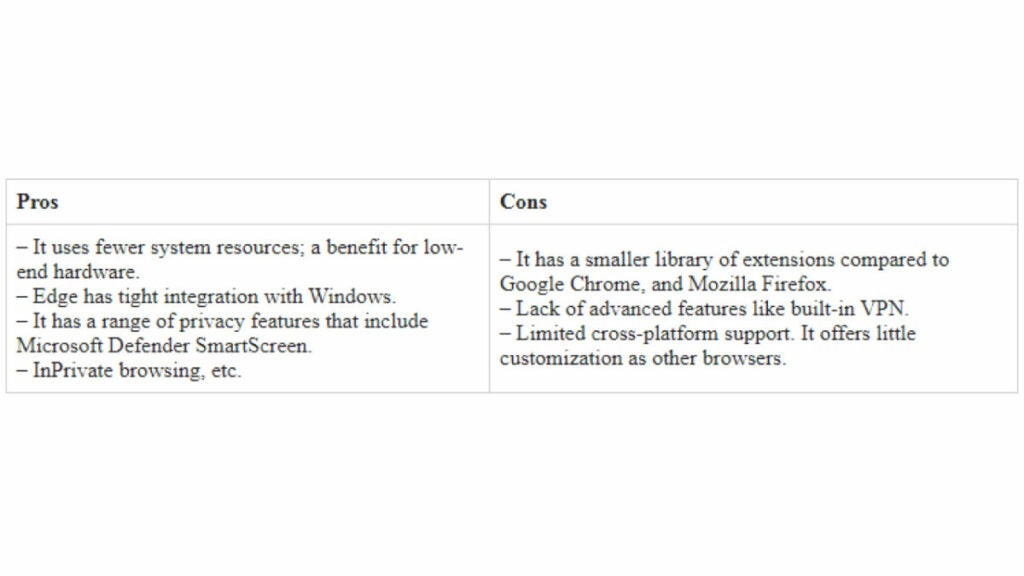
Vivaldi

This is a browser that focuses on customization and performance. It has a wide range of customization options, including the ability to change the appearance of the browser and create custom keyboard shortcuts. Vivaldi also has features that help with performance, such as the ability to prioritize tabs and manage memory usage. Its interface is more complex than other browsers, making it more suitable for power users and those who want more control over their browsing experience. It’s best for users who prioritize customization and performance over privacy and security.
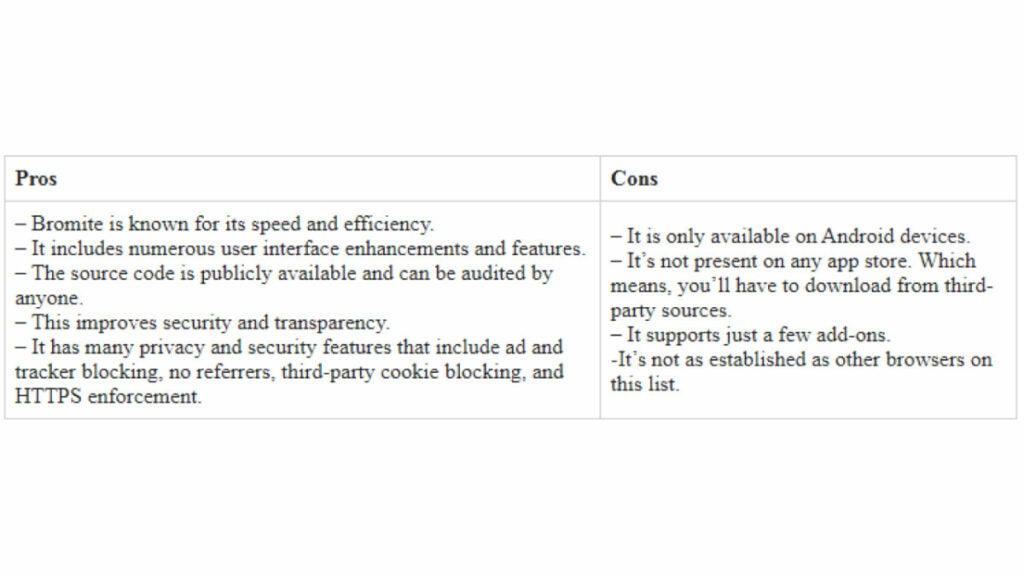
Ultimately, the choice between these alternatives will depend on the user’s specific needs and preferences. There is no one-size-fits-all answer to the question of which browser is the best. It comes down to personal preferences and what users value the most in their browsing experience, whether it’s speed and performance, security and privacy, or a combination of both.