Google Chrome version 28 released

Google Chrome 28 has finally left beta, and is available as a stable public release. The two main changes are the new rendering engine and notification system.

The new rendering engine is a big change for Chrome, but it will be hardly noticeable to users. Chrome previously used Webkit, which according to Google had become unwieldy and difficult to develop with because it’s used on so many platforms (Safari, and the BlackBerry 10 navigator, for example).
Google says it has made Blink much cleaner than Webkit, having removed nine million lines of code. This should result in an even faster and more efficient browser.

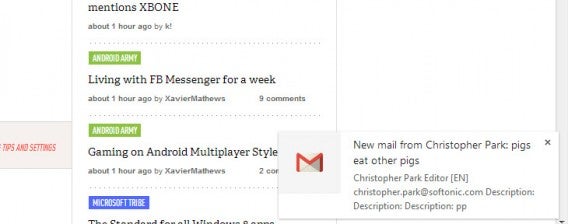
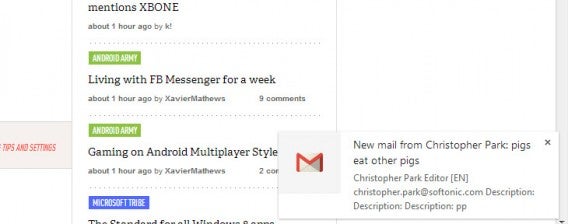
Notifications are so far only available on Windows and Chrome OS. These are a way for notifications to appear outside the browser window. Chrome apps and extensions can use these rich notifications, with formatted text and images to provide extra functions without users having to leave the page they are viewing. The notifications can include actions, like responding to an email or taking a web-cam photo. Support for Mac is coming soon.


Download Chrome for Windows or Mac.

Plants vs. Zombies 2 soft launched in Australia and New Zealand

Plants vs. Zombies 2 has been delayed until “later this summer” but Australians and New New Zealanders can get their hands on the game right now. PopCap is soft launching the zombie tower defense game early in these two countries to test out the game before shipping it to the rest of the world.

The goal of this test launch in Australia and New Zealand is to test PopCap’s server capacity to make sure services won’t go down when tons of Plants vs. Zombies download and play the game. However, this doesn’t mean that the game requires an internet connection to play. This is a good move especially with the EA’s botched SimCity launch, which required an internet connection to play the game. The second goal for this soft launch is the ability to see how players play the game and to fix any balance issues.

PopCap is warning players in Australia and New Zealand that the game will be subject to changes throughout the testing phase. “Please be sure to remember that we are going to be testing all sorts of different aspects of the game’s functionality, pricing, stability, etc. So don’t be surprised if you see lots of changes during this testing phase,” writes Allen Murry, Sr. Producer of Plants vs. Zombies 2.

[Source: PopCap]

Chrome pop-up notifications out now on Windows and Chrome OS

We already knew that Google was working on bringing interactive notifications to its Chrome browser but with Chrome version 28 released today, they’re finally available. Windows and Chrome OS users can look forward to rich notifications that were previously only available in the Chrome beta channel.

The new notifications don’t offer anything too dramatic in terms of features. They come with the unified card-style that debuted with Google+ and Google Now. Gmail notifications are still very basic, and only show the Gmail icon, sender address, and subject line. There’s no way to initiate a reply or to archive the email from the notification.

chrome notifications

While the new notifications can be integrated with third party extensions, not many take advantage of them. Currently, only first-party apps like Gmail, Google Calendar, and Google+ work. When more developers take advantage of the notification API, you can expect rich alerts, embedded images, and actions.

We’ll see if Google wants to integrate this feature into the mobile version of Chrome for Android and iOS, though it’s less relevant since each operating system has its own notification system. Google is also planning on bringing the new notifications to the Mac version of Chrome but they have a bit more work to do before it’s complete.

[Source: Google Chrome Blog | Download: Windows]

iOS 7 beta 3 and Mac OSX Mavericks for Developers Preview 3 released

Apple released iOS 7 beta 3 last night, for iPhone, iPad and iPod touch. The Mac OS X Mavericks for Developers Preview 3 has also been released. Intended for developers, these beta updates are free.

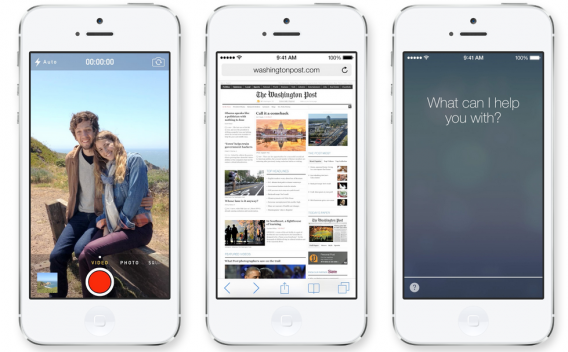
The iOS 7 beta 3 is available as an over the air update for devices running beta 2. It brings improvements and tweaks to graphics and animations, bug fixes and changes in the notification center. Siri has received a speed up, with a faster interface and more realistic voices. The camera app has a new feature to help reduce red eye in your photos.

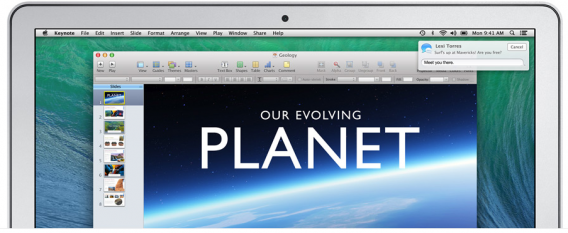
The Mac OS X Mavericks for Developers Preview 3 is focused on bug fixes and there are no noteworthy changes. It can be downloaded from the Mac Dev Center, but if you’re not a developer it’s advisable to wait until September or October.

iOS 7 and Mac OSX Mavericks are expected to be released to the public this fall.

Test the pre-release of Minecraft 1.6.2

Only a week after the official release of The Horse Update, you can already download the pre-release of Minecraft 1.6.2. It’s less radical, addressing bugs and issues that appeared with version 1.6.1.

The biggest fixes and changes are:

  • Fixed horses starting to suffocate when touching walls
  • Fixed animals escaping their pens
  • Improved sprinting behavior
  • On Mac, holding Ctrl while left-clicking now counts as a right-click
  • Custom fonts look better

Check developer Mojang’s blog for a full list of changes. If you try the pre-release, you can report any problems you find to the Minecraft Bug Tracker, which will help Mojang improve the game.

Version 1.6.1, better known as the Horse Update, was the most popular and radical update to Minecraft since the introduction of alternate dimention ‘The Nether’. It’s surprising, but bringing horses to the sandbox game seems to be one of the most popular moves ever.

Have you had problems with suffocating horses in Minecraft 1.6.1?

[Source: Mojang]

Microsoft’s Network Speed Test app released for Windows 8

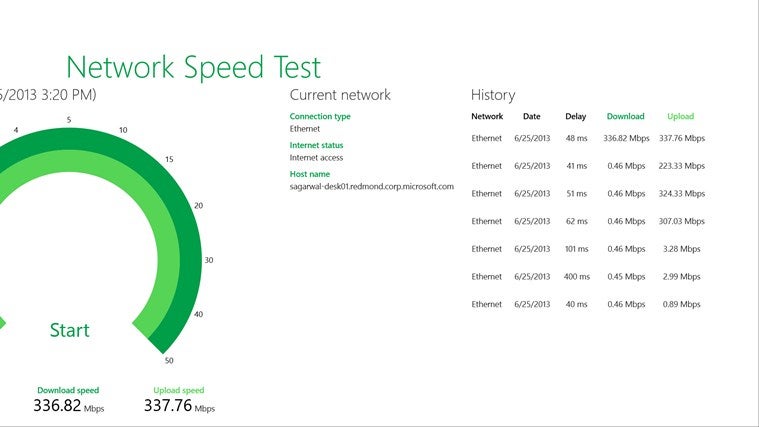
Do you know how fast your internet connection is? Good enough to stream music and video? If these questions keep you awake at night, Microsoft has just launched Network Speed Test for Windows 8 so you can make a complete analysis of your connection.

Network Speed Test is a free app that gives you detailed information about your upload and download speeds, and tells you what activities your speed is suitable for. You can keep a detailed record of your speed tests, which is great for checking if today’s connection is really slow, or you’re just impatient!

You can voluntarily send anonymous data to Microsoft’s servers, to help them learn what kind of connections users have all over the world, and can tailor their services better. It’s important to remember the developer of this official app is Microsoft Research, which is responsible for investigating new products at Redmond. This little tool could be the first step in a larger project from Microsoft.

Download Network Speed Test for Windows 8 and Windows 8.1

First update for Windows 8.1 Preview released

The Windows 8.1 Preview was released just one week ago at Build 2013 but Microsoft has already issued an update for the operating system. The updates are pretty minor and focus on stability and bug fixes. Internet Explorer 11 gets updated in this patch as well as the definitions in Windows Defender.

Here’s a full list of the changes:

  • Update for Windows RT 8.1 Preview (KB2864247) which is specifically supposed to fix a bug causing Metro apps to crash on Windows 8.1 Preview just after launch.
  • Update for Windows RT 8.1 Preview (KB2864806) that makes it possible to sing you Google account through Picasa or other applications that rely on Google services. According to Microsoft, this issues occurs because “the application cannot retrieve certain cookies located on the computer.”
  • Update for Windows RT 8.1 Preview (KB2864808) addressing a bug in Internet Explorer 11. “When you start and then pause a download in Internet Explorer 11 Preview on a Windows 8.1 Preview-based computer, the download cannot be resumed,” the company explains.
  • Update for Windows RT 8.1 Preview (KB2863312) developed to improve compatibility of software and hardware with the new OS release. “This compatibility update improves the compatibility experience in Windows RT 8.1 Preview and in Windows 8.1 Preview. Microsoft regularly releases Windows compatibility updates to improve the overall user experience,” Microsoft explains.
  • Update for Windows RT 8.1 Preview (KB2864713) that improves “the robustness of data files,” as Microsoft wrote in the advisory.

The updates apply for both the desktop and tablet versions of Windows so Windows RT users can update their operating system as well. Users should be getting the update pushed to them. To get the patch manually, simply launch Windows Update and click “Check for updates.”

[Source: Softpedia]

Wikipedia launches new simple VisualEditor for contributors

Wikipedia has launched a WYSIWYG (what you see is what you get) editor that makes contributing to the site easier for everyone. The old article editor, wiki markup, is difficult for newcomers. The simpler VisualEditor will mean contributors can focus on their articles, without being wiki markup experts.

The new VisualEditor has been available as an alpha test for a few months on Wikipedia in English, and now all registered users can use it. The classic editor is still available, and according to the site, there are still some functions in wiki markup that are not available in the VisualEditor. Experienced Wikipedia editors will therefore still be able to work as normal, but the foundation is trying to convince as many people as possible to use VisualEditor by default, so any bugs or problems can be ironed out as soon as possible. There are no plans to to remove the wiki markup editing ability.

Not all browsers support VisualEditor yet – current versions of Chrome, Safari, and Firefox are supported, but Internet Explorer is not. Wikipedia is asking for as much feedback from users as possible, to make VisualEditor as good as possible.

[Source: Wikimedia Foundation]

Skype celebrates 100 million Android installs with 4.0 release

Skype has hit a new milestone today on Android and its celebrating with a redesigned app. Version 4.0 of Skype for Android features a new design that looks more like Windows Phone, as well as redesigned conversations.

The impetus behind the redesigned converstations comes from wanting to make “interactions easier and [putting] conversations first.” Check out the short trailer below to see the new Android app in action.

Beyond visual changes, Skype for Android also has a ton of performance and bug fixes. Skype has been concentrating on making a more stable and speedy app. The company also promises more updates “in the coming months.”

[Source: Skype | Download: Softonic]

Xbox Music web version launched

Xbox Music, Microsoft’s streaming music service has a new web service, so you can now listen from your browser. All you need is Adobe Flash player installed for the web app to run (so it currently doesn’t work on iOS devices).

Previously only available on Windows 8, RT, Windows Phone 8 and Xbox 360, the new web app means you can access Xbox music from any PC or Mac, and unlike some streaming services, you can be logged into the service on multiple devices at the same time. Android and iOS users will be able to use the service later this year according to Microsoft.

Xbox Music has a very simple interface, and mirrors the design of Xbox and Windows 8’s Modern UI design. It lacks the recommendations and social features of rivals like Spotify or Deezer, but does offer ‘millions’ of songs to listen to. We don’t know exactly how many, so can’t yet compare Xbox Music with the libraries of competitors.

You can try the service free for 30 days.