Cloned Consoles Galore: AliExpress’ Attempt at Replicating PS5, Switch, and Xbox

A GameStation 5, an X-Boss, a Nontendo Sweetch: Chinese plagiarisms of the latest generation consoles are a refuge for the gullible and something hilarious to always watch. Let’s take a look in the darkest corner of AliExpress!

We believe that no one will enter AliExpress with the intention of buying a next-generation console at a ridiculously low price without seeing the scam from miles away, but you would be surprised by what amateur bargain hunters are willing to do to convince you of how much they’ve hit the jackpot. A GameStation 5, an X-Boss, a Nontendo Sweetch: Chinese imitations of the latest generation consoles are a haven for the gullible and somewhat hilarious to observe. Let’s take a look into the darkest corner of AliExpress!

AliExpress DOWNLOAD

GameStation

Finally! A genuine GameStation M5 with PS5 controllers! And with over 10,000 games built-in! You’d have to be a complete fool not to snag a console like this for 55 euros, which, according to its features, comes with an HDMI cable, a MicroUSB cable, two Game boxes (controllers, I suppose), a host (the console itself), and box design. They’re practically flying off the shelves.

According to the website, it emulates everything from MAME to PS1, so if you were looking for a retro emulator with controllers from the future, this could be a great choice. And you might be wondering, can it get any more audacious? Oh yes, it certainly can.

X Game

The Xbox might not be as popular as its competitors, but a good X marks the spot, especially for 66 euros. Sure, the controllers are from the PS2 era, and the box looks like an 80s cassette player, but when there’s a good deal, you’ve got to pounce on it. With 600 built-in games, 4K output (yep), wired controllers, and the promise that “adults and children can play,” it’s not like it’s going to bite your hand off or anything.

Supposedly, it has games from Game Boy, NES, Mega Drive, and Famicom. So, get ready for those spectacular 4K graphics. Oh, and they’re “full color” too. Thank goodness for that, huh? What a luxury.

Detachable Console

Who needs a Nintendo Switch when you could have an authentic Detachable Console? Same concept, just infinitely worse. It boasts 800 “great games” (at least that’s what they claim) inside, promising to make it seem like you have the trendiest console and not some gadget that requires batteries and connects to the TV via an AV cable, not HDMI. The future is here!

For some reason, the advertisement shows a kid continuously playing ‘Assassin’s Creed Brotherhood,’ but something tells us that particular game won’t be included. However, get ready for an 8-bit version of ‘Crash Bandicoot,’ the famous ‘Andry Birds,’ and countless repetitive versions of ‘Super Mario Bros.’

I mean, if you don’t have a console now, it’s because you just don’t want one!

AliExpress DOWNLOAD

Some of the links added in the article are part of affiliate campaigns and may represent benefits for Softonic.

AliExpress: How to Detect Scams and Other Useful Tips

If you love a good online bargain, you’re probably more than familiar with AliExpress. This portal encompasses the majority of stores and small businesses in China that have ventured into the global market, selling their products to consumers all over the world… and always for the lowest price!

Mujer comprando por Internet

So, it’s easy to understand why AliExpress is one of the internet’s most popular marketplaces. But as usual, whenever money is involved, there are scams, and some dishonest seller is always ready to prey on unsuspecting shoppers with bait-and-switch schemes.

Did you purchase a brand-new iPhone 11 for a ridiculously low price, only to receive an iPhone-shaped cushion in the mail? Did you fall in love with an adorable stuffed seal but end up with something that looks more like Steven Seagal than the aquatic mammal of your dreams? Or did you simply purchase an item and never receive it?

Don’t worry, you’re not the only one who has felt scammed after buying something on AliExpress. Because unless you’re careful, you could easily end up frustrated with what initially seemed like the bargain of the century.

AliExpress DOWNLOAD
8

To save you from bad experiences on AliExpress, in today’s article, we’re going to teach you how to detect scams on this platform and give you some tips in case you have somehow been conned. We hope you find it helpful!

Is AliExpress a secure platform?

Logotipo de AliExpress

That’s the million-dollar question, something we all wonder when visiting AliExpress. This marketplace offers endless items we’d love to buy, but we seem to recall reading somewhere online that it’s not very secure. Is that right?

The truth is that AliExpress is completely secure as a platform, in the sense that your banking or credit card details won’t be stolen by the seller. Your payment information (credit card, Western Union, Paypal, etc.) is never shared with the seller and is also protected by a reliable security system, Verisign SSL.

But scams are another issue entirely. While you can be sure a seller won’t swipe your credit card info, you may never receive anything in the mail. There have been many cases where the seller plays dumb and never ships your package. Apparently, it’s also common to receive a pirated item instead of the original. Keep reading to find out about the most common types of scams on AliExpress.

The top scams on AliExpress

Compras online

There are many methods of scamming, but fortunately, dishonest AliExpress sellers often have a modus operandi that is easily identifiable. Below we’ll share the most common ones, so if you’re a victim of any of them you can defend yourself before it’s too late.

The seller never ships your item

Imagine finding a Nintendo Switch on AliExpress with that special edition of Animal Crossing that’s so hard to find. And all for just 100 euros! Who could resist such a bargain? But after you purchase it, several months go by and your package never arrives. The seller claims they shipped your package as soon as they received the money, but your Switch never turns up. What happened?

If you find yourself in a situation like this, we have bad news: it’s more than likely you have been the victim of the classic scam of the package that was never shipped. The seller will claim over and over that your package is on its way, asking you to be patient, but the fact is, they never sent your merchandise, and your cool Nintendo Switch probably doesn’t exist. The scammer will try to make you lose the 60-day buyer protection period as you wait, and then you can’t open a dispute.

The seller gives you a false tracking number

Closely linked to the above scam is the false tracking number trick. After announcing that your phantom shipment is on its way, the rogue seller gives you a false tracking number so you rest easy and don’t get suspicious.

When you go to check the tracking number on the mail website, you’ll probably be informed that no such number exists in its database. The seller will claim that this is normal, as it’s common for shipments from China to experience delays in being recorded in the database. They’ll tell you to wait about two weeks for the number to work. But don’t be fooled, this one is never going to work!

Another common tactic: they give you a tracking number that works, but when you search for it, your package appears as delivered. That way, the seller is covered when you try to open a dispute. It will claim that you received the package and that you’re the scammer, when the situation is actually the opposite!

The products you receive are different from those advertised

This is the ultimate AliExpress scam. It’s fairly normal for any product you purchase online to look much nicer in the advertising photos than it does at home. Photoshop is the culprit in most cases. However, we all know China has a reputation for creating copies of products and selling them for a much cheaper price.

One of the biggest tricks on AliExpress is sending us products that barely resemble what we wanted and cost their seller much less to manufacture. In this case, photos of the original products are often used to trick the buyer, and once received, their quality leaves much to be desired. We’re talking about the classic Chinese fakes.

How to avoid getting scammed on AliExpress

Idea

Now that you know what kinds of scams you can find on AliExpress, we’d like to tell you how you can avoid them. Let’s get to it!

One of the keys to avoiding being conned is to do some research on the seller. Never, ever buy a product from a person or a store with bad ratings or complaints from buyers. If many people leave bad ratings or complain that they never received their item, you’ll be taking a risk by purchasing something from that seller, and you’ll likely fall into the same trap.

But what if the seller is new? Scammers often open new accounts on AliExpress when their old one has racked up too many bad reviews and nobody is taking the bait anymore. Should you always avoid new sellers, then? While our best advice is to stay safe and only buy from verified “reliable” users, you don’t necessarily have to avoid all new sellers. That said, please tread carefully.

To determine whether or not seller is real, it’s a good idea to scrutinize the photos they are using to advertise their product. If they use advertising photos from the manufacturer, you should be wary. If, on the other hand, they are real photos of the product, you should run a search on Google Images to see if they appear on other websites. Just go to Google Images (click here) and drag the photo to the box in the middle of the page. If the same picture appears on multiple websites, find a different seller. It’s probably a scam!

What to do if you’ve been scammed on AliExpress

Mujer frustrada

So we’ve told you about the most common scams on this platform and how to avoid some pitfalls, but… what if you had a moment of weakness and some dodgy seller managed to rip you off? Don’t worry! Your money isn’t lost yet, and we can help you get it back.

Many users are unaware that AliExpress has a 60-day buyer protection period. During this time, if you’ve had some problem with the seller or never received your order, you can open a dispute on AliExpress. There, you can submit your complaint, photos and proof to the platform, explaining what happened and how you have been the victim of a scam.

In theory, the seller has the right to defend themselves in the dispute and try to reach an agreement with you, but if no solution is found, the platform itself will resolve the dispute. After reviewing your case, the messages you have exchanged with the seller and the proof that you have submitted for the dispute, AliExpress will settle the case.

If all goes well, your stolen money will be returned, and the seller will be reprimanded by AliExpress. So if fewer than 60 days have gone by since your purchase and you still haven’t received your order, don’t hesitate to open a dispute on AliExpress. Just go to “My Orders” and click the button that says “Open Dispute.”

We hope our tricks and tips for detecting scams and avoiding cons on AliExpress has been helpful to you. Have you ever been the victim of an online scam? Tell us about your experience in the comments section!

How to use the AliExpress shopping app

If you’ve never used AliExpress to shop, you’re in for a treat.


AliExpress

AliExpress has been around for quite some time now, but the Chinese shopping portal is still clouded in mystery. In many ways, AliExpress is comparable to a Chinese version of Amazon, but in other ways, it is completely different. The differences come from AliExpress’s genesis as a retail version of the wholesaling website Alibaba, while the similarities come from being able to buy pretty much anything from a single site/app.

What is the difference between Alibaba and AliExpress?

With China famous for its immense manufacturing sector that can build almost anything, it makes sense that a wholesaling platform established itself so that the millions of Chinese factories would have somewhere to sell their wares. Alibaba is China’s leading wholesale platform and you can find everything on it, from DIY basics like nuts and bolts to the latest consumer tech via fashion and accessories. It is all built for business, however, with minimum orders often starting in the thousands. For personal users, this is no good. Who wants to buy 5,000 phone cases when you only have one phone?

How does AliExpress compare to Amazon?

This is where AliExpress comes in. While it is possible to find factories on AliBaba that will sell you a single unit, it is rare. AliExpress, on the other hand, is designed for vendors or retailers to sell single units. AliExpress is where you go to buy one phone case while AliBaba is where you go for 1,000 phone cases.

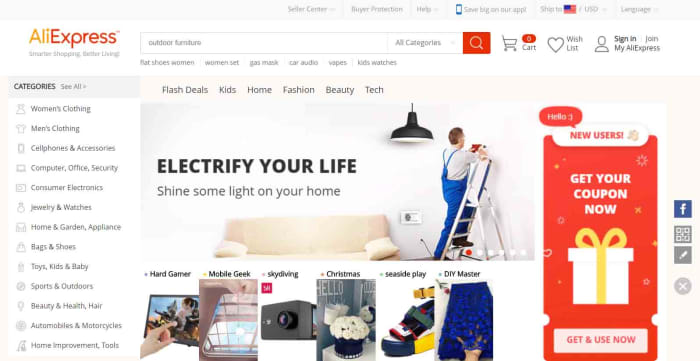
AliExpress homepage
The AliExpress homepage for desktop

This means that AliExpress ends up as a mix between eBay and the Amazon marketplace. When you buy things off AliExpress, you’re buying them from individual stores and vendors rather than off a centralized store. You can search for items or you can search for stores.

Since AliExpress was founded, it has grown to become the world’s largest online store. Its proximity to factory supply lines allows it to offer extremely competitive prices compared to local retailers and online retailers like Amazon. If we look at phone cases again, just as an example, it is easy to find them on sale for as little as 30 cents, which is a lot cheaper than you’ll find them at Best Buy.

Things to consider when buying off AliExpress

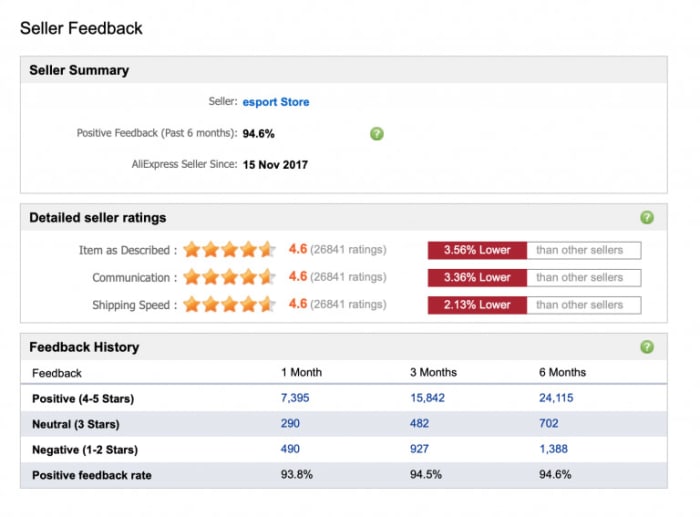
Seller feedback on AliExpress
Image via: AliExpress – You need to make sure you can trust the vendor you’re dealing with when you’re shopping on AliExpress

If you’re thinking of buying something from AliExpress, it is likely the low prices are what caught your attention. When buying from AliExpress, however, you need to consider more than just the retail price of whatever you’re looking to buy. The main things you need to be aware of when shopping on AliExpress are the trustworthiness of the seller, shipping times and costs, and potential import fees. Another thing you might want to look at, if buying a branded item, is whether or not you can guarantee its authenticity. Fortunately, AliExpress has created a guide on how to check for all of these, which you can read here.

How to use the AliExpress app for Android and iPhone

Now let’s have a look at how to use the AliExpress app. AliExpress has an app available for both the iPhone and Android smartphones and you can download them both here:

AliExpress Download free ►
9

Navigating the AliExpress app homepage

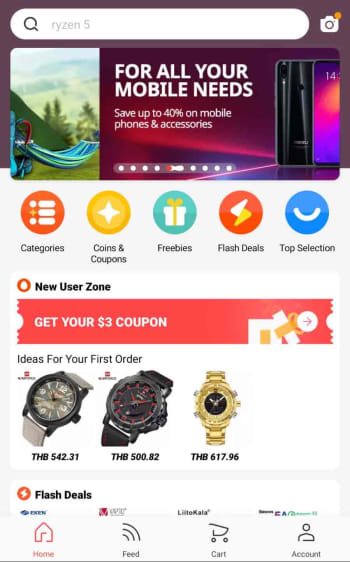
When you first open the app, you’ll find something that looks rather similar to the homepage you’ll find on the AliExpress website. In the middle of the screen, the app shows scrolling special offers and various buttons including coupon codes, flash deals, freebies, and searchable categories. You’ll also be able to scroll up and down the page to see different shopping sections filled with many different types of items like USB cables, sports footwear, makeup, and toys.

homepage of the AliExpress app

At the top and bottom of the homepage, you’ll find the function keys that will help you navigate the app, your account, and the shopping process. You’ll see a search bar at the top of the screen and a toolbar at the bottom. The toolbar includes a home button, a feed button that gives you a personalized feed based on your shopping history, a shopping cart button, and an account button. Whenever you click on an item or a store, the toolbar will disappear, but you’ll be able to find all the toolbar buttons by clicking on the three dot icon that appears in the top-right of the screen.

Next to the search bar across the top of the app, you’ll find a camera button, which activates some very interesting features.

The AliExpress camera app

AliExpress camera search
The AliExpress image search function is rather impressive

Clicking the camera icon in top-right of the AliExpress app homepage gives you three options. AR scan and QR code scan use your smartphone’s camera to scan for links to AliExpress items and pages. The really cool feature, however, is the image search feature, which can detect what you’ve taken a picture of and search for similar products or accessories. In all our tests this feature worked really well and was able to determine things like the brand of the item we’d snapped and, in some cases, even the model.

How to buy things using the AliExpress app

Step 1 Sign up

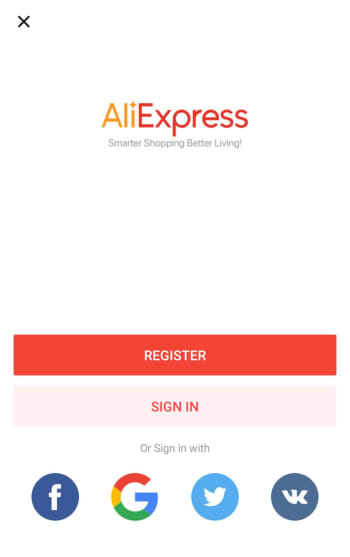
The first thing you need to do when buying something on the AliExpress app is to create an account. This process is simple, and similar to how you’ve signed up to a million other online accounts. You can even use your social media account details to create your account for you. You can do this using your Facebook, Twitter, or Google accounts.

AliExpress app sign up page

Step 2 Add items to your cart

You can find what you’re looking for using all of the homepage tools we highlighted earlier. Once you have an item you want you can either add it to your cart or hit the buy now button.

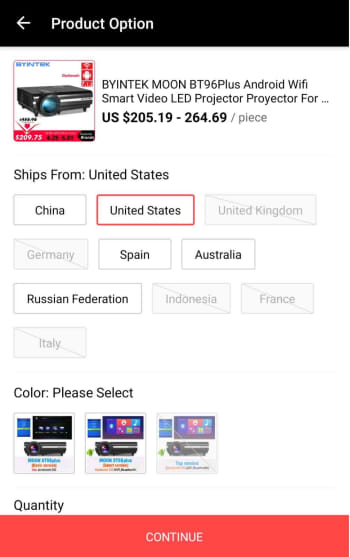
Depending on what you’re buying, you might have to select a few extra options at this point. This could include where your item will be shipped from. Here, it may be more expensive to have the item shipped from the U.S., but then you won’t have to worry about long shipping times, import duties, and taxes. This decision is up to you. You can find information on importing goods into the U.S. from abroad here.

where do you want your AliExpress item shipped from?

Step 3 Select the items you want to buy

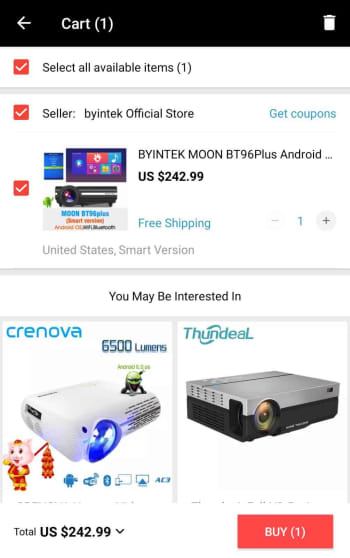
The AliExpress cart works a little differently to other online shopping carts. Rather than automatically selecting all the goods in your cart for purchase, you’ll have to select the items you want to buy by selecting the box next to each item.

confirm the items you want to buy

Step 4 Add shipping address and place order

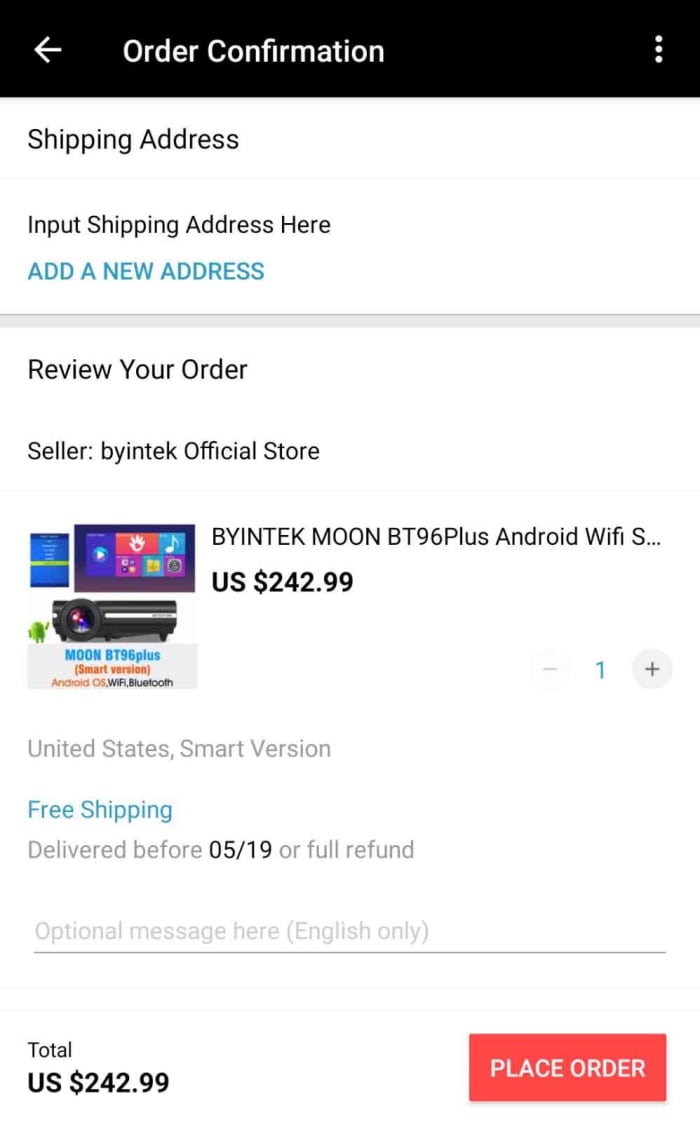
Once you’ve confirmed the items you want to buy, you’ll be taken to an order confirmation screen where you need to input your shipping details and check all of the information relating to your purchase. This will include any potential discount coupons and will also inform you of whether there are any shipping-related issues attached to your item. Sometimes you’ll see the seller offering a full refund if it hasn’t arrived by a certain date.

Ad your shipping address to your AliExpress order

Step 5 Payment details

After you’ve input your shipping details, you’ll need to enter your payment details. AliExpress accepts a number of payment methods including its own version of PayPal called AliPay, card payments, and bank transfers as well as a host of other payment methods including WebMoney, Western Union, Yandex.Money, QIWI, DOKU, MercadoPago, Ticket, and American Express. For full information on all the different payment methods available on AliExpress and the risks attached to them click here.

Conclusion

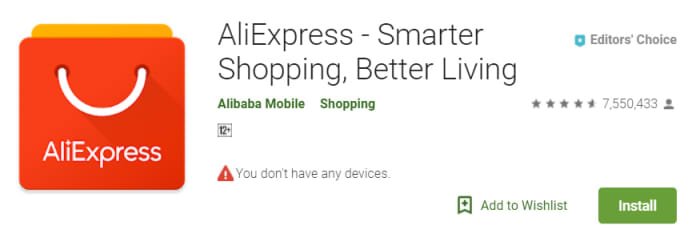
As you can see, using the AliExpress app itself is very simple. It is intuitive, easy to use, and also offers some cool and innovative features. This is reflected in the high ratings the app has on both the Apple app store and the Google Play Store. The app has an impressive 4.6 rating on the Play Store even after more than 7.5 million downloads.

AliExpress on the Google Play Store

The tricky business relating to shopping with AliExpress, however, is the mystery of it all. This is why we’ve gone through a bit of context for you to show you how the company operates and where it came from.

There are things you need to consider when you’re buying from AliExpress, and first and foremost you need to ensure that the vendor you’re dealing with can be trusted. Secondly, you need to consider shipping times, costs, and any import duties and taxes you may be liable for; we’ve also pointed out, however, that this might not always be necessary as the vendor may also ship items from your region. If you’re confident in the seller and understand all the shipping details, however then you should think of AliExpress as another viable option when you’re looking to buy something online.

AliExpress Download free ►
9