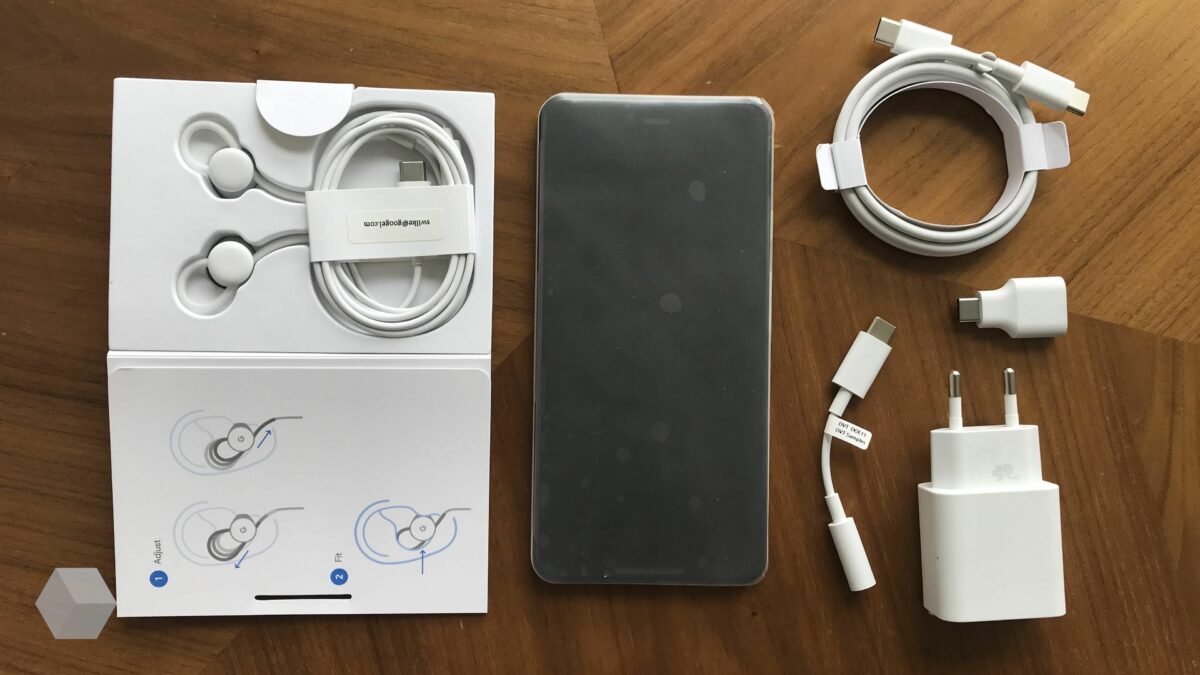
Time to Patch: Google Pixel devices vulnerable to Lock Screen Bypass

Google Pixel device owners may want to download and install the November 2022 security patches for their devices as soon as possible. Google fixed a serious security issue that allows the bypassing of the lock screen of the device.

Android 13 Download Now

The attack requires access to the Google Pixel device, but nothing besides that. Successful exploitation of the issue gives the attacker full access of the device, bypassing any lock screen protection that may be in place.

Security researcher David Schütz discovered the vulnerability by accident and reported it to Google after verification on his end. According to Schütz, it took Google several months to patch the issue and release a security update for supported Android devices.

The Google Pixel lock screen bypass explained

Schütz explains that he discovered the issue by accident. His Google Pixel 6 phone shut itself down while traveling. He typed the wrong PIN several times after connecting the device to a charger; this led to the device asking for the PUK to be entered.

After entering the PUK, the device asked Schütz to enter a new PIN to protect the device. Schütz noticed then that the device was not asking for the lock screen PIN, but that he could sign-in using fingerprint protection. That should not happen at this stage, as it was a fresh boot.

He investigated the issue in depth, putting the device into the PUK state multiple times. One time, he decided to hot-swap the SIM card and do the PIN reset process using the PUK of the other SIM card. This worked and to Schütz’s surprise, bypassed the lock screen protection of the device and loaded the home screen.

In other words: Schütz discovered a lock screen bypass that worked on Pixel devices. It requires physical access and a second SIM card that is in PIN locked state. The same issue affected the researcher’s Pixel 5 device.

Schütz did not test the issue on other devices. He suggests that devices off other manufacturers may be affected by the security issue as well.

Google awarded Schütz a bug bounty of $70,000 for discovering and reporting the issue. It is important to realize that older Pixel devices may be affected by the issue. Security updates are not released for devices that are out of support. As a result, some devices that may be vulnerable may never be patched.

You may check Google’s support page, which details for how long Pixel devices are supported with updates by the company.

Google Pixel’s November security patches fix the issue

Google releases security updates for Pixel devices once per month. Pixel owners may check the installed Android version in the following way:

  1. Open the Settings application on the Pixel device.
  2. Go to About Phone > Android version.

There, you find listed the Android version, Android security update, and the build number.

Do the following to check for Android updates:

  1. Open the Settings application on the Pixel device.
  2. Go to System > System update.

The page that opens displays the update status. Follow the steps outlined on the page to download and install the latest security update for the Pixel device.

Devices that can’t be updated may be vulnerable to the security issue. While there is no option to mitigate the issue fully, Android users may turn off the device before leaving it unattended for better protection against the issue.

All things considered, Google Pixel users may want to update their devices as soon as possible. A full lock screen bypass gives attackers full access to the device; this includes access to photos and videos, messages, applications, security apps, the browsing history and much more.
You may soon sign-in to sites and apps with just your Android phone

Soon, Android users may sign-in to any website or application using just an Android device. Passwordless authentication is the future, according to leading tech companies such as Apple, Google or Microsoft.

Authentication on the Internet and on local devices relies on passwords for the most part. Some devices support other forms of authentication. On Android, users may sign-in using biometrics, including fingerprints, or by using a PIN.

Android 13 Download Now

Not all devices support all forms of authentication on the other hand. As far as websites and services are concerned, most require passwords to sign-in.

The requirement may soon be a thing of the past, as Google just announced the introduction of passkeys support on Android and in Chrome. Major tech companies, including Apple, Google and Microsoft, pledged support for the standard. Users on Apple devices and Windows PCs may also use the new form of authentication in the future.

Passkeys: a replacement for passwords

To better understand Passkeys, it is important to understand how sign-ins work on the Internet and on devices currently.

When a user creates an account on the Internet or in an app, a password needs to be set. This password may have certain restrictions, such as a minimum length or that certain characters need to be included, but is largely up to the user.

Some users use password managers to create secure unique passwords, but many don’t. Password reuse and the use of weak passwords are a huge problem on the Internet. Malicious actors may exploit these weaknesses to take over accounts, for instance through phishing or brute force attacks.

Passwordless authentication systems promise a safer alternative. Passkeys, which Google introduced this week on Android and in Chrome, is a passwordless authentication system.

Passkeys are built on industry standards. They are operating system agnostic, and work across apps and websites, just like passwords.

It is important to realize that Passkeys have several advantages over traditional passwords:

  • Each Passkey is valid for a single app or website.
  • Server breaches do not leak Passkeys, as the important information is available only on the user device.
  • Phishing attacks, at least in the common form, do not work anymore, as users do not need to enter passwords when they authenticate.

Sign-in workflows do not change much with Passkeys, which is another benefit.

One downside to using Passkeys is the Android device requirement. Without the Android device, it is no longer possible to sign-in to sites and apps to authenticate. Some sites may offer fallbacks for that, but not all may provide this alternative in the future.

Sites and apps need to add support for Passkeys before the option becomes available.

The sign-in process with Passkeys

source: Google

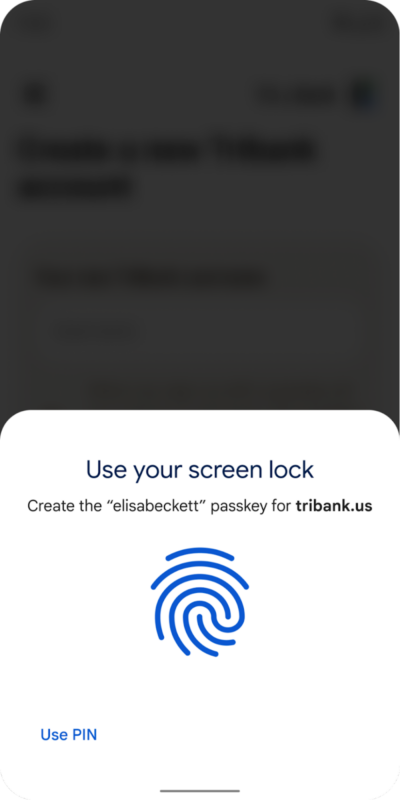
Creating an account using a passkey is a simple straightforward process. All it takes, is the selection of one of the accounts that is available on Android, and verification using one of the supported authentication options, such as using a PIN or a fingerprint.

There is no need anymore to select a password, which was a frustrating experience often.

Signing in to sites requires the same two steps. Select the account the passkey was created for in the first step, and then authenticate using any of the authentication methods available.

Passkeys work across different operating system environments. Windows, macOS, iOS, Android and ChromeOS support the authentication method, or will support it in the future.

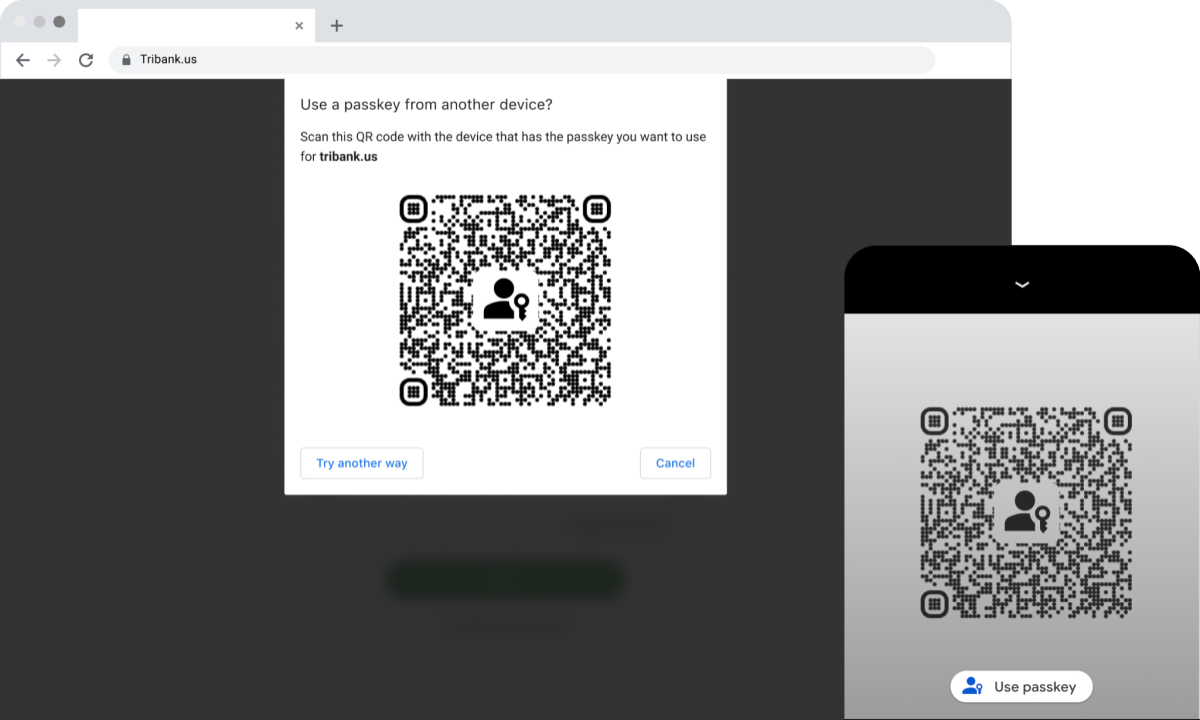
Google notes that Android users may use their device’s passkeys functionality on their desktop, notebook and tablet devices as well; this requires the scanning of QR codes, which programs display that support the authentication feature.

A passkey on a phone can also be used to sign in on a nearby device. For example, an Android user can now sign in to a passkey-enabled website using Safari on a Mac. Similarly, passkey support in Chrome means that a Chrome user, for example on Windows, can do the same using a passkey stored on their iOS device.

Google

Android phones will soon have much more natural voices

More and more these days we are interacting with virtual voices. Whether it be on automated customer service lines, with our virtual assistants at home, or perhaps when using our smartphone’s text-to-voice features we are increasingly happy to hear a machine talking to us. Still, however, there is a lot of room for improvement as most of these voices sound unnatural and a little weird. To address this situation on Android phones, Google is rolling out an update to the Speech Services by Google speech engine, which handles text-to-voice translations.

Android 13 Download Now

In an Android Developers Blog Post, Google has released details of a massive upgrade coming to Android’s speech engine, which will affect all 421 voices that are a part of the operating system across 67 different languages.

The feature utilizes a new voice synthesizer and model to drive the improvement in quality and produce a more natural sounding voice output. The blog post claims that the improvements are considerable and has provided a number of side-by-side comparison audio files across multiple languages for users to try out. If you want to check them out and compare them for yourselves you can do so by clicking here.

These text-to-voice features are extremely useful across a whole host of different apps from Google Translate to Google Play Books as well as offering inclusive accessibility features.

Google has said that the upgrade will be rolling out behind the scenes and claims that users of the TTS and Speech Services by Google engine will have already downloaded the update without even knowing about it. It will be rolling out 64-bit users of Android via the Google Play Store over the coming months.

In other recent Google news, Google Chrome is getting a speed upgrade thanks to a new freeze-dried tabs feature.

Android updates are now easier than ever

Software updates are more important than ever these days. As we move more and more of our lives into the online digital realm, we increasingly connect ourselves to a global web that as well as offering opportunity and efficiency also offers access to who we are and what we own to malicious actors and scammers. Software updates are one way of staying safe as they often come packed with security patches and upgrades. Updates, however, can be a bit of a pain, which is why this news from Google about updates for its Android mobile operating system is welcome.

Android 13 Download Now

Traditionally, Android has always had a much smoother updating process than iOS but it looks like the gap between the two is about to grow even larger as reports are coming through that it will soon be automatically set for Seamless Updates to occur on Android mobiles.

The Seamless Updates feature has been on Android for a while now and enables updates to automatically download in the background. The result is that updates occur, you guessed it, seamlessly without you noticing until the device restarts and the update becomes active.

The catch with the feature, however, us that it has only ever really been active on Google’s own line of Pixel phones as third-party manufacturers normally deactivate the feature when they adapt Android to work on their smartphones. This means that if the report from Tech Radar is true, the feature will soon be active on all Android phones, which means they will have the latest security updates installed on them more than 95% of the time.

Not only will this change keep users safe, but the wholesale blanketing of all Android phones with the latest security updates and patches will also likely have an effect on the malware industry too and cause a whole sector’s worth of scammers and cybercriminals to either give up all together or seek out new pastures.

In other recent cybersecurity news, did you know that Windows 11 has now become an unattractive target for brute force attacks?

Android 13 is shipping with some interesting business-focused features

Android 13 is Google’s latest version of its flagship mobile operating system. We have tracked the development of the mobile OS since back in May when the search giant first presented it back at I/O. We know, for example, that it is coming packed with new accessibility features and that it finally has tablet-optimized apps. Today, however, we can report on some of the new business-facing updates and upgrades shipping with Android 13.

Android 13 Download Now

To inform users about what Android 13 can offer businesses, Google has recently published a Keyword blog post going through new features and tools. These include new tailored experiences for workers, better navigation options, and improved security and privacy features.

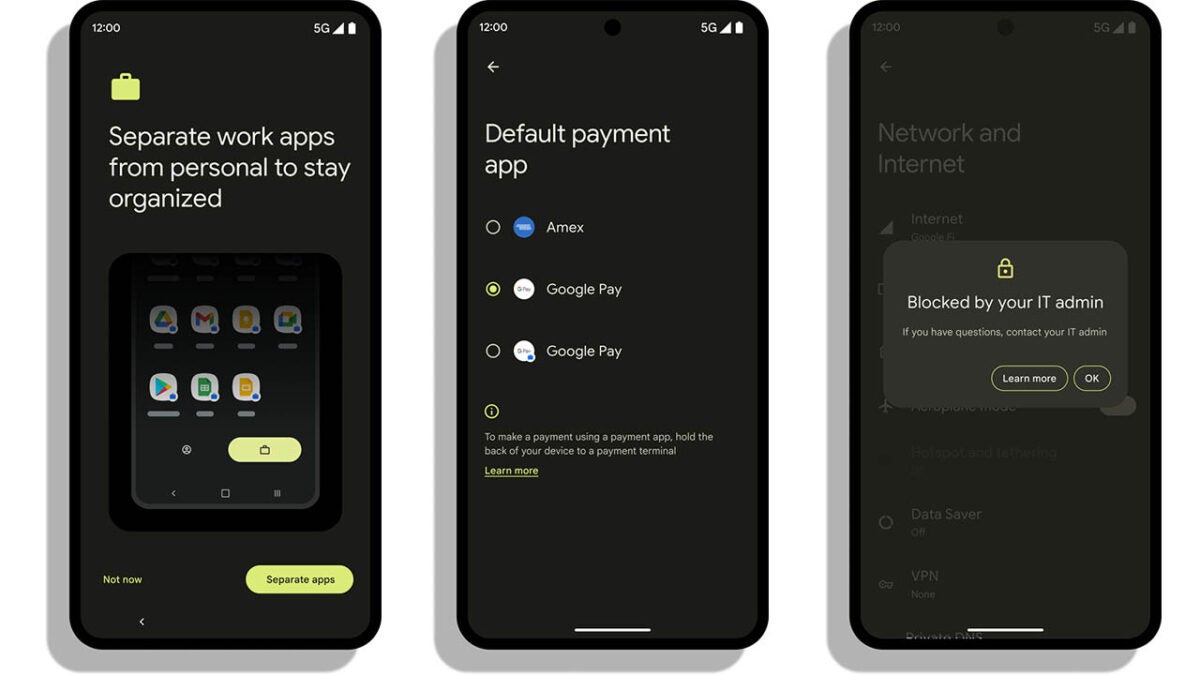
The first update relates to Google improving the Android 13 Management API, which means enterprises and companies can now customize employee experiences to better suit their corporate environment and structure.

The second new feature has to do with the profiles you use while you are on your Android device. More and more these days, people are using the same device for both work and personal use. This means single devices often have multiple profiles, each with their own distinct needs and requirements. Google has tried to make switching between these different profiles a much smoother experience as well as making your work and personal profiles much more tailored to their specific use cases.

Finally, Google is also extolling the virtues of the added enterprise-level security features it is building into Android 13. This includes a new central hub where employees can manage device security and privacy, more control for company IT admins, and new features like Lost Mode and Stay Private.

All these features do add up to an intriguing enterprise offering from Android 13, which has a lot to offer potential users. Interestingly, however, Google has already started talking about Android 14, including new satellite connection capabilities.

Most of your Android apps collect and share data

There is a good chance that the majority of Android apps that you have installed on your Android devices are collecting data and sharing it with third parties.

Android 13 Download Now

A recent study conducted by Incogni analyzed the top 1000 free and paid applications on Android. The company interacts with data brokers on the behalf of customers to get collected user data removed.

Of the 2000 Android applications, 55.2% share data that they collect with third parties. Free apps, those available without a price tag on Google Play, share seven times more data points with third parties than paid applications.

Google Play’s new Data Safety section

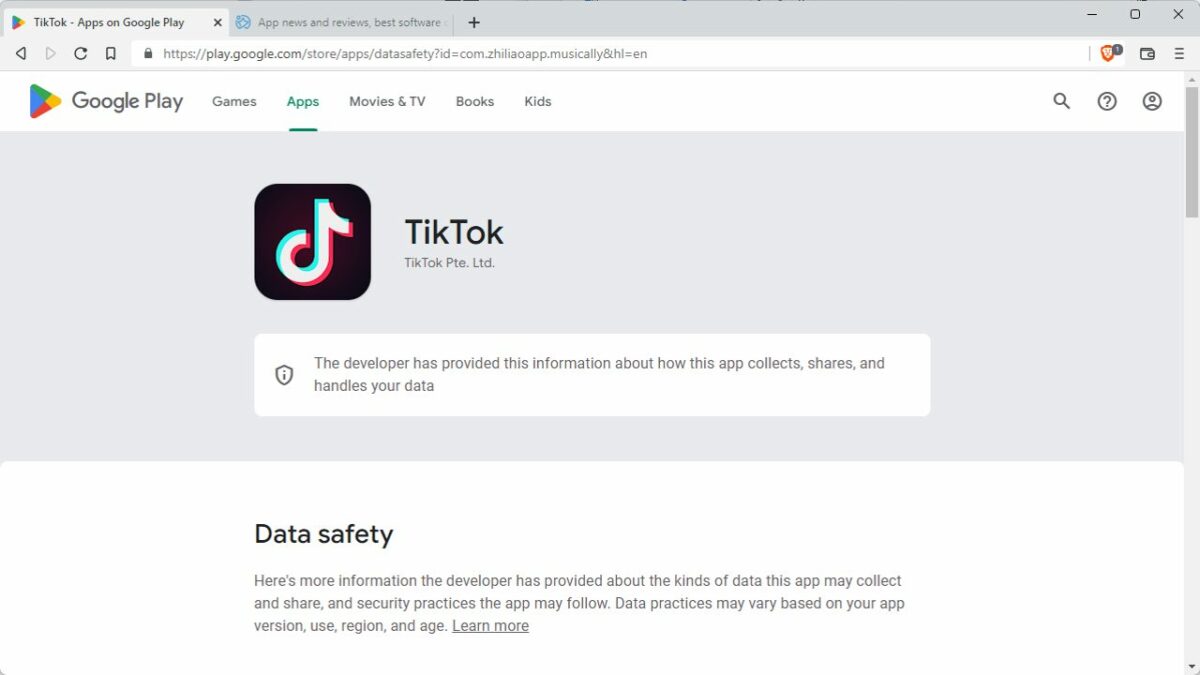
Google introduced a new Data Safety section on Google Play in July 2022. All Android developers, small one-person teams, and the largest international organizations needed to fill out data safety information for their applications before the deadline.

The section informs Android users about how applications collect, share and handle user data. The whole system is honor-based, which means that developers provide the data without it being verified by Google.

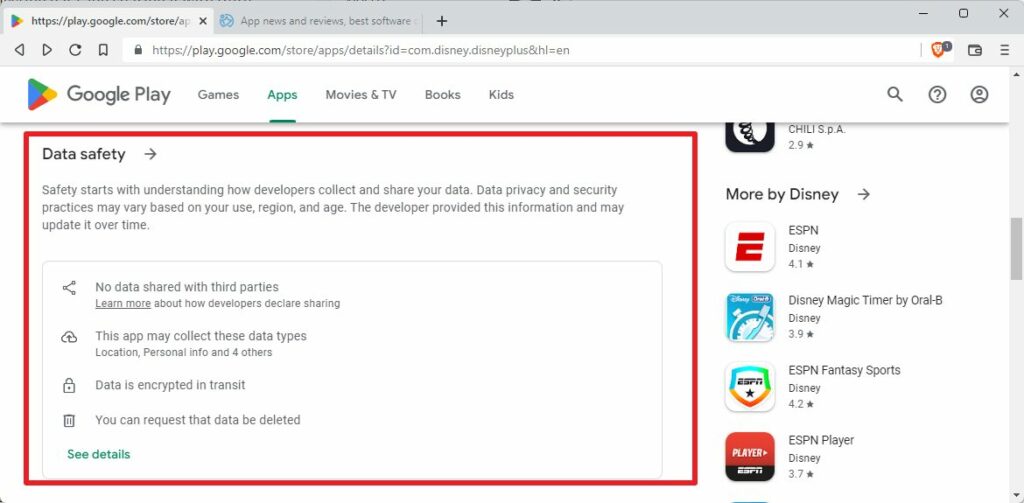
Here is how you check the data safety information on Google Play:

  1. Open Google Play on the Android device or in any web browser on mobile or desktop systems.
  2. Select the application or game that you want to verify.
  3. Scroll down to the Data Safety section.

There, you find a summary, which reveals major points. If you want to know more, you may activate the data safety link to open a page with additional details.

For example, opening the Disney+ app reveals that is does not share data with third-parties, that it collects six different data types, uses data encryption, and supports data deletion requests.

While that sounds good on paper, Incogni discovered that Google has a specific definition of data sharing. According to Google’s definition, data sharing refers to the “transfer of user data to any third party”.

Anonymous data, as well as transfers “made to a service provider or for legal purposes”, does not need to be revealed in the Data Safety section on Google Play.

In other words; if an app anonymizes collected data before it transfers it, it may not be revealed in the Data Safety section.

Apps collect lot of data on Android

Social applications like Facebook, Messenger or LinkedIn collect the most data points according to the study.

The top 10 apps that collect the most data points:

  1. Facebook
  2. Nextdoor
  3. Microsoft Teams
  4. Messenger
  5. Instagram
  6. Oculus
  7. LinkedIn
  8. Ebay
  9. Snapchat
  10. DoorDash – Dasher

The top 4 applications collected 36 out of 37 available data types. Only race and ethnicity is not collected.

While social applications collect the most data, most social apps share very little. Meta’s applications, Facebook, Facebook Lite, Messenger, Instagram, and Messenger Lite, share only 4 data types with third parties, according to the Data Safety section on Google Play.

It is important to realize, again, that certain forms of data sharing do not need to be revealed.

Social, business, and shopping applications collect the most data points on average on Android. Consequently, apps in those categories know more about their users than apps in other categories.

The Data Safety section does not reveal the purpose of the data collection, but the list of shared data points gives some clues.

Android apps share a lot of data as well

Incogni analyzed the main data points that Android applications shared.

The top 10 apps that share the most data points with third parties:

  1. Cast for Chromecast & TV Cast
  2. DoorDash – Dasher
  3. Booking.com Hotels and more
  4. The Home Depot
  5. Fetch Rewards: Earn Gift Cards.
  6. DoorDash – Food Delivery.
  7. Picsart Photo & Video Editor
  8. Dave – Banking & Cash Advance
  9. Drum Pad Machine – beat maker
  10. Reddit

App interactions, crash logs, diagnostics, the approximate location, and other actions top the third-party data sharing list. Diagnostic data, including crash logs and performance data, is used by developers to find and resolve errors and issues.

A significant number of apps shared user names (4.77%), email addresses (6.77%), and home addresses (3.85%). 13.4% of apps share the approximate location, 3.85% the exact location.

All in all, 55.2% of the 2000 analyzed applications share that with third parties. Almost 70% of apps that do not share data with third parties are paid applications.

As a result, free apps share an “average of 7 times more data points than paid ones” according to Incogni.

Closing Words

Incogni’s study demonstrates that Google Play’s Data Safety section lacks information that Android users may consider important.

Data Safety, on the positive side, reveals some information on an application’s data collecting, sharing and handling.

On the negative side, the filled-out information is not verified. If that was not bad enough, Google’s own definition of data sharing gives developers the go-ahead to omit some of the data sharing of their applications.

Free apps share more data points than paid Android applications; this should not come as a surprise. The saying that free is not really free seems to be confirmed by this, as users pay with their data.

To be clear, there are free Android apps out there that do not collect or share data, and paid apps that do. On average though, free apps share more data points than paid applications.

Google is working on bringing satellite connections to Android

With Android 13 heading to Pixel devices and soon to be landing on other third-party manufacturer phones, we have some rather interesting news to bring you about the next iteration of Android that will likely come towards the end of 2023. It looks like Google is going to build satellite connection functionality into Android 14. Here is what you need to know.

Android 13 Download Now

Rumors have been circulating for a while that Apple is working hard on making it possible to for iPhone’s to be able to connect to Space X’s Starlink satellite network, which offers internet connectivity that comes from space. Now, according to XDA Developers, Google does not want to be left behind in this race and so is also looking to implement this new satellite functionality into the next version of Android too.

All this news follows hot on the heels of a recent announcement from T-Mobile and Space X, detailing a new partnership that would see the telecommunications provider offering satellite connectivity from 2023.

The news about Google looking to ensure that its own smartphones would be able to take advantage of this historic partnership seems to be official as the Senior Vice President of Android, Hiroshi Lockmeyer, tweeted about the news himself. He said:

“Wild to think about user experiences for phones that can connect to satellites. When we launched G1 in ’08 it was a stretch to get 3G + Wifi working. Now we’re designing for satellites. Cool! Excited to support our partners in enabling all of this in the next version of Android!”

This new satellite connectivity should help to remove mobile connection dead zones where users are unable to connect to their networks. It will be interesting to see if these deals with T-Mobile will also work abroad as although there are plenty of dead zones in the US, it has to be said that this technology will be much more useful in countries that don’t have access to the high level of mobile telecommunications technology available in the US.

If you’re still living in the present you may want to check out all the latest features shipping with Android 13 rather than thinking about Android 14.

Android 13 is out with these new features

Each year, Google releases a new version of the Android operating system. Android 13 is now available on select devices as a direct upgrade and as images that Android users may download and install.

Android 13 DOWNLOAD NOW

Google is rolling out the new Android version to Pixel devices already. The rollout happens in waves, and it may take some time before the update is offered on a specific device.

Third-party manufacturers will publish updates for some of their Android devices in the coming weeks and months. New Android devices will also become available that run Android 13 out of the box.

If Android 13 is available on your device already, you may about new features and improvements that the update includes.

For this reason, we are taking a look at the top features of Android 13. Developers may want to point their browsers to the official summary on Google’s Android website, as it provides a deeper look at the changes.

Android 13: the major features

Android 13 includes a huge number of changes and improvements. Some of these may be discovered immediately, while others may be discovered later or not at all.

One of Google’s focus in Android 13 was on improving the privacy of users. While that is a commendable effort, some changes require application updates before they become available.

App notifications are now opt-in

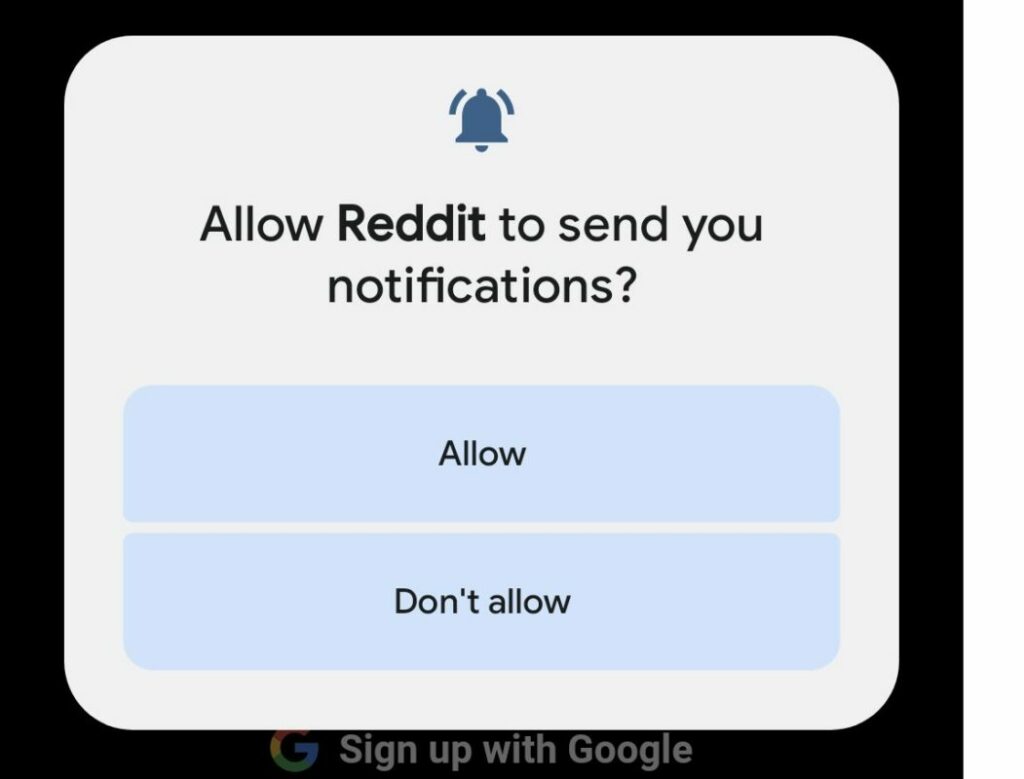
Android 13 gives users more control over application notifications. In previous Android versions, applications obtained notification permissions automatically. While you could remove the permission at any time, apps could send notifications immediately after installation.

Starting in Android 13, applications need to ask for permissions explicitly. Those who do not do that can’t send notifications on the Android device.

As a result, another permissions prompt may be displayed on first launch of applications on an Android 13 device; this gives users more control over notifications, and may prevent spammy apps from abusing the system.

The change applies to new application installations only. Consequently, already installed apps do not display the notifications permissions prompt after upgrading to Android 13.

Android 13 displays notifications about apps that use battery excessively to the user. The silent notification gives you an option to kill an app with a single action.

Per-app language settings

Many Android users speak more than one language. Android itself supports a single display language only, and this language is used by all applications, provided that it is supported.

There are good reasons for wanting to change the language of individual applications: the translation of some apps may lack clarity, or you may prefer a different language for some content.

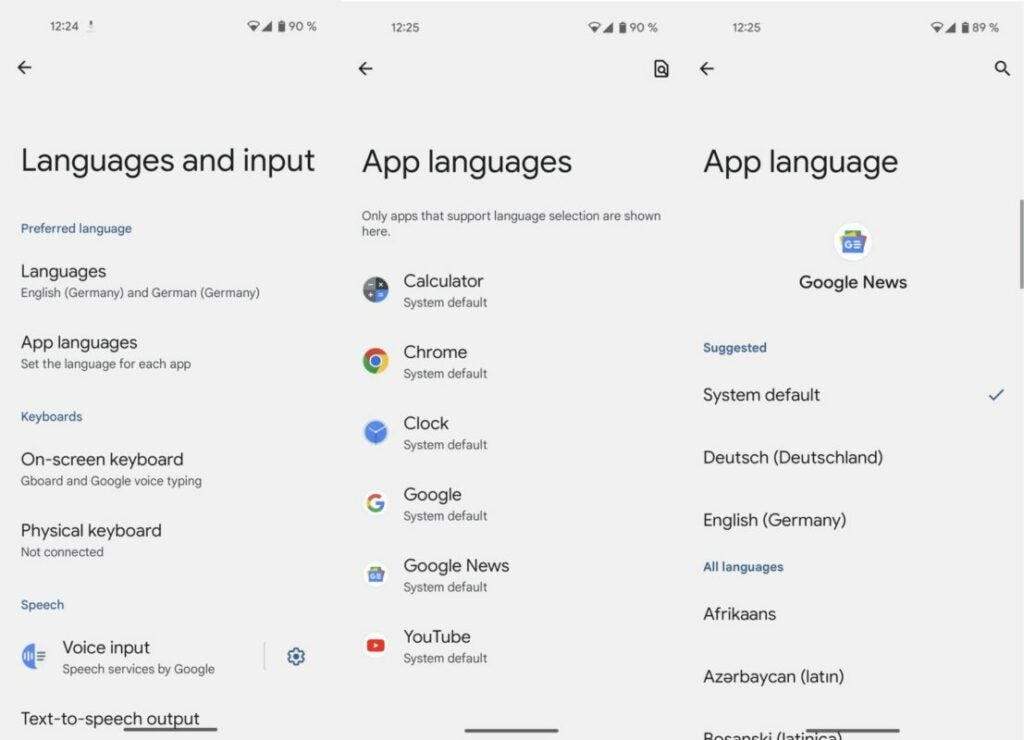
Android 13 introduces the ability to set languages for individual apps. Want Google News in English, YouTube in Spanish, and the Calendar in Japanese? This is doable in Android 13.

Just select Settings > System > Languages and input > App languages. Not all applications support the new feature at the time of writing, but many system apps do already.

Clipboard improvements

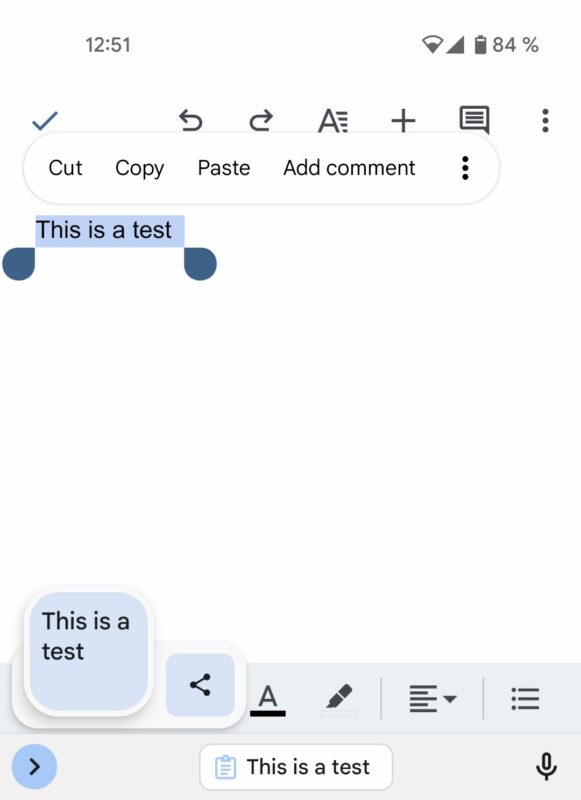
When you copy text on Android 13 devices, you will see a small overlay on the screen that contains it. It allows you to edit the text and share it immediately.

As a new privacy feature, the clipboard clears content automatically after some time. Consequently, clipboard text becomes less of a privacy risk. Email addresses, passwords, credit card numbers and other sensitive data is removed automatically by the Android device.

At the present time, there is no option to adjust the interval or disable the functionality altogether.

Smaller changes in Android 13

Android 13 features a number of smaller changes that users may benefit from. Here is a short list of other features and improvements in the new Android version:

  • You may give apps permissions to only access photos or videos that you select. In previous Android versions, permission to access the entire media library needed to be granted.
  • Sleep Mode supports the dimming of the wallpaper and the selection of a dark theme.
  • Support for Spatial Audio, which detects head movement to adjust sound automatically.
  • There is a new QR code scanner widget that you may add to the notifications area to scan codes quickly and without using a third-party app.
  • Additional Material You color schemes and wallpapers.
  • Support for the exFAT file system is finally available.
  • Improved switching between different Android device types, e.g., from tablet to smartphone, or Android TV to tablet.

Conclusion

Android 13 includes several important improvements and features for users. Some of these are limited to certain applications at the present time but will become available sooner or later in more apps.

Google Pixel owners are among the first to get the upgrade option to the new version of Android. Third-party manufacturers like Samsung or Motorola will offer the upgrade to some of their devices in the coming weeks and months as well.

Google gets a big fine for misleading Android users about Location Data collection

Recently Google had to backtrack on a planned move to remove permissions from the Google Play Store. User outrage over the search giant’s disinterest in their privacy, caused the company to reintroduce permissions and remove any chance for app developers to simply lie about the user data their apps were accessing. Unfortunately, however, news coming out of Australia seems to indicate that app permissions themselves aren’t enough as a safeguard as Google has been misleading users about the location data that was being collected on their Android devices. Here is what you need to know.

Android 13 Download Now

The Australian Competition and Consumer Commission (ACCC) has announced it is fining Google $60 million for what it calls misleading practices relating to the collection of Android user location data between January 2017 and December 2018.

ACCC Chair Gina Cass-Gottlieb said that the fine marks not only punitive damages for Google but should also act as a deterrent against further privacy-related deceptions in the future:

“This significant penalty imposed by the Court today sends a strong message to digital platforms and other businesses, large and small, that they must not mislead consumers about how their data is being collected and used.”

The move from the ACCC is a result of Google continuing to track the location data from some Android users’ phones even after they had disabled the Location History settings on their device. This meant that while they believed Google was not tracking data relating to their location, in fact, in some cases tracking was in fact occurring. According to the ACCC, more than 1.3 million Australian Google accounts were affected in this way.

Google is no stranger to fines like this, but it is disappointing to see the internet giant acting this way, at a time when online user privacy is such a hot topic. In this regard, Meta has just announced that it is seeking to automatically protect Messenger chats with end-to-end encryption.

Image via: ACCC

10 Million Android users have already installed a new wave of malware apps

Despite stricter rules, the Google Play Store is still full of malware apps. A new flood of malicious Android apps has just been discovered on the Play Store that is riddled with malware and spyware. Worst of all, Android users have already downloaded these apps 10 million times. Should we be worried about Android 13?

Android 13 DOWNLOAD

The apps used to spread malware often pose as image-editing tools, virtual keyboards, wallpaper changers and image filters. Many of these apps might even deliver the bare minimum of what they promise. However, their underlying goal is to push ads, subscribe unknowing users to premium services, steal social media account details and engage in other harmful activities.

The Dr Web antivirus team discovered these apps and highlighted these threats in a report. Google followed up by removing many of these malicious apps from the Play Store. However, a few of them remain. If you installed any of these apps, even if they’re already removed from the Play Store, you’ll have to uninstall them manually and run an AV scan to clear any remaining fragments that can still cause harm.

10 Million Android users have already installed a new wave of malware apps 2

Here is the full list of the most recent malicious apps discovered on the Google Play Store: 

  • Photo Editor: Beauty Filter
  • Photo Editor: Retouch & Cutout
  • Photo Editor: Art Filters
  • Photo Editor – Design Maker
  • Photo Editor & Background Eraser
  • Photo & Exif Editor
  • Photo Editor – Filters Effects
  • Photo Filters & Effects
  • Photo Editor: Blur Image
  • Photo Editor: Cut, Paste
  • Emoji Keyboard: Stickers & GIF
  • Neon Theme Keyboard
  • Neon Theme – Android Keyboard
  • Cashe Cleaner
  • Fancy Charging
  • FastCleaner: Cashe Cleaner
  • Call Skins – Caller Themes
  • Funny Caller
  • CallMe Phone Themes
  • InCall: Contact Background
  • MyCall – Call Personalization
  • Caller Theme
  • Funny Wallpapers – Live Screen
  • 4K Wallpapers Auto Changer
  • NewScrean: 4D Wallpapers
  • Stock Wallpapers & Backgrounds
  • Notes – reminders and lists

Hopefully, the optimizations planned for Android tablets will include stricter app security. For now, it’s important to remain cautious of any apps you install. While Google tries to screen them all, sometimes they still slip through. We recommend reviewing the rating and reviews before installing any app.