Google Meet will have several artificial intelligence-based features, and you will have to pay for them

As is the case in most of the tech industry, the giants of the sector have artificial intelligence as their major bet for the present and the future, so Google was not going to be an exception, of course. A clear example of this is Gemini, the multimodal artificial intelligence of the American firm, whose technology is gradually reaching existing services of those in Mountain View, as you already know. Now, the company has announced several new artificial intelligence features that are preparing to arrive at Workspace and more specifically to Meet, and these will not be free.

Google Meet Download

In relation to this, Google announced in a recent post on its Workspace blog that all AI innovations they are developing for their different services will be paid. Specifically, the monthly subscription will be $10 per user, which is a standard fee for each of these features. In fact, Google Meet already has some of these innovations, which aim to streamline the work of employees in companies that use these services.

Google Meet will have new and interesting AI-driven features

If you want to enjoy the new features of Gemini in Google Meet, you should know that these new functions, and all the ones announced by the company for all Workspace services, can be added as an add-on to any of the following plans: Business, Enterprise, Frontline, and Nonprofit. Obviously, not all of these functions are available yet. In any case, Google has added the new AI tool “Take notes for me” in Meet, which will take notes during meetings so that users can focus on the conversation itself.

AI will be responsible for summarizing and creating a list of notes about everything that happened in the meeting, regardless of the number of participants. This tool can provide the entire conversation in context and transfer all the important details into a document that can be used as a summary. This feature is already available in Meet, but the service is preparing to receive another exciting update, although it will have to wait a little longer for it.

Google has also announced that, starting in June, its mentioned service will feature “Translate for me”, a function dedicated to automatic and instant translation of subtitles. In fact, this important addition to Meet will be able to translate and transcribe the entire conversation in real time on both screens where the meeting is taking place. It is worth mentioning, in addition, that this artificial intelligence function will be compatible with up to 69 languages, resulting in 4,600 language combinations available. As for the translated transcription of the entire conversation, it can be summarized and downloaded later in a text document.

Google Meet Download

In addition to all this, Google Meet will also allow the use of generative backgrounds as part of these new artificial intelligence features, as well as the ability to take advantage of adaptive audio benefits. In addition, Google Chat will also have the option to add a watermark when sharing screens and conversation summaries. These additional innovations do not yet have a specific arrival date to these Mountain View programs.

Google Meet adds a “calls” tab in its web version

The American company that revolutionized web search engines in the past continues to try to improve its services. Google, which owns multiple applications and services in all areas, has recently worked to have a calls tab in Google Meet in its web version with the aim of facilitating access to information in this category through the PC.

Google Meet is the Google service that allows connecting with other Gmail users through calls. In plain words, it is the evolution of the old Google Hangouts, and they wanted to take a step forward with its rebranding, showing a much more complete service and interfaces. That is why, today, it has millions of regular users who have already made Gmail and its affiliated services their work ecosystem.

Google Meet Download

New call tab for Meet

As explained by 9to5google, Google Meet has implemented a new calls tab to access information related to this feature more easily. In this way, the application shows greater cohesion when carrying out all its functions, including keeping the user within reach of key information.

This is a low-caliber improvement, considering that the change has been to add a new button to the Google Meet web interface, but it also shows the interest and perfectionism that Google has in continuing to develop advances in its services, no matter how small they may be. Because, in the end, detail by detail, the quality of an application can end up taking many steps forward.

Google just paid 700 million
Google works daily on all the services it offers to users

Your current priority: Artificial Intelligence

Like many other companies in the technology sector, Google has dedicated a great deal of resources to developing its own Artificial Intelligence and system that can provide them with a differential value as a service based on this cutting-edge technology. Thus, from this work, Google Bard emerged, and the AI-based system that will soon underpin it, Google Gemini.

In recent weeks, Google has shown its impressive progress with Google Gemini, and has demonstrated that its efforts to develop a striking and powerful AI have paid off. It is still pending integration into Bard, but there is no doubt that if Bard already provides a very useful service to millions of users today, the improvements they will be able to enjoy when Gemini is finally implemented will be more than amazing.

Google Meet Download

Google Meet is opening up to calls without links for business accounts

Google Meet, which is undergoing many changes and improvements on its platform, will allow users with business accounts to make calls or conferences without the need for a link. This means that business accounts, like personal accounts, will be able to enjoy this functionality.

Until now, users with personal accounts were the only ones able to make calls directly through Google Meet. However, with the recent improvements, users with business accounts will also be able to do so, significantly enhancing the user experience and making things much easier.

Google Meet DOWNLOAD

End-to-end encrypted calls

As Google explains, these link-free calls will allow users with business accounts to make calls without the need to share a room link. This means calls can be made directly, in a more agile and dynamic manner, eliminating any friction that hinders work. It’s an improvement aimed at enhancing productivity by removing the requirement for something that is not essential.

Furthermore, in addition to these direct calls, other usual options will remain active, such as filters that change the background of the room or office, and visual effects that enhance communication through eye contact. Therefore, users with business accounts will also have access to all these features that are typically available to personal Google accounts.

Google Meet is constantly evolving.

A plethora of improvements for Google Meet

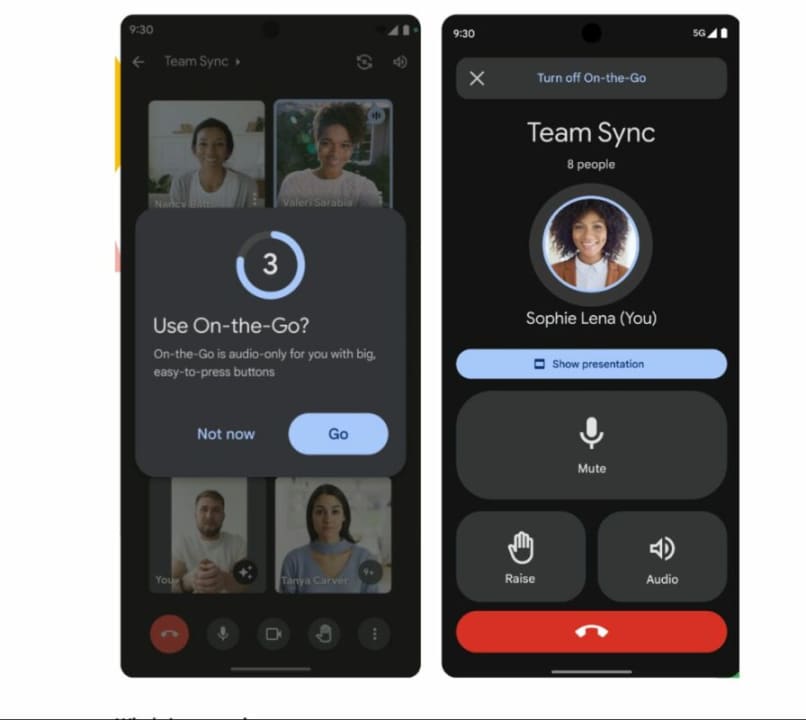
With this improvement for business accounts users, Google has made several advances in its conferencing platform. Just recently, they introduced the “On The Go” mode, which simplifies the interface for users while driving, and new facial filters, exclusive to business accounts for those who want to use them during a video call.

Google Meet is putting in significant effort to integrate itself further into work ecosystems, a segment that has seen substantial growth since the pandemic, where other major competitors like Zoom or Microsoft Teams are competing fiercely. That’s why Google Meet continues to work on these advancements, and it remains to be seen what Google’s next surprises will be for its video calling service.

Google Meet DOWNLOAD

Google Meet launches its “car mode” on mobile with significant improvements

Many employees frequently hold meetings while commuting, a practice that Google Meet has taken into account in its latest update. For this reason, the conference application focused on the professional environment has created the “car mode,” which will be especially useful for those individuals who conduct meetings while driving.

In the current era, where time is precious, many entrepreneurs tend to save meeting time by conducting them in the car, but it also comes with its risks, either due to distraction or the risk of looking at the screen. Therefore, the features of Google Meet’s “car mode” are aimed at simplifying the experience and focusing on what matters: communication.

Google Meet DOWNLOAD

A simpler interface

The main change that Google Meet has in this On-the-Go mode, as Google explains, is that native image transmission will be disabled so that the user who activates it only sends and receives sound, without images that create distractions while driving. In addition, the buttons will become large and easy to press, to minimize the time spent not looking at the road.

This is an improvement focused on the business environment, but really, all users who make group calls in any context can benefit from it. This way, communication between other participants is not reduced, and the person driving will have a safer interface.

Google in vehicles

The world of vehicles is a market where Google has been showing interest for years, leading to the development of Android Auto, a system specifically designed for the screens of modern vehicles. It facilitates navigation through applications such as music, GPS, or calls, among other things. This allows users to access these features without having to connect their phones via Bluetooth in the car.

However, Google is also aware that there are millions of people with not-so-modern cars who also need phone interfaces and modes designed for driving. For this reason, Google Meet’s ‘car mode’ update is a feature that can provide significant value for many people who regularly use the application.

Google Meet DOWNLOAD

You can finally add emoji reactions on Google Meet. See how it works

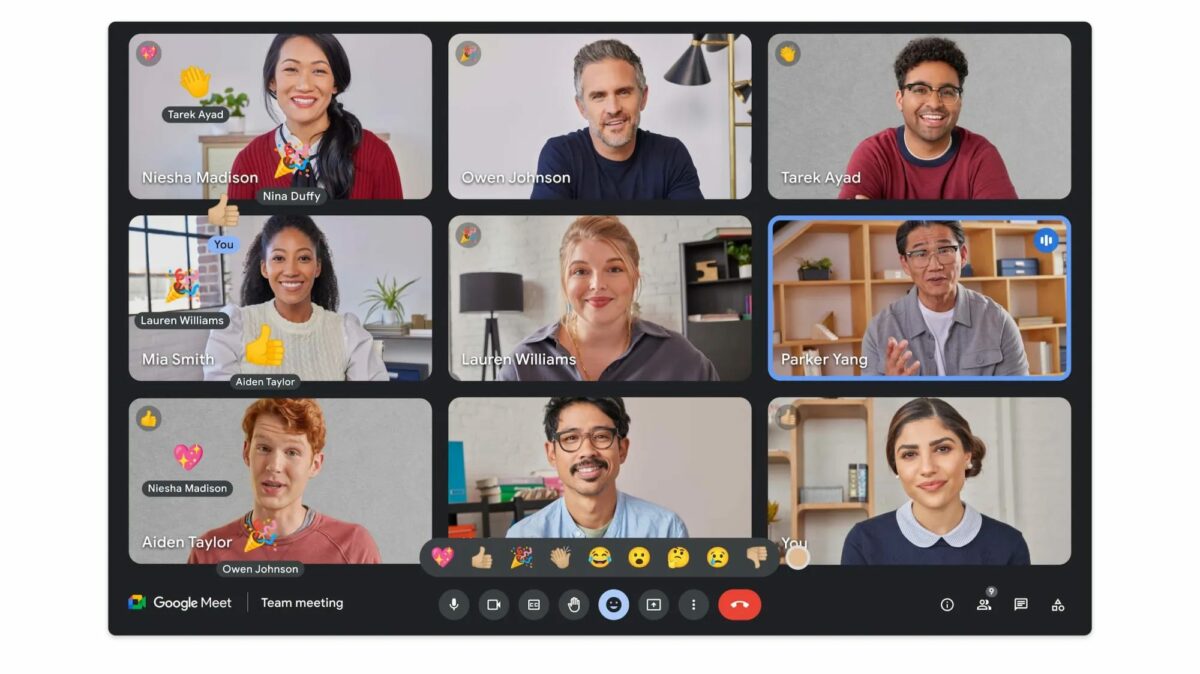
If you regularly have meetings in Google Meet, you may already know about the hand-raising tool for when you want to speak. The company behind the app wanted to take it a step further, ensuring you can respond to the discussion without being disruptive. To that end, you can finally react with emojis during the video call.

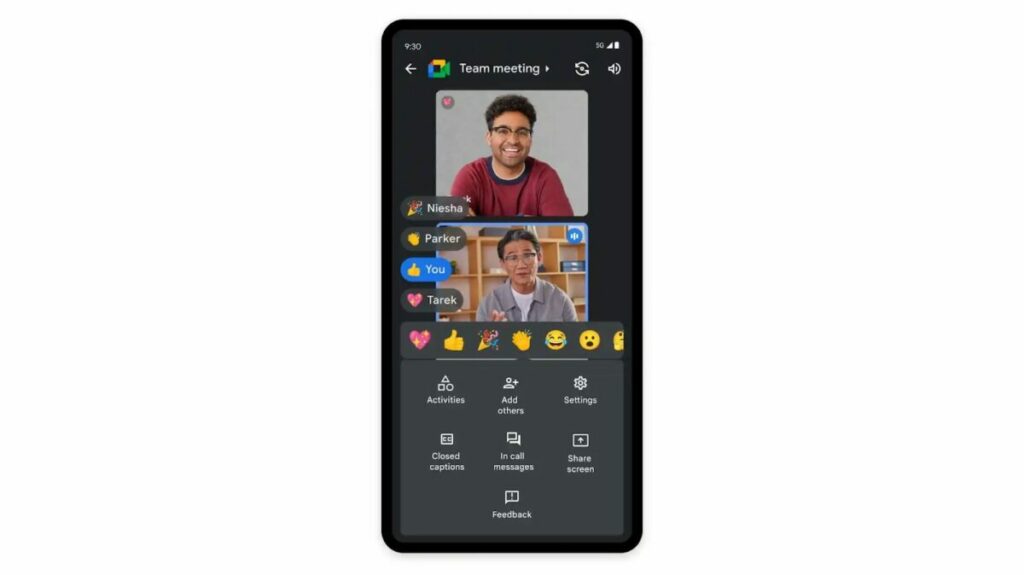
Should you wish to do so, it’s easy to apply. When you’re in Google Meet, just look at the bottom row of emojis. The ones available at this point are Sparkling Heart, Party Popper, Face with Tears of Joy, Thumbs Up, Astonished Face, Clapping Hands, Crying Face, Thinking Face, and Thumbs Down. I don’t know about you, but I really hope no one reacts to what I’m saying with that last one.

add emoji reactions on Google Meet

Here’s a short statement from Google on the new emojis:

“We hope these features make it easier for you, your colleagues, and stakeholders to stay better connected and engaged, whether they’re working from home, the office, or anywhere in between.”

add emoji reactions on Google Meet

Time will tell if we’ll see more of a selection in the future. You can also change the skin tone of the emoji across the boards for Google Meet on the right side. Once selected, it applies to all the emojis. 

As for not being a distraction, I seriously have my doubts. Since it’s a new feature, someone in the meeting is going to be trigger-happy and look for every opportunity to use each emoji. Also, the attention seekers in the audience won’t be happy unless everyone in the Google Meet claps for a standing ovation. 

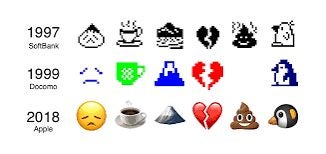
As a point of interest, did you know that Shigetaka Kurita was the first one to make emojis? He made a collection of about 180 emojis for a Japanese web platform for mobile devices at the time. To think, we’re still using them to this day, just upgraded.

add emoji reactions on Google Meet