
Remind is a messaging app built just for teachers, students, and parents

Never miss an assignment or forget a permission slip with Remind!

School

With the final days of summer dwindling down, it’s time to get focused on going back to school. Whether you are still in school yourself, or if you’re a parent who needs to keep track of their kids’ education, you need all the help you can get. In the age of smartphones, there is a laundry list of apps out there that can help you out. However, Remind is the best one out there by a mile.

10

Remind: School Communication gives students, parents, and teachers tools for communication. Now, you no longer have to worry about missing an assignment or getting in contact with your teacher to ask them a question. 

Remind: School Communication is changing the education game

Keep students up to date

Teachers can use remind to send notifications to students about things going on in class. For example, if your teacher is missing class because they are sick, they can let you know that class is either canceled or that there will be a sub.

Also, if permission slips are due for a field trip, teachers can send students a reminder that the due date to turn them in is approaching.

Parents can stay informed

If you’re a parent, Remind is an invaluable app for you. You can stay on top of your kid’s assignments, and never miss signing another permission slip.

One of the best parts of the app is that you won’t have to wait until parent-teacher conferences to hear from your child’s teachers. 

Safety concerns

At first glance, this app may seem a bit sketchy. Private messaging between young children and their adult teachers at any hour of the day sounds like a recipe for disaster. Also, there are tools for sending money such money for field trips, so that also opens another ethical can of worms.  However, Remind has plenty of tools to help keep users safe.

For example, all users can get a full transcript of their conversations. This way, all users can be held accountable for things that they say. Also, students under 13 have several measures in place to help protect them:

  • They can only be invited to join a class.
  • They can only join a class that has been connected to their school on Remind.
  • They cannot participate in two-way conversations. This means they cannot talk privately with their teachers.
  • They cannot start conversations or reply to announcements.
  • They cannot create groups.

Wrapping up

If your school does not have an account with Remind, then it can’t help you. However, if you’re a teacher, you can set up a free account yourself! You can register up to 10 classes on Remind so all of your students will be kept in the loop!


6 apps that will help you ace your next test

Got a big test coming up? Here’s how to get an “A.”

Few life events stress us out as much as an upcoming exam — especially one that weighs heavily on our final grade. Luckily, today’s students can use technology to get a leg up. Check out these great resources to supercharge your test-prep efforts.

6 apps that will help you ace your next test

1. Cite This For Me

It’s not enough to write a great report. You also have to cite your sources properly. APA, Harvard, Chicago, MLA — it’s a lot to learn! Good thing Cite This For Me exists. Use it to totally nail your bibliographies, references, and citations.

2. iTunes U

Looking for materials to help you put together a killer paper or nail that big exam? iTunes U provides access to loads of lectures, books, videos, and other collegiate-level learning resources from respected higher-ed institutions (Yale, Stanford, Oxford, MIT, and more). Plus, it’s all free.

7

3. Grafio

Visual learners, rejoice! Grafio is an app that helps you create diagrams for days. There are some similar apps out there, but this one is by far the most polished. Turn your notes into diagrams and charts so you can create a study map that makes sense to you. The app also supports integrated audio recordings to help you further customize your visual aids.

Grafio 3 - Diagram Maker Download Now ►
8

4. Notability

This note-taking app lets you do notes your own way. Import files and data, convert your handwritten notes, or “write” directly in the app. You can also create, sign, and share documents using Notability. Additionally, the app lets you record and play back audio.

Notability Download Now
7 ►

student-smartphone-class

5. My Study Life

If getting through the semester feels like chaos, try organizing your workload with My Study Life. This app is a student’s best friend — especially an organizationally-challenged student. Get reminders about study groups, upcoming exams, due dates, classes, and more. Use the app to carve out time to study, and set alarms to help you stick to it.

My Study Life Download Free ►
7

6. Quizlet

Remember those good old flashcards? They’re actually a very effective way for many people to absorb and remember information. Quizlet lets you create your own virtual flashcard sets to study. The app also lets you make your own cool learning aids, such as games that make studying a lot less boring.

10

Schools use AI to fight vaping

vaping

Isn’t that the most 2018 headline you’ve ever read?

If you know anyone who’s in middle or high school, they’ll tell you that school bathrooms are foggier than Silent Hill. Over the past year, vaping went from an uncool habit done exclusively by 25-year-olds who wear Monster snapbacks to an extremely common teen pastime. Teens vape so much in school, that a common joke is “Dude, why are there toilets in the Juul room?”

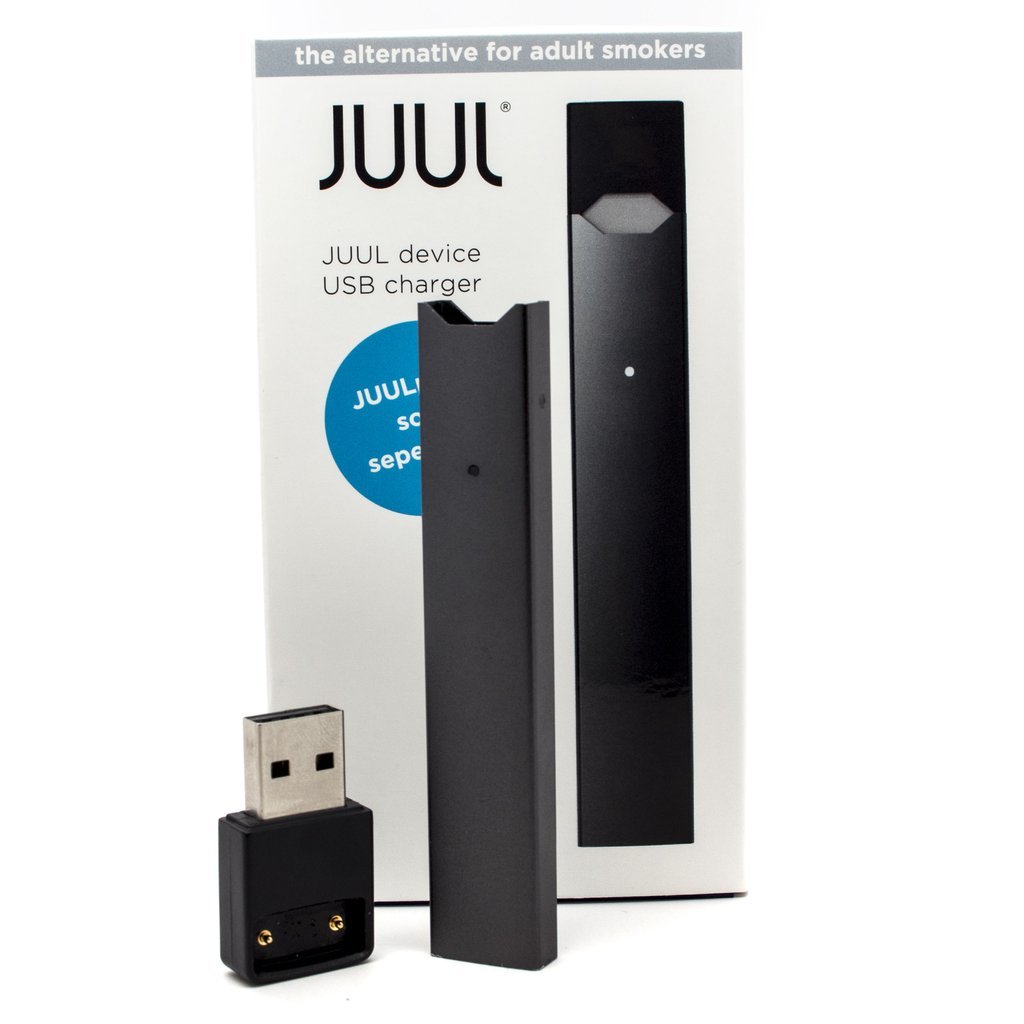
The meteoric rise in vaping’s popularity among teens is due to the Juul. Whereas previous vaping devices were large, boxy and clunky, the Juul is streamlined, sleek, and subtle, looking way cooler while being significantly easier to hide. The nicotine content in a Juul pod (disposable cartridges that hold the vape juice) is significantly higher than most other vape devices, providing a more immediate and intense buzz. Combine all these factors and it’s easy to see why Juuls became so popular.

The days of sneaking smoking cigarettes in the bathroom are long gone. Unlike cigarettes, Juuls don’t leave behind a smell for very long, either in the air or on the user’s clothes, making it much harder to catch in the act. To fight this advancement in smoking technology, teachers are turning to AI.

The Fly Sense, developed by Soter Technologies, is a device that analyzes water vapor levels in the air. Take a look:

First, the device is calibrated to detect what the vapor content of the room is like normally (which in most cases is the school bathroom). Then, when a nearby student vapes, the device detects a change in the air. It then proceeds to send alerts to the phones of relevant teachers and faculty members, giving them ample time to storm the bathroom and catch the unfortunate student. The Fly Sense uses machine learning AI to detect specific water vapor levels that match certain vape juices, including being able to detect the presence of cannabis.

The AI vape detector market is surprisingly (and hilariously) intense, with multiple companies scrambling to get their products into schools. The Fly Sense seems to be winning, having been deployed in more than 200 schools across the U.S. and Canada.

Schools aren’t the only audiences of this technology. Juuls are also popular among college students and adults, prompting an increasing number of offices and workplaces to ban vaping and install anti-vaping technology like Fly Sense.

What do you think about the vaping phenomenon? Let us know!