Remind is a messaging app built just for teachers, students, and parents

Never miss an assignment or forget a permission slip with Remind!

School

With the final days of summer dwindling down, it’s time to get focused on going back to school. Whether you are still in school yourself, or if you’re a parent who needs to keep track of their kids’ education, you need all the help you can get. In the age of smartphones, there is a laundry list of apps out there that can help you out. However, Remind is the best one out there by a mile.

10

Remind: School Communication gives students, parents, and teachers tools for communication. Now, you no longer have to worry about missing an assignment or getting in contact with your teacher to ask them a question. 

Remind: School Communication is changing the education game

Keep students up to date

Teachers can use remind to send notifications to students about things going on in class. For example, if your teacher is missing class because they are sick, they can let you know that class is either canceled or that there will be a sub.

Also, if permission slips are due for a field trip, teachers can send students a reminder that the due date to turn them in is approaching.

Parents can stay informed

If you’re a parent, Remind is an invaluable app for you. You can stay on top of your kid’s assignments, and never miss signing another permission slip.

One of the best parts of the app is that you won’t have to wait until parent-teacher conferences to hear from your child’s teachers. 

Safety concerns

At first glance, this app may seem a bit sketchy. Private messaging between young children and their adult teachers at any hour of the day sounds like a recipe for disaster. Also, there are tools for sending money such money for field trips, so that also opens another ethical can of worms.  However, Remind has plenty of tools to help keep users safe.

For example, all users can get a full transcript of their conversations. This way, all users can be held accountable for things that they say. Also, students under 13 have several measures in place to help protect them:

  • They can only be invited to join a class.
  • They can only join a class that has been connected to their school on Remind.
  • They cannot participate in two-way conversations. This means they cannot talk privately with their teachers.
  • They cannot start conversations or reply to announcements.
  • They cannot create groups.

Wrapping up

If your school does not have an account with Remind, then it can’t help you. However, if you’re a teacher, you can set up a free account yourself! You can register up to 10 classes on Remind so all of your students will be kept in the loop!

8 best apps for parents of babies and toddlers

Your phone can help you be a better parent. Here’s how.

new parent

Congratulations/condolences! You’re a new parent! Becoming a parent can be one of the most difficult transitions in your life. But with new technology, this process can be much easier than it was a few decades ago. Your phone is an incredible resource of information and cataloging that you may not even be fully aware of. With these apps, you’ll be able to put all your parenting anxiety away. (You can bookmark this until naptime. We won’t blame you.)

8 best apps for new parents

Reading Eggs

Eggs

Reading Eggs has learning tools for kids from ages 2 to 13.

When it comes to teaching your kids how to read, Reading Eggs does an egg-cellent job!

Kids have a blast playing games, singing songs, and earning rewards, all while improving their reading skills. 

The creators of Reading Eggs used solid scientific research to make a proven, working formula for teaching children how to read. With more than 2,000 online books for your kids to read, they will have plenty to keep them occupied. 

There is a version for teachers as well as one for parents. If you’re a parent, you can take advantage of a four-week trial to see how just how well Reading Eggs works. If Reading Eggs sounds like something you want to try with your kids, crack open this link to get started! 

Along with the Reading Eggs app, there are also workbooks that you can purchase if you want to reduce your child’s screen time, but still want them to work on their reading. 

Reading Eggs Download now ►
10

Peanut

New parents can sometimes struggle to make friends, or keep those who aren’t parents themselves. This app can help you meet other parents who are looking to spend time with similar families. The main purpose is to retrain your individuality, so you don’t just turn into “blank’s mom.” Their YouTube Channel does a great job of expressing the experience of using the app.

SitterCity

This app can help you find a sitter no matter where you may be. It can really be a lifesaver for last-minute sitter needs. Sitters fill out detailed profiles on their availability and references, making them easy to contact and sort through. It can really decrease the time and effort that goes into meeting with multiple sitters to choose the right one. 

Child Lock

Child Lock

When a child is old enough to start using your devices, it may be difficult to keep them from accessing apps that you’d prefer them not to use. (“Tyler! I’ve told you a million times, ‘Black Mirror’ is only a Mommy and Daddy show.”)

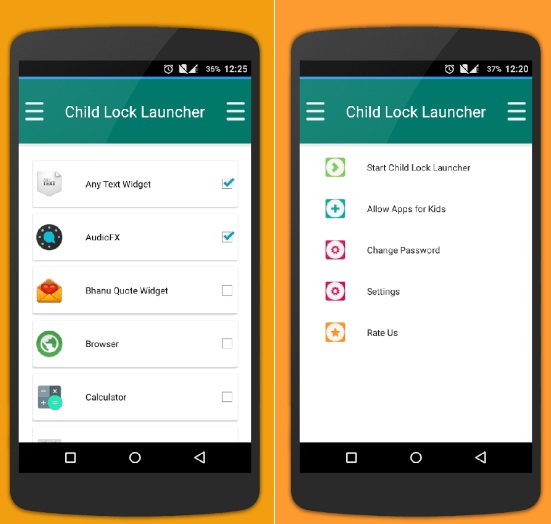
Thankfully this app lets you customize your phone with locks to prevent your child from accessing anything you deem inappropriate. The customizability comes in deciding what you want to be locked and for how long. It has options for virtually everything on your phone, allowing you to pick and choose exactly what your child has access to.

BabyCenter

When you’re expecting, it can be overwhelming to try and find all the information you need leading up to the birth of your child. This app gives you real expert advice on all the questions you are wondering about when you have your first child. From what’s okay to what’s not, you’ll be able to find out a plethora of important information much quicker than continually looking it up online.

BabyCenter - Pregnancy Tracker Free Download
7

PBS Kids Video


Keeping your child entertained is the hardest thing to do when you can’t constantly be in the same room as them. This gets especially hard once they become a toddler and have a better understanding of the world around them. Thankfully, there are some fantastic shows out there to keep kids entertained and learning. No station is better at this than PBS Kids. They even have their own app so you have the station with you at all times. This app is more for your child than for the actual parent.

PBS Kids Video Free Download
10

Baby and Child First Aid

When something seems off about your child, it may be your first instinct to go straight to the hospital and find out what’s wrong. Alternatively, you may not realize something is more serious than it seems. This app helps you figure out what you need to do when something is off with your child, and whether it’s the right time to go to the hospital or to figure it out at home. While the app is owned by the British Red Cross, the advice is universal and worth using even outside of the UK.

Baby Connect

The ultimate baby tracker. This app keeps track of everything, from medical records to new achievements. It is the perfect app for recording your child’s first moments in life and keeping the schedule on track. For more information on this app, be sure to check out our in-depth article on how to use it.

Baby Connect Download Now ►
8

For some babies and young children, white noise won’t cut it for helping them sleep. Thankfully, our Softonic Solutions community offers their list of the best apps for helping your child fall asleep

Softonic is always looking for products we think our readers will value. When you buy through links on our site, we may earn an affiliate commission.

Should you add a cashless payment app to your child’s phone?

Adults use cashless apps all the time, but are we ready to let kids use them?

Family credit card

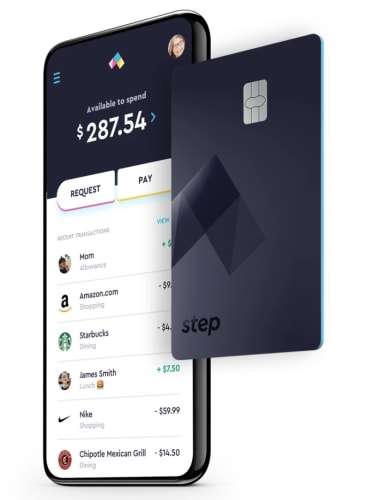
In January, TechCrunch posted an article on Step, the cashless app targeting kids and their parents. The app is the latest in a long line of cashless apps that aim to usher the youngest generations into an increasingly cashless society.

Step’s founders say that today’s teens are still largely burdened by cash transactions. They say that their goal is to be a teen’s first bank account and spending card.

The benefit of this solution is that Step doesn’t charge overdraft fees. Also, parents can put in controls against unauthorized spending.

Step is competing against a handful of apps targeting teens. All of them aim to teach financial responsibility and give kids access to digital payments.

Here, we’ll look at whether cashless apps for kids are a logical solution for allowance and summer job earnings. However, there still may be value in doing things the analog way.

Step - Mobile Banking built for Teens Download now ►
7

Are cashless accounts a good teaching tool?

Paying by phone

Cashless apps for kids and teens are becoming popular enough that the New York Times ran a piece highlighting the trend.

Parents themselves aren’t dealing in physical cash for the most part. Who wants to mess around with cash and coins, anyway? The parents profiled in the NYT said that using apps made it easy to transfer money to kids — for allowance or unexpected emergencies. Additionally, apps can present savings in a visual way, whereas with cash, it can feel like an abstract concept.

greenlight app cashless

Phys.org interviewed parents about their reasons for using cashless apps to send cash to kids. One parent said that they turned to the app Gohenry, another competitor, to help them “understand the value of money.”

However, a Prudential survey found that the opposite was true. The findings showed that contactless payments didn’t help kids develop the mental math skills associated with handling cash.

On the other hand, financial apps may be a good tool for teaching kids how they’ll likely use their own cash when they grow up. Our concept of money has changed dramatically in the past decade or so. It’s to the point that one wonders whether we’ll see physical cash at all in the coming decades.

In other parts of the world, there’s been a greater push toward a cashless society. For example, in France, it is now illegal to pay for anything over €1,000 in cash. Singapore and India are moving toward cashless societies, too. There’s also China’s mass adoption of tools like WePay and AliPay.

7

Are cashless accounts safe for kids?

The whole point of apps targeting kids and teens is that they are supposed to help them navigate the financial landscape. At the same time, they’re meant to allow parents to set limits.

step available spending

Greenlight and Current, are teen-centered debit cards that parents to set chores, transfer money, and keep a watchful eye on their kids’ spending habits.

Parents also have the ability to block certain types of transactions or limit the amount of money their teen can pull out of an ATM. Basically, parents could block teens from buying airfare or bus tickets without their permission.

Assuming the parents are involved, kids are protected from things like overspending or unauthorized charges. Still, one parent from the NYT article mentioned that their child racked up a number of unexpected autopayments by signing up for free trial subscriptions. This is a lesson we’ve all learned at one point or another.

However, with the rise in digital transactions, parents also need to teach kids how to protect their accounts.

Greenlight Download now ►
7

We can’t ignore that even kids have digital payment needs

Kid with money

According to a survey from TD Bank, 68% of parent participants said that their kids were just as comfortable or more handling digital transactions than cash. However, 80% of respondents said they did have some concerns about their children navigating a digital payment landscape.

Ultimately, these apps appear to present more advantages than negatives. Concerns like bad credit, impulse purchases, and poor savings habits are completely valid. However, establishing financial savvy comes down to educating kids about these things they’ll soon be dealing with in the “real world.”

There’s also the idea that it’s getting harder to ignore that kids do need access to digital payments. Sticking to cash alone is as unrealistic as trying to prevent them from using YouTube or Instagram.

Summer apps for parents

These great apps will make your family’s summer even easier.

Parent and child phone

Many (if not all) parents find themselves looking forward to school coming back after the hectic excitement of summer!

We’d like to suggest a few apps that could help during those summer months; a few helpful tools you probably wanted without realizing it. They are the 2019…

Summer Apps for Parents!

Cozi

Cozi

If Cozi doesn’t have it all, it certainly has a lot of it!

The app assists with planning chores, events, and meals. Normally, each of these functions would be covered by separate apps, but Cozi does an impressive job of performing all of them at once! Also, thanks to the magic of internet connectivity, every device running the Cozi account can be automatically updated so the whole family is on the same page across their multiple devices.

What better way to describe it than their intro video?

It’s that easy!

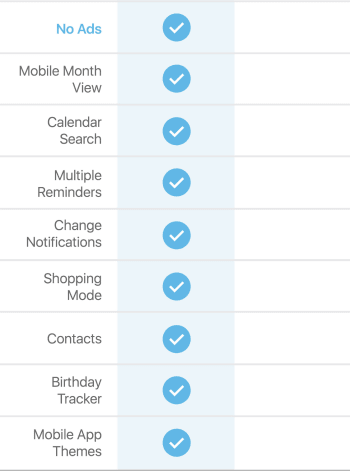
NOTE: while Cozi’s vanilla version works perfectly well, it offers a Gold account that adds extra features for $30 a year, applied to the whole family. The benefits are as follows:

Cozi

In the normal version, ads aren’t too intrusive and the mobile weekly views are helpful and everything still works well overall. Give it a shot, and go Gold if you think it’s worth the price!

Greenlight

Greenlight

What could go better with a chore planning app than a debit card for children? Allowance accountability here we come!

Greenlight prepares kids for the cashless future with a debit card that can be tracked and deactivated from either the kid’s or parent’s devices. As their website suggests, the system is, “Safer than cash. Wayyy safer.”

The reason they chose the name Greenlight comes from the ability to choose where the money can be spent, either “anywhere” or at a specific store. For example, allowance can be set for use anywhere, while lunch money can be restricted to a restaurant!

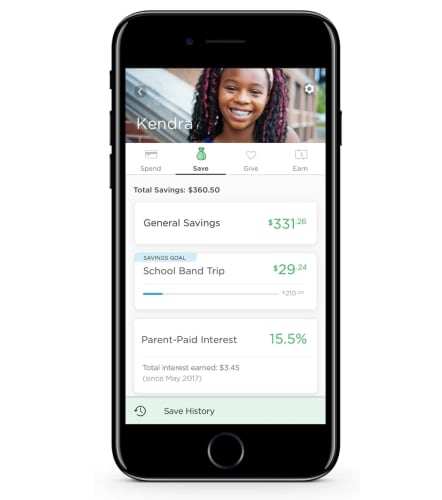
Not only that, but parent-set interest rates can be implemented, and savings projects can be created to teach a hands-on finance lesson.

If a financial app for kids still doesn’t seem like your thing, try visiting their Frequently Asked Questions page for more information on safety, features, and tutorials. We think you’ll enjoy what you find.

FamilySearch

FamSearch

Alright, admittedly, this one comes a little out of left field. But hey, who hasn’t watched “A Knight’s Tale” and wondered if their legacy can be traced back to Charlemagne?

Gosh, that would be cool.

This free application, courtesy of the Church of Jesus Christ of Latter-Day Saints, helps compile worldwide information on genealogy! Unlike our first two apps, it may not keep your family entertained for the whole summer, but it certainly may give you a better idea of your ancestry, and that could last even longer.

Better yet: if you make an account, you can add information to the website rather than just searching for your ancestors! The world’s family tree is growing, and sharing historical information will always be welcome and appreciated.

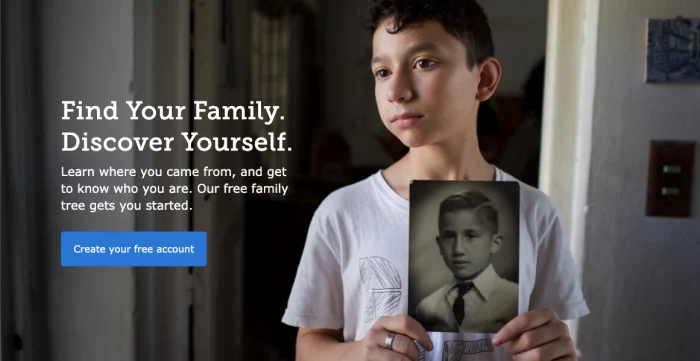
(Off-topic note: we’re not sure why the kid on the website’s main page looks so forlorn as he stares off into the middle distance. For some reason, it’s a little unsettling. Is that just us?)

Forlorn kid

(Anyway…)

Google FamilyLink

Google family link goes beyond internet safety apps. In addition to protecting kids from malicious sites, you can set time restrictions to internet access to build healthier habits, ensure uninterrupted sleep at night, encourage focus on productive tasks during the day…

Actually, this sounds good, even as an adult.

We’ve said it many times: the internet’s store of knowledge blows every other information resource out of the water, but poses many dangers to younger, developing minds. Plain and simple, Google Family Link helps parents shape an improved environment tailored to their family’s needs.

So, while your kids are helping with chores and dinner, spending their money wisely, and learning about their family tree, you can foster better internet usage as well.

Wishing you a happy summer

While parents don’t need these apps, they can help create a more interesting, fun, helpful, inspiring, and productive summer. We hope one or many of them sparked your interest!

Study shows social media impacts children’s diets

Learn how social media is impacting kids’ diets.

Kids social media

Social media is taking its toll on our mental health. That toll can come in the form of selfie dysmorphia, Instagram-fueled depression, or an increase in eating disorders. Study after study is discovering more ways social media can cause mental and physical harm. If you don’t believe us, even Oprah and Prince Harry are tackling these issues.

The latest discovery comes by way of a recent study published in “Pediatrics.” Social media (particularly channels like YouTube and Instagram) may have a negative impact on what kids choose to eat.

The findings revealed that social media influencers could inspire children to eat junk food like cookies and candy, but those powers did not extend to getting kids excited about eating more vegetables.

What was measured?

Anna Coates, a Ph.D. student at the School of Psychology at the University of Liverpool, was interviewed by NPR. She and her colleagues wanted to know how much children’s diets were influenced by the accounts they followed on social media.

The study involved 176 children between the ages of nine and 11. They were divided into three groups so researchers could see how social media influences junk food cravings.

The kids who saw the junk food versions of photos were more likely to snack on cookies and candy. Their peers who saw healthy food images were less likely. According to the researchers, the extra snacking meant that the students in the junk food group consumed, on average, up to 90 calories more than their peers.

Junk food

While that doesn’t sound like much, American Academy of Pediatrics spokesperson Natalie Digate Muth says otherwise. She said that just an extra 70 or 80 calories a day can make a difference. She also said that a small increase can cause a healthy child to become overweight.

Unfortunately, it doesn’t seem like that influence works the other way. Those kids who saw the healthy food-focused images did not eat any more carrots or grapes than the other groups.

Just the latest in fast-food marketing to youth

We’ve long known that junk food ads have influenced what kids want to eat. Think about the items that were in your lunchbox growing up. We remember the Dunkaroos, Capri Suns, Oreos, and Doritos. Carrots aren’t in our highlight reel.

It seems that social media is making things worse. The WHO reported that platforms use kids’ data to push out targeted ads. That’s just ads; influencers muddy the waters.

Influencers are so effective because they feel familiar to us.  Recommendations coming from these social media users feel authentic, like a recommendation coming from a friend.

Of course, parents should talk to their children about influencers and how advertising works. Kids (and all of us) are more susceptible to influencer ads and product placement more than traditional ads.

Is regulation a possibility?

There’s little in the way of regulation when it comes to how we handle ads promoting junk food. In general, the FTC does have social media regulations in place. They require that influencers disclose when a post is sponsored.

However, it’s not exactly realistic for the organization to monitor every incoming post for potentially harmful content. There are millions of influencers all posting regularly.

Influencers complicate junk food marketing

Ronald McDonald

The study recommends tighter restrictions on marketing junk food. The digital marketing landscape is much more complicated than it was in the days where TV was the main concern.

Sure, we don’t have tobacco-sponsored cartoon characters targeting today’s youth, but advertising has changed a ton. Seriously though, that happened:

Influencer culture has made it cool to participate in advertising. So, chances are, popular influencers have tremendous power over the kids that follow them.

In this day and age, where teens are creating fake sponsored content for real brands, what is the widespread impact of online advertising on children?

TikTok banned in India

TikTok is banned in India for showing inappropriate content to minors, but are they alone?

Tik Tok

TikTok has been removed from the App Store and Google Play store in India today after a court ruling. TikTok is fighting the removal in court. You can still download it through Softonic’s catalog here:

9

In a statement to CNN Business, TikTok said, “We have faith in the Indian judicial system and we are optimistic about an outcome that would be well received by over 120 million monthly active users in India.”

TikTok has about half a billion downloads across the globe. Of those, about 25% of users are in India making this a massive hit for the company.

Why is TikTok being blocked in India?

TikTok has been blocked in India due to the fear that the app is helping to spread inappropriate content to children.

TikTok does list policies against inappropriate content such as porn, cyberbullying, and harassment. Those who violate TikTok’s policies can be reported and banned from the service. This is the protocol for most apps.

The app description suggests it is for ages 12+, but the purpose of the app is not to share material for an 18+ audience. The main purpose of TikTok is to share original videos, typically with musical flair like this:

Does TikTok have inappropriate content?

As we all know according to Rule #34 of the internet, “If it exists, there is a porn version of it.” TikTok is no exception.

Users have been using the app to make pornographic content. Finding pornographic material through the app is not difficult. Then again, finding porn on the internet isn’t hard.

Sure, you can use the app to shoot and share inappropriate content, but you can do that with a slew of other apps as well. 

You can potentially cyberbully people on any social media platform as well. TikTok is not the only offender, so they shouldn’t be singled out for this.

What does this mean for TikTok?

We’re guessing that this ban will only be temporary. This happened before in Indonesia for the same reason, but it was overturned.

The 18+ crowd in India that loves to use TikTok will voice their stance on the issue. Most likely, the app will return to making more videos like these:

Where do we go from here?

The inappropriate content is far from the only reason why you might want to consider removing TikTok. In February, the app had to pay nearly $6 million in fines for stealing information from its 13-and-under users. 

TikTok might be unintentionally exposing kids to inappropriate content. However, it is intentionally stealing their data. 

Banning one app won’t keep children safe. If you don’t want your children looking at inappropriate content, TikTok is far from the only app you need to worry about. Parental vigilance and child education are your best bets to keeping your family safe.

No, your kid’s phone isn’t wrecking your family time

A new study shows that the phone isn’t decreasing your family time, but there’s a catch…

family on phones

Parents often worry that handing their kids phones or tablets will wreck the family dynamic. But new research suggests that being on a mobile device doesn’t keep you away from your family after all.

A study conducted by Oxford University and the University of Warwick found that having cellphones and other mobile devices didn’t impact the amount of time that families spent together. In fact, from 2000 to 2015 when there was a large increase in mobile devices and higher quality internet connections, time spent with family at home increased by 30 minutes per day. Good news, right? Well, there’s a catch…

Although there was a significant increase in family time, that 30 minutes was classified by researchers as “alone-together” time, meaning family members are together in the home and doing things alone instead of shared activities like having meals or watching their favorite shows together.

Even though families have voiced concern that mobile devices are behind a decrease in shared activities, the study found that this wasn’t the case as researchers reported that the increase of alone-together time did not have an impact on the amount of time that was spent doing those activities, like watching television as a family. This time remained unchanged and sat at around 90 minutes per day.

The Journal of Marriage and Family says that these are the rest of the findings from the study:

  • In 2000, on average, children and parents spent 347 minutes per day in the same location. Of this, 95 minutes was alone-together time and 84 minutes were spent in shared activities such as eating and watching TV
  • In 2015, on average, children and parents spent 379 minutes per day in the same location, an increase of 32 minutes. Of this, 136 minutes was alone-together time and 87 minutes were spent in shared activities such as eating and watching TV
  • In 2015, children and parents used mobile devices for 38 percent of total family time, 47 percent of alone-together time, and 27 percent of shared activity time
  • Older children (14-16) spent less time in shared activities with their parents and more time using devices, which was concentrated during alone-together time.

Researchers say that even though the time spent doing shared activities has not changed, because games, text messaging, and other things done on phones and mobile devices can be distracting during the activities, this could be why parents are feeling like family members are not as present during Sunday night TV time.

Since mobile devices are now an integral part of day to day life, the sharing of Dad’s hilarious reaction to an episode of “Game of Thrones” on Snapchat could actually be complementing family fun time. Take that, parents.

How to create a Baby Registry on Amazon

Expecting? Here’s how to build a baby registry with Amazon.

baby

Look, letting others pick out stuff on your behalf is not always the thoughtful surprise they intended.

For parents-to-be, an Amazon Baby Registry is probably the most comprehensive, straightforward approach to stockpiling all things baby–and letting your network know exactly what you need.

This way, friends and family aren’t stuck trying to guess how you want to dress your baby or how you plan on wheeling them around.

Amazon is home to the largest selection of, well, everything, including baby stuff. 

Here, you’ll find practical items like bottles and diapers, as well as toys, high-tech monitors, and luxury cribs. (Need recommendations? We recommend Mr. Dad Reviews.)

What’s more, gift givers can send registry items straight to your house, they can join forces for one big purchase, or receive items themselves to wrap and give in person. 

Here, we’ll look at how to get started with your Amazon registry, and give you a quick overview of some of the features:

How to set up your Amazon baby registry

Signing up is really easy. 

To get started, select “baby registry” from the dropdown menu on the top right-hand corner.
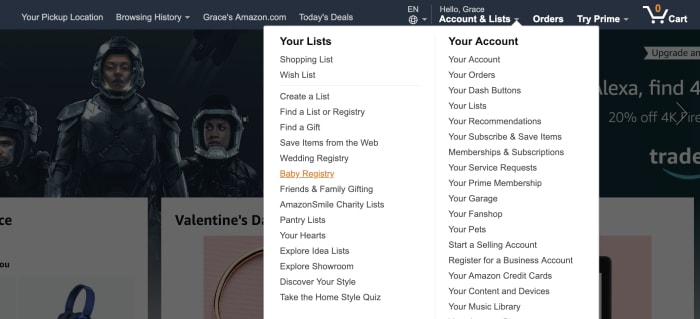
When you create your registry, Amazon will ask for a few details. Fill in the expected due date, an address for receiving gifts, and who can see the registry.

You can choose to make this private — i.e. so you can set things up before you’re ready to share the news. Provide access to anyone with a link, go public, or share your registry on TheBump.com.

Additionally, you can add a message for family and friends — select the gender (or leave it a surprise, if you don’t want to receive a bunch of frilly baby dresses or tiny football jerseys).

After that, you’re in — and it’s time to fill out that list.

Start “shopping”
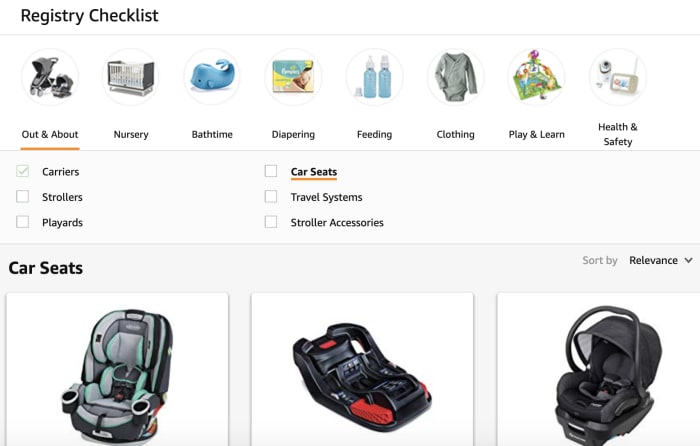
Checklist baby registry

So, even if you’re totally unprepared and don’t really know what you’re supposed to have when the baby comes — Amazon breaks things down pretty well.

Navigate to the Registry Checklist tab, and you can shop by section. The Out & About section offers everything you need to transport your baby — from joggers to those baby-packs.

Nursery has cribs and changing tables — your basics for outfitting the baby’s room. And — from there, you can sort through diapering essentials, feeding, clothing, and toys.

There’s also the ideas and inspiration section, which provides a list of popular items, product guides, and additional checklists. 

Adding items is as easy as putting items in your Amazon cart. The only difference is, you’ll click the “Add to Baby Registry” link instead. 

There’s also a section that allows you to provide additional details. Set priority to low, medium, or high, and indicate how many of that item you have or need.

For example, you might opt to indicate that you need 10 bottles — and if someone buys six, your registry will reflect that you still need four. 

What’s nice about the browsing features is, it’s easy to discover products you might not have initially thought of.

Share your registry

Amazon’s baby registry offers a few different sharing options — all of them easy. Share your link via email, social media, or create an ecard announcement. 
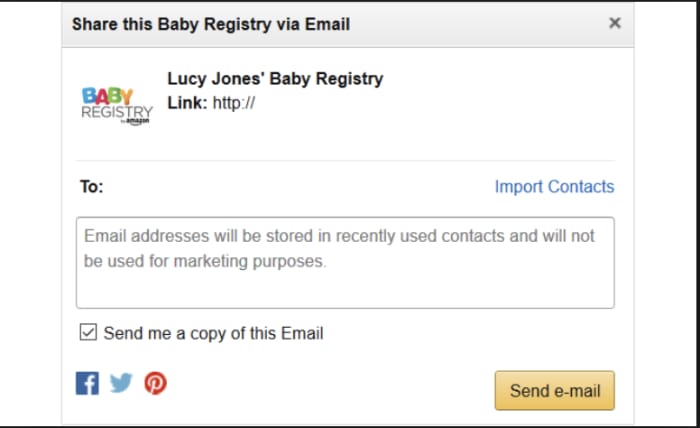
share registry link on Amazon

Claim your welcome box

The welcome box is a surprise selection of samples and full-size products. 

To claim a welcome box, you’ll need to first complete your checklist by adding products from each category. You’ll also need to mark each category as complete — and purchase $10 or more. That initial purchase can come from you or your gifters.

Contents vary, based on what’s available, but Amazon lists items that have been included in previous boxes — it’s a mix of things like baby wipes, ointments, diapers, and soaps and shampoos. There are a few outliers, the odd pacifier, a pack of onesies, bottles. 

Completion discount

Amazon offers a completion discount — 10% off or 15% off for Prime members — that applies to items remaining on the registry. 

The registrant can buy the items left over for up to 60 days after the arrival date listed on the registry. 

There are a couple of caveats here.

For one, the discount only applies to baby or maternity-related items. So you can’t load up your registry with household necessities or even books for the baby.

Second, the discount is only good for two orders for a combined total of $2,000 or less.

Still, this is a good way to buy up those last minute items and save a bit of cash.

Universal registry

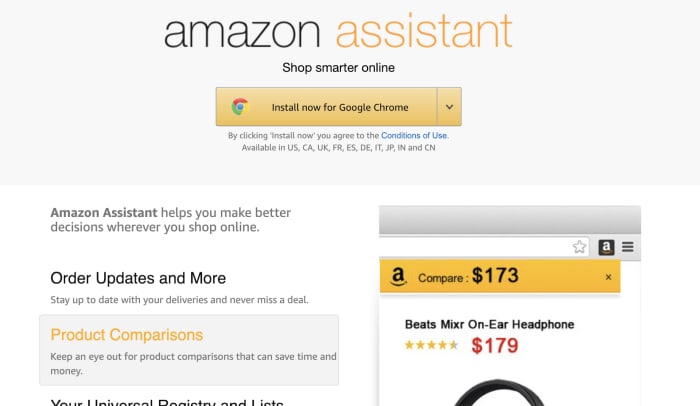
The universal registry is a feature that allows you to add items from any website with the help of the Amazon assistant. 

If you’ve used Amazon’s 1-Button App extension to add products to your wishlist, the process is the same. This allows you to add items not available on Amazon and add it to your registry.
amazon assistant add extension

Thank you list

Finally, we’ve got to call out this nice little touch. With all of the craziness that comes with getting ready for baby, keeping track of who gave you which set of burp cloths might not be a priority.

Luckily, your registry navigation links to Thank You List & Returns. This is a lifesaver, as you can see who purchased what — and show your appreciation accordingly down the road. 

Final thoughts

In the end, if you’re expecting,  Amazon’s Baby Registry is definitely the best bet when it comes to covering all your bases.

The massive selection, plus all of the convenience features, make things easy on you, your family and friends. 

Oh, and one final word of advice. Don’t be afraid of looking greedy. As you go through your checklist, add big-ticket items, miscellaneous necessities, and everything in between. You never know what people will give you.

And, if the spendy stuff goes untouched, that 15% Prime discount will take a good chunk off of that luxury crib.


Top 4 pregnancy apps

These four apps can make your pregnancy easier, safer, and more fun!

pregnancy

Pregnancy is maybe the biggest game-changer you’ll ever experience. Even for parents who have had children before, every pregnancy is different and comes with its own challenges. No matter the case, you’ll often find yourself looking up new symptoms and safe alternatives to your unique cravings. Instead of searching all over the internet to find your answers, a handy app is usually all you need. Many apps let you track your symptoms and read up on what you can expect in the coming months. Here are some of the best apps for helping you throughout your entire pregnancy:

4 best pregnancy apps

WebMD Pregnancy

WebMD is one of the most reputable medical sites on the internet, and their pregnancy advice is top notch. Besides answering any medical questions you may have, this app comes with a variety of tracking tools. You can track baby kicks, contractions, and a large selection of pregnancy symptoms. You can also create checklists with this app for baby preparations.

WebMD Pregnancy Download free ►
8

Mind the Bump

Pregnancy can be stressful in ways you never expect it to be. Mind the Bump is a great app for helping relieve some of this stress. It walks you through various meditation techniques while giving you advice for dealing with any mental health problems you may be having while pregnant. While most apps focus on helping you with your body through this process, Mind the Bump is all about your feelings and mental space. These areas are often neglected, so having an app remind you to self-care can be a big help.

Mind the Bump Download Free ►
7

Ovia Pregnancy Tracker

The use of this app starts before pregnancy even begins. It lets you track your ovulation cycle so you know the perfect times to try and conceive. Once pregnant, the app gives you helpful tips on what is and isn’t healthy. It also gives advice on relieving pregnancy symptoms throughout each trimester as you experience them.

Ovia Fertility Download Free ►
8

If you’re specifically looking for an ovulation tracker, you may want to check out My Days as an alternative. It tracks both your period and your ovulation cycle, and it lets you create helpful reminders regarding both of these.

My Days - Period and Ovulation Free Download ►
7

Hello Belly Pregnancy Tracker

Facebook is often the place we turn to when we want to find something relatable. Your Facebook friends are often around your age, so they’ll be sharing memes that you can relate to. However, not all your friends will be getting pregnant when you are, so you may feel alone when you open up Facebook and aren’t able to relate with your peers as much. This app gives you a daily dose of pregnancy memes so you don’t feel alone in this process. The memes also relate to your current stages of pregnancy, as the app tracks how far along you are.

Hello Belly download free ►
8

You can find more pregnancy apps at our Softonic Solutions page, and you can even add your own app suggestions if you feel we missed any.

How to set up parental controls on iPhone and Android

Keep your kids safe with these simple steps.

Parental controls are important to set up when you want to give your child access to a mobile device. Not only can it prevent your child from doing something harmful or inappropriate, but it can also keep them from doing basic mistakes like deleting important apps. These parental controls can also free you up because you won’t have to worry about what they can access and when. Here’s an easy way to set these controls for Androids and iPhones.

How to set up parental controls on iOS and Android

Android instructions

Restricting a child’s Google Play access can be easy on Android devices. There are two ways to access parental controls on Google Play devices, depending on how you have set up your child’s device. The first way is if your child’s Google Play account is already linked to yours under Family Link. This makes things easy, as all you need to do is access your Family Link app on your device, click on your child’s Google Play account, then “Manage Settings” and “Controls on Google Play.” This will give you access to your child’s settings so you can restrict their account however you want. You actually don’t even need to do this on app, since you can access Family Link on a browser.

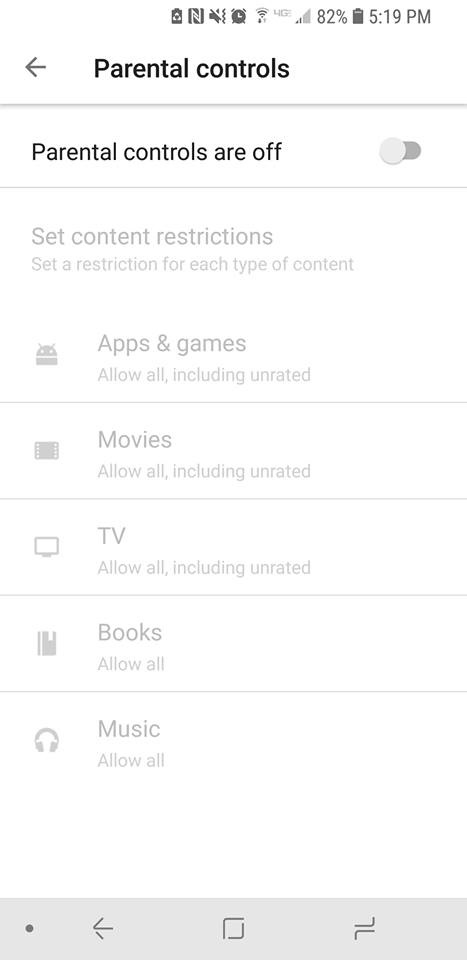
If you don’t have your child’s account linked to yours through Family Link, then you’ll have to go on their device itself, rather than being able to set it up on your phone or a browser. Once you’re on their device, you can go to “Settings” under the Google Play app and press “Parental Controls.” Once you switch them to on you’ll be prompted to create a PIN. This PIN will be how you access and manage the controls, so pick something that isn’t easy for your child to guess. Once it’s created, you can pick and choose the settings you’d like to set for the device.

Android parental controls

If you wish to restrict access to features outside of Google Play on an Android, then you will find each Android has different ways to go about this, depending on which model you are using. As such, it may be easier to use a third-party app for setting up your parental controls. There are many apps out there to use, but we recommend Mobile Fence. This app provides makes management of your child’s phone incredibly easy.

iPhone instructions

Apple has recently updated their terminology and process for setting up parental controls, so there are also two ways in which you may have to go about setting these parental controls.

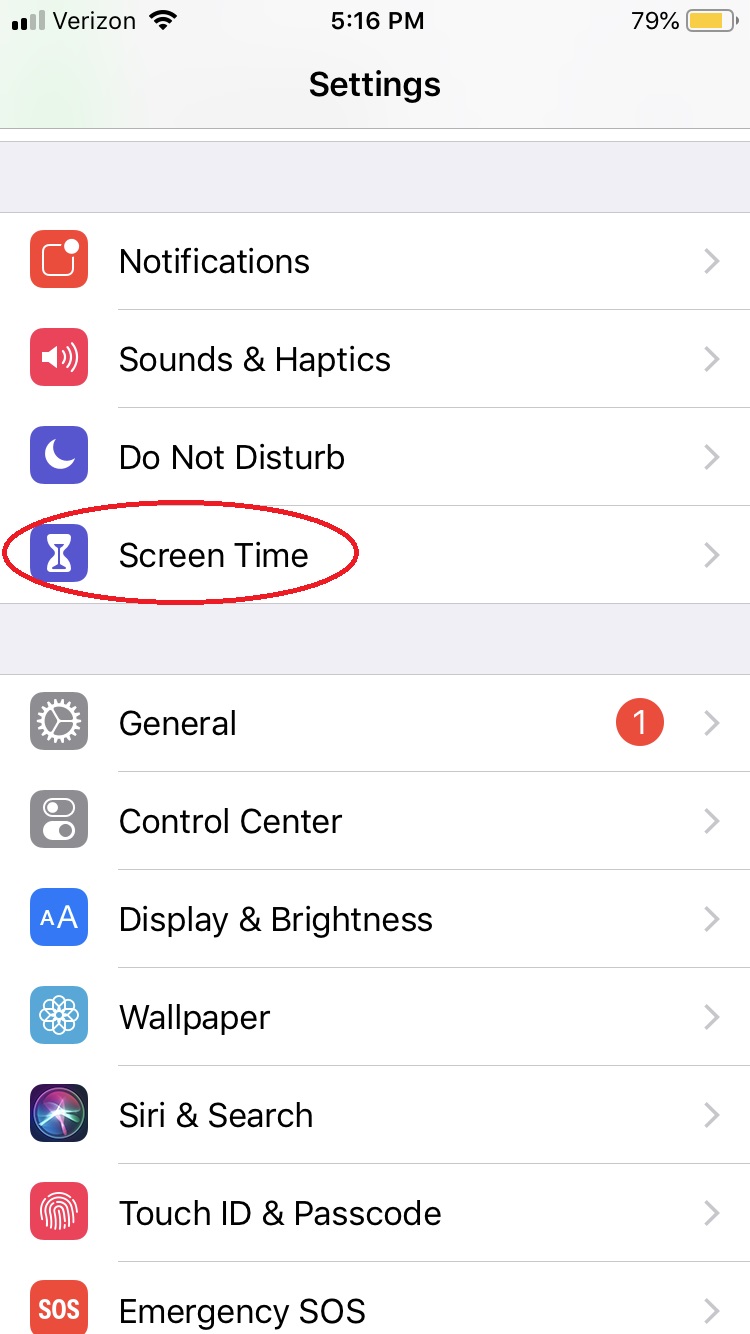
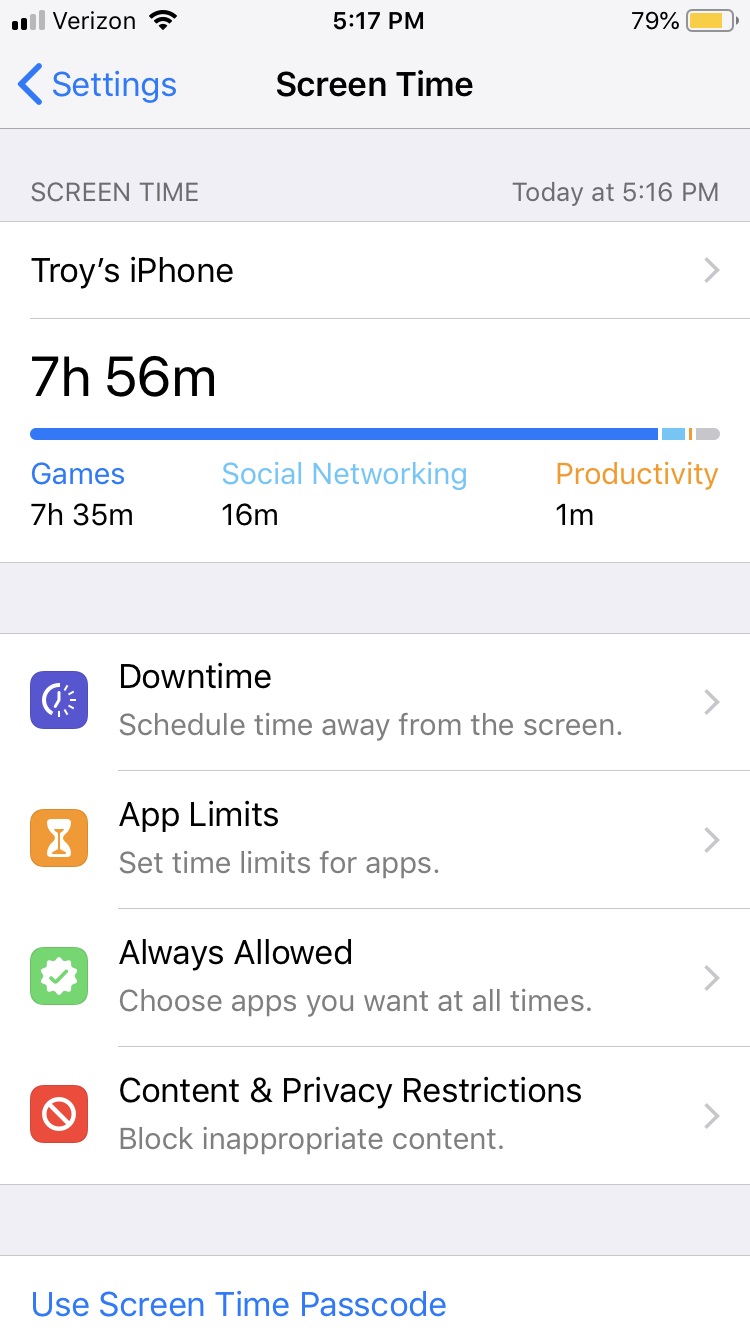
For iOS 12 and newer, under Settings there is a button titled “Screen Time.” 

Parental Controls iphone

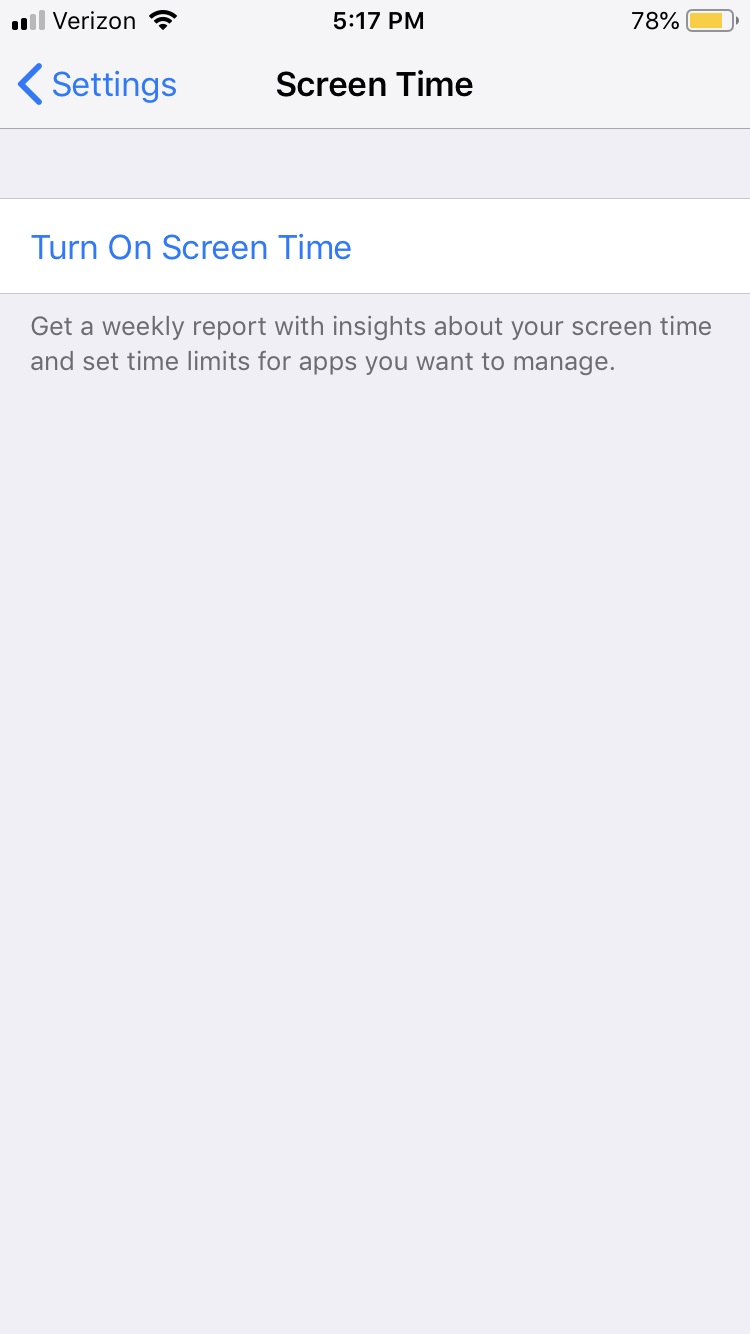
This is essentially the parental controls for Apple devices now. You’ll want to turn on Screen Time to monitor all activity on the phone and create any restrictions you want.

iPhone parental controls

Notable things you’ll want to check out in the Screen Time menu are: “Downtime,” which lets you turn off the phone at specific times; “Content & Privacy restrictions,” which let you block any specific activity or app from your child’s access; and “Set Up Screen Time for Family,” which will let you access your child’s Screen Time from your personal iOS device.

iPhone parental controlsAny iOS before 12 will have parental controls in the settings tab under “General” > “Restrictions.” Enabling restrictions will prompt you to create a passcode that you can use to disable those restrictions if you ever feel the time is right.

With these simple steps, you’ll protect your children and provide yourself a little peace of mind, knowing your little ones aren’t accessing the dark web and setting up an illegal Bitcoin gambling ring or whatever.