Eject USB devices faster in Windows

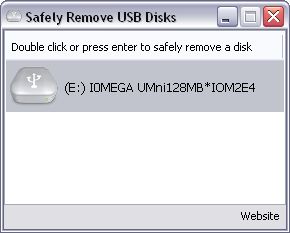
Eject USB devices faster in WindowsFollowing Cyril’s post on how to remove USB device safely, I found another USB-related application that’s become part of my daily work on its own merits. Its name is USB Disk Ejector and does exactly what its name states: ejects your USB devices in just a couple of clicks or keystrokes.

As a frequent user of USB memory sticks to carry documents and photos around, I’m sick of the lengthy process Windows puts me through every time I want to eject a USB device from my computer: first click on the taskbar icon, then select the device, then wait for Windows to show another dialog box and finally click again. It’s totally inefficient and a complete waste of time.

This is why I was glad to find USB Disk Ejector: simply run it and remove your USB device by double clicking on its name on the program’s interface – or just press Enter if it’s already selected. Plus, the program features a much more intuitive design which helps you identify your USB devices if there’s more than one connected at the same time.

By the way, here’s one tip to make the program even more useful: save the EXE file anywhere you want and create a shortcut to it on the Desktop. Then open the shortcut’s Properties dialog and assign a keyboard shortcut to it. From now on, you’ll be able to eject your USB devices in no time!

Tools to track your carbon footprint

Act on Co2 logoThis weekend I watched a polemical documentary on the global warming debate called The Great Global Warming Swindle. The makers claimed that the entire man-made global warming debate was a sham and that the whole process was very natural. The theory was that it was nothing more than an attempt by governments and corporations to extract more money out of people through carbon taxes. The documentary was certainly persuasive although I couldn’t help feeling that surely, even if we’re not directly responsible, the amount of CO2 that we produce can’t be helping – or at least is speeding-up the process to an unhealthy extent.

Whatever your take on the matter, what can be said with certainty is that it surely can’t hurt to reduce your carbon footprint. Last year I wrote about MakeMeSustainable which is an online project to track your carbon footprint online. However, having had my interest re-stimulated in the debate, I’ve recently discovered a few more sites which offer alternative ways of calculating or tracking your carbon footprint.

If you’re based in the UK, then the Carbon Rationing Organisation offer a simple utility to calculate your footprint which can be completed online. The program allows you to calculate your carbon output for regular commuter trips and display the results in graphical format. Meanwhile Carbon Footprint offer a much simpler tool but a more proactive approach which calculates your carbon output in tonnes for flights. Once calculated, you can then offset some of your contribution by donating to organisations and projects that are fighting against increased CO2 emissions such as the Clean Energy Fund or replanting trees in the Third World. Probably the most fun especially for kids, is the UK government’s Act On CO2 Calculator which is packed with graphics although is very heavy on the use of Flash.

Note that all of these projects are aimed at individuals but if you want to make your company more responsible, then Verisae Carbon Footprint is a professional package aimed to calculating the output of heavy industrial plants. If you’re sceptical about the merits of making your organisation more responsible for it’s carbon emissions, then this article in Redmond Magazine spells out the benefits and issues in black and white.

Firefox 3 consumes less RAM than IE or Opera

Firefox 3The final release date of Firefox 3 is fast approaching and we’re beginning to hear much more good news about it. According to a report by Ryan Paul at Ars Technica, beta 4 of Mozilla’s browser consumes less than half the memory of Firefox 2.0.0.12. Using a memory benchmarking technique, Firefox 3 was also found to be using less memory than either Internet Explorer or Opera. Safari 3 and IE 8 both crashed during the test, so they weren’t counted.

…Which is all great news if you’re a Firefox fan like me. However, It’s not all good news. In my (admittedly not quite so scientific) testing of the various beta versions, beta 4 has caused me more trouble than betas 2 or 3 did. And yes, I’m testing it on a Mac. Firefox 3 beta 4’s main problems on the Mac seem to fall into two categories: (1) the horrible theme which, while it bravely incorporates native Mac elements, is just plain ugly; and (2) Beta 4 has crashed numerous times while Beta 3 didn’t crash once.

As I said, I’m aware that my experience isn’t as well documented as it should be – I’ll try to track down the error logs for the problem some time. All that said, I’m really happy that the latest Firefox looks like it’ll be the best yet. Its bookmarking system and much-improved auto-complete mechanism are streets ahead of Firefox 2, as are more technical aspects like text rendering and AJAX handling. Stay tuned for more in-depth coverage as the Firefox 3 final release approaches.

Currency conversions made easy

Dollar logoIf you’re reading this in the USA, then you’re probably cringing at the plummeting value of the dollar which today hit a new low against the Euro. At one stage today, it required $1.561 to buy €1 and there seems no end in sight to the depths that the once mighty currency is going to drop.

If you are in the USA, or you’ve got savings and investments in dollars, now might be the time to think about trading them in or at least converting to a different currency for a while. Rather than use online currency converters, it’s much quicker and easier to make conversions from your desktop. Currency Converter FX is a simple little app which sits on your desktop and is updated in real-time with the conversion rates of over 150 currencies. The same goes for Desktop Currency Converter which carries info for around 50 currencies but has a nicer interface and converts in real-time as you type – no conversion clicks needed.

If you need something a little more advanced, then Currency Server is a sophisticated solution for those who need to be updated in real-time on their desktop as to the latest conversion rates for world currencies. Meanwhile, if you work in industry and need to know how the latest market fluctuations are affecting the price of your goods, Raw Materials is designed especially for you, enabling conversions to be made per kilo, metre, square metre etc. Finally, if you use your own exchange rates for making conversions, then you can customise WorldCalc according to your needs for making quick and easy desktop conversions.

Flickr video to launch in April

Flickr logoChances are, if you take photos then you also take video on your digital camera. The problem is that photo sharing sites inevitably only allow you to share photos but not the video footage you’ve taken of your holidays, concert footage, family snaps etc. However, that could all be about to change as the hugely popular Flickr photo sharing site launch Flickr Video beta in April according to Cnet. At the moment, the project is very much under wraps although a few details have been released.

According to the report, Yahoo! who own Flickr, say that the new project is not intended to replace Yahoo! Video or compete with YouTube. It’s meant to appeal specifically to photo sharers who simply want to share their video related photo footage as well – not just upload random footage from any source. It sounds like a reasonable idea but the question is, is it already too late to entice away those who have already joined other video sites and is there really a need for yet another video file sharing community?

I currently use Picasa to upload photos and YouTube multi-video uploader to upload my video footage which is no big deal but it would be nice to be able to do everything under one umbrella. I’ve never really latched onto the Flickr style of photo sharing but I would be more than willing to reconsider if the video interface fulfilled certain requirements. The most important things that would persuade me to change are the ability to upload large video files, perform batch uploads and the speed of the uploading. If there’s one gripe I have about YouTube’s multiple video uploader it’s that it only accepts a maximum of 2GB and it’s terribly slow. If Flickr Video can solve these two problems, then I’d change quicker than you say Adobe Flash.

In the meantime, if you’re interested in exploring current alternatives to the forthcoming Flickr Video service before it arrives, TechCrunch have a good report here.

Software apps for Formula 1 fans

Software for 2008 Formula 1 seasonThe 2008 Formula 1 season has just started (featuring excellent results so far, by the way) and along with it, the show of trips around the world, powerful cars, beautiful women and excited crowds cheering for their hi-speed idols. This admiration can be shown not only in F1 circuits during the race, but also in many other aspects of your daily life: for example, on your computer.
Formula 1 races are in fact the subject matter of many varied software tools, ranging from the official F1 screensaver (for Windows and Mac) to a complete Palm application like F1 Season 2008, which enables you to track the competition in full detail. If you’d like to follow Formula 1 results but don’t own a Palm, don’t worry: you can also keep an eye on the competition with F1X; it’s not exactly a tracking tool, but it does contain loads of statistics and very accurate information about the Formula 1 competitions since 1950 to nowadays.

Of course, the F1 software fever is not restricted to desktop tools. You can also find online apps and services with which to follow results and learn more about pilots, circuits and races. Besides the standard sources of information like Google or your favorite digital newspaper there are interesting tools such as the F1 Gmaps mashup, which uses the power of Google Maps to display highly detailed information about each track: date, location, satellite imagery and links to Wikipedia.

Finally, for those of you who don’t resign themselves to just watching F1 drivers speeding on the track, you can now emulate them with MiniRacingOnline, a simple fun game where you can compete on actual Formula 1 tracks against players from all over the world.

The great software Easter egg hunt – Day 5: MS Works

It may be a poor-man’s answer to Word, but Windows’ built-in office suite Works hides a few fun secrets. After delving under the hood of its bigger brother last week, today I thought I’d scout for some Easter eggs for those who don’t have MS Office installed on their PC.

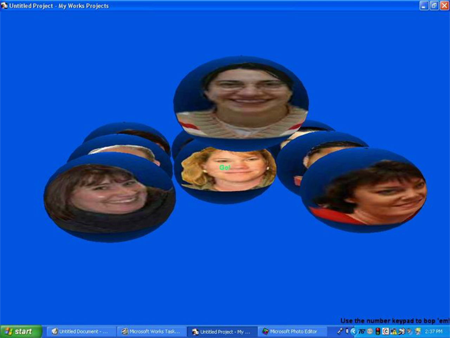
If you’re frustrated by Works’ somewhat limited functionality why not take it out on the software’s development team by hitting them in the face? Open the Works Task Launcher and ‘Start a Blank Project’ on the home page. In the ‘Project Title’ type “weiVtcejorP” (without quotes) and click in an empty space underneath the title. Hit Ctrl+F6 and you’ll now get the chance to whack the developers as they fly around the screen!

ms-works-blog-1.png

Another fun bit of animation is available in Works 6 and Works 2001 Suite. Open the Database, Spreadsheet or Word Processor and select ‘About Microsoft Works’ from the ‘About’ menu. Left-click on the copyright information box, then type”works 6 rules”. You’ll now be presented with an all-singing, all-dancing full-screen animation page with lots of cool goodies.

If you’re running Works 4.5 then try this one: open a new word processing document and type in “zzzz”. Highlight it then go to ‘Tools’ and ‘Spelling’ and check out Microsoft’s definition (this one also works in Word). That’s your lot for today. I’ll have some more treasures for you tomorrow.

Continue with the Easter egg hunt here.

Top 5 file archivers

Archiver logoCompressing is a perfect way to clean up all those files that you no longer need to access on a regular basis and can safely archive in case you ever need to look at them again. What type of archiver you’ll need depends on the type and size of archive you want to save. Here’s a selection of 5 powerful archivers, apart from old favorites WinZIP and WinRAR, that are suitable for most needs:

PowerArchiver – One of the most powerful compression ratios around

7-Zip – Open source high compression archiver for all file types

WinRK – Designed especially for dealing with large files

PeaZip – Fast and easy archiver for beginners

IZArc – The perfect all-round archiver

The great software Easter egg hunt: Day 4 – Word

Uncover the mysteries of MS WordWow, it’s day four already of my software Easter egg hunt and already I’ve uncovered some really cool secrets for Photoshop, Windows XP, and Winamp. Being a writer I’ve usually got my copy of Word open so I set about discovering some Easter egg goodies for the veteran word processing app. Here’s my pick of the pops:
Want to quickly generate some random text? Then open a new Word document and type “=rand(200,99)” (without the quote marks). Hit Enter and you’ll be presented with page upon page of randomness. Now try tinkering around with the numbers in brackets – you can change the repitition of the text and the number of times in a row it appears.

If you’re still using Word 97 then you needn’t feel left out. In fact, there’s a feature in there that users of Office 2007 will be envious of – a neat pinball game. Launch a new document and type the word “Blue”. Select the word, then go to ‘Format’, ‘Font’ and make the text bold and blue. Go back to your document and type a space after the word. Now go to ‘About’ in the ‘Help’ menu and Ctrl-Shift left-click on the Word logo/banner. The game will now magically launch! The ‘Z’ key controls the left flipper and the ‘M’ the right. Hit Esc to quit.

Here’s an interesting one for you linguists – did you know that liberal bias exists in Word theasaurus? See for yourself by looking up the words “liberal” and “conservative” in the Thesaurus. notice that the definition of liberal is much more positive (i.e. ‘broad-minded’, ‘tolerant’, ‘free-thinking’, ‘non-interventionist’), whereas to be conservative seems to be a bad thing in the eyes of Microsoft (e.g. ‘unadventurous’, ‘old-fashioned’, ‘conformist’, ‘old school’).

Though technically not an Easter egg, here’s an ‘old school’ trick for all you conservatives out there: open a new document and type ‘Q33 NY’. Now change the font size to 26 and the type to ‘Wingdings’. Amazingly, it looks like a plane flying into two towers with a symbolic message which apparently represents ‘death to jews’. Personally I think this one is pure conincedence, though some conspiracy theorists swear by it.

Continue with the Easter egg hunt here.

The great software Easter egg hunt: Day 3 – Winamp

Watch llamas rock out to The ProdigyOK, so it may not be the most popular audio player any more, but I still rate Winamp above iTunes. Not just because of the way it combines immense functionality with streamlined performance, but also because its developers are a lot more generous in handing out Easter eggs. In fact, I would argue that the treasures I’ve dug up this time are better than my previous hauls in Photoshop and Windows XP.

If you’re into music with filthy, insane beats then there are two wonderful Winamp tricks that you’ll instantly fall in love with. Firstly, you can apply an effect that changes the transparency of the program’s interface in unison with the beat of the track you’re playing. Load the program with a classic skin applied, hold down Ctrl+Alt+Shift and type the letters ‘n u l l s o f t’ (you don’t need the spaces). After each ‘l’ you need to press Esc otherwise Winamp will recognise this as the Load shortcut key.

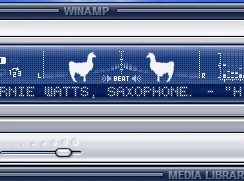
The second beat-related Easter egg is even better. Stretch the main player window until you can see the Beat visualisation, then hold down Ctrl+Alt+Shift and left-click in the centre of the small circle in the middle. Two llamas will now appear and they will nod their heads in time with the beat.

Interesting Facts reveals another cool llama trick. Click on ‘Options’ and choose ‘Preferences’. Highlight the ‘Input’ option under plug-ins. Now click on Nullsoft NSV Decoder and go to ‘About’. A little llama picture will appear and you can keep clicking this to change the effect.

However, by far my most favourite Winamp Easter egg has to be this one: As before, go to ‘Preferences’ and ‘Input’, only this time pick the Vorbis decoder. See the little fishy? Click him and he’ll start to spin. Now keep clicking as fast as you can. Faster. Faster. Let me know if you can beat my score of 631 RPM. OK, I’ll be back tomorrow with some more Easter eggs. If I can tear myself away from this fish, that is.

Continue with the Easter egg hunt here.