Friday timewaster: Neverending Light

For anyone afraid of the dark, stop reading now! OK, just don’t play Neverending Light. This is a Flash based browser game which although it can be a cheesy at times, is also a little bit scary due to its good use of light and dark. You begin the game as part of a group on a tourist tour of a mine, then the lights go out…

It’s very linear, but an enjoyable few minutes (unfortunately there’s no pause). You’ll need Flash 10 installed, and be warned – it’s a bit grisly.

OnSoftware Daily Digest

Microsoft working on a new web browser called Gazelle [readwriteweb]

Facebook opens a way for user feedback regarding the site’s policies [facebook]

Neat collection of WordPress tutorials to create themes, plug-ins and more [tutsplus]

President Obama signaling the end of the Twitter trend? [New York Times]

Can anyone escape from Sagrario’s Room? [Sagrario’s Room]

Play pub sports on your phone

Play darts on your phoneVisiting a bar isn’t all about just getting drunk and chewing the fat with the locals. In fact, pubs are often a breeding ground for some of the most successful sportsmen on the planet. Heroes such as snooker star Ronnie O’Sullivan and darts legend Phil ‘The Power’ Taylor honed their skills in the smoky games rooms of their local watering holes.

We all know that pub sports aren’t the most strenuous of activities but if you’re so lazy that you can’t even be bothered to get up and walk to the local bar then stop panicking. You can now enjoy your favorite pub games on your mobile phone. Grab yourself a cold one and install these fun sports on your device.

If you’re into darts then you’re spoiled for choice in terms of titles. One of my personal favorites is the graphically-rich Power Dart for Symbian Series 60 devices. The game allows you to play the popular ’01’ tournaments (i.e. 301, 401, 501, 601) against the computer, or challenge your friends over Bluetooth. Arrows games for other platforms include Darts for iPhone, Darts (Java), Darts Deluxe (Palm), and Dartz (Windows Mobile).

Pool fans also get a plethora of choices when it comes to mobile games. The king of the genre is Virtual Pool Mobile, which is available for a range of different mobile phone platforms. This impressive 3D simulation sees you start your career in a garage then work you way up by defeating different opponents in a range of locations. Other decent pool games include Vegas Pool Sharks (multi-platform), Pool Rebel (Windows Mobile), and Pool House (Palm).

An alternative ball-blasting game, popular in British boozers, is bar billiards. The object of this one is to accumulate points by strategically potting the eight balls into any of the nine holes, which each have a points value. You also have to contend with three pegs that are placed on the table, each of which affects your points tally in a different way when it. It sounds complicated but it’s quite easy to pick up, as you’ll see if you install Pocket Bar Billiards on your Windows Mobile phone.

My personal favorite barroom sport is table football, mainly because it’s a lot less strenuous than the  real thing (and you actually play better after a couple of lagers). Masterkick is an awesome foosball sim that’s available for a wide range of different mobile operating systems. The game looks and sounds great and offers a realistic handle-twiddling experience. Alternatively, you could try Resco Table Soccer, which supports Windows Mobile devices.

Dominoes is one of the oldest bar games around and has been played in taverns ever since the times when smugglers and pirates would bet with each other for pieces of silver or parrots. Real Dice Dominoes allows you to take on up to four real-life players online, or a strong computer opponent. All players take their turns to lay down their slabs so that the number of dots corresponds to those of the last domino played. Whoever gets rid of all their stones first is declared the winner. The game is available for BlackBerry, Windows Mobile, Palm and Symbian handsets.


Queue for Quake!

Quake is arguably the best 3D shoot em up engine ever built. While there have been plenty of pretenders since, nothing really matches the fun of Quake multiplayer games. The announcement of Quake Live, ID Software’s ad supported free online service, has got lots of people excited. It has just been released as an open beta. Using a downloadable plugin, Quake Live actually plays from your browser (not if you use Chrome, though).

After some queuing, as they are suffering from too many users on day one, I got in..blah blah blah. I was going to explain more, but it’s Quake. It’s still the fastest, and best balanced multiplayer shooter you could hope for. I can’t recommend it highly enough.

Apple unleashes Safari 4 for Windows

Apple was wildly criticized when it launched Safari for Windows. That first version was so unstable and buggy it didn’t cause the best of impressions.

But things have changed a lot since then, and today we see the release of a far more stable, robust and reliable Safari 4 Beta. The new version features the same minimalist gray interface most Mac users love – not me, sorry – but hides a few aces up it sleeve that make it really appealing, even for those of us who have a lifelong relationship with Firefox.

Safari 4 features a new, minimalist interface

Thanks to the aforementioned minimalist interface, Safari 4 Beta can devote a lot of space to web page rendering – which, by the way, is still incredibly fast. During our tests we didn’t have any problem with any site we visited, including JavaScript forms, embedded videos and other special web elements. Safari also includes some interesting tools such as spellchecker, support for zooming in and out, and even an incognito mode that enables you to browse the web without leaving any traces.

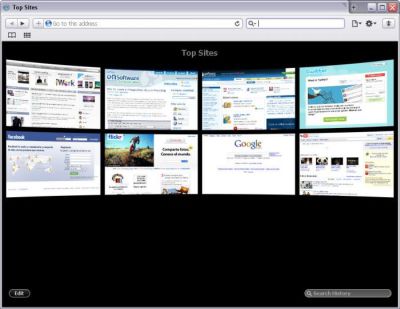
But that’s not all. The new Safari 4 makes use of the well-known Cover Flow feature and uses it to display websites listed in your bookmarks or browsing history in a much nicer way. Besides, every time you open a new tab you get a special document called Top Sites with all your recently visited web pages.

The Top Sites feature is a reqal masterstroke by Apple

On the downside, I still found problems with this new Safari: thumbnails in Top Sites didn’t load until you visited the site, and the Cover Flow browsing system didn’t work properly either. What’s more, I even managed to make the browser crash when trying to import bookmarks from Firefox. Finally, I didn’t find Safari that user-friendly, especially regarding tab management: they look really weird in the title bar, and it’s difficult to drag them around because you need to click on a small top corner on the tab.

Safari has improved a lot in stability and reliability, and is still an amazingly fast browser. However, there are still a few details in this version that keep the program far from perfection.

Five ways to share your music on Twitter

Share your music on TwitterEveryone loves sharing stuff online. Whether it’s music, videos or simple photos, we find the human impulse to share hard to resist. And if you mix this natural tendency – especially regarding music – and a popular social network such as Twitter, you end up with a bunch of mashups and online tools that enable you to share your music on Twitter in a very easy way. Here are some of them:

  • TwittyTunes – lets you post the song you’re currently playing to Twitter. You can select specifically which songs you want to share. Requires the FoxyTunes Firefox extension to work.
  • Twisten – created by the same developers of Grooveshark – and therefore featuring a large music collection – this music sharing app updates your Twitter profile with with the song you’re listening to, plus some links with information about the artist.
  • Tweetj – add a #tweetj tag to your tweets and they’ll be automatically added to a public playlist with the music you listen to. These lists let you to discover new music and include links to buy those MP3 on Amazon.
  • Blip.fm – this full-featured social community built around music enables you to share your favorite songs and bands in other social networks, including Twitter.
  • LastFMLoveTweet – sign up for this mashup and any song you ‘love’ on last.fm will automatically posted to your Twitter account with the artist’s name and a link for your followers to listen to it as well.

Is Spotify the best free online music app ever?

Spotify logoEvery so often an application comes along that simply blows you away and the free version of Spotify is definitely one of the best music apps I’ve ever used. You know you’re dealing with a serious piece of software when a band as big as U2 decides to launch an exclusive preview of their album on it. The closest equivalent I can think of is Pandora (which is now unavailable in Europe) but this is on a whole new level and far better.
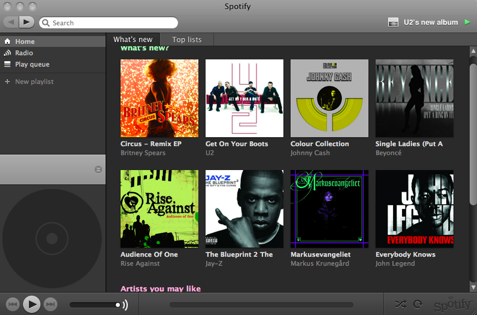
At the moment, the free version is in beta stage and you need an invite from the developers or a friend to use it. Spotify is basically like having access to a huge amount of commercial music, in a format as elegant as on iTunes, but available to you for free, wherever you go. It’s simple to use, beautifully presented, the amount of music available is unbelievable and the quality of streaming is superb.

Spotify screenshot

What’s the catch? You just have to put up with a few non-obtrusive ads inside the Spotify interface and occasionally in between songs. At the time of writing, the free version is in beta so you’ll have to sign-up with your e-mail address and await an invitation. Alternatively, if you know someone who’s already got an invite, they can invite you in if they’ve got a few invites left. As a new user, I have no invites as yet but I suspect that this increases the longer you use the service. If you can’t wait that long to try it out, you can buy a one day pass for about $1 or a month’s pass for around $10. The slight advantage of signing up to either of these is that both are completely ad free. Continue reading “Is Spotify the best free online music app ever?”

How to: create a vintage photo album in Photoshop

Digital photography is now a standard worldwide, which means that fewer and fewer people spend time creating those classic photo albums with paper photos, stickers, text scraps and other goodies. If you’re a fan of handicrafts and miss those nice hand-made albums, here’s your chance to go back to them, at least in a digital version. Follow the steps of this easy tutorial and you’ll learn how to create a vintage photo album in Photoshop.

1. First of all, we need the background for our album. After browsing the web for a while, I decided to use this old notebook I found on stock.xchng. You may want to use a different image though.

Create a vintage photo album in Photoshop

2. Open the photos you want to add to your album. Taking into account that we want to create a vintage photo album, we need to apply an old photo effect. In this case I’ll use the vintage photo effect created by Emanuele Feronato, but there are many other similar tutorials to create old photos on the Web. Also, make sure they’re photos that could be taken a few years ago – an iPhone for example won’t look that “vintage”. Continue reading “How to: create a vintage photo album in Photoshop”

4 great tiny applications

Sometimes we come across little applications that improve day to day PC life in small but excellent ways. Here are a few recent ones you might like to try:

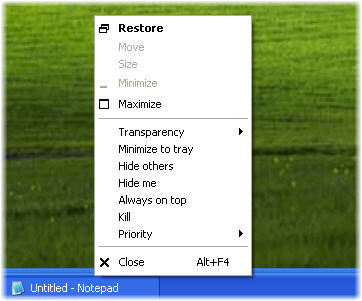
  • Process Manager For Windows adds some great functions to the right click menu, like kill, and minimize to system tray, and is a great way to speed up and simplify your deskspace usage.
  • WakeupOnStandBy lets you automatically wake up your PC start applications and execute tasks while you are away (or asleep)
  • UrlbarExt is a fantastic Firefox extension that adds a toolbox of nice functions to the address bar of the uber-browser.
  • Finally, for now, is DiskDigger which is a very lightweight application that can help you find deleted files on any disk. The results can be surprising!

Time waster: A highly realistic online golf simulator

Golf is a recurrent topic when it comes to online games, but this is certainly the first time I’ve seen such a perfect reproduction of this sport as an online Flash game. Unlike other minigolf-style games with cartoonish design and fun sound effects, World Golf Tour features highly realistic graphics – with the obvious Flash limitations – that give this game a serious appearance, similar to any other desktop golf simulator.

World Golf Tour

World Golf Tour lets you play a 9-hole game for free, including also a short tutorial that teaches you how to use clubs, aim the shot and control your power. If you want to play a full round though, or have a game with your friends, you need to create a free account on the game’s website. The user account also lets you customize the player and join tournaments.

World Golf Tour is fairly easy to play, even if you have no idea about golf. The game is basically stripped down to choosing the right angle and learning to control swing power. Other than that, you can enjoy a beautifully designed scenery while trying to reach par on each hole. Just make sure you don’t play too much: it’s pretty addictive!