How to: Read RSS feeds in Outlook 2003

One of the new features included in Microsoft Outlook 2007 is native support for RSS , which comes in quite handy because it allows you to manage email and feeds from one single application. But what happens if you’re still using Outlook 2003 – like me – or even older versions, and still would like to embed RSS feeds in Microsoft’s email client? The answer is RSS Popper: a useful Outlook plug-in developed by Paradisoft with which you can comfortably read your favorite feeds right on Outlook’s interface.

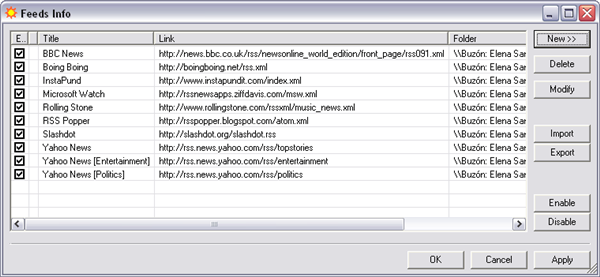
Once RSS Popper is installed, launch or restart Outlook and you’ll see a new toolbar. Click on RSS Popper > Edit Feeds and you’ll open a window where you can start adding your feeds straight away. RSS Popper brings some example feeds by default, but you may as well delete them if they’re not your cup of tea.
Read RSS feeds in Outlook 2003

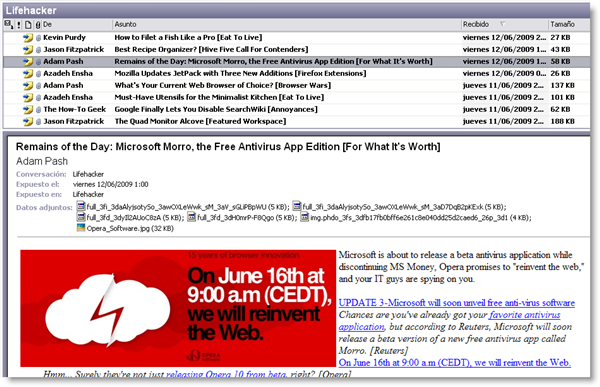
The good thing about RSS Popper is that it also features support for importing and exporting, which means you can import your complete feed collection in XML format and embed it directly in Outlook. RSS Popper will organize each feed into different folders – just like your email folders – and display selected items as if they were email messages.
Read RSS feeds in Outlook 2003

RSS Popper can be configured to refresh feeds automatically according to a certain period of time, though you can also refresh them manually by clicking the correspondent button on the toolbar.

Collections: a new way to share Firefox add-ons

Collections: a new way to share Firefox add-onsAfter launching a first set of add-on kits under the suggestive name of Fashion Your Firefox a few months ago, Mozilla have taken a step beyond in themed packs with the so called Add-on Collections. Collections are customizable groups of related add-ons that anyone can create and share on the Mozilla website. In this way you can easily keep track of new updates for your favorite add-ons, create personal packs with your basic add-on kit for quick browser installations and share new exciting add-ons with your friends online.
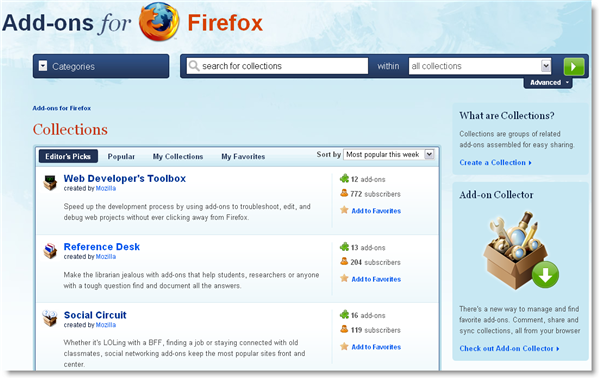
Collections have now their own section in the Mozilla Add-on official website – which, by the way, has been redesigned. From here you can browse collections by popularity, and also check Editor’s picks and latest additions to the site. You can also subscribe to any collections you like, and create your own. Creating a personal collection is as easy as filling in a form with a name, description and a choice of a few selected add-ons. Plus, they can be made public or restricted to only people you invite.

Collections: a new way to share Firefox add-ons

But the best way to keep track of your favorite collections and manage the ones created by you is probably installing the Collector add-on. This add-on has been especially designed to keep track of any updates in the collections you’ve subscribed to, and let you update your own collections with new additions, all directly from your browser.

Google Quick Search Box – not quite a Spotlight killer

Google Quick Search Box logoAlthough some bloggers are hailing it as a “new” release from Google, Google Quick Search Box was included as part of the Google Codes project earlier this year but it’s now been given an official release by Google with its own webpage. And you can see why Google think the tool is fitting of a major release. Google Quick Search Box is a basically a Spotlight style app that can search for just about anything both on and offline as well as launch apps.
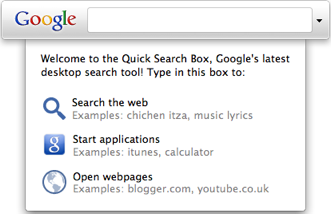
In this way, it’s very similar to Google Desktop except it’s far more discreet and lightweight and there’s no annoying indexing to wait for. Rather, Google Quick Search Box floats on your desktop ready for action whenever you need it. Previously, it only performed basic searches on your hard and online but this official release makes it an altogether more powerful proposition.

Google Quick Search Box 1Google Quick Search Box can performs more through hard drive and online searches and even launch applications. As you’d expect from a Google product, searches are incredibly detailed and quick and results are displayed clearly. Search for “Firefox” for example and it immediately brings-up the Firefox icon ready for launching. In this way, Google Quick Search Box acts not only as a search tool, but as a launcher as well.


You can even customise Google Quick Search Box to search only those online sites that you choose such as YouTube, Wikipedia, Gmail and Google Docs. To search both your Gmail and Google Docs account, you need to enter your Gmail account credentials in the “Accounts” section in preferences. However, when I tried to search my accounts using Google Quick Search Box, the search seemed to hang for a while and no results were found. Whether this was an error on my side or a bug I’m not sure but it was a little disappointing. Continue reading “Google Quick Search Box – not quite a Spotlight killer”

WordPress 2.8 ‘Baker’ released

WordPress today announced the release of the latest version of its awesome eponymous blog platform. Version 2.8 (‘Baker’, after the famous Jazz trumpeter Chet Baker), consists of few immediately visible changes but plenty of performance enhancements.

Once you’ve had a time to play around with the new version, you’ll spot an overhauled widget interface, easier to handle theme installations, a new CodePress editor for editing themes and plugins within wp-admin and a new Screen Options interface that lets you customize the look of your admin area to fit your monitor. As well as all that, WordPress seems to run much faster.

Find full details of the new release on the WordPress Codex. Or just watch their video…

You can download the latest version of WordPress here, but if you’re running 2.7 or higher, you should be able to upgrade automatically. If you don’t have a web host but you’d like to try WordPress out, skip along to WordPress.com and register for a free hosted blog!

Google Earth: Weather, sun and street view

Google Earth gets more and more features all the time. Its 3D mapping is always improving, the not very interesting ocean floors have been included as well as historical sites and lots of buildings.

You can now choose to add weather conditions and the sun to your experience. Clicking View – Sun, will add a time slide to the interface. You can now move time, and see the sun rise, set and create shadow all over the globe. All the information is astronomically correct – so you can see the change in sunrises over the year. The sun effect can be quite spectacular. With the weather, which is activated on the sidebar of Google Earth, you simply select Weather, then conditions. You can then click on any weather icon to get a forecast for that place. 

On the same sidebar, there is also a Street View button, giving you the same images you can find on Google Maps in your browser.  It’s not quite as well implemented – moving around is definitely easier in your browser,but it’s still a cool feature. Incidentally, if you haven’t tried the revamped street view in Google Maps, it’s much improved. If you’re looking for a holiday experience, you can now visit a modeled Euro Disney site, and watch the sun go up and down, repeatedly! alternatively, try some mountains for a more epic view.

How to: Protect your HTC Magic from being stolen

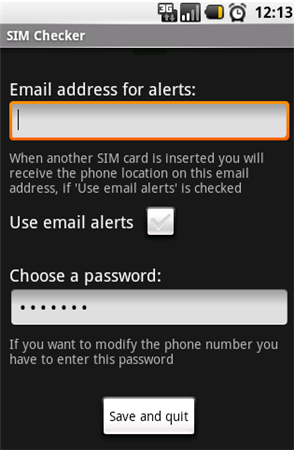
Protect your HTC Magic from being stolenOne of the worst nightmares I’ve had lately is about my precious Android-powered phone being stolen. It would be a complete disaster, no only because of the money value, but also because of all my personal information stored in that small device. So I started looking for a way to protect my HTC Magic in case it got stolen, and finally found this application in the Android Market: SimChecker.



With SimChecker you can configure your phone to send the coordinates for its current location, both by GPS and WiFi network positioning, as soon as the device detects a new, unknown SIM card. The coordinates can be sent either by text message to another phone number, or by e-mail to a predefined address. You can also check both options to be on the safe side.

In this way, as soon as somebody else tries to use your phone with a different SIM card, you’ll get an immediate report about its location. What’s more, if you enable text message alerts, you’ll also get the actual phone number that SIM card is linked to, which may help you trace the phone back to the person who has it now. Another feature I’d like to see would be the possibility to automatically erase all your personal data from the phone in case it’s stolen, but SimChecker doesn’t include it – yet.

In any case, remember that the best way to keep your phone safe is taking proper care of it: don’t leave it lying around, always use a blocking code and jot down the IMEI code in case you need to block it.

Today’s downloads for Windows, Mac and Mobile

Download ShareFireWindows: Looking for a nice, clean RSS reader to check your favorite news every morning? ShareFire may be the program you need. This sleek AIR-based app lets you access your RSS feeds in a comfortable interface, organize them by folders, see the selected item on its original website and easily share the most interesting posts in Facebook, Delicious, MySpace, Digg, Twitter and more.

Defend your castleSymbian: Living in a castle is great but it does have its downsides. One of the main ones being that you’re prone to attacks by invaders who want to get into your castle, as you’ll witness in Defender. An interesting mobile strategy game, Defender charges you with the task of defending your citadel from waves of attacks by nasty monsters.

2t_safari.jpgMac: Sick of Internet Explorer and tired of Firefox? Safari is Apple’s iconic browser, and as you’d expect, it’s a delight to use and easy on the eye. Version 4 (now out of beta) sees some exciting introductions such as Top Pages to instantly see your most visited pages, tabs on top for easier management and Cover Flow to flip through your bookmarked sites iTunes style.

Play free DJ Hero-style games online

One of the highlights of the summer for me will be getting my grubby mitts on the new DJ Hero and Scratch The Ultimate DJ turntables for PlayStation. If you too can’t contain your excitement then why not pass the time to the release dates by playing free online virtual DJ games. Granted, you won’t find anything as complex as the new console titles, and you won’t get to mess around with virtual decks, but there are some genuinely fun games out there where you can perfect the art of mixing, scratching, and sampling before DJ Hero and Ultimate DJ come out. Here are some of my favorites:

DJ Mixer – Take to the studio in this fun game featuring two mixmaster aliens who rap in Romanian. There are 12 loops to choose from and you can scratch tracks by clicking a button on the decks. Weird spacey effects will play if you hit the red buttons at the top of the screen.

DJ Mixer

Coolio DJ Rock Out – I’m not sure if crazy-haired gangster rapper Coolio actually had anything to do with this game, but if he was involved then hats off to him. Coolio DJ Rock Out is an addictive game in which you must spin the decks to match the patterns that appear in the circles. It’s harder than it looks, especially when your brain’s caught in the grip of hardcore techno. Continue reading “Play free DJ Hero-style games online”

Snow Leopard struts its stuff at Apple’s WWDC

Snow Leopard logoApple’s prestigious Worldwide Developers Conference got underway in San Francisco yesterday and delegates finally got to see the long awaited next incarnation of Mac OS X – Snow Leopard – in action. I wrote about what to expect from Snow Leopard a few weeks ago and there seems no reason to refute any of the claims made there, except that Safari will no longer be in beta stage when it will be released, probably in September. There are however some new revelations that weren’t originally mentioned:

Higher Resolution iChats – Better video quality yet only consuming a third of the bandwidth

Support for Chinese – Including those written on a trackpad writing and predictive typing

Enhanced Exposé – Click and hold a dock icon to reveal windows for that program

Drag and Drop Features – Drag and drop items and images between different programs

Cheap Upgrade – Leopard users can upgrade for just $29 (family license is $49)

Those that we already knew about but now have more details on include:

Enhanced Stacks – Handles a larger range of files and allow you to drill-down sub folders

Microsoft Exchange Support – Browse global Exchange addresses and integration with iCal

More Discreet Quicktime – The interface hides as soon as your cursor leaves the window

As I mentioned before, the most noticeable benefit for most general users will probably be speed enhancements. That said, the long-awaited support for Microsoft Exchange is bound to be a big pull for business users. And for programmers, Snow Leopard presents the most exciting developments of all with support for 64-bit architecture, Grand Central Dispatch and OpenCL. Many of the other subtle enhancements mentioned above aren’t exactly essential but they will streamline your workflow. And for just $29 dollars to upgrade, you can’t really go wrong.

Motion Controllers should be the future!

At the E3 conference, all three console manufacturers announced new motion sensing controllers – from Nintendo’s Wii-motion and Sony’s wand, to Microsoft’s controller-less Project Natal. Along with recent improvements in touchscreen technology, it’s reasonable to conclude control will change quite a lot over the coming months and years.

Here’s Microsoft’s promotional video for Natal

[youtube]http://www.youtube.com/watch?v=UkSV1rXJ0pU[/youtube]

That looks pretty energetic to me!  Like the Wii, I imagine this will be loads of fun, but won’t replace existing controls either – after all, wireless joypads allow you to play in a relaxed way, and sometimes that’s fine. As I wrote a while ago, I think if we treat new methods of control as replacements, we’re in danger of losing good things that aren’t broken.

I would be happy to have a touchscreen monitor, or one that I could manipulate with gestures. But as long as we still use writing, having a physical keyboard will be essential. Watching the PlayStation’s motion controller in action, it looks good, but a little inaccurate – it still looks a lot harder to pick stuff up on screen than it does in real life.

With some development though, it might be a nice way to interact with your Windows desktop. Using your hands to grab things on the screen and move them around would be cool. Personally, I think control from a distance is much more sensible for large devices. A touchscreen for my phone or laptop, but here in the office I wouldn’t want to be stretching to touch my screens all the time.

So far I’ve heard a lot about PC touchscreens but for me – and maybe I’m  lazy – I like the idea of sitting back from a screen, so motion sensing controllers sound much more exciting. How long it takes for anything like this to be adapted for PCs or Windows is anyone’s guess though.