Which iPod music ripper for Mac? Senuti versus iPodRip

Senuti logoiPodRip logo

In the world of iPods and iPhones, there’s nothing more annoying than not being able to copy your music from them onto your hard drive. This is because Apple have locked both devices so that you can only copy music onto them but not vice-versa. This is incredibly frustrating if you want to replace a song you’ve lost or deleted in iTunes, your Mac has crashed and your iPod/iPhone is the only place you’ve saved your music, or if you simply want to transfer some songs between computers.

Fortunately, there are two excellent “unlocking” solutions for Mac in the form of Senuti and iPodRip. Both applications used to be free but now require a modest fee to use them. Both have free trial versions however and I put them both through their paces to see which is best.

Senuti

Firstly, Senuti supports both iPod and iPhones so if you own the latter as well, then it’s a no-brainer which to choose. The interface of Senuti is very clean and as soon as you connect your iPod, your music and playlists appear pretty much instantly. To transfer a song, you can either drag and drop them or select the song and click the clearly labeled “Transfer” button in the top left corner.

senuti screenshot

That’s about all there is to it. Once a track is transferred, it is denoted with a blue dot which tells you that it has already been transferred to your hard drive. You can also play songs simply by double clicking on them. The demo is limited to 30 days and 1000 song transfers but there’s no nag screen and the full license costs $18. Continue reading “Which iPod music ripper for Mac? Senuti versus iPodRip”

Can we afford to rely on Twitter as much as we do?

Twitter logoAlthough it started over three years ago, the Twitter phenomenon has gone into overdrive in 2009. Its importance in breaking news and reaching the areas that traditional news outlets simply can’t have been well documented and the current political situation in Iran is a perfect case in point. Even the US State Department has asked Twitter not to perform maintenance and thus risk blocking crucial tweets from emerging out of Iran. Meanwhile others have suggested that Twitter may be the most important thing to hit the net since Google.

However, are we getting a bit carried away with the reliability and effectiveness of what Twitter can do? Isn’t it a bit worrying when even the US State Department starts relying on Twitter to maybe formulate foreign policy? And the more popular it becomes, isn’t there a danger that an over reliance in it could be both politically dangerous for governments, embarrassing for news organizations and potentially taint how authentic tweets actually are as spammers, commercial organisations and governments join in.

We’ve already seen a study that has punctured the myth of exactly how popular Twitter is. Harvard University found that a paltry 10% of Twitter users generate over 90% of the content. When you see how much content high profile tweeters like Stephen Fry, Demi Moore and Ashton Kutcher create, this isn’t as hard to believe as it may at first sound. It also found that half of all users update their pages less than once every 74 days and that most people only ever tweet once during their lifetime. It’s clear then that relying on Twitter as some kind of “democratic miracle” is fraught with problems.

In the case of Iran however, there’s no doubt that Twitter has provided an invaluable outlet in a country where getting a true picture of events isn’t easy. During the 20 year commemoration of the Tienanmen Square massacre in China, Twitter also proved one of the few ways of people getting their voices heard despite authorities trying to block them. As a blogging man myself however, I’m prone to agree with bloggers such as Muhammad Saleem who point out that one of the “hidden” dangers of Twitter is the brevity of tweets. There’s no scope to write any detailed analysis or context in a microblog of just 140 characters.

Saleem also makes the salient point that with Twitter, there is a far greater danger of information overload. It can take a while just to filter the wheat from the chaff when you’re trying to filter hundreds of tweets, many of which are garbled in order to fit more words in. A search for #Iranelection provides the perfect example. In the time it takes you to scan the first five to ten Tweets, you’ll be told that there are already another 150-odd new messages matching your search. It is simply impossible for anyone to accurately stay on top of, let alone filter, such a vast weight of opinion.

There’s no doubt that there’s some valuable information being tweeted every day on Twitter. But there needs to be a much better way to filter genuine breaking news from inane tweets. And the more popular it becomes and the more organizations like the US State Department start taking an interest, the more skeptical you have to become.


Today’s downloads for Windows, Mac and Mobile

Synchronize your BlackBerry dataBlackBerry: Not all of us have the memory of an elephant, and if you’re the kind of person who always forgets what you should be doing or where you’re supposed to be going then it’s high time you did something about it. Evernote is an application and web service that lets you capture, store and synchronize all manner of information on your BlackBerry, PC and online, all at the same time.

Crash3DMac: If you’re a fan of stunt car games then Crash3D widget provides a good fix of dare-devil fun directly on your Dashboard. Crash3D sees you take control of a stunt car as you race around a desert landscape hitting as many ramps and loop-the-loops as possible in an attempt to get your name on the high score table. You can play just for fun, or compete with players across the net and it’s 100% free.

Opera 10Windows: As we reported yesterday, Opera‘s latest build features Unite, a new technology that lets you turn your browser into a content server, sharing whichever files you like with other clients. Designed so that even novice users can enjoy it, Opera beta build 10.0.1589 has been the buzz of the week on software blogs. Give it a spin today!

Ask OnSoftware: Customize your browser home page

The web browser has slowly evolved from being just one more program on our hard drive to becoming almost the only tool you’ll ever need, thanks to the popularity of web apps. This is why it’s important to keep it perfectly updated, and tailor it according to your needs and tastes. One of these small customization details is the browser home page, that is, the first web page that loads when launching the browser; something our reader David seemed to have some problems with:

I want to delete the Google search page from my Firefox home page.  Don’t quite know how it got there in the first place but I want to delete it.  Please advise how I can do this and thanks!

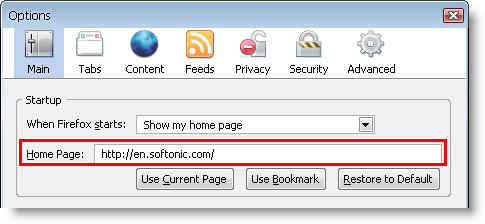
I must say I don’t really understand what David meant by ‘deleting’ the home page, but assuming that what he wants to do is changing the home page, it’s quite easy: simply open Firefox, go to Tools > Options and in the Main tab, enter the address of your preferred website in the ‘Home Page‘ text field.

Customize your browser home page

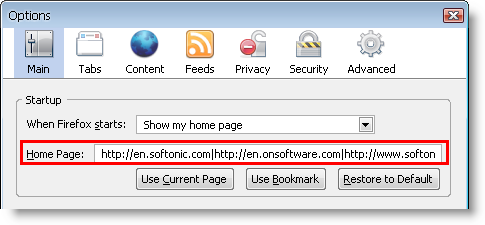
Besides this basic functionality, there are other tricks you can use to spice up your browser home page. One of them is opening several webpages at the same when you launch the browser. All you have to do is entering the addresses of all the web pages you want to use as home pages in the same field described before, separating them with vertical bars.

Customize your browser home page

An easier way to configure multiple home pages without having to type that much is opening all the web pages you want to use, then go to Tools > Options and click the ‘Use Current Pages‘ button. Continue reading “Ask OnSoftware: Customize your browser home page”

7 interesting Twitter tools

7 interesting Twitter toolsUnless you’ve been living under a rock for the past couple of years, you probably know what Twitter is. What’s more, you may have been using it for a while now, to share links, keep in touch with friends and follow the ups and downs of a few celebrities.
But besides its main purpose as microblogging platform, and thanks to the Twitter API, Twitter has become also the ground base for a wide variety of apps and services, created by hundreds of developers worldwide. Thanks to this stream of creativity, Twitter is now much more than just a microblogging service. Here’s a small sample of everything you can do with Twitter – apart from exchanging 140-character long messages:

  • TwitPic – Probably one of the most popular Twitter-based apps, TwitPic lets you easily share photos on Twitter. Simply upload the image to the TwitPic site and it’ll be automatically sent to your Twitter account.
  • FileTwt – Lets you send files online via Twitter, up to 20 MB in size. Files are shared in either in your public timeline or in a private message addressed to only one person (which requires signing for a free account on the app’s website).
  • TwitVid – It’s similar to TwitPic, only that it lets you share videos instead. TwitVid supports multiple video sharing – in playlists – and can also capture the image source from your webcam.
  • Twisten – With Twisten you can discover new music everyday. This app searches Twitter for music-related tweets and lets you listen to those songs on the spot. There are also links to download the MP3 from Amazon or iTunes.
  • TwtJobs – Believe or not, Twitter can also help you get a job! Twtjobs lets you create and publish your “twitter resume”, or advertise a job post in Twitter. The 140-character limit can be quite challenging though.
  • TwitterCal – If you use Google Calendar, you’re going to love this one: TwitterCal lets you create new tasks and appointments by sending direct messages to a specific Twitter account.
  • TweetStats -Finally, a little nourishment for your ego: with TweetStats you can quickly generate statistics about your own Twitter account: how many tweets per hour do you send? Who do you retweet most?

First look at Opera Unite

According to Opera, today is the day the Web changes. Its new Unite service promises to radically extend what we do online. The basis of the new platform, which is built into the latest build of Opera 10, is to do away with Web servers owned by strangers and instead connect people on a computer-to-computer basis. The developer’s vague advert ( a candidate for the list of worst tech ads ever) fails to convey any of the real benefits of Unite, of which there are many.

[youtube]D5hr-6cw4M8[/youtube]

bar.jpgUnite is designed to allow you to easily share you data, such as photos, music, notes – in fact, any file you have on your computer. You can share just with yourself (to access your work computer and home, for instance); with selected friends, family or colleagues; or with the whole world. What’s more, Unite works across any browser and even supports mobile browsers. This concept itself isn’t a new one – services such as LogMeIn and Laplink have been enabling remote PC access for years. In the case of Opera Unite it’s the way the service is implemented that makes it so special.
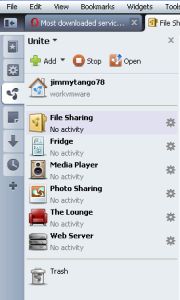
Opera Unite can be accessed from a tab on the side panel in the browser. The first thing you’ll need to do is create a free account with Unite. Once you’ve done this, you can start using the Unite ‘services’, which are like mini-apps that allow you to perform certain tasks. There are six services pre-installed into the latest Opera 10 build, though obviously the company hopes that developers will embrace Unite and frantically start churning out new services. Here’s a look at what you get at the moment though: Continue reading “First look at Opera Unite”

Crane Wars!

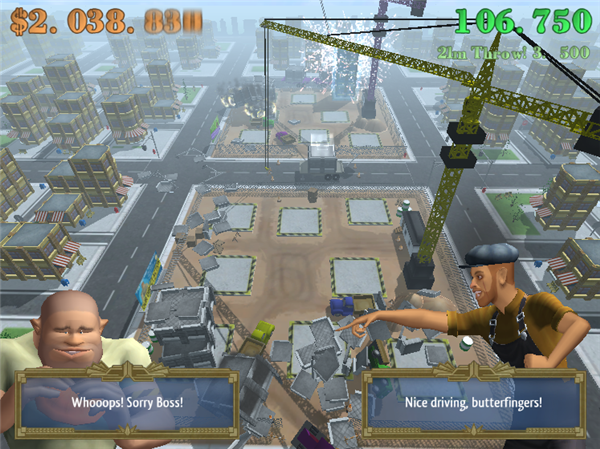
Crane wars is an almost ready for release game from Flashbang studios, the quirky team behind Paper Moon, Off Road Velociraptor and Minotaur China Shop. You can play a beta 3 version of this browser game here. You control a crane at a construction site, and have to build tower blocks, while watching out for attacks from a neighbouring crane company. You can throw objects at the competition’s buildings, and they can do the same! The game is timed – your budget is constantly being drained, and when it runs out the game is over.

The controls are simple, but building your skyscrapers can be a bit fiddly, especially when someone’s throwing trucks at your creation! Like all of the games on Blurst, Crane Wars is compelling mainly because it’s a cool and ridiculous idea. It was originally scheduled for release today on the Blurst site, so if you don’t fancy playing the beta and want to wait, it shouldn’t be long… As with all Blurst games, you’ll need the Unity browser plug-in.

Get new emoticons for Skype

I’m a massive Skype fan, but I’ve always found it lacking a little when it comes to emoticons. Personally, I love using smilies and find them a good way of injecting some fun into ailing conversations. But I get a bit bored of seeing the same old faces all the time – after all, there’s only so many times you can look at a ninja stick man before it stops being funny. So, I decided to track down the so-called ‘secret Skype emoticons’, which is a set of smilies that the developer deemed too risqué to include in the program itself. Here is the full cut-out-and-keep list for you:

(toivo) toivo.gif
(mooning) mooning.gif
(finger) finger.gif
(bandit) bandit.gif
(drunk) drunk.gif
(smoking) smoking.gif
(rock) rock2.gif
(headbang) headbang.gif
(myspace) myspace.png
(flag:) – with the country code after the ‘:’. e.g. (flag:us)usflag.gif,(flag:gb)flagbg.gif,(flag:au)auflag.gif. You’ll find a full list of country codes here.

Continue reading “Get new emoticons for Skype”

Friday timewaster: Little Wheel

Little Wheel is a beautifully presented and animated point and click adventure. It’s relatively short, but really enjoyable. Little Wheel takes place in a robot world, which has lain dormant for 10,000 years dues to an accident that left the robots without power. Waking after a lightening strike, your little robot has to journey through the dormant city and bring it back to life. With its quirky, silent robot protagonist and simple though engaging gameplay, Little Wheel is the most charming browser game I’ve played.

Opera’s special announcement will not be Opera 10

opera-special-announcement-1.png

A lot of people are beginning to talk about Opera’s special announcement planned for next week. A special page on the developer’s website states that at 9 a.m. this Tuesday, Opera will “reinvent the web”. But what could they be talking about?

Checking out the page’s source code [thanks to Pallab for this!] reveals this secret message:

<!-- 	We start our little story with the invention of the modern day computer.
Over the years, the computers grew in numbers, and the next natural step in the
evolution was ...  -->

This little teaser has also begun to show up on Twitter, along with the next part which continues:

… to connect them together. To share things … #reinvent http://www.opera.com/freedom

Our natural assumption when we saw all this was: Opera 10’s about to drop. That’d be great news and it’d just about explain a bit of viral hype building on Opera’s side. However, if we are looking at the release of version 10, Opera are being much more reticent than normal. Our request for a preview (which would normally be answered with a URL to download the final version under embargo) was answered with a cryptic message stating that Opera will be unveiling ‘a new technology‘ on Tuesday, and that there’ll be a live webcast.

Operawatch has plenty of interesting comments regarding what the exciting announcement might be (the least exciting of which would be a beta for the new version of Opera Mini – I mean, come on!). The most likely idea seems to be something to do with cloud computing (see the pic?) .

Our best guess is that Opera will announce that their new browser will feature a ubiquitous experience across devices and machines with everything possible (cookies, history, bookmarks and more) handled in the cloud. It’s difficult to imagine quite how far they’ll take server side technology, but looking at the company’s history, this is definitely the direction they’re heading in.

Got a better guess? Let us know….