How to choose the right anti-virus protection for your business

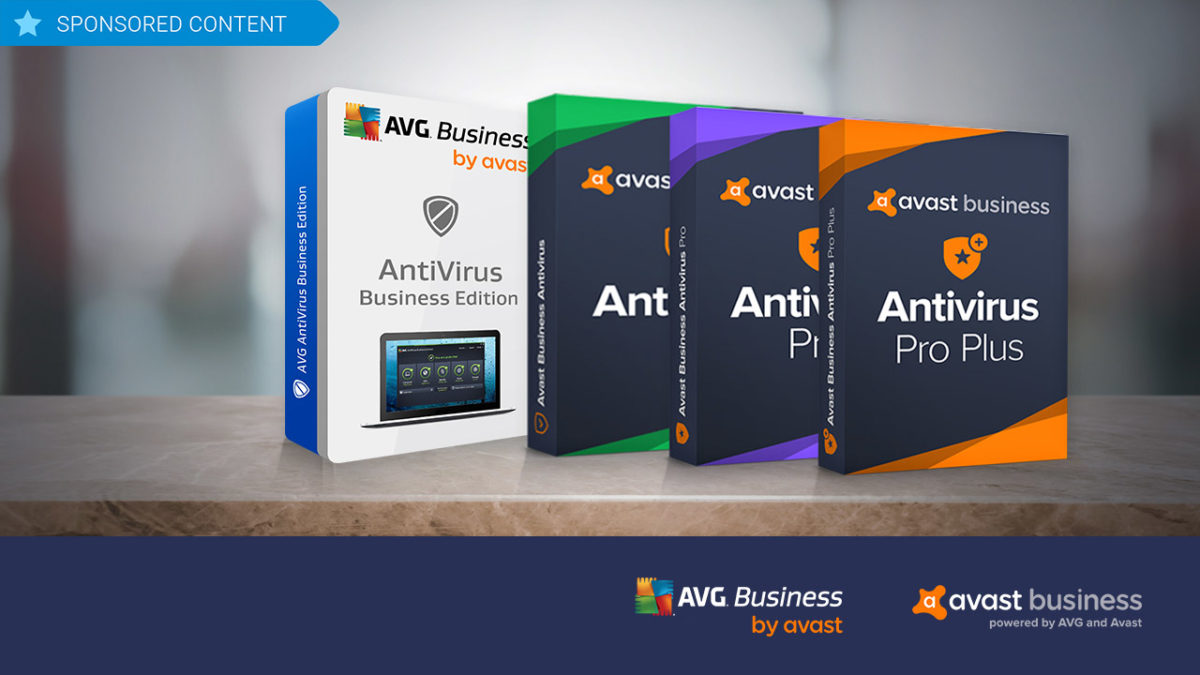
Avast, a leader in security software, supplies two different business security solutions: AVG Antivirus Business Edition and Avast Business Antivirus. Try them out!

While there are lots of anti-virus software programs on the market for individuals, when it comes to protecting your business, the choices tend to shrink. Avast, a leader in security software, believes that businesses should have all of the flexibility in anti-virus and hacker protection offered to individual consumers. This is why it supplies two different business security solutions, each further broken down into additional options that let business owners choose exactly the kind of coverage they need based on budget and requirements: AVG Antivirus Business Edition and Avast Business Antivirus.

AVG Antivirus Business Edition

As with all Avast products, AVG Antivirus Business Edition has world-class antivirus protection baked in, and is an ideal solution for larger businesses with multiple workstations. 

The software employs cloud-based Real-Time Outbreak Detection to ensure that it is continuously updated and prepared to thwart the latest attacks whether they be from spam, viruses, hackers or malware – or through problematic email attachments or downloaded files. The program also includes a behavioral shield that looks for suspicious behavior that might be hiding in programs on devices across your network. 

Additionally, AVG Antivirus Business Edition provides a WiFi inspector, a data shredder that overwrites files multiple times to permanently erase potentially sensitive data, and a sandbox, which isolates troublesome files in a safe, virtual environment for deeper analysis. 

To add even more protection, AVG’s Internet Security Business Edition adds exchange server protection where your emails are scanned at the server level and you are protected from spam and phishing schemes before it even hits your network. 

Avast Business Antivirus

If you’re a smaller business owner, Avast Business Antivirus lets you choose the exact level of protection you need to keep your operations safe and smooth, as it’s available in three versions: Business, Business Pro, and Business Pro Plus.

The base-level program offers the same file, web, email and behavioral shields as AVG Antivirus Business Edition, as well as the sandbox and WiFi inspector, but it does so in a lighter-weight program that takes up less resources on your network.

Stepping up to the Business Pro level adds the data shredder function, the exchange server email protection and SharePoint Server Protection – a scanner that monitors all files on your shared storage system to ensure that they stay malware free.

Moving on to the Pro Plus level adds four additional features including the ability to protect employees’ login details with a secure master password; VPN functionality; a browser cleanup function to remove cookies that contain personal data; and a webcam shield. These features are also not included in either of the two AVG Antivirus Business Edition products, so for true 360-degree protection for your business, Avast Business Antivirus Pro Plus really is the way to go.

 All the software is compatible with Windows 10, 8 and 7 as well as Mac OS.

Best websites for business cards

Need a business card? These are your best options.

BusinessCard2

Business cards can get you a job. They solidify connections. They ensure your last and best impression sticks. They’re important!

To make sure you get the best business cards for you upcoming career mixer, we compiled a few of the best sites for business cards, ranging from the highest quality and most expensive to the bargain brands.

Best websites for business cards!

Moo

Moo cards are the best! The company runs like Apple when Steve Jobs was around: more expensive, but definitely not just a brand name. These cards are great, they’re delivered promptly, and the service is professional.

If you want the best, go with Moo!

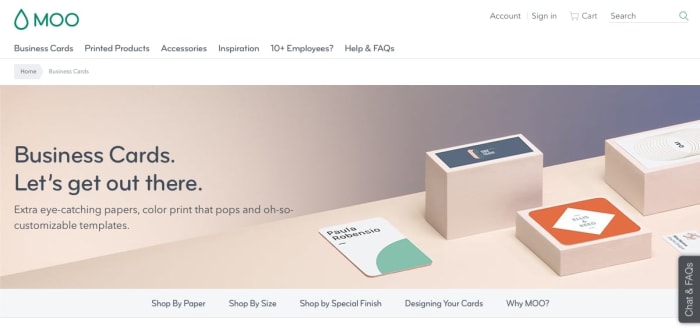
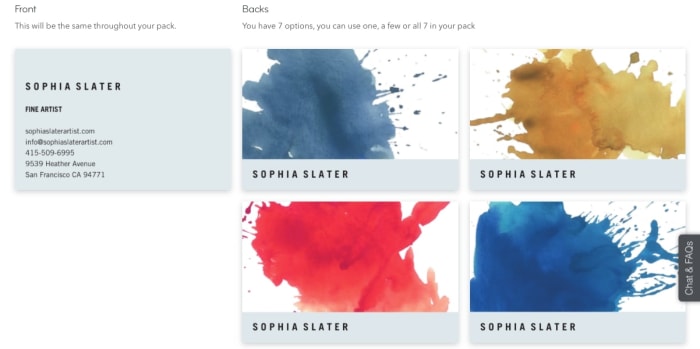
MooHomeWhen you open the website, you’re given the option to choose between a number of card options: if you’re going by paper, you have the choice of original, cotton, super business cards, and luxe business cards.

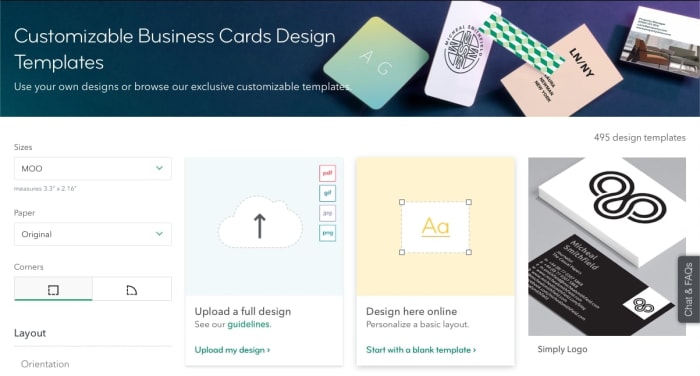
If you proceed with original, you’ll visit the selection environment, where you can discover card templates:

Find cardsFrom there, you enter a card creation environment that looks something like this:

ColorsThe options look professional, you can find a great card with excellent color choices, and the renaming process works like a charm. All cards are automatically a good, quality thickness, 16pt. They are full-color on both sides, with options for Matte or Gloss.

The one downside? They cost $20 per 50 cards.

Picture it this way: rather than go to an all-you-can-eat buffet, why not go to a fancy sit-down restaurant that serves the best food? The answer is, it depends what you’re looking for: if you’re taking your whole family to dinner or going on a fancy date, your priorities may change.

That metaphor probably got out of hand, but you get the point.

Vistaprint

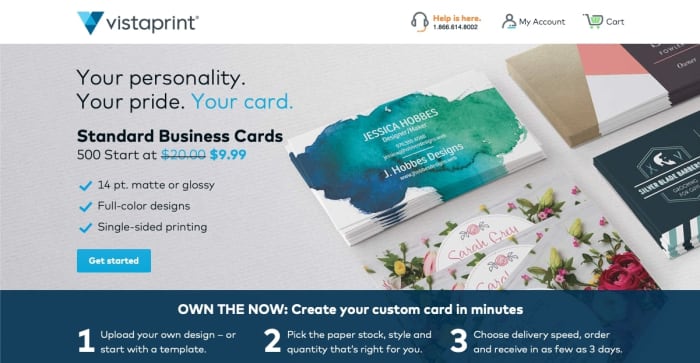
VistaPrintVistaprint specializes in all types of printing. In the realm of business cards, their base offer gives you 500 cards for $20. That’s a ton! However, this cost gets you 14pt cards (thinner), and only one side of print. To get all that, you’ll be paying closer to $45 for 500 cards.

VPHome

When you jump into the template chooser (because we’ve assumed most people buying business cards didn’t create their own design from scratch), you’ll be greeted by this window:

VP1Choose your design and then move on to the reworking portion:

VP2

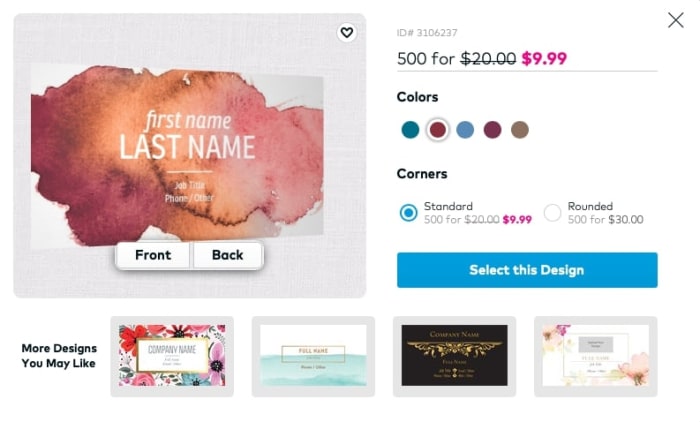
Here, you can choose your color (which may result in a discount), and begin setting up your card as you wish. When you’re finished putting together the perfect design…

Congratulations, you have a card!

Staples

StaplesYou probably know Staples. They aren’t strictly in the business of business cards, they’re an all-around office specialist: ink cartridges, office chairs, envelopes, planners, folders, printing and more.

So, why wouldn’t they do business cards?

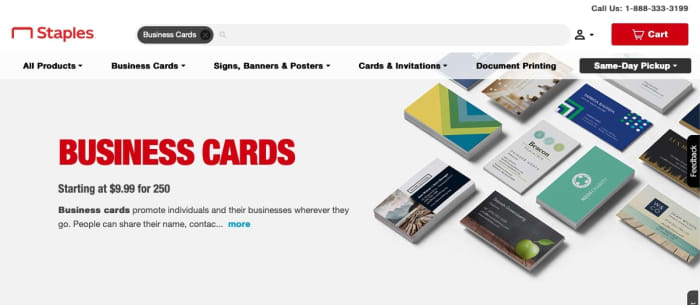
StaplesHome

Their template environment will look something like the image below. Straight to the point, no messing around here:

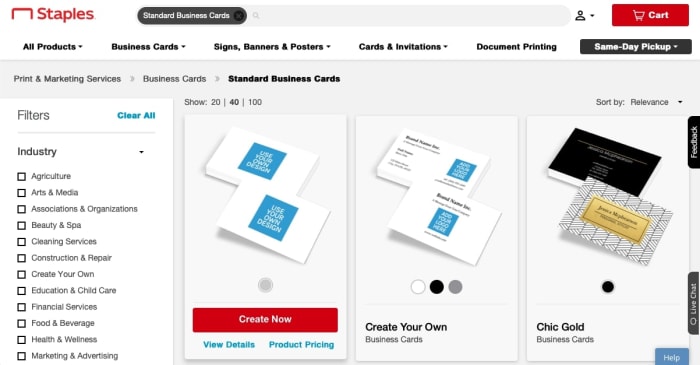
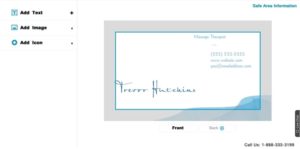
Staples1Their card creator environment also looks rather bland, but that may be perfect for a businessman or woman with a time crisis:

Finally, we arrive at the cost. Staples makes a set of 250 business cards for $9.99! Of course, these base cards are naturally thinner and only have print on one side. To upgrade to fancier options, you’ll be paying around $35 instead.

Another useful thing to note: Staples charges at least $9.95 for shipping. If you want to get your cards for free, you’ll just have to use their same-day pickup system. Which, frankly, may be a very good thing!

Conclusion

Any of these websites can deliver great service, and have a wide range of delivery options and card types. If you go with Moo, you can expect great service, great cards, and a great website, not to mention a reasonable amount of business cards. Staples and VistaPrint have great designs and reasonable prices for the large number of cards they produce. As always, the choice is yours to make.

We hope this helps you find a great business card!

Complete guide to advancing your career

From building your resume to acing your interview to succeeding in an office, here’s everything you need to know to grow your career.

Ready to take the next step in your career? Just getting started? Looking for a side-hustle to make some extra money? Or maybe you’re ready to strike out on your own and start your own business. Whatever the case, we’ve got some excellent articles to help you on your journey.

Guide to advancing your career

career guide

Looking for a traditional job

Interviewing

job interview

At the office

office work

Productivity tips

Personal tips

staying calm

Working remotely

remote working

Entrepreneurs, freelance, and self-promotion

entrepreneur

Make yourself more valuable

skills learning

The future

future work

WhatsApp launches its new app for the iPhone

WhatsApp Business brings a number of commerce-focused features to iPhone.

WhatsApp Business was a long time coming. We got our first glimpse of it back in the summer of 2017 and further images of the new app from WhatsApp leaked onto the internet later that year. The beta version dropped a little later the same year, just before Halloween, and the app finally received a wider roll-out in January last year. At least it did if you use WhatsApp on Android.

For iOS users, WhatsApp Business was nowhere to be seen, and it has remained that way until now. Almost 16 months after it became available on Android, WhatsApp Business is now available for iOS users, too.

WhatsApp Business brings a number of commerce-focused features to iPhone

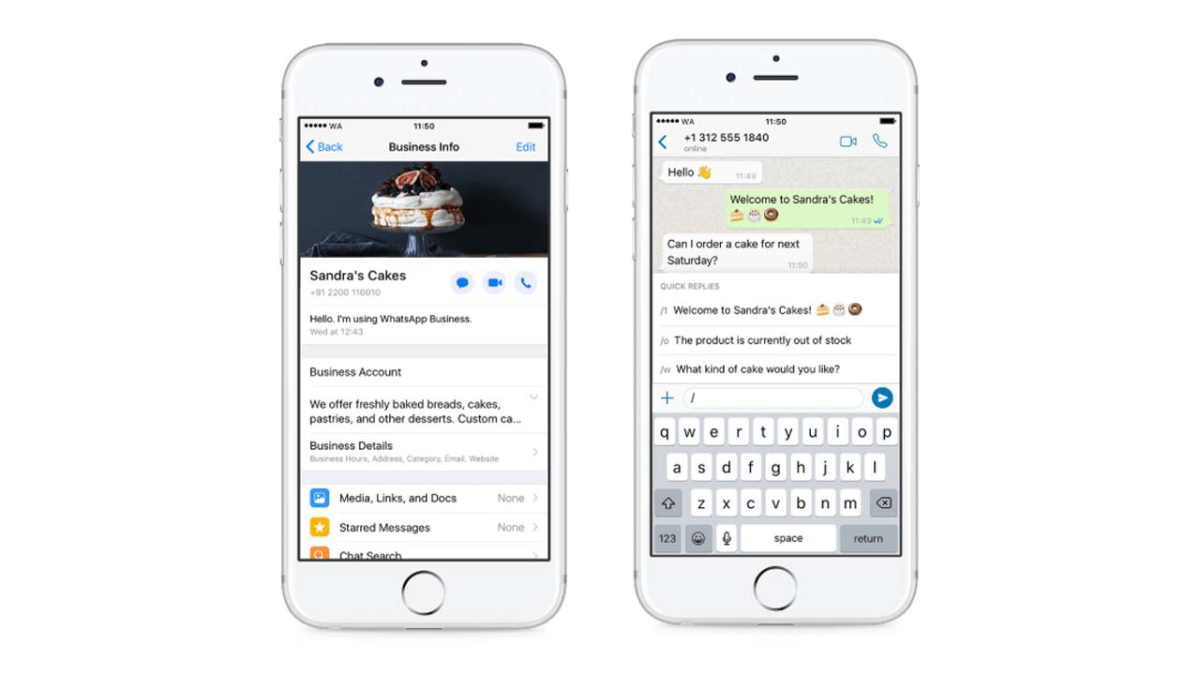
Screenshots of WhatsApp Business on iPhone

According to WhatsApp, millions of businesses have started using WhatsApp Business since it first launched on Android. The WhatsApp blog post announcing the move to bring WhatsApp Business to iPhone users says that the team behind the app has received a lot of requests to give small business owners the chance use the app on their device of choice, rather than being forced to use it on Android. In answer to these requests, WhatsApp Business is now available for free on the Apple App Store.

WhatsApp Business Download Now ►
7

As you may have guessed, WhatsApp Business isn’t aimed at the individual user, but rather business owners. As WhatsApp Business levies a charge for its use, it provides businesses a way to communicate with their customers while also offering WhatsApp a way to monetize its use. WhatsApp has long struggled to make money, and WhatsApp Business is one of the latest ways it is trying to do so.

WhatsApp Business employs a number of enterprise-friendly features, to help businesses stay in touch with their clientele. These include:

  • Business Profile: Share useful information about your business such as a business description, email or store addresses, and website.
  • Messaging Tools: Respond to customers easily with efficient messaging tools — quick replies to provide fast answers to frequently asked questions, greeting messages to introduce customers to your business and away messages to let them know when to expect a reply.
  • WhatsApp Web: Chat from your desktop to manage conversations and send files to customers.”
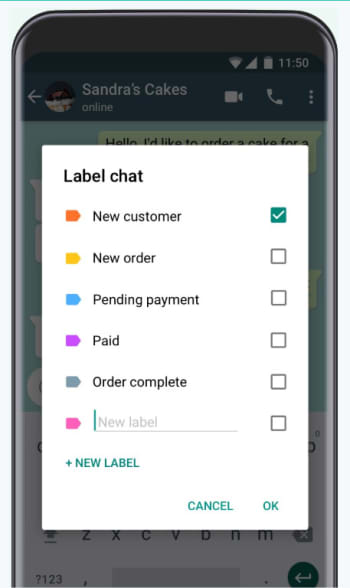
Labels provide a great way for Businesses to organize their chats

If you’re a business user who uses an iPhone, then this will be good news as it offers you a new way to communicate with your users. For now, though, that is only true if you’re in one of the countries where the app is available. WhatsApp Business is now available in Brazil, Germany, Indonesia, India, Mexico, the U.K., and the U.S. but WhatsApp has promised that it will be available all over the world in the coming weeks.

Google Hangouts is officially on the way out

The Google Hangouts shutdown will begin October 2019.

google hangouts to be shutdown

Google Hangouts is Google’s most popular messaging app. On mobile, Hangouts has seen over 1 billion downloads on Android and for desktop, it has enjoyed its privileged position as the main chat facility for Gmail’s 1.5 billion users. It has been around for over 13 years when it started its life as Google Talk. Google has now released details of how it will shut down Google Hangouts and move users to its new app: Hangouts Chat.

Hangouts Chat Download now
6

The Google Hangouts shutdown will begin October 2019

In a blog post announcing the Hangouts shutdown, Google described how it will be enterprise Gsuite customers who will be the first to see the app go. The post mentions a piece from 2017 in which Google talked about the next generation of Hangouts focusing on team communication and it seems that the new timetable shows how this move will be implemented.

According to the recent blog post from Google, these are the key dates to be aware of in the lead up to Hangouts retirement:

“…timeline of changes

  • April 16, 2019 – Several changes that may require administrator action.
  • Between April and September 2019 – Features from classic Hangouts will come to Chat.
  • October 2019 – Start retiring classic Hangouts for G Suite customers.”

G Suite users will start to lose access to Hangouts in October with regular consumers being switched off sometime in 2020.

For those who like Hangouts, the good news is that from April, Google will begin work on migrating some of the key Hangouts features to Hangouts Chat. With Hangouts being Google’s most popular messaging app ever, it would be an own goal for the search giant to not include most, if not all, of the features Hangouts users have enjoyed in this migration.

The key thing to understand here is that essentially Hangouts is now three apps, but that the two newest apps mark different key features from the original Hangouts app. Hangouts Chat is the Slack-like app that will deal with messaging, while Hangouts Meet is a video-conferencing app. To avoid confusion around this issue, Google is now calling the original Hangouts app Hangouts Classic. Google HQ is now committed to taking the best of Hangout Classic’s features and moving them across to the two newer Hangout apps before decommissioning it.

The funny thing about all this is that Google is doing it to simplify its messaging app output. Google is currently carrying out plans that will remove Hangouts and Google Allo from its roster. Once they’re gone, that’ll leave Google with five messaging apps available, which is the same number of apps it had before it introduced Hangouts Chat and Hangouts Meet.

This new direction doesn’t appear to make too much sense and hinges on the successful migration of users from Hangouts Classic to Hangouts Chat and Hangouts Meet. Maybe all will become clear further down the line, but it is clear that the next few months will be crucial for Google’s messaging strategy.

5 best tools to jumpstart your new online business

Ready to launch a new business? These tools will give you a jump on the competition.

new business

A new year means New Year’s resolutions, and it’s a perfect time to make a fresh start, turn over a new leaf, and chase the dream you’ve been wanting to pursue. Hundreds of people are realizing that the best way to live is to work for themselves, and with the internet and social media evolving quickly every day, there are more ways to do what you love now more than ever. Whether you’re selling handmade jewelry or your stock market expertise, here are a few resources that will help you get started with creating your own business.

Best online tools for entrepreneurs

1. BigCommerce

Instead of having to spread your attention thin over a ton of websites, with the help of BigCommerce, you easily streamline your selling process. From one page, manage your listings from the most popular platforms like Amazon, eBay, Instagram, and Facebook. You can choose from a wide variety of themes from a dark and sleek look to a more lighthearted aesthetic.

Access a variety of different apps like Hubspot to better market your products and increase sales, and apps for ShipperHQ and Ordoro to more efficiently ship your products once a purchase has been made. BigCommerce offers different plans depending on what you want for your business, starting at a reasonable $29.95 per month for the basic option. If you’re not sure, you can start with a 15-day free trial where you can start selling immediately.

2. Constant Contact

Constant Contact logo

People check their email repeatedly throughout the day, so the ability to market through emails is one of the keys to increasing traffic to your website. Constant Contact is one of the biggest newsletter tools in the world, and with over 100 easy-to-edit templates to choose from, email marketing has never been more simple. You don’t need to be a master coder to create the perfect email, just drag and drop graphics and scroll through fonts to create top-tier designs that will engage your customers and have them exploring your website for more in no time.

Also integrated is Autoresponder, a feature that sends personalized emails for events like birthdays and anniversaries that help build a stronger connection between you and customers so that they understand that their business is valued. There’s a 60-day free trial and a 30-day money back guarantee once you’ve chosen a plan (but we don’t think you’ll need it), so head over to the website to check them out.

3. Intuit

Finances are a huge part of any business, but we can’t say it’s the most exciting. It’s easy to get confused when handling the numbers gets a little convoluted. Luckily, Intuit will take the stress out of dealing with money by organizing everything for you. Finance giants like TurboTax, QuickBooks, and Mint are incorporated into Intuit, so things like taxes, invoices, and general expenses are broken down to make things easier to understand.

Intuit also offers services to help build your website, attract customers, and enhance productivity. After your free 30-day trial, plans start at the low cost of $7.99 a month. Spend less time worrying about money and more time doing what you love with your business.

4. Buffer

The internet is one of the most important tools in creating a business, and once you’ve got the ball rolling, you need to keep it rolling. Word of mouth is powerful, and new information can be shared at lightning speeds. Buffer is a platform that helps you harness your potential and spread the word about your business by way of social media. With all of your apps in one place, you can easily schedule and send out content at the same time. You can also view your post analytics to see which ones are more popular and how they improve the posts that need a little help.

As you expand, you can add team members to your account and give them access to certain areas to manage, and you have the ability to approve posts before they’re sent out. There are five different plans to choose from so you can use the “Starter” options if you’re not ready to jump in head-first; when you are, you can switch to the “Business” plans to increase the number of social networks you can use.

5. Moo

Now that your business is up and running, you can focus on the physical part of networking. Big brands like AirBnB and Quantcast are using Moo to make items like business cards, flyers, and custom letterhead. Start by connecting with Moo on their website, and they’ll assign you an Account Manager. They’ll help by making your business account and working with you to create designs online for whichever products you’d like, so you can log in at any time and see the progress. Once you have finished designs that you love, simply order your products. Small businesses can start free with same day setup and once you expand you can move up to the “Office” and “Enterprise” plans.

Now you’ve got all the resources you need to start building your own brand. There’s no time like the present – good luck!

4 steps for making your webinar an immersive branded experience with ClickMeeting

Spice up your meetings and webinars with ClickMeeting!

Creating a webinar requires a significant time investment. Creating a useful and engaging presentation takes hours of research, writing, design and practice. So why not turn it into an interactive and branded experience to offer your audience more value, while adding a sense of authority to your work?

Here’s why you should brand your webinars:

  • Improve brand recognition. Whenever a prospective attendee arrives at your landing page, your branding (including your logo) should be displayed clearly. Once they become more familiar with your brand, they’ll be more likely to trust you and purchase your products or services.
  • Adds brand equity to your core business. Adding branding elements to your webinar helps viewers associate the value they receive on the webinar with the promise of value in your products and services.
  • Builds authority. People want to do business with someone who is an expert in their field. This means that if your brand has a reputation of helping people solve their problems, you can leverage that to promote yourself as an authority in your industry.

With this in mind, in this article, we’ll explain how you can make your webinar an immersive, branded experience with ClickMeeting, a browser-based, white label-friendly webinar platform.

Along the way, we’ll share actionable tips on how you can get more out of your webinars by equipping them with your business branding.

Step one: Send customized invitations to boost event attendance

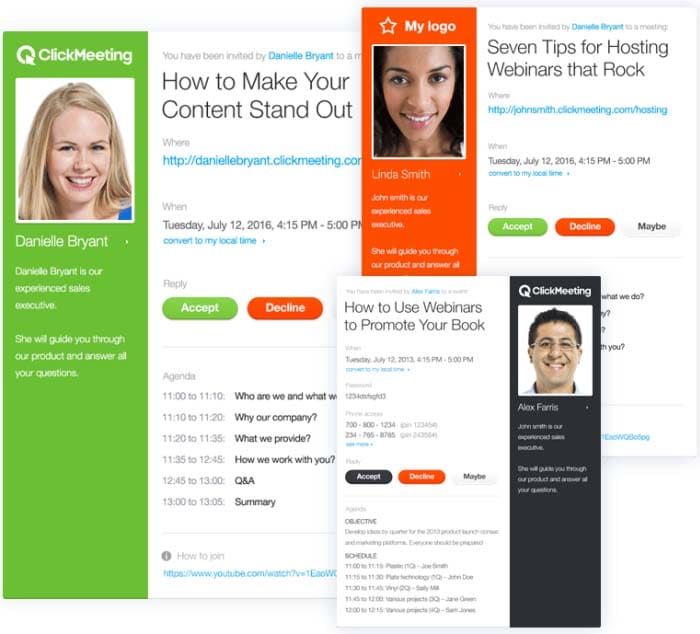
With ClickMeeting, you’re able to choose from a library of email templates to give your email invites a professional look and feel. It lets you customize the color scheme to match your branding.
Branded

ClickMeeting also lets you share important webinar details with attendees via your custom invite. For instance, you can share webinar objectives and agenda bullets, which encourages participants to attend your event and helps boost in-webinar engagement.

This way, attendees will know when to tune in for the webinar and what to expect from it.

It’s also a great way to share links to resources, for example, if you want attendees to download a PDF worksheet, for example, before the webinar begins.

Step two: Create a brand hashtag to promote your webinar

A great way to promote your events and build hype among your participants is by using a brand hashtag. It’s a powerful marketing tool for:

  • Building brand awareness.
  • Positioning your brand as a leader in your industry.
  • Finding and curating brand content to share with your audience.

For this reason, it’s a good idea to use branded hashtags in your marketing campaigns. Here are a few actionable tips to help you get started:

  • When you’re creating email invites, posting event content on social sites, or producing marketing material, always include your brand hashtag in your messaging.
  • Encourage webinar hosts and speakers to use your brand hashtags when they invite their followers to attend your webinars.
  • Include your brand hashtag in the title tag of blog posts, landing pages, and email newsletters when announcing your webinar. This way, whenever someone shares your event post, the hashtag will naturally show up in their tweet.
  • You can also combine your event marketing with Twitter chat marketing. For instance, before or after your webinar, you can organize a Twitter event for followers to ask questions using your event hashtag.

Step three: Customize your webinar pages

You invest a lot of time and resources creating and running marketing campaigns for your webinar. It only makes sense to promote them with your own branding. ClickMeeting enables you to build a professional reputation with customers and show them what your webinar is all about by customizing your webinar pages to match your branding.

You can easily create beautiful and professional-looking webinar pages in just a few clicks. It lets you customize your webinar registration page, waiting room, profile page, thank you page, and webinar room page.

Branding all of your webinar pages is important so attendees are able to recognize you right away. With ClickMeeting, you’ll be able to edit the color schemes and incorporate your logo and brand colors in your webinar pages. This is a great way to stand out from the competition and build trust with your target audience.

ClickMeeting also lets you add background images to match your branding and webinar theme. You can also use free, professional photos from Unsplash to add some personality to your webinar pages.

Branded

In addition to this, it lets you embed webinar content on hosted web pages. You can also create a customized CTA button for encouraging participants to click through to the webinar registration page or landing page.

Step four: Host an engaging and interactive webinar

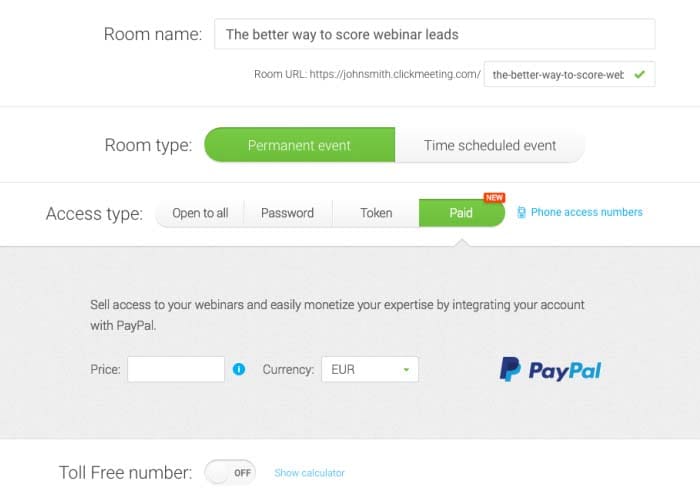
ClickMeeting lets you organize both free and paid webinars. It offers integration with PayPal to sell your webinars and collect payments from attendees. By enabling the payment feature, you’ll be able to choose which webinars you want to monetize and which ones to offer for free.
Branded

You’ll be able to decide how much to charge for each webinar and easily access your paid webinar’s stats to find out which webinar events were most profitable. ClickMeeting lets you organize on-demand webinars to help you tap into your target market and generate leads.

In addition to this, you can run your webinars on autopilot. You can simply upload recorded webinars, videos, and CTA, and select your Automated Webinar Timeline. The setup only takes a few minutes and the platform will handle everything else for you.

Here are some of the reasons why you should consider using ClickMeeting’s Automated Webinars feature:

  • It lets you automate the lead generation process so you can focus on converting more customers.
  • You can easily automate your online courses and spend more of your time engaging with students.
  • You’ll be able to create replays of meetings to ensure that everyone involved is on the same page.

ClickMeeting also lets you live-stream your webinar videos straight to Facebook and YouTube. This way, you can reach more of your target audience and boost engagement on social media platforms.

To take things to the next level, you can leverage audience engagement and encourage them to take action by displaying a well-crafted CTA within your content. This way, you’ll be able to direct participants to a sales page and showcase your product during the webinar.

Here are some other ways you can host an engaging and interactive webinar with ClickMeeting:

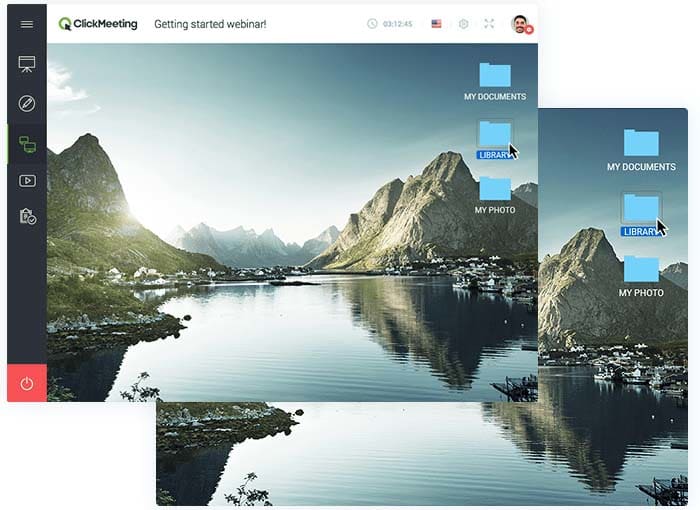
  • Screen sharing. Screen sharing enables remote attendees to see your computer screen. You can use it to show your participants how to configure a software program or demo your latest product. You can also use remote screen control to operate an attendee’s screen.
Branded

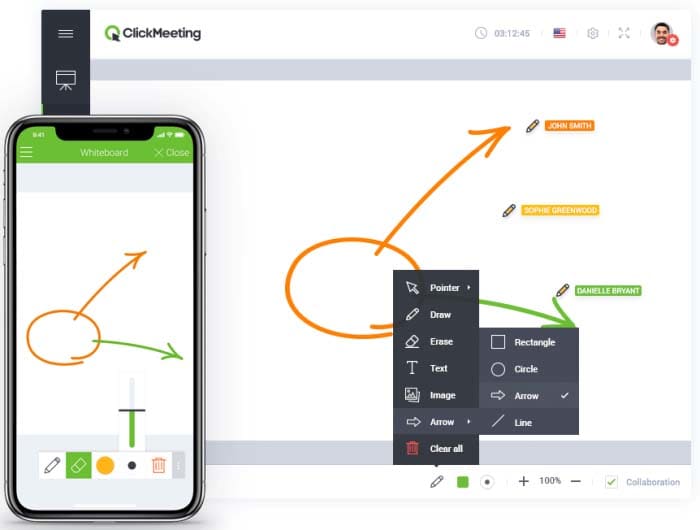
  • Whiteboard. This feature lets you communicate and collaborate with your attendees in an effective and creative way. You’ll be able to use shapes, text, drawing tools, and eraser to share ideas and offer a great learning experience to participants. Plus, you can save your work and include it with post-webinar resources.
Branded

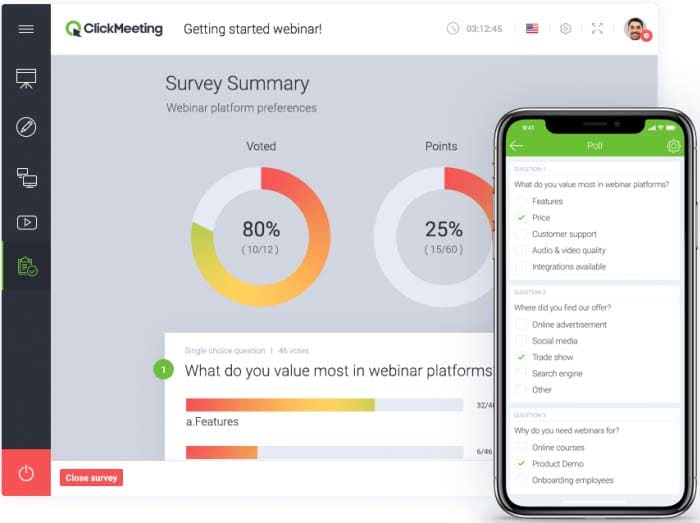
  • Surveys and polls. These are great for gathering helpful feedback and insights from your webinar audience. This information can help you improve future events as well as ask attendees for new webinar ideas. You can use polls to collect data during webinars, which is also great for keeping participants engaged.
Branded

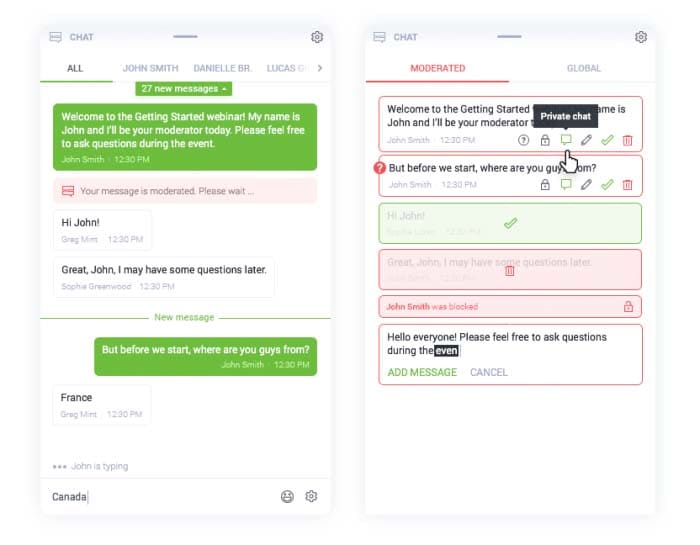
  • Q&As. Q&A sessions enable your attendees to ask questions, interact with the host, and get immediate clarification. You’re also able to moderate attendee feedback in real-time and save chat history for future reference.
Branded

Bonus: Track Audience Behavior for Nurturing Afterwards

Let’s look at some of the ways you can track audience behavior using ClickMeeting:

  • Google Analytics. You’ll be able to add Google Analytics tracking code to your registration form, waiting room, logging page, profile page and thank you pages in order to track your audience’s behavior and interactions.

  • Google Tag Manager. This integration lets you manage tracking codes from popular analytics and marketing services such as RocketFuel, Facebook, AdWords, and Adroll. By getting access to a wide variety of predefined tags, you’ll be able to run targeted remarketing campaigns.
  • Facebook Pixel. It offers information about attendee’s behavior on ClickMeeting pages which can be used to run well-timed Facebook remarketing campaigns.

ClickMeeting also offers integration with Pipedrive enabling you to automatically export webinar registrants’ data to your Pipedrive account. This data can be analyzed to reveal useful information, so you can streamline your sales funnel by including in-webinar interaction data as part of your lead scoring model.

Conclusion

ClickMeeting is an amazingly powerful webinar tool that lets you deliver enhanced webinar experiences. You’re able to customize everything from email invites to webinar pages, amplifying the sense that your webinar is a rich branded experience.

It also offers a number of game-changing in-webinar features – like paid, automated, and on-demand webinars, surveys and polls, screen sharing, and Q&As – to help maximize attention and interactivity during your presentations.

In addition, the various tracking tool integrations make it easy for marketers to follow up with participants with follow-up emails, nurture drips and retargeting ads.