Gallery: iPhone soccer games

The start of the domestic soccer seasons in Europe has spawned three new versions of the iPhone’s premier association football games, namely: FIFA 11, Pro Evolution Soccer 2011 and Real Soccer 2011. All of the new versions are a marked improvement on last season’s offerings, and all offer a decent mobile simulation of the real thing.

I’m a bit of a connoisseur when it comes to soccer games, and have spent the best years of my life locked in my bedroom playing everything from Super Kick Off to Actua Soccer. However, I’m having real difficulty deciding which of these three iOS games I prefer. All of them are fun to play, all of them look pretty good, but all have their own unique flaws.

In terms of the visuals, here’s an idea of how FIFA, PES and Real Soccer square up. Again, I’d say it’s hard to pick an overall winner in the aesthetic stakes. Personally, I love the menus in Pro Evo, but I think the player likenesses are more realistic in FIFA, and the in-game graphics are smoother in Real Soccer. I’d be very interested to hear which you prefer.

Game menus

fifamenu.jpg

FIFA 11

Pro Evo menus

PES 2011

Real Soccer Menus

Real Soccer 2011

Continue reading “Gallery: iPhone soccer games”

Apple announces OSX Lion with App Store, Multi-touch and more.

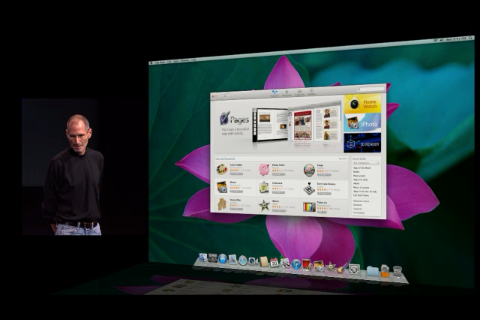
Steve Jobs  announced the release today of the iLife ’11 suite of apps, FaceTime for Mac, and previewed OS X Lion.

We’ll deal with iLife later, but it looks like a great value package of applications that have been dramatically improved.

FaceTime for Mac makes a lot of sense, and the beta can be downloaded from today. If your friends and family use iPhones and Macs, you can say goodbye to Skype!

OS X  Lion was previewed, and Steve Jobs explained that the big idea for this release was ‘Back to the Mac‘,  what Apple learned taking OS X into the mobile world with iOS, they are now bringing back to the Mac:

– Lion will see multi touch gestures (but no touchscreen for Macs)

– Mac App Store (But it won’t be the only place you can get apps)

– Mission Control, which is a great looking hub for your Mac Apps, inspired by the iPad.

OSX Lion will be released in summer 2011, but the Mac App Store will be available for Snow Leopard within 90 days. That’s a huge development, and could really change Mac computing! We’ll update with our reflections, reviews and thoughts soon.

Full review: Skype 5

A few days ago Skype, the most popular and reliable VoIP app in the world, was updated to version 5. I already had a sneak peek at the new version thanks to the beta released weeks ago, but Skype 5 Final brings more new features: a refreshed interface design that makes the program easier to use, and integration with your Facebook profile – though that might not be such a good idea after all.

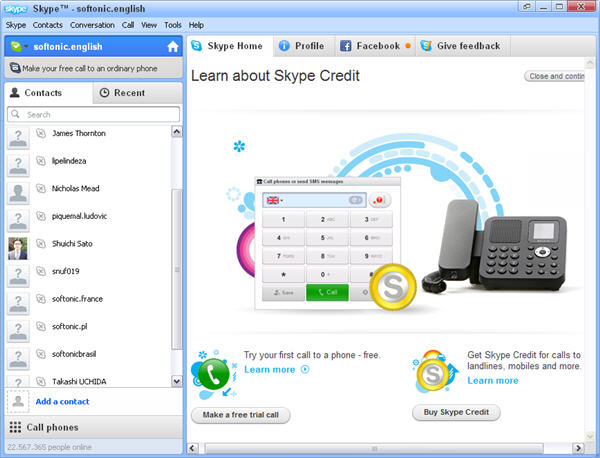
After a fairly quick installation, you can login with your username and password, or create a new Skype user right on the spot. You’ll immediately notice the new interface with a cleaner, more streamlined design. The app feels clearer and easier to use.

Skype 5

The new Skype interface is divided into two main sections. The left sidebar displays your contacts and your most recent calls, while the area on the right is divided into several tabs:  Skype Home (which is basically Skype advertising its own products), your Skype user profile and another tab to give feedback about the program.

Continue reading “Full review: Skype 5”

Microsoft takes on Google with Office 365

office365.jpg

Microsoft has launched the beta version of its answer to Google’s online office suite in the form of Office 365. The suite comprises of Microsoft Office, SharePoint Online, Exchange Online and Lync Online and is aimed at small to large business enterprises that want the remove or reduce the burden of installation, administration and maintenance of their office infrastructure.

The beta version (of which there are limited places) is currently available in 13 countries including the US, Canada, the UK, France, Japan, Mexico and Germany and will go on sale next year. There are two versions of Office 365 available:

Office 365 Beta for small businesses: Designed specifically for smaller businesses and professionals who are looking for cloud-based productivity tools without IT hassles.

Office 365 Beta for enterprises: For organizations that are looking to move their productivity tools to the cloud but maintain control of their IT services.

Both versions comprise of the same 4 components:

Office Professional Plus: The familiar Office desktop apps plus a new Office Web Apps connected to the cloud and with a pay-as-you-go, per-user licensing system.

Exchange Online: Microsoft Exchange email, calendar, and contacts with built-in virus and spam checker. This allows users to access their mail anywhere including on mobile devices.

SharePoint Online: Sharing and collaboration tool which allows users to share and sync documents without the need to set up their own datacenter with SharePoint installed.

Lync Online: Communication suite allowing instant messaging (IM), video conferencing and screen sharing.

Although Microsoft dominate the desktop market with Microsoft Office, they’ve been left behind by Google Docs for Business in the online or cloud computing department. For small businesses, Office 365 will be available for $6 per user per month. For larger organizations, the service will cost between $2-$20 per user per month which includes online support.

Whether Office 365 is a success or not will largely depend on how much businesses and organizations trust Microsoft with the confidentiality of their information and how satisfied they are with the service and maintenance provided. For example, it’s easy to foresee situations with the Office 365 small business version where businesses will feel helpless to resolve IT issues because they’ve relinquished control of all maintenance of their office system to Microsoft.

Many organizations live with Windows and Office as a necessary evil. Do they really want to remove large parts of their IT maintenance departments by trusting Microsoft to maintain their Office infrastructures competently?

HP announces Palm Pre 2 with web OS 2.0

HP has today announced its vision of the next generation of mobile devices – the Palm Pre 2, which will be the first handset to run the new web OS 2.0. The device itself doesn’t appear radically different from the original Palm Pre, but the new operating system has been significantly tweaked to improve the user experience.

Among the new features of web OS 2.0 are improved multitasking, an enhanced Universal Search, HP Synergy support, and the inclusion of Flash Player 10 Beta. For a fuller run-down, check out the post I wrote last month when the web OS 2.0 SDK was announced.

Palm Pre 2

Free Browser Game: Moby Dick – The Video Game

Moby Dick’s a pretty long story so I’m told, so why waste your time with some old book when you can play a free browser game instead? Moby Dick – The Video Game boils hundreds of pages down into an experience we can all understand. You’re a whale, and in-between eating and breathing, your purpose is to ‘Kill all Humans’. Does that about cover the book?

You move by pointing the mouse and can get a short boost using the left mouse button. As you eat and find pills you’ll grow, and can get really big which makes Moby Dick – The Video Game enjoyable, destructive fun. Play it here, and make sure you have Flash installed.

iOS scrolling coming to OS X 10.7?

backmac2.jpg

Ahead of the big “Back to the Mac” event being held by Apple tomorrow, the rumor mill has gone into overdrive and a few details are claimed to have leaked as to what users can expect to see in OS X 10.7 “Lion”. Most notable of all is the introduction of iOS scrolling to OS X according to Macstories who claim to have inside information. According to them, the interface of OS X will remain Aqua based but will include iOS features such as iOS scroll bars and scrolling behavior.

Macstories report:

That means you’ll have to say goodbye to the current Aqua scroll bars and get ready for a more minimal look. Also, the “rubber band” elastic scrolling iOS is famous for is making its first appearance on the desktop, and we’re told it “works really well and feels natural”. Basically, it works like the current inertial scrolling, but when you hit the top or bottom of a scroll view it “rubber bands” down like iOS devices do. Stuff like “pull to refresh” will be possible (and most of all, it’ll feel native) on OS X. We don’t know whether this would be an option or if Apple will turn on the new scrolling by default.

The site also claims that OS X 10.7 will also feature a newly designed Quick Look. Quick Look’s UI will change from the current translucent black to all white. Apple have also implemented a Quick Look popover so that when you highlight a file in Spotlight, a popover with detailed information about it will appear for a few seconds.

It should be noted that these are still rumors but the introduction of iOS scrolling would be a logical move for Apple if as is thought, they eventually plan to move towards touchscreen Macs.

Audiogalaxy resurrected – as an audio streaming service

If you’re around your thirties, you probably heard about Audiogalaxy – or even used it in the early days of P2P. Audiogalaxy was a peer-to-peer music sharing app that became very popular between 1998 and 2001. In 2002, however, their developers had to face a lawsuit from the RIAA for allowing exchange of copyrighted material. It was the beginning of the end: later that year Audiogalaxy blocked its P2P functions altogether and rebranded a paid streaming service called Rhapsody.

Audiogalaxy back to life - as an audio streaming service

The big news is that Audiogalaxy is back, though in a different shape. The program has reinvented itself and is now a music streaming – or more accurately, placeshifting – application with which you can listen to the music stored in your computer at any time, no matter where you are.

The new Audiogalaxy has nothing to do with its ancestor. Instead of sharing music with people over the Internet, you just listen to your own music, stored in your own hard drive, thanks to Audiogalaxy’s mobile apps for iPhone, iPod, iPad and Android-based devices.

Continue reading “Audiogalaxy resurrected – as an audio streaming service”

Facebook Privacy – Who can you trust?

This weekend the Wall Street Journal made a worrying discovery: all of the top ten Facebook apps have been transmitting user IDs to internet advertising and tracking companies, breaking Facebook’s privacy rules. While there is lots of anonymous data tracking on the internet, in this case some companies have been linking internet activity with specific Facebook user IDs.

The main culprit seem to be a data gathering firm Rapleaf, while apps by developer LOLapps were taken down over the weekend, although they are available again now. It’s not clear whether the linking of Facebook user ID and internet databases was intentional – Rapleaf says not – but it exposes a problem of trust with the Facebook model.

While it’s had it’s fair share of privacy controversy, I think Facebook itself is trustworthy. You can’t be such a big company and try and cheat people if you want to succeed. Like Google, mistakes will be made, but it is in their interests to act above board and maintain consumer trust.

Facebook’s problem is that it has become such a big platform that the huge number of companies that use it to offer apps may not always be trustworthy. The activity discovered by the Wall Street Journal looks like a mix of error and intention, but shows that Facebook needs to find a better way of policing the companies that use its platform.

This also highlights how users have to responsibly manage their Facebook privacy settings, and watch out for apps that require a high level of access to their accounts. My main issue with many Facebook apps is that they can only be used if you grant them an unreasonable level of access. Here’s an example I picked at random, Zynga’s Frontier Ville:

When you consider this is just a casual social game, you might ask yourself, ‘why does it require access to all my profile information?’ The answer has to be advertising. Under Facebook’s terms, that’s fine as long as the information is gathered anonymously, but you have to trust the developer will do that. In the light of the WSJ’s findings, that looks difficult.

These apps – which I admit I am not a fan of – are free to play, but with a high cost in terms of sharing personal data. Whether or not that’s too high a cost for you is down to choice, but I suspect most users play without being truly aware of what they have signed up for.

Opera 11 getting extensions


Opera 10 is a really impressive browser (in my opinion). It may not be to everyone’s tastes, but it’s full of useful tools and is very fast. A common criticism of Opera is the lack of browser extensions, like the ones that make Firefox such a customizable beast.

Well, that’s going to change with Opera 11. According to the official Opera blog, extensions are coming, and they will look very much like the add-ons we’re already used to.  They are trying to make it easy for developers to port extensions from ‘certain browsers’ – which I hope means Firefox! Otherwise, Opera extensions will have quite a mountain to climb to catch up with the rest.

The Opera 11 Alpha release is ‘coming soon‘, and we’ll be sure to give you our impressions as soon as we get our hands on it.