Make Twitter more secure with HTTPS

As announced on their official blog, Twitter has taken an important step in making their service more secure for users: they’ve added a new option in the Settings menu that lets you choose to always use the HTTPS protocol when accessing the Twitter website.

HTTPS is a combination of the regular HTTP protocol used on the web with the SSL/TLS protocol to provide secure identification and data encryption in your communication with web servers. It’s often used for sensitive transactions and online payments.
Using HTTPS in Twitter will improve the security of your account and protect your information, especially when using Twitter over an unsecured Internet connection such as a public WiFi spot. The HTTPS option has already been made default when you log into Twitter – to protect your password – and on the official Twitter app for iPhone and iPad.

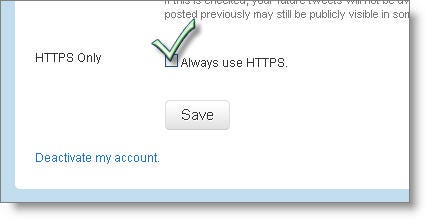
In order to enable HTTPS on the Twitter website, log into your Twitter account, go to Settings and scroll all the way down to the bottom of the page. Tick the Always use HTTPS and you’re done!

Find apartments to rent in no time with PadMapper

Apartment hunting can be a total pain, and the hardest part is often locating an acceptable place in a desirable location. If you do your apartment search online like most people, you have two essential browser windows open: one for a site like craigslist or Rent.com and another for Google Maps to get an idea of where the places you find are actually located. This can get annoying quickly.

Lucky for apartment hunters everywhere, there’s PadMapper. Using Google Maps and pulling available apartment information directly from apartment listings across the internet, PadMapper is a fully integrated apartment search engine. If you’ve ever used Google Maps for any purpose, you’ll know how to use PadMapper. The service is completely free and allows you to filter your searches based on a number of different factors, including maximum monthly rent, number of bedrooms and bathrooms, neighborhood location, amenities, and whether pets are allowed.

Clicking on a selection in PadMapper opens a new tab in your browser to the listing’s direct web address. From time to time the posting will be out of date, but generally you’ll end up with additional useful information about the listing. If you register with PadMapper, you can also save listings to your favorites and come back to them later on.

PadMapper is available for free both as a web app online and also on the iPhone through the PadMapper Apartment Search app. Prepare to find your next apartment with ease. PadMapper puts some fun back into apartment hunting!

Interesting updates for Echofon

Popular Twitter client Echofon has recently released some interesting updates for Mac, iPhone and iPad.

Echofon for iPhone and iPad now clock in at 4.0.3. This update seems mainly to be a bug fixer, removing some non-crucial but irritating glitches, such as the “email this link” feature that didn’t work .

Meanwhile, the desktop version for Mac moved from 1.3 to 1.4. Not a huge jump, admittedly, but in this case, a really interesting one. This update allows you to mute users, clients or hashtags, a godsend for those irritating people you can’t stand to follow, but can’t afford to unfollow! It also improves notification settings, making alerts easier to manage and, crucially, other alerts easier to disable.

More information here, image courtesy of Echofon.

Internet Explorer 9 available for download

Internet Explorer 9 is finally available for download. Microsoft has released the final version of their popular browser for Windows 7 and Windows Vista, both in 32 and 64-bit versions. You can download them all from Softonic.

There are no significant changes since the Release Candidate we tested a few weeks ago. But we thought it would be a good idea to go over the most outstanding features in Internet Explorer 9 once more, especially for those of you who haven’t been testing the previous versions (Platform Preview, Beta and RC).

Web Slices

Internet Explorer 9 lets you add special web elements like top lists to the browser’s Favorites bar. These elements are known as Web Slices and their content is updated automatically. Continue reading “Internet Explorer 9 available for download”

Interview: Launching Pad Games

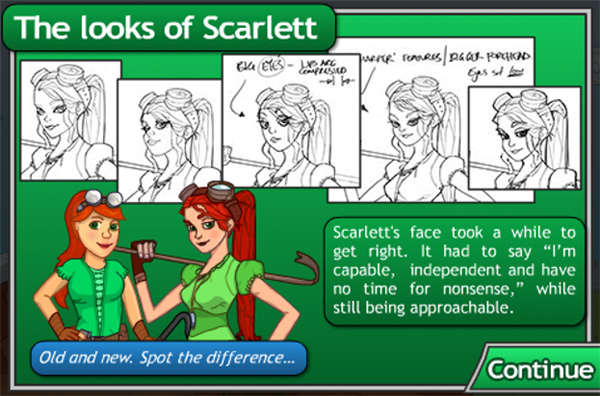
With all the casual games in the App Store, it’s great to run into titles that stick in your mind, and are involving from start to finish. Scarlett Adventures Episode 1 is such a game and buying it will not only make you chuckle on the subway: all proceeds go to the Red Cross until the end of March. You can read more about this great initiative here.

Scarlett and the Spark of Life is a breath of adventuring fresh air, with its witty dialogue and memorable characters. We enjoyed playing through the game, and were left hungry for more. We decided to ask creators Tim Knauf and Tristan Clark about the time-line for Episode 2, creating games for iOS and managing a software house with just two members:

You guys are low in numbers (2 and expanding?), yet deliver an all-round experience with your games. How do you manage? What exactly are your backgrounds and how did you get involved in the gaming business?

Tim: First up, we’ve got to give credit to the very talented James Ellis for the beautiful backgrounds and character design in ‘Scarlett’. His help arrived late into the project, yet after a few incredibly intense weekends, he had turned the art style around. You can see why we’re keen to bring him back full-time for Scarlett Episode 2.

Tristan: As for our backgrounds… would you believe we both have degrees in English Literature? Completely related to game development, I know. Actually, our love of stories is what led us to both our degrees and the kinds of games we most want to make, so there’s more overlap than you’d think.

Continue reading “Interview: Launching Pad Games”

Free Browser Game: Cactus McCoy

Cactus McCoy is a sideways scrolling beat ’em up, with a western theme and lots of weapons! This is a Flash based cartoon game with a silly story – you play McCoy, who finds a mysterious stone that turns you into a cactus-hero! Strangely, Cactus McCoy doesn’t seem to have any super powers beyond being green and spiky, but that doesn’t spoil what is a well made if simplistic beat ’em up.

Although there is just one attack button, the range of weapons make it all quite enjoyable. Taking out baddies with a branch is kind of funny, and there’s even a water pistol lying around! Overall, Cactus McCoy is a great little arcade timewaster to play in your browser. Head over to Kongregate and check it out.

Angry Birds Rio to launch exclusively on Amazon Android App Store

The next installment of the Angry Birds series for Android will be launched exclusively on the new Amazon Appstore. According to a post on the Appstore’s blogs, users will not be able to download Angry Birds Rio from the Android Market, when the game is released.

Angry Birds Rio

Instead, the long awaited sequel to the smash hit game, will be distributed solely via the Amazon Appstore. This is a major coup for Amazon, as it means millions of users will swoop on its yet-to-be-released store, when the South American-themed sequel to Angry Birds finally arrives.

The Amazon Appstore team has created its own Twitter feed @amazonappstore, so you can follow its progress up until launch.

Instagram updated with new tilt-shift effect

A striking new effect has been added to Instagram that will give your iPhone photos a 3D look. The new tilt-shift filter applies depth of field and blur to your pictures, bringing certain parts of the image to the foreground, and blurring others to make them appear further away. Tilt-shift is often known as the ‘model village‘ effect, for the way the pictures come out. This screenshot we took from the office window demonstrates the effect in action.

Tilt Shift effect

Other welcome changes in the latest Instgram update include the ability to email photos directly from the app, a reformatted news feed, and the ability to tag locations without having to type the name of the place you took the picture. If you’ve yet to try Instagram, and you have an iOS device, I highly recommend you go play with it – it’s free!

Why more ISPs should follow the UK

Have you ever tried to watch a YouTube video and found it painfully slow? Ever tried to watch a TV show streamed online and found it stopping and starting constantly? Or simply tried to download a file from your e-mail and had to wait ages for it to complete? Most of us at some stage have suffered from painfully slow downloads and the causes can be various. More often than not though, the biggest culprit is bandwidth throttling by your Internet Service Provider (ISP) particularly at peak usage periods such as evenings and weekends.

Bandwidth throttling is when an ISP purposely restricts the amount of bandwidth that you’re using in order minimize traffic congestion. As HD video and other bandwidth heavy applications demand more and more bandwidth, users are increasingly noticing the squeeze being put on them. That’s why todays announcement by Britain’s major ISPs that they are going to reveal exactly how they manage traffic and throttle bandwidth should be applauded and followed by ISPs everywhere.

This greater transparency reduces the threat to net neutrality – i.e. the temptation of ISPs to make deals with net giants such as Google that websites such as YouTube will be given bandwidth priority over smaller websites. How exactly this greater transparency will work is not clear though. Whether ISPs will be forced to publish reports of how they’ve managed traffic over a certain period or whether they will provide real-time updates on how traffic is being managed remains to be seen.

However, although transparency moves like this should be encouraged, it is no substitute for investment in infrastructure which is the main problem. One of the main reasons that South Korean Users can look forward to speeds of up to 1Gbps – 200 times faster than British average of 5Mbps – is that South Korea has invested heavily in its internet infrastructure. This is not only essential to providing a fair service for all but also for maintaining the innovation that makes the net so exciting. As John Naughton points out in The Guardian today:

The reason the internet has been such an powerful enabler of innovation is that it is, at its core, a meritocratic network which is not owned or controlled by anyone. All it does is take data packets in at one end and deliver them to their destinations at the other. And it was designed to be agnostic about the packets – to give them all the same treatment. In that sense, it was “neutral” towards applications. If you had a good idea that could be implemented in data packets, then the internet would do it for you, no questions asked.

That ISPs should seek to provide a more transparent service that continues to maintain a level playing field for innovation in applications is something all software developers and users should support.

Convert audio to MP3 for free on Macs with Switch

One of the most common needs of Mac users is to convert audio to MP3 format. Although you can do this easily in iTunes, not everyone (like myself) likes to use Apple’s music app. One of the simplest and most effective solutions for free conversions to MP3 from almost any audio format I’ve found is Switch for Mac.

What I like about Switch is the ease of use and slick interface. There are no ads and no bloatware to complicate or confuse things.

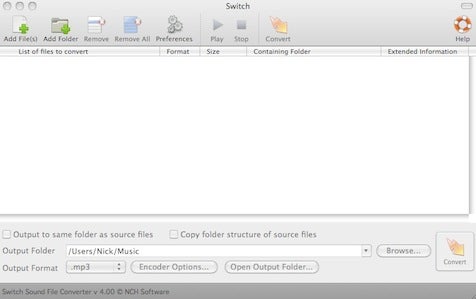
Just open the main interface and click the Add Files button:

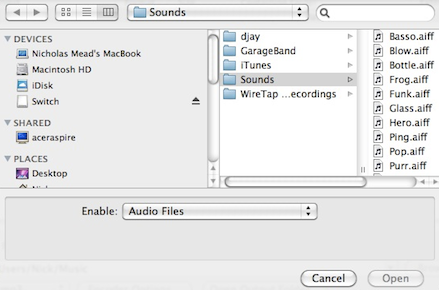
Switch will automatically detect your “Sounds” folder on your Mac and prompt you to select some audio for conversion. Note that you can select as many as you want for batch conversion:

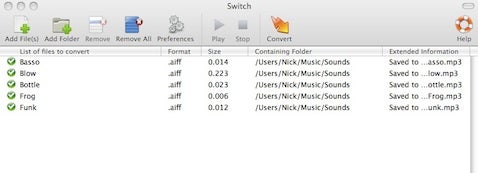
Then simply select all of the files you want to convert and click the Convert button:

Conversion are extremely quick and Switch always makes it clear exactly where your converted files are saved on your Mac (in my case /Users/Nick/Music.)

There is one drawback however – Switch only allows unlimited free use for 14 days but if all you need to do is an urgent conversion of audio to MP3 format within that time, its a very easy, straightforward solution. However, if you need to output in formats other than MP3 or change the bitrate, you’ll have to upgrade to the full version.