How to remove toolbars in Chrome

If you’ve accidentally installed a toolbar in Google Chrome, or if you want to remove one that you don’t use anymore, here’s how to do it.

If you’ve been experiencing performance issues with Chrome, it may well be a toolbar that is causing problems, so it’s a good idea to follow this procedure to check if you’ve got any installed.

Note that the process is exactly the same on Windows as it is on Google Chrome for Mac.

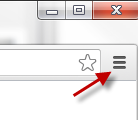
1. Customize and control

Click the Customize and xontrol symbol in the top-right corner of Chrome
2. Extensions

Go to Extensions along the left-hand column, and you’ll see the toolbars that are installed. Click on the garbage can symbol, on the right next to each extension, to remove them.
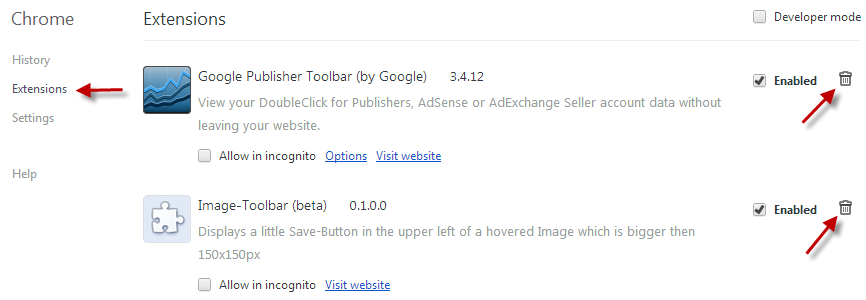

3. Confirm

Confirm the removal, and you’re done.
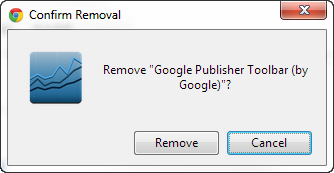
The good thing about Chrome is that no restart is required after removing Extensions, so you can continue browsing immediately.

If you’re looking for more info about Chrome, check out this tutorial on How to find noisy tabs.
Mozilla releases Firefox Metro Preview for Windows 8

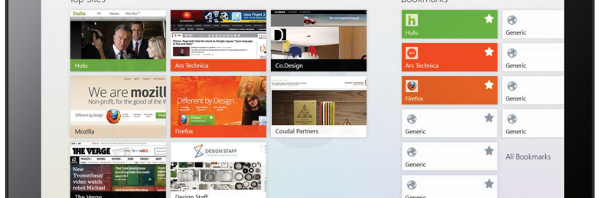
Mozilla Nightly iconWith Windows 8′s official launch right around the corner (October 26th), Mozilla is scrambling to finish their Modern UI version of Firefox. Today Mozilla released its first preview build of Firefox for Windows 8’s Modern UI, called Firefox Metro Preview. Users can now download and test this newest version of Firefox.

Firefox Metro Preview has two interface modes: it can function as a desktop version of Firefox or as a Modern UI application. To enable the Modern UI interface, users must set “Nightly” as the default browser in Windows.

Let’s take a look at the new touch features of Firefox Metro Preview. Continue reading “Mozilla releases Firefox Metro Preview for Windows 8”

Google Maps webapp adds Street View feature for iOS

google maps ios 6 iconGoogle has yet to announce an official Google Maps app for iOS, but users can still use Google Maps in Safari on iOS 6 if they desire. Be sure to read our guide on how to get Google Maps on iOS 6. One of the most useful features of Google Maps is Street View, a feature that Apple Maps lacks.

Today, Google has added Street View to their webapp, giving iOS 6 users (and anyone else that has a HTML5 supported browser) a viable, browser-based mapping solution.

Let’s see how well it works. Continue reading “Google Maps webapp adds Street View feature for iOS”

How to extract audio from video in Format Factory

Format Factory may be known as a video and audio converter, but it can also extract audio from video files and convert them to different audio formats.

You can still use Format Factory to convert your videos to other formats for getting video to work on different devices. We have a great tutorial about how to format videos for iOS.

The simple interface of Format Factory doesn’t show the full potential of what the program is capable of. If you’re looking to extract audio from any of your videos, Format Factory offers a good selection of options to get a decent rip from a video source.

Continue reading “How to extract audio from video in Format Factory”

How to: rip a DVD using VLC


largeVLCVLC is my video player of choice for its spectacular feature set. It plays just about every format under the sun, whether it’s audio or video. There are so many features in VLC that is easy to over look some useful features. Most people know that VLC can play back subtitles, delay or advance audio, and convert files but did you know that VLC can rip DVDs too?

In this tutorial, I’ll how you how to rip a DVD using only VLC.


Continue reading “How to: rip a DVD using VLC”

Are private messages from 2010 and earlier visible on your Facebook wall?

Another Facebook privacy rumor has been spreading, this time claiming that your private inbox messages are appearing in your timeline:

All private messages from 2010 and earlier are all visible on your Facebook wall! This could get VERY awkward, very quickly…this is a new change from Facebook as of 28/09/2012. Don’t believe me?

Read your timeline from those years…

But do not worry; this is not true. Facebook has confirmed there is no such bug, and what people think are old private messages on the Timeline are simply a reflection of how Facebook, and our use of it, has changed over the years.

Read on to find out why the rumor is mistaken, and how you can spot a viral message or scam.

Continue reading “Are private messages from 2010 and earlier visible on your Facebook wall?”

New emoticons added to WhatsApp for Android

WhatsApp Messenger for Android has been updated, improving its support for emoji emoticons. Not only has the emoticon menu been improved, but a whole bunch of new icons have been added to the collection.

The emoticons interface in WhatsApp 2.8.5310 has been tweaked to make it easier to use. The emoji icon categories are now displayed as tabs along the top of the interface and can be browsed by flicking left and right. In this new Android version, there’s a recently used emoticons tab for quicker access to your commonly-used icons.

Continue reading “New emoticons added to WhatsApp for Android”

Download the new browser from Yandex

Yandex.Browser is the new browser from the search engine Yandex. It’s based on Chromium, and while it looks similar to Chrome, it does have some features that set it apart.

The main difference with Yandex.Browser is when you type into the search/address bar, you can pick from one of four search engines, instead of just the one you specify in Settings. It also includes a Yandex button that takes you to the Russian language homepage of Yandex – hopefully this will link to the English homepage in future versions.

Yandex.Browser is available for Windows and Mac. Check below for some screenshots.

Continue reading “Download the new browser from Yandex”

Giveaway: FX Photo Studio for Mac

We’ve got together with developers MacPhun to offer you a free copy of FX Photo Studio for Mac. FX Photo Studio for Mac is a powerful Instagram-style photo editor that adds lots of great effects to your photos.

FX Photo Studio can automatically apply over 173 photo effects and filters plus 40 frames and borders to give your photos an extra special touch.

To get a free license, all you have to do is the following:

1. Purchase the iPhone version of FX Photo Studio for just $0.99.

2. Edit a photo in it and send it from the app with the subject heading “Softonic” to gift@macphun.com.

In response you will receive your free copy of FX Photo Studio for Mac worth $10 so get editing your photos now!