More beta invites being sent out for The Elder Scrolls Online

Zenimax Online is sending out more invites to The Elder Scrolls Online beta. It’s the highly anticipated massively multiplayer online role playing game of the hugely popular Elder Scrolls series, last seen offline with Skyrim.

The developer advises gamers who applied for the beta to check spam folders, and Gmail users to check their ‘promotions’ tab, to make sure they don’t lose the invite. There’s no word on how many are being sent, but if you don’t get one this time, more will be sent out as the beta testing continues.

The Elder Scrolls Online is set to be released in Spring 2014, so you don’t have long to wait if you miss out on beta testing. Zenimax has been carefully drip feeding information about the game since its announcement in May 2012. Beta testers who break the terms of service and upload videos to the web have been dealt with quickly. Zenimax doesn’t want early reviews to pop up online before the game is finished, understandably.

You can apply to join the beta here.

Tumblr for iOS updated

Tumblr, the micro blogging service has updated its iPhone app with a complete redesign more suited to iOS 7.

The app has a brand new dashboard, post compose screen, new post chooser (video, image, text etc), fast re-blog feature and autocomplete for tags.

The new design overall is cleaner and flatter than before, with a new icon to match. Images now look much better in your home feed, and overall it feels fast and slick to use. When you tap the compose icon, six buttons pop up, so you can choose to post text, photo, quote, a link, chat or video. The interface is neatly animated, but not intrusively so.

With the Tumblr app you can manage multiple blogs, and well as save posts in drafts or schedule them and so on. Unlike some services, the app fully supports animated GIFs, so you don’t get a worse experience on mobile.

Download Tumblr for iOS.

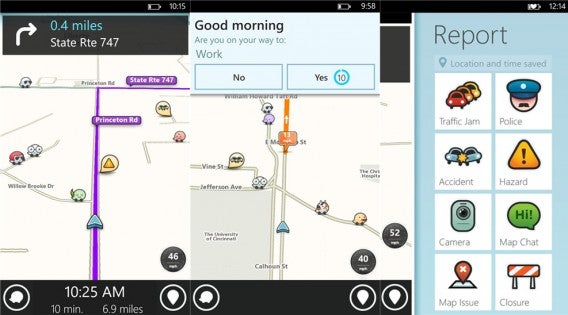
Waze released on Windows Phone

Windows Phone has been getting a ton of popular apps lately and today, the social mapping app Waze joins Microsoft’s growing library of apps. Waze will live alongside Google Maps, the company’s other mapping app.

Waze for Windows Phone screenshots

While Maps is a perfectly adequate mapping solution for Windows Phone users, Waze offers excellent crowd-sourced traffic reports and clever social features. You can earn points for driving and reporting on traffic conditions. Other Waze users show up on your map as you’re driving so you can view their status and points, while you’re stopped, of course.

Waze has over 50 million users around the world and has remained autonomous after the company was acquired by Google. Google is working to integrate Waze’s features into Google Maps over time but has no plans to discontinue Waze.

Download Waze for Windows Phone 8

RELATED STORIES

Source: Waze (Windows Phone Store)

Opera for Android updated with tablet interface

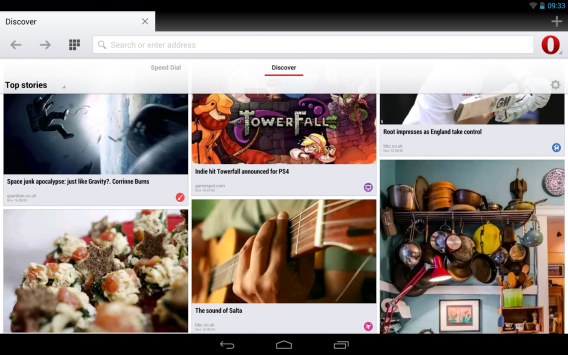
Opera for Android received a major update today, featuring a tablet optimized interface. Opera for Android has been out for a while but there hasn’t been a tablet optimized version yet. That changes today as the Opera team has released a version of Opera for Android with tablet support.

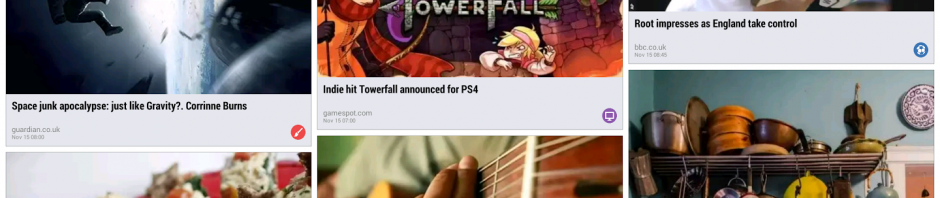
The Discover, Off-Road mode, and Speed Dial features are included in the tablet interface. Discover lets you add news sources and other sites to your start page within Opera, making it easier to get to your content. Speed Dial is basically Opera’s grid layout of your most visited sites, similar to Chrome. Perhaps the best feature of Opera, Off-Road mode, allows users to compress data to save on bandwidth if you have a capped data plan or if you have a poor connection.

Opera for Android tablets Discover

In addition to a tablet optimized interface, Opera for Android is now based on Chromium 31, the latest engine that runs Google’s Chrome browser. This means the two browser should be equally speedy.

Opera made a surprising transition from its Presto engine to the WebKit, which Chrome and Safari are based on. Google decided to create its own fork of WebKit called Blink, which Opera quickly adopted for version 15 of its desktop browser.

Download Opera for Android

RELATED STORIES

Source: Opera

Winamp shutting down Dec 20th

The popular media player Winamp will be shutting down December 20th, ending its 15 year career. Winamp was most popular in the late ’90s and early 2000s for the amount of customization it allowed. Users could download different skins and play just about every audio format out there.

In 2002, Winamp developer, Nullsoft, was purchased by AOL for $80 million. While Winamp eventually landed on Mac and Android, the app never really took off. Apple bundles iTunes with every Mac sold so there’s little incentive to use anything else. Apple’s iOS devices also rely on iTunes for transferring media, which meant iOS users have little choice in which media player they used.

Winamp has not posted a reason for the shut down, only displaying a banner on its site that reads:

“Winamp.com and associated web services will no longer be available past December 20, 2013. Additionally, Winamp Media players will no longer be available for download. Please download the latest version before that date. See release notes for latest improvements to this last release.

Thanks for supporting the Winamp community for over 15 years.”

If you want to hold onto a copy of Winamp, head over to their site before they disappear forever.

RELATED STORIES

Source: Winamp

Google Play Newsstand combines Magazines and Currents apps

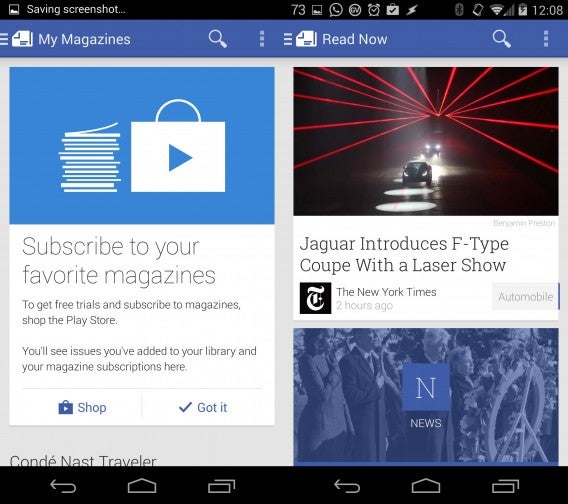
Google has released its new Google Play Newsstand app, which combines both Play Magazines and Google Currents apps. The new app rolls in the magazine purchasing ability of Play Magazines with the news feed features of Currents.

The app feels like a hybrid between Apple’s Newsstand app and Flipboard. There’s no flipping animation like in Flipboard but users can scroll through a long list of stories. Tapping on a story opens it up within the app and the story will be grayed out once you jump back into the main feed, signifying that it has been read.

Play Newsstand main feed

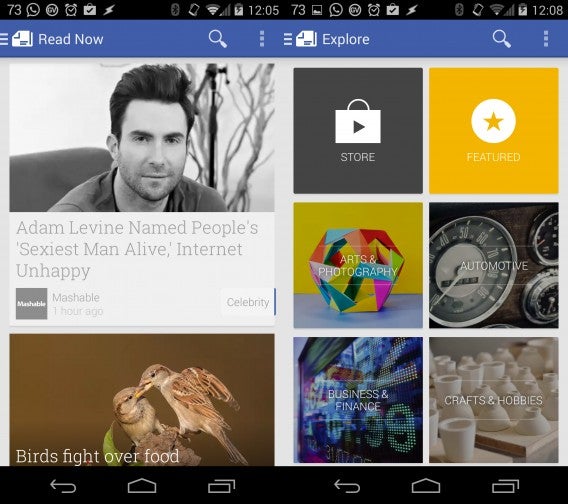
There are tons of new sources to choose from to consolidate into a feed, which resembles Google+‘s card-like layout. You can add more sources by navigating to the source list and tapping on the “+” button next to the source you want to add. Popular newspapers like The New York Times, Los Angeles Times, and Wall Street Journal are all in the app. Want something more in depth? You can purchase individual issues or subscriptions of magazines from within the app.

Play Newsstand discovery

Google Currents will still exist alongside Google Play Newsstand for the time being, but will redirect Android users to the new Newsstand app instead. It’s only a matter of time before Currents is discontinued.

Google plans on bringing Google Play Newsstand to iOS in the future but it’s uncertain if Apple will allow a competitor to its Newsstand app onto its operating system.

Download Google Play Newsstand for Android

RELATED STORIES

Source: Google Play Newsstand (Google Play)

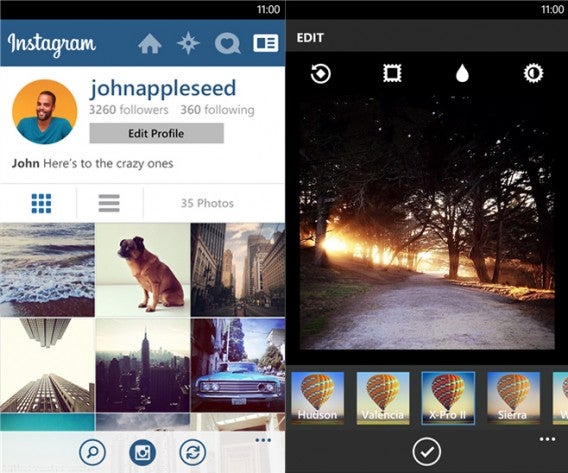
Instagram arrives on Windows Phone in beta

Instagram for Windows Phone is finally here but users may be disappointed. The app is launching in beta because it’s missing key features like in-app photo taking and video recording. Strangely, the Windows Store description says video recording is supported.

Instagram for Windows Phone feed and explore

Since you can’t take photos within the app, Instagram for Windows Phone will launch the default camera application instead. After you snap your photo, you can edit it with filters and more before uploading it to the photo sharing service.

Also missing is the ability to tag your friends in photos or view maps of geotagged photos. Instagram says they will keep working on the app to bring its feature set up to par with its Android and iOS counterparts.

Instagram for Windows Phone profile and filters

Instagram for Windows Phone only supports Windows Phone 8 so Windows Phone 7.5 and 7.8 are out of luck.

In the mean time, short video aficionados can  get their fix with the Vine for Windows Phone app.

Download Instagram BETA for Windows Phone

Source: Windows Store

RELATED STORIES

Candy Crush creators launch Pepper Panic Saga on Facebook

Pepper Panic Saga is the latest game from King, the creator of Candy Crush Saga. Launching first on Facebook, Pepper Panic Saga is also a ‘switcher-and-matcher’ game, so fans of Candy Crush will have no problems jumping right in.

Pepper Panic Saga follows ‘Pepper Puppy‘, a dog who craves spicy chillies and explosions (!), as he journeys from Pepperfield Place to Squawker’s Island. Like other ‘saga’ games, you have to match objects to set of chain reactions, and get through each level as fast as possible.

The game launches on Facebook with 70 levels over five different episodes. King’s Tommy Palm says Pepper Panic Saga’s new characters like Pepper Puppy and Mister Claws the cat, along with bright graphics and new levels will make the game a success.

Play Pepper Panic Saga now.

We have no word on whether the game is coming to mobile devices soon, but if it is a success on Facebook, it’s highly likely we will see it on Android and iOS too.

Speedball 2 HD coming to PC on December 5th

Speedball 2 is one of the best loved games of the early 90s 16-bit era, and now a shiny HD remake is coming to PCs on December 5th.

The futuristic sports game plays a bit like handball, but as well as scoring points for goals, you get points for violently knocking out opponents. The cut 1970s futuristic sports film Rollerball is obviously an influence too. Speedball 2 has been re-released a few times since 1990, most recently on iOS. While that version got lots of things right, the game never suited touch screen controls.

The new PC version is developed by the same team as the iOS version, Vivid Games, and directed by veteran UK developers Jon Hare (of Sensible Soccer fame) and Mike Montgomery (from original developer The Bitmap Brothers). Speedball 2 HD keeps the 2D graphics, instead just polishing the original graphics and adding some sparkle to the backgrounds.

It features local multiplayer only, perhaps staying true to its origins, but it feels like a missed opportunity not to have online multiplayer.

RELATED STORIES

[Source: RockPaperShotgun]

Post animated GIFs to Facebook with GifBooster

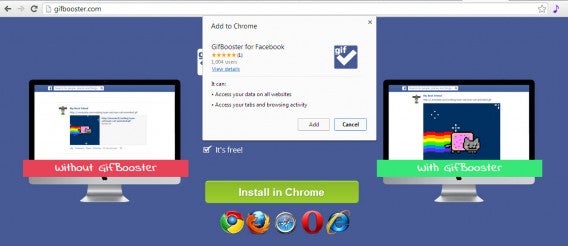
Facebook doesn’t let you post animated GIFs on your news feed or wall. Thanks to GifBooster, though, you can make GIFs come alive! It’s a browser plug-in for Firefox, Chrome, Internet Explorer, Safari and Opera and below, we’ll show you how it works.

1. Add the plug-in to your browser

When you download GifBooster, you’ll be taken to a page where you can select which browser you’re using, although it’ll usually detect your browser by default. Follow the instructions to add GifBooster to your browser. In this case, we used Google Chrome.

Click Add.

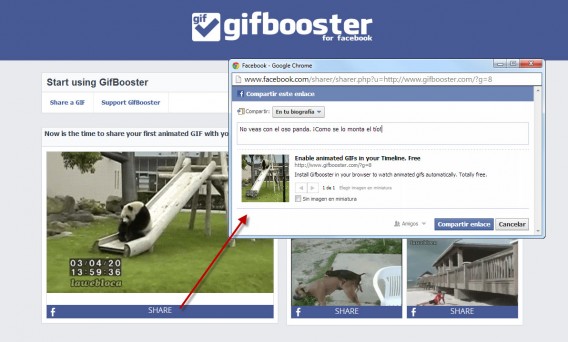
2. Share a test GIF

Once you’ve added GifBooster, the plugin will redirect you to the GifBooster page so you can test it. Select any of the sample GIFs (the panda bear, for example) and click Share.

This opens a new window, where you can choose which Facebook profile you want to share the GIF on, and if you want to add a message.

3. Share your own GIFs!

Once the test is successful, you’ll be ready to use GifBooster on Facebook. Try sharing a GIF on your wall to see how it looks. You’ll also be able to see which of your friends have GifBooster installed in their browser.

You can find GIFs using sources like Giphy (a must-visit site), or you can create your own.

Once you have the one you want, post it on Facebook as if it were a link.

Important note

When using GifBooster, you need to take two factors into account. The first is that for your friends to see your animated GIF, they must also have the plugin installed on their browsers. If they don’t, they’ll only see a link.

The other is the fact that Facebook is continually updating its code, meaning that GifBooster may not always work properly and might need occasional updates by its developers.

What do you think of GifBooster?

Original article by Alberto Cifuentes published on Softonic ES.

RELATED ARTICLES: