Skype 6.13 update available for Windows

Skype for Windows has been updated to version 6.13, and should bring relief to users who found the app was using lots of resources.

According to Microsoft, a problem was occurring when Skype was running on Windows PCs where Google Chrome was the default browser. It meant that Skype used a lot of resources, slowing PCs down. This problem has been fixed in version 6.13. The update also brings improved stability for group calls and High DPI mode.

Skype was bought by Microsoft in 2011, and went on to replace the corporation’s well known Windows Live Messenger apps. While a lot of user feedback asked for features such as email alerts and better emoticons to be brought to Skype, that hasn’t happened. Now available on all major platforms, Skype has lots of competition from apps like Viber and LINE.

RELATED STORIES

[Source: Skype]

Tomb Raider reboot released for Mac

The latest Tomb Raider comes to Mac today. The 2013 reboot of the series sees a younger, rawer Lara Croft thrown into a terrifying adventure on an island called Yamatai.

While the earlier Tomb Raider games were mainly about exploration, puzzles and the acrobatic Lara, this reboot is different. The traditional vaulting and climbing around ancient sites was largely sidetracked, to make way for more action, survival and characterization.

Default player


brightcove.createExperiences();

While it caused some controversy, and didn’t please all Tomb Raider fans with it’s grittier portrayal of Lara Croft, we thought it was still an excellent adventure game which gives the PlayStation exclusive adventure series Uncharted a run for its money.

Tomb Raider is available in the Mac App store. Here are the minimum Mac requirements:

  • OS X 10.9.1 or later
  • Processor: 2.0GHz, RAM: 4GB, Graphics: 512MB, Free Space: 12GB.
  • Intel HD4000 series cards require an Intel i7 CPU or better.
  • The following graphics cards are not supported: ATI X1xxx series, ATI HD2xxx series, Intel GMA series, Intel HD3000, NVIDIA 3xx series, NVIDIA 7xxx series, NVIDIA 8xxx series and NVIDIA 9xxx series.

If you’re a Mac gamer and you enjoy adventure games, Tomb Raider comes highly recommended.

RELATED STORIES

How to: back-up (and restore) Gmail and Calendar files

Security issues, space limitations, migration– there are plenty of reasons to back up your Gmail account and Calendar. Here, I’ll explain how to make backups and recover them when needed.

Google has improved Takeout, a tool which lets you download your data to a hard drive, finally including Gmail and Calendar in the tool. Until now, Google would let you download data using other services such as YouTube, Blogger, and Drive, but not of its flagship products, like Gmail and Calendar.
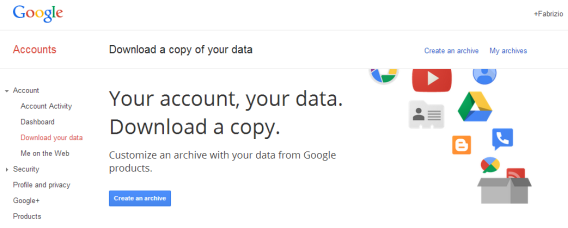
Gmail and Calendar backup

The Gmail inbox downloads in MBOX format, which is the standard universal mail format, while the calendar downloads in an iCalendar format. In both cases, the download is packaged in one or more compressed files in ZIP format (two gigabytes per file). So, how do you download these files?

1. Go into your Google profile

The Takeout feature can be found in Account > Download data. You can access it directly by clicking this link (or this one if you just want to download Gmail data). You will see a list of Google products with check boxes – select Gmail and Calendar.

Gmail and Calendar backup

2. Configure the download options

Click Edit to change the backup options. The backup of Google Calendar allows you to select which calendars to save, while Gmail lets you choose the tags that interest you.
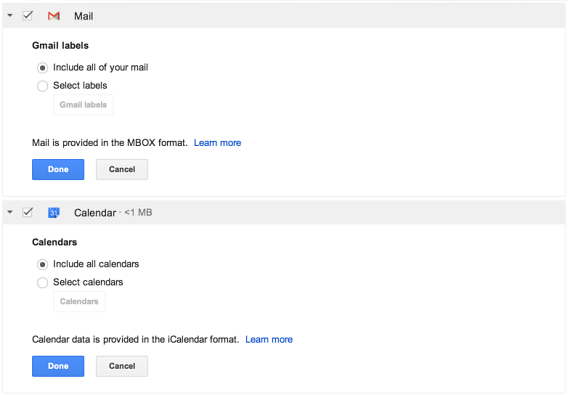
Configure download options

Both options will be of interest if you want to better organize your backups or partial backups, like if you only want to download “Important” emails. By default, Google Takeout downloads a complete backup.

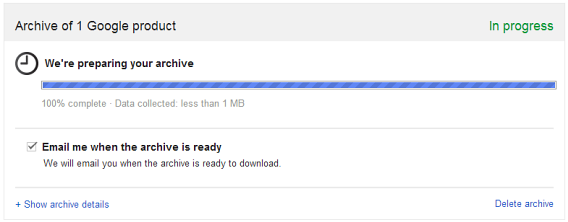
3. Wait for the files to be generated

The files containing the backups are not generated instantly: at any given time, there is a queue of users who have also requested their own download. Luckily, Google servers are fast, and in less than ten minutes, your files should be ready for download. You will be notified of this via email.
Wait for the files to be generated

4. Download the files in Google

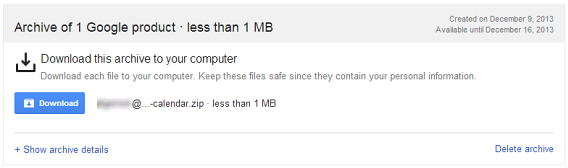
When they’re ready, you can download the files, located on the same page. If you accidentally closed it, use the link in the notification email, or go to settings/takeout/downloads. Then, you’ll see the files that have been generated for you and can chose to download or delete them.
Download the files from Google

In the ZIP file you will find MBOX files for Gmail and ICS files for Calendar.

How to import MBOX and ICS files to Gmail and Calendar

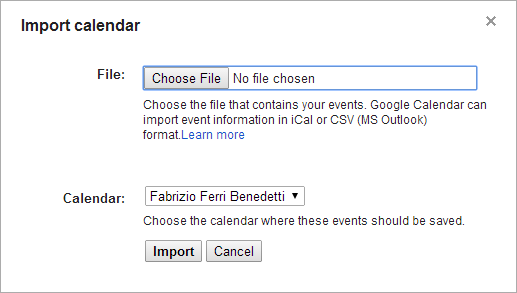
Once you have the files, you’ll probably be wondering what you can do with them. For Calendar, importing them back to Calendar is really easy. Go to options in the Calendar tab and click  ‘Import Calendar’, an option right next to the Create new calendar button. Then, you can upload the ICS (iCalendar) files.
Import Calendar

For the MBOX files for Gmail, you can re-upload them to a Gmail account using a simple method. One such method is to import them through a desktop mail client like Mozilla Thunderbird while also configuring the Gmail with an IMAP account.This ensures that the new mail synchs with the old mail.
Import files using Mozilla Thunderbird

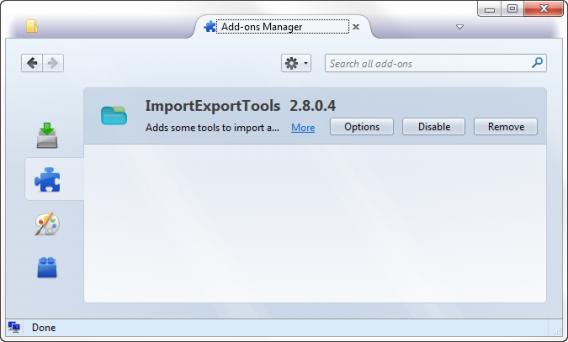
In Thunderbird, you can import MBOX  files by using the ImportExportTools extension. You can install it manually using the extensions tab: click the gear icon and choose ‘Install Add-on From File’. Select the XPI file in ImportExportTools and confirm the installation.
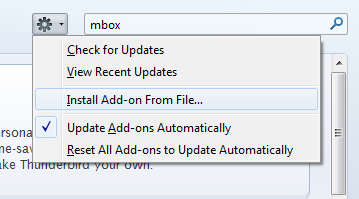
Import MBOX file

After restarting Thunderbird, you can import the emails directly in the Tools> ImportExportTools menu.
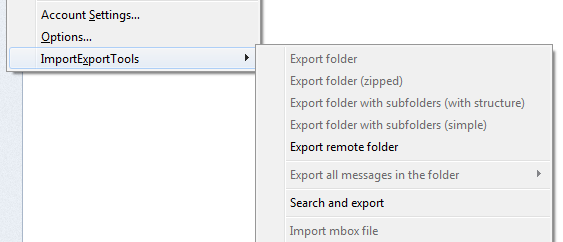
Import using ImportExportTools

Configuring Thunderbird with Gmail through IMAP means that imported emails will automatically synchronize with the Google account you are using, letting you transfer a large amount of mail between accounts.

Have you done a backup of your Gmail and Calendar?

Related articles:

Horizon app hopes to eliminate vertical video

Vertical video video will be a thing of the past if you use the new Horizon app for iOS. The app cleverly uses your device’s gyroscope and accelerometer to keep your video horizontal, no matter how you hold your phone.

Video sharing sites like YouTube do not support vertical resolutions so your vertically shot video will always show up with huge black bars on the left and right. Even playback on your tablet or computer will show the huge black bars with vertically shot video. Horizon fixes this by leveling your video, no matter how your phone is held. You can even rotate your device 360 degrees and it will still record leveled and horizontal video. The app also offers live video filters and support for multiple resolutions.

Default player


Still, it’s not perfect. By leveling your video in any orientation, video quality suffers in vertical mode, since it uses digital zoom to stretch and fill up the screen with video. There’s also the price of $0.99 ($1.99 when the promotional period ends) that users will have to swallow if they don’t want to deal with vertical video. Unfortunately, most users who shoot vertical video probably don’t realize they’re doing so until it’s too late or just don’t care.

Horizon offers a look at technology that could one day be implemented into phones to help videographers keep their footage leveled and stable. To try it out yourself, head over to the download link below.

Download Horizon for iOS

Source: Evil Window Dog

Via: Wired

RELATED STORIES

iTunes 11.1.4 for Mac brings Wish List view and more

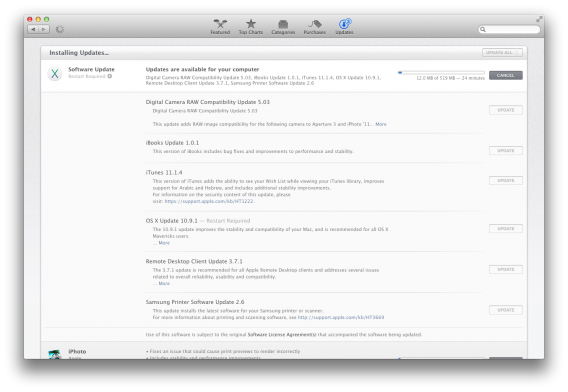
Mac users are getting a minor update to iTunes today, which brings a new Wish List view in the music library as well as improved Hebrew & Arabic support. Version 11.1.4 of iTunes is a very minor update but brings performance and stability improvements to the program.

iTunes 11.1.4 update

Here’s the full changelog:

“This version of iTunes adds the ability to see your Wish List while viewing your iTunes library, improves support for Arabic and Hebrew, and includes additional stability improvements.”

You can get the update on your Mac by visiting the App Store and ‘Updates’ section or you can find the direct download here.

Via: 9to5Mac

RELATED STORIES

Battle.net desktop app out now

Blizzard’s Battle.net desktop app is now available to download for Mac and PC. The app serves as a single place to launch all of your Blizzard titles like World of Warcraft, Diablo III, and StarCraft II. Those who currently have those games installed will be automatically updated to the new Battle.net desktop app “in the months ahead” if users don’t download the app before then.

The Battle.net app will feature single sign-on support, auto-updates, and a news feed for Blizzard game information. Single sign-on will allow users to log into all of Blizzard’s games at once for up to 30 days.

This release arrives just a day after the company’s digital trading card game, Hearthstone: Heroes of Warcraft, reached open beta.

Source: Battle.net

RELATED STORIES

Snapchat introduces “ghost” captcha to thwart hackers

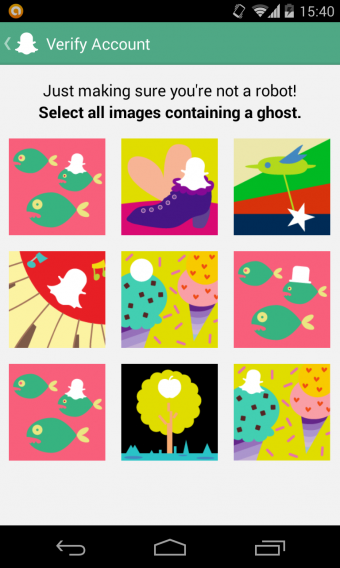
Snapchat is tightening security after 4.6 million usernames and passwords were exposed earlier this month. The photo and video sharing service introduced a new “ghost” captcha system where users will be presented with a grid of photos, some featuring the Snapchat ghost mascot which users will have to select.

Snapchat captcha

Snapchat has also patched the API security hole by rate limiting the number of requests from its “Find Friends” feature to once per hour. In addition to the new ghost captcha system, it will be extremely difficult for bots to quickly query Snapchat with a list of possible phone numbers to match with users. This will also make it difficult for spammers to annoy users with scams and spam.

It’ll be interesting to see what other security measures Snapchat will deploy to protect its users in the future. Since the Snapchat hack, I’ve noticed a ton of fake friend requests from users, which has definitely degraded the user experience.

Source: TechCrunch

RELATED STORIES

Avira Online Essentials manages Avira products across devices

Avira has unveiled its long rumored web dashboard service, Avira Online Essentials. Originally code named “MyAvira,” the service allows users to control all installations of Avira products across different devices. Since Avira products are available on computers, tablets, and phones, Avira Online Essentials will be able to manage Avira products across all of these devices.

“Every device and operating system requires a certain set of security applications in order for our users to be safe. Managing and ensuring their security is up to date is a challenge most users have,” says Travis Witteveen, CEO of Avira.

Avira Online Essentials will ship with every Avira product download and will treat security products as individual services that can be toggled on or off. Still, most users want to install an antivirus product and forget about it so it’ll be interesting to see if users will actually use Avira Online Essentials. System administrators and parents who want to make sure their family is adequately protected will find Avira Online Essentials useful.

Avira Online Essentials is available today in English and German with other languages rolling out “over the next few months.” You can try out Avira Online Essentials at the source link below.

Source: Avira Online Essentials

RELATED STORIES

Latest iOS 7 beta blocks evasi0n7 jailbreak

It shouldn’t come as a surprise to anyone, but Apple has blocked the exploit used by the evasi0n7 group to jailbreak iOS 7 with its latest beta. iOS 7.1b4 is only available to developers now, but assuming nothing changes before the public release, users who have jailbroken iOS 7 should avoid updating their device.

The news was broken by Twitter user and hacker iH8snow, and it means that there will be another wait while jailbreak teams look for another way to break iOS 7.

Jailbreaking is not illegal, but it voids your Apple warranty. Other disadvantages of jailbreaking are less reliability and being unable to get the very latest version of iOS when Apple releases it. However, many users like the freedom jailbreaking gives them – you can download apps from alternate stores and make changes to the operating sytem that Apple doesn’t allow. There’s a constant struggle between jailbreakers trying to open iOS, and Apple closing the exploits they find.

RELATED STORIES

Amazon Germany and France accepting pre-orders of GTA V on PC

To add to the GTA V for PC rumors, Amazon.fr and Amazon.de today started accepting pre-orders of the title on PC. Update: the French page has since been taken offline, while the German page remains at the moment.

This isn’t the first time this has happened, as we first saw GTA V on PC listed by Amazon.de back in September 2013. Being able to pre-order the game suggests the release may be closer, or it may just be more ‘errors’ by Amazon. We still expect Grand Theft Auto V for PC to arrive this spring, and most sources seem to unofficially confirm this. The only thing that’s left now is for Rockstar to confirm its existence and give it a release date.

Rockstar are still saying officially that their focus is on giving console player the best possible GTA V experience, and that has been a challenge. The launch of GTA Online was typically chaotic, and it continues to get lots of complaints about players cheating and ruining the game for others. Rockstar has also announced that DLC is forthcoming for GTA V. As they have said nothing officially about a PC release, it could be that we’ll have to wait at least until this first major DLC is released.

There’s certainly huge demand for GTA V on PC, as over 650,000 people have signed a change.org petition about it. The petition highlights how much fin the PC community will have modding the game, as it was a huge part of GTA IV on PC.

We’ll update as soon as we have a release date for GTA V on PC.

RELATED STORIES

[Source: Eurogamer]