Watch the first gameplay trailer for zombie game H1Z1

Sony Online Entertainment has released the first official trailer for H1Z1, its upcoming online massively multiplayer zombie survival game.

Scheduled for release in late 2014 on PC and PlayStation 4. It’s got some obvious similarities to the ARMA II spin-off DayZ and RUST. from the developer of Garry’s Mod. Sony’s advantage is its experience with MMOs – running big multiplayer games is a challenge, as we saw with Battlefield 4 and SimCity last year.

Whether it can beat the incredible atmosphere of DayZ is difficult to know. Watch the trailer below to get a taste of the game.

Default player


brightcove.createExperiences();

Like Planetside 2, H1Z1 will be free to play with micro-transactions. How this will be implemented has yet to be announced, and Sony has been discussing possibilities with the community on Reddit. President of SOE John Smedley said that whatever they decide, they don’t want the game to become ‘pay to win’, so you won’t be able to buy power or weapons. More likely is payment for cosmetic objects like clothes.

RELATED STORIES

Clear to-do app for iOS and Mac finally adds reminders

Popular to-do app Clear has been updated with reminders. It seems odd that a to-do app launched without reminders but today’s update finally brings the feature to iOS and Mac.

Users can add custom reminders to tasks as deadlines approach. Clear offers scrollable times for quickly setting reminders.

Clear for iOS reminders

Sound packs are also new to Clear. While sound packs cost $0.99 on iOS, the sounds are included for free on the Mac. Customers who purchased Clear+ are eligible for free sound packs. To claim the sounds, follow the guide here.

Download Clear for iOS

Download Clear for Mac

Source: Clear (iTunes)

Via: The Next Web

RELATED STORIES

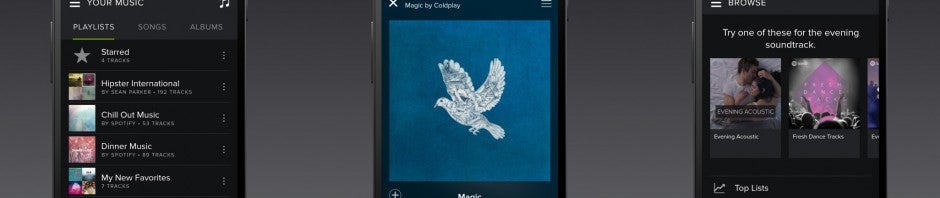
Spotify’s dark redesign now available on Android

Things are getting darker for Spotify for Android users today, but in a good way. The app has been updated with the cleaner, dark theme that debuted on iOS earlier this month.

The redesign focuses on creating a more unique look for the music service with rounded buttons and a dark theme throughout the app. Content is better highlighted in this update, making it easier to navigate.

The dark theme has already appeared on the web, desktop, and iOS Spotify apps. The company promises to redesign apps for other platforms like Windows Phone in the future.

The update to Spotify for Android is rolling out now so check Google Play for an update. If you don’t want to wait, you can download the latest version of Spotify for Android below.

Download Spotify for Android

Source: Spotify

Via: TechCrunch

RELATED STORIES

Yahoo! Mail for iOS adds news, weather, and more

A major update to Yahoo! Mail for iOS brings mail, news, and much more together in one app. The update includes new sections tabs called News and Today. Now you can catch up with the news without leaving the Yahoo! Mail app.

Default player


brightcove.createExperiences();

The Today tab is Yahoo!’s attempt at emulating features found in Google Now. Yahoo! says you’ll find “the information you care about most every day” for things like weather, sports scores, and stock prices.

It’s unclear whether Yahoo! is using the same email scanning technology that Google uses for Google Now. By scanning emails, Yahoo! Mail could offer up personalized information in the Today tab without users asking for it.

Yahoo! Mail offers relevant information in the Today tab by pulling information from other Yahoo! sites. For example, if you favorite a sports team on Yahoo! Sports, that team’s scores will show up. The same applies to stocks you favorite in Yahoo! Finance. The News section works similarly by offering stories based on your digest preferences.

Yahoo Mail Today tab

The updated Yahoo! Mail app will begin rolling out over the next couple of weeks to iPhone and iPod touch users.

Update: The story has been updated to reflect how Yahoo! Mail personalizes information in the News and Today sections.

Looking for Yahoo! Mail on other platforms?

RELATED STORIES

Combat Internet Explorer security vulnerability with EMET

There’s a free app from Microsoft that monitors programs so that no existing or future viruses is able to infect your PC.

Microsoft EMET (Enhanced Mitigation Experience Toolkit) is a service that prevents viruses from exploiting vulnerabilities which would enable them to take control of your computer. To be able to do this, EMET blocks or diverts the type of actions commonly used by malware in web browsers and other programs.

Installation of EMET is quick and immediately protects you from unknown vulnerabilities in Internet Explorer, Office, and other applications. Although it’s a powerful and highly technical tool, using it is simple.

In this article, I’ll take you through how to install and configure EMET on Windows.

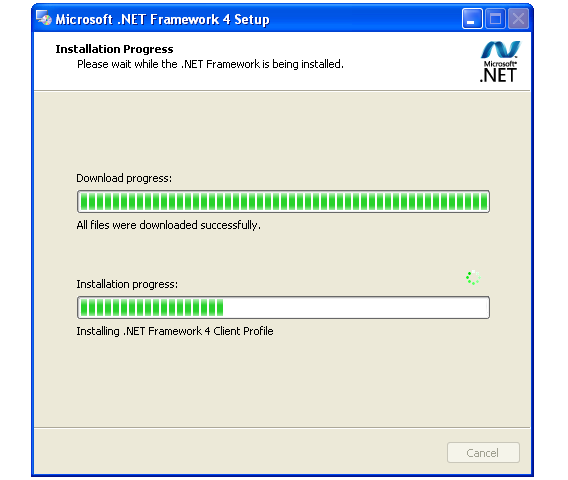
1. Install .NET Framework 4.0

To work properly, EMET requires .NET Framework 4.0 library. Install it before installing EMET by clicking here. The installation wizard makes it super easy.

Microsoft .NET Framework

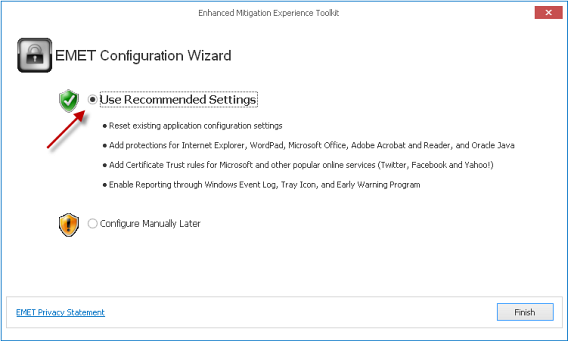
2. Install EMET 4.1 with the recommended configuration

Now that you’ve installed .NET Framework 4.0, you can download EMET and start the installation. The most important step is choosing the recommended settings.

Enhanced Mitigation Experience Toolkit (EMET)

This configuration is what allows EMET to protect the most vulnerable programs, like Internet Explorer, Office, Acrobat Reader, and Java, without messing around with the options.

3. Check that EMET is working

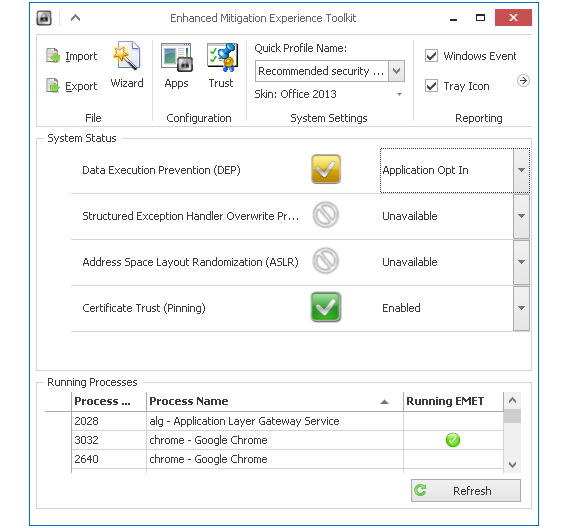
Once you’ve installed EMET, it opens in a new window. You’ll see a list of buttons and processes, as seen in the image below.

Enhanced Mitigation Experience Toolkit (EMET)

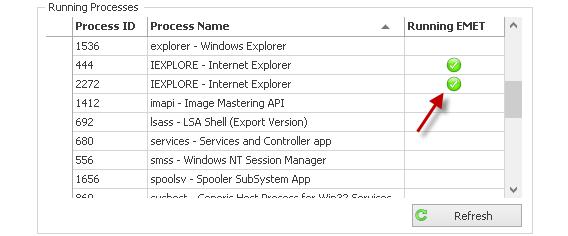
Open Internet Explorer and then return to the EMET window. Search for IEXPLORE in the list of running processes.

Search for IEXPLORE in EMET

The green icon indicates that the program is being protected by the EMET “cage.” As it’s a recognized and compatible application by default, you shouldn’t notice any difference in use.

4. Add other options to EMET [Optional]

If you want to protect other applications with EMET, you can add them easily through the application window.

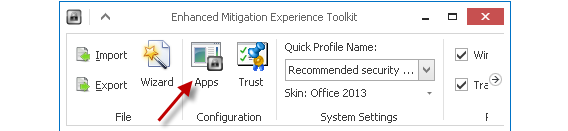
First, click the Apps button.

Protect other apps with EMET

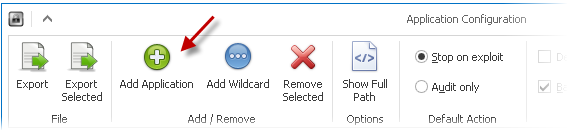
In the window that opens, click on the green button to add a new application.Protect other apps with EMET

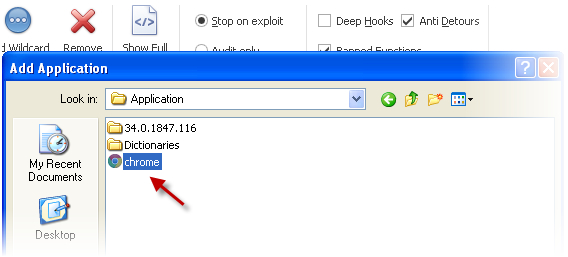
Browse your hard drive to find the executable file and accept. In this case, it’s Chrome.Protect other apps with EMET

By default, each new application is added with all possible protections.

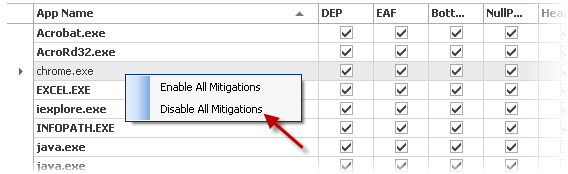
If you saw that the application had stopped running, uncheck the boxes one by one to test which one it is, or deactivate all protections at once by right clicking on the process.

Protect other apps with EMET

You can access EMET at any time from the system tray or the Start menu.

Access EMET from the system tray

EMET protects Windows better than an antivirus

When it’s correctly used and configured, EMET can protect Windows and above all, Windows XP – against malware that most antiviruses have traditionally been unable to handle, such as the police virus (REVETON) or the hijacker virus Cryptolocker. If you’re using XP, install it immediately.

Two interesting alternatives to EMET are Sandboxie, and the sandbox mode from avast!. In both cases, these are environments in which you can run suspicious or dangerous applications without anything happening that can affect your equipment. Having said all this, EMET still has the advantage of being fully integrated with Windows.

RELATED ARTICLES:

Office for iPad now supports printing

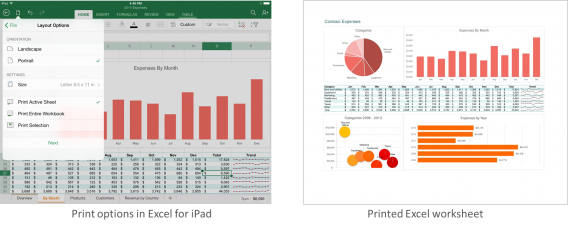
Office for iPad was released last month without printing support. Today, Microsoft announced in a blog post that printing has arrived in Office for iPad.

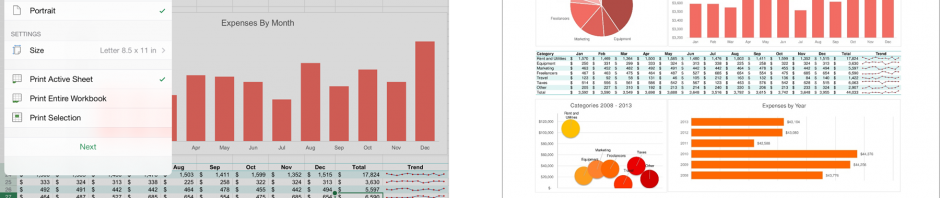
Printing inside Office for iPad uses Apple’s AirPrint technology. Users can wirelessly send documents, spreadsheets, and presentations to an AirPrint compatible printer. You can preview and choose which pages you want before sending your work to the printer.

Excel-print-blog_revised

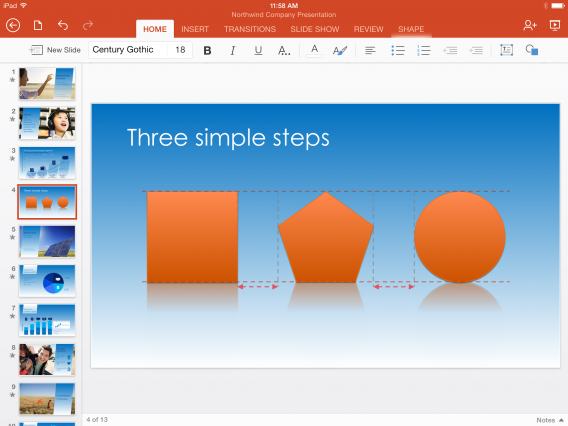
Microsoft also updated PowerPoint for iPad to support SmartGuides, which helps align images and text boxes in presentations.

PowerPoint-for-iPad-SmartGuides

Office for iPad doesn’t come as a suite so you’ll have to download Word, Excel, and PowerPoint separately. While the apps are free for viewing your work, you’ll need an Office 365 subscription for editing.

Download Word for iPad

Download Excel for iPad

Download PowerPoint for iPad

Source: Microsoft

RELATED STORIES

Plants Vs. Zombies Garden Warfare PC release date revealed

EA has announced that Plants Vs. Zombies Garden Warfare will be released on PC June 24th, via Origin. It’s a multiplayer third person shooter, and it’s pretty good.

Plants Vs. Zombies Garden Warfare came out earlier this year on Xbox 360 and Xbox One. It has matches of up to 24 players, fighting as Plants or Zombie characters from the original game, with crazy weapons. There are four game modes: two 12 versus 12 modes, Gardens & Graveyards and Team Vanquish, as well as the 8 versus 8 player Gnome Bomb and a cooperative co-op four-player mode called Garden Ops.

Default player

<!–
By use of this code snippet, I agree to the Brightcove Publisher T and C
found at https://accounts.brightcove.com/en/terms-and-conditions/.
–>

<!–
This script tag will cause the Brightcove Players defined above it to be created as soon
as the line is read by the browser. If you wish to have the player instantiated only after
the rest of the HTML is processed and the page load is complete, remove the line.
–>
brightcove.createExperiences();

EA also recently announced the introduction of in-game purchases to Plants Vs. Zombies Garden Warfare. You will be able to buy packs of coins, to spend on upgrades. This means, if you want, you can speed up your progress by paying for upgrades, instead of earning them in game.

RELATED STORIES

Play Team 17’s Flockers from May 6th in Steam

May 6th sees Team17‘s new game Flockers, its first new IP in over a decade, will be released on PC via Steam Early Access. Flockers is a macabre puzzle game featuring a flock of sheep you have to save, reminiscent of Lemmings. Team17 are most famous for creating the Worms series of games.

Flockers costs $13.99 for Steam Early Access, which gets you 25 levels to begin with, and a level editor. More levels will be added later, and Steam Workshop is supported, so you can share your level creations. If you buy Flockers in Steam Early Access, you also get a digital art book and the soundtrack.

Default player

<!–
By use of this code snippet, I agree to the Brightcove Publisher T and C
found at https://accounts.brightcove.com/en/terms-and-conditions/.
–>

<!–
This script tag will cause the Brightcove Players defined above it to be created as soon
as the line is read by the browser. If you wish to have the player instantiated only after
the rest of the HTML is processed and the page load is complete, remove the line.
–>
brightcove.createExperiences();

We played an early version of Flockers at EGX Rezzed in April, and it’s certainly lots of fun. The debt to Lemmings is obvious, but it’s got a character of its own, and is much more violent! The violence is cartoony and fun, though, and the sound effects are really funny and gory.

RELATED STORIES

3 tips for optimizing the new Twitter profile

The new Twitter profile doesn’t just change the aesthetics of the social network; it also brings new opportunities for users. Let’s see how you can make the most of it.

Already in the pipeline for a few months, Twitter has made the new profile available to all users, inviting them to switch to the new interface. As with any layout changes, it can take a while to find your bearings, not to mention getting a grip of the new features.

We’ll explain what the changes are, as well as how to adapt to make your Twitter profile even more appealing.

Activate the new Twitter profile

To switch to the new Twitter layout, just log into the social networking site and click on the link you see at the top. If you can’t find it, go to the new profiles section in the About page and click on Get it now. You’ll be redirected to the homepage of your account, where you can activate the new profile by clicking on Turn it on!
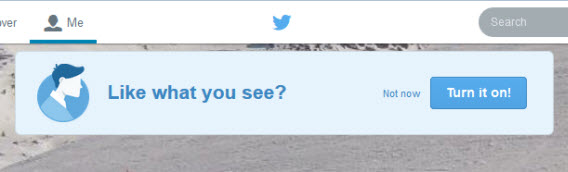
Twitter new profile

Choose your images carefully

The new Twitter is putting all its money on visual impact. Just like Facebook, the social network that’s all about tweets has decided to give priority to photos and videos. You’ll notice a much greater emphasis on images in your timeline, and now the same’s happening with profiles.

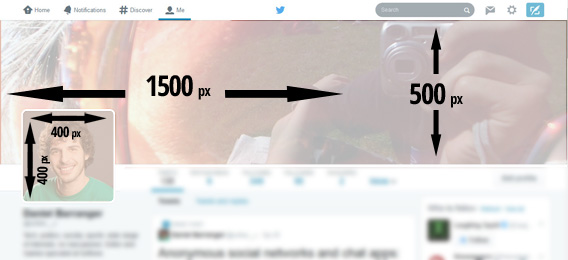
The first thing you should do is change your homepage images to make them fit better with the new design. The right dimensions are:

  • 400×400 px for profile photos
  • 1500×500 px for the header image

Twitter profile image sizes

The size of the Twitter profile images

Twitter is clearly pushing towards the personalization of your profile page, but it still provides you with a gallery of Flickr images to choose from for your header, if you prefer to use something a bit more generic.

flickr gallery for TwitterThere are endless way to combine a cover image and a picture, giving you the chance to have a creative and original profile that sets you apart from other users. The new design is not, however, fixed, and is adapted from time to time depending on the screen and the device of whoever’s viewing , making it impossible to have a predetermined composition for each monitor, as many have done on Facebook.

New Twitter profile image

An image taken with a fish eye lens can have great impact as a new header

My advice is to choose two images that go together regardless of their arrangement. In any case, the header will be displayed in full on all devices.

Set your main tweet and craft your biography

With the new Twitter profile, you can pin a tweet, or make it always appear at the top of your page. This is what other social network users will first see when they go to your profile, probably even before the biography, which is now relegated to the left of the screen.

Choose a tweet that represents you and that you want others to read first. Another option is to pin an image to give your profile even greater visual impact.
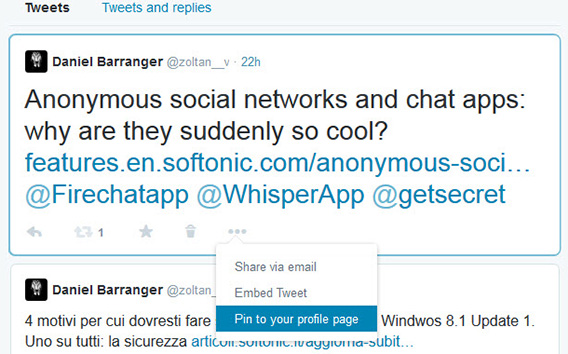
Twitter pinned tweet

Menu for pinning a tweet to your profile

Also, if you haven’t already done so, take this chance to write a biography, your sort of (mini) introduction on Twitter. Although it’s not on the new profile page, when a user clicks on your name on their timeline, the first thing they’ll see is a pop up with your biography above the header.

The other new feature is a timeline of tweets on your profile, which now shows your most successful activity (most retweeted or marked as favorites) as larger tweets.

Twitter tweet timeline

Retweeted or favorited tweets appear larger

With all these changes, Twitter hopes to encourage the 44% of accounts that have never tweeted anything to get out there and start tweeting. If you’ve only posted a few tweets, making your profile more appealing should encourage you to start posting more regularly.

Going down the list, you’ll also find profiles of the people you’ve recently followed. Hopefully, this means that whoever visits your profile will follow you immediately, and you can do the same by visiting the profiles of others.
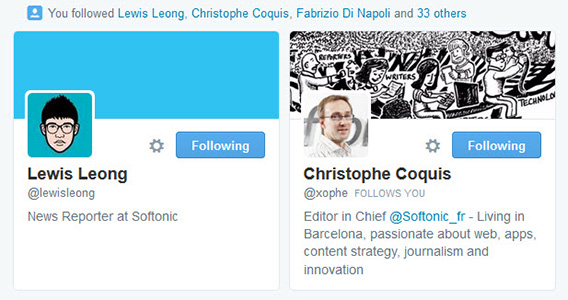
Twitter recently followed

Profiles of the last people you followed

Videos, photos, and favorite lists: your stories at your fingertips

As mentioned, Twitter’s finally realized that, in many cases, a picture is worth much more than 140 characters. Now, they’ve also added a tab on your profile where you can see all the media files you’ve uploaded on the social network.

In this respect, we’ve got two pieces of advice. First, clean out embarrassing images and videos that you don’t want to appear in your profile. You can also delete tweets by clicking on the trash can icon, as shown in the image.
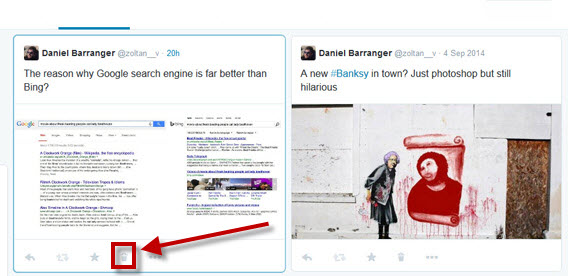
Twitter delete images

Clear images and tweets that you don’t want to appear

The other tip is to liven up the multimedia content of your account, because a profile with poor images and videos is unattractive, perhaps even more so than one without a description.

Along with fast access to photos and videos, you’ll also find buttons for viewing tweets that you’ve added to your favorites and lists. One annoying thing, however, is that the filter automatically removes the conversation from the main screen of your profile: whoever wants to see them will have to click on the appropriate tab. On the other hand, you don’t have to worry about removing conversations that you think are clogging your timeline!

Twitter tweets and replies

Less like Twitter, more like Facebook

As noted by many, the redesign of Twitter is very similar to that of Facebook, putting images front and center on your profile, rather than the more “volatile” tweet. The home page of your account is now much more personalized, hoping to provide even more information about you.

Whether you like the change or not, the new profile pages have much better visual impact, although they’re perhaps a bit light on the information side. In any case, any redesign brings with it new opportunities, which, more often that not, are worth taking advantage of!

Follow me on Twitter @zoltan__v

RELATED ARTICLES:

New ‘shake’ feature for Tango Text, Voice and Video

Tango Text, Voice & Video is a free messaging app. Like LINE, Tango also offers games and other services as well as simple messaging. The latest update for iOS adds new features like ‘Shake’ to find new friends.

Tango offers free texts and phone/video calls, via wifi or mobile networks. It also has games you can play with or against friends, music discovery powered by Spotify, and photo sharing is possible during calls. Version 3.8.6 allows you to post status updates, videos and songs to your News Feed, find friends by location on a map, and has the new ‘shake to meet friends’ feature.

Tango also has a ‘Premium Discovery’ account, which costs $9.99 per month. This allows you to ‘chat to the most popular people on Tango’, and there are lots more in-app purchases on offer.

Tango has 200 million registered users, although as we have written, the number of active users could be significantly lower.

Download Tango for iOS and Android.

RELATED STORIES