Zero Day security hole in Adobe’s Flash

Yesterday it was Internet Explorer, and now Adobe Flash has a ‘zero day’ security exploit. It was discovered by Kaspersky Labs, and confirmed by Adobe, which has issued a patch. The vulnerability is found in a Flash component called Pixel Bender, which handles video and image processing.

The attacks originated from a Syrian Ministry of Justice site, and are the latest examples of security vulnerabilities being exploited by governments. Stuxnet, Flame, and Red October were all state sponsored attacks, and the United States’ NSA was rumored to know about and be exploiting the Heartbleed bug before it was exposed.

While the exploit could affect all Flash users, Kaspersky said it is sure that the attacks from the Syrian Ministry of Justice were aimed at a ‘very specific group of users’. However, now the exploit has been exposed and Adobe has patched it, users are advised to update as soon as possible.

If you use IE 10 or 11 on Windows 8, the update will arrive automatically, but they sometimes take hours to be delivered. You can update Flash manually if you’re worried about the potential security risk. If you use Firefox on Windows, you have update Flash for Firefox and Internet Explorer separately.

Download or update Flash here.

Source: Arstechnica/Kaspersky

h4>RELATED STORIES

Bungie explains why there’s currently no Destiny for PC

Bungie, the studio famed for creating Halo, is releasing its next game Destiny in September. But it’s not coming out on PC, and the studio says that’s because working on four console versions is already enough. Bungie doesn’t rule out releasing a PC version later.

Destiny is a first person shooter, like Halo, but it’s online, multiplayer and has a lot of ideas taken from role playing games. So as well as action, there will be classes, lots of customization and leveling up as you would find in a game like World of Warcraft. It’s an ambitious game, although it does look very much like Halo. However, this is Bungie’s first game for Xbox and PlayStation, and they are releasing it on the old and current generation consoles. Bungie says it’s too much risk to develop for a fifth platform at the same time.

One of the complications for Bungie is that the game world is cross-platform: you will be playing in the same game world as players on other platforms. Managing this between Xbox and PlayStation is tough enough for now, says Bungie.

But it’s not all bad news, as the studio says it loves PC gaming, and hasn’t ruled out developing it for PC in the future. We won’t be holding our breath though, as Bungie in the past gave PC development to other studios, and only the first two Halo games got PC releases.

Destiny will be released on September 9th for PlayStation 3, PlayStation 4, Xbox 360 and Xbox One.

Source: Eurogamer

RELATED STORIES

Half million AOL Mail accounts compromised in attack

AOL announced today that half a million AOL Mail accounts have been compromised. The company first noticed the attack last week and have been working with federal law enforcement to investigate the attack.

AOL Mail users will have to change their passwords and security questions to keep their accounts secure. The attackers gained access to user names, passwords, and other personal information like addresses. AOL says user inboxes were not affected.

The attackers are using compromised AOL Mail accounts in a large-scale phishing attack. Phishing attacks involve masking malicious links in legitimate looking emails. Clicking on malicious links could install harmful software on your computer or will steal your user name and password by using a fake login page.

If you have an AOL Mail account, you should change your password immediately. Make sure the password is unique and not used on any other site. Use a password manager to create and manage unique passwords for all your accounts.

Source: Ars Technica

RELATED STORIES

How to upgrade to Mac OS X 10.9.3 beta

Beta versions of OS X are normally only available to developers. This time, however, Apple has decided that anyone who has Mavericks can try out OS X 10.9.3.

In this tutorial we’ll explain how to install it (as well as how to go back if you don’t like it).

Make a backup of your Mac

OS X 10.9.3 is a beta, so it’s not fully stable. With this in mind, it’s best to have the option to go back to version 10.9.2.

Since downgrading isn’t possible, you’ll have to make a backup copy of your pre-upgrade computer so that you can reinstall it, if necessary.

If you use Time Machine, your computer will make backup copies automatically. To revert to a backup copy, restart your Mac while holding down Command + R (which starts OS X Utilities), choose Restore from Time Machine Backup, and follow the wizard.

Another good option is to use Carbon Copy Cloner, which lets you create backups of and easily restore your Mac.

Once you’ve sure hat you can retrace your steps, you’re ready to install the OS X 10.9.3 beta.

Download and install the update

1. Register with the Beta Seed Program

To download Mavericks 10.9.3, you have to register with the program that lets you test Apple OS beta versions.

Go to OS X Beta Seed Program, click on Join Now, and then on Get Started on the following page.

OS X Beta Seed Program

2. Login

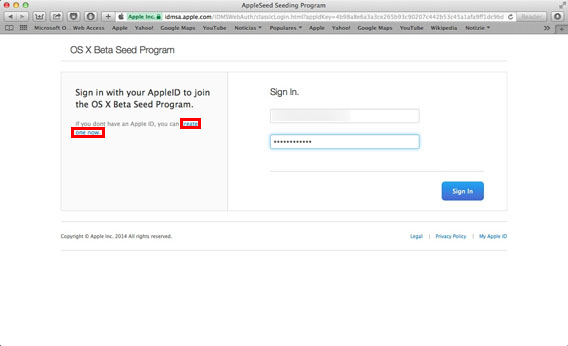
At this point, you need to enter your Apple ID and password. If you’ve got a Mac then you’ll almost definitely already have this account. Otherwise, click on create one now and follow the steps.

OS X Beta Seed Program login

You’ll need to register your Mac with the program by clicking on Enroll Your Mac.

3. Download the update package

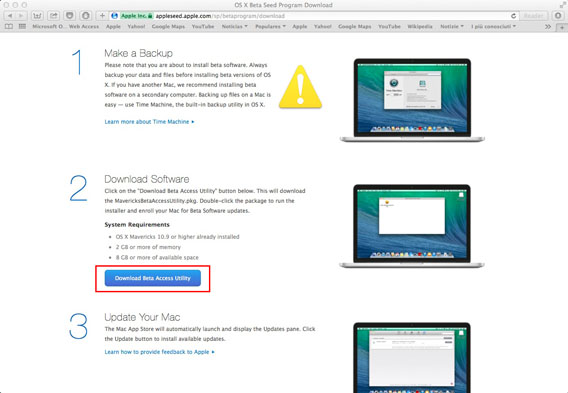
To download the Mavericks Beta Access Utility, which is necessary to update your Mac to version 10.9.3, click Download Beta Access Utility.

Download Beta Access Utility

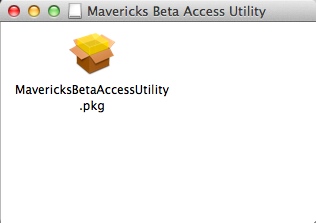
At this point, open the disk image you just downloaded and double-click on the PKG file, then follow the installation wizard.

Mavericks Beta Access Utility pkg

4. Update OS

The App Store will open automatically, and after checking for available updates, you’ll see under Software Update the update of the OS to version 10.9.3 beta (Pre-release version: OS X 10.9.3 Update Seed 13D45a) and iTunes (Pre-release: iTunes 11.1.6). Click on Update for both of them.

Mavericks Beta Access Utility update

You’ll also need to update iTunes because OS X 10.9.3 synchronizes contacts and calendars through iTunes.

5. Restart your computer

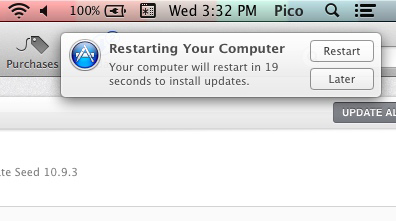
To complete the process, you’ll need to authorize the restart of your Mac.

Restart Mac

And after a few more minutes, voila! You’ve got Mavericks 10.9.3 installed on your Mac.

Your feedback is important

In the Dock, you’ll also find a new app called Feedback Assistant. Open it, log in with your Apple ID credentials, and you report any problems you encounter during the beta test directly to Apple.

You don’t have to give feedback, but if you do, you’ll help the developers fix bugs in the beta.

If you haven’t yet upgraded to Mavericks because you’re not sure whether it’s right for you, read our review and find out the advantages and new features it can offer.

Facebook Messenger update makes it easy to share photos and video

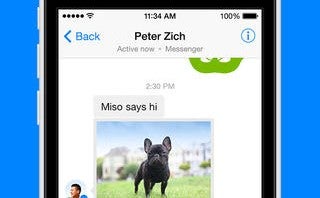
Your Facebook chats are about to get more visual thanks to the latest Facebook Messenger update. Users will be able to quickly share photos, video, stickers, and voice from the new compose screen. These features were hidden behind the paperclip button in previous versions.

Perhaps the most intriguing new feature is the ability to quickly take a selfie. Tapping on the camera button will turn half your screen into a camera viewfinder to quickly take a selfie. Of course you can switch to the rear camera with a tap of a button. This feature already exists in WhatsApp, which was purchased by Facebook in February.

FB Messenger selfie

Video attachments are new to Facebook Messenger. While the app won’t allow you to record video, you can attach previously recorded video to your chats.

iOS users will get the update starting today but Android users will have to wait a bit. Facebook says the update will roll out to Android some time this week.

Download Facebook Messenger for iOS

Source: Facebook Messenger (iTunes)

Via: TechCrunch

RELATED STORIES

Skype group video calls are finally free

In an attempt to keep up with Google Hangouts and ooVoo, Skype has made group video calling free. The feature previously cost $8.99 per month.

Starting today, group video calling will be free on Windows desktop, Mac, and the Xbox One. Skype promises to bring free video calling to more platforms in the future.

Skype group video calling supports up to 10 people at once, same as Google Hangouts. However, ooVoo supports up to 12 people at once.

Microsoft has built Skype support into Outlook.com making it easier for its users to use Skype for messaging. Like Google Hangouts, Skype requires a web plugin to work in a browser. Alternatively, users can download Skype for Windows or Mac to make and receive messages, calls, and video chats.

Source: Skype

RELATED STORIES

(Updated) Firefox 29 features redesign, simplified Firefox Sync

The latest version of the Firefox browser is available now. Mozilla has updated existing Firefox users to version 29, on Windows, Mac and Android. To check if you have the update, click on Firefox button at the top left and About under the Help menu.

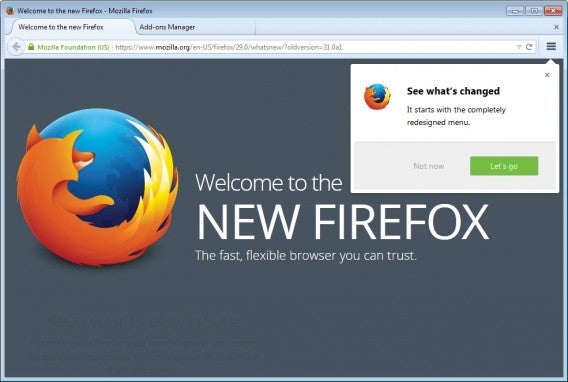
The most notable change in Firefox 29 is the new interface which borrows heavily from Chrome. Tabs are now rounded and most interface elements are hidden in the new menu button.

Firefox 29 redesign

The search and address bars have been combined like in Chrome as well. Type in an address or search into the bar and Firefox will recognize what you’re looking for.

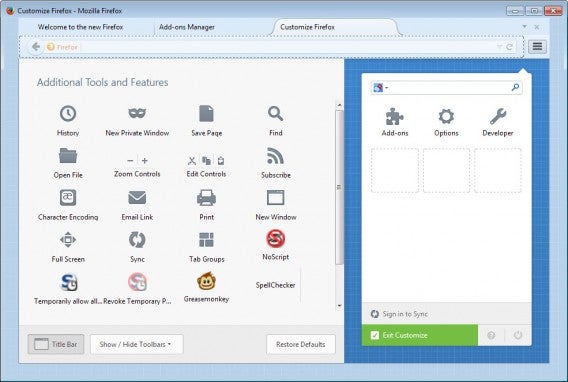
Add-ons are also hidden away in the new menu button. The menu is customizable, allowing users to drag and drop which interface elements they want.

Firefox 29 customize menu

If these changes seem dramatic, they are but Mozilla will include a tutorial about all the changes. When you update, you’ll be given a walkthrough about what’s moved around and how everything works.

Firefox Sync has also been simplified, requiring users to create a Firefox account. Firefox Sync keeps all your bookmarks, history, tabs, and other data synced across all your installations of Firefox. To get started, create a Firefox account by entering your email and password. Log into each installation of Firefox to sync your data.

Android users will also be getting Firefox 29, but the changes won’t be as dramatic. The Bing search engine now suggests results and support for Firefox Sync has been added.

Firefox 29 is available to download below.

Download Firefox for Mac

Download Firefox for Windows

Download Firefox for Android

Source: Ghacks

RELATED STORIES

Trailer for Sony’s H1Z1 revealed with Konami code

The first trailer for Sony’s upcoming zombie survival online game H1Z1 has been revealed on the game’s official website. Although it looked empty, fans discovered that by entering the famed ‘Konami code’ while on the site, the trailer was revealed along with a very strange image. See them below.

H1Z1 was announced early this month, and is a massively multiplayer online game. It bears an obvious similarity to DayZ and RUST, with the main difference seeming to be it comes from Sony Online Entertainment, who have a great history with creating online games like Planetside 2. H1Z1 will initially be released on PC and PlayStation 4.

Default player

<!–
By use of this code snippet, I agree to the Brightcove Publisher T and C
found at https://accounts.brightcove.com/en/terms-and-conditions/.
–>

<!–
This script tag will cause the Brightcove Players defined above it to be created as soon
as the line is read by the browser. If you wish to have the player instantiated only after
the rest of the HTML is processed and the page load is complete, remove the line.
–>
brightcove.createExperiences();

The ‘Konami code’ dates back to 1986, when it was included on the NES version of Graduis, as a way of getting the full set of power-ups. thus making the game much easier. It has since appeared in many games, and can be activated on a gampad like this: ↑↑↓↓←→←→BA.

RELATED STORIES

Snapchat: everything you ever wanted to know

In this FAQ we focus on Snapchat: with these 13 questions and answers you’ll learn everything you’ve ever wanted to know about the app and its use.

Snapchat has become an essential app for those who wish to send messages that self-destruct. However, there are many questions that need a answers.

Confidential information and user account

How do you open an account with Snapchat?

It’s free and simple. Remember that the official Snapchat app is only available for Android and iPhone, but 6snap, the unofficial app for Windows Phone works just the same.

Once you’ve downloaded the app, select Sign up and fill in the fields with your email address, password, and date of birth.
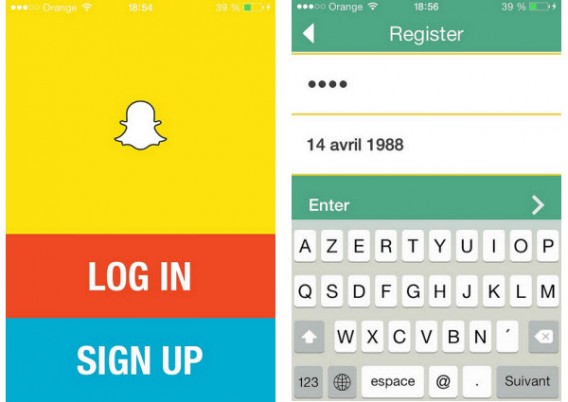
Snapchat sign up

Once you pass verification, you have to choose your username. You can link your phone number to the app to help you find your friends (although this is not a prerequisite).
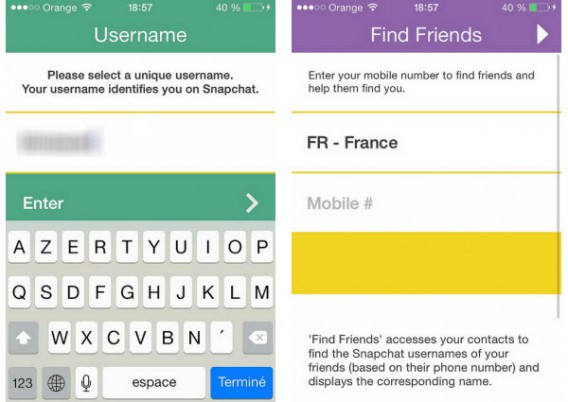
Snapchat username and friend search

Can I change my account and my personal information?

Once the account is created, you can modify certain personal information from settings.
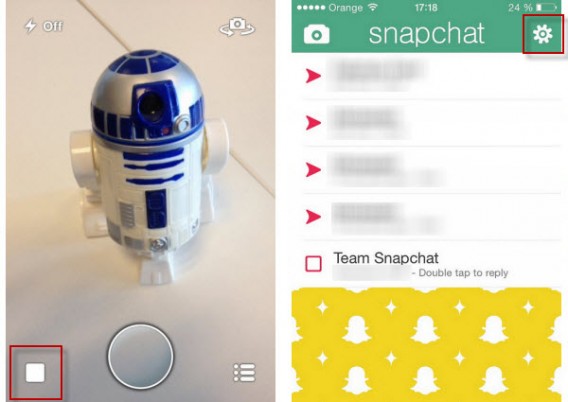
Snapchat settings

On this menu you’ll be able to change the phone number associated with your account (Snapchat will then send you a code via SMS for security reasons) and the email address where you receive all the important notifications from Snapchat.
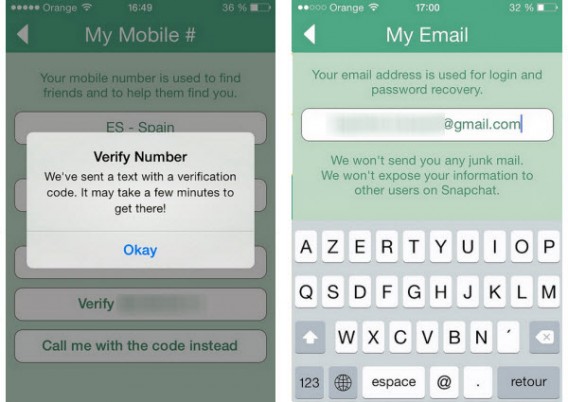
Snapchat verification

However, you won’t be able to change your username. If you want to use another nickname, we recommend you close the account and open a new one.

How do I add friends to my contact list?

The easiest way to add people to your contact list is to link your phone number to your account. Then simply go to the contacts menu in the Add Friends option.
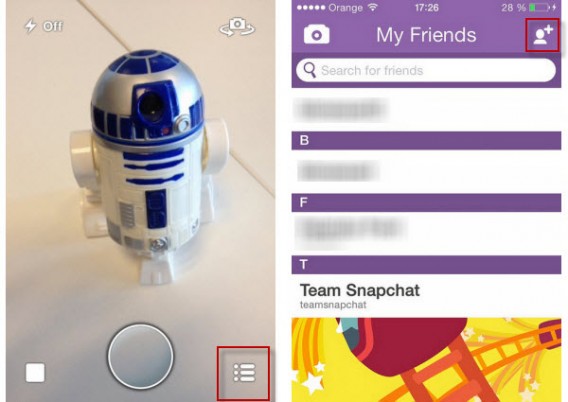
Snapchat add friends

The app gives you two options to add friends. On the first, it gives you a list of the people in your address book who are using Snapchat. The search tab, symbolized by the magnifying glass, lets you search by username.

Snapchat add friends

In summary, if you want to add someone on Snapchat, you must know either their phone number or exact username.

How do you know if someone has blocked you or deleted you?

Snapchat doesn’t send notifications when one of your friends blocks you or deletes you from their contacts.

When someone blocks you, they will disappear from your contacts list. You won’t even be able to find them through Snapchat’s search engine.

If, on the other hand, someone deletes you from their contact list, they will still appear on your list of friends, but if you send them a picture, they won’t receive it.

Getting started with the app

How do you access Snapchat’s menus?

Snapchat has three main screens. Every time you open the app you start at the camera. To access the main menu, you must select the square button on the bottom left or drag the screen from left to right. To see your friends, select the icon in the bottom right corner or drag the screen from right to left.

Snapchat main interface

Can you send videos via Snapchat? How do you go from Photo mode to Video mode?

To record a video for your contacts, you simply have to leave your finger on the trigger. The maximum length of a video is 10 seconds and the sharing process is the same.

How do I choose how long the picture will be seen?

To change the allotted time you must first take the photo or video you want to share, then click on the stopwatch icon. A drop-down menu will let you set the timer from 1 to 10 seconds.
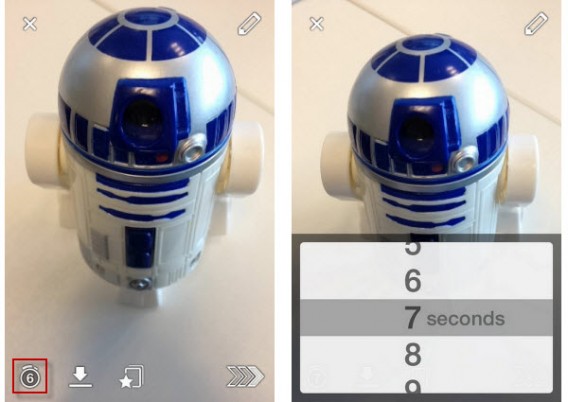
Snapchat change time limit

Can you import photos stored on your smartphone?

The answer is no. You can’t send any of the photos stored on your iPhone or Android. There are some applications like SnapRoll for iOS, but for security reasons we don’t recommend using them.

Can you comment on photos?

No, you can’t send comments on the photos or videos you receive. When taking your snaps, you can add text to the picture or video in two ways. With the pencil on the top right of the screen you can write or draw freehand. You can also add text by tapping on the screen.

If you want to comment on friends’ pictures, you can reply by sending them another photo or video. To make it easier, your friend’s username will already be selected when taking the picture. Don’t forget that Snapchat doesn’t have a standard chat system.

What is the 403 error message?

Many users complain about getting a 403 error message when sending a message to their friends. Don’t worry, it’s not your smartphone, it’s a technical problem with the app itself. You can try to uninstall and install the app again to get rid of this message. If this doesn’t work, wait until service is restored.

Advanced Features

Can you save any of the pictures, and what does the Screenshot message mean?

The answer is yes. Although Snapchat messages self-destruct, it’s possible to take a screenshot of the picture or video you were sent using the smartphone’s physical buttons. So, be careful with what you send and who you sent it to.

If your friend takes a screenshot of what you’ve sent, you’ll get a notification – sometimes. This depends on the smartphone you are using. Screenshots taken with an iPhone are systematically detected, while those made with a Google Nexus 5 weren’t detected during our tests.
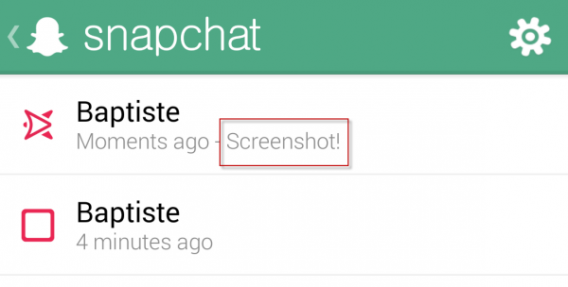
Snapchat screenshots

How do you add filters to photos?

To add filters to your photos like with Instagram, you must enable the corresponding feature in the Settings menu: just click Manage under Additional Services.
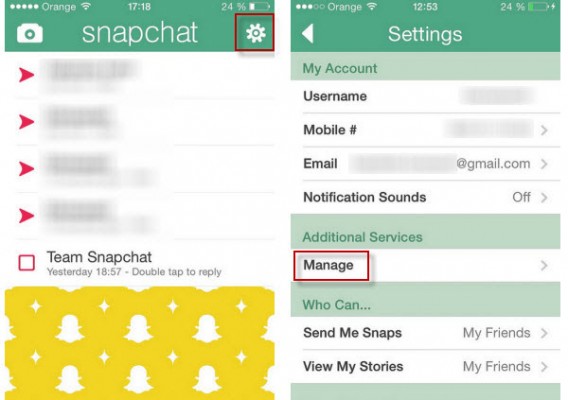
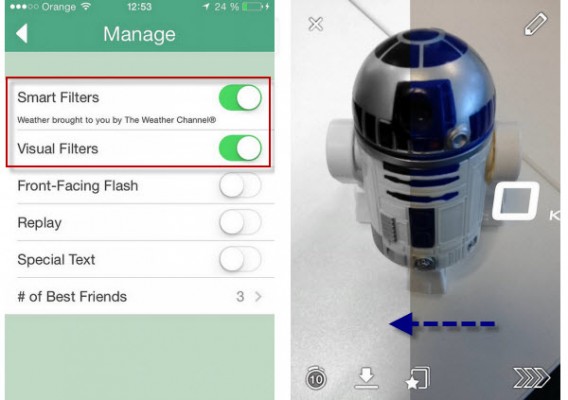
Snapchat additional features

Snapchat filters

You can then activate visual filters to add effects to the pictures. Smart filters, on the other hand, will let you add a watermark with additional information (phone speed at time of photo, time, weather, etc.).

What are Snapchat Stories and how do you make a photo public?

Snapchat launched Snapchat Stories with their October 2013 update. Snapchat Stories can be compared to the “walls” found on other social networks. The snaps and videos you add to your Story are not public; they are only visible to your friends for 24 hours.

If a friend shares a photo only on Stories, you’ll have to access their profile to see the picture.

Snapchat Stories

Wrapping up

When using Snapchat, more than with any other app, it’s very important to understand how it works, or you can end up sharing content with the wrong person. So be careful with the publications that appear in your Snapchat history, or you could find yourself in a very compromising situation!

Follow me on Twitter @bbrassart

RELATED ARTICLES

New ‘pull to refresh’ ads could be coming to your mobile devices

A French company, Appsfire, has launched a new kind of mobile ad which you could be seeing soon on your smartphone. It uses ‘pull to refresh’ in apps and pages, and sticks an ad in the space created when you pull down.

‘Pull to refresh’ is one of the most common gestures on smartphones and touchscreens, and it is surprising that no-one has thought of filling this short space and time with an advertisement before. You can see how intrusive, or not, these ads could be by installing Appsfire’s own Newsfire app. This is a news aggregator app, and features the first test of ‘pull to refresh ads’.

Appfire says these ads could be the end of banner-ads, which can be ugly and intrusive. But pull to refresh ads could mean more ads in apps, not less. Is this a better future for in-app ads? Watch the promotional video below to see how it will work.

Source: Adage

RELATED STORIES