Monument Valley puzzle game out now on Android

When I first saw Monument Valley at this year’s GDC, I was blown away by its beauty. Of course the game would be nothing without fun and challenging puzzles. Monument Valley succeeds on both ends and is now available on Android.

Monument Valley first debuted on iOS in April for $3.99. The price remains the same for Android players. The game can work on either a phone or tablet but you’ll want to play on a big screen to appreciate the level of detail in each level.

monument valley

“If [a level] couldn’t be hung on the wall as a piece of art, it wasn’t going in the game,” said executive producer Dan Gray. The game includes a photo mode where you can take and share pictures of your progress through a level.

Monument Valley is available to Android devices running version 2.3.3 or higher. The game is also available on the Kindle Fire.

Download Monument Valley: Android | Kindle Fire

Source: ustwogames (Twitter)

Follow Lewis on Twitter @lewisleong

RELATED STORIES

iMessage causes problems when moving from iOS to Android

Some users who switch from iOS to Android are facing problems with receiving SMS from other iPhones, according to a blog post by Adam Parsh.

The problem starts with iMessage, Apple’s messaging system that allows you to send SMS for free between iPhones. If you use an iPhone, your number is associated with the iMessage system, and it seems that if you then move your number to another system, you may not be able to receive messages from iPhones.The sender will get a ‘delivered’ notification, but it won’t appear on the target device.

Parsh chronicled his difficulties talking to Apple customer support about the problem, and discovered that there is currently no solution. Here are his conclusions:

1: This is a problem a lot of people are facing.
2: The engineering team is working on it but is apparently clueless as to how to fix it.
3: There are no reliable solutions right now — for some people the standard fixes work immediately; many others are in my boat.

While iMessage is really easy to start using, it seems there are bugs when you migrate your number. I have found that iMessage stops working when a friend migrates from one mobile provider to another, even if they still use iOS. iMessage is clearly not as perfect as it could be.

Apple has not yet commented on how many people are affected by this problem, and we don’t know whether it is working to fix it yet. Watch this space, and if you do have this problem, there are plenty of other multi-platform messaging solutions to hold you over, like WhatsApp, Viber and LINE.

Source: Adam Parsh

Follow Jonathan on Twitter @jonathanriggall

RELATED STORIES

New security fixes released for Adobe Flash, Reader and Acrobat

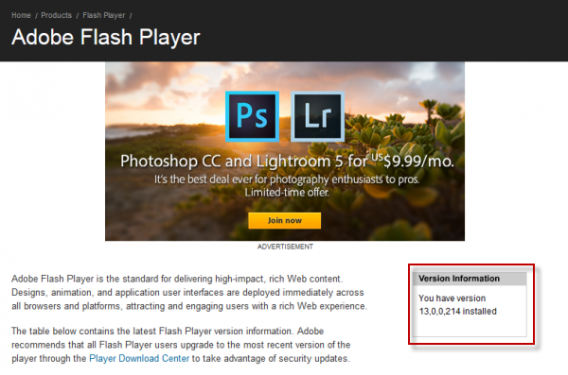
Adobe has released a series of top priority security updates for Flash Player, Reader and Acrobat on Windows and Mac . They fix a serious security flaw that could allow a malicious attacker to take control of your operating system.

The security update is for Adobe Flash Player 13.0.0.206 and earlier versions for Windows and Mac, and the cross platform Adobe AIR 13.0.0.83 and earlier. You can easily check your Flash version by visiting the Adobe Flash About page. Reader and Acrobat X and XI users also need to apply the latest updates. Adobe has also issued minor security fixes to Illustrator CS6.

You can download the most recent versions of Flash Player and others from Adobe’s Download Center, or when prompted by Adobe update on your computer. Updates to Flash in Google Chrome and Internet Explorer are automatic.

Flash Player is an almost constant source of security issues, but Adobe’s been quick to fix them when as soon as they’re discovered. It’s always advisable to keep your Flash versions as up-to-date as possible.

Follow Jonathan on Twitter @jonathanriggall

RELATED STORIES

3 alternatives to Time Machine for backing up your Mac

Time Machine is an awesome tool for backing up Mac. Even so, here are 3 other options to have in mind, depending on your needs.

Periodically backing up your hard drive is something everyone should do. These days, there are so many tools that make the job easy, you’ve really got no excuse.

By default, OS X offers Time Machine, which creates incremental backups on a periodic basis, and if you ever need to use it (HD failure, kernel panic), it lets you to back up your Mac.

But Time Machine, by its nature, has very few personalization options. Often times, that’s not a problem, but there are times when you’re going to want more control.

Bearing that in mind, here are 3 great alternatives to Time Machine that will let you clone and restore your Mac’s HD: SuperDuper!, Carbon Copy Cloner and Paragon Drive Copy.

SuperDuper!: make your life easier

I remember using SuperDuper! for the first time about 7 or 8 years ago. At the time, Time Machine wasn’t around, and I was looking for a good backup program. I read about SuperDuper. It was billed as “idiot-proof”, in the sense that anyone could use it, and it was easy to see what you were doing before you started, thus avoiding potential disasters.

After I tried the demo, I immediately whipped out my credit card and bought the full version. I also sent an enthusiastic email to the developer, complementing him on a great program. And I still use Super Duper! today.

SuperDuper!’s beauty lies in its transparency. Everything is based on three simple drop-down menus. In the first one, you pick which disc you want to copy; in the second, you choose where you want to copy to; in the last, you choose what parts to copy (or restore).

Depending on what you’ve picked, you’ll see a simple explanation of your particular combination in the middle of the interface.
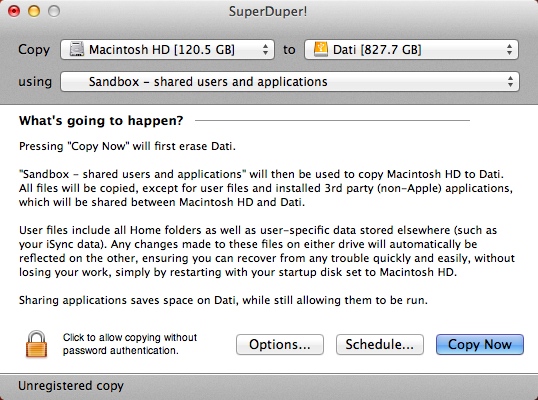
SuperDuper!

From Preferences, you can refine the operation by enabling some important options. The most interesting is probably Smart Update. If you’ve already done a full copy of a disc on another disc, this tool allows you to integrate it– basically, it’ll copy the files that weren’t there in previous backups, and will replace the ones that have changed without touching the ones that have stayed the same.

This means that you’ll always have a backup, and save a lot of time, because after the first backup, subsequent ones are much faster. The system, known as incremental backup, is similar to that used by Time Machine. You can also schedule automatic backups periodically.

In Settings, you can choose what your Mac should do once the backup has been made. Among your options, you can reboot using the newly made backup as a bootable disc, turn the computer off, or put the computer to sleep and eject the disk where you made the backup.
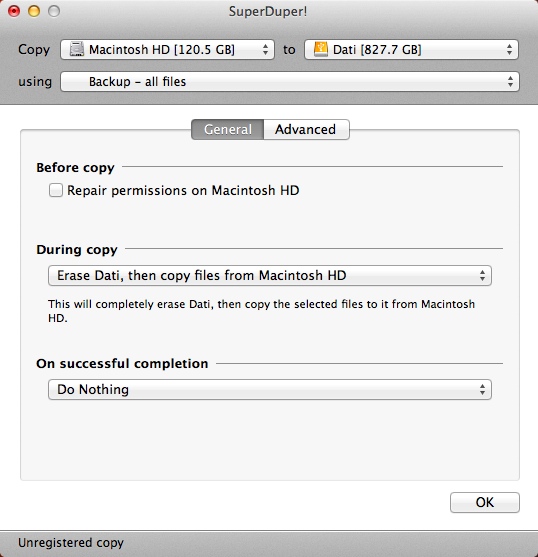
SuperDuper! - Options

As if all this wasn’t enough, SuperDuper! offers a full trial version with no time limits. Even better, it has very few restrictions compared to the full version. Incremental backup, unfortunately, is among these limitations: you’ll only get it with the full version. Fortunately, the full version is priced very reasonably. It’s a great backup program, and has years of conscientious development behind it.

The latest version is compatible with OS X 10.6, but you’ll find versions for operating systems as old as Mac OS X 10.2 Jaguar on the developer’s website.

CarbonCopyCloner: the all-powerful

Also known as CCC, this is the old-school backup program for Mac. CCC has always staked everything on the strength of its bootable backup. The scenario that was (and still is) painted by developers is this: you’re working on an important project, you’re about ready to finish, and suddenly, your Mac stops working. The HD pings worryingly, and everything disappears.

CCC

With a classic backup, you’ll spend an entire day buying and installing a new disk, reinstalling the OS and programs, and finally, restoring the data. With CCC though, just boot the Mac from the backup and you’re immediately operational. When you want, you can restore the backup to your new hard drive and magically, everything will be as it was before the disaster. This apocalyptic picture is no longer as effective as it once was, because bootable backups are no longer the exclusive domain of CarbonCopyCloner, but the program still does a great job.

Compared to SuperDuper! and Paragon Drive Copy (which we’ll talk about later), it’s slightly more complicated to use. On the other hand, you’ve got almost total control over customization, including what to include in the backup, what to exclude, and how to process the data.
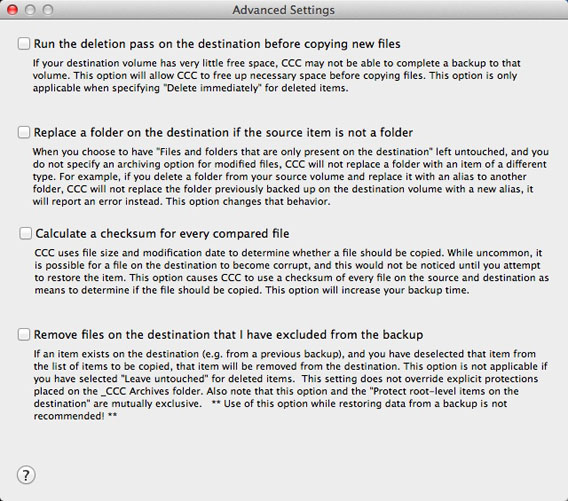
CCC - Advanced settings

Some of CCC’s many settings

An experienced user with non-standard requirements will probably need to make several tweaks to the process, but that doesn’t mean that it’s insufficient for the average user. By choosing the source drive and the destination– and leaving the parameters to their default values– you’ll get a complete and bootable backup of your Mac’s HD.

If you want to venture into custom and advanced parameters, you’ll find a mine of options that give you total control over every operation.
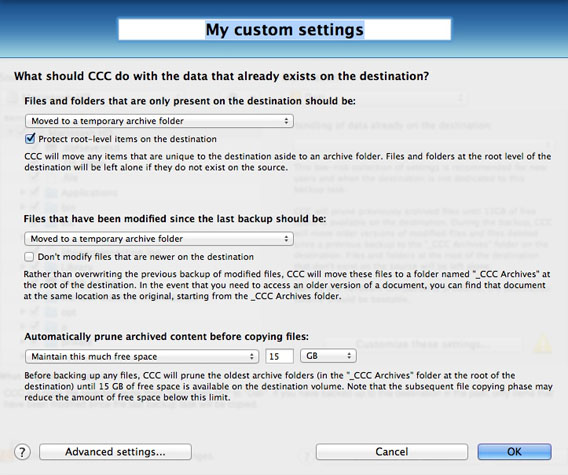
CCC - Custom settings

Many of CCC’s parameters are customizable

CarbonCopyCloner also offers incremental backups, plus the ability to save the backup to a disk image. You’ll be notified by email whenever a new backup copy is made, which you can save to another Mac on the same local network, or a remote network using an internet connection.

Another very useful function: you can keep your Mac awake and set CCC to perform a backup at a specific time (say, at night), and then put the computer to sleep.

CarbonCopyCloner is an excellent alternative to Time Machine, especially for those who are more familiar with the technology and have specific needs, but also for those who want one of the most comprehensive tool in the product category.

The latest release (3.5.4 at the time of writing) is compatible with OS X from 10.6 to 10.9, but on the author’s website, you ‘ll also find the 3.4.7 version, compatible with Mac OS X 10.4 and 10.5.

Paragon Drive Copy: the future belongs to the young

This product is new and, at the time of writing, is in open beta, meaning anyone can test it for free. The interface of Paragon Drive Copy for Mac OS X Beta, at least in this beta, is pure OS X style, simple and familiar to any Mac user, and using the app will come easily to pretty much anyone.
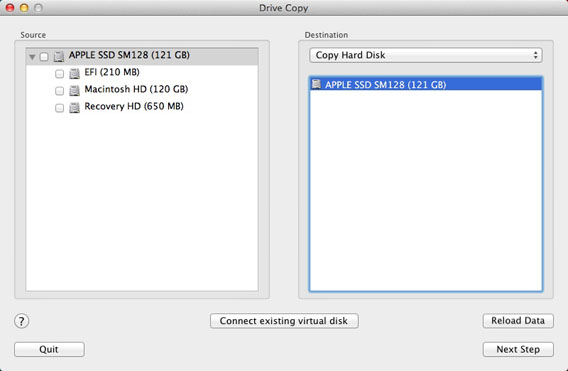
Paragon - Interface

This tool differs from competitors because, in addition to the traditional method of copying a disc to another HD, it allows you to clone the hard disc of your Mac into virtual containers, more specifically, in the pVHD format: VMDK, VHD and VDI.

What are these containers? Basically, they are files that contain the virtual hard drive (disc image), used by programs like VMware or VirtualBox. In practice, Paragon Drive Copy is able to copy your hard disc in formats that can be read from virtual machines.

You can use these containers as simple backup and restore them to a HD, or you can start them as virtual machines and use them as if they were physical computers.

Another feature of Paragon Drive Copy that we like: use simple drag and drop to establish the size of the disc you’re copying to a hard drive another location. This lets you create a backup of the exact dimensions of the copied disc, without wasting extra space on the destination disc.
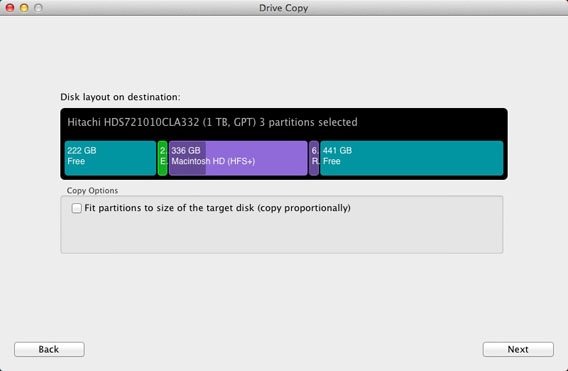
Paragon - Drive size

Paragon Drive Copy supports OS X 10.7 Lion, Mountain Lion and 10.9 10.8 Mavericks.

No more excuses

Summing up, you have lots of good options for backing up your Mac. The three lsited above are all of great quality and reliable.

Want clarity and transparency? There’s SuperDuper! Would you like completeness and speed? Then choose CarbonCopyCloner. Would you like simplicity and innovation? Paragon Drive Copy is the one for you.

The main point is, make regular backups of your HD. Even if you decide to stick with Time Machine, make sure to set it properly the first time, and you’ll be able to sleep soundly.


RELATED ARTICLES

Cider – a system that allows iOS apps to run on Android

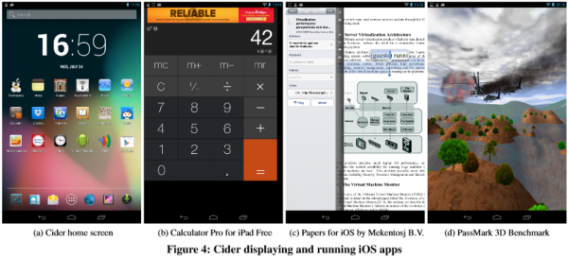
A research group at Columbia University is developing a system that can run iOS and Android apps together on an Android device. The prototype runs on a Nexus tablet with the latest version of Android, and according to the team, only adds ‘modest performance overheads’ to the system.

The system is called Cider, and is designed to run Android and iOS apps on the same device. It’s an ‘enhancement’ of Android that mimics aspects of other operating systems, in this case iOS, to allow it to run unmodified ‘foreign’ apps. The report says Cider is the first system to be able to run unmodified iOS apps on non-Apple devices.

As a research project, Cider is a cool proof of concept, although we’d really like to see it in action. You can see some screenshots of iOS apps running in Android below, and read the full academic paper by clicking on the source link at the end of this article.

The authors say the idea was to solve a problem that users face today. You can use iOS, which limits your screen size and customization, or Android, which means you can’t use many of the high quality apps available on iOS. However, it’s unlikely that a system like this would ever receive support from Apple (or Google). It might have a future in the same grey area where iOS Jailbreaks exists, but probably not as a commercial product.

Source: Columbia University

Follow Jonathan on Twitter @jonathanriggall

RELATED STORIES

3 reasons we can’t wait for Civilization: Beyond Earth

Four years after the release of Civilization V, the strategy game saga is back with Civilization: Beyond Earth. This new installment abandons the historical simulations of the past and propels us straight into the world of science fiction. The action in Beyond Earth unfolds about 200 years in the future. After events of unprecedented gravity (The Great Mistake), mankind is forced to abandon Earth to seek salvation on a new, more welcoming planet.

Default player


brightcove.createExperiences();

Civilization is one of the most prolific franchises in video game history: the series has sold over 21 million copies with barely a change in its 23 years of existence. This makes Beyond Earth a real gamble for the creators of the game.

Did the game trailer leave you wanting more? Me too! With that in mind, I’m going to explain why I’m excited about the release of Civilization: Beyond Earth… and why you should be too!

The spiritual son of Alpha Centauri

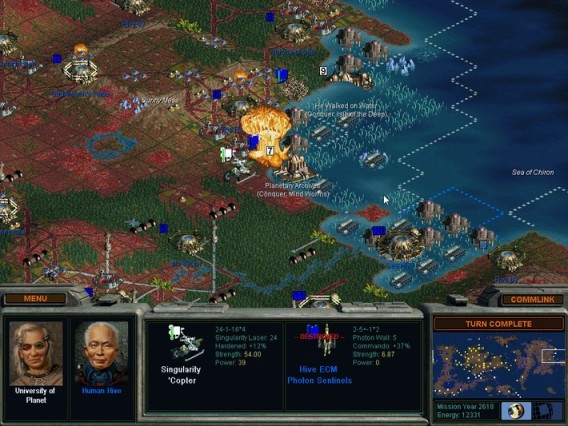
Alpha Centauri - Civilization Beyond Earth

Alpha Centauri, the first Civilization to take place on another planet …

If you like strategy games, science fiction and you had a computer in the late 90s, chances are you’ve played Sid Meier’s Alpha Centauri. Since its release in 1999, this strategy game has given players the ability to extend humanity’s adventure into the stars.

Critically acclaimed at the time, Alpha Centauri hasn’t had a true rival…until Beyond Earth, a worthy successor in terms of both story and gameplay. And when everybody already knows how good the original was, this new project leaves us very hopeful.

New kid on the block

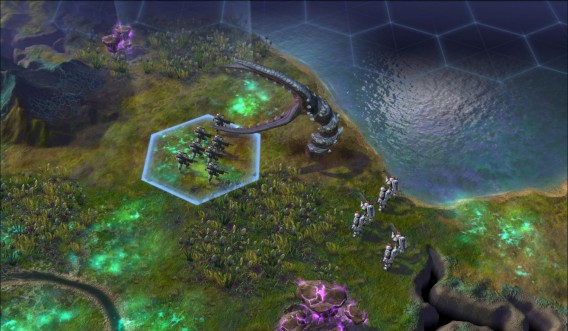
civilization beyond earth

Sid Meier revives the saga with new game mechanics…

Sid Meier and his team intend to revive the Civilization saga by providing new evidence that could change gameplay in a sustainable manner. That’s what Dennis Shirk, senior producer of the Civilization, series told Time magazine:

You’re not going to see an abundance of similarities between Beyond Earth and Civilization V. I mean, obviously you’re in space and colonizing a planet, but the gameplay systems we’ve introduced are all new, from the tech web to affinities to the way that the upgrade system works. We’ve diverged significantly from the original title.

Among the innovations in question, a system of semi-random quests should give rhythm to games, introducing scriptwriting elements which may change from one game to another.

Civilization: Beyond Earth also introduces a new search system replacing the traditional tech tree. In the new chapter, it will have Tech Web, a network of technologies allowing more organic and unpredictable development for searching.

But the most innovative aspect of Civilization: Beyond Earth will surely be its completely new game environment, an unknown planet inhabited by alien fauna. As in Alpha Centauri, players have the choice to live with indigenous forms of life or fight a merciless war against them.

Civilization first and foremost

Civilization: Beyond Earth

Can you make the right choices and nurture your civilization?

Let’s get right to the point: Civilization V, the predecessor to Beyond Earth in the series, is quite simply one of the best turn-based strategy games in history. And I’m not the only one who thinks it. The 2010 title impressed everyone with the depth of the game, its graphics engine and historical accuracy.

Nearly 10 years after the release of the first episode, Civilization V has built on the mastery of Sid Meier and his team in a genre they helped to craft. With such a rich heritage and Firaxis at the helm, we can’t see how Civilization: Beyond Earth could fail.

If all goes as planned, Civilization: Beyond Earth will land on shelves in late 2014. To give you an idea of ​​what Civilization in the stars is like, why don’t you play (or should that be that replay?) Alpha Centauri! The game has aged pretty well and is available on Windows XP, 7, 8 and Mac for a small fee from GOG.com (Good Old Games). Don’t deny yourself this pleasure!

Download Alpha Centauri from GOG.com

Sources: Civilization.com, Time.com

Follow me on Twitter @SamSoftonic

RELATED ARTICLES

KMPlayer introduces Connect media streaming

Popular music and video app KMPlayer has been updated with a new feature called Connect, turning your PC into a media server so that you can access your files remotely from Android and iOS apps.

KMPlayer connect is not a cloud service – instead, it streams over the web from your PC to your device. The developer claims that this is faster than most cloud services, although it only works when your PC is turned on. When you activate Connect, you get an automated PIN number and assign a password. With these two codes, you can access files from any other device that has KMPlayer installed. This also means that you can share your files with anyone you give the pin and password to.

KMPlayer is a free app for Windows, Android and iOS. Like BS. Player and VLC media player, it supports tons of file types and codecs, so you can watch and listen to almost any music or video without worrying about conversion. KMPlayer Connect means that you don’t need to store big movie files on your mobile device, although streaming could be costly unless you’re using Wi-Fi.

Download KMPlayer for Windows, Android and iOS.

Follow Jonathan on Twitter @jonathanriggall

RELATED STORIES

Watching Netflix on the Xbox will finally be free

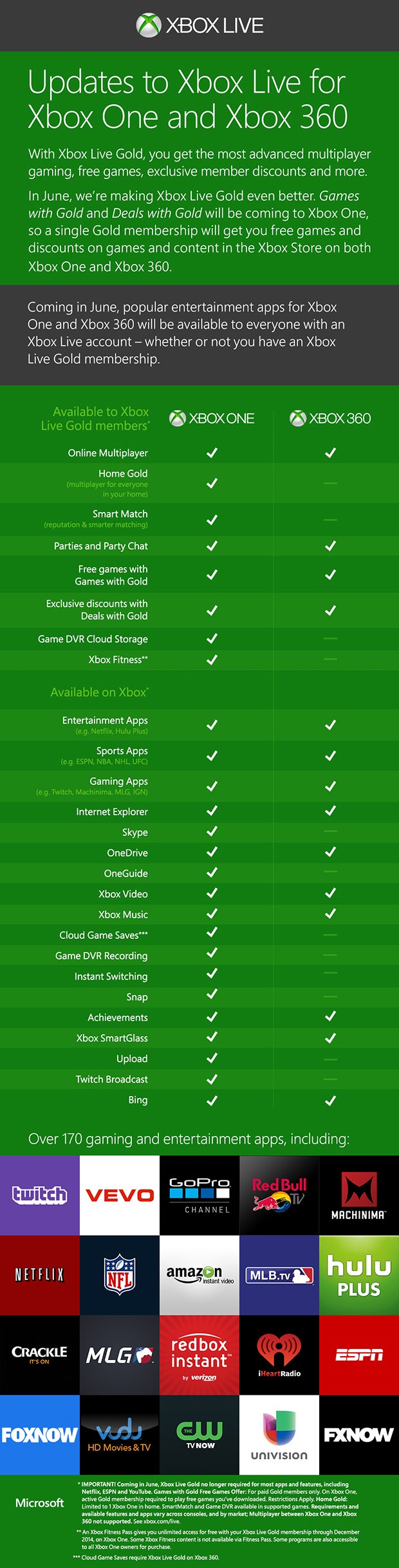
Come June, Microsoft will make Netflix, Hulu, YouTube, and other entertainment apps free to use on the Xbox. These apps previously required a Xbox Live Gold subscription for $60 per year.

Microsoft will also debut Games with Gold on the Xbox One in June, giving players free games and discounts. One Xbox Live Gold subscription will get you free games on both the Xbox One and Xbox 360. Here’s what you get with a Gold subscription for each console:

Xbox Live Gold infographic (click for full size)

This decision was no doubt in reaction to Sony’s pricing model for PlayStation Plus. Netflix and other media apps were free to use without a PlayStation Plus subscription. Sony also offers free games and discounts for subscribers. The price for PlayStation Plus is $50 per year (which covers the PS4, PS3, and Vita), $10 cheaper than Xbox Live Gold.

Source: Xbox Wire

Follow Lewis on Twitter @lewisleong

RELATED STORIES

Spotify for Windows Phone gets massive update

Microsoft promised a huge Spotify update for Windows Phone users in the spring and they delivered today. Version 3.0 of Spotify for Windows Phone features the dark redesign we saw in the Android and iOS versions.

The app also makes music discovery easier with curated content from “music experts.” You can see personalized recommendations in the Discover section or browse for music.

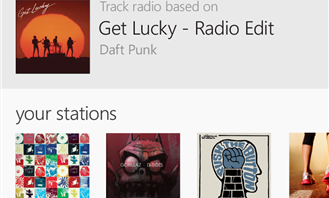
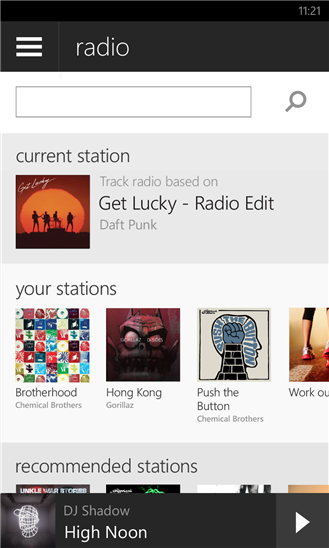
Spotify Radio Windows Phone

Spotify radio is finally included with this update, letting users create radio stations based on an artist, album, or track. If you’ve used Pandora before, it works the same way.

The app requires a Facebook account to use. Those with two-factor authentication on their accounts will run into issues with this release. Spotify promises to fix two-factor authentication problems in a future release.

Download Spotify for Windows Phone

Source: Spotify (Windows Store)

Via: Windows Phone Central

Follow Lewis on Twitter @lewisleong

RELATED STORIES

Report: iPad to get split-screen multitasking in iOS 8

The iPad may finally be getting true multitasking in iOS 8. 9to5Mac has multiple sources that confirm Apple is considering split-screen multitasking for the iPad. This means Apple’s tablet can finally match Microsoft’s Surface and Samsung’s Galaxy Tabs for productivity.

True multitasking is one of the most requested features from iPad users. While the iPad does keep apps in memory, jumping back and forth between apps is a pain.

While multitasking makes sense on the bigger 9.7-inch iPads, it may not come to the smaller iPad mini. Sources speaking to 9to5Mac say split-screen multitasking may not appear until iOS 8.1 or may be scrapped altogether.

Jailbroken iPad users got a taste of true multitasking this week with OS Experience. The app allows users to keep multiple apps on the screen at once. The app works by giving you a separate desktop screen where you can run as many apps as you want. Full screen apps sit alongside the desktop screen.

We’ll find out for certain whether the iPad will get split-screen multitasking in just a couple of weeks at Apple’s developer conference in San Francisco.

Source: 9to5Mac

Follow Lewis on Twitter @lewisleong

RELATED STORIES