Foursquare’s Swarm app makes it easy to stalk your friends

Foursquare is separating its app into two parts: one for finding your friends and checking in, and one for finding nearby things to do. Swarm is the company’s new app that takes care of check-ins and finding friends. The app is extremely simple to use, showing you a list of friends from nearest to furthest away.

To check in, tap the location button at the top right and the app will automatically detect where you are. You can choose from a list of nearby locations if the app can’t find you.

Swarm doesn’t rely entirely on check-ins to show where your friends are. Instead, it uses passive location signals to show your location to your friends. If you want to stay private, you can disable this feature (called Neighborhood Sharing) by swiping right on your profile picture at the top.

Foursquare Swarm list

The app also lets you create a plan for inviting a specific list of friends. You can use this to plan a trip and to chat with your friends about it.

The official Foursquare app still has the ability to check in an find your friends but these features will be removed soon. The updated Foursquare app will focus on discovering things to do, taking on Yelp.

Swarm is available now for Android and iOS at the links below.

Download Swarm: Android | iOS

Source: Foursquare

Follow Lewis on Twitter @lewisleong

RELATED STORIES

PayPal now accepted in Google Play on Android

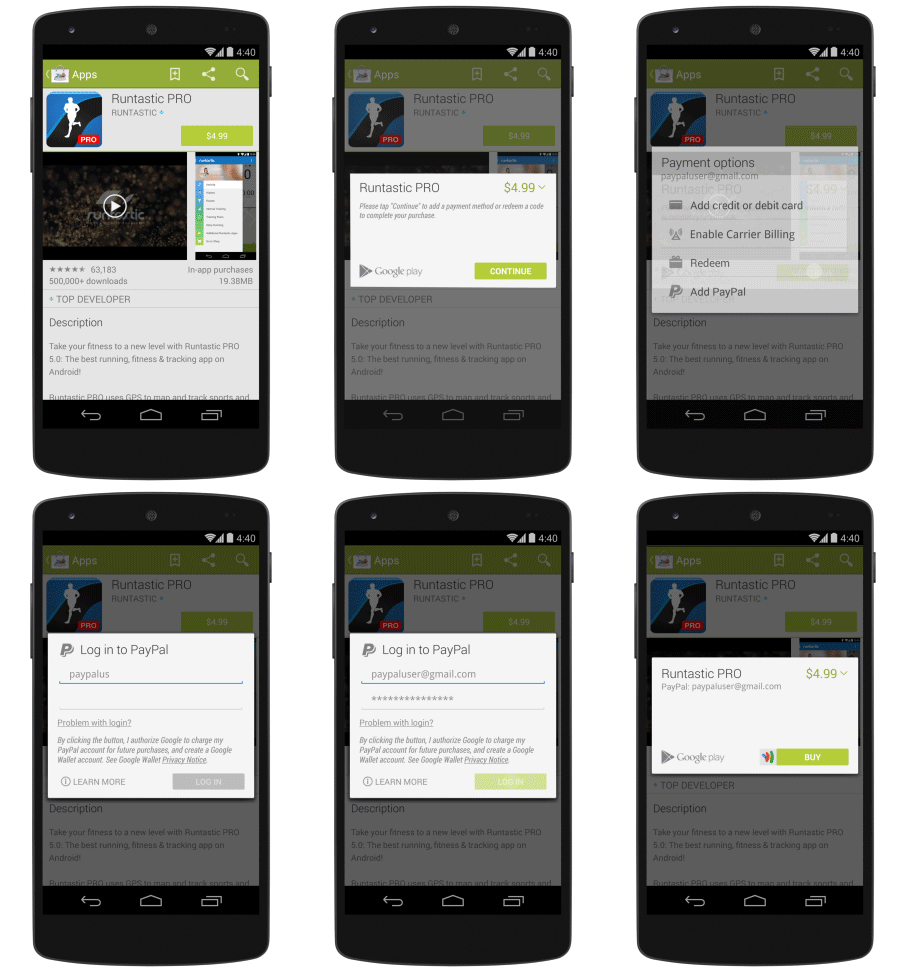
Google is making it easier than ever to purchase apps and more by accepting PayPal in Google Play. The popular payment method is now an option when paying for content on your Android device.

Google has also added carrier billing in more countries, which allows you to add app and media purchases to your monthly phone bill. Google says that half of all Google Play users will now have the option for carrier billing when making purchases.

PayPal in Google Play gif

To use PayPal in Google Play, begin buying an app like you normally would and you’ll have the option of using PayPal. Log in wth your PayPal user name and password to pay.

Unfortunately, PayPall will not work for purchasing devices or accessories, according to a Google support page.

PayPal support is rolling out to the US, Austria, Belgium, Canada, Finland, France, Germany, Ireland, Italy, Netherlands, Spain, and the UK.

Source: Android Developers Blog

Follow Lewis on Twitter @lewisleong

RELATED STORIES

OS X 10.9.3 update available now, improves support for 4K displays and more

The latest OS X update is finally here after several beta releases. Highlights of this update include improved support for 4K displays, improved contact sync, and Safari 7.0.3. To download the update, open up the App Store and click on the “Updates” tab.

Mac Pros and the 15-inch MacBook Pro with Retina Display (late 2013 models) will get improved 4K resolution support for external monitors.

USB sync has also been restored after its removal with the debut of OS X Mavericks. Mac users can now sync contacts and calendars over USB in iTunes again. This means users aren’t forced to use Apple’s iCloud if they don’t want to.

While this update to 10.9.3 may be minor, big changes to OS X are coming soon. Stay tuned for our coverage of Apple’s developer conference in June where we expect to learn more about the next version of OS X.

Via: 9to5Mac

Follow Lewis on Twitter @lewisleong

RELATED STORIES

Tom Clancy’s The Division delayed until 2015

After delaying Watch Dogs seven months, Ubisoft is at it again. Tom Clancy’s The Division has been pushed back to 2015 after debuting at last year’s E3 conference.

“We are creating something we are really proud of and we don’t want to compromise on quality. We are going to release the game when it’s ready,” wrote Senior Community Developer Antoine Emond.

The Division takes place in a plauge-stricken New York City where a classified unit of tactical agents tries to prevent the fall of society. The game will be an online multiplayer RPG. Check out the seven minute gameplay trailer below.

Default player


brightcove.createExperiences();

The game will be available for PlayStation 4, Xbox One, and PC. Ubisoft will be showing updates of the game at this year’s E3 in a couple of weeks.

Source: Tom Clancy’s The Division

Via: Polygon

Follow Lewis on Twitter @lewisleong

RELATED STORIES

Mozilla can’t fight implementation of online video DRM

Digital Rights Management (DRM), which is already coming to Internet Explorer, Safari and Google Chrome, will soon be included in Firefox. This means implementing closed-source code for online video, which Mozilla disagrees with, but feels forced into using.

This DRM, called a Content Decryption Module (CDM), affects services like Netflix, Amazon Video, and Hulu. It was agreed upon between Microsoft, Google and content providers like Netflix in 2013. If Firefox would choose not to include DRM, you wouldn’t be able to view this kind of video from the browser, forcing you to use a different one. This would obviously threaten Firefox’s user base and its competitiveness with Chrome and IE.

Starting with desktop versions, Mozilla will include this DRM (from Adobe) in Firefox, but it’s keen to minimize some of the negative effects on users. Unlike other browsers, Firefox will be implementing the CDM in a ‘sandbox’. The code of the sandbox will be open source, and will contain the CDM. The sandbox means that the CDM will not have access to your hard drive – it will give sites like Netflix a ‘unique identifier’ so that you can view the content, but it will not reveal any additional information about you or your device.

The implication here is that Internet Explorer, Safari, and Chrome will indeed send more information to video providers that identifies you and your device.

This DRM system will give services like Hulu more control over how you view video, and on what devices. It is also an attempt to curtail piracy, although the industry’s yet to come up with a silver bullet solution for that, as pirates and hackers eventually find a way around DRM.

Follow Jonathan on Twitter @jonathanriggall

RELATED STORIES

Facebook 10.0 for iOS out now

Facebook has released version 10.0 of its iOS app for iPhone and iPad. It introduces post reviewing, offline posts and a faster loading News Feed.

Facebook’s unusual version numbering means that what looks like a big release, version 10.0, actually brings fewer big changes than some earlier updates. The same happened with version 9.0, which didn’t significantly change the app. Still, there are some interesting changes in Facebook 10.0.

The most significant change is being able to draft posts in Airplane mode, or when you have a weak or non existent signal. This change better reflects the reality of mobile usage, making Facebook much more practical. Now, if you’re not connected to a network, you can create posts, and they’ll be published when you reconnect.

You can also now review how your status updates and posts will look like before you publish, removing suggested links to books, movies, or songs if you don’t want them to appear.

Download Facebook 10.0 for iPhone and iPad.

Follow Jonathan on Twitter @jonathanriggall

RELATED STORIES

Adblock Plus is a memory hog in Chrome and Firefox

The popular Adblock Plus extension may be hogging your computer’s memory. Mozilla developer Nicholas Nethercote published a blog post today explaining why Adblock Plus doing this.

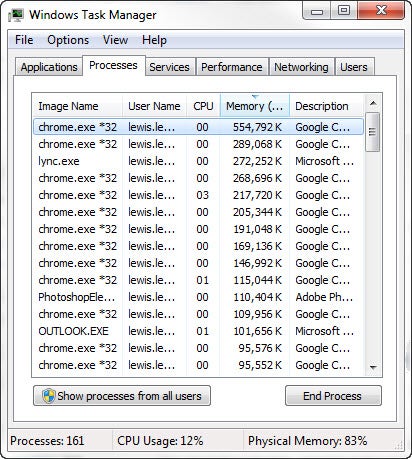
The problem comes from Adblock Plus loading custom CSS stylesheets into every website it loads. This wouldn’t be a problem except for widespread use of iframes, which act like separate websites, causing Adblock to load the stylesheet many times.

Each stylesheet takes up 4MB, which can add up for websites that feature lots of ads with iframes. Even social sharing buttons for Facebook and Twitter are created with iframes.

Adblock Plus task manager

It’s a bit ironic that Adblock Plus is causing performance issues when it aims to increase performance by not having ads load.

Mozilla and Adblock Plus are working together to resolve the issue. You can follow the bug report to see what’s being done.

“We’re doing the best we can to figure out what’s wrong and where, then fix it if it’s on our end,” said Adblock Plus spokesperson Ben Williams.

If you find Firefox or Chrome running slowly, you may want to disable Adblock to see if performance improves.

Source: Nicholas Nethercote

Follow Lewis on Twitter @lewisleong

RELATED STORIES

Flappy Bird to return in August with multiplayer

Speaking in an interview with CNBC, Flappy Bird developer Dong Nguyen revealed that the game will return in August as a multiplayer game. Flappy Bird took the world by storm and was downloaded over 50 million times. Nguyen pulled the game from app stores in February for being “too addictive.”

CNBC Producer Donna Burton tweeted that the upcoming game will feature “one guy jumping form building to buildings [sic].” Nguyen promised to make the game less addictive this time around.

Since Flappy Bird was pulled from app stores, tons of clones have unsuccessfully tried recreating the magic of the original. Even Angry Birds developer Rovio is making a game based off of Flappy Bird.

Source: Donna Burton (Twitter) | Kelly Evans (Twitter)

Via: The Verge

Follow Lewis on Twitter @lewisleong

RELATED STORIES

Google Slides: easy to use with lots of options

Back when I was in college in the early 2000s, I only had a few assignments that needed presentation software. Microsoft PowerPoint was the most popular choice for presentations. My presentations were simple, using mostly text, lists, or pictures. Inserted video would only play in a media player.

Today, using my prehistoric knowledge of PowerPoint, I tried to create a presentation using Google Slides by using all the basic tools that I used in PowerPoint. Google Slides made making presentations surprisingly enjoyable.

Themes

When you start a new presentation, you have the option of choosing a theme from Google or importing your own. Google’s themes are ok, but a bit basic. There are a lot of other themes available in Google Docs Templates, so you’re not stuck with the same set.
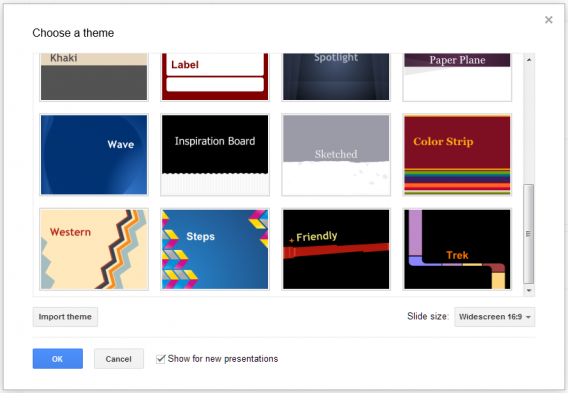
Google Presentation Themes

Even though there are preset layouts, each one is customizable. You can move the text box around, change orientation, and customize the font. It’s very similar to PowerPoint, but the simplicity of the layout in Slides is much easier. It’s quicker to get to the options you want rather than hunting for them.

Text

Adding text to slides is easy; select the text box feature and start typing. You can customize the text and adjust the size of the text box to fit. Depending on the theme, you may need to adjust the font color if it matches the background. If you’re going for a simple presentation, the best decision is to use an interesting theme.
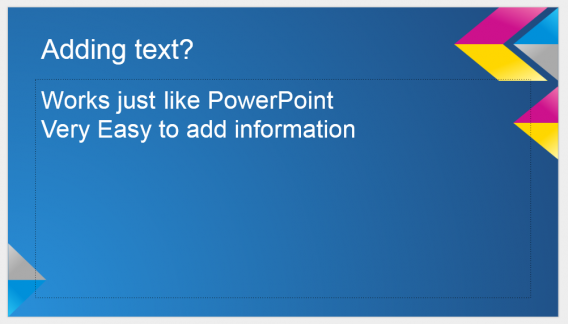
Google Presentation adding text

Since most information is presented using words, it’s important that there is an impact with your text and Slides offers a good font selection.

Photos

Visuals can grab viewers’ attention quicker than text. Adding relevant images is really important, but in the case of this test I chose images that I had in Google Drive. You can easily upload images to add, but the ability to add images from Drive (or a shared folder) makes group projects much easier. Slides is a powerful tool for collaboration.
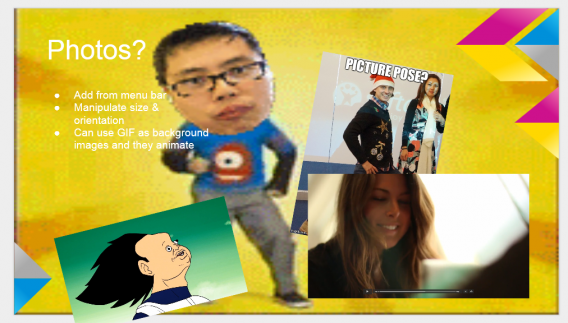
Google Presentation photos

Since Drive serves as your cloud storage, you can access all your important images fast. Also Slides supports animated GIFs. You can even replace the background with a GIF that will animate in the background. Whether this has a real use doesn’t matter, it’s the potential of using animations inside a presentation.

Video

Slides also supports video, although embedded videos are limited to YouTube. A quick workaround would be to upload a video to YouTube to use in a presentation. You can use unlisted videos but not private ones.
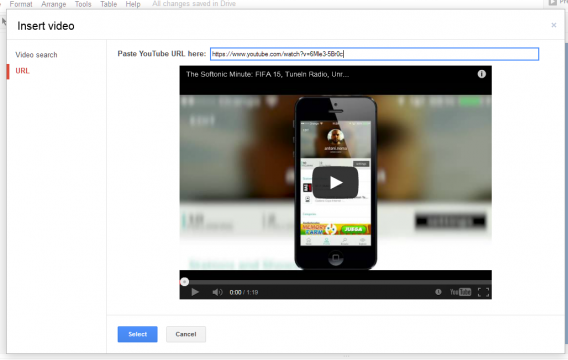
Google Presentation video

You can’t play them when you’re editing the presentation, but they will play when you’re actually presenting.

Tables

If you have a lot of comparative data, using a table is the best way to show it. Unfortunately you can’t add different types of tables like circle graphs, but those can be imported as an image. The simplicity of tables may be better used as placeholders until you get the actual table you want to import.
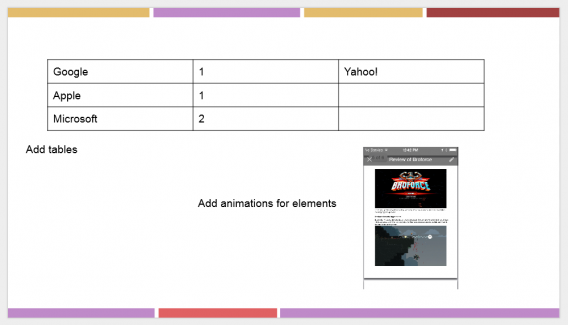
Google Presentation adding tables

Animate everything

Individual section of slides can be animated. Depending how you want information be presented, you can animate text boxes, images, and tables display to give some life to a static slide. The rules are simple: on click, after previous, and with previous. So depending on how you decide to display the data it can animate on command or all at once in order.

A decent alternative

While I don’t know how many people need to make presentations now, Google Slides does a decent job of covering your basic needs. Since there’s a high level of customization, slides don’t have to be the standard title and bold list. Adding photos and animated GIFs give a lot of life to slides and the ability to embed YouTube videos can be really useful to keep people interested.

The biggest weakness of Slides is the lack of table varieties and inserting a picture of a table is hardly ideal.

Google Slides will likely suit your collaborative needs, but the web app has been a bit ignored in favor of Docs and Sheets. Those apps probably see a lot more use than Slides and Google is likely focusing development on them instead of improving Slides.

Next up, Google Sheets.

Related Articles

The Sims 4 trailer shows off powerful character creator

The latest trailer for the upcoming The Sims 4 game shows off a powerful character creator. Called “Create A Sim,” the tool allows players to drag their mouse to manipulate character features. Past games required players to select a body part and drag a slider.

With Create A Sim, characters can be easily customized while still offering precise control. Ryan Vaughan, producer of the game, showed off a digital version of himself in the game as well as a few of his coworkers.

Default player


brightcove.createExperiences();

You will also be able to customize each character with traits that give them special abilities. For example, you can make a character a genius, bookworm, and creative to make him or her a quick learner. This allows the sim to build new skills faster.

The Sims 4 will be available for the PC this fall.

Source: The Sims (YouTube)

Follow Lewis on Twitter @lewisleong

RELATED STORIES