Skype to issue mandatory updates for Mac and Windows

Microsoft will require Skype users to update to the latest version “over the next few months.” The company released a blog post Friday, saying it will “retire” Skype for Windows 6.13 and below as well as Skype for Mac 6.14 and below. The company didn’t give a reason for discontinuing the five-month-old versions of Skype.

So what exactly happens if you try using a “retired” version of Skype? Not much really, but you will be forced to update. Retired versions will not accept logins until you update to the latest version and will provide download links to the latest version.

While it seems heavy handed of Microsoft to discontinue such recent versions of Skype, it has done the same for its other products. Windows 8 users had to update to version 8.1 to keep receiving security patches. Internet Explorer users also had to update to the latest version (IE11) on Windows 7.

Running the newest versions ensures you have the most up-to-date security so I can see why Microsoft is issuing a mandatory update.

If you don’t want to wait for Microsoft to retire your version of Skype, you can download the latest versions below.

Download Skype for Mac

Download Skype for Windows

Source: Skype

Via: Computerworld

Follow Lewis on Twitter @lewisleong

RELATED STORIES

How to install WhatsApp on your iPad or iPod touch

Contrary to popular belief, it’s possible to install WhatsApp on an iPad or an iPod touch without resorting to a jailbreak.

With a little trick and a simple app,  I’ll explain how you can install WhatsApp on your iPad or iPod, even without a SIM. The procedure takes no more than ten minutes, is simple, and works great.

What you need

In addition to your iPad or iPod touch, you’ll also need:

  • a Mac or PC with iTunes
  • iFunBox, a file manager for Mac or PC that’s used to manage the files on iOS devices
  • an iPhone (used only for a few minutes, you can even borrow your friend’s if you don’t have your own)
  • SIM (this will also serve just as a one-off and only for a few minutes)

The last item must be inserted in the iPhone to install and authorize WhatsApp on your mobile phone. Subsequently, this authorization will be “transferred” to the iPad, as I’ll explain in the next steps.

Since, however, the same phone number can’t be used for WhatsApp simultaneously on two devices, the idea is to use a SIM which isn’t already tied to a WhatsApp account.

1. Download the app on your computer

Open iTunes on your Mac or PC and go to the iTunes Store. Find WhatsApp  for iPhone– there isn’t a specific one for iPad– using the search field, and click on Free to download it.
Find WA in the Store

By doing this, the installation file (.IPA) will be downloaded to Music> iTunes> iTunes Media> Mobile Applications (on both Mac and PC).

The IPA file

For your convenience, drag it to the Desktop.

2. Install WhatsApp on your iPad

Download iFunBox (it’s available for Mac and PC), open it and connect your iPad. Click on Install App.

iFunBox install app

Browse on your desktop, select the .IPA file, and install the app on your iPad. Disconnect it from your computer.

3. Authorize the app on an iPhone

Install a new version of WhatsApp on an iPhone, using a SIM card that isn’t already linked to a WhatsApp account. If the app is already on your smartphone, delete it and re-install it. Before deleting it, though, back up your chats to iCloud (open WhatsApp, go to Settings> Chat> Backup chat and tap Backup Now). That way, you can restore them when the app re-installs.

If, for example, you have an old SIM card you no longer use, but which can still receive a text (the code to authorize the app will be sent via text message), or maybe a SIM card belonging to a relative or friend who doesn’t use WhatsApp on that number, use that.

The SIM will only serve to activate the app. Then, it can continue to function as normal.

Open WhatsApp on your phone and proceed to register your number. Once you’ve entered the code, which you’ll get via SMS, you can close the app.

4. The iPhone to iPad Transfer authorization

Disconnect your iPad from your computer and connect your iPhone. In iFunBox, choose User Application, find WhatsApp, and double click. Get the Documents and Library folders and drag them to the desktop.

Docs folder and Lib iPhone

Disconnect the iPhone, connect your iPad, select User Applications> Whatsapp again, open it with a double click, and drag the two folders that you took on your iPhone and “parked” on the desktop.

Subsequently, the iPhone (which contains the authorization), is replaced by the iPad or iPod touch.

5. Open WhatsApp on your iPad and start chatting

If you’ve carefully followed the above steps, WhatsApp should be fully operational on your iPad.

List Chat

WhatsApp without limits

Having WhatsApp on an iPad or iPod touch is nice and convenient. You can surf, chat, or work on the same device, and it’s very easy to use.

In the case of the iPod, since you probably spend most of your time in places covered by WiFi networks, the Apple music player becomes a quasi-iPhone, even more so when WhatsApp will be able to accept voice calls.

If you want to transfer music files on WhatsApp on an iOS device, check out our tutorial on transferring MP3 files via WhatsApp.


How to delete Google search results

In mid-May 2014, the European Court of Justice ruled that internet users have the right to be forgotten. This means that search engine providers such as Google are obliged to make it possible to delete references on web pages containing sensitive and personal data.

To ask for a Google search result to be deleted, you have to fill out an online form. Here, I’ll go through the checklist to make sure that you know exactly what to look out for when making your request.

Apply for the deletion of search results here.

It depends on the individual case

In the intro to its search removal request form, Google stresses that, for each request, decisions are made on a case-by-case basis and subject to certain conditions. The search results must meet the following requirements:

  • Search results must include the name of the person affected.
  • The results must be inconsistent with the purposes for which they were originally intended, or
  • Must not be relevant for these purposes or go beyond them
  • In each individual decision, the time elapsed since publication is particularly taken into account.

In making a decision, Google weighs the privacy rights of the individual against the rights of the general public. The removal of search results is only possible for citizens of the European Union.

Prohibited Cases

The removal of search results is prohibited in some cases. These include, amongs others:

  • Financial fraud
  • Professional misconduct
  • Abuse of authority
  • Criminal convictions
  • The public behavior of government officials

What you need for the application

As well as a digital copy of a valid photo ID in PDF or JPG format, you also need to send the relevant internet address (URL) with your application. You must also state why you want the result to be removed. There are three justifications that you need to expand on in an additional field:

  • The search result is irrelevant
  • The search result is outdated
  • The search result is otherwise inappropriate

In cases that aren’t obvious, you must also explain why the URL specifically refers to you. For example, why, if your name is not explicitly stated on the page, are you still being personally addressed.

How to request removal from search results

Step 1: Find affected URL

If you’ve checked that your URL fulfills the requirements for deletion, you’ll first need the web address in question.

Search Results

If you click on a search result, you’ll find the URL in your browser’s address bar. Cope the URL to the clipboard using Ctrl + C.

Step 2: Fill in all fields.

Now, fill in all mandatory fields in Google’s online form.  Paste the copied URL with Ctrl + V in the box provided. You can provide more than one URL.

In the next field, you have to explain why you want to remove the URL.

Step 3: Upload identity document

When you have inserted all the URLs and provided a justification for each search result explaining why this particular site infringed your personal data protection rights, you then need to upload a copy of your ID. You’ll need to scan your ID beforehand and save it as a PDF or JPG file on your computer.

To upload, click the Browse button and select the file with the copy of your ID.

Step 4: Confirm the details and sign application

Before sending the request to Google, you must first confirm that you have entered all the information legally. This also means that you are the affected person or have been instructed by the affected person to submit the application.

As a last step, you have to add a digital signature to the document. To do this, enter the current date and confirm your name and the accuracy of the information one last time.

Once you’ve submitted your application, you’ll have to wait until Google contacts to see whether or not your data will be removed.

If you’re looking for a way to securely browse the web, check out our article on anonymous web browsing.

E3 2014: The Sims 4 are smarter, but with stranger personalities

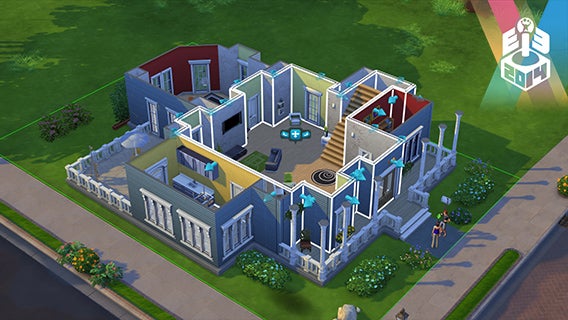
The Sims is one of the most popular EA franchises on the market, and while this fourth installment has taken longer than expected to hit the shelves, the truth is that it’s definitely been worth the wait. The Sims 4 promises to be the most complete social life simulation in history with great graphics, and we had the chance to check it out at E3 last week.

The Sims…but with feelings

Developers warned us at the beginning– because of the changing personalities of the Sims, each demo might be slightly different than the one before. Why? Sims now have feelings and very strong personalities, making them more volatile and reactive to those around them, whether that be objects, places or other Sims.

When creating your Sim, you’ve got to choose your highest aspiration in life. I couldn’t see all of them, but there seemed to be over 50. Each of these aspirations also give your Sim a unique skill that will help them achieve that goal. In parallel, you’ll also have to choose three additional characteristics that define their personality and feelings.

Depending on each Sim’s mood, the way they relate to others will either make it better, or worse.

An example: if your Sim is angry (for whatever reason), they’ll be in a better position to exercise to relieve the stress. So far so good, but the difference is that their level of anger increases the speed of improving your Sim’s “fitness” level.

Now, let’s say that your Sim is also crazy about sports, giving you a plus in this skill, and let’s also say that your Sim gets along with another Sim friend who encourages them when they do sports. When all these variables combine, that particular situation can substantially improve their fitness level of your Sim.

Sims4

This example can be applied to lots of situations. Since parties can be organized via cell phone, in moments of solitude, more scholarly Sims can raise their level faster in a quiet space or in everyday situations like walking in the park with a Sim friend. The feelings between Sims completely change relationships and their skill levels.

Character editor and really advanced houses

Another new feature I really liked was the game editor. Whether it’s to edit the Sims (which we talked about a few weeks ago) or the houses, the game editor is super simple to use but also full of possibilities.

The presentation teaches you how to change a house from top to bottom in just seconds. It’s as easy as picking up walls and dragging them where you want them, moving rooms from with all their contents  just by using “click and drag.”

Editor

I always found The Sims editor clunky and slow, but this new editor has completely changed my mind. It’s quite the opposite of how it used to be: it’s now fun, and that’s just what they wanted.

Gallery mode, another big new feature

Finally, another major new feature of Sims 4 relates to the online connection and how players interact with each other. The focus has been to create a Gallery Mode that’s updated every day. This Gallery is built into the game and it’s like a bazaar of characters, objects, and houses which you can access and purchase.

The system is easy. You can upload your belongings or creations, anything from the house you created, to objects you like. Then, other players can enter the gallery, click, and buy with Simoleons. You can even buy entire houses, fully furnished and decorated! It couldn’t be easier.

The Sims 4 is about personality, feelings, and friendship between Sims. Throwing all these elements into the mix creates different, strange, and funny situations. What I’ve seen has convinced me completely, from the graphics section, which really hits you between the eyes, through to the very simplified and accessible interface, all topped off with this new focus on Sims’ relationships.

The Sims 4 will (finally) be released in September.

Follow me on Twitter: @raulprz

Path Talk messaging app combines features from Snapchat and Foursquare

Path, the “personal” social network, is reinventing itself. Today, the company split its mobile app in two, leaving social networking duties for the Path app and messaging for Path Talk.

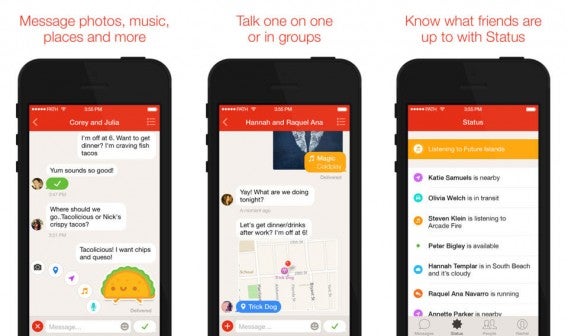
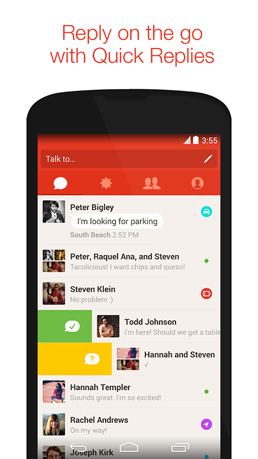
Path Talk enters the crowded mobile messaging space with strong competition from WhatsApp, Facebook Messenger, and others. To differentiate itself, Path Talk offers automatic activity sharing call “Ambient Status.” This allows Path Talk to automatically post what you’re doing by detecting your location, movement, and even battery level.

Path Talk for iPhone combined

For example, if Path Talk detects you’re moving rapidly, it will automatically share with your friends that you’re “in transit.” The app can also let your friends know if you’re nearby, similar to Foursquare’s Swarm app.

Users concerned about privacy will be happy to know that Ambient Status is opt-in. The feature is disabled by default. However, I can see how auto activity sharing would be compelling, especially for couples and close friends.

Like Snapchat, Path talk also features self-destructing messages that disappear after 24 hours. Messages are still sent to Path’s servers, so this feature isn’t so much for security as it is for making people feel at ease about chatting and sharing.

Path Talk for AndroidBy separating messaging from the Path app, CEO Dave Morin hopes to make the Path experience simple. “We’ve failed a lot in terms of implementations we’ve tried, and we finally came down to – well let’s make it simple,” he says speaking with The Verge.

Path is also removing its 150 friend limit, a “feature” it used to separate itself from other social networks. The company found that the arbitrary friends limit confused users who wanted to add more than 150 friends. With its friends cap removed, Path isn’t really a “personal” social network for your closest friends any more.

Path also announced today its purchase of TalkTo, a service that connects people with businesses. The service lets people call, text, or email companies for help. Responses are returned within five minutes, supposedly. Path plans to integrate TalkTo into Path Talk by the end of this summer.

It seems odd for Path to integrate TalkTo into PathTalk. Do users really want to mingle business with private messaging? Still, it makes sense for Path as TalkTo could generate revenue for the company.

Path Talk is up against some well established competition and needs to offer something other apps don’t. Ambient Status and TalkTo are interesting, but I don’t think they’re enough to lure users from other apps. It’s one thing to get a single user to switch, but that user has to convince his or her friends to use the app too. And that’s something I don’t think most users are willing to do.

Path Talk is available today for Android and iOS.

Source: Path Talk

Follow Lewis on Twitter @lewisleong

RELATED STORIES

The Softonic Minute: Twitter, Boom Beach, Adobe and New Emoticons

Twitter gets in on the GIF game, Boom Beach drops on Android, Adobe gets 14 new apps in its creative suite, and 250 new emoticons are coming your way. Check out this week’s hottest software news in the Softonic Minute.

Default player

<!–
By use of this code snippet, I agree to the Brightcove Publisher T and C
found at https://accounts.brightcove.com/en/terms-and-conditions/.
–>

<!–
This script tag will cause the Brightcove Players defined above it to be created as soon
as the line is read by the browser. If you wish to have the player instantiated only after
the rest of the HTML is processed and the page load is complete, remove the line.
–>
brightcove.createExperiences();

Twitter finally gets support for animated GIFs

There’s something incredibly satisfying about sharing animated GIFs, and it looks like Twitter gets it: this week, the company introduced support for GIFs in your timeline. Continue reading…

Boom Beach blows up Android

Boom Beach, the latest game from the creators of Clash of Clans, has finally come to Android devices. The game combines strategy and combat, providing a mission to rescue various islands and their inhabitants from the control of an invading army.

Adobe announces Creative Cloud for 2014 and new iOS apps

After smaller updates to its individual apps in the suite, Adobe is updating Creative Cloud for 2014. This major release marks new versions for fourteen Creative Cloud desktop apps and new iOS apps. Continue reading…

Texting just got more emotional: 250 new emoticons to be added

Those in charge of making emojis, everyone’s favorite hyper expressive characters, have renewed their inventory. Soon, you’ll have 250 new emojis to express your emotions. From a squirrel, to the middle finger, the new emoticons will arrive on all platforms soon.

Make sure to check out all of our past Softonic Minutes.

World Cup 2014: The best soccer games for mobile

Soccer, football, the beautiful game, or “22 guys in shorts running after a ball.” There are many ways to refer to what, for many, is the best sport in the world. With the World Cup 2014 in full throttle, soccer will be on everyone’s mind during the next month.

Not just playing on the field, however, one of the best ways to play soccer is as a video game. From Pele’s Soccer (Atari, 1981), which is considered the first soccer video game in history, to the upcoming FIFA 15, there are a ton of games that have come out on platforms ranging from consoles, to regular old computers, to now, more than ever, mobile devices.

Here, I’ll show you some of the best soccer games for mobile devices that can help curb your enthusiasm for the sport in-between matches.

FIFA 14

FIFA 14
The mobile version inherits all the benefits of the console version, and is arguably the best mobile installment from FIFA that’s been launched to date.

The playability is unquestionable, the controls have been improved, and the variety of official licenses and championships is overwhelming, not to mention that its free! Well, it’s sort of free– you can play Ultimate Team mode for free, but you have to pay to access the other modes.

FIFA 14

Real Football 2013

Real Football 2013
If there’s a game that can can knock on FIFA 14’s door and say “Hey, I’m here!”, it’s Real Football 2013, a soccer simulator that’s completely different.

I can say that the 2013 version is a change from previous versions. Real Football 2013 has put all its efforts into linking soccer to the business side, although doing so at the expense of the simulation itself. As with FIFA 14, Real Football 2013 is also free, although every so often, the game will try to get you to spend money.

Real Football 2013

Dynamite Pro World Championship Soccer

Dynamic Pro Football

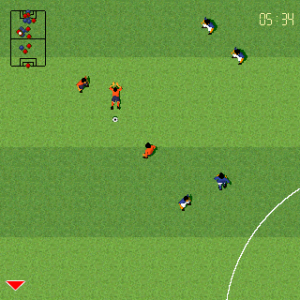
Do you remember games like Sensible Soccer and Kick-off? Dynamite Pro Football takes an aerial view of soccer games and moves them to your mobile.

The point of these games isn’t polished graphics or fluid movement, but to enjoy a soccer game like you did in the 90s. Fun gameplay and speed are the hallmarks of Dynamite Pro World Championship Soccer.

Dynamic Pro Football

  • Download Dynamite Pro World Championship Soccer: iOS

Flick Kick Football

Flick Kick Football
There is life after soccer simulators, and Flick Kick is proof of that. Touch screens open up the possibility of an original and extremely addictive game concepts.

In Flick Kick Football, you score goals swiping with your fingers and achieve different objectives, depending on the mode you’re playing in. Once you begin to master the effects and score real goals, you simply can’t stop playing.

Flick Kick Football

Football Kicks

Football Kicks Football Kicks is a more realistic version of Flick Kick Football. The graphics are more elaborate, and fouls are more realistic with more variation. In terms of fun, though, that’s pretty much it.
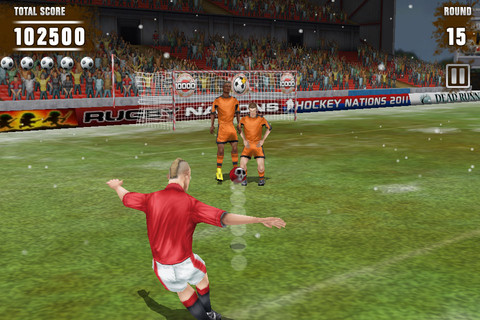

If your heroes are sharpshooters like Maradona, Beckham, Pantic, or Mihajlovic, Football Kicks will make you appreciate the beauty of their play.

Football Kicks

Score! World Goals

Score! World Goals If you’re not a crazy soccer fan, stop reading now. If you are, then you can’t miss Score! World Goals.
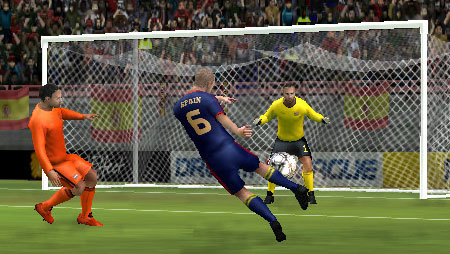

In Score! World Goals, you try to recreate mythical goals, all of which have been engrained in the minds of soccer fans worldwide. There are goals from World Cups, European Cups, and Champions League from the 80s. The best part? When you get to the hardest level you’ll be invited to rewrite history and change the result of these decisive moments.

Score! World Goals

Soccer on the field may not be for everyone, but there’s definitely an opportunity to spice things up with a mobile version of your favorite game, all with different methods of play.

If you want want to follow this year’s World Cup on mobile, make sure to check out our article on how to track, follow, and watch every game.


TrueCrypt developer says fork would be “impossible”

After TrueCrypt’s sudden discontinuation last month, fans have been trying to keep the software alive. Matt Green, an assistant professor at Johns Hopkins, asked one of TrueCrypt’s anonymous developers to use its code to build a forked version.

The developer’s response was discouraging saying:

“I am sorry, but I think what you’re asking for here is impossible. I don’t feel that forking truecrypt [sic] would be a good idea…I believe that starting from scratch wouldn’t require much more work than actually learning and understanding all of truecrypts [sic] current codebase.”

While TrueCrypt’s code is open to the public to see, it is not Open Source. This means TrueCrypt’s code is licensed and requires permission to use and modify, stopping developers from creating a forked version.

TrueCrypt’s code is currently being audited [PDF] by a group of security researchers looking for backdoors. The program passed it’s first audit but a second audit is happening soon. This means TrueCrypt is currently still safe to use, but this could change as development for the program has ceased.

If you’re looking for a program to replace TrueCrypt, check out Ghack’s list of alternatives.

Source: Pastebin

Via: Ars Technica

Follow Lewis on Twitter @lewisleong

RELATED STORIES

Watch Dogs patch fixes corrupt save files, other bugs

Ubisoft is releasing a Watch Dogs patch that will fix corrupt game saves as well as various other bugs in the game. The game launched last month with crashes and performance issues, causing a huge headache for PC gamers.

The patch is rolling out to PlayStation 3 and PlayStation 4 users today. Xbox 360 and Xbox One users can expect the patch “within the next week.” PC players can expect to see it “in the coming days.”

The biggest fix included in the patch is the ability to “automatically reconstruct corrupted save files.” It’s a relief that those saves can be recoved instead of being lost forever.

PC users will see fixes for graphical glitches, SLI crashes, and various connection issues. For a full list of fixes, check out the source link below.

Source: Ubisoft Forums

Via: Polygon

Follow Lewis on Twitter @lewisleong

RELATED STORIES

Steam kicks off its summer sale with huge discounts on XCOM and Far Cry 3

Valve’s annual summer sale officially kicked off today, which huge savings on popular games like The Witcher 2, XCOM: Enemy Unknown, and Far Cry 3. These deals change daily so be sure to check Steam every day for more sales.

In addition to daily sales, Steam offers a group of four games as “Flash Sales,” which change every 8 hours. Steam users can vote on the next set of games to go on Flash Sale. This year is a bit different, giving gamers a choice of two bundles instead of voting for individual games. Voting on Flash Sales also gives you Steam trading cards.

Here’s a list of what’s on sale at the moment:

Daily Deals (changes daily)

  • Democracy 3: $8.49 (normally $24.99)
  • Dead Rising 3: $37.49 (normally $49.99)
  • Day Z: $25.49 (normally $29.99)
  • Don’t Starve: $3.74 (normally $14.99)
  • Sins of a Solar Empire: Rebellion: $7.99 (normally $39.99)
  • Far Cry 3: $7.49 (normally $29.99)
  • XCOM: Enemy Unknown: $7.49 (normally $29.99)
  • The Witcher 2: $3.99 (normally $19.99)
  • Divinity: Original Sin: $31.99 (normally $39.99)

Flash Sales (changes every 8 hours)

  • Dead Island Riptide: $4.99 (normally $19.99)
  • DmC: Devil May Cry: $12.49 (normally $49.99)
  • Hotline Miami: $1.49 (normally $9.99)
  • Mirror’s Edge: $4.99 (normally $9.99)

Source: Steam

Follow Lewis on Twitter @lewisleong

RELATED STORIES