iPhone security flaw lets spammers make calls on your phone automatically

A simple bit of text allows spammers to force your iPhone to call a malicious number. The trick uses what’s known as a web handler, which is a bit of text that gets interpreted into a command. Using the “tel” web handler, spammers can force your phone to call a number as soon as you view the message. This type of scam is profitable for spammers, as calling a premium phone number could automatically charge your phone bill.

These types of attacks are nothing new; In 2012, Samsung phones were affected by a similar vulnerability that allowed someone to trigger a factory reset of a phone using a line of text in the dialer.

Apple isn’t the only one to blame for this vulnerability. App developers can and should be including protection against these types of hacks by warning users with a prompt. Apple could build a dialog system into iOS as well.

In the meantime, do not open messages from people you don’t recognize.

Source: Algorithm.dk
Via: Engadget

Related Stories

Sony Entertainment Network and Battle.net back online after DDoS attack

‘Anonymous’ social networks like Secret fail to provide anonymity

The Windows Store is full of fraudulent apps and Microsoft doesn’t care

Google Chrome blocks software designed to trick you

Adobe releases critical patches for Flash Player, Acrobat and Reader

Follow Lewis on Twitter: @lewisleong

Pinterest experiments with a News feed in its iOS app

Pinterest is experimenting with a ‘News‘ feed in its iOS app. This list is a feed of Facebook friends’ activity, as well as the Pinners and boards you follow.

The idea behind the News feed is to let you see what other people are pinning, and perhaps allow you to discover more through the app. While this means that your activity may appear on friends’ news feeds, the things you pin to secret boards will of course not. Only the things you pin publicly will be available in the News feed.

Pinterest is testing this feature, which is why it hasn’t been rolled out to other platforms yet, and will continue to do so for the next few weeks. The company is asking for feedback from users during this time.

Download Pinterest for iOS.

Source: Pinterest

Related Stories

Which OS has the most popular apps: iOS, Android or Windows Phone?

Ello: a Social Network that wants to be the anti-Facebook

Twitter considers abandoning vertical timeline

How to organize your clothes and create looks with apps

Follow Jonathan on Twitter: @jonathanriggall

Sim City 4 Deluxe edition on Origin is unpatchable and incompatible with popular mods

If you buy Sim City 4 Deluxe Edition from Origin– one of a number of digital stores selling the game– you will get a version which is apparently un-patchable, and incompatible with mods. Sim City 4 Deluxe Edition is over a decade old, but remains popular and has an active community of players.

Modder TarkusSC4 has written about the problem, and explains how the Origin version of the game is 1.1.610. Due to differences in this version, compared to the later version (1.1.641) sold by other vendors like Steam and GamersGate, it cannot be patched and will not work with popular mods like the ‘Network Addon Mod’.

This means that as well as being locked out of lots of community made add-ons and mods, the Origin version cannot even be updated with patches that developer Maxis itself released, including basic fixes to the game.

According to comments on Reddit, Origin was selling a more current version of the game at least up until a year ago, and it’s not clear why that has changed.

Source: Reddit

Related Stories

The Sims 4 will avoid controversial ‘real life tragedies’

SimCity offline mode finally ready

Citybound could be the SimCity you always wanted

The best PC games for… playing with the family

Follow Jonathan on Twitter: @jonathanriggall

Rumor: FIFA 15 demo coming September 9th

EA Games recently announced that the FIFA 15 demo will be coming in the weeks before the full game is out on September 26th. A FIFA fan site is suggesting the demo will be out on September 9th, as last year’s demo was also released on the second Tuesday of that month.

This rumor makes sense, and means that the EA soccer juggernaut will have a week to get players’ attention before the competing PES 2015 demo arrives.

The demo is likely to be available on all major platforms, including PC, but this is not yet confirmed. On PC, this will of course means that the FIFA 15 demo will require Origin.

Default player


brightcove.createExperiences();

There will be two game modes, Kick-Off and Ultimate Team. In the former, you’ll be able to play a single match of 3 minute halves, in single or two player mode. The game will take place at Liverpool’s Anfield Stadium, and you can choose from one of eight teams (listed below).

The demo will also give you a taste of Ultimate Team mode, allowing you to use some sample squads similar to the ones you’ll be able to create in the full game. Ultimate Team allows you to buy, transfer, and sell players to build your ideal team. In the demo you’ll be able to experiment with formation and team line-ups.

Playable teams in the FIFA 15 demo:

Barcelona

Boca Juniors

Borussia Dortmund

Chelsea

Liverpool

Manchester City

Napoli

Paris Saint-Germain

Source: FIFAUTEAM

Related Stories

Pro Evolution Soccer 2015 demo September 17 with November 11 release

Gamescom 2014 – FIFA 15 demo out next month before September 26th release

Rumor: Microsoft to remove Charms bar in next version of Windows

E3 2014: FIFA 15 Ultimate Team’s new features

FIFA 15 lead producer Sebastián Enrique talks gameplay, control and response

Follow Jonathan on Twitter: @jonathanriggall

Read comics on your mobile, tablet or PC with these apps

It’s increasingly easy to read comics online. Many major publishers offer their comics in a non-physical format at great prices, sometimes even free, and along with a PC, tablet or smartphone, you’ll need a good app that’ll help you manage your collections and make reading more comfortable.

Here are some of the best apps for Android, iOS and Windows for reading digital comics, programs that open all formats and let you download and start reading them in seconds.

Manga Rock

If you like reading Japanese comics, you’ll love this app for Android and iOS. With a collection of over 50,000 comic books in 7 languages, Manga Rock is very easy to use: search for the manga you want to read, download it, and start reading. This means that you don’t need to load external files because the app itself offers all the content.

Manga Rock is not only a never-ending source of comic books, but also has the classic options required of any good e-reader: reading modes, zoom, brightness control and, of course, reading direction, if you want to read the traditional Japanese way instead of the Western way.

Download Manga Rock for: Android | iOS

ComicFlow

If you’ve already downloaded comics in any of the most common formats (.cbr, .cbz and .pdf), you’re probably looking for a comic book reader. For iOS, I recommend Comic Flow, an app with a simple interface and many options. The best part is that you can import more than 1,500 comics without taking up any storage on your iPad or iPhone.

You can import and delete comics easily with Comic Flow using iTunes or over Wi-Fi.

Download ComicFlow for:  iOS

Perfect Viewer

If you have an Android, one of the best readers on Google Play is Perfect Viewer. As the name suggests, it’s (almost) perfect; it includes many options to display comic books and supports many picture formats including .pdf, .jpg, .gif, .cbr and .cbz, among others.

Its library system also includes options to manage your favorites and create folders so that you can keep your huge collection of comics under control.

Download Perfect Viewer for: Android

Marvel Comics

Get Spider-Man, Captain America, the X-Men, and other Marvel superheroes on your tablet with the official app from one of the most popular comic book publishers. With this virtual store, you’ll never miss the adventures of your favorite superheroes.

The Marvel Comics app has many advantages. Besides being able to read comics whenever you want, it gives you the option to create a wish list, get notifications when a new issue is released, and preview comics with a scoring system to help you decide if the comic is worth purchasing.

Download Marvel Comics for: Android | iOS

DC Comics

Marvel’s eternal rival, DC Comics, has an equally good app for iOS and Android. Here, you’ll find comics from the past 75 years of DC Comics, classified by characters and collections.

Just like Marvel, it offers several options to choose your next purchase using full reviews of each, and has a good reader to top it off.

Download DC Comics for: Android | iOS

YACReader

If you want to read on your PC, YACReader offers a comic book manager to organize your collection, along with a full-screen reader.

YACReader is especially known for its Cover Flow effect, which shows thumbnails of pages to go from one to another quickly while reading a particular comic.

Download YACReader for: Windows

Comic Rack

Comic Rack is another classic comic book reader for your PC. It has many options including support for most formats, and a double-page view. The biggest plus though, is a joint app for both Android and iOS devices.

If you install Comic Rack on your mobile or tablet, you can sync content between devices, ideal for keeping up the reading wherever you are.

Download Comic Rack for Android | iOSWindows

Almost better than reading on paper

Years ago, comic readers were little more than image viewers, so they weren’t very comfortable for reading lengthy comic books. In recent times, especially with tablets, it’s become increasingly easy and comfortable to read comics in digital format, and it has many advantages over paper: you can save space, it’s easy to find exactly the comics you want, and you can take any comic with you wherever you go.

If you like reading on the go, check out the article from our Android Tablet Series for apps to read from your tablet.

Follow me on Twitter: @mariabaeta

Windows 9 to get simple, single-click updates?

Windows 9, codenamed ‘Threshold‘, is expected to be presented as a Technical Preview on September 30th. It seems likely that it’ll introduce single click updates to the operating system.

This feature exists in internal releases of the Windows 9 Technical Preview, so it’s not guaranteed to be in the public release or final version of the operating system. Single click updates, however, are a ‘fully developed’ feature already, so it seems likely. This would mean that for minor updates at least, you wouldn’t be required to go through a complete re-installation process, making them quite painless and unobtrusive.

Making updates as easy and unnoticeable as possible will help Microsoft make Windows as secure as possible. The company currently has a monthly update schedule, and easy updates will mean more Windows users actually apply them.

Source: NeoWin

Related Stories

Report: Microsoft planning Windows 9 event for September 30

Rumor: Windows 9 tech preview coming late September

Cortana digital assistant coming to Windows 9

Update 2 for Windows 8.1 could be coming next week

The Simpsons: Tapped Out spoofs Clash of Clans

Follow Jonathan on Twitter: @jonathanriggall

Could the next Android version be ‘Lemon Meringue Pie’?

The next major update to Android could be called Lemon Meringue Pie. The codename ‘Android L’ has been seen for a while, but new documentation refers to the release as LMP. Previous Android names have all been sweet based, like KitKat, Jelly Bean, and Ice Cream Sandwich.

At Google’s I/O event in June, it was referred to as Android L, which is presumably version 4.5 or 5 of the mobile operating system. Many commentators predicted the ‘L’ would stand for Lollipop.

Lemon Meringue Pie seems to be the only likely confectionery with the initials LMP, but in the run up to the announcement of Android KitKat, that release was referred to as ‘Key Lime Pie’, from the initials KLP. So, even if Lemon Meringue Pie is correct, it could still change before the final builds are released.

Source: Android Police

Related Stories

How to use Google Maps offline on Android

The best map app for Android – Sam’s Choice

‘Anonymous’ social networks like Secret fail to provide anonymity

App of the Week: Modern Combat 5

The Simpsons: Tapped Out spoofs Clash of Clans

Follow Jonathan on Twitter: @jonathanriggall

Sony Entertainment Network and Battle.net back online after DDoS attack

The Sony Entertainment Network, Blizzard’s Battle.net and other PC online gaming services are back online today after a large distributed denial of service (DDoS) attack by a hacker group calling itself Lizard Squad.

Sony confirmed the attacks on Twitter, and have assured users that no personal data was lost. The DDoS attack’s only purpose seems to be disruption by the Lizard Squad, which also tweeted a bomb scare on an American Airlines flight carrying Sony Online Entertainment president John Smedley.

The group’s Twitter account stated ‘Sony, yet another large company, but they aren’t spending the waves of cash they obtain on their customers’ PSN service. End the greed.’ However, the Twitter feed has also made comments like ‘Today we planted the ISIS flag on @Sony’s servers’, which is more political (ISIS referring to the terrorist group currently fighting in Iraq and Syria). The attacks may be simple vandalism, criticism of Sony and other companies’ server security, or making some kind of political point. It’s not yet clear.

As well as SEN and Battle.net, League of Legends and Path of Exile were affected. All services are now back online.

Source: Sony

Related Stories

‘Anonymous’ social networks like Secret fail to provide anonymity

Windows August updates causing ‘blue screen of death’

The Windows Store is full of fraudulent apps and Microsoft doesn’t care

Google Chrome blocks software designed to trick you

Adobe releases critical patches for Flash Player, Acrobat and Reader

Follow Jonathan on Twitter: @jonathanriggall

How to use Google Maps offline on Android

Google Maps on Android lets you save and use maps offline, especially helpful when traveling abroad without access to a mobile network. With offline maps, you can create custom maps to help you get directions anywhere in the world.

With the update to version 8.0, the steps have been simplified even more on smartphones and tablets.

1. Find the map you want to save

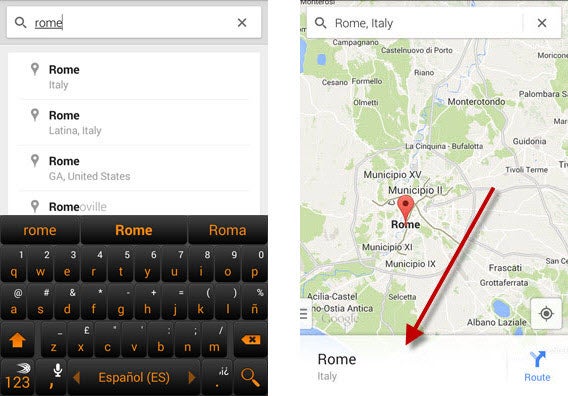
Open Google Maps and search for the location you need. You can do this in two ways.

First method: type the location name in the search bar and then tap on the name of the place that comes up.

Search city

Search for the name of the place you want to access offline. Then, tap on the bottom bar with the name (second image),

Second method: Manually move the map to the location you’re interested in, and then tap on the search bar at the top to open the menu that’ll let you save the map.

Google Maps for Android search bar

2. Save the map

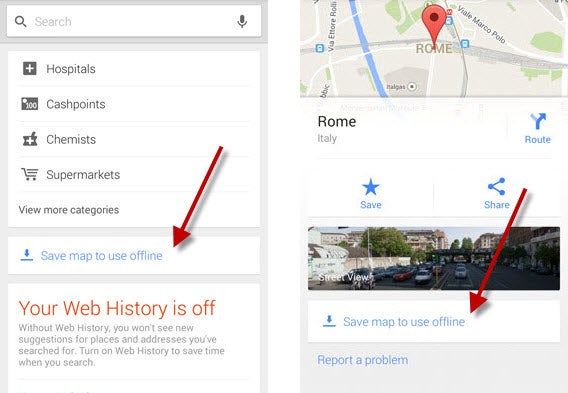
When the menu opens, scroll down until you find the option to Save map to use offline.

Save map offline
Look for the option to save the map offline.

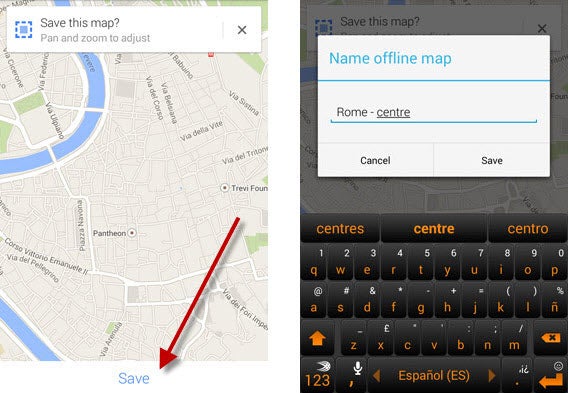
Enlarge the map or zoom out with the index finger and thumb on the screen to choose the map size.

Once you’ve defined the area, click on the Save button. After that, you’ll have to name the map and hit Save.

Rename and Resize

Resize and name the map

3. View maps offline, and manage them

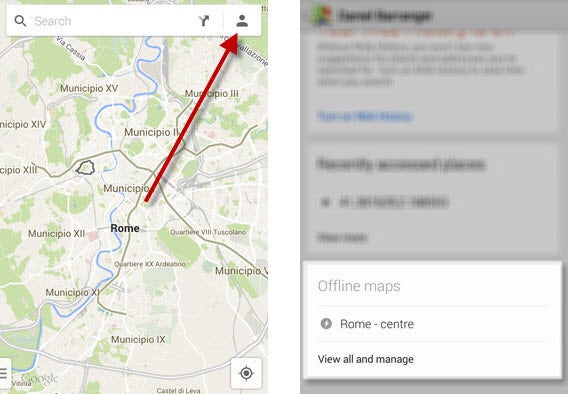
To access the map offline, open Maps and tap on the shape of the person in the top right corner. Once the menu opens, you can scroll through to find your map.

Saved map

Access the saved map

Tapping on View and manage gives you access to a page where you can rename, delete, and update the maps you have saved.

Google Maps for Android offline

Manage offline maps

Beware of maps that expire

Offline maps can be very useful, but beware:  a saved map only lasts thirty days before it’s automatically deleted. If you’re planning a trip, save the map just before leaving or remember to update it.

Related Articles

What can I do with my tablet: use it as a GPS navigator

The best Android games to play on public transport

The best Android games to relax

The best map app for Android – Sam’s Choice

Some people, myself included, have a poor sense of direction and get stressed out by maps. Fortunately, there are multiple navigation apps that make it difficult to get completely lost. As I transitioned to Android, I naturally put my faith in Google Maps. After all, it has a very good reputation and in the beginning, no other app really came close.

Then on one miserable, rainy day a location error meant I ended up walking though the mud and pouring rain. That day, I began looking for a replacement mapping app. Looking at features such as recommendations, offline mode, turn-by-turn navigation, public transport schedules, and traffic updates, I reviewed different apps in this category to save you time. My findings were quite surprising.

The best app

Google Maps

Google MapsWith nine years under its belt, Google Maps remains the undisputed master of GPS apps, especially on mobile platforms. Google Maps offers everything we could expect from a modern day atlas. The app displays accurate and updated maps of any location in the world. It lets you find the exact location of an address and plan out routes for traveling on foot, by car, or public transportation. However, what makes Google Maps stand out is the bunch of additional features that Google has added over the years.

Google Maps

Recommendations, turn-by-turn navigation, Street View Maps. Its strength lies in its additional features.

Google Maps is more than just a simple navigation app. It gives you the option to walk around the streets of major cities with Street View. The Google Maps Indoor feature lets you display the interior of certain buildings. You can also get recommendations on nearby shops and updates on traffic status. The app makes motorists’ lives easier by providing turn-by-turn navigation and lane guidance in the latest update. Another major feature is its ability to save maps offline, perfect for trips abroad or when using the subway.

Google Maps is the champion of navigation on Android. Its accurate maps, powerful search engine, and nine years of innovation in the cartography field make it a safe bet.

Download Google Maps for Android.

The rising stars

Google’s supremacy in mobile navigation has not prevented other competitors from emerging. Unlike Google Maps, the following GPS apps are both dedicated to specific uses. With good designs and innovative concepts, these alternatives apps are becoming major competitors for Google Maps.

Moovit

moovitMoovit’s speciality is public transport. Based on the free map application OpenStreetMap, this app is designed to help you get around by bus, subway, or train. In addition to its powerful route planning features, Moovit also allows you to check schedules and traffic information in real time using data provided by its users. Moovit is often more effective and comprehensive than Google Maps for public of transport and covers more than 350 cities. A promising app to have in your smartphone!

Download Moovit for Android.

Waze

wazeWaze is a motorist’s best friend. The application offers enhanced roadmaps with user-generated alerts. Whether its accidents, traffic jams, or nearby police, the members of the Waze community will alert you about events that could cost you time (and maybe even money). This successful app with great potential hasn’t gone unnoticed by Google, which bought the app  in June 2013. If expanded Waze alerts are integrated into Google Maps like nearby police, the resulting app will be ridiculously effective in making life easier for drivers.

Download Waze for Android.

Now all you need to do is download Google Maps if the app is not already preinstalled on your Android phone. After all, your smartphone deserves the best, right? If you think another app is better, please don’t hesitate to share with us by leaving a comment. Do you have Google Maps on your phone but are not sure how to use it correctly?

For more information about Google Maps, check out our 9 cool tips for Google Maps. Tell me what you think!

Related Articles

Why Lyft isn’t a glorified taxi service

Android Auto: Simplified Android for your car

Get a move on: 7 car-sharing and social taxi apps

Follow me on Twitter: @SamSoftonic