Metro Redux available now

If you missed Metro 2033 or Metro: Last Light, you can now pick up both games in the Metro Redux bundle. Depending on which game you’re more interested in, you can pick up each game individually for $24.99 as digital downloads or bundled together for $49.99.

The Metro Redux bundle also includes all previously released DLC for both games. With the update, you can play in different styles. Spartan is more traditional first person shooter fans while Survival is about dealing with limited resources. Also included is Ranger Mode, an option that hides the HUD and increases difficulty.

Default player


brightcove.createExperiences();

Metro Redux is available for PC, PlayStation 4, and Xbox One.

Related Stories

Diablo III patch 2.1.0 released today

Rumor: FIFA 15 demo coming September 9th

Minecraft Pocket Edition: 9 basic tips for the Survival Mode

The Walking Dead: Season 2 ‘No Going Back’ coming next week

App of the Week: Modern Combat 5

Follow me on Twitter: @chrislikesrobot

Hyperlapse from Instagram turns your shaky recordings into beautiful time-lapse videos

Instagram has a new video recording app out today called Hyperlapse. Although Instagram already records video, Hyperlapse is useful for turning your shaky smartphone video into an artistic time-lapse video.

The interface is extremely simple with a big record button at the bottom. After you’re done recording your video, a slider shows up where you can choose how fast you want your video to be (between 1-12x). Hyperlaps will then crunch the video with its stabilization technology to make one smooth looking video.

Traditional time-laps videos are time consuming and require expensive professional gear. While Hyperlapse doesn’t create time-lapse video as dramatic as this, it does help turn shaky video into something useful and easier to view.

Check out the video below to see how Hyperlapse works.

Default player


brightcove.createExperiences();

After you’re done creating your Hyperlapse video, you can share the finished product with your friends on Instagram or Facebook.

Hyperlapse is only available for iPhone and iPad today. An Android version is in the works but needs Google’s help to access the camera and gyroscope in Android phones.

Download Hyperlapse for iPhone and iPad

Source: Instagram

Via: Wired

Related Stories

Stop ignoring Android app permissions

Dropbox gets search for Word and Powerpoint docs on iOS

Google’s iOS productivity apps get native Office support, debuts Slides for iOS

Google is tracking your every move but you might want it to

Follow Lewis on Twitter: @lewisleong

Stop ignoring Android app permissions

Every time you install an app, you have to accept permissions. But what are you really agreeing to? Are they dangerous for your privacy and security? The recent drama over Facebook Messenger permissions had people freaking out over how sinister some of them sound.

To use the camera, internet, and other resources on your mobile phone, Android apps ask for permission. Apps are only installed if you agree, and you can only accept or reject all of them at the same time (it’s an all-or-nothing system). The problem arises when permissions are combined: to review them all is exhausting, so you just end up accept them without looking.

Permissions - Google Play

To accept these permissions without thinking can have consequences, such as SMS being sent without you knowing, or the theft of personal data, as happened with the Balloon Pop 2 virus. It takes less than a minute to check the permissions, a minute that can save you from major problems in the future (like having to change all your passwords).

Below, I’ll detail the current permissions that apps request prior to installation, and I’ll explain why they can be dangerous and what you can do to avoid future problems.

In-app purchases: beware of extortion and frauds

In a game like Candy Crush, for example, you can buy items that will help you level-up, but there are apps that use this system to extort money under all sorts of promises.

Fakedefender was a fake antivirus that showed security alerts and promised to clean the phone after making a purchase from the app. Another case is when a free game has in-app purchases: if a child is using the app, they may be fooled into buying premium currency.
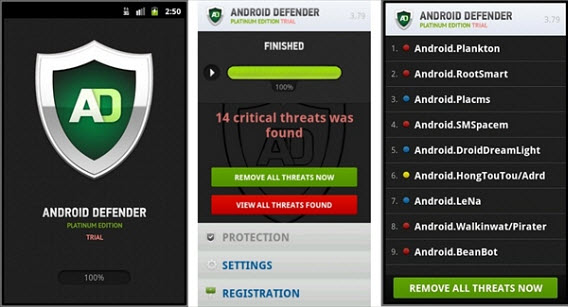
Android Defender, the fake antivirus that extorted users with in-app purchases

To avoid problems related to in-app purchases, enable password protection in Google Play.  That way, you’ll avoid impulse purchases. Above all, don’t be fooled by false promises.

Mobile data / Wi-Fi: the gateway for data theft

Both sections are relatively harmless, as they manage how apps are connected to the internet. Any app that needs to go online will ask for these permissions. They only become dangerous when they are combined with others, since they give the green light to an app to send data outside.

The pair “read contacts” and “mobile data,” for example, should worry you. Why would an address book need access to internet? Maybe it’s for advertising reasons, but you must be sure about it. When in doubt, you can choose to block the connection with a firewall (which is also effective to disable advertising in some games).

Device and app history: your history and bookmarks are there

These permissions allow access to phone data, such as sites you’ve browsed, your favorites, and what apps you’re running. A web browser, an app manager, or a social network needs to access your app and bookmark list to look up info or modify it, but not a game.

Chrome History Permissions

Chrome browser will ask you for permission to access your device and app history list: it’s ok

The risks to your privacy are obvious: this is the kind of data that the NSA or others want to be able to track your browsing history. Before installing any app that wants these permissions, you should ask yourself if it’s necessary.

Identity and accounts: your accounts available for any app

Identity permissions let apps access personal data, such as accounts you have on your phone. It makes sense for social network apps such as Facebook or Twitter, but not when this info has nothing to do with the main purpose of the app. Among other things, a virus that makes use of this permission could possibly delete your accounts.

Contacts / Calendar: careful with sharing your address book

The greatest danger of these permission lies when they ask to access your address book and calendar events. A malicious app could extract email addresses or phone numbers and delete calendar events without your permission (and even invite people without your permission).

The FireLeaker virus stole phone numbers and email addresses and sent them to a server controlled by cyber criminals, then sold that data to companies that send spam in emails or SMS messages.

Location: does a game need to know where you are right now?

This set of permissions provides access to location sensors such as GPS, useful for maps, guides, and apps that add location data to your photos and publications. If you think that this permission doesn’t make sense for a particular app, be suspicious.

Besides consuming battery, collecting location data will put your privacy at risk. The TigerBot malware, discovered in 2012, sent the GPS location of the mobile along with other data, such as call recordings and images.

Tigerbot is a Trojan that hid under the generic name ‘System’

SMS: be careful with apps that send expensive short messages

If you see these permissions, ask yourself why an app needs to receive, read, or send text messages. Some receive SMS to confirm your registration to a service, but other times, sending expensive text messages can be a lucrative fraud.

In 2014, Panda Labs discovered that a diet app, downloaded by 300,000 people, subscribed its users to an expensive SMS payment plan through a simple and effective fraud.

Phone: when an app can dial and call for you

These permissions are intended to allow apps to manage or initiate calls. Messaging apps such as WhatsApp or LINE, call blockers, and voice mail apps use these permissions.

But in apps where using the phone makes no sense, these permissions could indicate some kind of hidden call charges. MouaBad malware, discovered in 2013 by Lookout, allowed hackers to make very expensive calls without the device owners noticing.

MouaBad.P that could remotely call premium numbers

Photos, data and files: what if they read your saved files?

If an app needs to store files, it will ask for permission to modify or remove content. It’s difficult to know when this will be used for malicious purposes, such as stealing or deleting data.

Some viruses can take over the phone and send pictures and other files over the network. The Pixer app, which can still be downloaded from Google Play, deceived users to accept permissions and then uploaded photos to its servers.

Camera / Microphone: permissions 007 would have loved to have

When you allow an app access to your camera and microphone, it can take pictures and videos as well as record sounds. Makes all the sense in the world with apps like Instagram, Skype, or Facebook. In other cases, watch out.

PlaceRaider, an app capable of taking random photos and recreate entire rooms

The PlaceRaider app is an example of the danger of accepting permissions without thinking. Created by a team of researchers from the States, this app can take your pictures without permission and recreate rooms: you have given permission to be spied on.

Device ID and call data: your phone’s ID

Under this mysterious name, Android gives the apps permission to know your phone. Among others, it includes getting data like the IMEI number, which is the phone’s ID. It’s quite easy to get it.

An example of the data that can be taken with the ID permissions

With a valid IMEI, someone could clone your phone and make calls; the bill would come to you. It could also block your number if it tells the phone company that it has been stolen. The BadNews virus is an example of this type of malware.

Others: a very dangerous hodgepodge

Besides the typical Android permissions, an app can request other unique permissions. It’s very important that you review this list whenever you see it. Among other permissions, there are some that are particularly sensitive, such as reading messages on your social networks, having full network access, or having control over the device. There are no limits: the security of your device and data could fall apart due to that permission hidden under Others.

The golden rule: research and use permission tools

If you think that a permission doesn’t make sense, ask the developers: you can send them an email from Google Play or leave a comment and wait for them to reply. The comments sent by other users (and the app’s score) are also important to know if an app is safe and reliable. Don’t install anything suspicious without having checked it before.

What about the apps you’ve already installed? There are tools that are dedicated solely to checking the permissions for all the apps installed on your phone or tablet. A good example is F-Secure App Permissions, which scans all the permissions of the apps you are using and tells you the most suspicious cases for you to decide what to do with each.
F-Secure App Permissions gives a score to each app according to the permissions requested

After reading this article, you might think that permissions exist only for evil purposes. It’s not true: many legitimate apps would not work without them. The way Android handles the permissions, however, is not adequate, as it leads to dangerous oversights. It’s just too easy to accept an objectionable permission.

Related Articles

How to protect your online identity and why you should care

Why Facebook Messenger permissions aren’t unique or dangerous

The Windows Store is full of fraudulent apps and Microsoft doesn’t care

‘Anonymous’ social networks like Secret fail to provide anonymity

Follow me on Twitter: @remoquete

Rumor: ‘Modern UI’ disabled by default on Windows 9 Enterprise and Server editions

Reliable Windows leak source Wzor has been at it again, apparently spilling details of Microsoft’s upcoming Windows 9 (Threshold) operating system.

On Twitter, the (presumably) Russian Wzor made a number of statements about Windows 9:

– The Metro (Modern) UI won’t be enabled by default on Enterprise and Server versions.

– A special build of on Windows 9 Enterprise Technical Preview is already ready, but consumer test builds of Windows 9 pro will not be available to the public.

– There is a test build of Windows 9 RT, that is only compatible with the ‘Surface 3‘ device.

– Microsoft doesn’t know how to get XP users to upgrade, but Windows 7 users will get an ‘awesome offer’ to encourage them to upgrade.

– Anyone who bought a Windows 8 retail version or PC with it installed will get a special offer to upgrade (maybe $20).

– Windows 9 will support 3D for ‘ultra’ high definition TVs.

– Windows 9 will feature backup and system restore from the cloud, and it is developing systems to ‘virtualize’ backups of physical systems in the cloud.

One of the surprises in Wzor’s statements is the existence of Windows 9 RT. Windows 8 RT was heavily criticized for being a hobbled version of the OS, and it seemed probable that Microsoft would not repeat the mistake again. The most interesting rumors are about the ‘cloud’. Offering system backups from the cloud, if the pricing and security is right, could be great for Windows users. Of course, it may also raise serious privacy concerns, so we’ll have to wait to find out more, if this turns out to be true.

We’ll learn a lot more on September 30th, when Microsoft is expected to announce and present the Windows 9 Enterprise Technical Preview.

Source: Wzor, via My Digital Life

Related Stories

Windows 9 to get simple, single-click updates?

Report: Microsoft planning Windows 9 event for September 30

Windows August updates causing ‘blue screen of death’

Rumor: Windows 9 tech preview coming late September

Follow Jonathan on Twitter: @jonathanriggall

Dropbox gets search for Word and Powerpoint docs on iOS

Dropbox for iOS has been updated to version 3.3, and includes a couple of significant improvements.

The major change in version 3.3 is the new ability to search within PowerPoint and Word documents, due to ‘higher fidelity previews’. There is also support for larger animated GIFs, and it claims to use less disk space due to ‘smarter caching’. The new Dropbox should also be better at opening back to where you were if you exited the app, although it’s not clear what ‘better’ means in practice.

For the uninitiated, Dropbox is an app available for almost all devices and platforms. Sign up for an account, and you can store your files ‘in the cloud’, which are then available for you wherever you are signed into Dropbox.

It’s a simple to use system, but the mobile apps, unsurprisingly, feel limited compared to the desktop apps. Viewing complex files like PowerPoint presentations and even Excel documents on mobile devices is not easy, but little by little, Dropbox is making it better.

Download Dropbox 3.3 for iOS.

Related Stories

Mailbox for Mac brings gesture controls to help tame your inbox

Tom Hanks releases typewriter iPad app for hipsters with writer’s block

How to export photos from iPhoto to Google Drive, Dropbox, or OneDrive

Is your iPhone memory full? Find and delete the guilty apps

Follow Jonathan on Twitter: @jonathanriggall

Age of Empires: Castle Siege coming to Windows 8 and Windows Phone

Microsoft has announced the upcoming release of Age of Empires: Castle Siege for Windows 8 and Windows Phone. The company says it “brings a fast-paced experience to touch-based screens while delivering all the strategy and combat Age of Empires is renowned for”. Watch the trailer below.

Age of Empires: Castle Siege gives you a few civilizations to choose from, like Teutons and Britons, and is being made specifically with touch control in mind. You will take on ten historical battles, like the Fall of Constantinople.

Default player


brightcove.createExperiences();

Microsoft says the game will include the strategy and combat Age of Empires is known for, but it’s impossible to look at the trailer and not be reminded of the massive Clash of Clans. Undoubtedly, Age of Empires: Castle Siege will be a more casual game than previous entries in the series, but will it really have that ‘Age of Empires’ DNA?

When EA announced it was bringing the Dungeon Keeper series back for touchscreen devices last year, many people were very excited, but the game EA release angered gamers and reviewers alike. Taking its cues from Clash of Clans, the new Dungeon Keeper was a shell of its former self, and was ruined with poorly implemented micro-transactions. We can only hope that in bringing Age of Empires to touchscreen and mobile devices, developer Smoking Gun interactive doesn’t make the same mistakes.

Age of Empires: Castle Siege will be released in September 2014.

Related Stories

Is Dungeon Keeper designed to manipulate Google Play ratings?

The Simpsons: Tapped Out spoofs Clash of Clans

E3 2014: Civilization: Beyond Earth, classic strategy has returned

E3 2014: low-gravity battles in Borderlands: The Pre-Sequel

Follow Jonathan on Twitter: @jonathanriggall

Diablo III patch 2.1.0 released today

Today sees the launch of the latest Diablo III patch, 2.1.0. It’s a major patch, with a raft of changes, despite only weighing in at around 300 MB. European and Asian players will get the patch after the US launch.

The Diablo III patch 2.1.0 has two major goals, according to its developers. First, they want to ‘reduce the number of extreme outliers in class balance in order to set us up for ongoing improvements,’ and second, to ‘provide ourselves a new metric (Greater Rifts) by which we can more easily identify future outliers’. Both of these goals are essentially about improving balance between the different classes (types of character) in the game.

This patch includes four major new features: Seasons, Greater Rifts, Leaderboards and The Cesspools. Read more about them here.

‘Outliers’ refer to classes, or certain combinations of classes with certain skills, items and so on, that appear to have an unfair power advantage over other combinations.

While it’s relatively small at 300 MB, according to an official post on the games’ forums, applying the patch may take up to 30 minutes, as it alters a lots of files within Diablo III. Once the patch has been rolled out to players, the game’s servers will be taken down for maintenance between 3am and 1pm PDT (pacific daylight time). This or course follows the downtime players suffered during the weekend when Battle.net suffered a malicious DDoS attack.

Diablo III is available for Windows and OS X.

Source: Diablo II forums

Related Stories

Battle.net desktop app out now

Steam, Origin brought down briefly in separate attacks

Diablo III: Reaper of Souls gets March 25th release date

Video: Heroes of the Storm features every Blizzard hero

Follow Jonathan on Twitter: @jonathanriggall

Google’s iOS productivity apps get native Office support, debuts Slides for iOS

Google Docs, Sheets and now the just-launched Slides app can edit Microsoft Office files without needing to convert them. Android users have had this ability since early July.

Before today’s update, users had to deal with converting Office files before being able to edit them with Google’s productivity suite. Now users don’t have to worry about using Microsoft’s popular file formats.

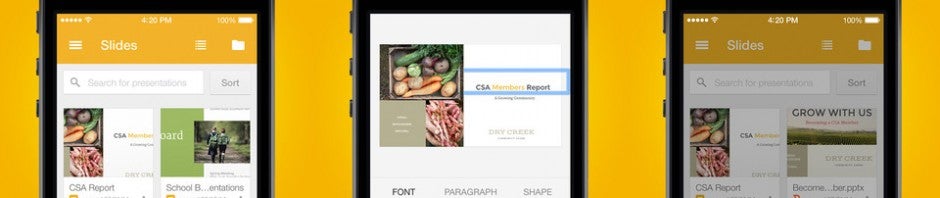
Google also launched its Slides app, which competes with Microsoft PowerPoint. The Slides app is the last app to be released after Google separated its productivity apps from Google Drive, the company’s online storage service.

Microsoft has its own mobile version of Office but users have to pay to edit documents on the go.

Download Google Docs: Android | iOS

Download Google Sheets: Android | iOS

Download Google Slides: Android | iOS

Related Stories

Google is tracking your every move but you might want it to

iPhone security flaw lets spammers make calls on your phone

Read comics on your mobile, tablet or PC with these apps

The days of ad-free SoundCloud are coming to an end

Follow Lewis on Twitter: @lewisleong

Google is tracking your every move but you might want it to

Last week, the internet was abuzz with news that Google Maps is tracking your every move. You can check just how cool and creepy this is by viewing your location history on the web. The thing is, location tracking isn’t new and Google isn’t the only one tracking your movements.

Many mobile apps like Facebook and Twitter track you constantly, but most users are unaware until they check their location settings. Google and Facebook offer maps for your location history, so you know exactly what each site knows about you, and of course, how to disable it.

Although your first reaction might be to disable Google’s location tracking, you might actually benefit from letting Google know where you are at all times. Here’s why.

Google Now

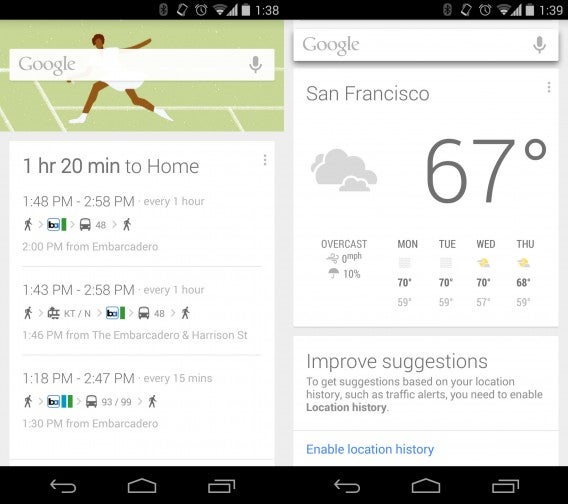
Google’s virtual assistant relies heavily on knowing exactly where you are at all times. It can suggest when to leave for an appointment, based on your location and the traffic around you. It also pulls relevant information from nearby locations, such as bus stops and restaurants. Location history also allows Google to give you more relevant recommendations for search results as well as weather information for the city you’re currently in.

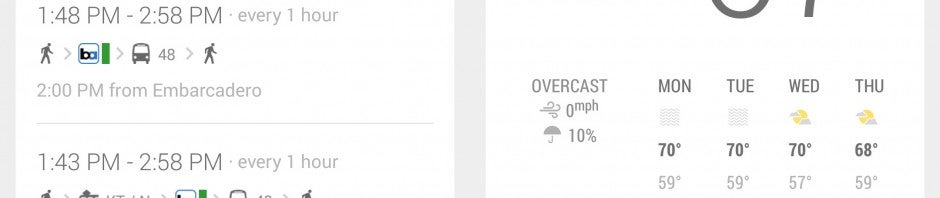
Google Now public transit and weather

I personally find Google Now indispensable for transit times. The Bay Area suffers from terrible and constantly changing traffic and Google Now has saved my bacon a few times. A few weeks ago, I had a reservation at NOPA in San Francisco and Google alerted me to leave much earlier than I anticipated since there were several accidents on the highway and no quicker alternative routes.

The service is entirely opt-in, and will warn you repeatedly that it will track your location. People who value privacy more than convenience can disable Google Now and Location History altogether. I’ll go into how to do this below.

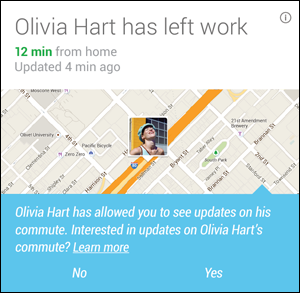
Share your commute using Google Location HistoryCommute sharing

Couples may find commute sharing extremely handy. The service alerts your significant other when you leave or arrive at home or work. The feature has been around for a while, but under the now discontinued Google Latitude name. Commute sharing relies on Google+ to choose who you want to share your commute with.

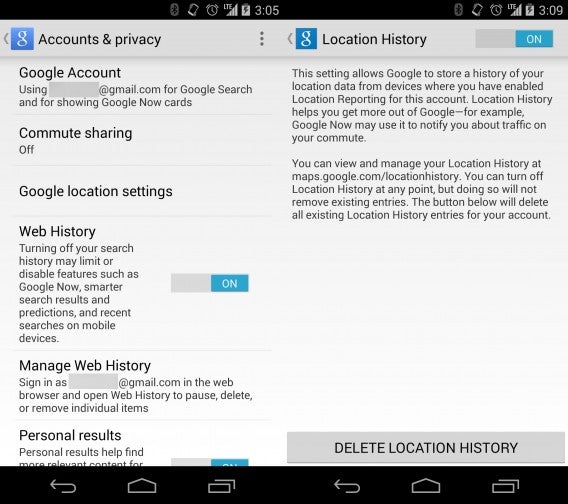
To enable commute sharing, activate Google Now and tap on the menu button (three dots) at the bottom of the screen. Then tap on Accounts & privacy and you’ll see an option for Commute sharing. From here, you can select individual friends or entire Google+ Circles to share your commute with.

Google’s apps talk to one another

Google Maps isn’t the only Google app that uses location. The company’s apps are so tightly integrated that location is shared between its apps and services.

Google Calendar can pull in location information to let you know where your next meeting is taking place. Google Now taps into this data and combines it with traffic information to make sure you won’t be late to a meeting.

Google Now can scan your Gmail account to look for flight info and hotel reservations to tell you when to leave based on your location.

If you lose your phone, Android Device Manager can find, lock and wipe your phone remotely. This feature relies heavily on location services.

How to turn off location history

While I find these features handy, I understand not everyone does. It is creepy and a little worrying just how much Google knows about me. But at the same time, Google provides users with transparency, letting them know what info is being collected and allowing them to delete the data if they choose.

If you value your privacy over convenience, here’s how to delete and disable your location history on Android and iOS.

Android

Activate Google Now on your device and tap on the menu icon (scroll to the bottom). Tap on Accounts & privacy, then Google location settings. From here, you can toggle Location Reporting and Location History. Tap on Location History and toggle it off. If you want to delete all the previous location data collected, tap DELETE LOCATION HISTORY at the bottom of the screen. This will wipe out all the location history Google has collected about you.

Turn off Google Location History

iOS

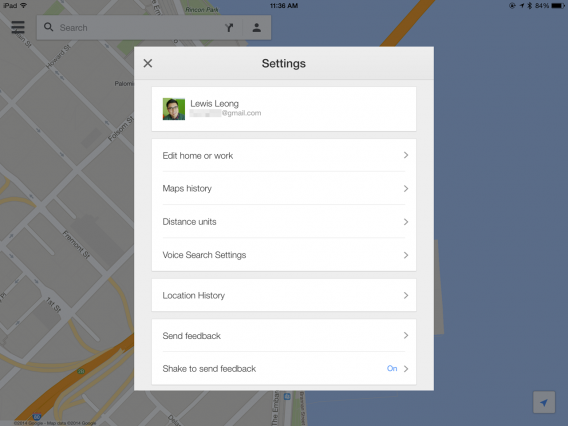
The process is the same as Android but the menus are slightly different. Go to the settings in either the Google Maps or Google Search app and look for Location History. From here, you can disable both location reporting and location history to make sure Google isn’t tracking you any more.

For some reason, Google doesn’t have an option to delete your entire location history using its iOS apps. You’ll have to use the website instead.

iOS Google Maps Location History settings

In the end, you have to decide for yourself whether convenience is worth the price of privacy. If you don’t use Google Now or Commute Sharing, there’s no reason to leave location history on. If you do find Google Now useful, protect your Google account with two-factor authentication so hackers won’t have easy access to your valuable location data.

Other apps also track your location too, so get to know which apps track you and why. Take time to audit which apps use location services and revoke or uninstall apps you don’t want knowing your location.

For more about protecting your privacy, check out Suzie’s article about fitness apps and location tracking.

Related Stories

Why Facebook Messenger permissions aren’t unique or dangerous

‘Anonymous’ social networks like Secret fail to provide anonymity

The Windows Store is full of fraudulent apps and Microsoft doesn’t care

Report: iOS has the best mobile security

Follow Lewis on Twitter: @lewisleong

Facebook punishes sites for click-bait headlines

Facebook is tweaking its News Feed to fight off “click-baiting,” a type of misleading headline. Facebook found that users did not find this type of content valuable, which resulted in less engagement and sharing.

An example of click-baitAn example of a click-bait headline.

Many websites use click-bait headlines to get their content to the top of users’ News Feed since Facebook only looked at the number of clicks an article received. Facebook is now tracking how many shares, and how long a user is on a page before jumping back to Facebook. If a user jumps back immediately to Facebook, it’s likely that link was click-bait.

To increase visibility for your content, Facebook recommends pasting the link into the status composition box and deleting the URL. By doing this, Facebook pulls the featured image and a short excerpt from the page. This offers a seamless look and makes it easier to click on content without hunting for a link.

The Atlantic Facebook update exampleAn example of properly linking to a site, according to Facebook.

Update: The post has been updated to clarify linking within status updates.

Source: Facebook

Related Stories

Facebook is testing stickers for comments

Facebook fixes iOS app bug to reduce crashes by 50%

Why Facebook Messenger permissions aren’t unique or dangerous

Follow Lewis on Twitter: @lewisleong