Facebook Messenger will finally allow editing messages… but you will have to do it quickly

Facebook Messenger, the messaging application that works within Mark Zuckerberg’s flagship application, will finally allow editing sent messages. Thanks to this improvement, any user who has written something and sees a typo, or wants to change the content of the message itself, will be able to do so without any problem. However, respecting the 15-minute time limit, as afterwards, it will not allow you to make any changes.

This is a highly anticipated improvement, considering that WhatsApp, also owned by Meta, has had this feature since early 2023. And the truth is that modifying written texts is usually much more subtle than deleting a message completely.

Facebook Messenger Download

Editable Texts in Messenger

As announced by Meta in recent days, Messenger will allow you to edit messages even after you have sent them. With a time limit of 15 minutes, you will be able to modify any text you have sent and even rewrite it from scratch if you wish. This way, Messenger, like WhatsApp, gets rid of the strict rule that prevented editing messages after sending them.

In addition, you will also be able to edit them even if your interlocutor has read them, so when they see the message again, later on, they would find the edited version with the changes already made. This is especially useful to correct typos during a conversation in which both users are active.

Now it can be used without an application

One of the best news that arrived in this 2023 to the Messenger service is that, after many years forcing users to download the application externally to be able to chat through Facebook, Messenger can now be used freely without the need to download the secondary application, something that, in times when smartphone space is usually scarce, represents a relief for those who do not want to burden their memory with applications.

That is why Messenger Lite also existed in the past, an application that can no longer be downloaded from the App Store or the Google Play Store, although it still has the APK available online to offer a smaller storage service while enjoying its own application. Therefore, if you want to download that application, you can find it on Softonic.

Facebook Messenger Download

Softonic Picks: The Best Apps for Videocalls

Video calls have gone from being a sporadic source of fun to completely essential since the arrival of coronavirus. They have helped us feel closer to our loved ones while in confinement, adding much-needed social interaction to make our daily lives more bearable. Although we’ve moved into the “new normal,” video calls are here to stay, having become the most popular way to call our family and friends.

Joven haciendo una videollamada

Whether you want to have a face-to-face meeting with a distant colleague or tell your parents how much you love them, you’ll need a good video calling app. You’ve probably seen tons of video calling apps in the Google Play Store, but they don’t all work the same way. Some are designed for work meetings, while others are for two-person calls, group calls, etc. Which one should you choose?

In today’s article, we’ll look at a selection of what we consider to be the best video calling apps of 2020. We hope you find it helpful!

Zoom

Logo de Zoom

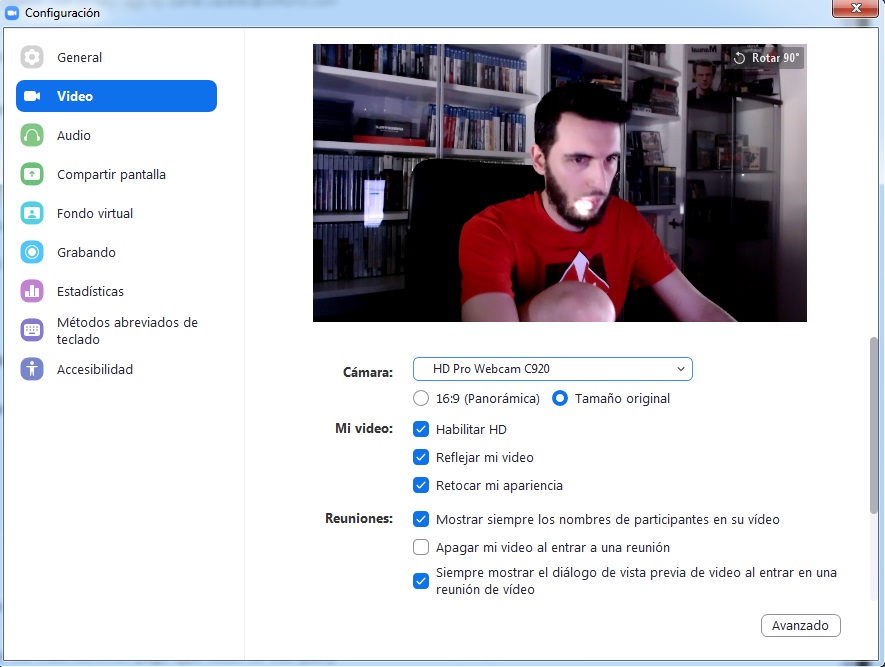
Zoom has been a revolutionary app during the coronavirus pandemic. It can be used for video calls between two people, but if desired, you can host group meetings with up to 100 participants in the free version. This makes it perfect for online classes or meetings with a large number of attendees. Zoom has a user-friendly interface, and as the chat host, you’ll receive an ID number to be shared with the rest of the participants.

During chats, you can adjust your display to see only the speaker, or a mosaic view with all of the participants’ faces. Zoom is an easy app and it’s free to use. Also, it has versions for PC, Android, and iOS. Want to try it?

  • Zoom for PC

Zoom Meetings DOWNLOAD
9

  • Zoom for Android

Zoom Meetings (Android) DOWNLOAD
8

  • Zoom for iOS

Zoom Meetings (iOS) DOWNLOAD
8

WhatsApp

Logotipo de WhatsApp

These days, it would be hard to find anyone who doesn’t have WhatsApp installed on their phone. So it is understandably one of the most popular apps for video calling. As you probably know, this messaging app is perfect for sending texts, photos, and voice notes. What many people don’t realize is that WhatsApp is also an excellent app for making audio and video calls. Just open WhatsApp like you usually would, tap on your contact, and tap the video camera icon in the upper right corner.

Once your video chat begins, up to eight contacts can participate in it. WhatsApp is a convenient way to make video calls without bugging your contacts to install a new app, because, let’s be realistic, who doesn’t have WhatsApp on their phone?

  • WhatsApp for Android

WhatsApp (Android) DOWNLOAD
8

  • WhatsApp for iOS

WhatsApp (iOS) DOWNLOAD
8

Messenger

Facebook Messenger logo

If you’re a Facebook user and you chat with family and friends through its messaging app, you’ll be interested to know that you can also use it to make video calls. Messenger lets you make voice or video calls with one or more contacts on your Friends list. In fact, you can host video calls for up to 50 people via its new service: Messenger Rooms.

Messenger’ video calling system is really easy to use. Just tap the camera icon in the upper right corner. Also, these video chats have fun filters and special effects that are updated every week. What are you waiting for? Download it today!

  • Messenger for PC

Messenger (PC) DOWNLOAD
7

  • Messenger for Android

Messenger (Android) DOWNLOAD
8

  • Messenger for iOS

Messenger (iOS) DOWNLOAD
8

Google Meet

Google Meet logo

Google Meet is Google’s latest foray into the world of video calling. It’s perfect for users of the Google suite, that is, Gmall, Drive, and Calendar. To access it, you only need a Gmail account, which is completely free. Get yours by clicking here. Google Meet offers video chats for up to 250 participants at the touch of a button. You can access them from the Gmail desktop version and through its convenient app for Android devices.

The way it works is very similar to Zoom. Create a meeting and share the link with the participants, all from Gmail’s convenient interface and without having to install any sort of plugin. Google Meet is especially good for work meetings and group video conferencing. To try it, click “Start a Meeting” in the lower left corner of your Gmail, or download the version for Android and iOS phones and tablets.

  • Google Meet for Android

Google Meet (Android) DOWNLOAD
8

  • Google Meet for iOS

Google Meet (iOS) DOWNLOAD
8

Skype

Logo de Skype

Skype was a true pioneer in the field of online voice calls and video conferencing. It is therefore one of the most stable services with the best performance in the market today. Although there are tons of ways to make video calls nowadays, Skype has the great advantage of being a multiplatform program. In other words, whether you use Windows, Mac, iOS or Android, you can make calls over Skype.

As for usability, Skype is especially convenient for group and work-related calls. This video calling service can be integrated into the Office 365 environment. We highly recommend it for job interviews.

  • Skype for PC

Skype (PC) DOWNLOAD
8

  • Skype for Android

Skype (Android) DOWNLOAD
8

  • Skype for iOS

Skype (iOS) DOWNLOAD
8

Google Duo

Logo de Google Duo

If you’re not entirely sold on Google Meet and would prefer a program for phone-to-phone video calling, try Google Duo. This app is very similar to FaceTime, the only difference being you don’t need an iPhone to use it… and it’s available for both iOS and Android devices!

Google Duo uses your phone number and lets you make free voice and video calls to anyone on your contacts list. The app has a feature called Knock-Knock that you can use to find out who’s on the other side of the camera before accepting the call. Another thing to keep in mind is that Google Duo lets you host group video calls for up to 12 people. Interested in trying it?

  • Google Duo for Android

Google Duo (Android) DOWNLOAD
8

  • Google Duo for iOS

Google Duo (iOS) DOWNLOAD
8

Houseparty

Logo de Houseparty

Houseparty is a fun app you can use to throw virtual parties without leaving your house. Every Houseparty user has a “house,” that is, a video-chat channel that users can visit, coming and going as they please.

Every channel allows up to eight visitors simultaneously, and it’s fun and easy to have little get-togethers with friends. What’s more, Houseparty features fun games you can play as a group, such as trivia or one where you have to finish the song lyric. It’s fantastic for hosting fun video chats with your friends.

  • Houseparty for PC

Houseparty (PC) DOWNLOAD
8

  • Houseparty for Android

Houseparty (Android) DOWNLOAD
9

  • Houseparty for iOS

Houseparty (iOS) DOWNLOAD
8

Snapchat

Logo de Snapchat

Snapchat is especially popular with young people. Besides being an excellent video calling app, it’s a social media platform where you can share photos and all kinds of multimedia content. Among Snapchat’s unique features are the funny filters you can use on your video calls. But that’s not all: Snapchat lets you make video calls with up to 16 people. It’s perfect for young people.

  • Snapchat for Android

Snapchat DOWNLOAD
6

  • Snapchat for iOS

Snapchat DOWNLOAD
6

FaceTime

Logo de FaceTime

FaceTime is an excellent app for making both video and voice calls. You can make one-on-one or group calls with a total of 32 people at the touch of a button. Although it’s a great app, it has a big problem: FaceTime is only available for Mac and iOS users. So if you’re a Windows person or you use the Android operating system, you won’t be able to download it.

  • FaceTime for Mac

FaceTime (Mac) DOWNLOAD
6

  • FaceTime for iOS

FaceTime (iOS) DOWNLOAD
8

Slack

Logo de Slack

Slack is a communication platform that has really taken off in recent years, especially in professional environments. Besides having chats with your coworkers and sending files, Slack lets you make two-person video calls. We should point out that if you use the app’s free version, you can’t make group video calls. Still, it’s a highly versatile app that you can use on both Android and iOS devices.

  • Slack for PC

Slack (PC) DOWNLOAD
6

  • Slack for Android

Slack (Android) DOWNLOAD
10

  • Slack for iOS

Slack (iOS) DOWNLOAD
10

WeChat

Logo de WeChat

Our final pick is WeChat, a versatile app that offers hundreds of options for users. One of its strong points is that it can be linked to your social media accounts, so you can upload photos or videos directly to your account without leaving the app.

Moreover, it has interesting features like Shake, which lets you find users in your area who want to chat and make video calls. WeChat lets you make voice and video calls to individuals and groups. And it’s free! Interested in trying it?

  • WeChat for PC

WeChat (PC) DOWNLOAD
8

  • WeChat for Android

WeChat (Android) DOWNLOAD
8

  • WeChat for iOS

WeChat (iOS) DOWNLOAD
7

We hope you found our selection of video calling apps useful. Do you have a recommendation that isn’t on our list? Tell us about it in the comments section!


How to translate instantly within WhatsApp and Facebook Messenger

Translate text instantly with WhatsApp and Google Translate!

Translate

Google has launched a brand new feature for the official Google Translate app, which enables users to translate texts from within instant messenger services such as WhatsApp and Facebook Messenger.

Google Translate Download now ►
8

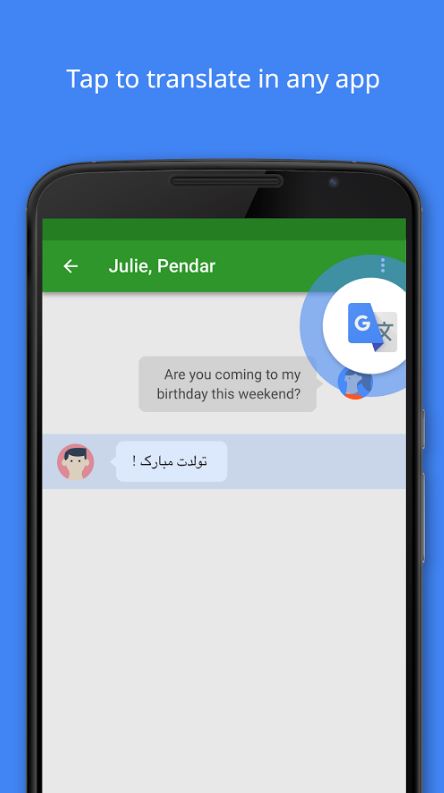
Tap to Translate is about revolutionizing the way you communicate with your friends who speak a language different to your own, and allows you to translate your messages without leaving the app you’re currently using, in record time!

Tap to translate in any app

If you’ve received messages in a different language via WhatsApp or any other messenger for that matter before, you’ll know how time-consuming it is to have to copy and paste a message into an external app to translate it (unless of course, you know the language).

WhatsApp Messenger Download Now ►
8

With Tap to Translate, all you have to do is simply tap the message you wish to translate to get it in your language, as well as tap your own message to translate it for others to understand! It’s great if you’ve got a WhatsApp group for university or work that’s full of international members who tend to switch between languages during the conversations.

As it works within most apps, you’ll never get lost in translation again!

Check out the official video below to learn how to do it!

What’s new with Facebook’s redesign

Facebook tries to reinvent itself. Will it work?

facebook new look

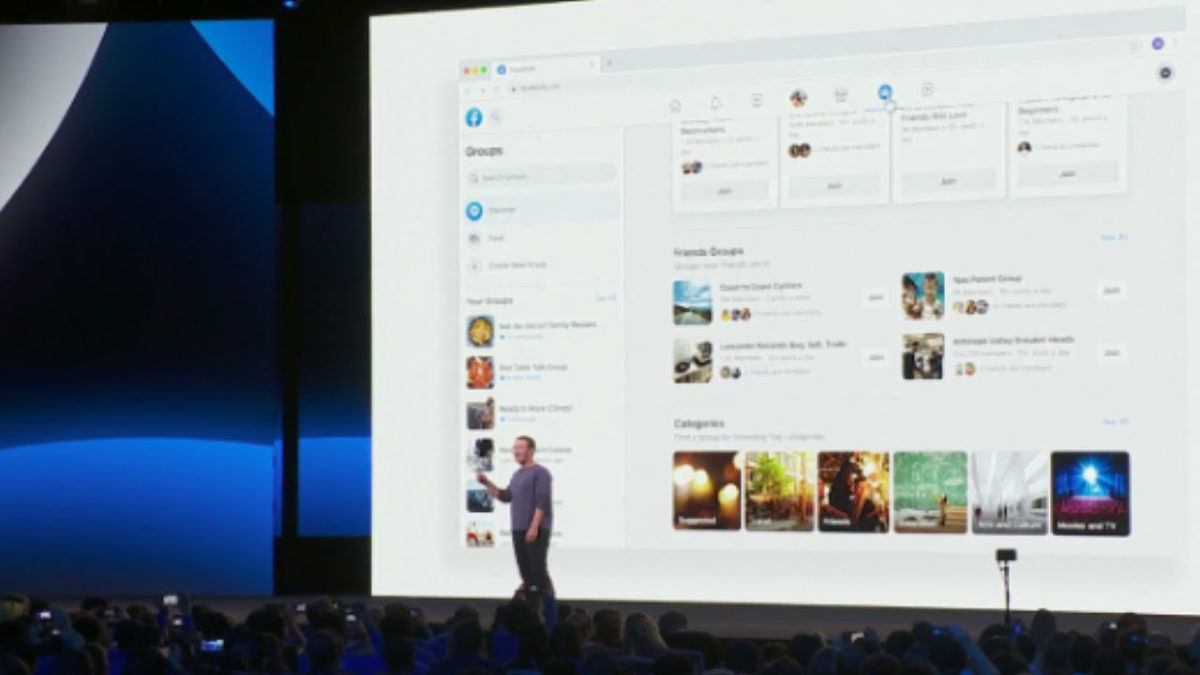
Facebook rolled out a redesign in the wake of its many recent privacy scandals. Today, it feels like Facebook is trying to wipe the slate clean with a minimalist interface and a pivot toward digital community-building.

Just last month, Facebook announced that significant changes were coming to the mobile and desktop platforms. They announced the changes would shift away from the news feed and toward the two features people still use: Events and Groups.

Watch the Zuckerberg announcement here, if you’re so inclined:

But, the gist of it is, Facebook is aiming to get more personal. The company is doing so by putting some distance between features like Groups, Messenger, and Events and the increasingly problematic newsfeed.

Here’s what’s changing:

New look, new feel

Facebook redesign

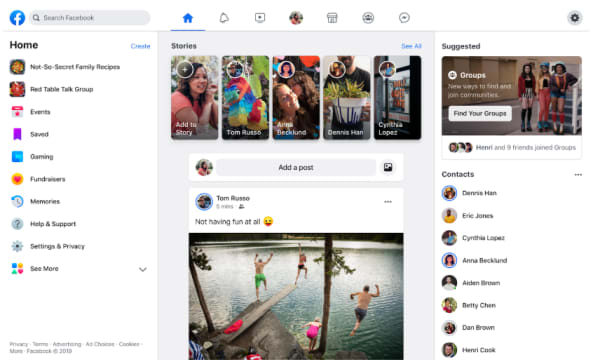
So, before we dive into the real meat of the redesign, Facebook has made some notable aesthetic changes. Instead of the big blue header at the top of the page, the site includes a lot more white space, with light gray icons for accessing your newsfeed, notifications, Messenger, and Facebook Watch.

They’ve also updated the logo, shifting gears from an F within a blue or white square to a brighter, circular icon.

7

It’s all about the groups

suggested groups

Zuckerberg is all about building communities these days. Groups represent a big part of that shift from a centralized newsfeed to a core focus on groups.

That focus on community, according to Zuckerberg, means building out both public and private groups on the platform. Increasingly, users seek private spaces where they can post content that reflects shared interests in front of an engaged audience.

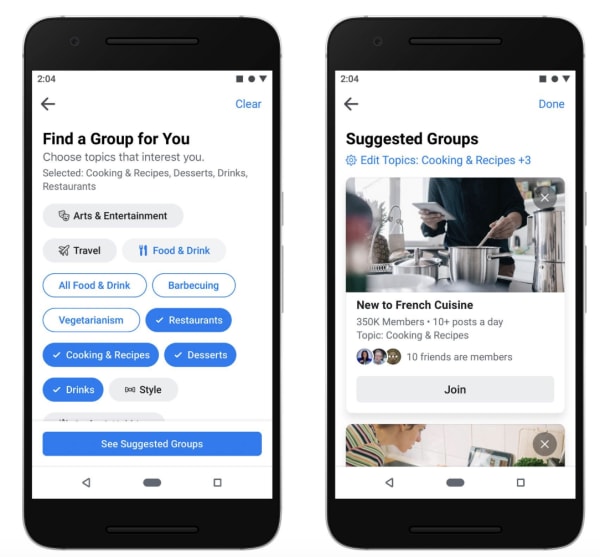
Facebook also plans on helping you expand your online circle by recommending groups based on past interests and interactions. Plus, they’ve improved the feed, making active Groups easier to find — within a personalized feed. Now, you can separate group posts from the regular newsfeed, making it easier to engage with other users.

Meet new friends

new friends on facebook

Remember when we could meet people online? Sure, dating apps are huge, and there are apps like Meetup designed to help you find a book club or a few local folks to go with you to happy hour.

7

But, the days of the chatroom are long gone — perhaps for a good reason (namely, safety).

It’s long been sort of taboo to add someone you don’t know in real life on Facebook. However, part of the redesign involves changing what’s become a digital norm.

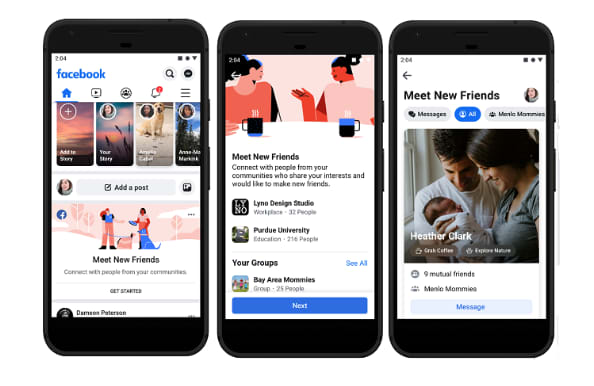
A new feature, Meet New Friends, aims to connect people with strangers who share an interest or connection. The goal is to help them meet up IRL.

Facebook Marketplace got a makeover, too

Facebook marketplace

The social network’s e-commerce service, called Marketplace, also got an upgrade.

People selling goods through the platform will now be able to to take payment directly from the platform, including shipping costs.

As it stands, marketplace users have to arrange for payment outside of the platform — though they can do so inside Messenger.

Events

facebook events new look

Another area where Facebook is diving in head-first is its Events page. As is the case with groups, Facebook wants to help you find more things to do near where you live.

The new tab is now next to the Groups tab in the new menu bar layout. It offers a more detailed map view that allows you to see where the events you are interested in are located in relation to one another.

Facebook Watch is front and center

Wait, what is Facebook Watch? Don’t worry; if you’re asking that question, you’re certainly not alone. According to a Diffusion study, 50% of adult Facebook users in the U.S. had never heard about it.

Facebook Watch aims to capitalize on streaming trends — it’s trying to hitch a ride off of the success driving Netflix and YouTube. But, there aren’t any notable “hits” on the platform.

Facebook says that 75 million people now use Watch for at least one minute per day, and not necessarily all at once.

While we get why Facebook insists on making us notice Watch — it’s hard not to feel as though they’re really forcing us to pay attention.

Privacy

Privacy has been Facebook’s Achilles heel going on a few years now.

From Cambridge Analytics to the ongoing debate about the company’s data collection practices, the company has had some difficulties winning back the trust of the public.

To combat this image problem, Zuckerberg has been promoting a message centered around privacy. It runs in stark contrast to its old narrative as this digital public square.

Zuckerberg said, “Privacy gives us the freedom to be ourselves,” pointing to a shift in how we interact online these days.

In the past, the purpose of posting was to reach as many people as possible. Today, Zuckerberg says, we now crave a sense of intimacy online.

Which, in all honesty, is probably true.

Wrapping up

If the recent news about Facebook’s shareholders wanting to hire a chairman to oversee Zuckerberg is proof of anything, it’s that the company wants to change.

These new design changes to Facebook are nice, but we are hoping that the changes to the social media giant go beyond the cosmetic level.

Facebook Messenger’s coolest hidden features

Learn how to use Facebook Messenger like a pro.

Look, Facebook Messenger is great for sending messages to your friends, but if that’s all you’re using it for, you’re seriously missing out.

Over the past few years, Messenger’s lineup of features has beefed up a ton. It’s an all-in-one platform these days, teeming with games, chatbots, productivity features, and more.

At the beginning of the year, Facebook rolled out its buzzed-about redesign:

Facebook redesign

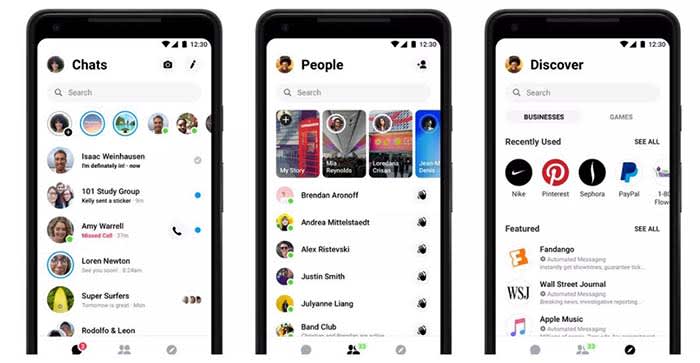
It gave the once overcrowded app a clean, fresh-looking interface. Now, some of the coolest features are hidden behind a four-dot icon.

Whether you’re new to Messenger or haven’t ventured beyond the dots, here are some features and tricks to know:

1. Use Messenger without an account

Facebook Messenger can work without Facebook? Well, yeah.

Hey, we get it, Facebook isn’t everyone’s thing. Many of us grapple with breaking up with FB, and a few actually go through with it.

Still, if all your friends are group messaging on Facebook without you, you don’t need to reactivate to join the thread.

Instead, download the app. When you get to the log-in screen, say you don’t have an account. From there, you can register your account with a phone number and use it to sign in.

2. Send money to your pals

fb messenger send payments

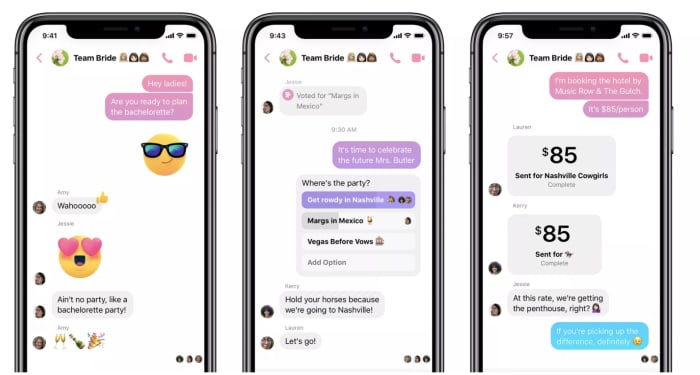
There’s no shortage of mobile payment apps, so this whole cashless revolution thing is old news at this point. However, hitting up your friends for money or paying them back for last night’s drinks no longer means you have to leave Facebook.

Add your debit card or PayPal account to Messenger by tapping your photo at the top of the app, then selecting “payments.” There, you can link the account of your choosing, along with a PIN or fingerprint for a layer of security.

To send or request money, all you do is choose the dollar sign next to the text field, fill in the amount, then add your payment information.

3. Add extensions to your chat

Facebook Messenger extensions are third-party apps that connect to your account. This way, you can access apps through your open chat window. You can also share articles, playlists, and more with your contacts.

Here, you’ll find games, apps like Spotify, OpenTable, Kayak, or The Wall Street Journal.

Want to make your friends a mixtape? Log into Spotify and share your picks through Messenger.

You’ll need to link your accounts (i.e. log into Spotify using your Facebook credentials).

8

4. Create Stories

Yep, just like Snapchat, Instagram, and now, even LinkedIn, Facebook lets you tell your story through videos and filters.

The app has a feature called My Day, which allows you to add videos and photos to your “day feed.” You can share moments with your friends. Like Instagram and Snapchat, FB’s version expires after 24 hours.

Instagram Download Now ►
7

8

5. Encrypted conversations

If you’re wary of how social media channels are stealing all of our data, you’re not alone.

But you don’t have to switch to Signal or WhatsApp to chat off the grid. Instead, Messenger allows you to encrypt from right inside the app. Messenger actually uses Signal protocol here to ensure that only you and the other person can see the message. Not even FB can read your messages.

To turn on Secret Conversations, all you need to do is, tap the little “I” at the top of the screen and select “go to Secret Conversation.”

There is a caveat — no group chats allowed. Secret Conversations are limited to one-on-one convos only.

WhatsApp Messenger Download Now ►
8

6. Send files

Sending files is something you can do with all sorts of platforms these days, but the beauty of messenger lies in its multifunctionality. The chat app supports multiple types of files, so you can easily send friends photos, PDFs, or Word Docs without clicking around multiple tabs. Sure, FB’s file sharing feature isn’t groundbreaking, but sometimes these little timesavers are a real gift.

7. Dark Mode

crescent moon dark mode

Dark mode was one of the most requested features for Messenger, and now our nighttime dreams have become a reality. Some users believe that dark mode reduces the eye strain that comes from looking at a bright white screen for hours on end. Others just think the inverted color scheme looks cool. Google says that activating dark mode preserves battery life on Android phones.

Here’s a step-by-step guide to activate dark mode on Messenger.

In summary

Messenger’s hidden tips and tricks can help you make the most of the messaging service. Although some of us have our issues with the big FB, Messenger’s free service keeps us coming back.

If you use WhatsApp or Facebook Messenger, you have to check out the Opera browser

No more switching tabs to message people on WhatsApp or Messenger. Opera browser has fully-featured WhatsApp and Messenger integration.

There aren’t many web browsers that stand out for having truly unique features. These days we’re all looking for a quick and secure browser and pretty much all of the big ones can offer this. After that, there isn’t too much to choose between them. Sure, privacy advocates veer towards Firefox and Apple fanboys use Safari, but it is difficult to put your finger on discernible differences between the offerings of the big web browser developers. That is, apart from Opera.

New features come to the internet all the time but has any web feature had such a huge impact on our daily lives as instant messaging? Who doesn’t have a separate tab or window with either Facebook Messenger or WhatsApp open right now? Well, Opera has long been studying how we use the web and innovating new features designed to accommodate common web practices. The Opera browser now has fully integrated versions of WhatsApp and Messenger built into the browser.

No more switching tabs to message people on WhatsApp or Messenger

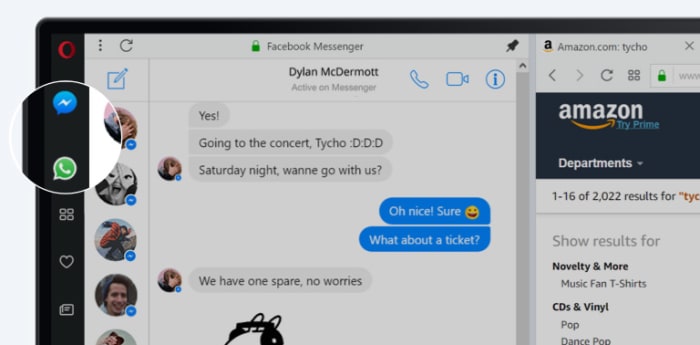
One of Opera’s key features for a while now has been its sidebar, which sits stealthily at the left-hand side of the browser. The sidebar gives quick and easy access to common web tools like search, downloads, favorites, etc. Last October, Opera also added two new buttons to the sidebar; the WhatsApp and Messenger chat bubbles.

Messenger Opera integration

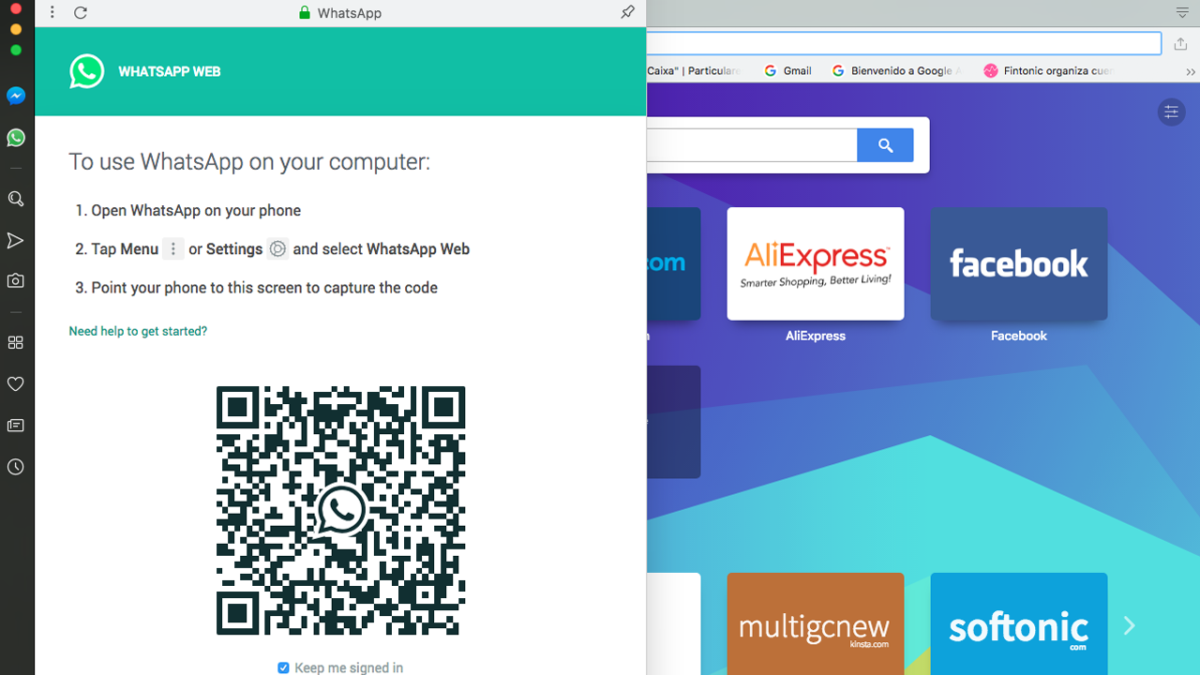
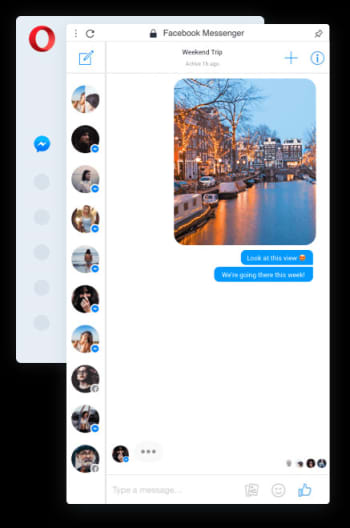
Clicking the WhatsApp and Messenger icons opens out fully functional and well-designed chat widgets from the sidebar. They offer all the features you’ll find on the web versions of both apps, but sit above the web page you’re currently browsing and only cover about a sixth of the page.

With the integrated messengers being so small, the design is key, and Opera has pulled it off nicely. All the buttons and features are there but they’re tastefully placed in a way that feels right. Contact icons are down the left and hand side, with the conversation taking up most of the display space.

Messenger Opera integration chat bubble

On top of the neat design and full feature sets, the Opera browsers WhatsApp and Messenger integrations offer other key messaging app tools to ensure you’ll never have to leave the web page you’re browsing to check your messages again. You can activate in-browser notifications for incoming messages, pin your favorite chats, mute conversations, or log off from the services altogether.

The key here is that when you get a new message all you have to do is click the icon to the left of your page, read the message, and then respond, should you feel the need. Throughout that whole process, there is no need to switch tab and the web page you’re viewing stays on the screen the whole time.

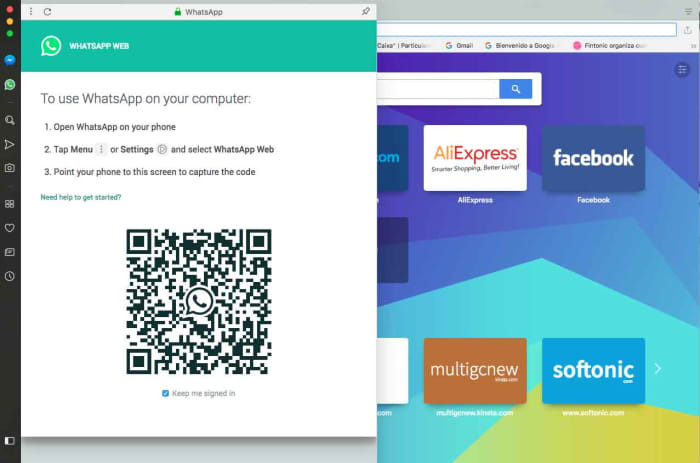
WhatsApp web on Opera browser

In the tech world, small things make big differences, but with WhatsApp and Facebook Messenger integration, Opera has added a large feature to its browser that creates a smoother workflow and makes it harder to become distracted from what you’re doing. This is more than a big difference; this is a big deal.

Softonic is proud to partner with Opera. When you download from us, we may earn a commission.

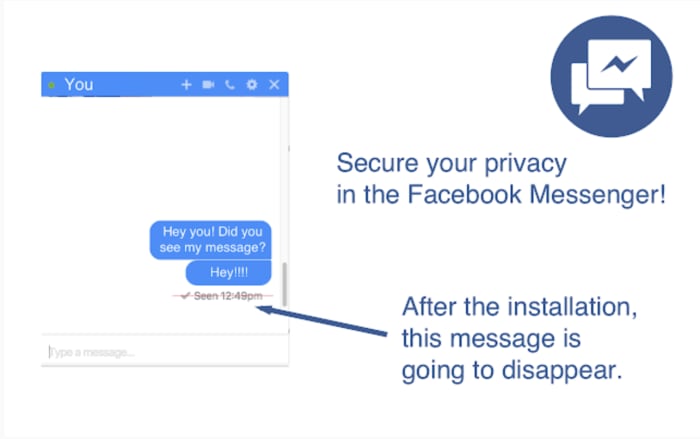
How to turn off read receipts in Facebook Messenger

Reclaim your privacy with these simple steps.

Install Facebook Messenger

Read receipts aren’t exactly popular.

They’re a great way to stir up a little drama among friends. They can also generate a ton of anxiety when you’re trying to figure out if that new guy you’ve been dating is serious or not.

Nothing is worse than knowing someone read your message and just didn’t respond.

There’s literally no benefit to this FB-sanctioned stalking tool. It’s just an added pressure designed, in Facebook terms, to add a conversational cadence to our online chat.

So, can you turn off Messenger’s read receipts?

The short answer is, no. Facebook doesn’t make it easy by allowing you to turn this setting off through your account.

That said, you do have some options.

How do you read a Facebook message without the sender knowing?

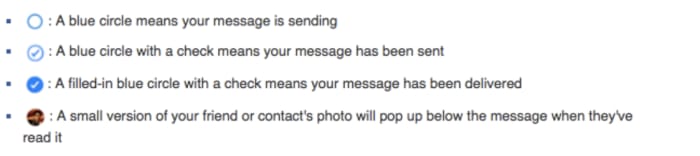
Facebook Messenger relies on a system of circles to show the status of each message you send. You’re probably familiar with the setup, but it looks like this:

Read receipt in Facebook messenger

We all know it’s a pain when you get a message, but don’t want to respond immediately. You could ignore the message, but, come on, that’s not entirely realistic.

There are a few workarounds to use here:

Turn on the airplane mode

One of the easiest ways to check your messages incognito is to prevent the internet from reaching your app.

Turn your phone on airplane mode, then open your app and read your messages.

Use the notifications screen

The other quick fix? Not opening the app at all. Instead, view your messages through your phone’s notification screen to avoid detection.

Just be careful you don’t accidentally open the app. This workaround is best used to quickly check if any notifications demand an immediate response.

Embrace the extensions

As with the mobile app, Facebook doesn’t provide an easy way to hide from your friends and family.

Chrome has a workaround, aptly named, Unseen, that you can add to your browser. You can start reading messages without feeling like you’re being watched.

Google Chrome Unseen feature

If you’re a Firefox fan, Message Seen Disable does the same thing.

Both browser extensions allow you to open the app and read your messages. However, that little ball with your profile picture won’t drop unless you turn off the extension.

Also, both apps are free and require no actual tech savvy. If read receipts are the bane of your existence, this is your best option.

FB Unseen Download Free
8

Read receipt drama is real — science confirms

For a deep dive into this subject matter, we recommend checking out an episode of the “Why’d You Push That Button” podcast. They interview researcher Lujayn Alhddad who literally wrote a paper on the topic.

The paper looks at the difference between how people feel about read receipts depending on whether they’re the sender or the recipient. Unsurprisingly, most people wanted to see when someone got their message but didn’t like the idea that someone might be tracking their behavior.

Alhddad brings up the real issue of social pressure associated with read receipts.

She says they serve as a reminder that we “need” to respond immediately. Otherwise, the sender will assume the recipient is not interested in what they have to say.

Another expert, Dr. Tony D. Sampson, of the University of East London has another thought. He says that apps like Facebook, iMessage, and WhatsApp are designed to “trigger negative emotions linked to compulsive behavior.”

This, admittedly, sounds troubling. Sampson says that unhealthy habits like compulsively checking read receipt time stamps keep us tuned in. This means we’re continuing to supply platforms with our data.

Next time you leave someone on “read,” give a thought to their mental state.

How to activate Messenger dark mode

How to activate Dark Mode in Facebook Messenger.

New Facebook Messenger Dark Mode
Image via: Facebook

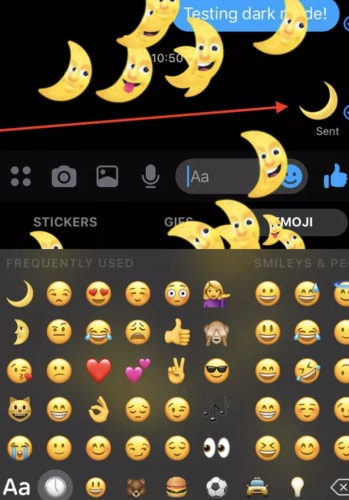
Last month, we first told you about Facebook Messenger’s new Dark Mode. Facebook did make the feature available to all users but hid it behind a kind of secret code. To unlock it, you had to send a crescent moon emoji to one of your friends. Now though, Facebook has finally announced that the new feature is now built-in to the settings menu for all Messenger users.

How to activate Dark Mode in Facebook Messenger

To activate Dark Mode in Facebook Messenger all you need to do is:

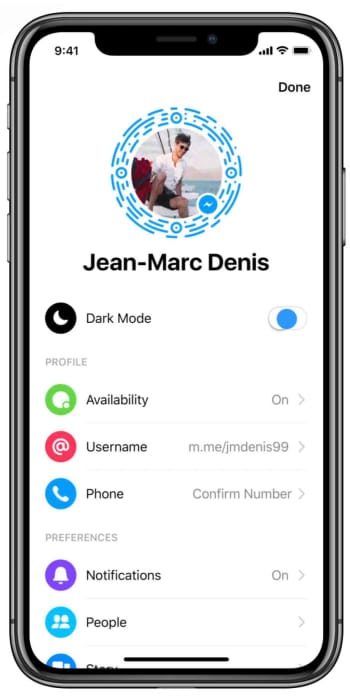
Step 1

Open Facebook Messenger on your phone and tap your profile photo to access the Settings menu.

How to enable dark mode in Messenger

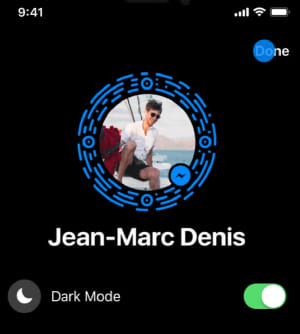
Step 2

Tap the Dark Mode toggle button to switch it to the on position.

How to enable dark mode in facebook messenger

Step 3

Hit Done in the top-right of the screen and get on with whatever you were doing in Messenger.

How to enable dark mode in Messenger

Now that there is no secret Easter Egg activation to go through, activating Messenger’s dark mode couldn’t be simpler. The dark mode will be easier on your eyes, won’t glare so much when used at night, and according to research by Google, will save your phone’s battery if you have a device with an OLED screen.

Complete Guide to WhatsApp in 2019

See all the great new features WhatsApp offers.

WhatsApp

WhatsApp has already been a news cycle staple in 2019, given Facebook’s recent announcement to merge the app with Messenger and Instagram. There’s also the fake news issue and the recent release of WhatsApp Business for iOS.

WhatsApp Messenger Download WhatsApp ►
8

Oh yeah, and the app just celebrated its 10th birthday in February. So far, this year has brought several new features into the mix, from playful stickers to better security protections.

Here is a look at just a few of the many new WhatsApp features to check out.

WhatsApp upgrades: 2019 Edition

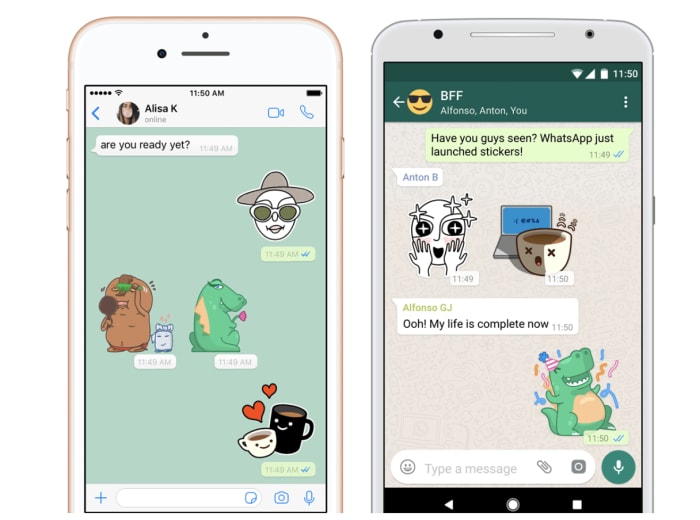
Sticker integration

WhatsApp rang in 2019 by adding stickers to the mix. The app comes equipped with its own set of stickers, but you can also integrate third-party packs into your account for more options.

whatsapp sticker integration

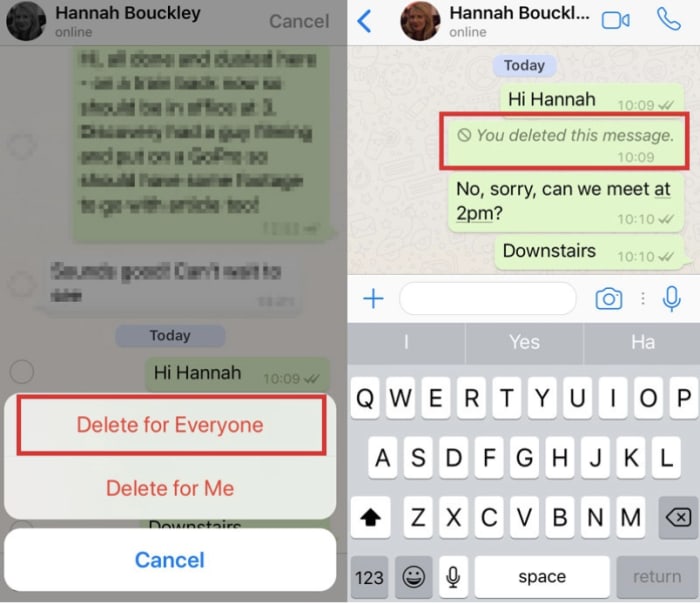
Unsend messages

Like Facebook, WhatsApp recently debuted an unsend feature that allows you to take back that stupid thing you sent. You’ll have an hour to make up your mind and can choose to delete a message for yourself or for everyone. Like Facebook, that doesn’t mean you can prevent someone from reading the initial message, but you can remove it from their feed.

whatsapp message delete

Listen to voice messages without headphones

Okay, fine, WhatsApp has always been able to play voice messages on the loudspeaker. What’s different about this latest feature is, you now have the ability to listen to voice recordings as if it were a phone call.

All you’ll need to do is put it up to your ear and play the message. It will softly whisper the recording so no one else can hear it.

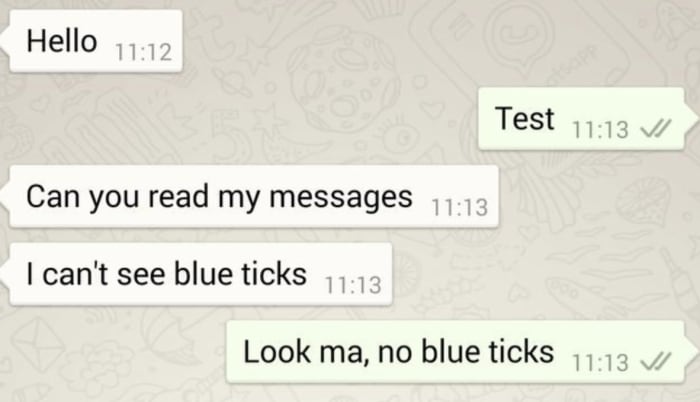
Check messages without going online

People will never know you left them on “read.”

Unlike Facebook Messenger, WhatsApp now lets you view your messages without letting the sender know that you’ve opened the message.

Alternatively, they’ve also made it easier to see who has reviewed the messages you’ve sent to others. This might not be the healthiest way to engage with your messaging system, but WhatsApp’s resolution for 2019 is choices.

whatsapp check messaging no read receipts

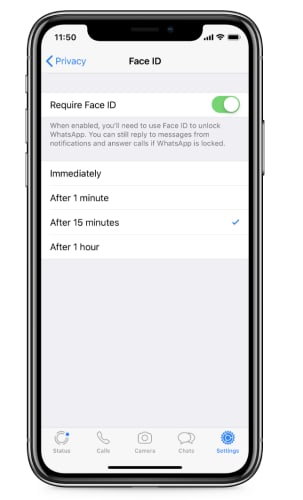
FaceID and TouchID Access

new authentication features for whatsapp

This isn’t the most exciting feature, but it is pretty heavy in demand. WhatsApp just added a new authentication feature to the stack for an extra layer of privacy.

Find it by tapping: WhatsApp Settings > Account > Privacy

It enables users to enable authentication before WhatsApp opens and shows your messages. It’s a lot like banking apps where you need to provide Touch ID or FaceID to access your account. The benefit with the new feature is that if someone gets ahold of your unlocked phone, they can’t access your chats.

How relevant this is to you depends on what you’re hoping to protect yourself from. If it’s a matter of making sure the average stranger, your kids, or a nosy partner don’t open your messages, it’s pretty useful. Although, this is all assuming they don’t know your PIN.

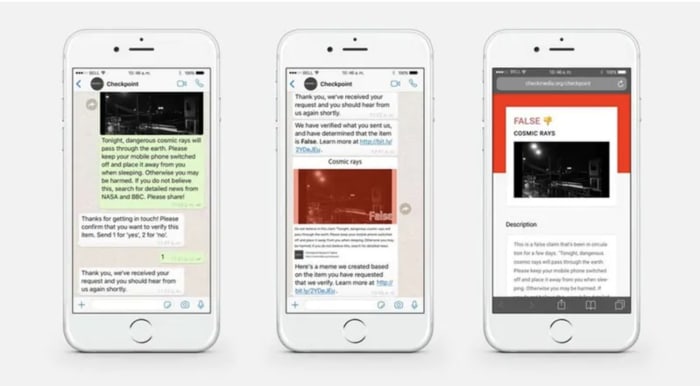
What’s new with WhatsApp’s battle against fake news?

Last year, the app faced some major challenges in India with backlash from citizens over the spread of misinformation. The problem was, WhatsApp’s encrypted messaging limited the company’s ability to track the source of the problem.

This year, WhatsApp said that it had refined its spam detection tool, making it easier to report bad actors. Still, it’s hard to say whether there’s been any impact so far.

If you look on the app’s FAQ page, WhatsApp makes some recommendations for avoiding spam and hoax messages. It states that they have the right to ban users who they believe are in violation of the app’s terms of service.

Finally, the platform rolled out the WhatsApp tip line. It is a reporting tool that allows users to report misinformation. As of now, the feature is only available to users based in India — and it’s unclear when or if this is coming to the rest of the world.

tip line for whatsapp india

Group chats are now more secure

new options for whatsapp group chats

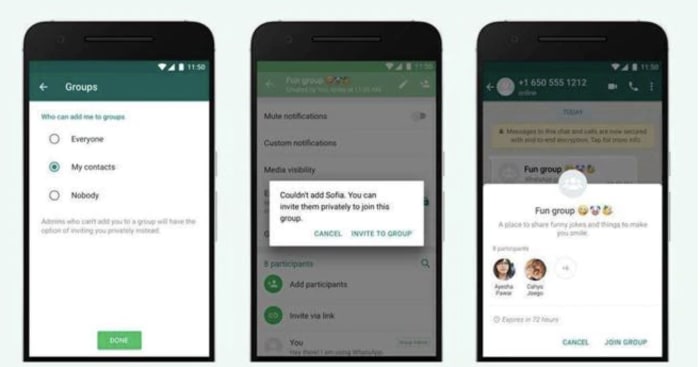
Another brand new feature for the platform is an additional privacy setting for group chats. Group chats now come with the following options:

  • Everyone — This setting means that the user can always be added to group chats.
  • My Contacts — This means that the user can always be added to groups if the admin is listed in their contacts. If the invite comes from someone outside of the contact list, they will receive an invitation to join.
  • Nobody — The user cannot be added to a group chat automatically. If another user wishes to add them to a thread, they will receive an invite and can choose whether to join or decline.

The new security features eliminate the issue of being added to random chats, which has increasingly become a problem for those users who just want to communicate with family and friends.

Wrapping up

We didn’t even cover every feature that WhatsApp has released in 2019. After 10 years, the private texting app has come a long way, offering cute stickers along with extra security protections.

Facebook Messenger might be coming home to the main app

A limited messaging facility has been spotted in some advance code of a Facebook app update.

Back in 2011, Facebook made waves by forcing everybody who wanted to message their Facebook friends to download a standalone app. In a heartbeat, Messenger was created and it has since gone on to have over 1.3 billion active monthly users. Now, almost eight years later, it looks like there is a new strategy at Facebook HQ and that it could include users once again being able to send messages to their Facebook friends via the main app.

A limited messaging facility has been spotted in some advance code of a Facebook app update

Facebook messaging is coming back to the main app
You might soon be able to message your Facebook friends from within the main app

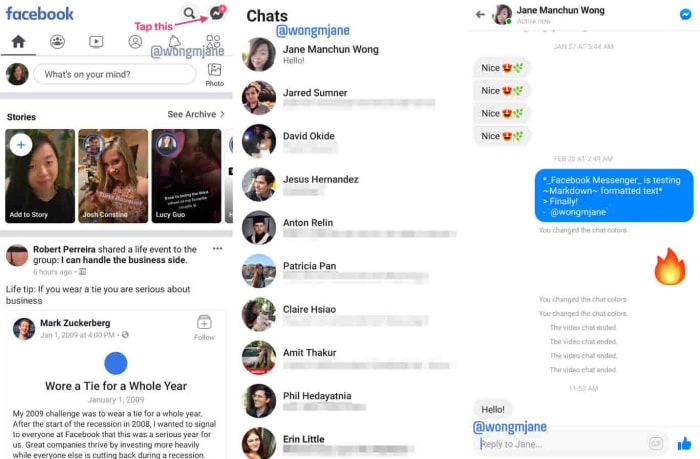
The code has been spotted in a special version of Facebook, which the social giant uses to test new features. According to tech tipster Jane Manchun Wong, the test app includes something all Facebook users will be familiar with but that causes a very different outcome. This is the Messenger chat bubble.

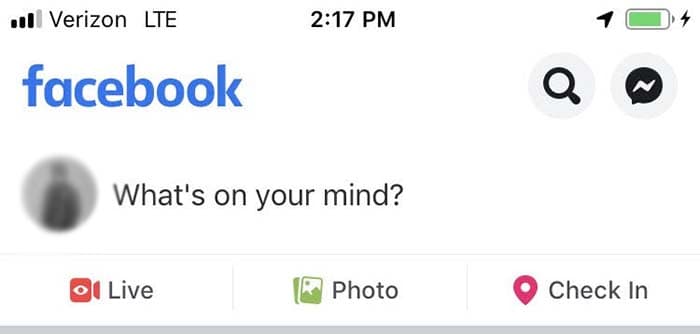
If you open the Facebook app you have on your phone right now and then click the Messenger bubble, your phone will open the separate Messenger app. In the advanced test version of Facebook, this bubble opens up a messaging service right there in the Facebook app.

Chat with friends in the Facebook app
Image via: Twitter

It isn’t quite time to get too excited just yet, as it also appears that Facebook is limiting the functionality of the new in-app messaging to the basics. You can type out messages to your friends but anything more than that and you’ll have to switch over to Messenger. If you’re the type of person who likes to communicate using emojis or GIFs, or if you want to make a call or send photos, you won’t be impressed by the new features.

This all fits with the new “Merger” strategy that Facebook is working toward as it plans to integrate Facebook, Instagram, and WhatsApp. The apps will retain their individual functions, but the plan is to make it easier for users to communicate with each other across the three apps. This latest move to bring messaging back to the Facebook app isn’t supposed to replace Messenger, it is just supposed to bring the Facebook app into the inter-operability that the merger is hoping to achieve.

8

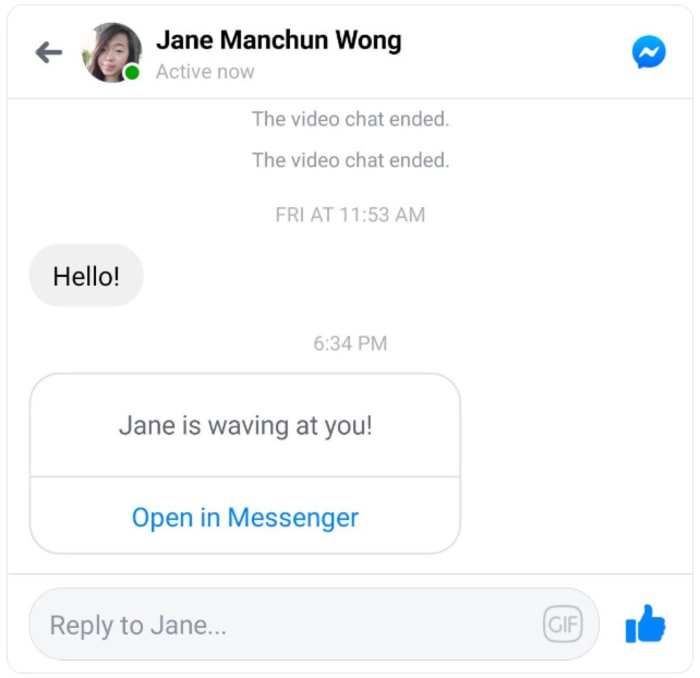
This has all been confirmed by Facebook, which told The Verge, “We are testing ways to improve the messaging experience for people within the Facebook app… Messenger remains a feature-rich, stand-alone messaging app with over a billion people using it monthly to connect with the people and businesses they care about most.” It is understood that if a user tries to do something with the new Facebook Chats feature that it can’t do, they’ll then be prompted to open Messenger.

Facebook Chats invite to Messenger
Image via: Twitter

There is no word yet about when the new Facebook Chats feature will roll-out to all Facebook users. When we know more, we’ll let you know.