How to get the most from UC Browser: hotkeys and keyboard shortcuts

Originally launching on mobile devices (Android|iOS|Windows Phone), UC Browser is a powerful browser with a dedicated and growing user base. The PC version is just as solid and (because based on the open-source browser Chromium) incredibly versatile due to it being able to use Extensions from Google’s Chrome Web Store.

UC Browser is thus a fantastic choice for all of your devices. But, if you want to get the most from the Windows version, then you need to learn all of the keyboard shortcuts it offers.

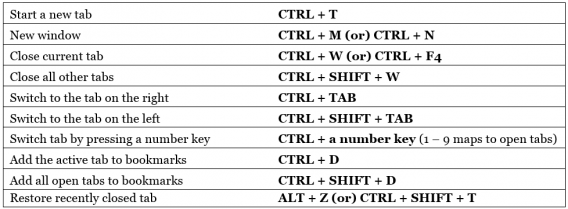
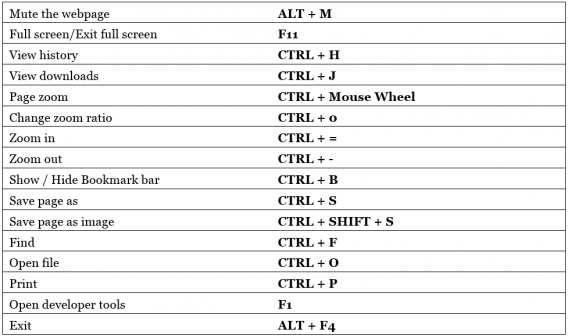
With over 30 of these hotkeys available, it can be difficult to memorize them all. Do not worry though, because we have the full list right here to show you how to be more efficient in UC Browser:

Navigation controls

address bar, forward, back, homepage, stop loading, refresh, reload, restore

Tab controls

open, close, restore, switch, add to bookmarks, tab

General controls

mute, full screen, exit, open, zoom, find, save, print

There you go, a comprehensive list of every UC Browser hotkey to speed up your web surfing.

Related Stories

3 Productivity Hacks for Office 2007

How to clear the cache on Safari for Windows

Windows 10: The 45 most useful keyboard shortcuts

How to delete your browsing history and protect privacy in UC Browser

You should definitely panic if you find this app on your partner’s phone

Applications created to record and analyze your dreams are ironically, getting a bit tiring. However, one new company has decided to go one step further and is now preparing an app that will alert you if someone is using your mattress when you’re not in your bed. Yes, you’ve guessed it – it can detect whether or not your partner is cheating on you.

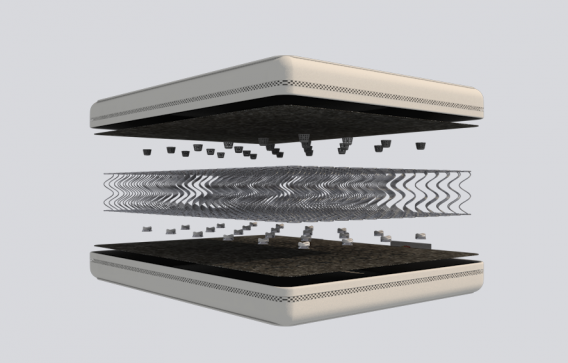
The invention is called Smarttress, and is a bit more complicated than your average application. For starters, you have to buy the mattress, which comes with a hefty price tag of around $1,750. The mattress comes with a number of sensors that vibrate whenever the bed is in use, measuring the activity, duration, impact and intensity of whatever is going on in there at the time.

The app will only alert you that someone is using your bed while you’re at work – which sadly leaves you with nothing concrete, but your imagination getting the better of you. Experts have apparently already suggested that instead of purchasing expensive beds and secret cameras, potential buyers should get themselves to couples therapy – which apparently works out cheaper.

Check out the video:

Source: Mashable

Leaked: Facebook may help you make money with your posts

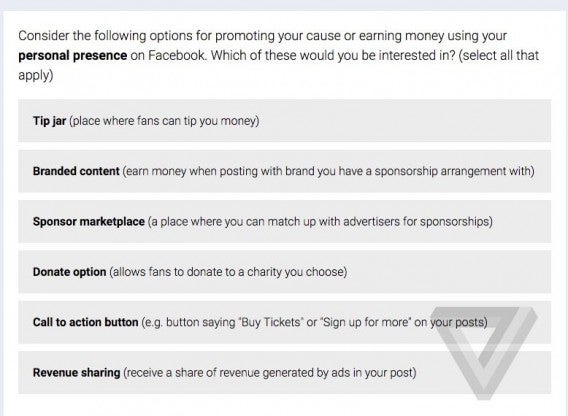
Facebook could allow you to make money with your posts. The webpage The Verge has discovered that the social network has recently sent out a survey to some users regarding the possible ways they could profit financially from Facebook, offering new options for tips, branded content, etc.

The survey also asks users to indicate their interest in a “call to action” button – a new way to ask followers to leave a tip or a “sponsor marketplace” where you can get in contact with brands and create economic relationships in order to feature products and services in your posts.

It is unclear as to whether these options will be made available to all Facebook users or for those who have a significant amount of followers or meet certain requirements.

Facebook’s latest moves indicate the company’s interest to allow a number of users to benefit financially from promotional tools – for example, in February, the company began its campaign that allows every user to use Instant Articles.

Here you can catch a glimpse of the survey Facebook is currently offering:

Facebook wouldn’t be the first social network to enable its users to profit from their work. For example on YouTube, fans can financially support those they follow (although this option is hidden).

Stay tuned for more info as soon as it’s released!

Source: The Verge

You are 10x more likely to catch a virus if you download outside of Google Play

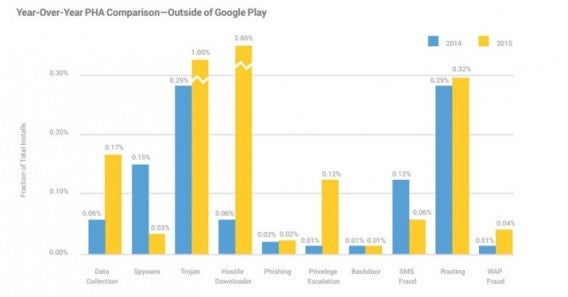
The risk of contracting malware on your Android device is multiplied by 10 if you choose to download apps from an unofficial source. Google has revealed that it currently analyzes around six billion applications and devices a day, in order to detect potentially harmful apps (PHAs). Users who use the Google Play store to download, are much less exposed to safety hazards, as only 0.15% of their apps contain them.

Google has also shown a comparison that examines malware data taken between 2014 and 2015, which shows a decline in the number of spyware found in applications or fraud text messages, and an increase in the type of malware that steals user data and automatically downloads malicious apps without warning.

The launch of Android Marshmallow has helped introduce new security measures, but it’s not the only Google product that’s taking anti-malware seriously – Google Chrome includes features for safe navigation, and there are now reward programs in place for users who detect vulnerabilities before they do.

It’s a dangerous Android world out there – stay safe and only trust Google!

This is the page you should have in favorites if you have an Android

Are you an Android user? If so, you should definitely keep this page as one of your favorites: Android Device Manager. It’s the one place you should go to if you’ve lost your mobile or had it stolen. This website has the ability to tell you if it is the worst case scenario, or you have in fact just accidently dropped it down the back of the sofa.

The new service allows you to use the website or app on another Android device to locate your lost or stolen Android device. You can even enable the ringer on your device if you’ve misplaced it in your home. This means you’ll never have to worry about finding your phone that’s on silent.

In addition to locating your Android device, Android Device Manager also has the ability to wipe your phone of all personal data if you’ve had it stolen. Many times, the data on your phone is worth more than the device itself. Google has your back and will wipe your device and stop your information from getting into the wrong hands.

To start using Android Device Manager, register yourself using the same account you have activated on your cell phone. Simply open the webpage to automatically see where the device is currently located.

Say goodbye to the Apple App Store you once knew!

Browsing the Apple App Store can be one of the most stressful things in the world. Fortunately, a new rumor has revealed that Apple are planning to renew the platform and fix the things that bother people the most.

According to Bloomberg, Apple has created a “secret team” that is currently working on a refurbishment for its famous App Store. One of the most significant changes would be to introduce a method that allows companies to pay for their apps to appear higher up on searches – a similar formula to that of a Google search.

This secret team supposedly consists of 100 people, whose objective is to “try to improve the way in which customers browse the App Store.” It is still unclear as to what this would entail, however there’s one thing for certain – it will be the most significant change the store has seen since its early beginnings.

It’s said that this secret project is only in its early stages of development, so it’s probably best not to expect to see anything any time soon!

How long does an iPhone actually last? Apple finally answers that burning question

It’s the question every iPhone owner has that very moment their bank accounts are stripped bare to pay for their new (and beautiful) device…just how long will it last? Well, we’ve got some good news – Apple have finally responded!

There are many conspiracy theories surrounding this, for example some believe an iPhone expires the minute a new model is launched, or thatit lasts long enough so you don’t have to use your two-year warranty.

Apple has attempted to address this burning question within a recently-published information document in which the company answers questions regarding its involvement with the environment. It’s safe to say that one particular part of the document attracted a bit more attention from their audience:

To model customer use, we measure the power consumed by a product while it is running in a simulated scenario. Daily usage patterns are specific to each product and are a mixture of actual and modeled customer use data. Years of use, which are based on first owners, are assumed to be four years for OS X and tvOS devices and three years for iOS and watchOS devices.”

So there you have it – your device should last no longer than four years. Have any of oour readers got a device which has lasted longer? Let us know!

What is in the Windows 10 Insider Preview 14316 and the Windows 10 Roadmap

Microsoft has plans to launch the next edition of Windows 10 with the Anniversary Update. Announced a few days before the Build Conference in Redmond, it caught many of us by surprise.  But the announcement gives a far clearer idea of what the Microsoft intend to do with its plans to make Windows 10 a truly universal operating system.

On their official website Microsoft officially explained that this Roadmap is a snapshot of the innovations that have been launched, features that have been trialed with Windows Insiders preview builds, and some others still in development. A Roadmap to success.

In this video we summary some of the developments that will come in the Anniversary Update, but expect more surprises as Microsoft continues to add to its flagship product.

What you can and try, but … how?

Providing that you are a Windows Insider you can try some of these updates today. You can join this select club if you meet some minimum technical requirements and are not afraid to reinstall Windows from scratch and possibly lose all your data. If you do not want to take the risk, don’t worry because here at Softonic are happy to (it helps when you have a pile of PCs no one is using). We have installed the Windows 10 Insider Preview 14316, which also announced in BUILD 2016. Here the news:

  • Cortana universal and powerful

New features have come to Cortana to make her more powerful. These include syncs to allow Cortana to share information across devices connected with your Windows 10 account. That doesn’t only mean Windows 10 devices, it includes Xbox One and some Android devices that have the Official 1.5 version of Cortana installed.

Cortana has been integrated into more programs: she can now read your emails in Outlook and Skype conversations. The information collected allow you to automate some functions, such as hotel reservations, saving shipping invoices, and ticketing.

  • Command Line Bash

Bash on Ubuntu on Windows 10? Microsoft has convinced Canonical to work with them, and now Linux users familiar with Bash have the option to open a Bash console to in order to navigate Windows 10. However this does require that you run Windows in developer mode.

  • New extensions for Edge

In the 14316 build Microsoft Edge – the Internet Explorer replacement – has received new extensions. These include OneNote Clipper and Pinterest which join previously announced add-ons like Microsoft Translator. Of course Edge still has a ways to go before catching up with Google Chrome or Firefox, both of which feature 100 of extensions, but it is a start.

  • Universal Skype

After an official announcement on the Skype blog, it is now possible to try an version of the Skype Universal app (Skype Universal Windows Platform or Skype UWP). This replaces Skype Messaging and Skype Video apps to let you manage all of your communications in one place. Much easier. Gradually this is to replace the standard Skype app.

Skype Bots were also announced at the BUILD 2016 conference. These tools are being designed to enhance user experience and can already be trialed in some countries (Australia, Canada, England, Ireland, India, New Zealand, Singapore, and the United States) for users of the latest version of Skype on PC, Android, and iOS. Developers have been invited to start creating Bots with the view of Skype as a potential platform for communication between company and customers.

More new features

The 14316 Build incorporates many other new features, including:

– An improved Action Center to make it easier to find notifications and the Quick Control system buttons (Wi-Fi, Brightness, tablet mode, Red, airplane mode). You can prioritize notifications by importance: Normal, High or Priority. You can also set the number of notifications per application.

Emojis updated to be more detailed, with a thicker, more expressive edge.

Improved customization with two main themes (Dark and Light).

– New ways to access your PC. Besides improvements to Continuum, the Connect app lets you project your screen to another PC wirelessly.

Virtual Desktop Enhancements that anchor the window. With two screens, this allows you to keep an application running on one while browsing different desktops.

– Battery is to replace Battery Saver, a tool that lets you view all battery related settings in the same configurations panel. This will help you modify apps running in the background. You can now even set Windows to stop them to save charge.

– Improvements and bug fixes and common problems, including the Feedback Hub (the place for Insider comments), Windows Update, and Progress Updates.

Messaging Everywhere allows you to send and receive calls to your PC with Windows 10. The preview of this app is available soon.

Read more about these improvements in the official article: Announcing Windows 10 Insider Preview Build 14316.

The roadmap

With the publication of the Windows 10 roadmap, Microsoft clearly outlines which of its updates are already finished, published already (see above), which have been canceled (interesting), and which are currently development. Below are the future updates:

– The ability to unlock your PC with your phone (Windows Phone and possibly Android) or even with your SmartBand (Microsoft Band 2 and other compatible devices). System starts will also be more comfortable and more personalized.

– Improvements to Windows Defender will make using Windows 10 in professional environments more secure, with improvements to both Windows Hello and Windows Passport.

– It seems that Edge will continue to improve with the addition of web notifications. These could see notes generated by services such as Facebook and other web applications even when you’re not using them.

– The Start Menu will receive updates. Microsoft says it will focus on giving better access to all the apps and additional support for touch input and smart pens.

– Picture in picture: it seems that Microsoft hopes to allow playback of multimedia content over other applications. This could let you comment on live video using Twitter without having to move between windows.

– Cortana will be made more prominent in the notification menu (Action Center).

– Improvements to Windows Ink. Input with intelligent pencils and be better integration with other services.

Related Articles

Windows 10 now crystal clear with how updates improve your system

Windows 10’s most iconic feature is about to change forever

Windows 10 has a big challenge ahead: to conquer this giant

Facebook Messenger’s secret inbox you didn’t even know existed

Facebook has many secrets, and we love nothing more than to tell you about them!

For example, did you know that there’s a secret hidden inbox in your Messenger? This is the inbox where all the messages from people who aren’t your friends on Facebook go to, and basically, sit undiscovered. The question is…. are you ready to read them?

Now, we warn you, this could either go one way or the other. On one hand, you may discover that some do-gooder back in Australia has found that wallet that you lost during your travels (might be a bit late though), on the other, it may bring back some bad memories you were quite happy living without until this moment. Either way – you’re in for an interesting read!

Here’s how to find your secret inbox on mobile!

1) Open the Messenger app

2) Click on “Settings”

3) Click on “People”

4) Click “Message Requests”

5) Now click on “See filtered requests”.

Here’s how to find your secret inbox on desktop!

1) Click on Messages (on the version for desktop)

2) Go to “See All”

3) Select “Filtered” from the “More” drop down menu

And there you have it! So, any unexpected surprises?


“We will never have a 32-bit operating system”: 16 stupid predictions that intelligent people made

Windows 10 would be a completely different operating system had Bill Gates’s predictions been true:

We want to show you a collection of other similarly-stupid predictions that have been made by some of the world’s leading innovators. Why? Well, basically just to prove that we can all make mistakes from time to time, and that we can only move forward if we question our beliefs.

Let’s see what other geniuses have come out with over time!

So, there you have it! Everyone makes mistakes – even some of the biggest geniuses the world has ever seen. What does this say about us? Well, that we certianly shouldn’t cling on to our beliefs… and should question everything. Clearly, nothing is impossible!

Image Source: 9Gag