You’ll be shocked when you find out how much your old iPhones are actually worth!

So, it turns out that old iPhones are worth an absolute fortune! Who’d have thought it?

A recent environmental report from Apple revealed that the company had manage to salvage around 1,000 kilos of gold, which was salvaged from old products such as iPhones, iPads and Macs. Oh, you never knew your device had gold in it? Yes!

Gold is regularly used in electronics as it is an excellent electricity conductor, and is extremely durable as a material.

According to official sources, you can expect to receive just short of $40,000 for a kilo of gold. So, that means that just by recycling their old devices, Apple stand to make around $40 million (rough estimate)! According to sources, Apple does not sell its old devices – it simply reuses the materials to make newer ones.

Before you all start pulling apart your devices looking for gold bricks, be warned, there’s hardly any gold in one device to make you some big bucks. 🙁

Warning! This security flaw in Windows could put your PC at risk!

A new serious security flaw has been detected on Windows that could put you at risk. It’s so sneaky, that it’s able to run any program without Administrator permission – this includes malicious apps that can have fatal consequences.

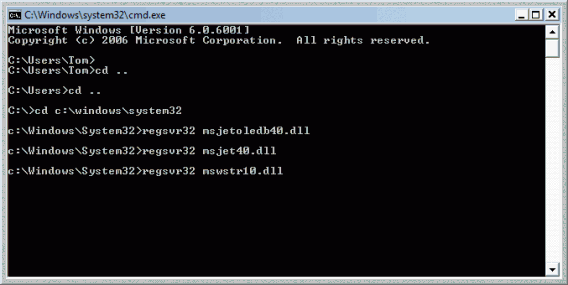
This bug, discovered by researcher Casey Smith, makes it possible to run any app remotely – even if the infected user is using AppLocker (a program that prevents programs starting up without permission from the Administrator). This security flaw takes advantage of the Regsvr32 tool.

But relax, we also didn’t know what Regsvr32 was before writing this article, so here’s a bit of a summary for you to chew on. It’s basically a tool within the Windows command line that handles log entries. By using it maliciously, and taking advantage of the flaw, a hacker is able to run any program on the PC, including malware or malicious software. Since the system doesn’t require the Administrator password nor does it alter the system registry, it’s almost impossible to trace where the attack is coming from.

The security flaw affects the business editions of Windows 7 onwards, so as you can imagine, this has the potential to be more of a problem for businesses rather than individual users.

Knowing Microsoft, we imagine that they’ll soon find a solution to this security breach, but it certainly never hurts to at least be aware of the current at this moment in time! Be careful!

Facebook Messenger launches a feature that Skype won’t be happy about

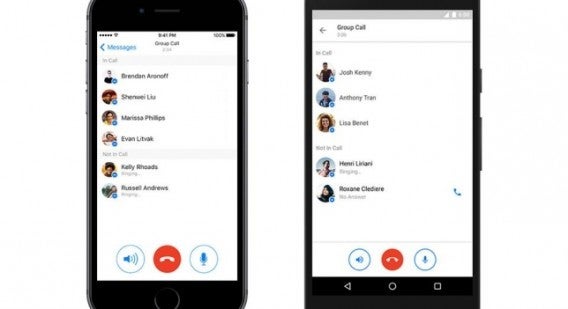
Facebook Messenger just launched one of its most-desired features: group calls. Do you want to start using this function right now? Simply update the app on either your Android or iPhone device, and you’re pretty much ready to go!

The group calls from Facebook Messenger allows you to talk to up to 50 people at any one time. To start a group call, simply create a group chat (as you normally would), and click the new red call button. The other members of the group will have the option to either accept or reject the call.

With this new option, Facebook Messenger is now able to compete with the likes of Google Hangouts, or Skype. Of course, this feature is a little late to be introduced, but you can’t say that it won’t make your life easier! Enjoy!

Getting tired of Facebook Live videos? We’ve got the solution!

The live-broadcasting feature on Facebook is now available to everyone, and while sometimes it can be useful, notifications can get a bit overwhelming (and annoying).

Luckily there’s an easy way to disable it!

Here’s how you do it:

  1. Go to Facebook Settings
  2. Click on the Notifications tab on the left hand side
  3. Go to “On  Facebook
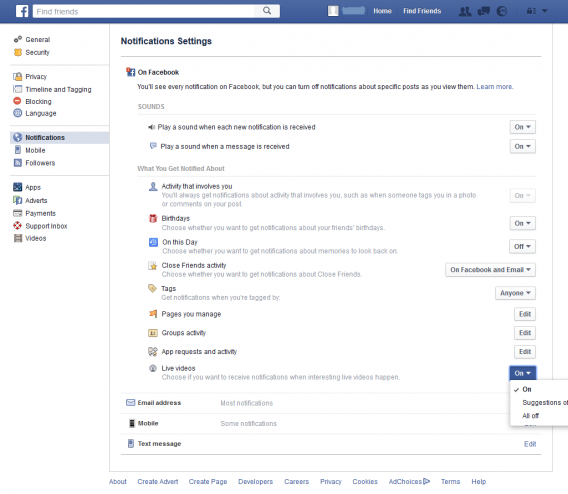
  4. Deactivate the Live Video option (see below)

As you can see above, this section of your Facebook configuration allows you to manage all notifications that you receive on your account. While here, it may be useful for you to explore it a little if you feel you’re receiving too many notifications you don’t think are necessary. You can always activate them if you feel you’re missing out!

Stay safe: the 5 best password managers

Password managers are apps that keep all your passwords safely tied together. This allows you to create complicated passwords for greater security across your accounts, all of which can then be accessed from a single password linked to the program. Here are our five favorites.

1Password (Windows|Mac|iOS|Android)

As 1Password’s name implies it offers one password to rule them all. The service works cross platform, generates strong passwords for you, remembers them, and works as a digital wallet to safely store tickets etc. It is easy to use, well designed, and integrates fingerprint lock where available.

LastPass (Windows|Mac|iOS|Android|Windows Phone)

LastPass was one of the first password managers. It checks your passwords are strong and automatically generates new ones if they are not. A two-step identification process uses either Google Authenticator or a USB key. It also offers a host of other features for security and ease of use. Great for security… not so much for design.

KeePass Password Safe (Windows)

The completely free KeePass Password Safe is an open source password manager. It lets you sync across devices using the cloud, but this function can be disabled if you don’t want your passwords floating around in the ether. KeePass’s main benefit is it open source nature, with a huge community you can be sure any security holes will be quickly patched.

Enpass (Windows|Mac|iOS|Android|Blackberry)

Enpass has support for loads of devices – even Blackberry. By now you know the basics: strong passwords generation, autosave, automatic password updates, and a digital wallet. By default you data is saved locally, but you can securely upload it to the cloud. As a bonus it does not require an account, and the service is free for desktop.

Dashlane (Windows|Mac|iOS|Android)

Encrypting using AES-256 protocol, two-step verification, compatibility with TouchID, and security for your master password, Dashlane maybe the safest app on this list. So much so, that if you do lose your master password you may be trouble… Dashlane also stores information to fill out documents, tickets purchase, and other forms.

Let us know in the comments if we missed a password manager your prefer. Next week we are taking a break, but I will be back in two weeks for another five apps, see you then.

Related Stories

Stay safe: the 5 best VPNs

Five voice changing apps

Five apps to create your own digital avatar

The three greatest vampire games

Follow me on Twitter: @DoFuss

Opera just became the safest browser

This week Opera added a VPN (Virtual Private Network) to its desktop browsers (Window|Mac|Linux). This is the first time one of the major browser developers has included this feature by default, and it is a huge step forward in security for all of the browser’s users. Best of all, it’s free.

At this point, nearly a quarter of the world’s internet population are using VPNs for the security they offer. They work by providing you with a secure connection to a server from which you can privately surf the web.

For most, the main advantage of this direct connection between your computer and the server is that it prevents anyone intercepting your information when connected via Wi-Fi. This is perfect if you are a laptop or notebook user who likes to use your machine when out and about. With the VPN active, you can safely connect to public Wi-Fi to browse, email, and shop, without fear of anyone being able to access your personal data.

However, this isn’t the only benefit of using Opera’s VPN. It replaces your IP with a virtual IP address making it harder for sites to track your location or identify your computer – adding yet further privacy to your browsing habits. Plus, by browsing from a remote VPN, you can circumnavigate some restrictions linked to location and firewalls that may prevent you accessing some sites.

Providing you have the most recent release of Opera installed, you can now start using its VPN on Windows, Mac, and Linux machines. On Windows and Linux, all you need to do is go to “Privacy and Security” and then activate the VPN within the “Setting” options. Similarly, on Mac, just got to “Preferences” to toggle the VPN on and off. All without having to install any extensions.

Unlike other free VPNs, Opera places no data limit on your browsing. This ensures that you can make use of this safe connection whenever you need it.

This is fantastic news for Opera users, and should also attract a new audience to this powerful browser. We just hope Opera adds this service to it mobile version, Opera Mini (Android|iOS|Windows Phone), sooner rather than later.

Related Stories

Stay safe: the 5 best VPNs

How Opera is different from Chrome and why you should try it

The five best security apps for your smartphone and tablet

10 apps that would have been really useful for the characters in Game of Thrones

Dragons, wars, suspense and a lot of death – pretty much sums up Game of Thrones. As George R. R, Martin once said: “This is the West, not Disneyland,” and boy isn’t that evident. Episode after episode, we see our beloved (and hated) characters immersed in a whirlwind of problems; all of which could have been easily solved with the use of a smartphone and the right app. Don’t believe us? Here are 10 apps which undoubtedly would have made life just a little bit easier for the characters of this tremendous saga!

1. Family Tree Builder (Windows)

Game of Thrones is an authentic parade of parentless children who’ve lead a tough life, some of whom have no clue that their father is a nobleman or a king in turn. Family Tree Builder would have solved this problem instantly. Think of all that time Stannis could have saved finding Robert Baratheon’s other son!

2. Instagram (Android | iOS)

With those cute little dragons, Daenerys would have loved uploading photos and videos of her babies like a crazy instagrammer, capturing every one of their special moments like their #firstflight, #firstflames, etc. She could eventually get more followers than Kim and Kylie put together!

3. Epicurious (Android | iOS)

Another app that Daenerys would have found useful is Epicurious, especially remembering that time she had to eat that raw horse’s heart. With more than 30,000 recipes, this app could have surely found a more suitable and palatable meal in no time at all!

4. Todoist (Mac)

Arya Stark has an endless death list of traitors and scoundrels, on whom she wants revenge. She certainly spends a lot of the series repeating the names over and over in order not to forget anyone. With Todoist, she would be able to efficiently manage the same list, without forgetting how many murders were still outstanding. Simple.

5. Linterna (Android)

It’s no secret that arsonist Melisandre is not too fond of the dark – so she could get a great deal of use of a flashlight app. Imagine how many of those candles would have been spared to keep her room lit!

6. Slap Up (iOS)

Although Tyrion has made some epic slaps (some worthy of movies) in his time, he’s still probably itching to land a few more on Joffrey. This is where Slap Up could come in handy, an app which has the ability to slap until the cows come home (or you run out of battery).

7. Google Translate (Android | iOS)

Hodor is undoudtedly the most misunderstood character in Game of Thrones. The poor guy has spent series after series sharing intelligent notes of the situation, providing brilliant solutions to all the problems raised and making sharp, witty comments in the perfect moment. The sad thing is that no one understands him. Google Translate certainly wouldn’t have gone amiss.

8. TrackR

Who hasn’t been frustrated at times when they’ve gone to look for their dragons to find they’re not at home? Daenerys certainly knows what we’re talking about. TrackR is a great app that allows you to find your belongings with the help on a small locating device.

9. Duolingo (Android)

At this point in the article, no one’s going to be surprised to find that it’s Daenerys that needs to download the most amount of apps. The Duolingo app is one of the most useful (and free) language learning apps. Perhaps she could have spent some time to learn dragon language before getting burned all those times!

10. Promise Me Now (iOS)

All characters throughout the series spend a lot of time compulsively promising things, the majority of which aren’t the nicest promises to hear. But with so many promises flying round, how are they supposed to remember them all? Promise Me Now keeps your promises in a social network. Obviously using this platform, things could have been a little less difficult.

What other apps do you think would have been useful in Game of Thrones?

9 tricks to use CCleaner properly – it does more than you think

If all you do with CCleaner is set it to automatically clean your system and then assume the job is done, then you are seriously wrong. You can endanger valuable information and slow your system performance if the program is not properly configured. And we all make this mistake, because very few people know how to use CCleaner properly – myself included. That is, until recently, because I have been reading a lot of tutorials to get myself up to speed (links at the end).

I have distilled my learning into 9 easy tricks to learn how to use CCleaner super effectively.

Download CCleaner

CCleaner does not do what you think

Many people believe that CCleaner is a maintenance tool that automatically improves the performance of their computer. Actually, CCleaner cleans your discs by deleting temporary files, or files that take up a lot of space. This frees up room on your hard disk, which can result in improved performance.

Why is it important to understand this? Because if you use CCleaner every day believing that your computer will run faster, you are mistaken; indeed, in many cases, it may run slower.

This is what you should do BEFORE cleaning with CCleaner

Before running CCleaner’s… cleaner… think of exactly what you want to clean. If you are not interested in deleting your cache and cookies, then set the program to ignore them. Alternatively, if you do not want others to spy your browsing history, then clean them frequently.
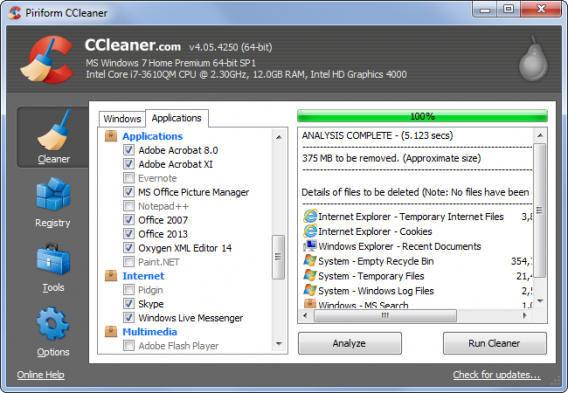
However, what happens if you clean your machine and it runs slower? This is because your computer needs some files to perform efficiently. If you delete these files with CCleaner, performance will suffer. If you visit some favorite pages every day, but clean the cache every few hours, you’ll find these pages take longer to load.

This brings me to my next point.

Protect the important cookies

CCleaner deletes all cookies by default – but you may well want to keep some of them around to keep your browsing quick.
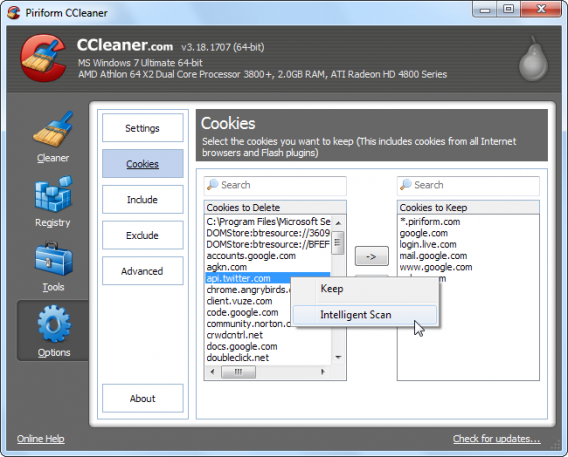
You have two options for this. On the one hand, you can use CCleaner’s Smart Scan to detect the cookies you use most and protect them from most common cleans (such as Google). Alternatively, you manually flag the cookies that do not want to be touched.

Do the same with programs

You can apply protection to programs and files. This feature is particularly useful if you find that CCleaner is obsessed with trying to eliminate a file that you actually want. You can exclude whole disks, folders, files, or records. You can also protect specific file extensions.

If you use Registry Cleaner often, you’re going to get in trouble

I do not recommend that you regularly use CCleaner’s Registry Cleaner. After all, who cleans their house every day? A clean registry can help if your system is damaged, but it doesn’t improve your performance under normal circumstances and – in some cases – it can be harmful. Leave this feature alone unless you have problems running a particular program.
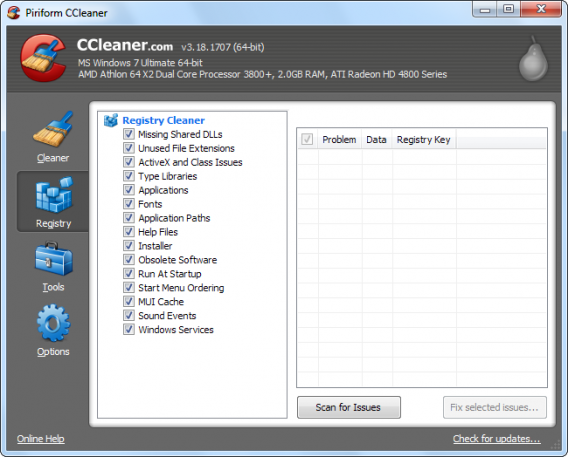
Registry cleaner

This feature offers much more than its name suggests

Startup is an optional tool that, in theory, lets you disable programs that run automatically when you start your computer. In this way, you can access and edit your PC boot process.
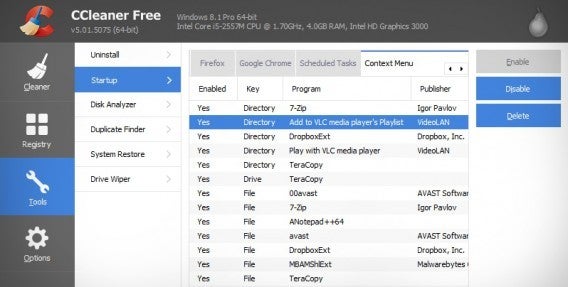
Startup

What few people know is that Startup allows you to disable or remove scheduled tasks and browser extensions. These options are already included by default in Windows, but you can have a look during one of your regular cleanings.

Breaking the myth of Cleaner Hard Drives

One of the great myths behind hard disk cleaners is that you need to perform multiple scans to get the drive really clean. But there is no need for this with CCleaner’s Drive Wipe, because it can clean your drive with a single click, completely removing unwanted files while leaving programs untouched.
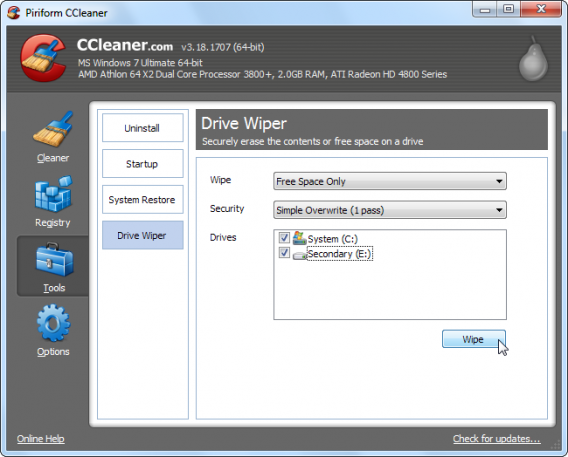
Note that when you delete a file in Windows it doesn’t actually delete it; it simply removes the path to it so it can’t be seen by the system, freeing the space it occupied and allowing it to be overwritten. This allows files to be restored by those who know how. That does not happen with CCleaner, which overwrites old files as it deletes them. Great for security, but please be sure that you want to delete the selected files.

Forget this tool

CCleaner has many secondary tools, the most redundant of which is Uninstall Programs. This is totally dispensable and does not work as well as the Windows Uninstaller. There are better uninstallers out there, like Revo, which you can download from Softonic.

You see? You do not need to know everything about CCleaner.

… and finally, the Golden Rule

It doesn’t matter if you use CCleaner or another cleaning tool – never do any cleaning without making a backup of important files first. If the program deletes something important, the consequences can be catastrophic. Fortunately, with a backup or a restore point, you can recover the state of your computer in a couple of clicks.

Sources: TechRepublic, How To Geek (text 1, text 2, and text 3), Guiding Tech, Life Hacker

Related Stories

3 Productivity Hacks for Office 2007

How to clear the cache on Safari for Windows

Windows 10: The 45 most useful keyboard shortcuts

How to delete your browsing history and protect privacy in UC Browser

The three greatest vampire games

This week we are going to look at the best three games in which you get to play as a vampire – and don’t worry, I promise that not one of these immortal blood suckers glitters.

BloodRayne (Windows)

For me, BloodRayne is synonymous with videogame vampires. Created in 2003 and clad in skin tight leather, Agent BloodRayne is a vampiric vixen who is a clear product of her time.

Trained by a government agency to stop the Nazi menace and their occult experiments, Rayne is a one vampire army. With huge wrist mounted blades, gun skills, and dynamic acrobatics, there is little that can stop her pirouetting through the game’s various diverse environments slicing up enemies.

upclose and personal

It does look a bit dated now, but the speed of the gameplay still makes for an entertaining action game. Plus, BloodRayne remains one of the most iconic vamps in gaming.

The sequels are great too, just please avoid the Uwe Boll movie adaptations.

Legacy of Kain: Soul Reaver (Windows)

Legacy of Kain: Soul Reaver is the sequel to Blood Omen: Legacy of Kain. It depicts a future where the vampires have won, humanity is nearly eradicated, and the world is ruled over by Kain.

You play as Raziel, a vampire killed and cast aside by Kain for evolving before him. Lying at the bottom of the Lake of the Dead for over a millennium, you are eventually resurrected by The Elder God for the sole purpose of revenge.

a tasty legacy

The third-person action gameplay focuses on navigation, combat, and environmental puzzles. It is in many ways pretty standard stuff, but Soul Reaver adds the fascinating ability to move between the real world and the world of the dead. Here everything is warped an twisted, creating new paths forward and forming new dangers to fight and avoid.

Like BloodRayne it is showing its age, but the dimension crossing elements keep it interesting.

Vampire: The Masquerade – Bloodlines (Windows)

Providing a more involved exsanguination experience than the other games on our list comes the RPG, Vampire: The Masquerade – Bloodlines.

This first-person RPG has you play as a newly turned member of Dracula’s extended family tree, trying to make a name for themselves in the city of L.A.’s undead underground. Talking to various characters in the world, you are sent on missions to battle other undead and mortals. Completing these tasks helps you to advance your stats and standing in the world.

he is behind me isnt he

With various stats to tweak, and seven different clans to align with (ranging from the trained Brujah to the brutal Gangrel), you have lots of opportunity to personalize your vamp and their story.

Thanks to its sharp plot and writing, Vampire: The Masquerade – Bloodlines is still an engrossing RPG for all creatures of the night.

That’s if for this week. Next week we won’t have a show, but I will try to post something game related – subscribe so you don’t miss that. I will see you for another Click-Swipe-Play in two weeks.

Related Stories

Three amazing games featuring time powers

The three best driving simulators

Three Dark Souls III alternatives

Follow me on Twitter: @DoFuss

WhatsApp is finally giving you that feature you’ve always wanted

It seems that the world’s favorite messenger is working on that feature you’ve all been waiting for: Video Calls!

A few primary screenshots have surfaced on the internet over the last week or so, which indicate that soon (although we’re not quite sure just how soon), we’ll be able to make free video calls using WhatsApp.

In true WhatsApp fashion, this rumor came from its official translations center, where translations have been found referring several times to “video call”,  “missed video call” and “change camera” – it doesn’t take a genius to work out what’s happening!

This news could be huge for the Facebook-owned app, who may very soon be able to compete with the likes of Skype and FaceTime.

WhatsApp being WhatsApp, the updates are sure to be sporadic, and Android (as usual) will probably take priority.

We’ll be sure to keep you in the know!