Look Your Best: 3 Tips for Video Calls

People use video calls for everything these days. From remote job interviews to simply chatting with friends, it’s important to look your best. Unfortunately, many people aren’t sure how to look great on a video call, and this can be detrimental in many ways. For example, not looking your best during a remote job interview can doom your chances, and when chatting with a love interest, failing to look your best may cause your potential partner to lose interest.

Thankfully, there are a number of ways you can prevent these problems, including:

1. Check Your Equipment Beforehand

Before you even attempt a video call, especially if it’s an important one, check your equipment first. You would be surprised at how easy it is for technical glitches to ruin a video call. Test your network connection as well as your microphone and webcam. Most video call software provides the ability to do this using simple controls. The last thing you want to happen is for your equipment to fail during a job interview.

2. Eliminate Background Distractions

You’re also going to want to have a neutral background to avoid distractions if at all possible. A busy background can cause the person you’re chatting with to become distracted, taking away attention from you. If you’re on a mobile video chat through an app like Imo, try to find a spot to hold the call where you won’t have people walking around in the background.

3. Make Eye Contact

One thing that makes for a good conversation in person is eye contact, so utilize it in your video call as well. When speaking with someone while making eye contact, you come across as sincere and engaged. Unfortunately, when using a webcam, many people are looking at their screens when they speak. This is natural because you’re looking at the other person while talking. The downside to this is that the other person sees you looking down at the screen instead of into their eyes.

To avoid this, look directly into your webcam when speaking. It’s fine to look at your screen when the other person is speaking, but when it’s your turn, look up. This can take some getting used to, so take some time to practice with a friend before taking on an important video call.

If you want more ways to keep in touch, don’t forget to download Line!
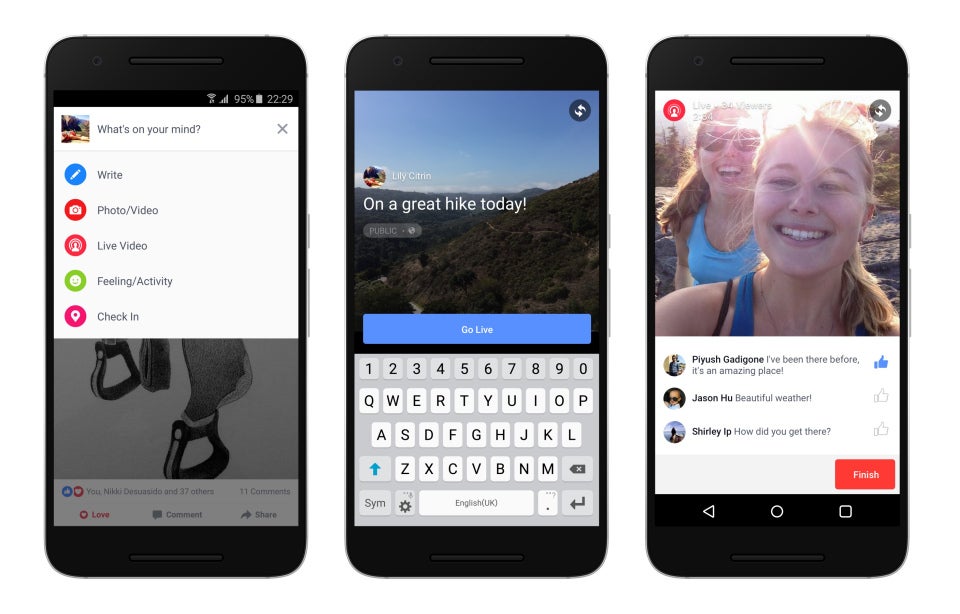
Facebook Live finally launched on the Android app!

The popularity of Facebook Live has proved successful since its launch on iOS back in April, and it’s taken over a month for it to finally surface onto Android devices.

Facebook revealed earlier in the year that live video was going to a big focus for them for 2016, and now offer a specific page for users to explore live streams.

As you’ll see from the image below, Android users are now beginning to see the Live button appearing in the center of their screens, which when clicked on will bring up a scrolling stream of video.

One of the most engaging features of Facebook Live is that users can react in real time with the usual smiley or angry emoticons. According to Facebook, they’ve “seen that on average people watch a live video more than three times longer when it is live compared to when it is not live.”

Users are able to select their preferences for their live video feeds according to category. So, what are you waiting for Androiders? Get that app updated and start exploring!

Source: BBC

Facebook copies one of Snapchat’s best features

Facebook Messenger for iOS is about to introduce a particularly interesting new feature – messages that autodestruct. Basically, this means that you will soon be able to send messages over the app that will have an expiration date – very similar to the Snapchat way of working.

Do you wanna have Snapchat for PC? Know the best ways right here!

This option has been discovered by Twitter user @iOSAppChanges, that has (somehow) managed to capture screenshots of the function:

ChYPswIWMAAACX7.jpg large04-05-2016 11-40-25

04-05-2016 11-40-48

04-05-2016 11-40-38

As you can see, with this option, you can enable or disable “Disappearing Messages”. If the option is activated,  you have the choice to make the message vanish from existence after a certain amount of time once the recipient has read it.

This option could be very useful for sending sensitive information to a contact (ie, bank details, addresses, etc). Of course, nothing can stop the recipient taking a screenshot of the message before it’s deleted, but that all depends on how much you trust your Facebook friends.

With the feature, Messenger will start closing in on the gap between its rivals, as it’s similar to one of the star characteristics of Snapchat, and the best features of Telegram (the secret chat option).

So, when can we get to see and use this new feature?

At the moment, it’s still in its development phases, which in Facebook terms, means that it could only be a matter of weeks.

Want to see another way Facebook is closing in on Snapchat? Click here!

Related Articles:

Facebook Messenger’s secret inbox you didn’t even know existed

Sharing files with your friends on Facebook Messenger for iOS is now much easier!

Three games to get you ready for Marvel’s Captain America: Civil War

You are pretty much out of time to pick a side in Marvel’s Civil War. The third Captain America movie is finally here and – whether you are with Team Cap or Team Iron Man – it’s time to fight.

With all the buzz around this blockbuster, pretty much every Marvel free-to-play game is receiving an update with new characters, suits, and scenarios to get you in on the action. These are my three favorites to help you join the war today.

Marvel Heroes 2016 (Win|Mac)

Marvel Heroes is a free-to-play dungeon crawler that lets you run around iconic settings as your favorite superheroes. With more than 50 heroes to choose between, your goal is to beat up thugs and super villains to earn loot that lets you upgrade your chosen champion.

Marvel Heroes 2016

If you have played a dungeon crawler like Diablo, then the format needs little introduction: control your hero from a top down perspective as you send them dashing around the screen to flatten the forces of evil.

What makes Marvel Heroes so good is that it keeps improving. Since its 2013 release it has seen huge updates that have delivered additional free content. These have included characters, costumes, story missions, and loads more.

Marvel Contest of Champions (And|iOS)

Marvel Contest of Champions is a one-on-one, free-to-play fighter that has you build up a team of heroes to lead into battle. Featuring both heroes and villains from the Marvel Universe you can create some pretty diverse squads, even matching Deadpool, Juggernaut, and Star-Lord together.

Marvel Contest of Champions

Your three character’s must fight your opponent’s three one at a time. A stripped back combat system has you control blocks and dodges on one side of the screen, and light, medium, and heavy strikes on the other. Yes, this is quite basic compared to most traditional fighters, but the system is perfect for mobile and touch devices.

The problem is the difficult curve – or rather the lack of one. If you are not a high enough level and want to progress you either have to pay to upgrade or slowly grind for items and experience. On the plus side, there is lots to do to keep your grind varied.

Marvel Avengers Alliance 2 (Win10|And|iOS)

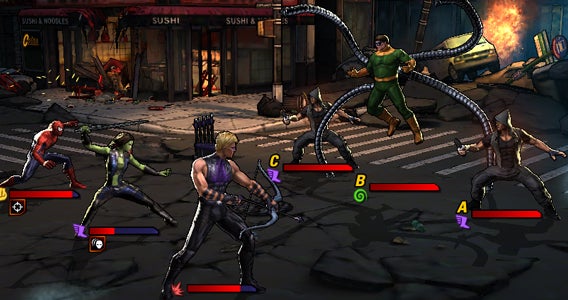
Finally we have Marvel Avengers Alliance 2. This fast-paced combat RPG uses the same formula as Star Wars: Galaxy of Heroes, having you take your squad of three into battle against the likes of Hydra and A.I.M.

Marvel: Avengers Alliance 2

If you have ever played a similar free-to-play RPG (or indeed any menu based RPG game) the format should be incredibly familiar: wait for your characters’ turn, pick a move, and then tap on a target to execute.

Yes, its predictable, but there is something to using characters like Hawk Eye, Gamora, and Spider-Man’s various abilities together to take down super villains that proves satisfying. It is also worth noting that the game does a good job with its free-to-play model with lots of missions, side content, and multiplayer making sure you always have something to do.

And that is it for this week and indeed from Click-Swipe-Play for a while. Keep an eye on me @DoFuss on Twitter for more gaming content and subscribe to Softonic Videos on YouTube Channel for more videos.

Related Stories

The three greatest vampire games

Three amazing games featuring time powers

The three best driving simulators

Three Dark Souls III alternatives

No iPhone user should be without this awesome GIF keyboard

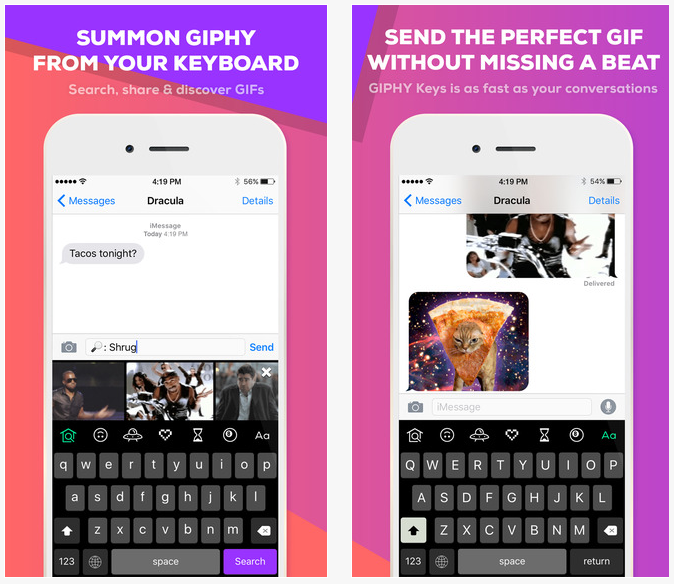
This is a dream come true for all you GIF-loving iPhone users out there! Now you can send GIFS, whenever you want, with the help of a specific keyboard called Giphy Keys– created by the king of GIFS themselves, GIPHY.

Giphy Keys is a third-party keyboard that allows users to send GIFs directly from whichever app they choose to communicate with. It works like an alternative keyboard (just like the Emoji keyboard) and once installed, requires you to simply tap on the little globe icon to bring up the keyboard and select the GIF you wish to send!

You can download the keyboard here.

04-05-2016 18-27-52

As well as offering an extensive library of thousands of GIFs to choose from, they also offer a great hashtag command system which allows the app to create a unique GIF – just for you!

Here are some hashtags you can experiment with:

#echo: Transform your words into a GIF

#sticker: Discover a random animated sticker

#text: Type a keyword to fetch the perfect text GIF

#8ball: Get the answers to your life questions with GIPHY’s magic 8 ball

#weather: Plug in your zip code and find out the weather

iOS users are going crazy for this new keyboard – so what are you waiting for?

This function on YouTube will consume you mobile data without you knowing – deactivate it in less than 1 minute

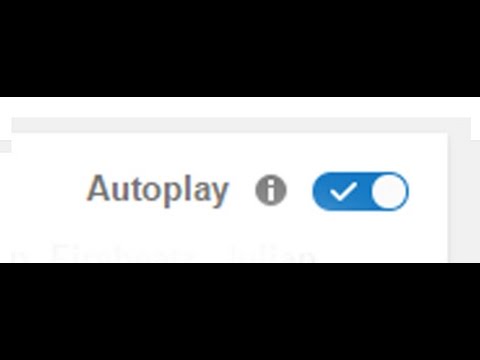
If YouTube is one of your most-used apps on your Android device, you will have realized that the platform has recently added autoplay to its videos. This system means another video will automatically start playing as soon as you have finished watching another.

So, why is YouTube doing this?

Well, one of its fundamental objectives is to make sure you watch more videos without stopping – you may have even noticed it’s happening on the web version too. And the problem? Well, if you’re a sucker for YouTube videos, the chances are you’ll get pulled in and spend days with your eyes glued to the screen, at the same time, allowing the app to devour your mobile data (which for many of you is limited).

But don’t fear! We’ve got a quick and easy way to turn off this option and save that precious data for a rainy day!

How to turn off autoplay on YouTube

1) Go to Settings on the YouTube app

2) Disable the Autoplay found in the General menu

hqdefault

It’s as simple as that! No longer with you receive those annoying and invasive suggestions – but you’re less likely to consume all your data within a week!


Instagram’s new design has divided its users – but which side are you on?

The world’s favorite photo album Instagram continues to bring us new features: multiple accounts, longer videos, and now, an all-new completely renovated interface! The dramatic new design is already being tested on some iOS devices (perhaps you’ve seen it already?), and shows that Instagram has gotten rid of its more traditional interface we’ve grown to love over the years.

ig-design

With this new style, Instagram has abandoned its original blue theme completely, adopting a much brighter and sleek design, with clean lines and bold colors – the difference is quite astonishing!

Discover the best app for Instagram Likes.

The good news is that Instagram takes into account the views and opinions of its users: remember when they were planning on changing our Insta-feeds with content that they thought would be appropriate for us? Luckily they swiftly got rid of that idea, and trusted the judgement/uproar of its loyal users. This could indicate that if users begin to react badly to the new design (remember how many times Facebook has changed), it might not be out of the question for the app to revert back to its old style.

Sounds pretty straight forward huh?

Well, going from some of the users’ reactions on Twitter, it seems that users are very much divided on how they feel toward this drastic new change. The question is, which side are you on?

Looking to build up your number of followers on Instagram? We’ve got the answer right here! 


How to use PaintTool SAI: a beginner’s guide

PaintTool SAI is a paint tool for Windows that will help you unleash the artist in you. However, if you’re a beginner you may find this program a bit difficult to use. In this video tutorial we will show you how to get started:

How to use PaintTool SAI – a beginner’s guide

1. First, open PaintTool SAI. Do be aware that during the installation process several additional software will be offered to you, so if you don’t want to install them or change your browser settings please opt out by unticking the corresponding boxes.

2. Go to File and select New to create a new canvas. You will be able to name it and to choose the preset from the drop-down menu. Once selected, click OK.

3. As soon as you see the canvas in the middle of the screen you’ll be able to start drawing! You’ll find a wide range of options available to choose from: including the color you want to use, the tools you want to work with from a range of pencil, airbrush, brush, water color, marker, bucket and more. You’ll be able to select the edge shape and size, density and texture of what you’re working with. You can test every setting on the scratchpad before implementing it on the canvas. While you can use this program with your mouse in order to get the most out of it, we recommend using a drawing tablet.

4. You can drag, rotate and zoom the canvas anytime to work more comfortably. In case you forgot a color you previously used, click on Color picker to use it again.

5. If you click on Layer you’ll be able to add more layers to your creations. Just click on Show / Hide Layer to see which one you’re currently working on. You can also clear or delete specific layers if you’re not happy with the results.

6. On the Filter tab you’ll be able to change the hue and saturation as well as the brightness and contrast of the last line you’ve drawn.

7. Finally, on the File tab you’ll find the option Export as” letting you save your drawing in several formats. This will allow you to share your art and edit it with other programs.

8. Don’t forget to save your drawing before closing PaintTool SAI!


Facebook is exposing everyone – and it could get really embarrassing

Facebook has a feature that very few people are aware of and it has the potential to anger, embarrass or publically shame you.

We’re talking about the ability to see any photo that any friend has EVER liked – and of course, that includes you too.

Have we got your attention? Of course we have. Let us explain a bit more about exactly what this could mean:

Think of how many times you may flippantly “Like” photos posted by your friends on a daily basis. Now imagine if your girlfriend or boyfriend discovers you’ve been liking a certain someone’s uploads a bit too much – let’s be honest, it’s not going to end well. What if you discover that Grandpa’s been liking certain things that you know Grandma definitely wouldn’t approve of? Or that Mom is liking those daily sex position posts from Cosmo magazine?

Don’t believe us yet? See for yourself!

How to find what photos your friends are liking:

1) Click on the Facebook search bar at the top of the screen.

2) Type in “Photos liked by (Name of Friend)

fb1796785729c70d93665b0f73ab197c

3) Click on the appropriate result, and voilà!

Now, before you go on a crazy “unliking bonanza” to get rid of any evidence that might incriminate you, or even start rumaging through your partner’s liked-list, it’s important to remember that most of us had lives before our other half came into the picture. It’s therefore advised that if either one of you are prone to the odd bit of jealousy (some people say it’s healthy is small doses), this is probably not the feature for you.

We hope we haven’t ruined your day!

If you love hidden features – here’s one of Facebook’s biggest secrets that you really don’t want to use any time soon.

Related articles:

Facebook declares war on Snapchat!

Facebook Messenger’s secret inbox you didn’t even know existed


Facebook is finally on Windows 10… no it wasn’t already

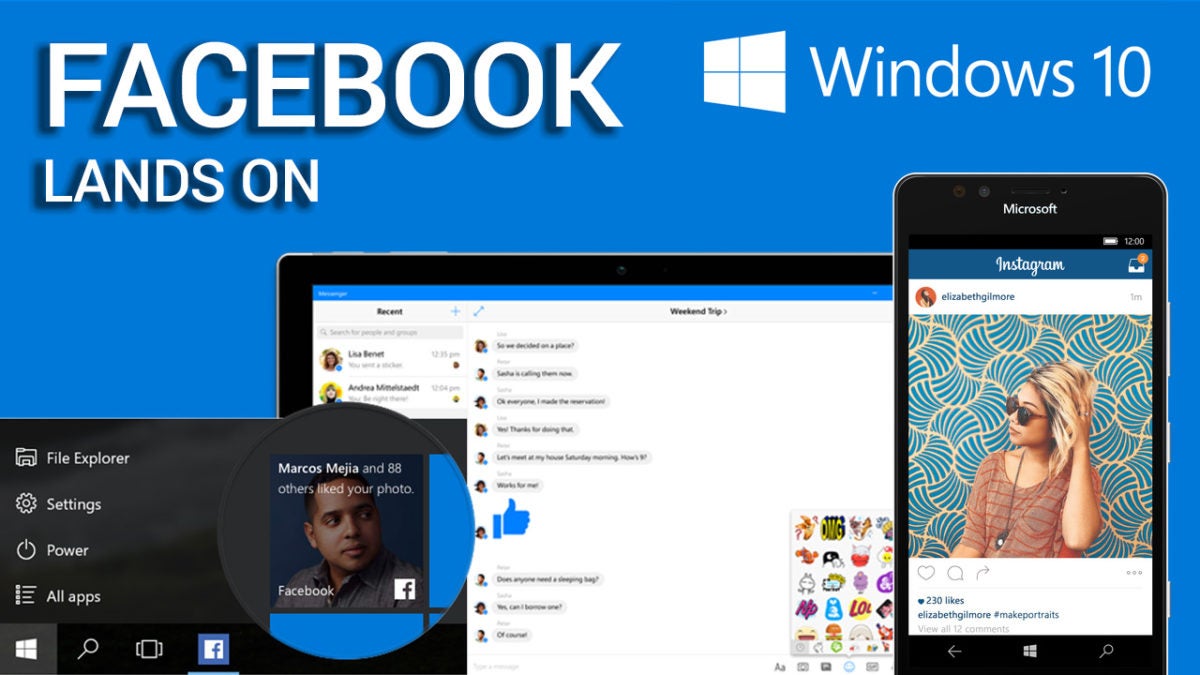
Facebook has finally launched versions of its Facebook, Messenger, and Instagram apps on Microsoft’s official Windows 10 Store.

While these apps have only just become available, they were announced back at Microsoft’s Build Conference. Some of the features promised then seem to have disappeared however, with universal cross-platform functionality missing from their initial release.

That right, while we were hoping that these apps would work across Windows 10 PCs, tablets, and Windows Phones, in their first form two of them only work on PC (Facebook and Messenger) and the other only on mobile (Instagram).

Facebook, Instagram, and Messenger come Windows 10

Checkout our video about Facebook coming to Windows

The updated Facebook for Windows 10 app loads and renews your timeline faster than ever and provides notifications integrated into the system’s live tile interface: never miss a puppy picture again. The app also lets you upload photos directly to Facebook’s from other programs. And, of course, you can expect all of the latest Facebook tools – stickers, birthday reminders, trending topics, and everything else – you’ve come to depend on.

The Messenger app for Windows 10 PCs is completely new. That said, the majority of its features are quite familiar to its users: stickers, emoticons, group discussions, GIFs, and notifications so you never miss a message. Windows 10 features include the use of live tiles and the ability to record audio messages to send to people.

The new Instagram app for Windows 10 is also here, but only for mobile devices. An early build of this app was focused on portability, providing little more than the opportunity to like photos. Now the application is complete with everything you expect from Instagram, including the ability to upload videos.

Facebook has promised that mobile versions of Facebook and Messenger for Windows 10 will arrive by the end of the year. Meanwhile, this is definitely good news for the Windows 10 app store – ensuring that these ubiquitous services are available for the operating system.

Related Stories

Stay safe: the 5 best VPNs

Stay safe: the five best password manager apps

Five apps to create your own digital avatar

The three greatest vampire games

Follow me on Twitter: @DoFuss