With 250 Super Mario Games to date it is no surprised that we’ve been introduced to so many iconic characters from the mythical mushroom kingdom. This quick test will tell you what your place is in the Super Mario universe.
Good luck and don’t forget to lt us know who you are in the comments below.
This quiz was originally published on May 19th 2017
Apple’s virtual assistant Siri has been around for some time now and a lot of people don’t know that Siri has some very interesting and useful commands. Apple have never published a full list of commands for Siri but we managed to find almost all of them on the internet and pick out the best ones.
Find out what airplanes are currently flying above you. Ex.: “What airplanes are above me?”
Siri will search the live airplane map and tell you exactly what airplanes are flying above you. It’s not very useful but it’s still fun.
Flip a coin
Whenever you can’t make a decision on your own you can always ask Siri to flip a coin for you.
What does the fox say?
Siri may try to convince you that she doesn’t have a sense of humor but this video shows the opposite.
Now that we got the funny ones out of the way let’s see what Siri can really do. Since iOS 10 came out developers have been able to implement voice commands into their apps and now you can send messages VIA WhatsApp or make payments with Square Cash. You can view and customize which apps are granted access to Siri on your device under Settings > Siri > App Support.
Pay [contact name] 10 dollars with Square Cash/PayPal/other app.
Send a message using WhatsApp/LinkedIn/Skype/WeChat/etc.
Call me an Uber/Lyft
Show me photos in [app name].
Siri is also highly optimized for navigation and can be very useful when traveling. For example, if you say, “take me home” Siri will get the shortest path and display it on your phone. You can also use one of these when traveling:
What is traffic like on the way home?
Find [driving, walking, transit] directions to [destination].
How do I get to [destination] by [walking, bus, bike, car, train…]?
Where is [business name]?
Where is the nearest [business type]?
Find out how long until you arrive. Ex.: “What’s my ETA?”
How much does gas cost right now?
You can also take pictures and change phone setting with simple commands:
Increase/decrease brightness
Turn on/off [Wifi, bluetooth, airplane mode…]
Open [App]
Take a picture
Take a selfie
As you can see, Siri can be very useful if used in the right way. Here is one more pro tip before we finish up here. Siri can do fact checking very easily so if you ever get into an argument Siri can settle it in a matter of seconds. Just ask ”How many calories does a Big Mac have” or whatever you are arguing about.
If you think that we left out some important commands please feel free to post them in the comments below!
You are probably bombarded every day with news about price fluctuations for Bitcoin and other cryptocurrencies but has anyone ever bothered to explain what is a cryptocoin, exactly? If you want to become familiar with the history of cryptocurrency bear with me and let’s look into the past.
Back in 2008, a man named Satoshi Nakamoto invented Bitcoin while working on a very different project. When he announced Bitcoin he said that his creation was “A Peer-to-Peer Electronic Cash System.“ which was something that had eluded a lot of people who had been trying to develop just that.
Announcing the first release of Bitcoin, a new electronic cash system that uses a peer-to-peer network to prevent double-spending. It’s completely decentralized with no server or central authority. – Satoshi Nakamoto, 09 January 2009, announcing Bitcoin on SourceForge.
After Satoshi realized that a centralized system wouldn’t work he decided to go with a decentralized approach, something like a peer-to-peer file sharing network. This small change gave birth to Bictoin as a currency.
For digital cash to work you need a payment network with accounts, balances and a track-record of transactions so someone can’t use the same amount of digital cash for two different transactions. That is a centralized system. In a decentralized system, there is no server so every entity on the network has to do the job itself. This means that every peer in the system has to have a list of transactions in order to prevent double spending.
In theory, if one entity has the wrong numbers everything fails because if every single peer doesn’t agree on every single digit there is no consensus and the system can’t work. Satoshi changed all of that with Bitcoin. Bitcoin made it possible to achieve consensus without a central authority
What is a cryptocurrency?
The definition of a cryptocurrency – limited entries in a database no one can change without fulfilling specific conditions. It may sound complicated but that is the most basic explanation that you will find. Think of a purchase with cash, you want to buy a pair of shoes but the price requires a certain amount of money. In the cash world, that would be a database entry that fulfills a specific condition – the price of the product.
How is it mined?
As we said earlier, the purpose of this network is to keep track of every transaction on the planet. If you make a payment with Bitcoin every peer in the network will know that you made a purchase and have that record stored in the database.
It takes some time for the network to confirm your transaction, but once it gets confirmed there is nothing that can reverse the process. You could say that it is the most secure payment system in the world right now. The transaction becomes a part of a blockchain and that is how a bitcoin is forged.
The job of miners in a cryptocurrency-network is to confirm transactions by solving the blockchains. The more transactions made, the bigger the blockchains and that is why miners need to upgrade their equipment every now and then. After solving a blockchain a miner is rewarded with a number of tokens or just a fraction, it depends on the value of the cryptocurrency that he is mining and the difficulty of the blockchain.
I hope that this article helped you understand how cryptocurrency works and what is a cryptocoin. Right now, you know more about cryptocurrency than 70% of people on our planet. We know that because recent studies showed that over 70% of people either have no idea what a cryptocurrency is or how it works. Feel smart yet?
We all have them, those annoying friends that are constantly going on about nonsense we don’t care about with an energetic zeal akin to a worker ant on amphetamines. Their selfies, status updates, holiday photos and more are constantly clogging up our streams and sapping our will to live. Well not anymore. Facebook is giving us a much needed tool that’ll shield us from their endless drivel. All hail the Facebook Snooze button.
Of course we already have the option to unfollow somebody and permanently hide their posts from your News Feed but the Snooze button gives you the power to do this temporarily. Like if their birthday is coming up or you know that they’re about to go on holiday. All you have to do is click Snooze and you won’t be bombarded with all that social media overkill.
For now the feature is only being tested out on a few Facebook users but hopefully it’ll be getting rolled out soon.
We all have mobile phones and away from all of the variation between different models and makes, we all share one thing in common. Sooner or later we run out of space. Everything we do these days takes up space on our phones but one of our most used apps can come to the rescue and help us clear out some space on our handsets. WhatsApp is here to help.
This new WhatsApp function can be found in settings and allows you to select a chat and delete all of its messages, contacts, locations, images, GIFs, documents and videos. All of that can add up to quite a bit of space so you could be able to free up quite a bit of space if you get rid of it all, especially from old messages and group chats.
Please bear in mind though, that for now this feature is only available for users of the Android version of WhatsApp and only for users who are using the beta version. If you’re not an Android beta user you’ll have to wait a little longer to get your hands on this nifty little feature.
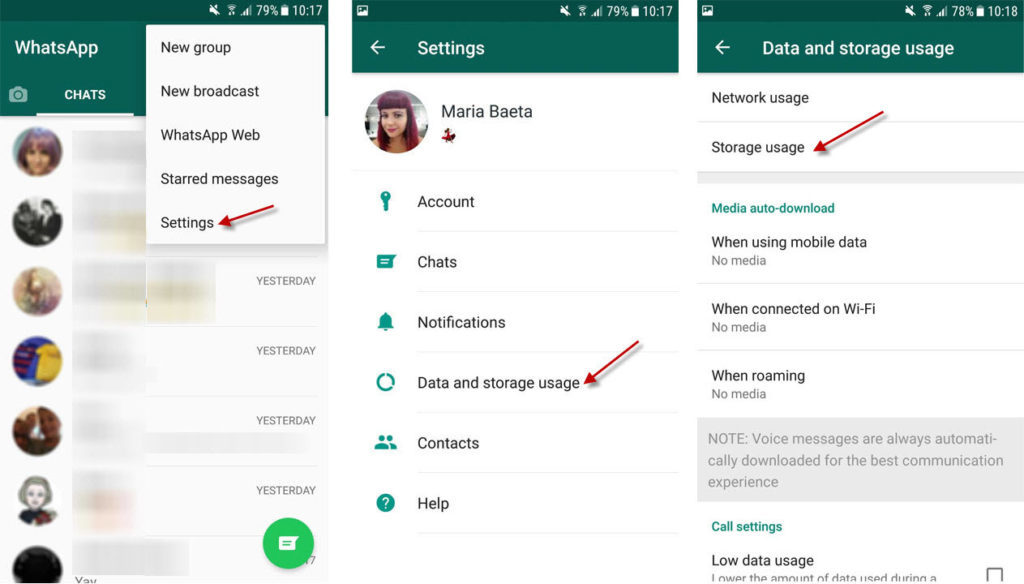
How to free up space using WhatsApp
1. Go to “Data and storage usage” in Settings
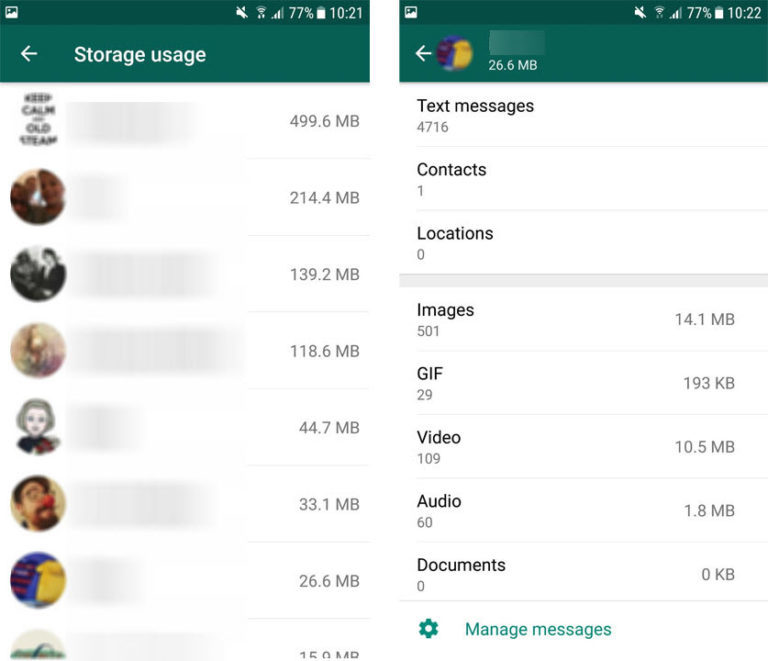
2. Select the chat you want to clean out
Once in storage usage, after a minute or two, a list of your messages and the amount of space they’re taking up will be listed. Select the message you want to clear out and you’ll see exactly what is being stored on the device and how much space it is taking up.
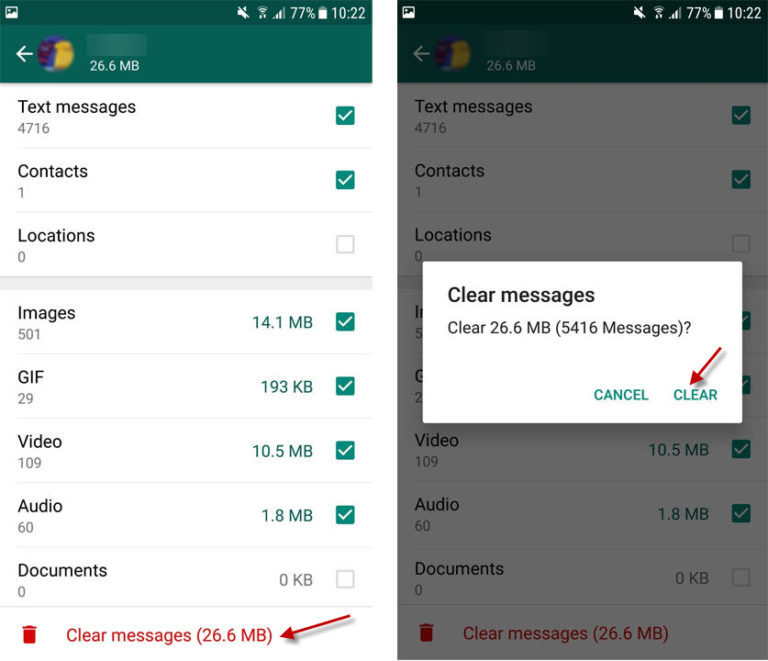
3. Delete the types of file you want to get rid of
If you click “Manage Message” you can select and unselect the types of files you want to delete. For example, if you want to delete only the videos from the message only select videos. Once you’ve done this click “Clear messages” and you’re away.
Bear in mind that once you’ve done this you’ll no longer be able to see the files in your chats as they’ll no longer be on your device. This is different than if you delete them from the WhatsApp folder on your phone because you’ll still be able to download them again if you do that.
Robots are coming for our jobs! We hear it all the time. We even have a robot that will work out the chances of a robot taking your job. Normally though we’re being told that it is the working class who are most at risk of job loss thanks to robots. No longer is this the case. A new robot designed in Tuscany, Italy has set its sights (even though it doesn’t have any eyes) on the high arts. If you’re an orchestra conductor, you’d best watch out.
YuMi is a humanoid robot that has been taught how to conduct an orchestra by Andrea Columbini, who is the usual conductor of the Lucca orchestra in Northern Tuscany. Columbini moved YuMi’s arms in time with the music and the robot was then able to remember the movements to be reproduced again on cue.
YuMi’s first performance was in Pisa, where the robot conducted the Lucca Philarmonic orchestra and the world famous tenor Andrea Bocelli. Often thought of as a conservative crowd, the concert goers loved it and even the musicians were heaping praise on YuMi’s performance. We really could be seeing a lot more robot conductors in the future.
If you think YuMi’s achievement is a milestone for robotkind drop us a comment below.
Who doesn’t love big explosions? Elon Musk certainly loves big explosions. Even if it is millions of dollars’ worth of, his Company, SpaceX’s equipment that is bursting into flames, in spectacular fashion. He promised a Space X blooper reel and he has delivered. Bask in its glory. You’ll probably want to watch it more than once.
Click Here if your Facebook friends will love this video
Click Here if your Twitter followers will love this video
Although this video is a tongue in cheek and very humorous way of highlighting some of the many failures that SpaceX have had it is also a path to glory. Each botched landing and blown up rocket booster is captioned with the reason it failed. You won’t succeed if you can’t learn from your failures and sure enough the last 2 rocket boosters land successfully.
Our users are talking about the best Space RPG games. Join the conversation now!
WhatsApp is the second largest messaging service on the planet behind Facebook. It is, however, not the quickest when it comes to implementing new features and services. Telegram, WeChat and Viber have all had an Unsend/Delete feature for a while now but the sheer size of WhatsApp’s user base means it is big news that the Delete for Everyone feature is finally coming to the little green speech bubble.
According to WABetaInfo, who are constantly releasing details of upcoming WhatsApp and are almost never wrong, WhatsApp now has a dedicated recall server. Not only is the new recall server up and running it is also successfully deleting test messages that have been sent on iOS and Android devices.
There is no clear date yet for when all users will get the Delete for Everyone feature but it looks like when it does finally come, it’ll even be able to delete messages out of notification trays. Any recipients who received messages that have been deleted will find a simple “This message has been deleted” message instead of the any text from the message itself.
What do you think of this new WhatsApp feature? Do you think you’ll use it when finally rolls out to all users? Let us know in the comments below.
Google Chrome is the most popular browser on the internet and most of you that are reading this article probably came here via Chrome. It’s fast, it almost never crashes, it’s light and it makes search as easy as possible. What more can you ask from a browser? Well, you can never be too secure.
Google Chrome is fast and very reliable and Chrome handles security very well on it’s own but there is always room for improvement. Thanks to extensions we can now fine tune Chrome to be the most secure browser you’ve ever used.
How to improve Google Chrome’s Security
1. Avast Online Security
Let’s start off with Avast Online Security. This extension focuses on your browsing security by preventing phishing attacks, making sure you don’t end up on fake websites by auto-correcting mistakes in URLs. Also, it will always warn you if you are browsing on a suspicious website.
2. HTTPS Everywhere
HTTPS Everywhere is an extension created by EFF and the Tor Project, which automatically switches thousands of sites from insecure “http” to the more secure “https”. It will protect you against many forms of surveillance and account hijacking, and some forms of censorship.
3. Check if google.com is your default search option
Some programs, during installation, can change your default search option and some people don’t even notice that it has happened or don’t know how to change it back. Here is what you can do:
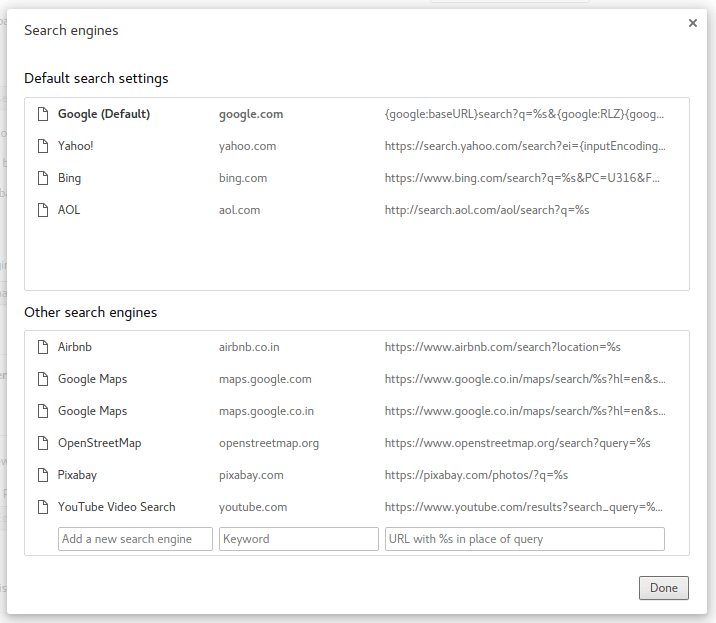
Click on “settings” and search for “default search settings”.
4. Chrome Cleanup tool
The Chrome Cleanup Tool will remove any exploits and flaws in the browser quickly and easily. You can download it for free here.
5. Always use a VPN
VPNs offer the most secure browsing experience. There are a lot of free VPN extensions out there but Hola VPN is the both well rated and easy to use. You can get it for free here.
6. Incognito Mode
Last but not least, be sure to use Incognito mode when using an insecure PC. On Windows, you can enter incognito mode by pressing CTRL+Shitf+N and ⌘-Shift-N on Mac. Incognito mode doesn’t store any browsing data and nothing that you do whilst browsing in incognito mode is recorded.
That’s all for now. If you think that we might have missed some important tip regarding Google Chrome security be sure to leave it in the comments below.
There is more than one way to skin a cat is a particularly morbid saying but it is one that most definitely applies to the philosophies of hackers and cyber-crimianls. They’re constantly looking for different ways of making money through the use of their malware and virus programs. One such way that has been gaining popularity recently is the Miner class of malware.
The rise of cryptocurrencies like bitcoin have seen a rise in cryptocurrency miners who seek to use the hardware capabilities of their pcs to legally mine the valuable cryptocurrencies. A standard PC could raise anything from a few cents to a few dollars a day running legal mining software. Hackers and cyber criminals have recognized this, however, and they’ve set about installing and hiding miners on as many PCs as they can so that can use other people’s hardware capabilities to illegally make money for them.
The obvious problem here, should some illegal ming software be installed on your PC, is computer slow down. Cryptocurrency mining is, necessarily so, a resource heavy endeavor. If your PC is working round the clock verifying cryptocurrency transactions it is going to have a serious effect on your computer’s performance when carrying out other tasks.
Number of users Kaspersky Lab protected from malicious cryptocurrency miners from 2011 to 2017 (Source: Kaspersky)
Since 2013 Kaspersky Labs have reported that they’ve seen a huge increase in the number of their users who have encountered illegal cryptocurrency mining software. Throughout the whole of 2014 only 205,000 users were exposed to this type of threat but after only 8 months of 2017 a staggering 1.65 million had been targeted.
This illegal software will install itself onto PCs via malicious ads for legal cryptocurrency mining software. It’ll then send all profits to the owner of the software rather than the owner of the PC.
If you’re looking to get into cryptocurrency mining as a hobby or you’re considering investing in hardware that could see you earn some extra money on the side you need to be very careful when downloading mining software. You should consult sites like Kaspersky and make sure that you’re following advice from reputable sites.
It is also important that you keep your PC safe from all other types of threat so make sure you click on the related links below.