Amazon MGM Studios has pulled out all the stops with the announcement of American Speed, a new blockbuster that will bring together two of the most popular actors of the moment: Tom Holland and Austin Butler. Inspired by true events, the production promises to explore the speed, risk, and dark side of the world of illegal racing in the 1980s, a subculture that has been explored in film before but not in this way. As revealed, in American Speed, Tom Holland and Austin Butler will portray the Whittington brothers, race car drivers who reached […]
Amazon MGM Studios has pulled out all the stops with the announcement of American Speed, a new blockbuster that will bring together on screen two of the most popular actors of the moment: Tom Holland and Austin Butler. Inspired by real events, the production promises to explore the speed, risk and dark side of the world of illegal racing in the 1980s, an underworld that has already been explored before in the cinema but not in this way.
Subscribe to the Softonic newsletter and get the latest in tech, gaming, entertainment and deals right in your inbox.
As revealed, in American Speed, Tom Holland and Austin Butler will play the Whittington brothers, racing drivers who rose to prominence on the International Motorsports Association (IMSA) circuit during the 1980s. Beyond their driving skills, the Whittingtons were known for financing their racing hobby through illicit activities. Drug trafficking, money laundering and tax evasion were just some of the controversies that surrounded their lives.
Who will direct American Speed?
American Speed is the first project to reunite Holland and Butler, who have been at the top of Hollywood for several years. The scope of the project is still unknown, as it will depend on the director they choose: it could be a summer blockbuster or a more authorial film that will reach the Oscars. We will soon find out.
Apple has repeatedly demonstrated that its focus is on creating complete products that can make a difference for everyone. With the arrival of Apple Intelligence (coming soon to Europe), the company takes this philosophy a step further. Unlike its competitors in artificial intelligence, Apple not only seeks to offer the most advanced functionalities but integrates them so seamlessly into its operating systems and devices that we don’t even realize we are interacting with artificial intelligence. Integration as a cornerstone The aspect that most distinguishes […]
Apple has demonstrated time and again that its focus is on creating complete products that can make a difference for everyone. With the arrival of Apple Intelligence (coming soon to Europe), the company takes this philosophy a step further. Unlike its competitors in artificial intelligence, Apple not only seeks to offer the most advanced functionalities, but integrates them so seamlessly into its operating systems and devices that we don’t even realize we are interacting with artificial intelligence.
Integration as a cornerstone
The aspect that most distinguishes Apple Intelligence from other artificial intelligence solutions is its seamless integration with the Apple ecosystem. Other competitors may offer powerful tools, but Apple has the ability to integrate them into the devices and applications that millions of people already use daily, such as Photos, Notes, Phone, Messages, etc.
On one hand, it is not necessary for us to learn to use a new application or functionality to enjoy the benefits of AI; Apple has simply added improvements to the tools we already know and use.
On the other hand, the reach of artificial intelligence multiplies. We open the Photos app and can search for specific people, places, or events effortlessly. Siri understands us better. We can correct a text much more precisely and completely. Our notifications are now gathered and summarized.
The other AI products on the market require us to adapt to new interfaces or methodologies, while Apple focuses on simplicity and a familiar environment. But that’s not all because convenience is not just about availability, but also the ability to interact. We can always copy several emails to ChatGPT and ask it to summarize them, but in Mail with Apple Intelligence, we just have to press a button. Does it matter if that summary is generated by Apple Intelligence? No. As users, we simply enjoy AI through a feature that, with great simplicity, makes a huge difference.
AI is often portrayed as a technology that requires certain knowledge, or at least learning how to communicate with it or request information. This is something Apple seeks to avoid with Apple Intelligence because, as we see in these announcements, AI is directly incorporated into the functions we already know.
Is it still intimidating? Apple knows that the use of emojis is widespread and accepted. By including a touch of AI, it can transform this experience in a fun and easy way. It’s the kind of natural integration that, like a game, gets us used to interacting with AI and, with something that has no greater significance, allows us to see how this AI reacts. Is there a better way to introduce all audiences to artificial intelligence?
All this integration, of course, is possible because the processing is done on the device, which means that our personal data is not transferred to the cloud for most functions. Smart notifications, object removal in Photos, and other tasks are processed directly on the device, thanks to the infrastructure and approach that Apple Intelligence has in terms of privacy.
This is something that other AIs cannot replicate and that hinders their more direct integration into devices. Apple has already arrived with its homework done, making Apple Intelligence better than any other AI for its unique options.
An AI for everyone
Apple Intelligence’s strategy is summed up in the subtitle the company has launched: “AI for everyone” or “AI for the rest of us.” A slogan that reflects the accessibility Apple seeks to offer and the integration and simplicity that characterize Apple’s artificial intelligence.
The company has created an experience where AI is perceived as an enhancement of the tools and services that are already part of our daily lives. This is a milestone we cannot overlook, and that gives Apple Intelligence a huge competitive advantage.
While other companies create new AI applications or platforms that, although they may be more powerful, remain in their own interaction bubble, Apple chooses to enhance the applications we already know as users. And it does so in such a discreet way that we don’t even realize that AI is there. And that, in the world of technology, is a truly extraordinary achievement.
If you’ve ever had the nightmare of a corrupted SQL backup, you know it very quickly spirals into a crisis for your business. SQL databases are the lifeblood of modern companies, securely holding the data that keeps the operations running. Consequences are severe when corruption occurs, causing halts in daily activities, reductions in productivity, and putting financial stability in jeopardy.
SQL backup corruption is pretty common and causes huge frustration to both IT teams and stakeholders. Power outages pose risks to your data, along with hardware failures, software bugs, and malevolent attacks. It is a very real possibility to spend hours setting up backups, only to finally find them corrupt and unusable in the crucial moment that you need them most. This is a scenario which is all too familiar and shows just how necessary it really is to understand SQL backup corruption and how to address it effectively.
In this article, we will look into some common causes of corruption for SQL backups, deliberate on prevention methods, and walk you through effective recovery.
These SQL backup corruption scenarios include a range of situations that put your day-to-day data stability at risk. Any person who has ever faced backup corruption knows pretty well how it can disrupt operations and cause costly downtime.
Power Failures and Hardware Malfunctions
One of the causes of SQL backup corruption involves something that most of the time is out of your control: power failure. An unexpected power outage during a backup process, transfer, or save will easily lead to file corruption and make your backup useless. Along the same vein, hardware failure — anything from disk failures down to the degrading quality of storage media — can compromise your SQL backup file integrity. At any moment where the hardware responsible for data safety gets compromised, the likelihood of losing data goes up.
Software Bugs and Human Errors
Software bugs can also be a common perpetrator of backup corruption. Bugs either in the applications performing the backup or within SQL Server itself may lead to inconsistencies in data or incomplete data, whereby restoration is not possible. Human error also plays a role: incorrect configuration, interruptions during the backup process, or omission to check on backup integrity can all result in corrupted backups.
Malware and Network Issues
There are other causes that, though less frequent, are just as serious. Malware attacks on backup files, network connections shutting off resulting in incomplete transfer, and even running out of disk space can cut off the backup. All these instances manifest in error messages, such as “Backup file is not valid” or “Checksum error”, which indicates that some backup verification process hasn’t been carried out.
Understanding the reasons for SQL backup corruption, both commonly and rarely encountered, allows you to spot weaknesses that may be inherent in your own backup strategy. That way, you can take due diligence to reduce the potential for data loss. Regular verification steps, maintaining up-to-date software, and storage health checks are all areas where you can prevent potential pitfalls.
Manual Actions to restore from an SQL Backup
These manual actions are typically required to restore corrupt SQL backup files using built-in SQL Server functionalities. They may come in handy if you don’t have third-party tools available.
If you’ve got your own method, first check backup integrity with RESTORE VERIFYONLY
Before restoration, you need to check that your backup file is in good health. RESTORE VERIFYONLY checks whether the backup is complete, and that all the files required are present, readable, and not corrupted.
Open SQL Server Management Studio (SSMS) and connect to your SQL Server instance.
Execute the following command: RESTORE VERIFYONLY FROM DISK = ‘C:\Backup\YourBackupFile.bak’;
Review the results. If the command completes without errors, the backup is structurally sound. If errors are reported, the backup file is corrupted.
Using RESTORE VERIFYONLY helps you determine upfront whether a backup file is usable before you go through the extended process of a full restore. It doesn’t actually restore the database but whatever manual method you’re using you should start by doing this. It reads through the backup file to validate integrity.
It can also give you an idea of what needs to be repaired: Checksum errors suggest data was altered or corrupted, media errors suggest issues with the storage medium and incomplete backupset suggests there are missing parts in your backup.
Restoring with CONTINUE_AFTER_ERROR Option
If your backup file is corrupt, you can attempt to restore as much of the database as possible using the CONTINUE_AFTER_ERROR option. This instructs SQL Server to ignore certain errors and continue the restoration process.
Use CONTINUE_AFTER_ERROR if your backup file is corrupted. You can try to restore as much of the database as possible using the CONTINUE_AFTER_ERROR option. This tells SQL Server to simply ignore some errors and continue the restoration process regardless:
In SSMS, run the restore command with the CONTINUE_AFTER_ERROR option:
RESTORE DATABASE YourDatabaseName FROM DISK = ‘C:\Backup\YourBackupFile.bak’
WITH CONTINUE_AFTER_ERROR, REPLACE;
Monitor the restoration process. SQL Server will attempt to restore the database despite encountering errors.
Due to the fact that CONTINUE_AFTER_ERROR instructs SQL Server to skip over any errors which would otherwise cause the restore to fail, it’s probable that here is going to be some data loss, but at least you will be able to retrieve parts of the database that are not afflicted by the corruption.
Method 3: Restoring from a Previous Backup and Applying Transaction Logs
You can recover your database by restoring from an older backup and then applying backups of the transaction log to bring the database up to date, even though this full backup is corrupt.
Restore the last known good full backup: RESTORE DATABASE YourDatabaseName FROM DISK = ‘C:\Backup\LastGoodFullBackup.bak’ WITH NORECOVERY;
Restore the differential backup if available: RESTORE DATABASE YourDatabaseName FROM DISK = ‘C:\Backup\DifferentialBackup.bak’ WITH NORECOVERY;
Apply all subsequent transaction log backups in sequence: RESTORE LOG YourDatabaseName FROM DISK = ‘C:\Backup\LogBackup1.trn’ WITH NORECOVERY;
RESTORE LOG YourDatabaseName FROM DISK = ‘C:\Backup\LogBackup2.trn’ WITH NORECOVERY;
Repeat for all log backups
Complete the restoration: RESTORE DATABASE YourDatabaseName WITH RECOVERY;
This will restore an earlier good backup and then apply transaction logs to recover the database to a point just before corruption occurred. The method here assumes that you have a sequence of transaction log backups available.
By using manual techniques, complete recoveries are not guaranteed and often require a notable amount of time and patience. If you find yourself in a critical situation where it’s essential to recover a database but your backup is corrupted, sometimes it’s better to use specialized and automated recovery tools, or consult with a database recovery expert.
Proactive Measures to Prevent SQL Backup Corruption
The best practices to avoid SQL backup corruption are proactive and comprehensive. Here’s how you can minimize the risk of backup corruption and make data more stable.
Regular Hardware Maintenance and System Audits
Perform routine hardware maintenance to avoid sudden failures. Backup corruption usually occurs as a result of either disk failures or power interruptions. System audits can show out-of-date hardware or software weaknesses that may affect the integrity of your backups. Replace old equipment and update system components to drastically reduce data corruption risks.
Effective Backup Processes and Redundancy Strategies
Nobody likes corruption, so put in place reliable backup strategies to avoid corruption. Create redundancy by making multiple copies of backups. Use the 3-2-1 rule: three copies of your data, on two different types of storage, with one stored off-site. This means that even if one of the backups does indeed get corrupted, there are other options.
Routine Backup Integrity Checks
Schedule periodic integrity checks for backup quality. Most of the backup solutions out there do include verification steps that can be used to check data integrity. Consistent checks help in finding corruption early and addressing issues before it affects your operations.
Secure Data Handling Practices
Handle data with care when transferring or storing. Transact data only over secured networks to minimize corruption during transmission, and have enough disk space so that there is no risk for fragmenting your backups.By abiding by these strategies, businesses will be exposed to less risk of SQL backup corruption and can keep charge over data security. Proactive measures are required if your goal is to make data resilient and reduce downtime
Stellar Repair for MS SQL: A Dependable Solution Against Backup Corruption
After considering some challenges concerning SQL backup corruption, a trustworthy solution needs to be at hand.Stellar Repair for MS SQL is just that sort of solution: Reliable software for efficiently restoring critical data. This tool is written specifically to deal with these kinds of
problems, offering a very effective way to repair corrupted SQL backup files and recover business data.
Stellar Repair for MS SQL Technician is powered with an algorithm that scans the backup of the damaged files – identifying corrupt elements for repair – thus preventing data loss. Its characteristics make it suitable as an ideal solution for handling even some of the most intense scenarios of corruption.
Thorough Data Recovery for Complex Needs
Stellar Repair for MS SQL repairs all types of SQL database components – tables, views, stored procedures, and triggers. This means that the most important elements of your database will show up correctly restored, and minimize the chances of data gaps or lost records
User-Friendly Interface for Speedy Restoration
The software is very intuitive and makes recovery a breeze. Even a less-than-highly technical user will find it easy to use, as the instructions will lead you through each step to repair corrupted backups. This helps minimize losses due to extended downtime and gets operations running smoothly quickly.
The usability factor of the software is an important factor as they reduce the likelihood of errors. You could quite literally dictate over the phone to even the least technical savvy administrator on site to follow the easy steps and restore corrupted backups with minimal or no downtime.
Data Integrity Focus for Uncompromised Accuracy
Stellar Repair prioritizes data integrity, which is to say that the restored SQL data retains its original data structure with reliable accuracy. That means not causing any operational discontinuity due to inconsistency or data changes.
Broad Compatibility with SQL Server Versions
It also supports SQL Server versions from 2022, 2019, 2017, 2016, 2014, all the way back to v7.0. This flexibility gives options to a business even when they have different systems in place. Whether one’s organization is still on older setups or has installed the very latest version of SQL Server, Stellar Repair will adapt to suit.
Stellar Repair for MS SQL Technician focuses on its major selling points: reliability, integrity of data, and ease of use. This positions it as a reliable tool that lets IT teams take care of even the most critical corruption issues and get operations up and running as quickly as possible.
Step-by-Step Guide to Repairing Corrupt SQL Backups with Stellar Repair for MS SQL
Stellar Repair for MS SQL makes recovering your corrupted SQL backups effortless and easy. Here is a step-by-step guide that will walk you through the process of repairing a corrupted SQL backup to get your database extracted with minimum downtime and complete data recovery.
Step 1: Launch Stellar Backup Extractor Tool
Launch Sellar Repair for MS SQL. Select “Extract from MS SQL Backup”. Click Browse if you know the location of the corrupted SQL backup (.bak) file, otherwise click Search to look for it. Select the corrupt .bak file.
Step 2: Scan the Backup File
Click Scan and choose one of two options: Standard Scan or Advanced Scan, depending on how heavy the corruption is. Choose the Backup set to proceed.
Step 3: Preview Recoverable Data
When scanning has finished, Stellar Repair for MS SQL then lists all recoverable items in a tree-view format. All database tables, views, and other items should be checked for their integrity within the database.
Step 4: Extract and Save the Database
Click Next to extract the recovered data. Give the destination path and format—MDF, CSV, HTML, or XLS—to save the repaired database.
Step 5: Save as New Database
Within the Connect to Server option, select the server/instance to which you want to restore the database. Specify where to save the recovered database. Click Connect and save the .bak file as a new database in MS SQL format.
Step 6: Save Log Report (Optional)
Save a log report, if necessary, for reference or auditing purposes.
Stellar Repair for MS SQL Technician is designed to emphasize ease of use. It makes even the most daunting repair operations feasible to users at a non-technical level.
Ensuring Data Security: Final Thoughts
SQL backup corruption can easily cause complete paralysis in day-to-day business, with lost productivity leading to severe monetary losses. Conversely, proactive measures like periodic hardware maintenance, redundancy on backups, and routine integrity checks will save your business from such risks.
Stellar Repair forMS SQL provides you with the trustworthy solution you need to restore corrupted data in an efficient way. With the proper strategies and tools at your side, you are now ready to face the challenges of SQL backups and corruption head on: Secure your data and keep your business resilient.
Microsoft PowerToys is a collection of utilities designed to expand and optimize the Windows experience, providing tools that Microsoft does not offer by default in Windows 11. These utilities offer useful functions ranging from file and window management to keyboard shortcut customization, ideal for enhancing productivity and assisting you in countless tasks. Although its installation used to be somewhat complicated, PowerToys can now be easily downloaded from the Microsoft Store or even from this very website. Once installed, you can customize which tools to use by enabling or disabling them from the control panel of […]
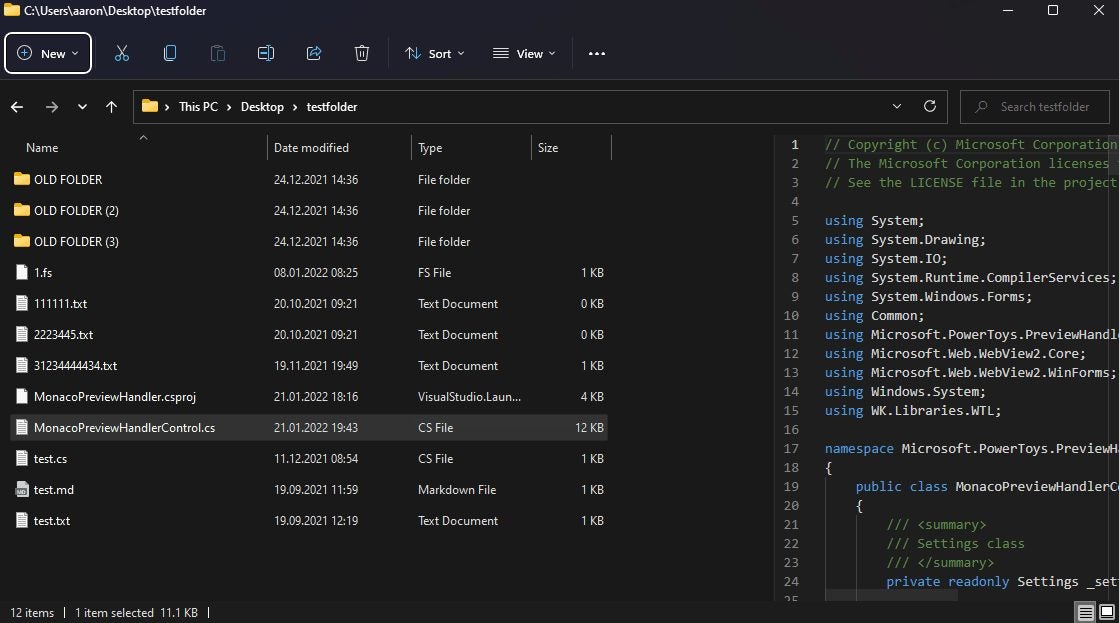
Microsoft PowerToys is a collection of utilities designed to enhance and optimize the Windows experience, providing tools that Microsoft does not offer by default in Windows 11. These utilities offer useful features ranging from file and window management to keyboard shortcut customization, ideal for boosting productivity and assisting you in a myriad of tasks.
Subscribe to the Softonic newsletter and get the latest in tech, gaming, entertainment and deals right in your inbox.
Although its installation used to be somewhat complicated, currently PowerToys can be easily downloaded from the Microsoft Store or even from this very website. Once installed, you can customize which tools to use, enabling or disabling them from the PowerToys control panel. Below, we show you 5 of the most useful features it includes that can be of great help in your daily life.
File Explorer Add-ons
File Explorer in Windows 11 allows you to preview images and certain documents in a preview pane. However, PowerToys expands the possibilities by adding support for other file types that Windows does not recognize natively. By default, PowerToys File Explorer add-ons allow you to preview SVG files, Markdown, and various source code formats such as CPP, JSON, PY, and XML.
In addition, you can also enable PDF file preview in the preview pane or as thumbnails in the Explorer itself. This is especially useful for developers or users who frequently need to consult these types of files, saving them the effort of opening them in third-party programs. This feature makes File Explorer a more versatile and convenient tool.
PowerRename
Renaming files in bulk can be a tedious task, especially if you have a large number of photos or videos with generic names. But don’t worry, PowerRename will make this task easier by allowing you to select all the files you want to rename and rename them at once.
To do this, select the files, hold down the Shift key, and right-click to access the context menu, where you can choose the option “Rename with PowerRename”. Once there, you can search for common text in the file names you want to change and replace it with the new text you prefer. This way, you won’t have to rename each file one by one, saving you a lot of time and effort.
Always on top
When working with multiple open windows, it can be annoying to lose sight of an important window behind others. The “Always on Top” feature of PowerToys solves this problem by allowing you to pin any window to remain visible at all times.
You just have to select the window you want to keep on top and press Windows + Ctrl + T; the selected window will appear with a blue outline, indicating that it is in the foreground. To remove the pin, simply repeat the same command. A very useful feature when you are multitasking and need to constantly refer to a window.
When copying and pasting text from the web or documents, it is most common to also copy the formatting along with the text. Although in a Word document you can use Ctrl + Shift + V to paste as plain text, the PowerToys Advanced Paste function goes a step further. Advanced Paste not only allows you to paste as plain text, but also as Markdown or JSON, and offers the option to add additional formatting through AI if you have an OpenAI API key.
Additionally, it features a clipboard history that displays a list of everything you have recently copied, assisting you in managing and accessing multiple copied items. To use this function, simply press Windows + Shift + V and select the special paste option you need.
PowerToys run
Windows search is not always effective for running applications, as it often offers Bing or web search results instead of browsers or other programs installed on your device. PowerToys Run improves this experience by allowing you to quickly run applications by simply pressing Alt + Spacebar. This search feature is similar to Spotlight on macOS and is much more accurate in finding installed applications.
In this way, if you are looking for a specific application, PowerToys Run will find it even if you type the name inaccurately or without spaces, something that Windows search does not consistently achieve.
Another will come who will make me good. This popular saying, little used according to the Centro Virtual Cervantes, applies very well to Shawn Layden. Not very well-liked during his tenure at the helm of Sony, he is experiencing a sort of redemption arc. Without the burden of having to lead a multinational company, it seems that his opinions are very different from those he had when he was at the helm. Or at least, much more sensible than those who are now steering that same ship. Because once again, the former executive and leader of the Japanese brand has decided […]
Another will come who will make me good. This popular saying, little used according to the Centro Virtual Cervantes, applies very well to Shawn Layden. Very little liked during his tenure at the helm of Sony, he is having a sort of redemption arc. Without the burden of having to lead a multinational forward, it seems that his opinions are very different from those he had when he was at the helm. Or at least, much more sensible than those who are now at the helm of that same ship. Because once again, the former executive and leader of the Japanese brand has decided to speak with a sensibility we did not expect from an executive.
As an executive at Sony for 30 years, he knows all the ins and outs of the company well, something that has earned him his current job as an advisor for numerous companies, including the Chinese giant Tencent. Where, currently, he is recommending doing exactly the opposite of what the entire industry is doing: reducing the scale of projects, teams, and thus, alleviating the budget issues.
PlayStation app is a free application specially designed for PS4 and PS5. With it, you can download and start your favorite games, customize your profile, see which friends are online, and discover the latest news from PlayStation Store.
In Layden’s view, it is necessary to return to making games with more modest budgets. Perpetual growth does not work. And he has reasons for this. Arguing that, “when a game costs 5 million dollars to make, you can charge 59.99 dollars, but when it costs 125 million dollars, you charge 59.99 dollars, so the math doesn’t work.” Saying that, by pure logic, it is impossible to maintain the current costs of video games. Not when, “the gaming community has said they don’t want to pay more than 60 dollars for a video game.”
This is something we have seen in recent years. With the growth of budgets, the leap with each new generation has also meant a leap in the base price of games. From 60 to 70 dollars, and currently making a gesture to reach up to 80. But the reality is that by doing this, games sell less at launch, inviting players to wait for the inevitable discounts to purchase the games.
That is why, according to Layden, the industry is hitting a wall. If 150 million is spent on making a triple-A game, then they are obligated to make a sequel. This is because all the risks are defined through mathematics that simply do not align with the material reality of things. What CEOs and finance chiefs see is that the price of a game does not match its cost and that, if it works, it is not worth trying to take a risk with something different. It is better to continue exploiting what is already known to work.
That’s why there are so many clones of the same game. So many DLCs, microtransactions, and battle passes. Because it’s a way to make money while minimizing risks in an economy that doesn’t work. But then, what does Layden propose? Literally, to de-escalate. To make cheaper games.
In his own words, “it’s time to make a radical reset in the business model, a radical reset of what a video game is.” The immense budgets, games over 50 hours, hyper-realistic graphics, are unsustainable in an industry that increasingly struggles to sustain itself. And that requires changing how video game production is approached. But also how we think about video games and what they should be.
Is what Layden proposes possible? Only time will tell. But when the former president of Sony says that the current model is unsustainable and that we are heading towards a cliff, perhaps these are not apocalyptic speeches. Perhaps it’s time to start rethinking the video game industry. And what a video game should be, in general.
Google is clear on how to use generative AI to improve its geolocation and navigation applications. To achieve this, it will introduce its artificial intelligence, Gemini, into the company’s three most used navigation apps. The idea is to enhance the experience when searching for something. Google Maps, Google Earth, and Waze will receive feature updates thanks to Gemini, although in some cases only with Google’s trusted insiders at first. How Gemini affects Google Maps At some point this week, if you use the Google Maps application […]
Google is clear on how to use generative AI to improve its geolocation and navigation applications. To do this, it will introduce its artificial intelligence, Gemini, into the company’s three most used apps in terms of navigation. And the idea is to enhance the experience when searching for something.
Google Maps, Google Earth, and Waze will receive feature updates thanks to Gemini, although in some cases only with Google’s trusted insiders at first.
At some point this week, if you use the Google Maps app for Android or iOS in the U.S., you should start seeing more detailed and contextual search results. Maps will now respond to conversational requests: during a demonstration, Google asked what to do on a night out with friends in Boston, and the app returned a series of results crafted by Gemini.
These results included categories of places -for example, cocktail bars- with summaries of reviews and user responses.
Regarding the reliability of the results, “we use the Gemini model to examine the facts and data we have in the map database, which includes data from our locations and reviews, and then we retrieve and respond, curate, and fact-check them,” explains Chris Phillips, Vice President and General Manager of Geo at Google.
This explained that the system will link and attribute third-party information, such as blogs, but that “when we answer the question about the details of the place and the facts about the place and the reviews about the place, the Gemini model is specifically looking into the datasets that we manage and operate and fact-checking there.”
Google says it has made it easier to explore secondary locations when planning a route, with suggestions for landmarks and other sites of interest available with just a tap of the “add stops” button.
At the end of a trip, Google Maps will start suggesting places to park and then switch to walking directions to your final destination, with augmented reality if you need it. This should be available to all iOS and Android users this week, according to Google, along with the ability to report weather disruptions and a more immersive view of 150 cities around the world.
And next month, Google will start adding more detailed information about lanes in some metropolitan areas.
Today, we’re adding new features on @Waze including an easier way to report road incidents and hazards with Gemini capabilities and info about school zones. Learn more ↓ https://t.co/q1pMTdp4iC
Waze, now fully integrated into Google’s Geo division, continues to offer an alternative road navigation experience and will also benefit from AI-enhanced natural language processing with the addition of conversational reports.
In practice, this means you will no longer have to search for the right icon on your phone to report that tire in the middle of the highway or the traffic officer hiding behind a bush.
The feature, which will initially only be available to Waze’s trusted testers, allows users to verbally describe what they see and potentially ask follow-up questions.
Waze also said it is making it easier for map editors to add school zones to the map, and it will alert users when they are passing through one. This feature will arrive on iOS and Android later this year, according to Waze.
The improvements to Google Earth will likely be of greater interest to urban planners, although they will need to request access to the Google Earth trusted tester program, which will be launched for beta testers next month.
In this case, Gemini is being used to add complex searches like “map the five zip codes with the fewest electric vehicle chargers relative to the size of their geographic area.” After determining the answer, Google Earth creates a useful visualization, as you can see on the Google blog.
With the new Clean Up tool in iOS 18.1, photo editing from our iPhone is greatly simplified, as we can now easily remove unwanted elements from our images. A photo of a landscape with a power pole? A sign in the middle of a shot? They are a thing of the past. With Clean Up, we can eliminate these distractions in seconds, without the need for editing programs, all from the Photos app. How to use Clean Up in iOS 18.1 The Clean Up tool uses Apple Intelligence to analyze our photos and detect objects that might not be part of […]
With the new Clean Up tool in iOS 18.1, photo editing from our iPhone is greatly simplified, as we can now easily remove unwanted elements from our images. A photo of a landscape with a power pole? A sign in the middle of a shot? They are a thing of the past. With Clean Up, we can eliminate these distractions in seconds, without the need for editing programs, all from the Photos app.
The Clean Up tool uses Apple Intelligence to analyze our photos and detect objects that might not be part of the ideal composition. From here, a simple tap on those objects makes them disappear.
And the best part is that we can do it directly from our iPhone, iPad, or Mac. How? By following these steps:
We open the Photos app and select the image we want to enhance.
We tap on the Edit button (the three horizontal bars).
We select the Clean Up option (which may require a short download the first time).
If Clean Up identifies an object we might want to remove, it highlights it with a special glow; we just need to tap it to remove it. If the system doesn’t suggest any selection, we can draw a circle around the object or paint over it to select it. As always, we can zoom in to adjust the selection if necessary.
Once the object has disappeared, we tap on Done to save the changes.
The Clean Up tool is most effective for small objects and simple backgrounds, such as removing signs or some people from the background. The results, of course, will vary greatly depending on the content of the photo and the complexity of the background, but they are sure to surprise us.
Although removing the content of a photo disables its Live component, we are looking at a way to improve our shots significantly and easily. Similar to creating memories with just a description, it allows us to make any photo much better with just a tap.
Fighting games and mobile devices don’t get along too well. With the proliferation of controllers and other peripherals that make playing on your mobile no different from doing so on consoles, this might be different, but that’s not the case with the average player. Most people continue to play without any kind of added device. That’s why fighting games on mobile never really take off, and their developers look for alternative ways to approach such an enticing market. This has been the case with SNK. Aware […]
Fighting games and mobile devices don’t get along too well. With the proliferation of controllers and other peripherals that make playing on your mobile no different from doing it on consoles, this might be different, but that’s not what happens with the average player. Most people still play without any added devices. That’s why fighting games on mobile never really take off, and their developers look for alternative ways to approach such an enticing market.
This has been the case with SNK. Aware that The King of Fighters is too complex for the possible controls on a mobile, they have decided to create a mobile game that works better with the idiosyncrasies of the same. Something that has led them to make The King of Fighters AFK. A very interesting twist not only to the KOF formula but also to RPGs.
Announced during the last Tokyo Game Show and developed by Netmarble, The King of Fighters AFK is an RPG that, as its name suggests, does not require you to be playing for your characters to continue leveling up. Even while you are not playing, the characters you have active will continue to accumulate experience, making the mere passage of time cause your characters to become stronger over time. However, that will not be enough to win.
With a pixel-art aesthetic inspired by The King of Fighters R-2 and Neo Geo Pocket Colour games in general, this is a game that revolves around 5 vs. 5 battles and deck building. So, even if your characters improve without you having to interact with them, you will still need to know how to play to make the most of those juicy levels you’ve achieved while doing other things.
Registration for The King of Fighters AFK is now available on both Android via Google Play and iOS through the App Store. If you register now, you will also receive 3,000 summoning opportunities, offering you a generous amount of gacha spins that will make it much more likely for you to get the powerful character you so desire. Or the character you’ve been playing for so many years that cannot be missing from your squad.
Konami has already gone a decade without giving us a new Castlevania. We never tire of repeating it. This wouldn’t bother us if the franchise were dead, or at least if they let it rest, and weren’t systematically exploiting it with all kinds of spinoffs, compilations, or even, let’s admit it, some excellent remakes. We’re not going to complain about being offered crumbs instead of sticks, as has been the case so far, but we would love to see a new Castlevania if Konami doesn’t consider the franchise to belong in the grave or a drawer. But it seems that everyone, except Konami, is interested […]
Konami has not given us a new Castlevania for a decade. We never tire of repeating it. This wouldn’t bother us if the franchise were dead, or at least if they let it rest, and weren’t systematically exploiting it with all kinds of spinoffs, compilations or even some, let’s admit it, excellent remake. We are not going to complain about being offered crumbs instead of sticks, as has been the case so far, but we would love to see a new Castlevania if Konami doesn’t consider the franchise belongs in the grave or a drawer. But it seems that everyone, except Konami, is interested in doing something new with it.
Or that’s the feeling when Takarazuka Revue has announced that the next big Castlevania project is not a video game, but a musical. Named Akumajou Dracula: ~Gekka no Kakusei~, translated as Castlevania: Awakening Under Moonlight, it will be a musical production held during the second half of 2025 by one of Japan’s most famous and long-standing theater companies.
Because the Takarazuka group is one with a long and very curious history. To begin with, it is composed exclusively of women. Divided into three different sections and with a very strict hierarchical system, all the women are divided between those who play male roles, those who play female roles, and those who can play both. In each of the sections, only one woman can become the star of the male and female roles, respectively. And all these particularities have made them very popular over the years, especially among young women and avant-garde artists.
In fact, the Takarazuka group has previously adapted video games. Between 2009 and 2013, they created three different plays adapting the Ace Attorney franchise, in 2013 they made a play based on Sengoku Basara and in 2023 they made a play based on Final Fantasy XVI, to name just a few of their adaptations. This demonstrates that it is not merely a curiosity on their part, but a genuine interest.
If you are interested in musicals, theater, and Castlevania and are planning a trip to Japan for 2025 or live there, you should know that you have two opportunities to see Akumaj? Dracula: ~Gekka no Kakusei~ live. The first will be at the Takarazuka Grand Theater in Takarazuka from June 7 to July 20, and the second will be at the Tokyo Takarazuka Theater in Tokyo from August 16 to September 28. The story will be completely original, and who knows when Konami will give us a new game from the franchise, so this is the best opportunity to enjoy a new Castlevania.
There have been many times we have warned you about the dangers of hackers and all the malware lurking on the internet. And although many people think we are exaggerating, the new hacker tools justify us warning you again and again. The internet world is dangerous, and everyone wants to get hold of our banking data. While calling our bank is common, as many procedures are done over the phone out of necessity or convenience, there is a new malware that is making this call dangerous, and we are telling you about it. A new malware […]
We have warned you many times about the dangers of hackers and all the malware lurking on the web. And although many people think we are exaggerating, the new hacker tools justify us warning you over and over again. The internet world is dangerous, and everyone wants to get a hold of our banking data.
While calling our bank is common, as many procedures are done over the phone out of necessity or because they are more convenient, there is a new malware that is making this call dangerous, we’ll tell you about it.
A new malware detected on Android phones might make you think twice before making your next call to the bank. The trojan application can detect calls to certain banks made from personal phones and redirect them to hackers, without the person making the call being aware of anything.
The malware can infiltrate Android devices through malicious apps installed using APKs. https://t.co/fWRRtOFQTD
The malware called FakeCall that can leave your account at $0
The malware “FakeCall” or “FakeCalls” has been active for just over two years, according to BleepingComputer, but it has recently become more complex and difficult to detect. Although it previously posed as a banking application, the new versions detected by the security company Zimperium are more complex.
The application is installed as a side-loaded APK, as is often the case with Android malware, and requests permission to become the default call manager, essentially replacing the phone’s normal dialer app.
The malicious app then runs in the background, patiently waiting for you to call a known banking phone number. When it detects such activity, it diverts the call to a hacker (who is literally on standby for this).
Next, with the help of a fake visual element to hide the real call destination, the hacker pretends to be a bank employee to obtain your real banking information. Once you have provided your account number and some personal data, they can empty your accounts at will.
And there are other obfuscation options. The system allows the hacker to call you directly and impersonate your bank if they see that you are not patient, or perform other tricks remotely.
It is an ingenious and complex system, but the core of the scam still relies on you downloading an unverified APK and granting permission to an application to replace your phone’s standard dialer. The new variants of the malware are also capable of monitoring Bluetooth connections and using Android’s accessibility tools to fake user interface elements.
Zimperium has detected this malware on the network, although it has not yet appeared in any Google Play Store application (something that happens, but rarely). In the GitHub tools to detect it, a dozen different APK variations are listed, some with seemingly random letter strings, others with innocuous labels like com.securegroup.assistant.
As always, and just like with Windows software, never download Android apps from a source you don’t trust, it can be the difference between a full bank account and an empty one.