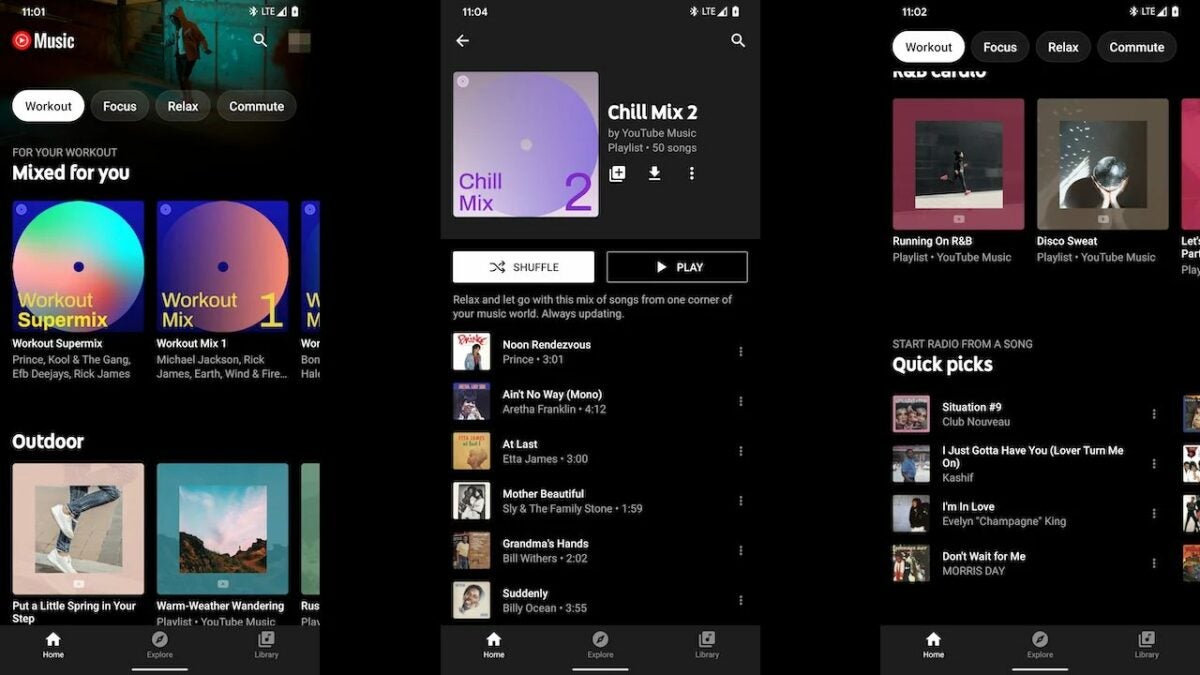
How to use filters on YouTube Music to customize filters in 5 simple steps

The popular music streaming service, YouTube Music, has filters that make it easier to customize your recommendations, find what you’re looking for, and add new music to your playlist or queue. However, it could sometimes be challenging to understand just how these features work and how to get the most out of them.

YouTube Music DOWNLOAD

Let’s take a quick look at how to use filters on YouTube Music to customize your music suggestions.

Using filters on YouTube Music to customize content

Scrolling through hundreds of results just to find that one perfect song is not a great way to spend your time. We understand that you’d rather be listening to good music than scrolling through lists of songs. Here is a step-by-step guide to help you use filters on YouTube Music on mobile to narrow down your searches and quickly find what you’re looking for. The steps are very similar in the desktop and browser versions.

  1. Launch YouTube Music

    YouTube Music to customize filters

    First, you need to launch YouTube Music. You can do so by tapping on the app icon on your home screen or in your app drawer.

  2. Tap on the search bar and type in a request
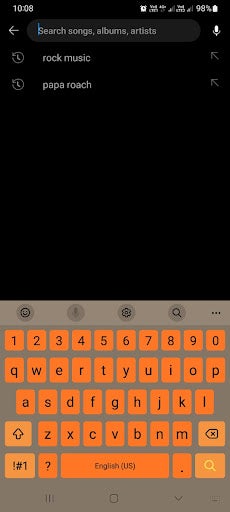
    YouTube Music to customize filters

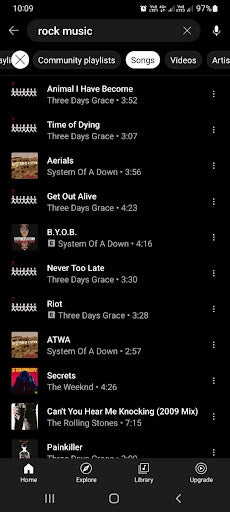
    Tap on the search bar found in the upper section of your screen. Next, type in what you’re looking for. It can be as specific as a song or artist’s name, or it can be more vague, like a genre. What you search will depend on what you’re looking for.

  3. Choose how to filter content

    YouTube Music to customize filters

    Once you’ve tapped on the search bar, a long list of suggestions will appear. Above this list will be a few filter options to help you narrow down your results. Some of the tabs include ‘Featured Playlists,’ ‘Community Playlists,’ ‘Artist,’ ‘Albums,’ and more. The types of filters you see are based on what you’re searching for. As such, you may see different filter options for different searches.

    Tip: After tapping on a filter, a new queue will be generated according to the filter selected. Bear in mind that since your queue completely regenerates after tapping on a filter, you might not see the exact same lineup when going back to a previously selected filter, so if you like a song or playlist, make sure to add it to yours.

  4. Play your chosen result

    YouTube Music to customize filters

    Once you’ve filtered your suggestions and you find something you want to listen to, you simply need to tap on it. Once tapped, the selected song or playlist will start playing

    Tip: You can immediately start playing a song or playlist if you find what you’re looking for and finish the process here. However, if you’d like to see even more options, you can continue on to the next step.

  5. Tap on settings for more options

    YouTube Music to customize filters

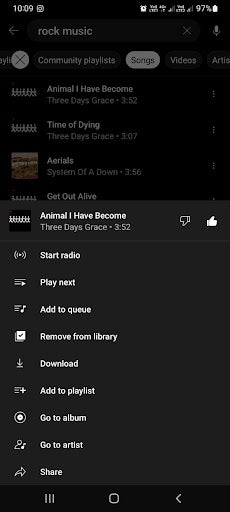
    However, there are even more options that you can choose from if you don’t want to start listening quite yet. Tap on the three horizontal dots to see more options. Now you can choose to add the song to your playlist, queue, or you can like the song to get more suggestions similar to it.

Filtering explicit content on YouTube Music

YouTube Music has another useful filter, but unlike the others, this one is buried in your app settings. This feature is especially useful for parents as it filters out explicit content such as bad language. Having it hidden in your settings also means children won’t be able to disable it accidentally.

To enable this feature, you simply tap on your profile and navigate to settings in the drop-down menu. The cog icon represents your settings. Here, under the general tab, you’ll find the toggle to enable or disable explicit content.

However, it should be noted that while every measure is taken to make this feature effective, it doesn’t capture all the songs with explicit content every single time, and some might slip through the cracks.

Enjoy your favorite tunes seamlessly with filters

YouTube Music filters make it much easier to customize the results you see. This means you can easily find what you’re looking for without scrolling through hundreds of results. Following our simple instructions above can make using YouTube Music much easier, and finding the right songs, playlists, or artists will be more convenient.
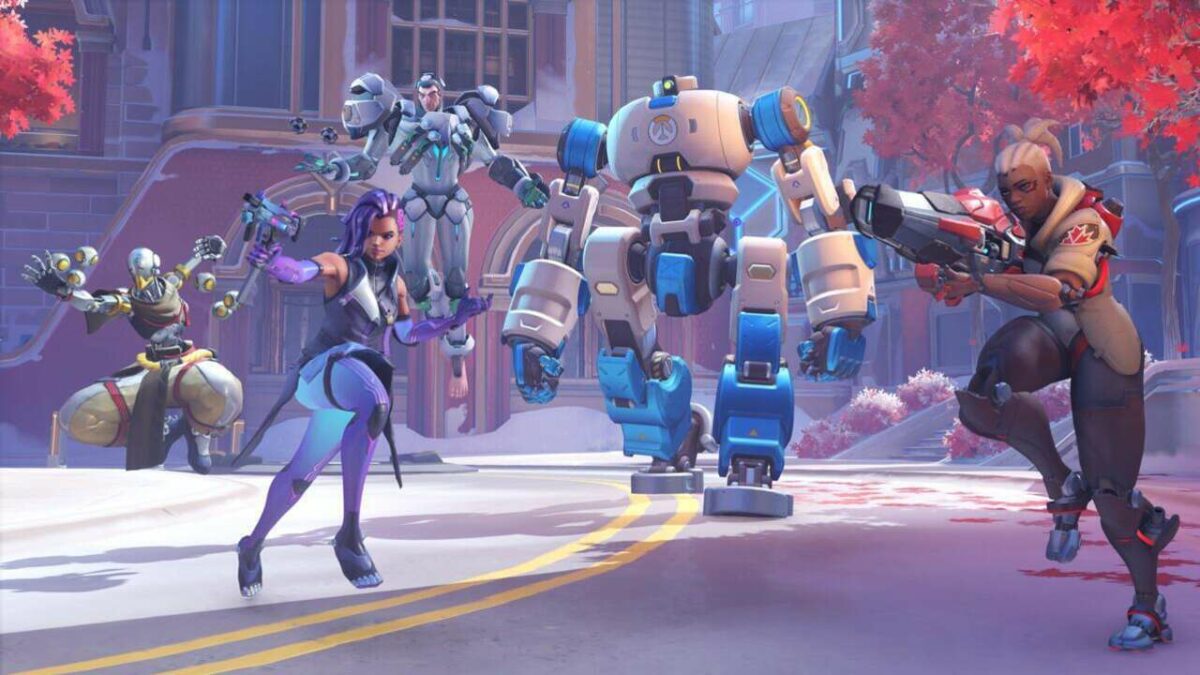

Overwatch 2 apologizes for the numerous issues following the launch

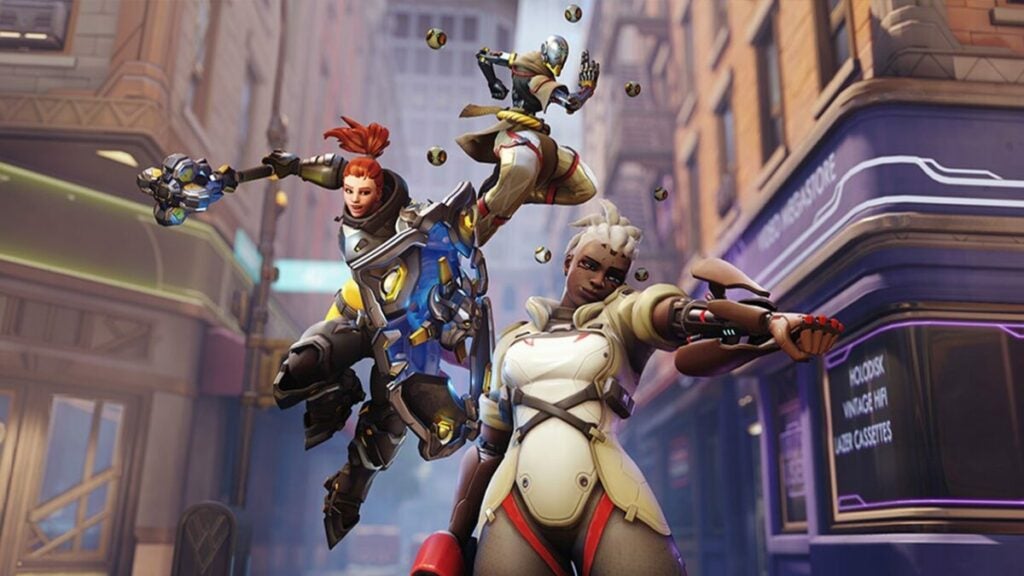
After much anticipation, the Overwatch 2 launch was underwhelming, to say the least. There were DDoS attacks on launch day, and players had to battle server errors, long queues, broken account mergers, and strange SMS requirements that locked mobile players using prepaid phones out of the game. 

Overwatch 2 DOWNLOAD

Blizzard has apologized and announced what they’re doing to fix these issues. The Blizzard community manager, Jodie, apologized on the Blizzard forum. She stated that they expected the launch to go without any problems but that the team is working on fixing the issues that did arise. 

Overwatch 2 introduced a new requirement for players to connect a phone number to their account. However, for some reason, this requirement doesn’t allow prepaid phone plans. The post explained that players who already have a Battle.net account won’t need a phone number from today as a fix for this issue. Unfortunately, it seems Blizzard isn’t removing this requirement entirely.

Overwatch 2 apologizes for the numerous issues

Jodie also announced that they are working on server stability to deal with the large number of crashes, lags, long queues, and even difficulty logging in. Some of the fixes will be to patch the login server and add nodes to the player database to lessen the load.

Another issue players experienced was merging accounts only to find lost inventory items. Blizzard is rolling out a UI fix to get more people to merge their accounts and stated that data isn’t lost. In many cases, it’s just taking longer to merge over to Overwatch 2.

Despite a rough launch, the game itself is solid – at least once you get past these initial issues. Even though there won’t be any loot boxes in Overwatch 2, it remains a fun team-based FPS that should only get better once these issues are resolved.

Pokemon GO announces increases in in-game prices on all platforms

The developers of Pokemon GO made an announcement regarding in-game prices that upset some fans. Niantic announced that due to Apple’s Eurozone price hike, players in certain countries would see an increase in in-game prices. What has fans in an uproar is the fact that this price hike will come to all platforms, not just Apple.

Pokemon GO DOWNLOAD

Fans in Ireland and mainland Europe can expect to see those increases from today. Countries that use the pound are spared for the moment, but many others will still be affected. Pokemon Go players in Poland, Sweden, Chile, Egypt, Malaysia, Pakistan, South Korea, Vietnam, and even those in the birthplace of Pokemon, Japa, will be affected by this Apple price increase.

Apple may drive this increase, but Niantic has decided to increase prices across all platforms in these countries, including Android. This decision has received some pushback from fans that are upset about the increases when they don’t own an Apple device. While some fans understand this move as Niantic is trying to be fair to all players, regardless of the device they chose.

Pokemon GO announces increases in in-game prices main

The changes in Apple’s prices are significant, making it understandable that developers on this platform might have to adjust their prices accordingly. Apple tiers that charged apps €0.99 have increased to €1.99, and tiers that were €9.99 per app increased to €11.99.

Niantic has also stated that aside from these increases, they won’t be making any other changes and will monitor the impact this has and then decide how to navigate changes on a global scale.

These changes can have a significant impact on Pokemon GO and players alike, so we’ll monitor the situation to see how things develop. On a lighter side, player surveys have recently narrowed down who the least favorite Pokemon Go character is.

Businesses are losing against cyberattacks as shocking stats are released

We frequently hear about new cyberattacks in the news, but the effects these attacks have on businesses are astronomical. Despite more businesses using measures such as Atlas VPN, proxies, and other security measures, the frequency of cyber attacks is climbing, and especially small and medium-sized businesses are suffering

Atlas VPN DOWNLOAD

The 2022 US Cybersecurity Census report has been released. It illuminates just how bad these losses are, with 37% of businesses reporting that they lose over $100 000 per successful attack. This percentage is broken down into 22% of businesses reporting losses higher than $100 000, with 11% of businesses losing between $500 000 and $999 999 and 4% claiming to have lost more than a million from successful cyber attacks.

As if the above statistics weren’t bad enough, the report also stated that businesses face approximately 42 cyberattacks annually. Out of those attacks, about three are successful. One cyber-attack can cause significant damage, and more than one can cause a catastrophe, especially for small and medium-sized businesses.

Aside from the major financial losses that successful cyber attacks cause, businesses also have to deal with other damages. 31% of businesses reported disruptions in partner and customer operations, and 28% reported damages to reputation and theft of confidential financial information. 24% had to manage supply chain disruptions, with 23% experiencing a major disruption of business operations. Furthermore, 19% of businesses noted a loss of business contracts, while money theft was present in 18% of companies.

cyberattacks stats

More worrying than all these statistics is that 48% of businesses were aware of the successful cyberattack but did not report it to the appropriate authorities. This significant lack of transparency causes further damage to the company’s reputation and can make these attacks more dangerous and prevalent.

Businesses are doing more to improve their cybersecurity, such as using VPNs, proxies, and stronger security protocols. However, this isn’t enough if a business can’t also be transparent about attacks. Therefore a data security and response plan is essential for any business. Remember, it’s best to always ensure you remain safe online.

How to use Telegram Download Manager in 5 simple steps

The Telegram messaging app has grown increasingly popular over the last few years. This messaging platform is serious about user privacy with enhanced privacy measures, powerful encryptions, and features like secret chats. However, it isn’t only these enhanced privacy features that make the messaging app so popular.

Telegram DOWNLOAD

It also has many other features that make it a worthy contender to other popular apps like WhatsApp. One of these features is sending and receiving files up to 2GB with unlimited cloud storage. Monitoring these downloads is also possible with a new native download manager. Let’s take a look at how to use Telegram Download Manager.

How can I use Telegram to download?

The Telegram Download Manager is a new feature that was released in March 2022. Many users are still unaware that it’s available since it is hidden quite well. However, for those that want more control over their downloads, having a download manager available directly in the app is very useful. 

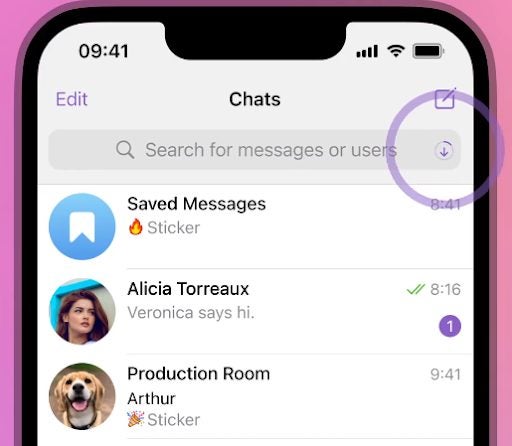
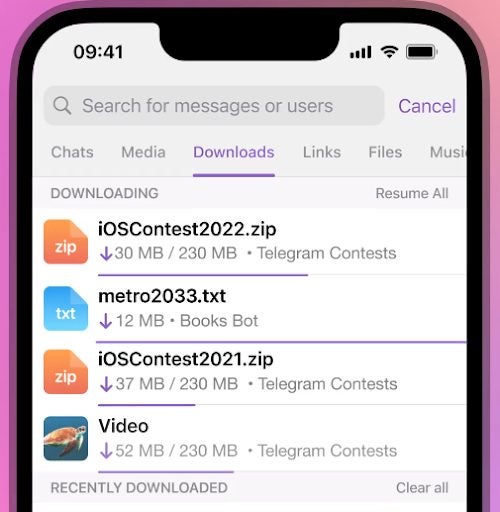
You can use the Telegram Download Manager to monitor the status of downloads, set the priority to ensure what’s downloaded first, and more. You may notice that while you’re downloading a file on Telegram, a download icon progress bar will appear in your search bar showing how far the file has been downloaded. Once the download has been completed, this progress bar switches to the next download file in the queue or vanishes completely if there’s nothing left to download.

How to use Telegram Download Manager

Let’s take a look at how to use Telegram Download Manager to monitor and manage your downloads.

  1. Launch Telegram

    How to use Telegram Download Manager

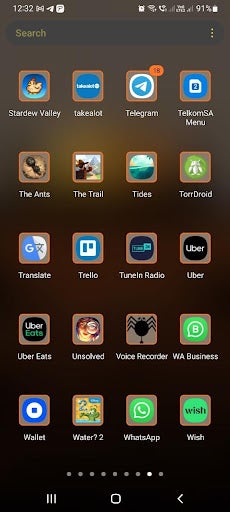
    Launch the Telegram app on your smartphone by tapping on the app icon found in your app tray.

    Tip: For easier access, add Telegram to your home screen.

  2. Tap on the search bar

    How to use Telegram Download Manager

    You first need to access your tabs on Telegram to get to your downloads. To do this, tap on the search button in the screen’s upper-right corner.

    Tip: This step is different on the Telegram desktop client. Instead of clicking on the search button, you need to go into your settings by clicking on the four vertical stripes. Then click on ‘Establishment,’ next click on ‘Advanced,’ and you’ll access the download manager.
  3. Navigate to ‘Downloads’

    How to use Telegram Download Manager

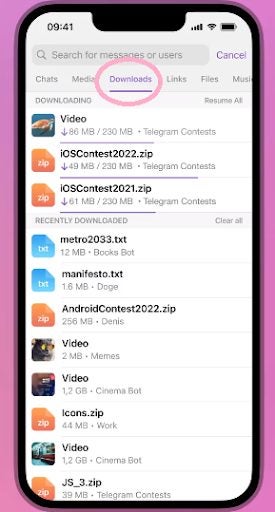
    Once you’ve tapped on the search button in the mobile app, you’ll see different tabs appear. You can move to other tabs by swiping the screen. First is the ‘Contacts’ tab. By swiping right, you’ll go to the ‘Media’ tab. By swiping right once more, you’ll reach the ‘Downloads’ tab.

    Tip: By clicking on the download icon in the search bar while a file is downloading, you’ll be taken straight to the download manager. However, this is only available while a file is downloading.

  4. Monitor and manage downloads

    How to use Telegram Download Manager

    In the ‘Downloads’ tab, you’ll be able to see all of your past downloads, with the most recent ones at the top. Any downloads that are in progress will also be visible here, along with how far they’ve progressed.

  5. Change download priority

    How to use Telegram Download Manager

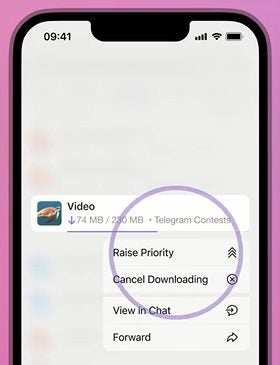
    You can also rearrange the download lineup to download certain files first. To do this, simply tap on the file in the lineup and choose ‘Raise Priority’ to move that file up the list and get it downloaded sooner.

Benefits of using Telegram Download Manager

You may be wondering why it’s even worthwhile to have a download manager. Well, there are quite a few benefits. In the past, downloads were done in each individual group or chat with no central system to manage them. While this isn’t a problem for some users, others found it extremely difficult to find certain files. The download files are extremely difficult to find as new messages come in, obscuring where the files were originally located. 

The download manager makes it possible to conveniently find all the downloads from any of your chats or groups in one place. It also makes it possible to remove sensitive downloads from this general list. Or you can change the order of your current downloads to complete important ones first.

Have more control over your downloads

Telegram is a very privacy-conscious messaging platform, and now with an easier way to manage your downloads, it’s even more useful. Use the above instructions to learn how to access and use the Telegram Download Manager easily.

You can also check out our on how to kick inactive members in Telegram groups.

Best new heroes for OverWatch 2

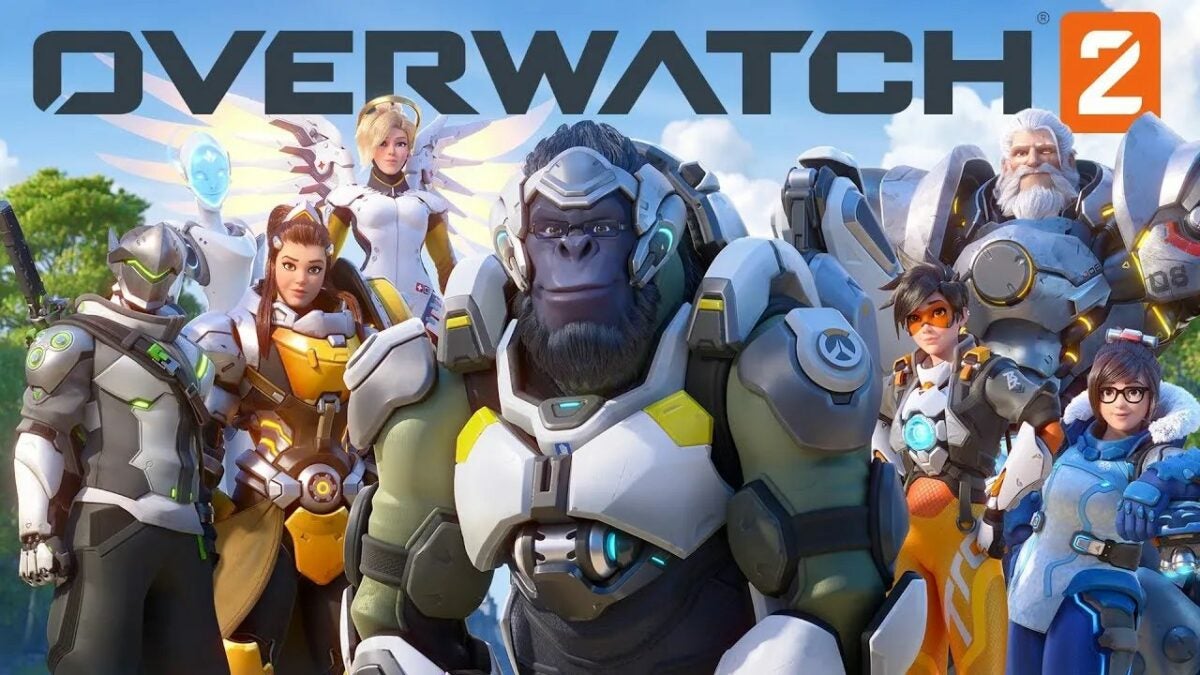
Excitement mounts as Overwatch fans anticipate the release of Overwatch 2 scheduled for 4 October 2022. As fans of the popular player-vs-player shooter game prepare for the release, one critical question comes to mind. What are the best new heroes for Overwatch 2?

Overwatch 2 DOWNLOAD

The recent patch in Overwatch 2 beta testing has changed the abilities and stats of many characters, completely reshuffling how they work in battle. As such, characters that were overpowered in the first Overwatch may now be more challenging to use and have less of an effect in battle. We’ve taken a closer look at the characters and how they perform to provide you with a list of the best heroes, covering each character type (DPS, Tank, and Support).

Best S-Tier Overwatch 2 heroes 

S-tier heroes are great. They are the best overall heroes you can play within the game, and by mastering them, you can be a real force to deal with on the battleground. 

Sojourn (DPS)

While Sojourn was a little weak when she was initially added to the Overwatch 2 roster, the latest patch has significantly improved her fire rate. Simply by increasing her rate of fire, her alternate fire rate and charge rate have also increased. This has significantly increased her fire’s raw DPS. These minor improvements mean that Sojourn has become one of the heroes with the highest DPS.

new heroes for OverWatch 2

Zarya (Tank)

Zarya is another player that’s received some adjustments and is in great form in Overwatch 2. With the change from 6v6 to5v5 meaning, there’s one less player on the field, Zarya’s pure damage output can make a massive difference to her team’s chances. She has another benefit by being able to save teammates or herself with her bubbles. However, there is a bit of a learning curve with Zarya, and you’ll have to time your cooldowns effectively, or you won’t be able to help yourself or your team.

new heroes for OverWatch 2

Lucio (Support)

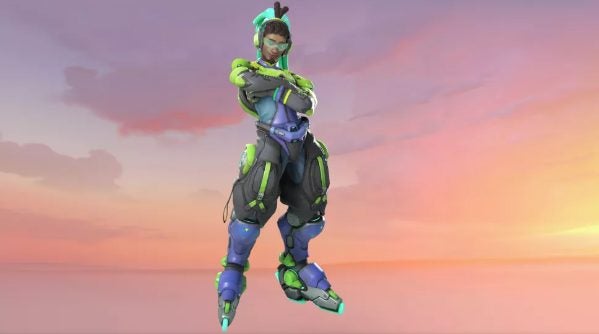
What sets great S-tier players apart from others is their ability to deal a lot of damage, are tough to kill, and can play solo. This is why Lucio is considered one of the best support heroes in Overwatch 2. Lucio can quickly maneuver into and out of battle situations using his Wallride and speed boost abilities. He also has passive heal and sound barrier abilities to help and uplift his team, making him an excellent all-around support hero.

new heroes for OverWatch 2

Best A-Tier Overwatch 2 heroes

A-tier heroes are strong. They’re not as well-rounded as S-tier characters, but they’ll become a powerful foe once mastered.

Sombra (DPS)

Sombra is a returning hero, but her skill set and role on the battlefield have been completely reworked. If you enjoyed playing this character in Overwatch 1, don’t expect her to be the same in the next game. She no longer focuses on disabling players but is a stealthy opportunist.

This character is a menace to support characters or any lone heroes. She has a hard skill floor to master and will take a dedicated player to make the most of her new role – however, once mastered, she becomes a significant threat on the battlefield.

new heroes for OverWatch 2

Sigma (Tank)

Sigma is one of the few heroes that’s remained relatively top tier since his initial release. He is a well-rounded tank with a mobile shield and the ability to eat incoming projectiles. He also boasts a great Ultimate. However, his slower mobility makes him a challenge for beginners and leaves many wondering where he truly fits in. Once again, he has a hard skill floor to master, which can be daunting for beginners, but for players comfortable with his unique playstyle, Sigma can become a well-rounded and powerful hero.

new heroes for OverWatch 2

Ana (Support)

Ana remains one of the best-designed characters in all of Overwatch 2. Her healing output is potent, and she can also kill other players from range. Her nano-boost abilities are great for saving players about to die or setting up teammates for devastating attacks. She is a little difficult to master and can sometimes be quite vulnerable to attacks.

new heroes for OverWatch 2

Best Overwatch 2 heroes from B-tier and lower

Here are a few more heroes from Overwatch 2 that you should consider from the lower tiers.

Tier B

Tier B characters are considered to be good options to play with. Some of the best heroes in this tier include: 

  • Cassidy (DPS)
  • Hanzo (DPS)
  • Junker Queen (Tank)
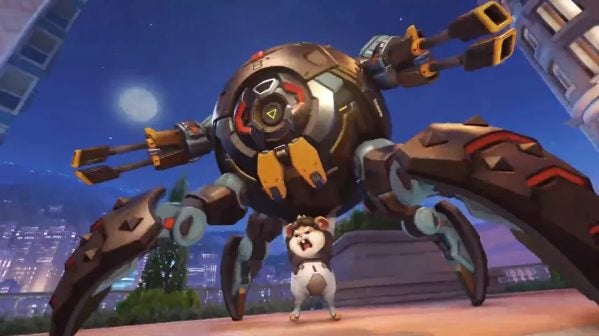
  • Wrecking Ball (Tank)
  • Moira (Support)
  • Baptiste (Support)
new heroes for OverWatch 2

Tier C

Tier C characters are considered playable but aren’t as well-rounded as tier B or above. Some great hero options include: 

  • Bastion (DPS)
  • Symmetra (DPS)
  • Orisa (Tank)
  • Roadhog (Tank)
new heroes for OverWatch 2

Tier D

Tier D characters are considered niche characters and best used in specific situations. Heroes in this tier include:

  • Junkrat (PDS) 
  • Wrecking Ball (Tank)
  • Mercy (Support)
new heroes for OverWatch 2

Excel in Overwatch 2 with the best heroes

Blizzard has significantly leveled out the playing field for Overwatch 2, making it more difficult to choose overpowered heroes. However, by choosing the right character and working on mastering them, you can still end up with a mighty hero. At least we won’t have to worry about Overwatch 2 loot boxes after what happened to Diablo Immortal.

Among Us is turned into a battle arena fighting game

The multiplayer deduction game from Innersloth, Among Us, has entertained players since its release in 2018. So much so that the mobile original was brought to consoles in 2020 and 2021, giving fans more ways to enjoy the game. A new battle arena game is being released based on the popular deduction game.

Among Us DOWNLOAD

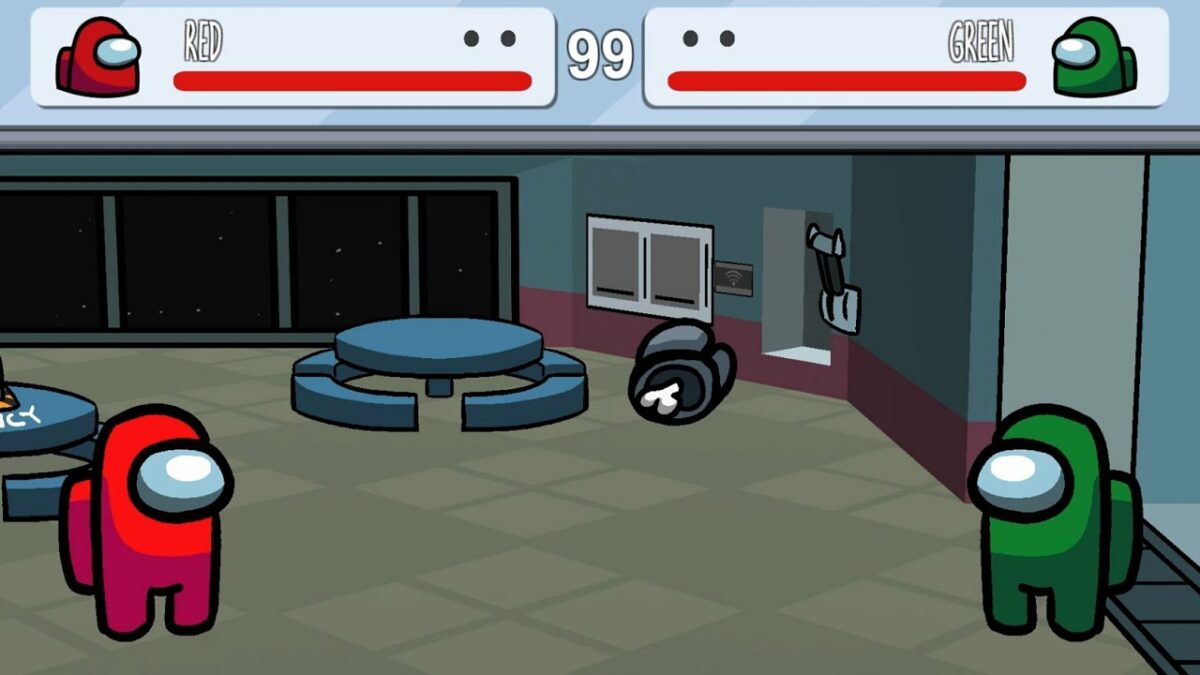
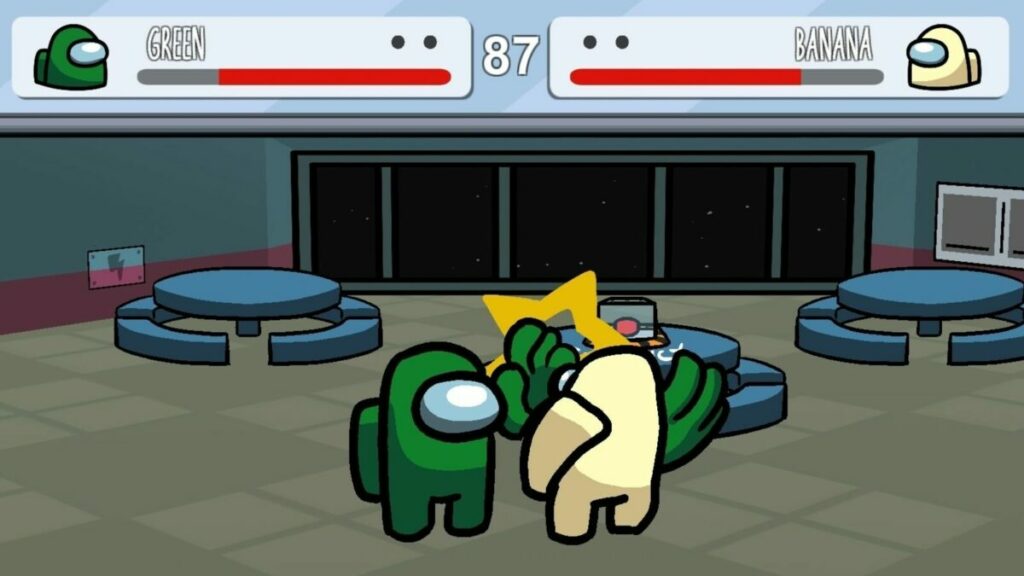
A fan of the original developed the new Among Us battle arena game. This spinoff is titled Among Us Arena Ultimate and is available for free on the distribution platform Itch. Players should be aware that this is a fan-created game and has no connection to the original developers, Innersloth. 

The fan responsible for creating this new battle arena game is known on Twitter as Startcutter and is a game developer themself. In fact, his team is working on their own fighting game, as is evident from the support notes in Among Us Arena Ultimate. These notes ask players who enjoy the game to consider donating to their project. They also note that players should support Innersloth, the original creators of Among Us.

So far, Among Us Arena Ultimate has received a rather warm welcome despite there still being a few bugs for developers to address. CommanderDemon commented on Itch that some of the AI is glitchy and makes it appear like the game is cheating. He mentioned a few situations where he would hit enemy players straight on with attacks that should have destroyed them; instead, the enemies received counters despite being hit after they flashed.

Among Us is turned into a battle arena fighting game 1

Among Us Arena Ultimate is very much inspired by the original game from Innersloth, and if you weren’t aware, you might not even realize it’s a fan-made game. Still, if you love the quirky art style and characters of Among Us and battle arena fighting games, this could be a match made in heaven. However, Innersloth is still keeping the original game alive as they’re currently working on a VR version of Among US with beta testing happening soon.

10 fun browser games to play with friends

Is there anything better than relaxing with friends and playing fun browser games after a long day? Well, sometimes, having to download and install the games on every one of your friends’ computers can put a damper on things. Sometimes you want to get home, connect with friends and immediately jump into a game without any setup.

Browser Games PLAY NOW!

This is where browser games can quickly become your best option. These games don’t require advanced computer specs, downloads, or installations. You launch them in your browser and start playing. Best of all, there are multiplayer browser games that enable you to play with your friends, no matter where in the world they are. Let’s look at ten fun browser games to play with friends.

Impostor 

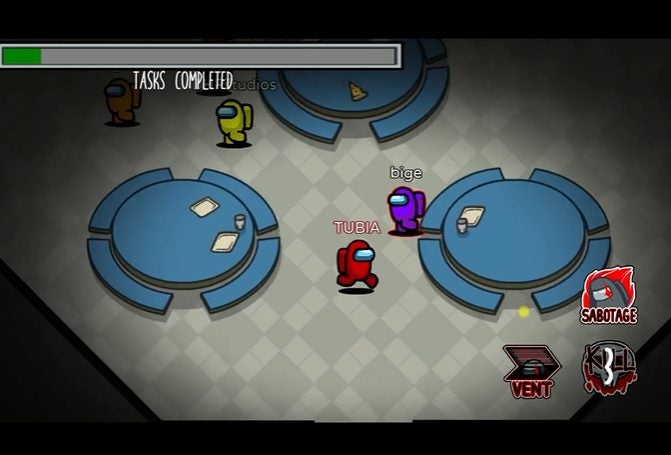
Imposter is based on the popular mobile game, Among Us. In this fun browser game, friends can play together, completing various tasks assigned by the game. However, danger lurks nearby as there are imposters among the crewmates. The imposter will cause all kinds of havoc, from sabotaging tasks to killing crewmates. It’s up to the rest of the team to figure out who the imposter is.

Impostor PLAY NOW!
fun browser games to play with friends

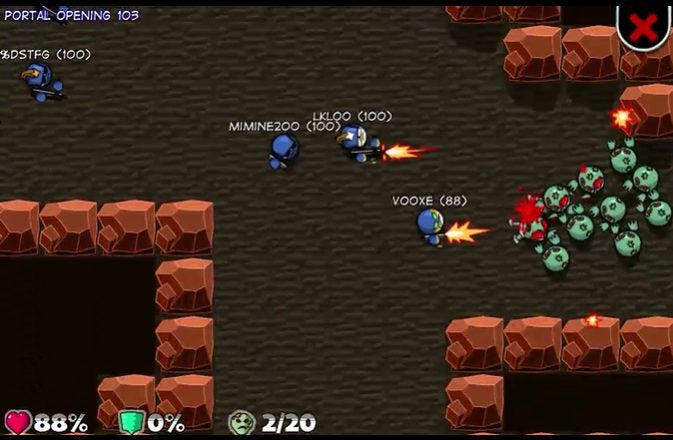
Zombie Hunters Arena

Zombie Hunters Arena is a free multiplayer zombie shooter that you and your friends can play directly from your browser. There are many different levels to enjoy, and players will spawn at random places on each map. They have to fight their way through the undead hordes to find the portal to complete the level. Throughout the levels, players will be able to collect bonuses and upgrade their weapons.

Zombie Hunters Arena PLAY NOW!
fun browser games to play with friends

Backgammon

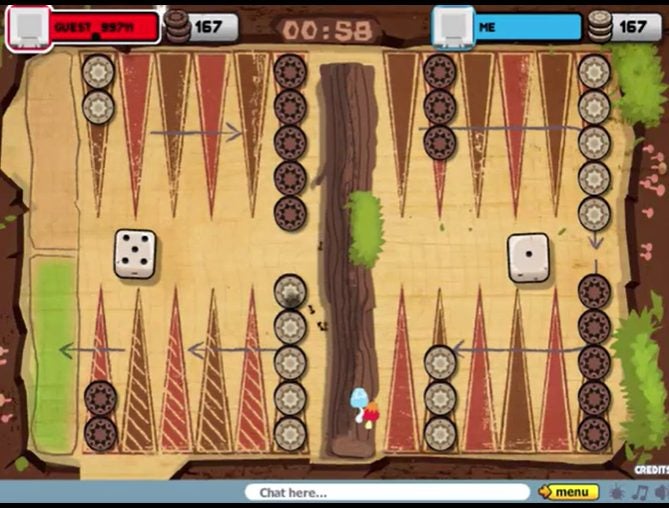
Enjoy the classic game of Backgammon right on your browser with this fun browser game to play with friends. This game is entirely free to play, and you can choose to play against a friend or the PC if you need some extra practice. It also has the option of playing against a friend on the same device. You can play together at home, or even if your friends are in another country.

Backgammon PLAY NOW!
fun browser games to play with friends

Tic Tac Toe

Based on another popular board game, Tic Tac Toe Online lets players enjoy the nostalgia of the noughts and crosses game in their browser. You can play against the computer, with friends on the same device or even those in other countries. While the traditional Tic Tac Toe game is played on a 3×3 board, this browser version lets you extend the board to 5×5 or 7×7 to increase the challenge.

Tic Tac Toe PLAY NOW!
fun browser games to play with friends

Battleship War

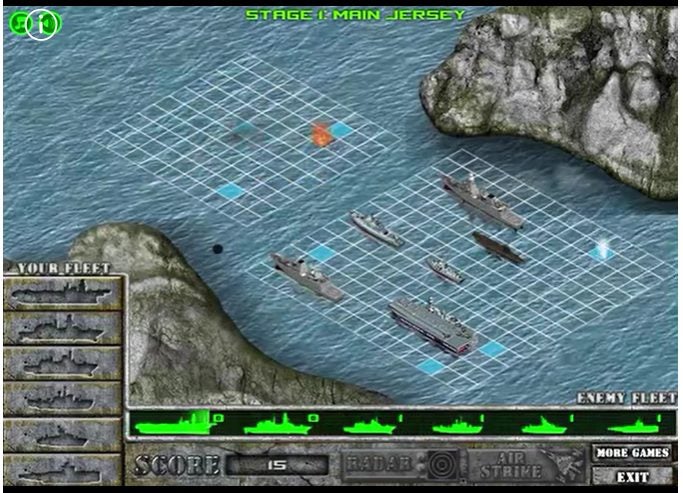
This free-browser game is based on a childhood favorite. You place your ships on a grid, and your opponent does the same. Your goal is to first sink all of your opponent’s ships by guessing where they might be. You can collect points to buy special power-ups by hitting your opponent’s ships. This is a fun browser game to play with friends.

Battleship War Multiplayer PLAY NOW!
fun browser games to play with friends

Rummikub

Rummikub is a game that requires memory retention, cognitive skills and quick thinking. Each player is dealt a set of numbered tiles. They have to make combinations using these tiles to clear their hands. Once a player has placed all the tiles in their hand, they’re declared the winner. This popular game is now available for free in your browser so that you can easily play with friends.

Rummikub PLAY NOW!
fun browser games to play with friends

Domino

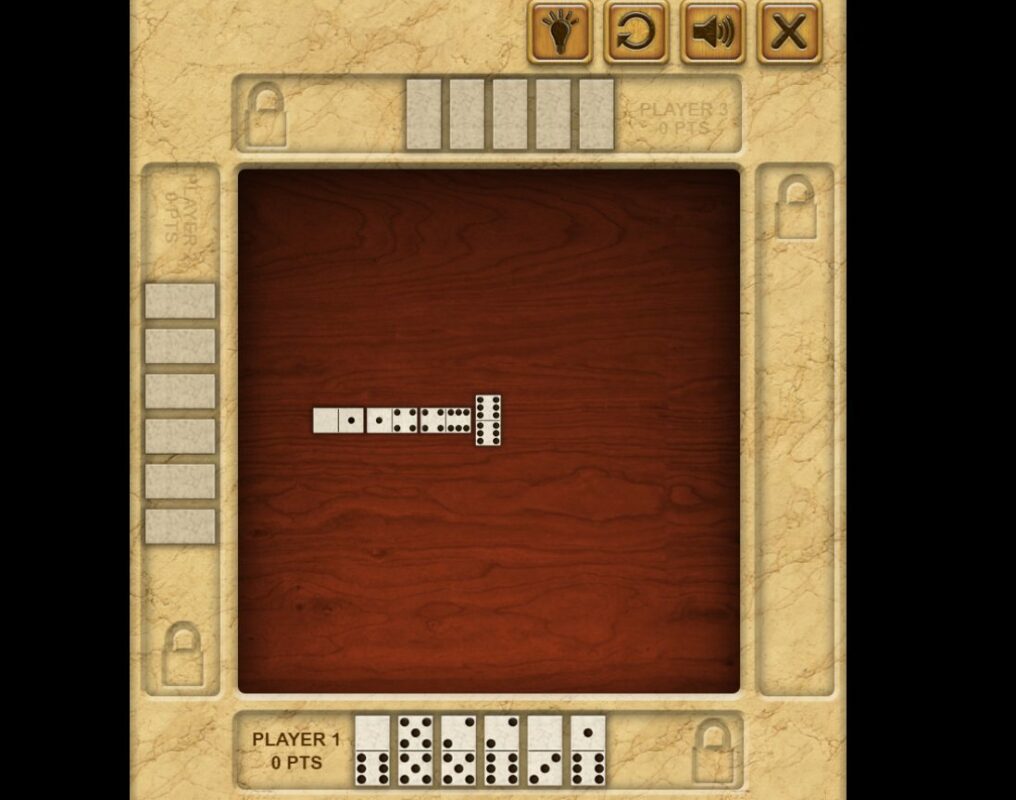
If you enjoyed playing dominoes growing up – get ready to fall in love again. This free browser game works just like the original Dominoes, and you can play against friends anywhere in the world. This popular tile game aims to get rid of all the tiles in your hand. To do that, you need to match up the color and value.

Domino PLAY NOW!
fun browser games to play with friends

8 Ball Pool

Enjoy a fun game of pool in the 8 Ball Pool browser game. The game uses real-world physics to ensure natural and realistic movements of the balls. The first ball potted will determine if your stripes or solids. You need to sink the balls in numerical order from the lowest value. The winner is the first player to sink all their balls, including the 8-ball. 

8 Ball Pool with Friends PLAY NOW!
fun browser games to play with friends

Ono Card Game

This classical matching card game has entertained friends and families for many years. Now, it’s conveniently available in a free browser version so that you can continue to enjoy the game even if your friends are in other countries. The game’s goal is to match cards by color or value until you play out your entire hand. The first person with no cards left is crowned the winner.

ONO Card Game PLAY NOW!
fun browser games to play with friends

Assassin’s Creed Freerunners 

This free browser game is based on the popular franchise from Ubisoft. Players can choose their favorite Assassin and compete against friends in this fun runner. Players need to run through the different courses while avoiding obstacles. Try to beat your friends while also collecting the most coins.

Assassin’s Creed Freerunners  PLAY NOW!
fun browser games to play with friends

Play with friends without downloads and purchases

If you’re looking for a great way to unwind and enjoy video games with friends, browser games are a great option. They don’t require game purchases or installation and can only be enjoyed in the moment. Which of these ten fun browser games to play with friends is your favorite?

Also, be sure to check out our lists of the top Android games and best Windows games!

Ubisoft announces another delay to the release date of Skull and Bones

Ubisoft has just announced another delay in the release date of their new upcoming action-adventure game, Skull and Bones. This is not the first delay this game has experienced, even if its reasoning is good. This latest delay has people questioning when they’ll actually be able to get their hands on a copy.

Skull and Bones DOWNLOAD

Skull and Bones is moving away from other Ubisoft-style games and provides players with a pirate-filled adventure as they traverse the seven seas. Ubisoft Singapore has been working on this multiplayer game since 2013, although Ubisoft only revealed the game in 2017. Since then, fans of the studio and pirate-lovers alike have been patiently waiting for a release date. 

The project’s launch has received quite a few pushbacks since it was first announced, and when we finally received a release date of November 8, 2022, many fans were extremely excited. This excitement was amplified when pre-orders for the game became available. However, this excitement didn’t last.

Yesterday, Ubisoft announced another delay and Skull and Bones will only be released to PC, Playstation 5, Stadia and Xbox X/S on March 9, 2023. The reason for the delay was that the developers had sufficient time to address the bugs and feedback from the recent Technical Tests and Insider Program.

Ubisoft announces another delay to the release date of Skull and Bones

This means that the development stage of the process is complete, and now it is just the polishing and finishing touches to ensure that when the game makes it to the public, it will be a great experience for all players. The developers also announced that an open beta will follow shortly (exact date not yet confirmed) for anyone wishing to give the game a test run before release.

As excited as we are for the release of this interesting game from the popular developers Ubisoft, there have already been so many delays for Skull and Bones up to this point. We hope this is the last one and that we can finally start getting excited for its release in March.
Easily clear cookies on Chrome Android

There are quite a few reasons why you’d want to clear cookies on the Chrome browser on your Android phone. From security and privacy risks to performance and device speeds, cookies can have many effects. In the past, they were essential, but as technology advances, our need for cookies is becoming much less, and often you’ll have the same experience whether you accept cookies or not. 

Chrome DOWNLOAD

In this guide, we’ll show you how to clear cookies on Chrome Android and explain why you should clear your cookies regularly.

What are cookies?

Cookies are small files created by the websites you visit and will be stored on your device. They were created to improve the users browsing experience by saving your login information, preferences, and device or browser information. While the original reason behind cookies had good intent, these files can also be used to track users. Many people are declining cookies and setting their browser to never allow these files. However, if you accidentally accept cookies, there are ways to remove them from your device.

Should you clear cookies?

You should avoid accepting cookies as much as possible, and if cookies are already stored on your device, you should clear them frequently. One of the main reasons why you should do this is to protect your privacy. Unfortunately, many third-party websites can store tracking cookies on your device and collect your browsing history, sites you visit, how long you spend on each platform and more. You have no control over what happens to this data, which can end up anywhere. This can be a serious privacy and even security issue. 

Cookies also take up storage space on your device. Even though these files are small, if you have plenty stored on your device, it will start affecting your device’s speed and performance. By routinely clearing cookies, you can keep your device performing optimally.

How to remove cookies from Chrome on an Android phone

  1. Open Chrome Browser

    How to Clear Cookies on Chrome Android

    First, you’ll need to launch the Chrome browser on your Android device by tapping on the browser icon.

  2. Open your History

    How to Clear Cookies on Chrome Android

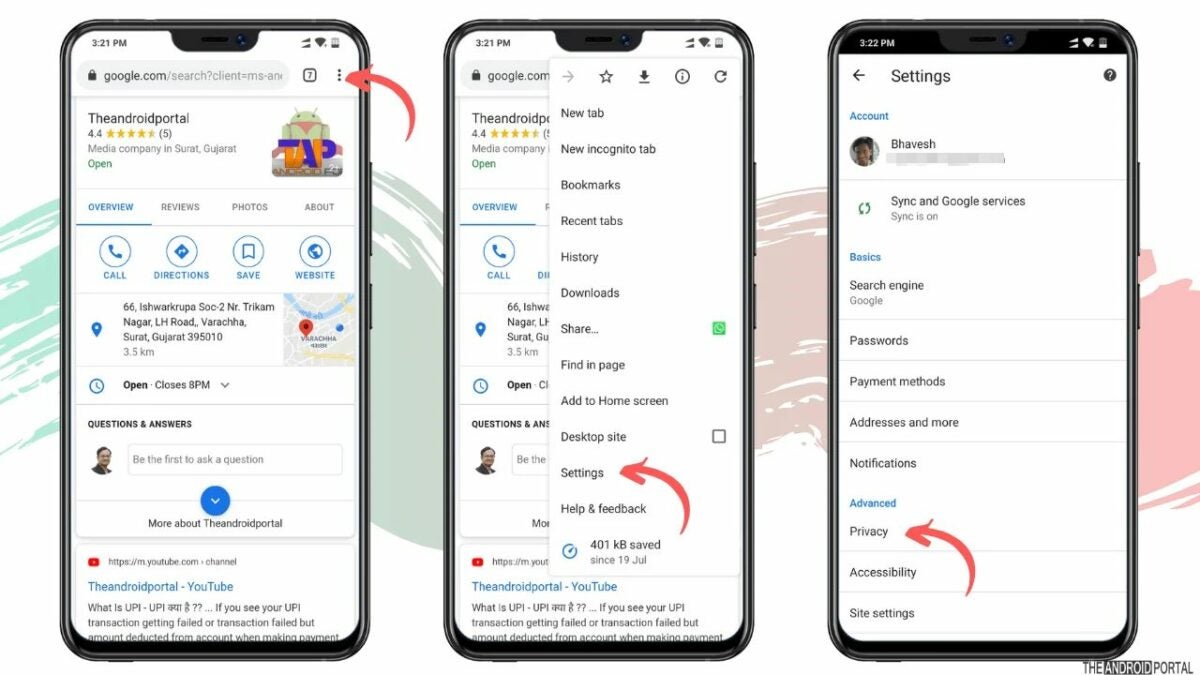
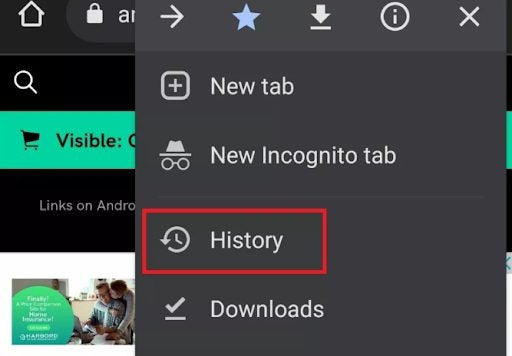
    Next, you’ll want to access your history. You do this by tapping on the ‘more’ option, represented by three vertical dots in the top right of your screen. A drop-down menu will appear. Here you can tap on ‘History’.

  3. Tap on ‘Clear Browsing Data’

    How to Clear Cookies on Chrome Android

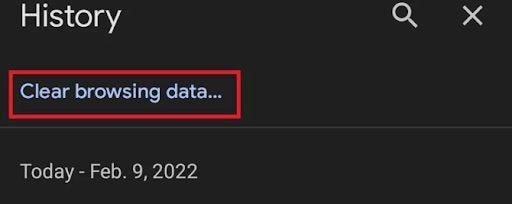
    On the next screen, you’ll see a list of your browsing history showing all the sites you’ve visited. This list could be quite long if you haven’t cleared your history recently. Tap on the ‘Clear browsing data’ option which can be found at the top-right of your screen.

  4. Select your options

    How to Clear Cookies on Chrome Android

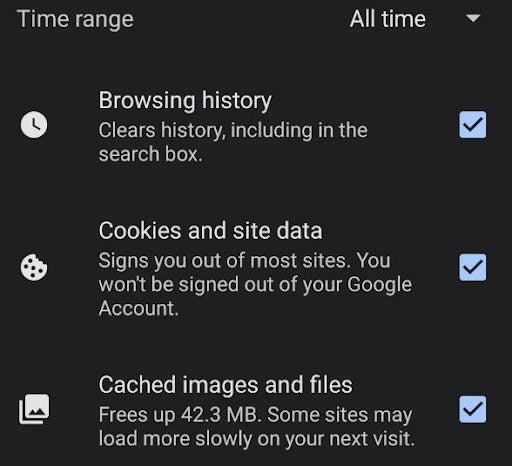
    A new window will open where you can select what you want to clear. First, you should specify the time range that you want to clear. By default, it’s set to clear everything, but if you only need to clear the last day or week, you can select that. Then you can select if you want to clear only your browsing history, cookies and site data or cached images and files. Again, all of these options will be selected by default, but you can unselect the options you want to keep.

    Tip: If you want to clear your cookies for privacy and security reasons, it would be best to clear your browsing history and cached images and files, as websites have other forms of tracking that can be used.

  5. Tap on ‘Clear Data’

    How to Clear Cookies on Chrome Android

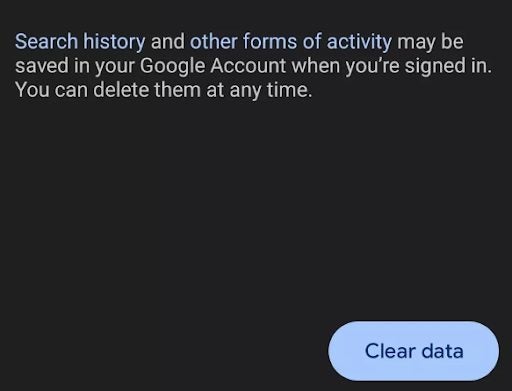
    Once you’ve made your selections, you can tap on ‘Clear data’ to start the process of removing your cookies and any other data you’ve selected. It could take a couple of minutes to complete depending on when you last cleared this data.

    Tip: Don’t be shocked if websites you asked to remember suddenly ask you to log in again.

Enjoy track-free browsing

Whether you want to protect your online anonymity or improve your device’s performance, routinely clearing cookies can help with either of these. Most browsers will allow you to clear cookies and other collected data directly from the settings. If you’re working from your PC, be sure to check out our guide on the top Chrome extensions for productivity.