How to use Foxi APK Movie and TV Shows to track your favorite shows

There are so many different video streaming services these days. Between Netflix, Hulu, Disney+, and a myriad of others, it can sometimes become quite challenging to keep track of all your series and movies. So how can you quickly and easily see where you are in a series without having to start an episode just to check? That’s where Foxi APK Movie and TV Shows comes in.

Foxi APK Movie and TV Shows DOWNLOAD

In this guide, we’ll show you how to use the Foxi APK Movie and TV Shows app to track your favorite shows.

Keeping track of series and movies using a catalog app

Most streaming services will automatically remember where you stopped watching a series or movie. This is very convenient as it means you can pick up right where you left off. But what do you do if your streaming service doesn’t remember?

Maybe you moved from one service to another? Or perhaps you canceled your account for a short period and created a new one only to find your history is gone? Maybe you fell asleep while watching, and the episodes kept playing? There are quite a few reasons why you might want to keep track of your series, but how do you do it?

One convenient way is using a free movie and series catalog app, like Foxi APK Movie and TV shows, that has an extensive list of movies and series. From the app, you can quickly track where you are in a series by looking at the episode descriptions. You can even use the app to find more movies similar to your favorites.

How to use Foxi APK Movie and TV Shows

Here are the five simple steps you need to follow in order to track where you are in a series by using the Foxi APK app for Android.

  1. Launch Foxi APK Movie and TV Shows

    How to use Foxi APK Movie and TV Shows

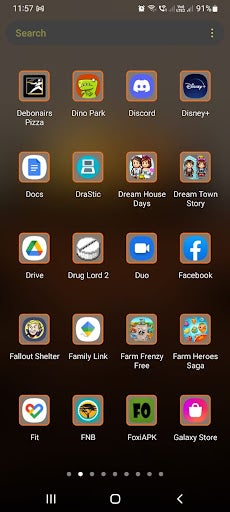
    Launch the Foxi APK Movie and TV show application from your Android device by tapping on the app icon in your app drawer.

  2. Search for the series you’re watching
    How to use Foxi APK Movie and TV Shows

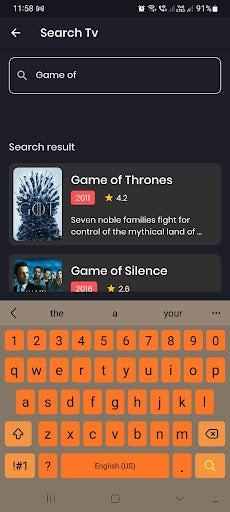
    You’ll see a handy search bar located at the top of your screen. Before tapping on it, make sure that you’re on the series page. By default, the app opens on the movies page. To change over to the series page, tap on the hamburger icon in the top left of your screen. Then tap on the ‘TV Show’ options. Now that you’re on the series page, you can type the show’s name into the search bar to find it and tap on it.

    Tip: You can use the search bar to find movies on the movie page.

  3. Add the series to your watchlist

    How to use Foxi APK Movie and TV Shows

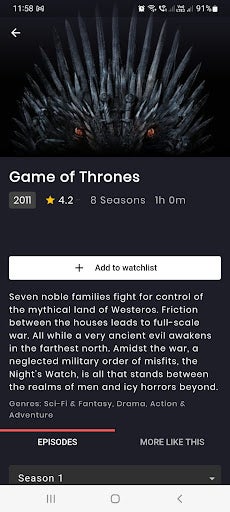
    We recommend adding them to your watchlist to make it even easier to keep track of your shows. To add a series to your watchlist, simply tap on the ‘+ Watchlist’ button located just below the series image and basic details.

  4. Select the season

    How to use Foxi APK Movie and TV Shows

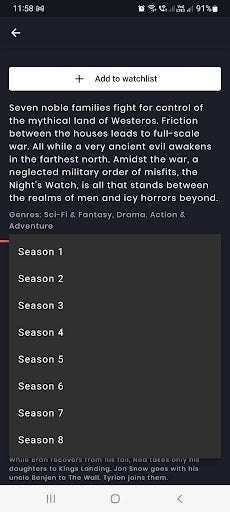
    Next, use the dropdown list to choose the season you last recall watching. By choosing a new season, it will update the information to show you the episode list and description of that particular season. If you’re unsure of what season you were last at, it’s best to work up from the first season so that you avoid any spoilers by accidentally going too far.

  5. Find the episode

    How to use Foxi APK Movie and TV Shows

    Once you’ve chosen the last season you remember, you can scroll down and read the episode names and a brief description of the episode. This way, you can see what’s familiar that you’ve watched and determine where the newest content starts that you haven’t seen yet.

    Tip: By tapping on ‘More like this,’ the app will recommend similar shows you might like. This is a great way to find new movies and series you might not have considered before.

Keep track of all your favorite shows

Foxi is a very handy free movie and series catalog app that can be useful if you want to track your series and movies. With a catalog app like Foxi, you won’t have to guess where you are in a series and start and stop episodes just to find your place. Use our simple instructions above to start using Foxi APK Movies and TV Shows now.
YouTube rolls out handy homescreen widgets to iPhone

YouTube is the latest of Google’s apps to roll out new homescreen widgets to iPhone and iPad users. Users have already noted how handy these widgets are, with one in particular that makes accessing YouTube on your mobile device even more effortless.
YouTube DOWNLOAd

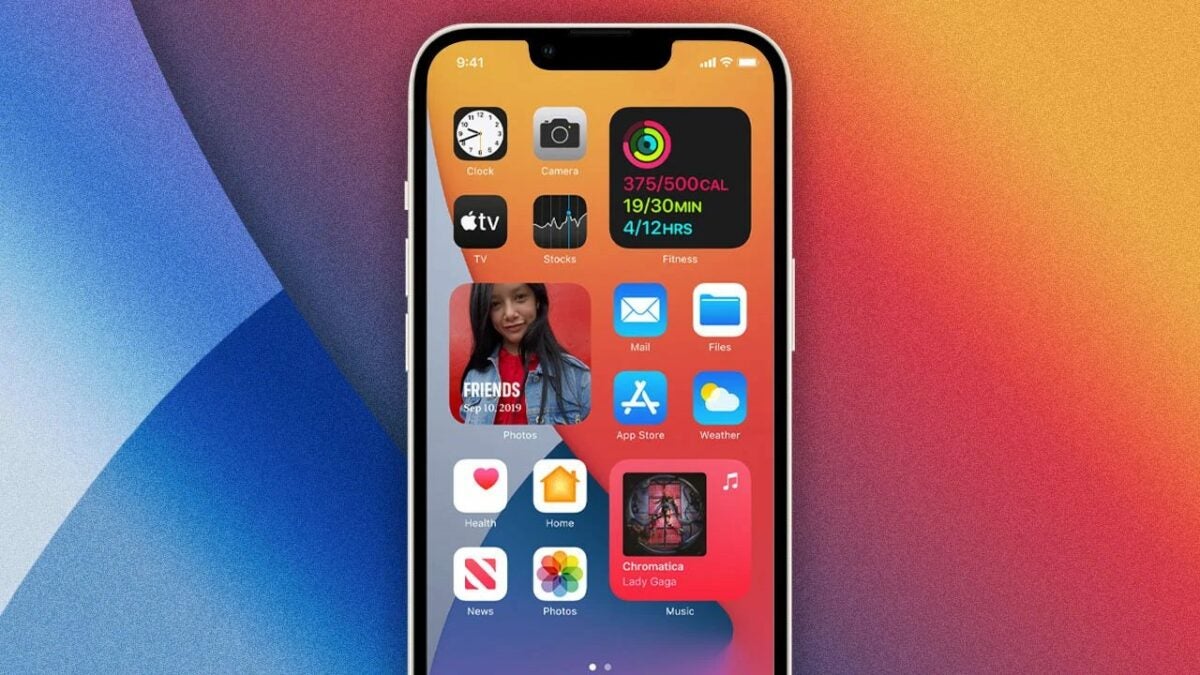
The ‘Quick Actions’ YouTube widget measures only 4×2, making it a manageable size. However, its features are what have users excited. With this widget, you have a search field that enables you to immediately search YouTube for content. Tapping in the search field will bring up your keyboard so you can type your query. Alternatively, you can also tap on the microphone icon to launch a voice lookup. Just below the search field, you’ll also have buttons to take you directly to your YouTube Home, Shorts, or Subscription.

If you prefer having smaller widgets that don’t take up too much space on your screen, they have you covered. There’s also a smaller 2×2 YouTube widget available that just allows a quick text-based search. Both of these widgets can have either a white or black background, depending on your system settings. 

YouTube rolls out handy homescreen widgets to iPhone

These widgets for iPhone and iPad have slowly been rolling out over the last two weeks. However, they only became live with the release of YouTube version 17.40.5 on Saturday, October 15th. As such, users should see them available in their widget settings once they’ve updated their YouTube.

This is the first major drop of iOS widgets from Google since they released the Inbox from Gmail, XL iPad options by Drive, and Translate shortcut widgets at the beginning of the year. There’s no denying that the release of these convenient shortcuts will make it even easier for iOS users to use and access YouTube straight from their home screen.

In other news, you should start hearing hit records in more YouTube videos soon!

Possible new Elden Ring DLC hinted at in the latest update data

Elden Ring was one of the first major releases in 2022, and since its release in February has grown a massive fan base. From the beginning, the publishers Bandai Namco hinted that they had big plans for the franchise. However, they never expanded on what this means. Now fans are wondering if it could possibly mean a new DLC is coming to the game.

Elden Ring DOWNLOAD

A recent update showed that Elden Ring’s plans could include a DLC. This was discovered when data miners uncovered lines of code referring to ‘DLC01’ and maps that don’t currently exist in the game. Although the developers, FromSoftware, have confirmed nothing, and there’s a lot that can still change, this might just indicate that there might be DLC released for Elden Ring in the future.

Information about the potential DLC, as well as lines of the code, was first revealed on Twitter by users @manfightdragon and @SatchelSeals. While this might have many fans excited to explore new maps, it should be noted that nothing is official until it’s announced by the developers. 

Elden Ring already has a large amount of content available, and players have found ways to continue enjoying a game with the current content that’s available. Yet, there’s no denying that adding more would keep the game in the player’s minds.

Possible new Elden Ring DLC

Elden Ring has been frequently cited as a good candidate for Game of the Year, but there are still a few great, highly anticipated releases still coming. Even though a DLC won’t have an effect on these results, it will keep the fast-growing fan base entertained and wanting more.

While we patiently wait for the developers to confirm any future plans and the possibility of a DLC, why not download the Elden Ring soundtrack? We’ll keep you updated on any future developments regarding a DLC for Elden Ring.

Pokemon GO gets ready for Halloween by announcing a two-part event

Spooky scary Pokemon will send shivers down your spine this October as Niantic announces its Halloween event. Not only will Pokemon GO players get to enjoy the spooky season with more ghosts and dark-type Pokemons, but the event is also split into two parts

Pokemon GO DOWNLOAD

The first part of Pokemon GO’s Halloween event will start on October 20th, 10 am local time. The event will run for seven days, ending on October 27th at 10 am local time. The second part of the event will follow, but we’re still waiting on its exact details.

Details of part one of the event showed that a new Mega Banette will be revealed. There will also be a pool of ghost and dark-type pokemon for players to encounter in the wild and a bunch of new raids. Other bonuses available throughout both parts will include an increased candy earning without saying trick or treat. There will also be a unique Halloween-themed research quest line, all to the sounds of a creepy Lavender-town remix.

Pokemon debuts in the first part include Mega Banette, a shiny Galarian Yamask, and a shiny Noibat. There will also be an increase in encounters with Absol, Drifloon, Dusclops, Gastly, Golett, Haunter, Misdreavus, Murkrow, Phantump, Pumpkaboo, Sableye, Shuppet, Spinarak, Yamask, and Zubat.

One-star raids will find players battling against Phantump, Purrloin, Sableye, Yamask, and Galarian Yamask. Three-star raids will be against Drapion, Drifblim, Gengar, and Umbreon. Five-star raids will face off against Altered Forme Giratina, while the mega raid will feature Mega Banette.

Pokemon GO gets ready for Halloween

Players will have an increased chance of hatching Golett, Noibat, Phantump, Yamask, and Galarian Yamask for 7km eggs. By completing the field, research players can encounter Duskull, Phantump, Shuppet, Yamask, and Galarian Yamask. They can also earn mega energy for Gengar and Absol.

Other perks are running throughout both events, including timed research events after purchasing Pokemon Go tickets in the item shop. While we’re still waiting for more detail about part two of the event, we’re already looking forward to part one. Get yourself a few strong ghost, bug, and fighting types ready to handle these raids.

How to use Lightroom on Android

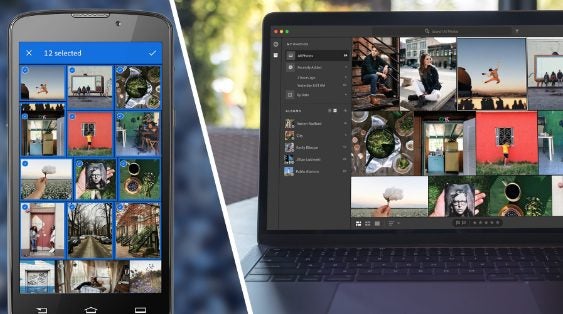
Lightroom is a powerful photo editing app from Adobe that is available on mobile devices such as Android and iOS. Did you just take the perfect summer selfie at the beach? Make all the necessary tweaks, such as adjusting light levels and using the app and share it with your friends within minutes.

Adobe Photoshop Lightroom DOWNLOAD

With Adobe Lightroom, you can have simple photo and video editing capabilities while on the go. Find out how to use Lightroom on Android for all your editing needs.

Why would you want to use Lightroom on Android?

Lightroom on Android is a great mobile photo editing app that allows you to make minor adjustments to photos straight from your device. This app contains useful features for anyone who loves taking and sharing photos. As part of Adobe’s suite of products, you can also be assured that the app is kept up to date with new features being added and existing ones being improved. Not only will you have editing tools available, but you’ll also have access to tutorials and a community to help improve your editing skills.

The mobile app now also includes a feature that allows users to collaborate with other photographers. This feature is already available on desktops and is known as ‘Remixes’. When entering this tab, you are able to see and edit other users’ photos. This gives you the opportunity to learn, inspire and connect with other creators.

Some of Lightroom’s features include:

  • Photo editing tools (includes basic and advanced tools)
  • Video editing tools
  • Presets for faster editing
  • Cloud storage
  • Masking panel that can quickly invert masks
Lightroom on Android

How to use Lightroom on Android?

Let’s take a look at how to start using Lightroom on your Android device.

  1. Import photos

    How to use Lightroom on Android

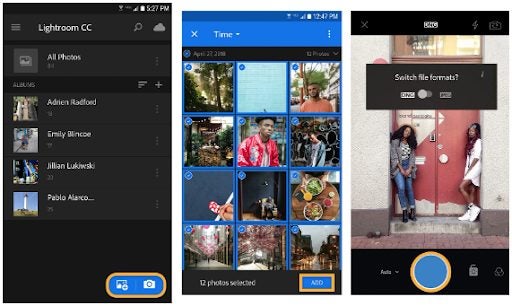
    Open Lightroom on your Android device by tapping on the app icon. You can take photos directly from the app, or you can add existing photos. To add an existing photo, tap on the blue button at the bottom of the screen with the photo and a +.

  2. Sort and search for photos

    How to use Lightroom on Android

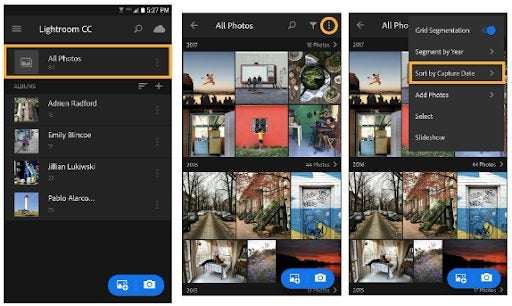
    After you’ve added photos to the app, they’ll all be available on the main screen of the app and will be arranged according to the capture date. To change how your photos are sorted, tap on the three dots to open the option. Now tap on ‘Sort by Date’ to see the other options and choose one from the list. If you work with a lot of photos, you might want to use a way to find specific photos. Lightroom recognizes certain common objects in your photos and will assign keywords to them. You can use the search function to find photos containing these objects. For example, searching the term’ flowers’ will show all photos containing flowers.

  3. Categorize photos into albums

    How to use Lightroom on Android

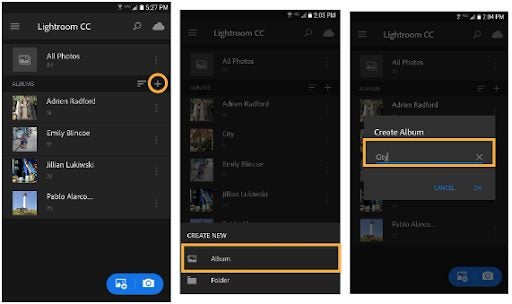
    The easiest way to keep your photos organized is by using albums. To create an album in Lightroom, simply tap on the + button on the main screen. Then choose ‘Album’ and create a name for your album.

    Now tap on the album name and select photos to add to the album. Alternatively, you can also start taking photos directly to the album.

  4. Edit your photos

    How to use Lightroom on Android

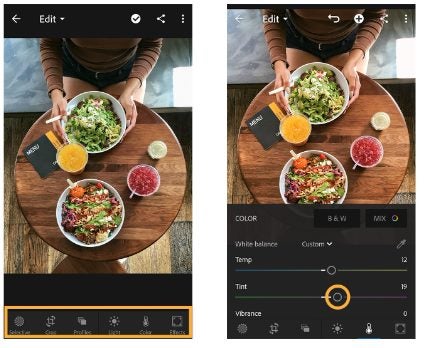
    You might want to edit your photos to improve them before sharing. Whether you just want to crop it, adjust the lighting, or use more advanced features such as reversed masking – Lightroom has the tools you need. The editing tools will all be listed at the bottom of the screen. Tapping on any of them will open up another panel with specific options. Some of the things you can do include:

    • Crop – adjusting the dimensions of your photos
    • Adjusting the light – brighten up photos taken in less-than-ideal lighting conditions
    • Adjusting the color – choose from different color options, such as black and white, or manually change the temperature, tint or vibrance.
    • Advanced editing – here you’ll find tools like masking
  5. Save and share your photos

    How to use Lightroom on Android

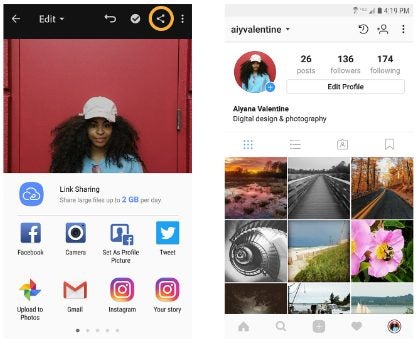
    Once you’re happy with your edits, simply tap on the correction mark to save the changes. Next, tap on the sharing icon at the top of the screen to share your newly edited photo to social media or through messaging platforms.

Turn your phone into a mobile photo studio

Having a reliable yet powerful photo editor on your phone is great when you need to adjust a photo while on the go quickly. Lightroom offers all the features you could possibly want from a mobile editor, including many useful ones to help you learn and improve your photography and editing skills. Follow the simple steps above to ensure you can start using Lightroom within a few minutes.

6 Best new heroes for Mobile Legends

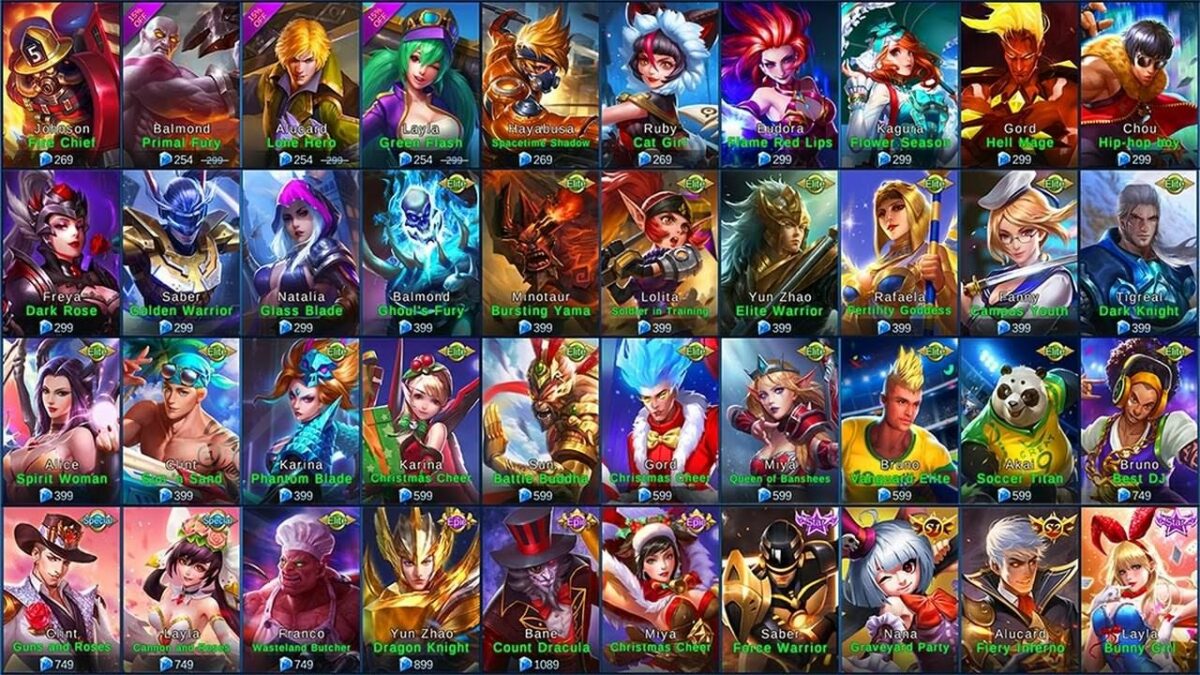
Mobile Legends: Bang Bang is a popular MOBA, and since its release, it has amassed over 100 unique characters for players to try out and master. All the players have their own unique backstories, skills, strengths and weaknesses. A new patch has just been released, meaning a shuffle in the tier lists as characters’ meta gets updated.

Mobile Legends Bang Bang DOWNLOAd

This evolution is part of what keeps players coming back. Mastering a powerful character and continually beating out other teams can get really boring, really fast. This evolution in their meta means that an OP character can now drop down in the tiers next month – keeping the playing field fair and creating more challenges for dedicated players.

What do the tier lists in Mobile Legends mean?

Before we get in the best new heroes after the last update, we first need to understand what the different tiers mean. As mentioned, characters can move up and down the tiers following an update if their meta has been changed.

  • Tier S – strongest and most well-rounded
  • Tier A – average but powerful when mastered
  • Tier B – Niche specialists
  • Tier C – weaker and will have to be paired with experienced characters
  • Tier D – weakest heroes and require the most practice to play with

6 Best new heroes for each class in Mobile Legends

Now that we understand the tiers, let’s look at the best new heroes in Mobile Legends after the last update. The hero features in each class are currently ranked as tier S; however, we’ve included a few honorable mentions from other tiers for you to try as well.

Best Tanks

Tanks are bulky brawlers with high defense ratings. Their job is to take the lead and decide when it’s time to engage the enemy. They’re also responsible for taking the heat away from other teammates.

Tigreal

Tigreal is one of the original heroes, and many players might recognize him from when they first installed the game. However, he has remained a consistently strong tank type, and after the last patch, he’s sitting solidly in tier S. Tigreal has a good set of dash skills, as well as impressive CC power and an area of effect which makes him a great tank character in most team setups. He fares particularly well in teams that include Aurora, Badang or Ruby.

Best new heroes for Mobile Legends

Honorable mentions

The honorable mentions in tank class are:

  • Edith (Tier A)
  • Lolita (Tier A)
  • Balmund (Tier B)

Best Fighters

Fighters are versatile team members, often sitting somewhere between tanks and assassins. They usually have mid-range mobility, damage and crowd-control abilities. They are best used as lane runners.

Paquito

Paquito is a strong S-tier fighter with good crowd control, burst, blink, buff and mobility. Paquito will dash towards the target and throw a powerful damage-dealing jab upon contact. Some of the best teammates to pair with Paquito include Angela, Mathilda and Franco. He can be countered by Alice, Benedetta and Barats.

Best new heroes for Mobile Legends

Honorable mentions

The honorable mentions in fighter class are:

  • Hayabusa (Tier A)
  • Zilong (Tier A)
  • Alucard (Tier B)

Best Marksman

Marksmen are the characters that really come into their own later in the fight. They work best when waiting in a lane with support characters. They often have hard-hitting attacks but lower HP.

Edith

Edith is a power S-tiered marksman/tank that controls a mechanical being, Phylax. She sends him to charge in a specific direction, and when he encounters an enemy along the way, he’ll stop, deal damage and throw the enemy over his shoulder. Her skills can include a mix of offensive and defensive items to make her truly formidable. 

Best new heroes for Mobile Legends

Honorable mentions

The honorable mentions in marksman class are:

  • Brody (Tier A)
  • Y Sun-Shin (Tier A)
  • Claude (Tier B)

Best Mage

Mages usually control the middle lane and work best when facing a single-lane opponent. A powerful mage can make a big difference in a team and can be used late in the game to whittle down enemies with large-area attacks so that other teammates can finish them off.

Valentina

Valentina is one of the newer mages to be added to the roster. She gains a lot of XP for successful attacks on enemies and also has a life-drain skill. If an enemy is on the same level or lower, 32-60% of the damage dealt will turn into HP for Valentina – a very useful ability for a mage. Valentina pairs well with Tigreal, Angela and Atlas.

Best new heroes for Mobile Legends

Honorable mentions

The honorable mentions in the mage class are:

  • Odette (Tier A)
  • Alice (Tier A)
  • Faramis (Tier B)

Best Support

Support heroes will typically stay close to marksmen and will provide support in various ways. Not all support characters are healers; some may aid in carry’s growth while others might slow down or stun enemies from afar.

Mathilda

Mathilda is a very strong support/assassin S-tier character. She has great burst, blink, speed-up and team buff abilities that can make her a big threat. Her circling eagle ability is also very powerful. Mathilda pairs well with Jawhead, Khufra, and Chou.

Best new heroes for Mobile Legends

Honorable mentions

The honorable mentions in support class are:

  • Minotaur (Tier A)
  • Diggie (Tier A)
  • Angela (Tier B)

Best Assassin

Assassins are sometimes referred to as junglers, as they do best when not on the lanes. Instead, they hide in the jungles, taking out monsters to quickly gain XP and gold. Once they collect enough, they can use their position to pounce on enemies in the nearby lanes.

Aamon

Aamon is one of the newer assassins to enter the roster and has quickly grown to an S-tier favorite. He is well suited to most situations, making him one of the easier S-tier characters to master. He also has a disappearing effect after landing a successful attack, during which he can regain HP, making him a formidable assassin. He pairs well with Angela, Floryn and Ruby.

Best new heroes for Mobile Legends

Honorable mentions

The honorable mentions in the assassin class are:

  • Hanzo (Tier A)
  • Harley (Tier A)
  • Lancelot (Tier B)

Dominate the competition by mastering the best heroes

Mobile Legends: Bang Bang can be a very entertaining and somewhat challenging game to play. The frequent updates to character metas mean you must continue mastering new characters, keeping the game fresh and exciting. Take a look at our list of the best new characters after the recent update.

CoD: Modern Warfare 2 will share Overwatch 2 phone requirement

Fans of the much-anticipated Call of Duty: Modern Warfare 2 have a little over a month before the game’s release date on 12 November. However, as much as fans are looking forward to this release, some have noticed a strange requirement that this shooter shares with another recent release, Overwatch 2.

Call of Duty: Modern Warfare 2 DOWNLOAD

It would appear that Call of Duty: Modern Warfare 2 will have the same telephone number requirement that’s been giving Overwatch 2 players issues. The issue isn’t linking a phone number; it’s that numbers on a prepaid network might not work. This issue is listed on Blizzard’s phone notifications page.

It clearly states that those playing Call of Duty: Modern Warfare 2 or those with newly created Overwatch 2 accounts will be required to enter a phone number to access the game.

If you plan to enjoy the game on PC through Steam, you’ll still face a similar issue. Valve states on the Call of Duty: Modern Warfare 2 sales page that a telephone number will have to be linked to your account to access the game. However, Valve does not specify whether this number needs to be linked to a mobile plan or whether prepaid plans will have the same issues as other platforms.

CoD: Modern Warfare 2 will share Overwatch 2 phone requirement

So, why is this strange new requirement popping up? Blizzard announced that this number will be used to send players updates, news, and important messages about the game. However, this is not the main reason behind this move. The bigger reason is that it will help stop disruptive behaviors. Having a phone number with a mobile plan in place will be another way to keep banned players from simply creating another account to regain entry to the game.

While the above reason is a good one, we’re glad to know this requirement before the launch as it gives players and fans enough time to prepare. After seeing the Call of Duty: Modern Warfare 2 gameplay trailer, we can’t wait for the release.

How to use Turbo VPN in 5 simple steps

Have you ever wondered why you see different shows on Netflix or Hulu than your friend in another country? Or maybe you tried playing an online game with a friend in another country only to find you can’t join the same server? Turbo VPN is a freemium VPN provider that can help you overcome these restrictions, but how does it work?

Turbo VPN DOWNLOAD

This article will show you how to use Turbo VPN quickly and efficiently to overcome geo-restrictions and content blocks.

What is a VPN?

VPN or virtual private networks are a great way to protect your online privacy as it encrypts your network. This means you’ll be able to browse, send and receive messages and files as if the two devices are directly connected. 

A VPN works by encrypting your network connection and it also changes your IP address. Think of a VPN as a secure tunnel that allows you to send and receive data privately between your device and the app, platform, or web page you are trying to access. This is a great tool when you need to send personal files on public or work networks.

Another benefit of using a VPN is that it can allow you to bypass blocks and restrictions. When selecting a VPN provider, you’ll have a choice between servers in different countries. You can then choose a server in the country you wish to access content from. Selecting one of these servers will change your IP address to one from within that country, giving you access to previously blocked websites.

How to start using Turbo VPN

Turbo VPN gives you all of the benefits of unlocking restricted or blocked content on Windows, macOS, iOS and Android phones. Here’s what you need to do to use Turbo VPN:

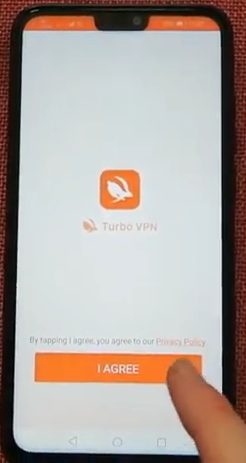
  1. Launch Turbo VPN and accept the privacy policy

    use Turbo VPN

    When you first launch Turbo VPN, you’ll be asked to accept the privacy policy before you’re taken to the home screen. By pressing on ‘Accept,’ you agree to these terms and will be taken to the home screen of the app.

    Tip: Always read the privacy policy, as it contains important information regarding the logging of your data and how it can be used.

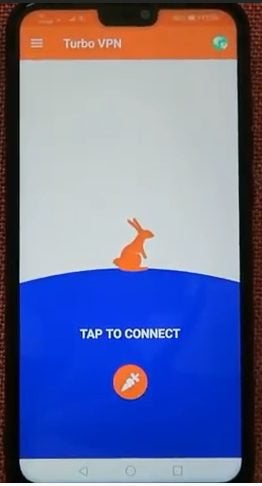
  2. Tap to choose a server

    use Turbo VPN

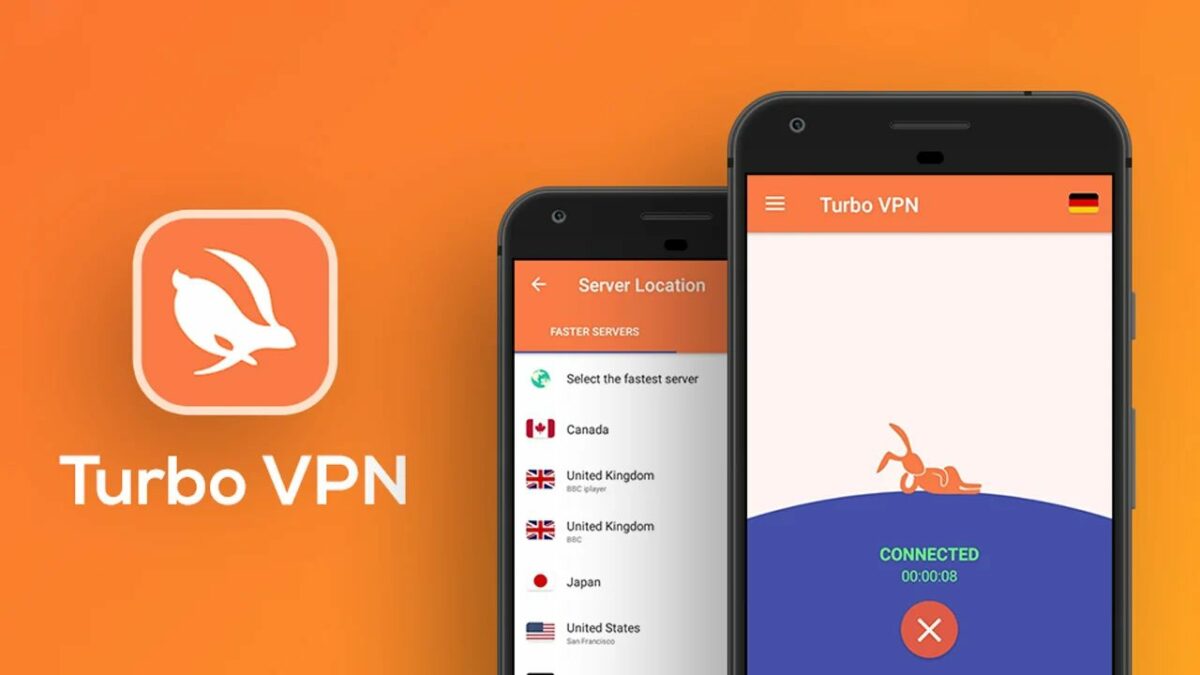
    The home screen is very basic, and to get started, all you need to do is tap on the carrot button to connect to a server.

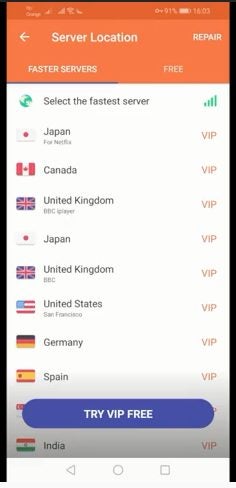
  3. Choose a available server from the list provided

    use Turbo VPN

    Next, you’ll be shown a list of servers in different countries to choose from. Choose the server from the country you want to gain access to. The app will show you the fastest servers by default. These are also part of the VIP package for paid subscribers. If you tap on the second tab, ‘Free’, you’ll see a list of the free servers and their associated connection speeds.

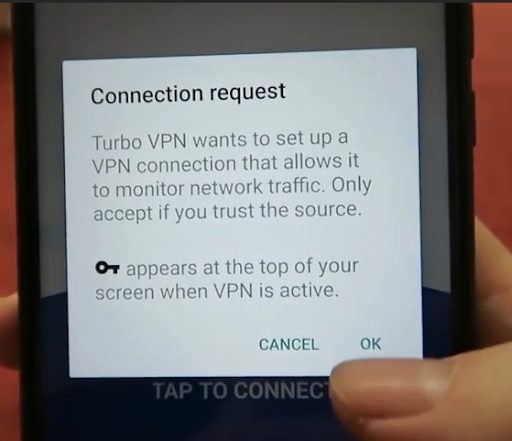
  4. Accept the connection request

    use Turbo VPN

    Once you’ve picked a server, a connection request message will pop up. If you’re ready to establish the connection, tap on ‘Ok’ to start establishing the connection.

  5. Wait for the connection to the server to be established

    use Turbo VPN

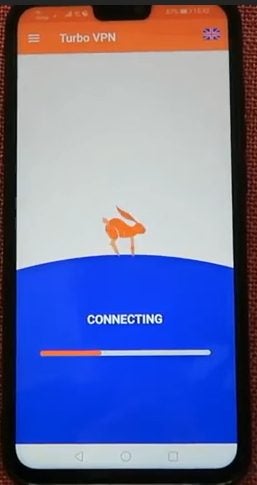
    Now, all you need to do is wait for the connection to finish, and once made, your connection will be encrypted. Now when you sign in to your streaming platforms or if you browse the internet, you’ll see new content that was previously blocked.

Things to bear in mind

There are a few things to bear in mind when choosing a VPN and the type you choose. A free VPN might sound like the perfect solution, and if you’re just looking for a tool to bypass restrictions and access blocked content, they can work fine for that. 

However, if you also want a tool to improve your online privacy and security, then you should look for a premium VPN provider that focuses on this feature. Unfortunately, many free providers still log your internet usage and can provide this to ISP and authorities upon request. This is also why it’s essential to read the privacy policy of any VPN provider so that you know exactly what they log and how they use the information.

Gain access to blocked or restricted content using Turbo VPN

Using TurboVPN makes it possible to easily access blocked or restricted content, such as movies and series on streaming platforms. Follow our above steps, and you’ll quickly find yourself connected to a server that gives you access to restricted content from other countries.

First steps with CarX Streets

CarX Technologies is getting racing game fans excited with their newest highly anticipated game, CarX Streets. Despite a few delays, the game is finally being tested and has a release date of 15 December. Once released, players will be able to enjoy street racing, with a range of challenges and cars to buy and upgrade.

CarX Street DOWNLOAD

Let’s take a look at how to take your first steps with CarX Streets and prepare you for the game.

Where can I play CarX Streets?

Currently, CarX Streets is being tested on iOS in selected countries only. The Android testing phase is also scheduled to start sometime in October. So if you own an iOS or Android device and are located in one of the participating countries, i.e., Belarus, Russia, or Ukraine, you can download the beta version through your app store.

If you want to play on PC, the game will be released on Steam with the current release date listed as 15 December. There is also a possibility that the game will be released on other consoles, but that will only be after the official releases on mobile and PC, with no confirmations yet.

How to take your first steps with CarX Streets

CarX Streets is very reminiscent of Need for Speed games and works in a very similar fashion. Drawing inspiration from this popular franchise, the developers have built on and improved many of the gaming aspects to create a really breathtaking racing game. 

Let’s take a look at the first steps when starting CarX Streets.

  1. Download CarX Streets

    First steps with CarX Streets

    The first step is to download and install the game. 

    Tip: the game is currently in a mobile testing stage, and if you’re located in Belarus, Russia, or Ukraine, you can download the beta version. We’re still awaiting the official release date, but PC players can expect it on Steam on 15 December.

  2. Launch the game

    First steps with CarX Streets

    Launch the game by clicking on the icon on your PC or by tapping the game icon on your mobile device.

  3. Start making money

    First steps with CarX Streets

    When you start the game, you’ll find yourself in the Port district. You’ll have a basic Honda Civic and $300 to start with. Before changing anything on your current car, first, use it to start making some money. There will be a few different jobs available on the maps that can bring in some much-needed starting moolah.

    Tip: Everything in the game costs money, just like in real life. As such, it’s crucial that you start earning money as soon as possible.

  4. Explore and practice your driving skills

    First steps with CarX Streets

    The map is very extensive, and although exploring the various areas doesn’t bring any achievements, this does give you an opportunity to practice your racing skills. Practice driving through traffic, drifting, and overtaking opponents across various roads. This is an excellent way to prepare for your races.

    Tip: Driving very fast and drifting will earn you money even if you aren’t racing, so why not practice?

  5. Compete in races and upgrade your car

    First steps with CarX Streets

    Racing is the aim of the game, and it’s also the most profitable venture. Participate in many different races to earn more money that you can use to upgrade your car.

    Tip: While it may be tempting to try and buy every car available in the game early on, it’s a good idea to save up and buy your favorite one first. Then you should spend money on upgrading it as much as possible. Soon you’ll end up with a fierce challenger and will be raking in more money, which you can start spending on buying other cars.

Is CarX Streets open world?

CarX Street is an open-world game that takes place in Sunset City. The map has six different districts to explore and race in, including complex mid-town roads, mountainous terrain, and much more. This extensive open-world map gives players a wide range of racing opportunities and challenges. So regardless if you’re a grip racer or a drift racer – there will be more than enough roads for anyone to enjoy regardless of their preferred racing style.

Is the game multiplayer?

CarX Streets will feature a multiplayer option so that players can challenge one another and race against each other along the various tracks in Sunset City or its outskirts. 

Enter the world of street racing in this new game

Anyone who enjoyed Need for Speed will surely enjoy this ambitious racing game from CarX Technology. Taking all the best features of NFS and adding their own touch, as well as multiple customizations and upgrade options, CarX Streets is sure to be a hit with racing game fans worldwide.

Fake LinkedIn profiles are using AI-generated headshots to impersonate companies

The popular business-related social platform LinkedIn is facing a bit of an identity crisis. Many legitimate businesses use the platform for sourcing and hiring experts; however, recent waves of fake impersonators are making it extremely difficult.

LinkedIn DOWNLOAD

There has been a significant rise in fake profiles using fabricated identities that have been lifted from legitimate accounts and feature AI-generated profile pictures. These accounts look very real, causing a major headache for corporate HR departments or those that manage invite-only LinkedIn groups.

Last week, KrebsOnSecurity investigated and revealed a flood of inauthentic accounts, all posing as Chief Information Security Officers for big fortune 500 companies, including Biogen, Chevron, Hewlett Packard, and others. Since this announcement, many other users have reported similar cases, and it seems these fake profiles are showing up en masse in executive roles across many different industries.

LinkedIn faked headshots

Hamish Talor runs the Sustainability Professionals group on LinkedIn and has added his voice to the concerns about these fake profiles. Since the start of the year, Taylor has announced that they’ve had to block more than 12 700 accounts suspected of being fake. He goes on to say that they receive approximately 500 fake requests to join each week, and it’s gotten much worse since January this year.

Another prominent LinkedIn user, Mark Miller, who owns and runs the DevOps Group, has also noticed a similar increase. Miller reported that he deals with fake profiles daily, sometimes hundreds of them. Miller has reported these accounts to LinkedIn reps for months to no avail. Finally, after eventually threatening to close his group because of the sheer number of fake profiles, it appeared that some action was taken.

Because of these and many other similar issues, platform users are begging for better tools and more protection against these fake profiles. After the recent LinkedIn phishing attacks experienced, we’re eager to see what they do to help businesses and groups deal with these waves of fake profiles.