{
"de-DE": "",
"en-US": "Publicist and audiovisual producer in love with social networks. I spend more time thinking about which videogames I will play than playing them.",
"es-ES": "Publicista y productor audiovisual enamorado de las redes sociales. Paso más tiempo pensando a qué videojuegos voy a jugar que jugándolos.",
"fr-FR": "Publicitaire et producteur audiovisuel passionné par les réseaux sociaux. Je passe plus de temps à penser aux jeux vidéo auxquels je jouerai qu'à y jouer.",
"it-IT": "",
"ja-JP": "",
"nl-NL": "",
"pl-PL": "",
"pt-BR": "",
"social": {
"email": "",
"facebook": "",
"twitter": "",
"linkedin": ""
}
}
Bluesky, la red social descentralizada, se encuentra en el centro de la polémica tras la reciente publicación de un conjunto de datos (dataset) en Hugging Face, una plataforma comunitaria de inteligencia artificial.
Según recoge 404 Media, el conjunto contenía un millón de publicaciones junto con información de usuarios, obtenida por el investigador Daniel van Strien mediante una técnica conocida como scraping, usando la API Firehose. Van Strien justificó el uso de los datos para “desarrollar modelos de inteligencia artificial, analizar tendencias en redes sociales y estudiar patrones de publicación”, aunque acabó eliminando el conjunto tras ver que “este enfoque violaba los principios de transparencia y consentimiento en la recopilación de datos”.
El conjunto de datos incluía metadatos sensibles, como los identificadores descentralizados (DIDs) de los usuarios y herramientas de búsqueda específicas, algo que preocupó a muchos por el posible uso indebido de dicha información. Aunque Bluesky asegura que no entrena modelos de IA con los datos de sus usuarios, admite que “no puede hacer cumplir esta política fuera de nuestros sistemas” y que la decisión recae en los desarrolladores externos. La compañía también promete seguir trabajando con ingenieros y abogados para abordar el problema.
Brief update on our ongoing efforts to allow users to specify consent (or not) for AI training: ?
Y es que la naturaleza abierta y descentralizada de Bluesky, basada en el protocolo Authenticated Transfer (AT), facilita que terceros accedan al contenido públicamente. Un enfoque que contrasta con plataformas como Twitter, donde Elon Musk restringió y encareció el acceso a su API para, supuestamente, frenar el scraping indiscriminado.
Bluesky, la red social descentralizada, se encuentra en el centro de la polémica tras la reciente publicación de un conjunto de datos (dataset) en Hugging Face, una plataforma comunitaria de inteligencia artificial.
Según recoge 404 Media, el conjunto contenía un millón de publicaciones junto con información de usuarios, obtenida por el investigador Daniel van Strien mediante una técnica conocida como scraping, usando la API Firehose. Van Strien justificó el uso de los datos para “desarrollar modelos de inteligencia artificial, analizar tendencias en redes sociales y estudiar patrones de publicación”, aunque acabó eliminando el conjunto tras ver que “este enfoque violaba los principios de transparencia y consentimiento en la recopilación de datos”.
El conjunto de datos incluía metadatos sensibles, como los identificadores descentralizados (DIDs) de los usuarios y herramientas de búsqueda específicas, algo que preocupó a muchos por el posible uso indebido de dicha información. Aunque Bluesky asegura que no entrena modelos de IA con los datos de sus usuarios, admite que “no puede hacer cumplir esta política fuera de nuestros sistemas” y que la decisión recae en los desarrolladores externos. La compañía también promete seguir trabajando con ingenieros y abogados para abordar el problema.
Brief update on our ongoing efforts to allow users to specify consent (or not) for AI training: ?
Y es que la naturaleza abierta y descentralizada de Bluesky, basada en el protocolo Authenticated Transfer (AT), facilita que terceros accedan al contenido públicamente. Un enfoque que contrasta con plataformas como Twitter, donde Elon Musk restringió y encareció el acceso a su API para, supuestamente, frenar el scraping indiscriminado.
Bluesky, la red social descentralizada, se encuentra en el centro de la polémica tras la reciente publicación de un conjunto de datos (dataset) en Hugging Face, una plataforma comunitaria de inteligencia artificial.
Según recoge 404 Media, el conjunto contenía un millón de publicaciones junto con información de usuarios, obtenida por el investigador Daniel van Strien mediante una técnica conocida como scraping, usando la API Firehose. Van Strien justificó el uso de los datos para “desarrollar modelos de inteligencia artificial, analizar tendencias en redes sociales y estudiar patrones de publicación”, aunque acabó eliminando el conjunto tras ver que “este enfoque violaba los principios de transparencia y consentimiento en la recopilación de datos”.
El conjunto de datos incluía metadatos sensibles, como los identificadores descentralizados (DIDs) de los usuarios y herramientas de búsqueda específicas, algo que preocupó a muchos por el posible uso indebido de dicha información. Aunque Bluesky asegura que no entrena modelos de IA con los datos de sus usuarios, admite que “no puede hacer cumplir esta política fuera de nuestros sistemas” y que la decisión recae en los desarrolladores externos. La compañía también promete seguir trabajando con ingenieros y abogados para abordar el problema.
Brief update on our ongoing efforts to allow users to specify consent (or not) for AI training: ?
Y es que la naturaleza abierta y descentralizada de Bluesky, basada en el protocolo Authenticated Transfer (AT), facilita que terceros accedan al contenido públicamente. Un enfoque que contrasta con plataformas como Twitter, donde Elon Musk restringió y encareció el acceso a su API para, supuestamente, frenar el scraping indiscriminado.
Bluesky, la red social descentralizada, se encuentra en el centro de la polémica tras la reciente publicación de un conjunto de datos (dataset) en Hugging Face, una plataforma comunitaria de inteligencia artificial.
Según recoge 404 Media, el conjunto contenía un millón de publicaciones junto con información de usuarios, obtenida por el investigador Daniel van Strien mediante una técnica conocida como scraping, usando la API Firehose. Van Strien justificó el uso de los datos para “desarrollar modelos de inteligencia artificial, analizar tendencias en redes sociales y estudiar patrones de publicación”, aunque acabó eliminando el conjunto tras ver que “este enfoque violaba los principios de transparencia y consentimiento en la recopilación de datos”.
El conjunto de datos incluía metadatos sensibles, como los identificadores descentralizados (DIDs) de los usuarios y herramientas de búsqueda específicas, algo que preocupó a muchos por el posible uso indebido de dicha información. Aunque Bluesky asegura que no entrena modelos de IA con los datos de sus usuarios, admite que “no puede hacer cumplir esta política fuera de nuestros sistemas” y que la decisión recae en los desarrolladores externos. La compañía también promete seguir trabajando con ingenieros y abogados para abordar el problema.
Brief update on our ongoing efforts to allow users to specify consent (or not) for AI training: ?
Y es que la naturaleza abierta y descentralizada de Bluesky, basada en el protocolo Authenticated Transfer (AT), facilita que terceros accedan al contenido públicamente. Un enfoque que contrasta con plataformas como Twitter, donde Elon Musk restringió y encareció el acceso a su API para, supuestamente, frenar el scraping indiscriminado.
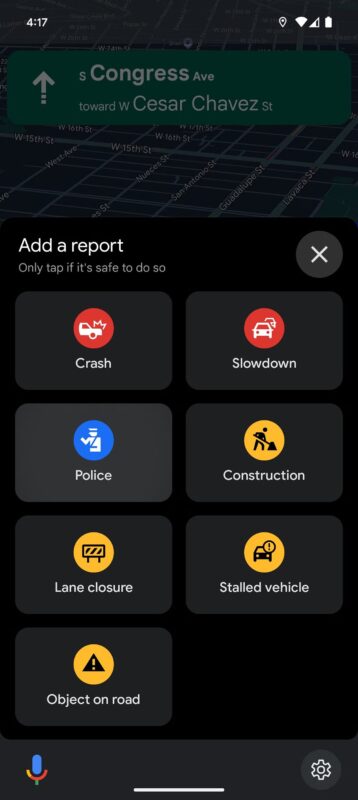
In its day, Google Maps decided to integrate the incident reporting system from Waze, another navigation app that also belongs to Google. With this feature, users can create incidents that will appear on the map for other users to see, including roadworks or accidents, among others. Now, the company has introduced a change that affects how police checks are reported, removing what was probably the favorite feature of many drivers: mobile speed cameras. Instead of reporting speed cameras, Google has introduced a more generic label to mark police presence. […]
In its day, Google Maps decided to integrate the incident reporting system from Waze, another navigation app that also belongs to Google. With this feature, users can create incidents that will appear on the map for other users to see, including roadworks or accidents, among others. Now, the company has introduced a change that affects how police checks are reported, removing what was probably the favorite feature of many drivers: mobile speed cameras.
Instead of reporting speed cameras, Google has introduced a more generic label to mark police presence. With this change, Google Maps would cover different situations where police officers are on the road, such as directing traffic or responding to emergencies, situations that did not fit the old speed camera system. Although this might disappoint those who used this option, the new feature still allows reporting areas where there are speed checks, albeit in a less specific way.
According to Android Police, the “police” label now appears prominently in the list of incidents that drivers can report. The new functionality will be available in all versions of the app, including Android, iOS, Android Auto, and CarPlay, although its availability may vary by region.
Although many drivers may not like it, the change could be very beneficial for road safety. The uncertainty about the purpose of the police presence could motivate drivers to be more cautious, reducing speed in designated areas, regardless of whether it is a radar or officers in another type of intervention.
The new change is included in version 24.47.04.699095382 of Google Maps. If you still don’t see the police label, it is likely still being rolled out in your region and may take a few days or even weeks to become available.
Spotify has announced that it will restrict developers’ access to certain features of its web API, such as song and artist recommendations. The new measure, communicated on its official developer blog, aims to address a series of security issues and curb the misuse of its platform, according to the company. Although not explicitly mentioned, this restriction seems to be focused on preventing user data from being used to create artificial intelligence applications. “As part of our ongoing work to address the security challenges that many companies face today, […]
Spotify has announced that it will restrict developers’ access to certain features of its web API, such as song and artist recommendations. The new measure, announced on its official developer blog, aims to address a series of security issues and curb the misuse of its platform, according to the company. Although not explicitly mentioned, this restriction seems to be focused on preventing user data from being used to create artificial intelligence applications.
“As part of our ongoing work to address the security challenges that many companies face today, we are making changes to our public APIs,” a Spotify spokesperson explained to TechCrunch. Among the revoked features are tools that allowed analyzing users’ listening habits, such as song and artist recommendations or audio analysis data that describe characteristics like “danceability” or its “energy.”
The developer community has not hesitated to react to this measure. In the Spotify forums, some expressed their discontent at losing access to these tools, which they used for various purposes, not necessarily related to AI. “With transformer models, there is probably a risk that models will be trained to emulate Spotify’s,” said one user. “I hope that is not the reason, but if it is, I am disappointed.” Another pointed out that this decision is not about security, but about the “data used to train AI models.”
Spotify has been working on its own artificial intelligence models for years. Its CEO, Daniel Ek, has stated that AI will be “huge for creativity” in music. In this context, the company has launched products such as an AI-powered DJ and customized playlists with this technology.
The changes will only affect developers with limited access to the API, while official partners and those with approved extensions will continue to access the restricted features.
Threads, the “Twitter of Meta,” is working on a new feature for Threads clearly inspired by the “Starter Packs” of Bluesky, its direct rival along with Twitter itself. These community-created user lists allow newcomers to find interesting profiles to follow. In the case of Threads, the… Continue reading “”
Threads, the “Twitter of Meta,” is working on a new feature for Threads clearly inspired by the “Starter Packs” of Bluesky, its direct rival along with Twitter itself. These community-created user lists allow newcomers to find interesting profiles to follow. In the case of Threads, the “recommended follow lists” would also be created by the platform’s users, as noted by technologist Chris Medina (via TechCrunch), who discovered the feature in testing.
While Bluesky designed the Starter Packs to quickly connect new users with others of similar interests, Meta might be adopting this idea despite the fact that it already uses the Instagram social network to suggest profiles. Threads benefits from data from Instagram and other Meta applications to infer user interests, but it seems that the enormous popularity of Bluesky’s Starter Packs is motivating Meta to explore more personalized options.
In the current tests of this new feature, only a list called “NBA Threads” appears, attributed to a user of the social network. This suggests that these lists will not be directly managed by Meta, but will be in the hands of the Threads community members themselves. Although Meta has not yet officially confirmed this feature, several tests conducted by TechCrunch indicate that it is in an advanced stage of development.
Meta has been incorporating more features inspired by Bluesky into Threads in recent months, such as the ability to change the default feed and adjustments in the algorithm to prioritize content from followed accounts. A series of measures aimed at curbing the growth of Bluesky, which has gone from 9 to more than 23 million users in just two months.
In today’s digital landscape, we’re completely surrounded by threats. The number of malware types is constantly growing, and what’s worse, existing malware continually evolves to bypass security measures. Analysis-resistant malware—designed to hide from or interfere with conventional antivirus tools—employs advanced techniques to evade detection, such as embedding itself in critical system files or dynamically modifying its code to disguise itself.
Rootkits, bootkits, and polymorphic viruses are examples of these sophisticated threats that can cause serious damage if not detected promptly. From breaches of sensitive data to drastic slowdowns of your computer, the consequences of these infections are increasingly alarming.
However, there’s a simple way to combat these advanced threats. AVG AntiVirus Free provides an innovative and accessible solution to identify and eliminate analysis-resistant malware. Below, we’ll explain how this free antivirus can protect your PC against the most persistent threats.
To understand the importance of tools like AVG AntiVirus Free, it’s essential to know why traditional antivirus scans aren’t always enough. Antivirus programs operate within the operating system, and advanced malware can exploit this limitation to hide in various ways. For example:
Rootkits: Integrate into the deepest levels of the operating system, allowing malware to act undetected.
Bootkits: Affect the computer’s boot process, ensuring that malware runs before the antivirus does.
Polymorphic Viruses: Constantly change their code to evade antivirus detection signatures.
These threats not only compromise your computer’s security but can also lead to secondary infections like ransomware or spyware, with the added risk of losing valuable data.
AVG AntiVirus Free: Protection Beyond the Operating System
AVG AntiVirus Free is designed to tackle these advanced threats with an approach that goes beyond conventional methods.
Boot-Time Scan
Boot-Time Scan is an advanced feature of AVG AntiVirus Free that scans for known types of malware and eliminates threats before the operating system and other services start. This tool doesn’t run automatically or regularly; if you suspect your PC contains malware, you can manually schedule the scan to run the next time your computer starts.
Advanced Threat Detection
AVG AntiVirus Free uses deep scanning techniques to locate even the most sophisticated threats. In addition to traditional signatures, the antivirus employs heuristic and behavior-based analyses to identify suspicious patterns in files.
Data Protection During Removal
Removing malware often involves risks of data loss. AVG AntiVirus Free safeguards critical files before starting the removal process, ensuring that no collateral damage occurs during the cleanup.
Rescue Disk
For the most persistent threats, AVG AntiVirus Freeallows you to create a Rescue Disk on a USB drive or blank DVD. Rescue Disk scans your PC when the system isn’t running, increasing the chances of detecting and eliminating malware since it can’t counterattack. By operating independently of the operating system, the antivirus can scan all files without interference, detecting malware that would otherwise remain hidden.
How to Scan Your PC for Viruses with AVG AntiVirus Free Rescue Disk
The Rescue Disk feature in AVG AntiVirus Free is your best bet for effectively combating analysis-resistant malware. Here’s how you can leverage this function, even without any technical experience:
Step 1: Create a Rescue Disk
Open AVG AntiVirus Free and go to Menu ▸ Rescue Disk.
Follow the on-screen instructions to create a bootable tool on a USB drive or DVD. This process takes only a few minutes and doesn’t require advanced technical knowledge.
Step 2: Configure Your Computer to Boot from an External Device
Turn off your PC and insert the USB drive or DVD containing the Rescue Disk.
Turn on your PC and access the Boot Menu (you can do this by pressing specific keys like Esc, F12, or Del, depending on your computer’s manufacturer).
Select the USB drive or DVD as the preferred boot option. Save the settings and proceed with the boot-up.
Step 3: Run a Full System Scan
Once your computer boots from the external device, click on “AVGPE AntiVirus” in the Rescue Disk’s main menu.
If your PC is connected to the Internet, click “Update VPS” to ensure the Rescue Disk uses the most recent virus definitions.
To scan your entire PC, select “All hard disks” and click Next.
When the scan is complete, review the report and results screen to see if any threats were found.
Additional Benefits of AVG Free AntiVirus
While the Rescue Disk feature is highly valuable, AVG AntiVirus Free offers other functionalities that enhance its value as a security tool:
Real-Time Protection: Continuously monitors your computer for potential threats, blocking viruses, spyware, and ransomware before they can act.
Web Security: Prevents access to fraudulent websites and infected links associated with malware and phishing.
Automatic Updates: Ensures you always have the latest version and the most recent virus definitions.
These features make AVG AntiVirus Free a comprehensive solution for maintaining digital security in any situation.
Download AVG AntiVirus Free Now and Protect Your Computer
If your computer has been affected by analysis-resistant malware or you simply want to be prepared to face any threat, download AVG AntiVirus Freetoday. Its Boot-Time Scan and Rescue Disk tools, combined with real-time protection and ease of use, make it one of the most comprehensive solutions on the market.
Don’t wait for a threat to put your security at risk! With AVG AntiVirus Free, peace of mind is just a click away.
With Black Friday just around the corner, the speed and efficiency of your computer become essential for snagging online deals. There’s nothing worse than missing out on a great bargain because of slow loading times or clunky navigation. Over time, computers accumulate temporary files, cache, cookies, and other elements that consume resources and hinder smooth browsing.
Sounds like a big problem, right? Fortunately, CCleaner Free, the popular computer cleaning software, helps optimize your device by removing temporary files and adjusting settings to speed up navigation. In this guide, we’ll show you how to use CCleaner Free to boost your computer’s performance, enabling seamless shopping on one of the busiest days of the year.
CCleaner Free: A Must-Have Tool for Better Online Shopping
Over time, computers tend to fill up with temporary files, cookies, and background processes. This “extra weight” can slow down your device, affecting how quickly it completes tasks, including online browsing. The result? Sluggish page loads, system crashes, and frustrating delays—especially inconvenient during time-sensitive events like Black Friday, where every second counts in scoring that irresistible deal.
This is where CCleaner Free comes into play. The optimization tool effectively cleans your device by removing unnecessary files and programs that consume system memory and resources. With regular clean-ups using CCleaner Free, your computer can browse faster, minimize crashes, and improve overall performance—making for a faster, smoother shopping experience.
Basic Steps to Optimize Your Computer with CCleaner Free
To ensure an optimal shopping experience on Black Friday, here’s how to use CCleaner Free efficiently:
1. Clean Temporary Files and Cache
Temporary files and browser cache accumulate as you visit websites. While these can speed up future visits, excessive accumulation slows down your system and consumes storage space. CCleaner Free analyzes your computer for unnecessary temporary files and cache, allowing you to delete them with just a few clicks.
Steps to clean these files:
Open CCleaner Free and select the “Custom Clean” tab.
Check the boxes for “Internet Temporary Files” and “Internet Cache” (names may vary depending on your browser).
Click “Run Cleaner.”
By completing this simple process, you’ll improve website load times and free up disk space, allowing your computer to manage resources more efficiently while shopping online. This helps reduce system slowdowns and ensures each click is faster and smoother.
2. Delete Unnecessary Cookies
Cookies store browsing data, including preferences and session details. While some cookies enhance your shopping experience with personalized content, they can also take up space and affect page loading speeds. CCleaner Free enables you to manage cookies selectively, keeping only those essential for your shopping while removing the rest.
Steps to manage cookies with CCleaner Free:
Open the program and go to the “Options” tab.
Click on “Cookies” to view a full list of cookies stored in your browser.
Select the cookies you want to keep (e.g., from trusted shopping sites) and move them to the right-hand list.
Highlight unnecessary cookies, right-click, and select “Delete.”
This personalized management speeds up browsing and enhances security by reducing stored cookie data. Plus, by eliminating unnecessary cookies, your browser can load pages more fluidly—especially useful when navigating multiple deal sites on Black Friday.
3. Optimize System Startup
A common issue affecting computer performance is the large number of programs that launch at startup. Reducing the number of programs that automatically run can significantly speed up boot times and free up system resources for other tasks. CCleaner Free simplifies this process, allowing you to disable non-essential programs from starting up.
Steps to manage startup programs with CCleaner Free:
Navigate to the “Tools” tab and select “Startup.”
Review the list of programs that run at startup.
Select non-essential programs and click “Disable.”
Exit CCleaner Free and restart your computer to notice the improved startup speed.
By doing this, you’ll enjoy a quicker boot time on Black Friday, getting you to your favorite shopping sites faster without delays caused by unnecessary startup programs.
Beyond optimizing your device with CCleaner Free, here are other recommendations to enhance your online shopping experience:
Keep your browser updated: Browser updates often include performance and security improvements. Ensure you’re running the latest version to avoid browsing issues.
Close unnecessary programs: Only keep active the programs you’re using. This frees up RAM and lets your browser function more efficiently.
Check your internet connection: Before shopping, confirm you have a stable connection. If possible, use a wired connection instead of Wi-Fi for faster speeds.
Protect personal information: Adjust your browser’s privacy settings to reduce the risk of fraud. Always shop on trusted, secure websites.
Get Your Computer Ready for Black Friday with CCleaner Free!
Black Friday is fast approaching, and CCleaner Free is your ally in preparing your computer to seize every deal. By removing unnecessary files, optimizing performance, and ensuring faster navigation, CCleaner Free guarantees you won’t waste a second during this important shopping event. Follow these steps, get your device ready, and be prepared to act quickly. No deal will slip through your fingers when your computer is optimized with CCleaner Free!
Anthropic has proposed a new standard to facilitate the connection of artificial intelligence assistants with the systems where the datasets they are trained on reside. According to the company, this open-source protocol, called Model Context Protocol (MCP), aims to improve the responses of AI models by making them more relevant and useful. MCP allows models to access data from enterprise tools, content repositories, and application development environments, making it a versatile solution for various tasks. In a statement on their website, Anthropic highlighted […]
Anthropic has proposed a new standard to facilitate the connection of artificial intelligence assistants with the systems where the datasets they are trained on reside. According to the company, this open-source protocol, called the Model Context Protocol (MCP), aims to improve AI model responses by making them more relevant and useful.
Subscribe to the Softonic newsletter and get the latest in tech, gaming, entertainment and deals right in your inbox.
MCP allows models to access data from business tools, content repositories, and application development environments, making it a versatile solution for various tasks. In a statement on their website, Anthropic highlighted how current AI assistants, even with their high capabilities, “are trapped behind information silos and legacy systems.”
The integration of new data sources requires custom implementations, making it difficult to scale connected systems. With MCP, the company aims to solve this problem by offering a standard protocol to establish bidirectional connections between data sources and AI-driven applications, such as chatbots.
Introducing the Model Context Protocol (MCP)
An open standard we’ve been working on at Anthropic that solves a core challenge with LLM apps – connecting them to your data.
No more building custom integrations for every data source. MCP provides one protocol to connect them all: pic.twitter.com/kYsivQyPDq
Companies like Block and Apollo have already integrated MCP, while developer tool platforms like Zed, Replit, Codeium, and Sourcegraph are adopting its support. Anthropic explained that the use of MCP will allow developers to avoid creating individual connectors for each data source. “As the ecosystem matures, AI systems will be able to maintain context between tools and data sets, replacing fragmented integrations with a more sustainable architecture,” the company noted.
The company has also made preconfigured MCP servers available for enterprise systems like Google Drive, Slack, and GitHub, and will soon launch tools for organizations to implement custom MCP servers. Additionally, subscribers of Claude, Anthropic’s chatbot, can now connect it to internal systems using MCP. “We are committed to building MCP as an open and collaborative project,” stated Anthropic, inviting developers to join the initiative.