Mirror Forge is a free demo of a survival horror game developed and published by MystiveDev, with a planned full release on September 30, 2022. The developer states that it’s inspired by Silent Hill, which is why I had to test it for a review. Being a long-time fan of the SH franchise since the start, I needed to see how well the game holds to these claims.
The demo certainly has a dark overtone, and there are certainly hints to the Konami classic. How are the gameplay elements in Mirror Forge, and are there good graphics? How long is the demo, and will you be scared? Find out all the terrifying, horrific details in my review below.
Mirror Forge inspired by Silent Hill
Let me start my Mirror Forge review by addressing the statement that Silent Hill inspired it. Playing through the demo, I definitely felt similar elements from titles like Silent Hill 2and Silent Hill 4: The Room. There’s even a section where you enter the memory of your home, which certainly connects to Silent Hills, or P.T. as we originally called it.
So, which parts were similar to Silent Hill? Well, the graphics and horrific elements definitely are. When you enter the hospital area later, some aspects and the map reminded me of Alchemilla Hospital. There isn’t any fog like in SH streets, but you get the same dark atmosphere within the buildings.
Besides some creature similarities, the aspect that connected Mirror Forge to Silent Hill the most for me is how it messes with your mind. I’ll cover this a bit more in the review below, but there are areas where you see one thing for a moment, and then it changes when you turn around. This tastes like every SH title I’ve played. There’s even a Silent Hill achievement for finding the Easter egg related to the game series.
Mysterious clues to the story
So, let’s get to the Mirror Forge demo. When you begin, you’re standing in a strange storage area with blood and frightening objects covering the walls. There are corpses with body parts within walls — to give you some idea. You don’t really know what’s happening except for the notes you find and the literal writing on the wall.
Each room and area is a puzzle you need to solve to get to the next phase, almost like an escape room scenario. It starts easy with hints of how to solve them, but when you reach the hospital, it’s all up to you to figure things out. I love how challenging the puzzles seem, but many times there’s such a simple solution, such as doing the opposite of what they say.
The main story so far is definitely intriguing, but it does in some ways feel a bit like Silent Hill 2. What I mean is the relationship between your character and your wife and the hint that you killed her. However, Mirror Forge takes a fresh approach to this premise, and I can’t wait to see how it unfolds in the complete game.
Terrifying visual effects
I need to place a disclaimer that I’ve played horror games for most of my life, and there are few things that still scare me in this genre. Yet, there are plenty of terrifying moments that made me jump for an instant and swear happily at the developers for making me feel that way again. What makes it more frightening is that you play in first-person view, much like Resident Evil 7.
The terror is a welcoming combination of gore, jump scares, and suspense building that’s hard to find a balance in most games. Fortunately, Mirror Forge seems to be getting it right. It’s definitely not for the faint of heart, especially for anyone dealing with anxiety issues.
Walking through an eerie atmosphere
The main gameplay aspects in Mirror Forge mostly revolve around walking around, finding items, solving clues, and evading death. There are no combat actions as yet, so everything hinges on survival. In the hospital, you have to do your best to avoid the deformed nurses without a weapon in hand. You don’t know how badly I wished for a crowbar to smash their skulls in. Thank goodness for the painkillers. There were some moments where the movement was awkward, though.
I’m at a crossroads about having no combat. I understand how it adds to the survival element, where you need to avoid creatures to continue playing. However, I do miss being able to clear the floor with a weapon so I can appreciate the beauty of the halls and rooms in peace. We’ll have to see if this element changes in the full game.
Nothing is as it seems in Mirror Forge
Finally, I need to add how much I adore how nothing is as it seems in Mirror Forge. One moment, you’re walking down a corridor to a door where a memory scene plays. When you turn around, the scenery has changed.
There’s also an alternate universe, much like Otherworld in Silent Hill. It mostly works with a mirror that transports you elsewhere and everything looks different. While it’s all the mirror does for the moment, I’m keen to see how they evolve this feature over the entire game.
Mirror Forge: Do you have the guts?
The Mirror Forge demo took me 1 and a half hours to complete. There’s a surprising amount you can do in that time, so don’t let that put you down. It’s a terrifying experience that I loved as a horror gamer and author, and especially as someone that has written Silent Hill novels. It took me deep into my fears, and yet I smiled at all the puzzles, horror, and scenery I encountered. The full game will be nothing but epic.
TheGoogle Play Storehas to be one of the most well-known digital storefronts. It is to mobile apps what Steam is to video games. But that doesn’t mean that it offers the best digital app storefront experience you can have on a mobile device.
Let’s explore the features and limitations of the Google Play Store, as well as its main competitors.
What is the Google Play Store?
Google uses the Google Play Store to offerdigital content to users. This could be a gaming application like PUBG Mobile, the Spotify app for music, or another Google app like Google Docs. It now encompasses books, music, games, movies, and function-oriented apps. User ratings and reviews offer insight into features, reliability, and usability of apps, as well.
Note: it does NOT come pre-installed on all Android devices, but it does come pre-installed on Google devices.
Main features of the Google Play Store
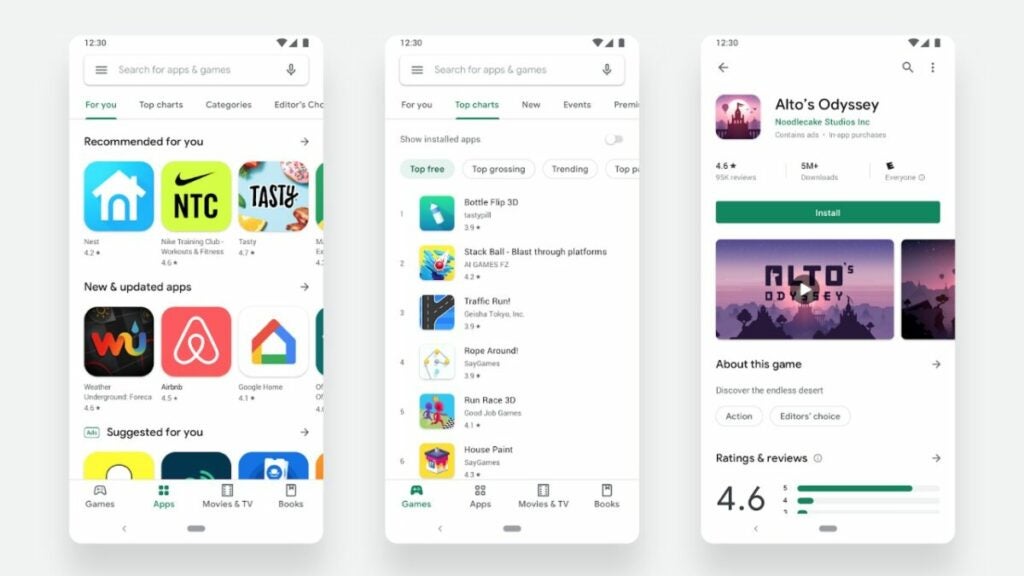
Google has tweaked the app store’s UI over the years to enhance user experience and declutter the screen. Its latest visual refresh came in 2019 to promote faster browsing and more efficient searching.
Users will find a search bar at the top but can search categories located at the bottom of the screen. They can also access user-specific tabs at the top left using the three horizontal lines icon.
How to use the Google Play Store
Using this app requires a Google account and offers the option to tie in your Google Pay financial information. This may not sit well with everyone as it means that Google has access to whatever app data you might accrue.
To use the store, follow these instructions:
Open the native digital storefront app you have on your mobile device.
Search for “Google Play Store”.
Download the app.
Login to your Google Account and set up your profile.
Google Play Store alternatives
Though it might not seem like it, there are plenty of alternatives when it comes to Google programs and offerings. This rings just as true for the Play Store as with other options.
Interested in finding the best app store apps for Android and Apple? Let’s compare some of the top competitors to see how they stack up.
Samsung Galaxy Apps
This program comes pre-loaded on most Samsung devices and is Samsung’s official mobile app store. As with its Google counterpart, people can use the app to search for and download Android games and apps. The big plus here is that you do not need a Google account to do that. However, you do need a Samsung account instead.
Since Samsung Galaxy Apps is designed for Galaxy products, it works best with those items. But overall, the interface is easy to use and similar to Google’s.
Mac App Store
The Mac App Store is Apple’s official retail app that directly competes with the likes of Google and Samsung’s alternatives. However, it offers Apple-exclusive content and apps, as well as ringtones and other items.
Similarly, it requires an Apple account to use and works best with the hardware for which it was designed (Apple products). It offers quick installations, but the UI can be a bit overwhelming at times compared to the Google Play Store.
Aptoide
This third-party app storefront serves Android devices and competes directly with the Google Play Store. The community-driven, open-source software makes it easy for users to upload apps, as well as create and manage a store.
As it is community-driven, Aptoide relies heavily on input from its users. It awards green badges to the most trusted apps among more than one million options. It’s a fantastic alternative to the Google Play Store.
It offers a straightforward UI, quick downloads, and filters to make searching easier. Aptoid also provides a safer third-party alternative vs. other options such as 9Apps.
Amazon Appstore
That’s right: Amazon has its own app store, too. Its primary purpose is to serve games, ebooks, and apps for Kindle and Kindle Fire users. Amazon’s secret here is that the app relies on Android for its operating system. As such, it works best on Android devices.
The big difference here is the number of apps available to users. Amazon’s app store offers far fewer programs than Google’s does. If you want lots of options and diversity, this is not competitive with the Google Play Store.
Expert review verdict
For people with Google-branded mobile devices such as Pixels and Android-based devices, the Google Play Store makes a fantastic option to connect with all the apps you need in life. However, if you aren’t comfortable with Google gathering dataon your app usage and habits, youmay opt for a different digital app storefront.
Download the Google Play Store program for yourself to see if you prefer it over other digital app storefronts.
PROS
Allows access to millions of apps and media options
Quick downloads most of the time
Works on Android devices
Sleek, intuitive UI
CONS
Requires a Google account
Allows Google to gather data on your habits
Not native to many Android devices
Not available to Apple device users
Developer: Google
Publisher: Google
Top features: Connects users with apps, movies, books, music, and more
If you thought there was just one way to use a mouse,X-Mouse Button Control (XMBC) can show you a whole new world. This alternative control methodology lets you harness more control over your computer mouse. It also lets you fully unlock the potential of mice that do more than just “point and click”.
For instance, your mouse wheel that you use to scroll also acts as a button that can be programmed. XMBC, a totally free program, can be used to unlock more controls for your mouse or just offer more versatility. Let’s break down the XMBC tool, its features, and its rivals to see how it performs.
What is X-Mouse Button Control?
Starting at the beginning, XMBC is a program that remaps the mouse button controls. It offers the following features:
Button remapping
Navigation customization
Context-dependent changes
Window-specific mouse behavior
Profile creation
Automatic profile activation
10 layers of unique button configurations
Distinct macros for specific actions such as screen-swapping
Timed button actions that vary with press time
Combining or shifting button actions
Simulated keystroke mapping
Key sequences
How do I download X-Mouse Button Control?
You can easily download the XMBC program from this Softonic page. After that, simply follow the setup and get started customizing your mouse button control configurations.
What are the benefits of this utility?
While XMBC lets you have more control, it also allows for increased usability across multiple users. In essence, XMBC sets up profiles to prevent your individual mouse controls from changing. If you share a computer with others such as family members, this is an ideal solution. But you need to think bigger.
Want a shortcut for copying text? XMBC can deliver that. Interested in altering what double-clicking the left mouse button does? XMBC can do that, too. Users can even introduce fourth and fifth mouse buttons into video games that don’t natively have them.
Each profile can host 10 different button configurations across “layers”. Simply use the mouse buttons themselves or hotkeys to switch them.
Is X-Mouse Button Control dangerous?
While some internet downloads can harbor malware, XMBC is a virus-free and safe program for Windows PCs. Rest assured that you are a getting quality program.
How do I use X-Mouse Button Control?
Getting to know the software is a matter of familiarizing yourself with how things are organized. This is easier said than done as there are 100 actions that users must specify. YouTuber Cannibal Haire has a very useful video as seen above to get started.
Moreover, you can consult the user guide for more specific instructions on multi-layered button mapping, profile setup, global settings, and more.
How do I remap mouse buttons?
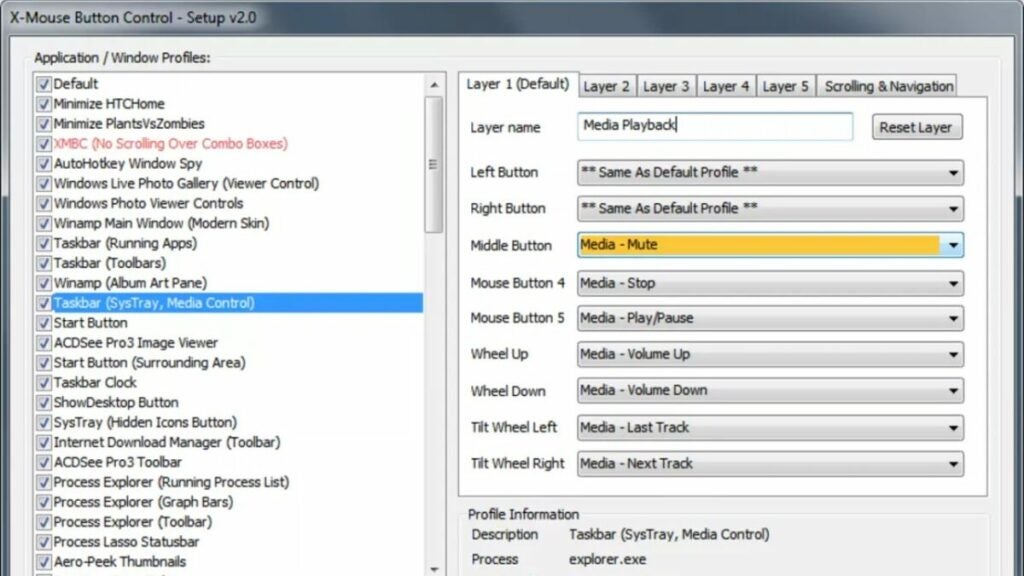
Remapping buttons let users change how the scroll wheel and mouse buttons function. You can assign different tasks to each button. For example, instead of using the left click button to “select”, you do that with the middle mouse button instead.
There are lots of options when it comes to remapping buttons, but you can easily adjust what they do within the XMBC interface as seen in the screenshot earlier in this article.
Common issues with XMBC
As with any program, XMBC has its quirks and a learning curve to it. The obvious issue with XMBC is that it is entirely text-based. Visual learnersmay struggle with dialing in certain features.
This trait also presents a hurdle for users not knowledgeable of computer hardware or Windows OS features beyond installing and using programs. Getting into the more granular features requires becoming intimately familiar with not just XMBC, but other aspects of Windows itself.
What’s more: the forums available to users specifically for XMBC arenot very active. If you go looking for help there, you may not find anyone. Going to a hardware subreddit might be a better option if you need specific guidance.
Can XMBC supplement gaming mice?
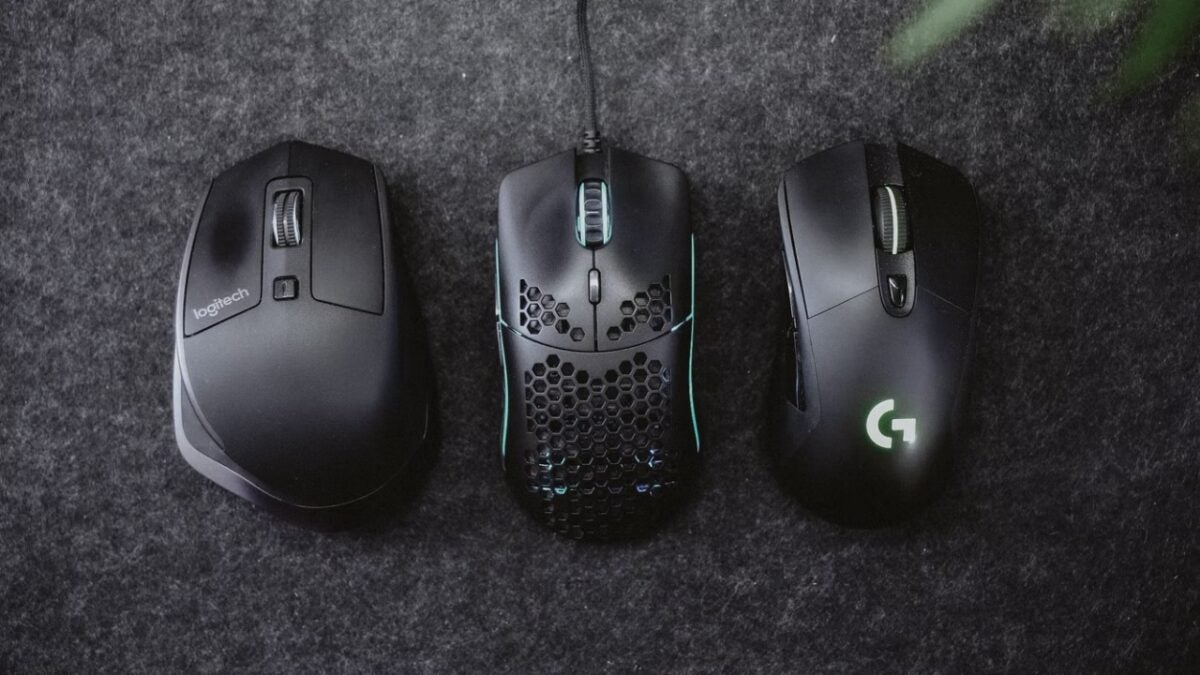
Many gaming mice from big companies like Razer and Corsair come with their own button customization programs. However, not all of them offer as robust of options as users may need.
To supplement that, XMBC makes a wonderful addition for those who need more features. It’s especially handy for people who work and game on the same PC. You can have one profile for when you are playing video games and one for when you are working.
X-Mouse Button Control competitors
XMBC offers lots of utility for users with specific needs. It can be especially time-saving if you have “dumb” hardware or hardware that is more plug-and-play vs. something with a companion app with other features.
However, some mice (including gaming mice) tend to ship with more sophisticated programs for the hardware. You can review how similar programscompare to X-Mouse Button Control on this page. But let’s see how the top-rated built-in software on some mice fares against XMBC.
Logitech Options vs. XMBC
Logitech software has come a very long way over the years. Though the company is known for tons of peripherals from webcams and speaker systems to smart home items,their mice and keyboard options are solid, too.
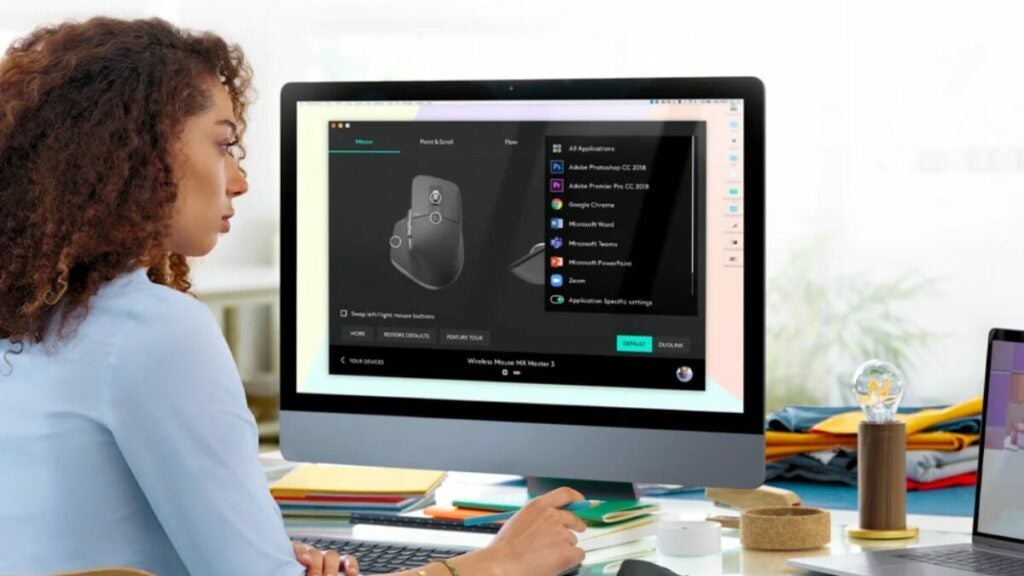
The company has revamped the interface of its software to offer more options for working. You can create hotkeys for Zoom, Photoshop, or even Google Chrome. It even provides app-specific settings as XMBC does.
From a utility standpoint, the software works well for those who have more professional needs.
Razer Synapse vs. XMBC
Razer is one of the most popular brands when it comes to gaming peripherals like mice and keyboards. But gamers also rave about its onboard software Razer Synapse. The sleek interface is clear, concise, and uncluttered.
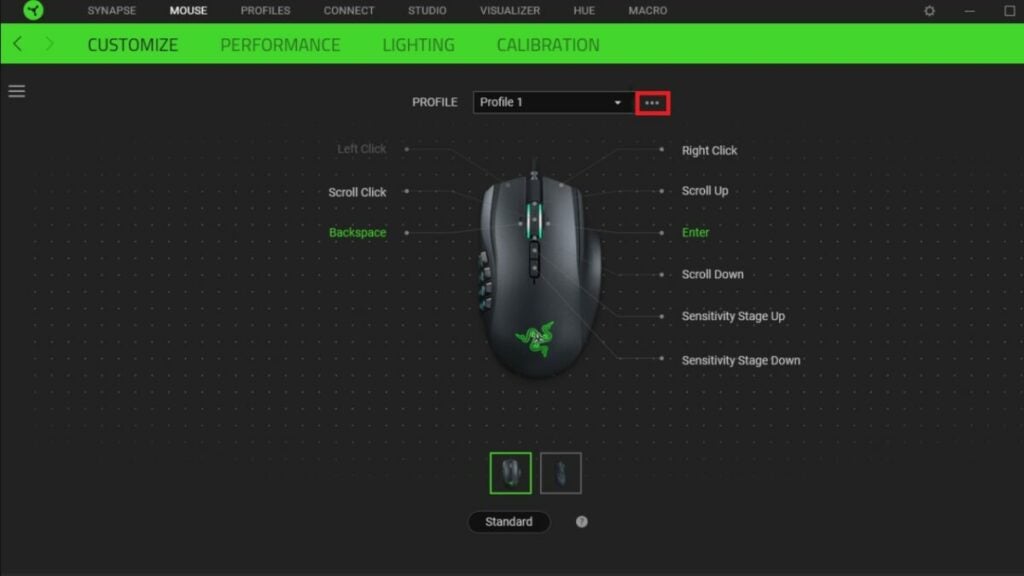
As you can see in the image of the UI above, Razer now has profiles just like XMBC, along with controls for RGB lighting, DPI settings, and more. In comparison to XMBC, it is a much more user-friendly option if you don’t need as much utility or versatility out of the program.
Verdict on X-Mouse Button Control
XMBC has been an incredibly useful tool for people who need more options when it comes to mouse controls. It still offers nearly unmatched features and versatility.
However, many readily available and affordable options from companies such as Logitech now come with comparable software that is easier to use for average people. XMBC is also not readily available for macOS users.
It wasn’t long ago when Adobe Photoshop users were leery when the creative software became a subscription-only service in 2013. It wasn’t immediately apparent how the new annual fee would be justified through continual enhancements to the application. Such concerns among the loyal Photoshop (PS) user community didn’t fall on deaf ears. In many respects, the new user expectations elevated the photo editing app to many new and unprecedented performance levels.
While Adobe Photoshop remains the overwhelmingly popular choice among photographers, designers, and graphic artists across all skill levels, several groundbreaking advancements from newcomers like Affinity Photo and Luminarplace the two in much closer competition. Lightroom, the counterpart to Photoshop that can be purchased from Adobe separately, continues to place itself as a strong competitor in this same segment, as well.
Is the latest installment of Photoshop up to task?
Adobe’s Photoshop underwent significant updates in October 2020, then later in February 2021, leading into the latest edition, updated Photoshop 23.2.2 released in March 2022. This current version of the software offers the most advanced features Adobe has ever produced. The company implemented Sensei machine-learning technology to automate specific advanced and time-consuming edits from the Cloud.
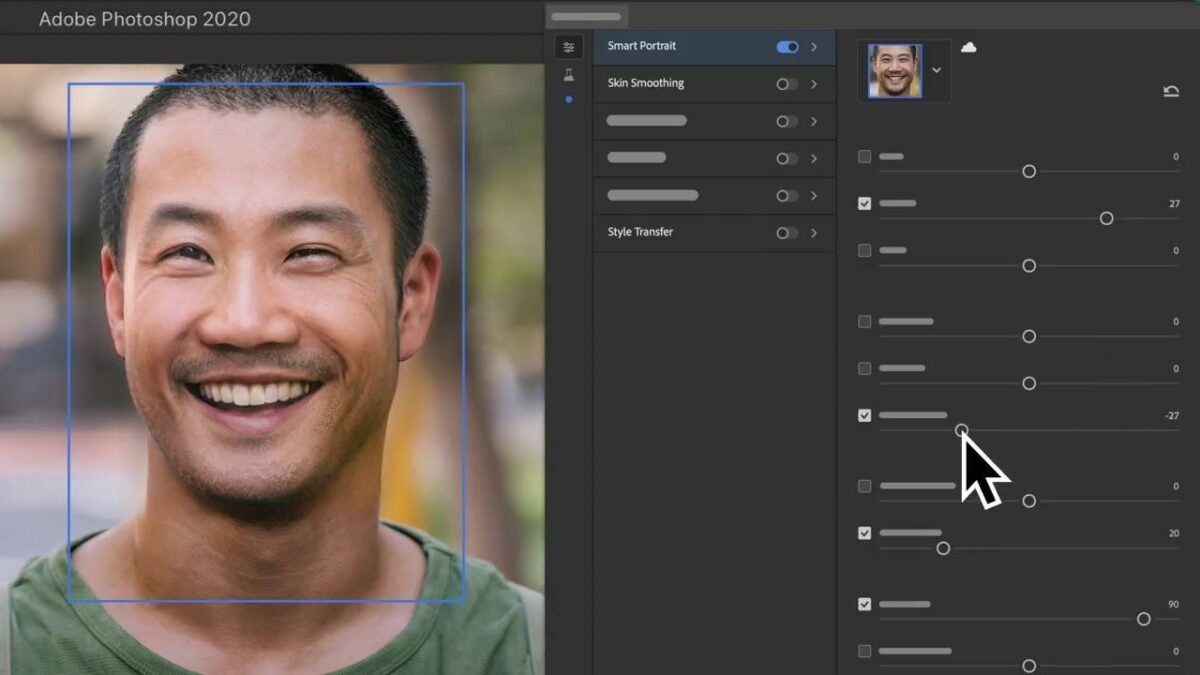
For the first time ever, the latest PS application lets you make single-click adjustments that will alter the mood appearance of your portrait. The mood itself depends on the slider you choose and can range from happier to sadder, angrier to older, and even an expression of surprise. Unlike the Lightroom application, which orientates itself on traditional photo editing concepts, Adobe PS is a powerful graphic design tool. With Photoshop’s Be Happyfilter, for instance, the adjustment slider lets you draw your subject’s mouth open to the desired expression as it fills in a set of teeth.
What sets Photoshop’s newest features apart?
The latest filters from Adobe for portrait photography are consistent insofar as they’re irreproducible by other photo-editing applications. Unlike its competitors, the most recent filters from Photoshop allow you to achieve advanced technical results with little to no user intervention. But there’s one caveat to this. While these filters always deliver uncannily realistic results, at second unwitting spectators invariably notice something peculiar about your subject’s expression.
Industry experts and insiders describe such a reaction critique as “beta.” This means the filters are not complete, and the developers are still sorting out the finer details. As you subscribe to Adobe’s Cloud services, expect these inchoate machine-learning features the company recently introduced to improve drastically over a short time. Also, while a few excellent filters are already part of the current repertoire, filters like Skin Smoothing and Light Adjustor, for example, not all of the new neural filters are quite as advanced.
What are Photoshop’s best neural filters?
Skin Smoothing is a highly advanced filter that saves users time. Until now, fashion-orientated portrait photographers have relied on a technique called “frequency separation” for maximum control over the delicate textures and colors in their images. In past times, when the photographic medium was strictly celluloid, the equivalent photo editing process was known as “retouching.” Frequency separation entails the use of multiple tools, blurs, brushes, and several layers to render professional, high-end-looking images while Skin Smoothing can produce these results right off the Cloud in a single click.
The two other impressive filters, Light Adjustor and Refine Hair are powerful filters that professional photographers and editors resort to frequently. Light Adjustor creates an image that looks like you were moving a physical light source around your subject on location. Refine hair also helps speed up the workflow by allowing you to fine-tune how you select your subject’s hair. While they aren’t perfect tools and won’t likely win you a coveted photo editor position at a leading agency, the two still produce stunning results in as little as one click.
Photoshop Sky Replacement
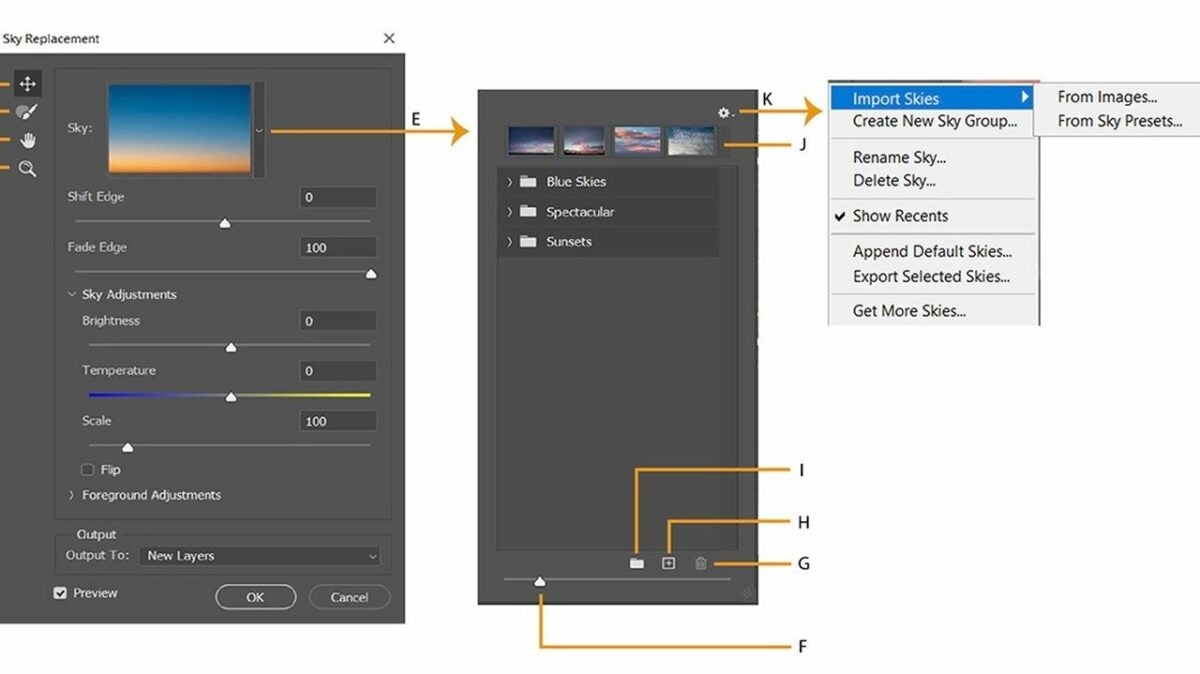
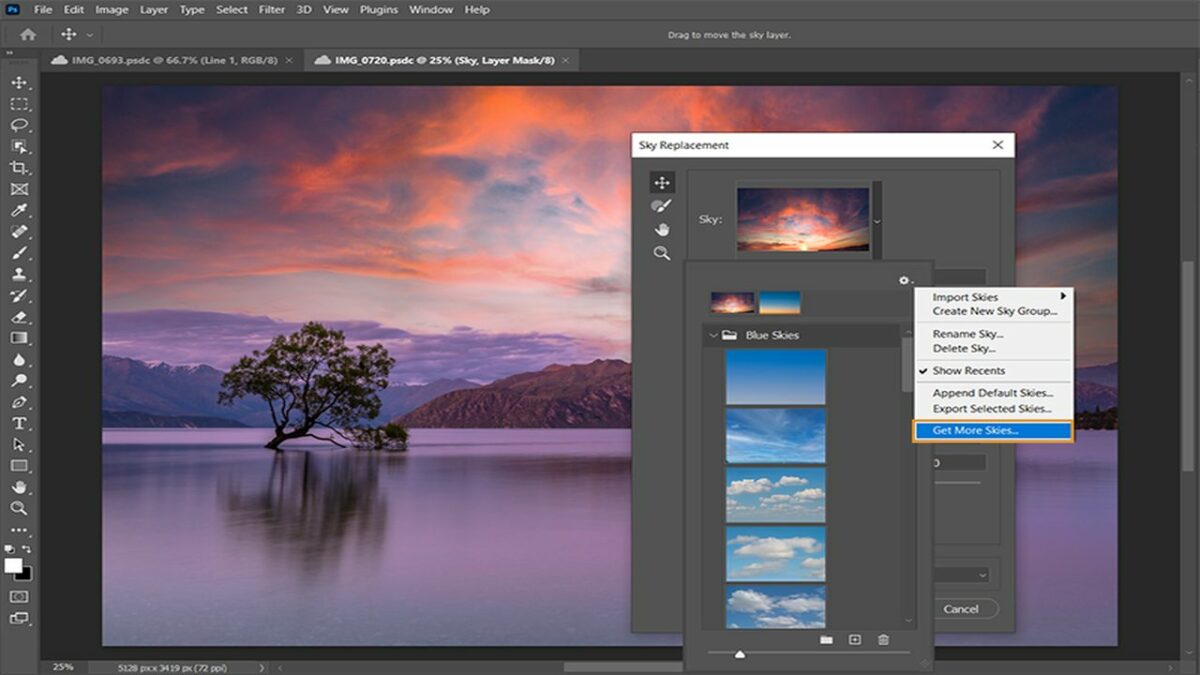
The neural filters may feel too beta for experienced Photoshop users, but another recent Photoshop feature surely won’t. Sky Replacement is decidedly one of the most advanced additions to Adobe Photoshop and any photo editor since the technology first came to pass. With Sky Replacement, you can choose your preferred sky from a series of preset options, or you can customize one of your own.
When you deploy this feature, Photoshop automatically detects the horizon of your image, masks it for you, and drops in your new dynamic sky. Sky Replacement also detects and adjusts white balance to ensure that your insert properly blends with your image. The one drawback to this feature is handling snow-capped mountains. If the peaks are set against a pale blue sky, Photoshop may fail at recognizing the minor difference in contrast and insert sky over the foreground. In this case, you’d resort to the traditional manual masking process.
Practical uses for Sky Replacement
As with many of the tools discussed here, the commercial photographer may start to feel ill at ease relying upon one-click features, especially if you’re after a unique high-end look. That said, each of these tools and features can shave quite a bit of time off your typical workflow and are extremely practical if you’re not under pressure to produce award-winning images every time.
For obvious reasons, up-and-coming real estate photographers quickly benefit from Sky Replacement, while the Discover Tab lets them remain in the Photoshop app and learn about the latest features without filtering through hours of relevant material on Google and YouTube. Likewise, the CMD+F allows you to quickly type in a keyword to search an array of high-quality instructional material on the subject.
Final verdict: Despite impressive newcomers, Photoshop reigns supreme
Photoshop has been leading the desktop photo editing industry since 1990, and its cloud-based service has only amplified its quest to continue innovating on behalf of its oldest and newest users alike.
Photoshop’s color management, layout handling, precision selection tools, neural tools, and new automated features leave the software handily unrivaled in 2022. If you are semi-professionally handling a lot of images for your small business, Photoshop will take your work to the level. If you’re an industry professional, it’s safe to assume you already know.
Microsoft Excel is one of the top spreadsheet programs that’s been around since 1985 when it was developed for Apple devices. We used to see different versions listed by year, and they were usually launched to meet a new operating system’s requirements. All of that has changed with Microsoft 365, where you can instead download and install the primary app for Windows 11.
What was once used for simple data manipulation has advanced to macros and complicated formulas. There are so many advanced features in Microsoft Excel, that it’s easy to become lost. Therefore, I’ll supply some handy tips in this detailed review.
Getting started with Microsoft Excel
It’s better to begin this Microsoft Excel review with the basics as easier to show what’s available without getting into the technical details. Here’s what you can expect when you open your first spreadsheet.
Creating new spreadsheets
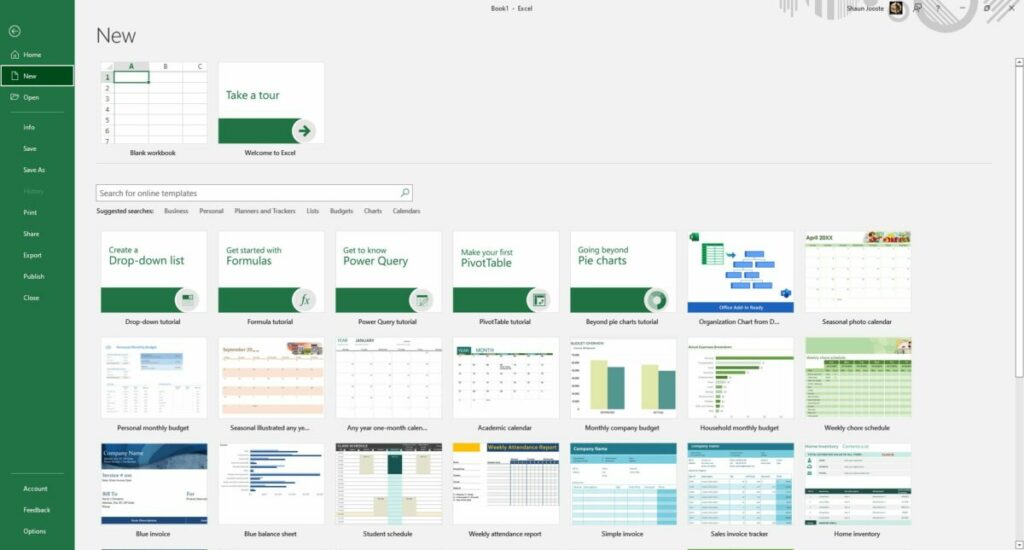
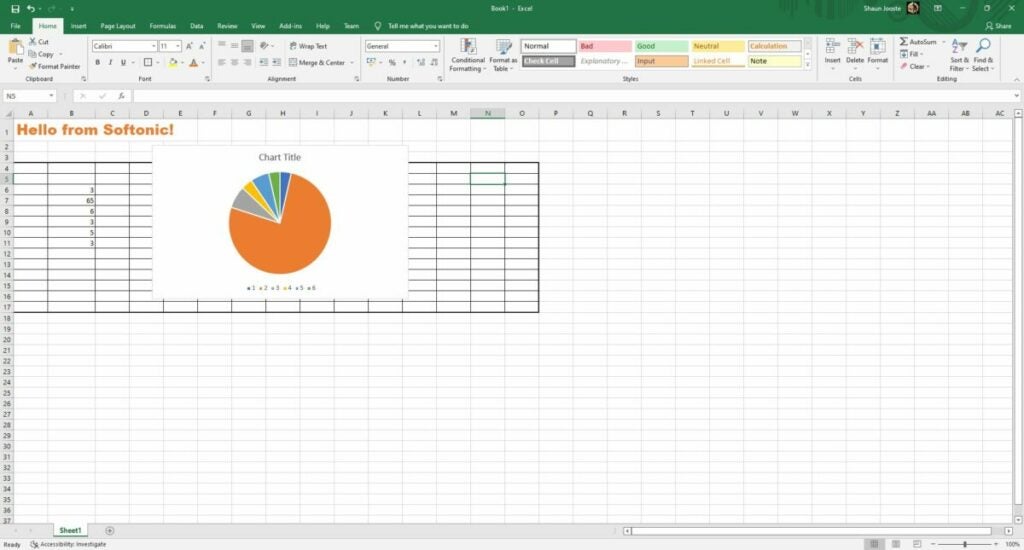
Starting your first spreadsheet is as easy as clicking on File and New. Microsoft Excel will ask you if you want a blank sheet or one of the included templates. There’s also a tour you can view so that you can try many of the features. I recommend you spend some time on it if you’re never used the program before.
Establishing ribbon shortcuts
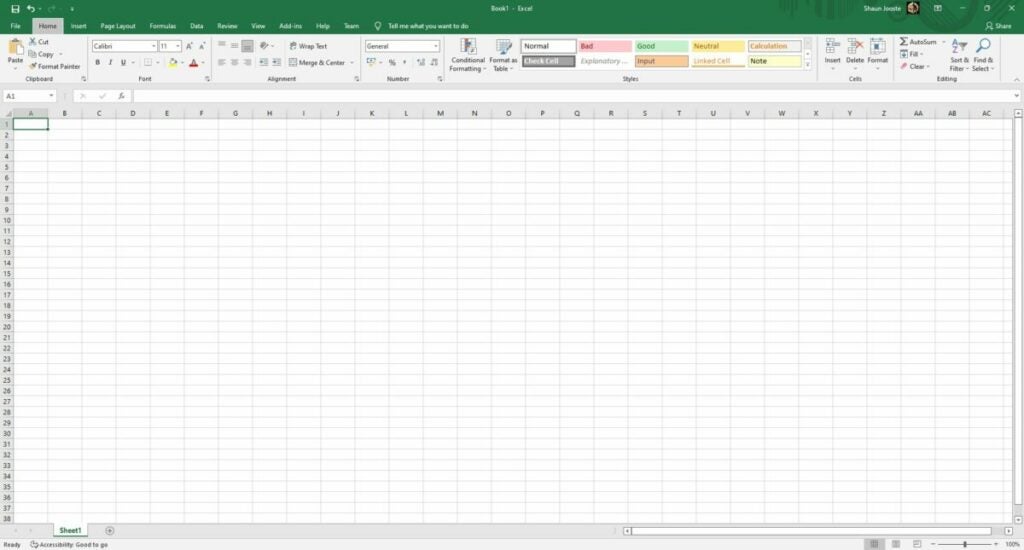
Before you begin inserting data into the cells, it may be beneficial to take a look at the ribbons in the top menu. There are many tabs, so browse through them so you can see where all the functions are. You don’t need to study them; it’s just to get a general idea of the layout.
Microsoft Excel uses most of the basic shortcuts you’ll find in other 365 apps, such as copy, paste, and undo. However, the spreadsheet also has unique shortcuts for the ribbon items. When you press the Alt key, you’ll see small buttons appear, revealing which shortcuts you can use when combined with the Alt key. It’s an excellent way to save time from moving the mouse around.
Become familiar with the spreadsheet grid
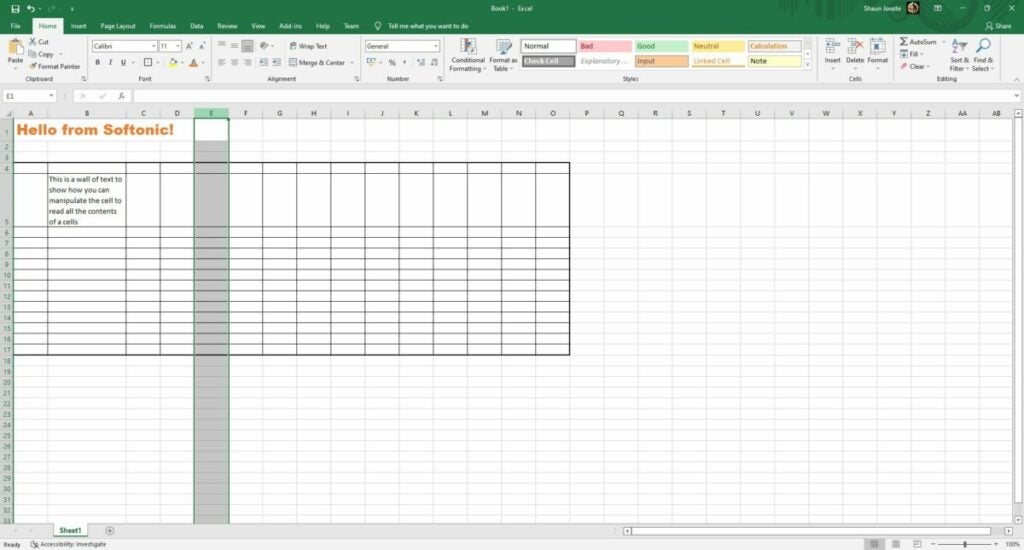
Now that you know what the menu holds for Microsoft Excel, let’s head to the main sheet. Each block is called a cell, which is where you’ll insert your data and formulas. If you move across one line horizontally, it’s called a Row. From top to bottom is referred to as a Column. Rows have numbers and Columns have alphabetical letters. You’ll need to learn how to identify a cell on the grid for more advanced functions. For example, the first one on the top left is called A1.
Change font sizes and styles
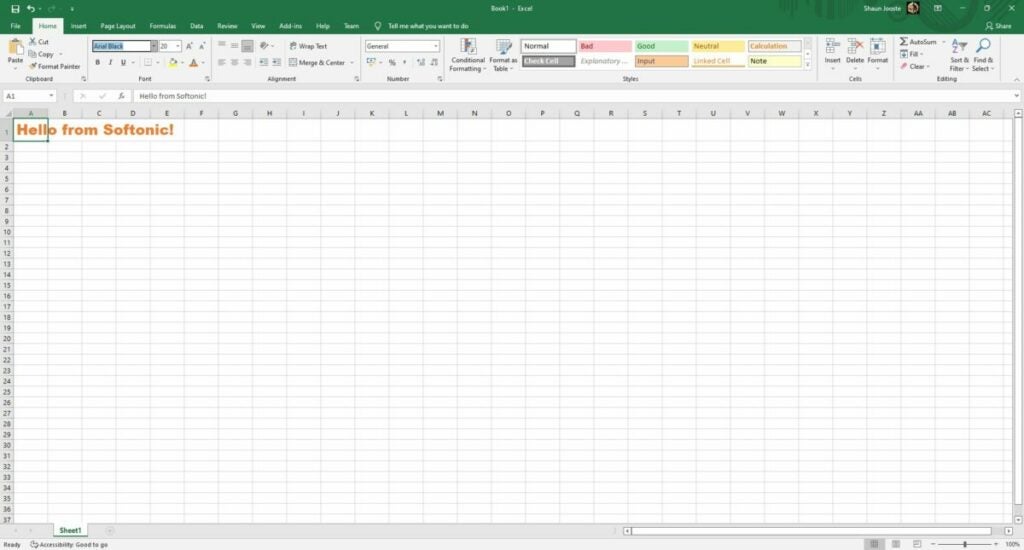
When you’re creating spreadsheets for companies and detailed reports, you’ll want to change some font aspects to make certain areas stand out more. You don’t need to settle for the default black Arial 12 text. Head to the font ribbon, and you can change the color, size, type, and so much more.
Creating borders
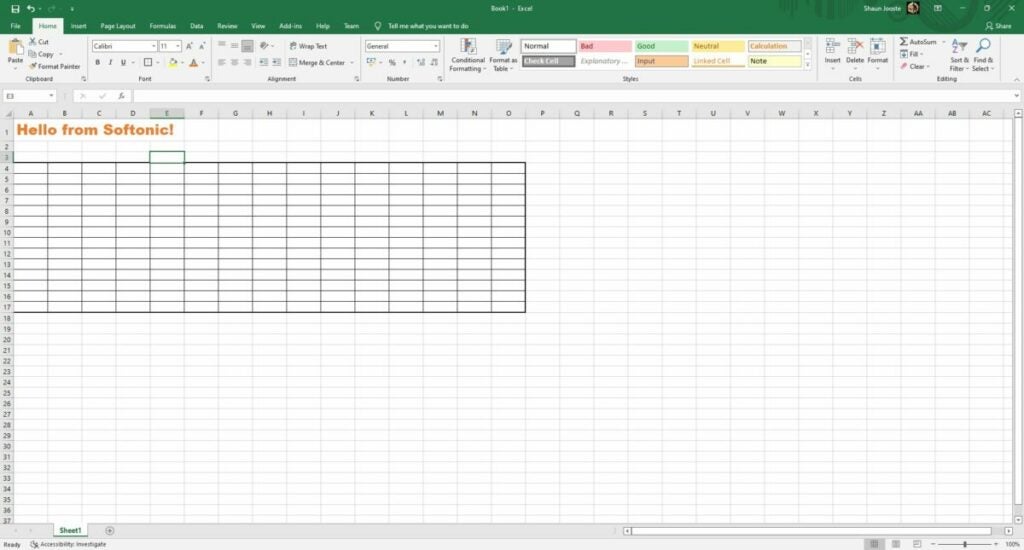
One of the unique features that sets Microsoft Excel apart from the other 365 apps is how easily you can create borders. You can select multiple cells and then head to the font ribbon again. You’ll notice a drop-down box for various border types. There’s also an option to change line colors, which means you can become creative in your design.
Freezing and unfreezing rows
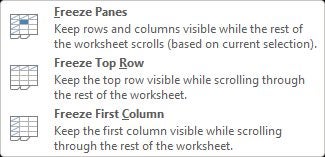
Here’s a handy trick that will help you when you have so much data to work through. If you want to keep the top rows while you scroll down, especially when you want to keep them in view, you can freeze rows and columns. It’s easy to undo when you’re done, so don’t panic when you see it worked. You can check out our guide on the top 2 methods to freeze rows in Microsoft Excel for more advice.
Resizing cells for loads of text
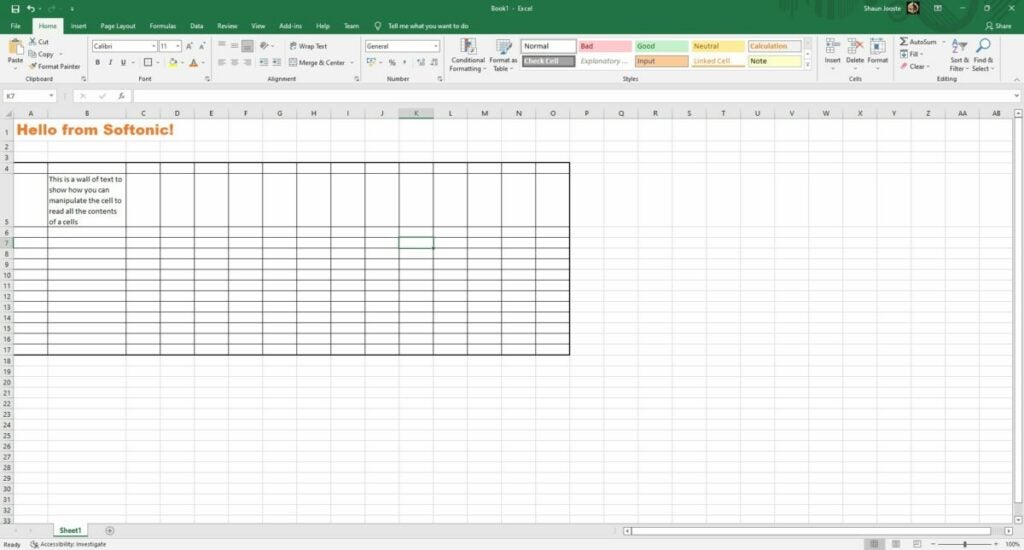
If you’re well on your way to using Microsoft Excel for work, you’ve probably reached a point where you’ve needed to enter a lot of text in a cell. The issue is that it stretches over other cells or you can’t see all of it.
Another handy feature to learn is that you can move rows and columns around to save you time. For example, you can click on the column letter if you want to shift all the content between other columns. The same rule applies to rows. There’s also an option to relocate the contents of individual cells wherever you want, but just be careful when it comes to formulas.
Keeping Microsoft Excel updated
One last basic aspect of Microsoft Excel I want to touch on for this review is keeping Microsoft Excel updated. While most of the features and functions will still work and you can use the program when offline, you may lose out on some new functionality with an update. Also, patches help to fix bugs. More importantly, outdated software programs make your PC an easy target for malware and spyware.
Exciting Microsoft Excel functions
Many competitors have arisen over the past few years to offer an alternative to Microsoft Excel. Some prime examples includeGoogle Sheets,OpenOffice, and WPS Office. Here are some of the top functions that many people still praise Excel for.
Using Microsoft Excel formulas
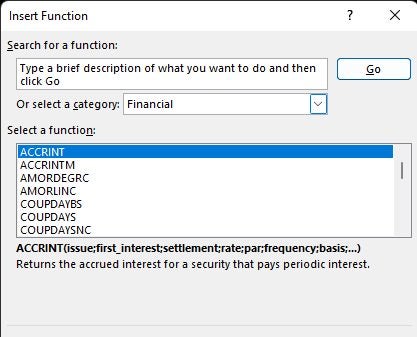
The number one reason most people use Microsoft Excel is for its advanced formulas. When you go to the Insert menu, you’ll see several categories of formulas. Even if you spend months using them, you won’t really master everything there is to learn about them. It’s incredible just how many there are and how powerful they can be.
Check our quick tutorial on how to use Microsoft Excel formulas, as there are too many to write about to fit in one review guide. The most common one is the Sum formula, but there are many other ways you can manipulate data and obtain results.
I would like to just caution you again about moving cells around with formulas in them. It may change the results depending on the formula you used. If you want to repeat the same one over multiple cells, you can just drag it down from the main cell.
Search and replace
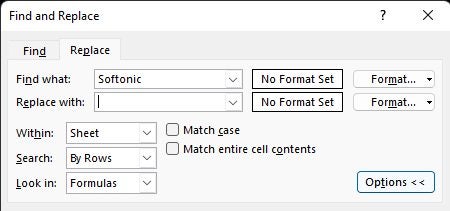
One tip of advice I can give you from experience is how valuable the search and replace button is. Every year, I spend time doing my accounting across several spreadsheet tabs. While I use a template, I sometimes need to replace the same information in all of them.
The search and replace function saves you time and helps with productivity. You don’t only need to search cells, but can also dig deeper into formulas. So, if you need to change the year in all tabs, you can do so with one click.
Mastering conditional formatting
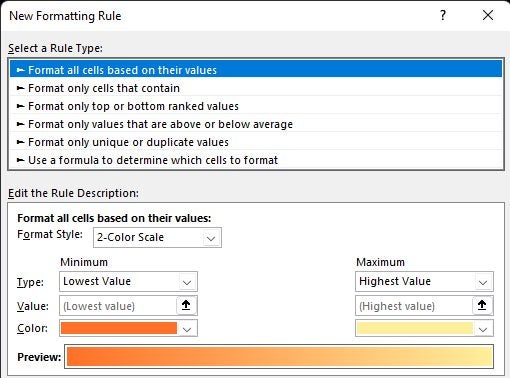
Sometimes, it helps if Microsoft Excel can alert you when the results of a formula meet a specific condition. To aid in this situation, you can assign conditional formatting. Basically, you set an “if-then” rule for a cell to change color and style should it meet the right specifications. You can read more about this and other advice in our top Microsoft Excel tips.
Splitting and combining data
You may reach a scenario where your boss or client sends you loads of data in one cell or email. It wastes time and is less efficient when you go into the cell and cut and paste each one individually. Two ways you can deal with this is via Flash Fill or Delimiters, which separates the information into various cells.
On the opposite side of that coin is when you have data in different cells, but you need to combine them into one. Fortunately, the Concatenate formula works well in this regard. Just make sure you include spaces where text is concerned.
Tables, graphs, and charts
Reports really stand out when you show data in graphical form. Microsoft Excel has several ways you can present it, such as tables, bars, pie charts, and so much more. You’ll find them in the Insertmenu under the Charts ribbon. You’ll need to give the sheet a location for the source data; otherwise, you’ll end up with a blank window.
Now that you have the hang of tables, you might run into a situation where you want the content in your rows to go to the columns or vice versa. To help you be more productive and safe time, there’s a simple transpose function you can use. It’s as easy as copying the information and then using a special paste condition to transpose the data around.
Interactive cells
Your colleagues might need to select answers from a drop-down list that will feed into your report or survey. It also helps when you’re dealing with loads of data and you need interactive cells to help sort them. When you head to the Data menu, look for the Data Validation function in the Data Tools ribbon. Follow the steps and you can make the cell more engaging for others to use.
Understanding how Microsoft Excel macros work
My final tip for improved productivity in Microsoft Excel is to set macros. This function records keystrokes and actions you perform to replicate at a later stage. You’ll save it in a workbook so that Excel can call the function later. The option is available in View and then the Macros ribbon.
It’s essential that you study at length how macros function. One small mistake can destroy your entire spreadsheet. You need to ensure that the conditions are right for your recorded macro before you apply it to your document.
Enhance Microsoft Excel with add-ins
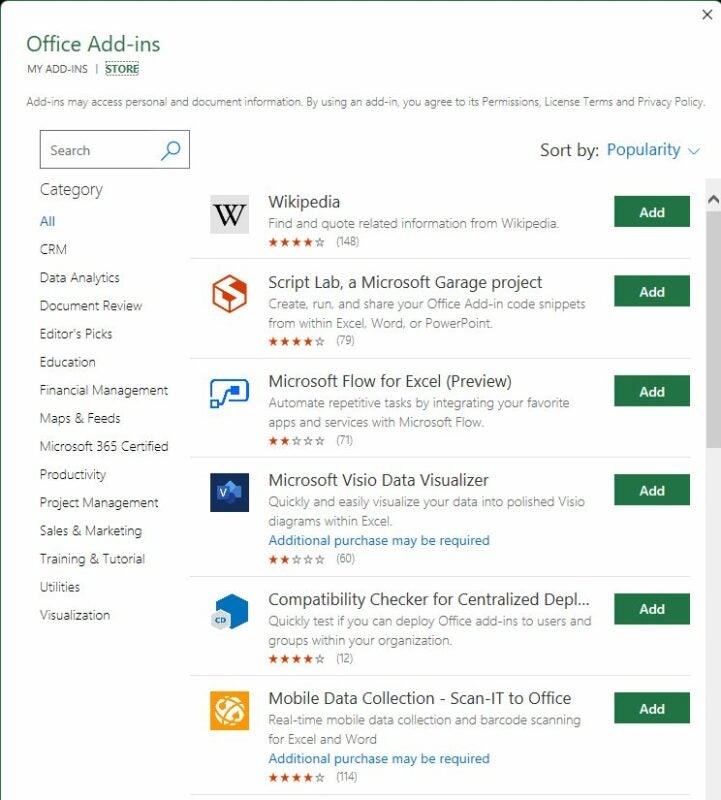
Fortunately, you don’t need to start from scratch in Microsoft Excel. I’m not only referring to the templates but there are also add-ins you can install. These are located under Insert in the Add-ins ribbon.
A small Microsoft store will open with all plug-ins that work with Microsoft Excel. You’ll notice various categories on the left to make browsing easier. There are so many available, it’s not possible to cover them in one article. Some of the top ones include Wikipedia integration for references, budget creators, and data mining tools.
Working online with Microsoft Excel sheets
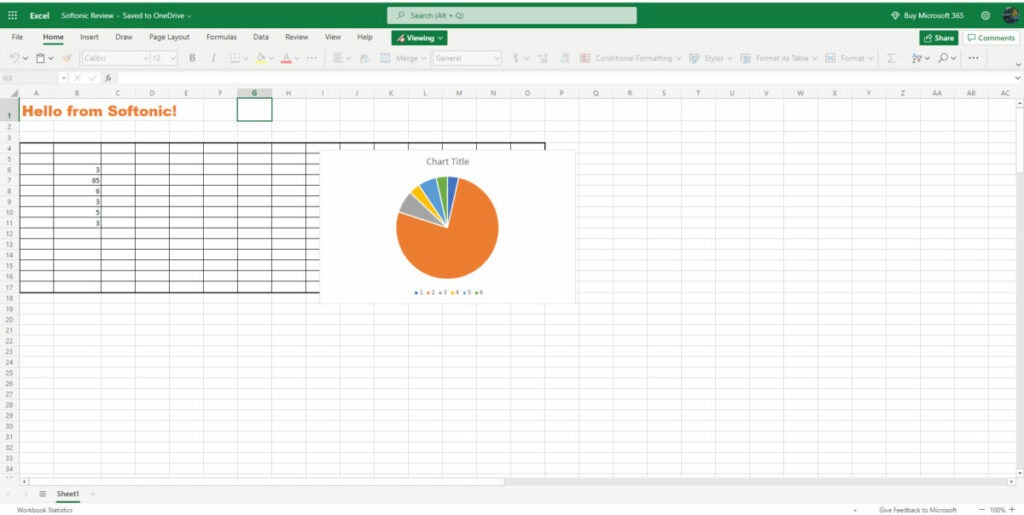
The last aspect I want to cover in my Microsoft Excel review is the online capabilities. If you’re away from your computer that has the app installed, you can still access your spreadsheets with Microsoft 365 online. The best part is that you can switch between docs, sheets, and presentations you have saved in the Office family.
Opening your Microsoft Excelspreadsheets online
When you head to your Microsoft account on your browser, you’ll have a list of applications on the left. You’ll notice the green one that represents Excel. When you click on it, you’ll see a pane open with the latest sheets you’ve worked on. You’ll see I managed to open the same sheet I created for this review in Avast Secure Browser.
Dangers of working online
Before you follow this route, I need to mention some dangers of working with spreadsheets online. If you don’t have malware protection installed or a secure browser, hackers may be able to view or access your sensitive data. It can be devastating if you’re working with financial or confidential information that can get your company into trouble.
Converting to other formats
Finally, let’s discuss changing formats and transferring Microsoft Excel files. If you need to send a report in a protected format, you can easily save it as a PDF directly from the program. There’s also a way you can convert Microsoft Excel sheets to Google Sheets if you prefer that medium.
Microsoft Excel: Top spreadsheet functionality
It’s undeniable that Microsoft Excel is an incredibly powerful spreadsheet program. It can be easy for beginners to feel daunted by all that it has to offer, but there are many basic features that are easy to use. Companies will often request experience in this program when looking for someone to develop reports and spreadsheets for them. Fortunately, it’s easy to learn how to use it.
Pros
Plenty of functions
Easy to move columns and rows
Stunning visual elements
Macros can record keystrokes
Saves to the cloud
Connects to the central Microsoft account
Ribbons are well organized
Cons
Can be daunting for beginners
Doesn’t synchronize with the cloud when offline
Developer: Microsoft
Publisher: Microsoft
Top features: data manipulation, graphs and charts, macros, conditional formatting, formulas
Released in 2004, LogMeIn Hamachi isn’t the typical virtual private network solution. As an on-demand hosted service, the VPN lets users establishdirect network links to distributed teams, remote co-workers, and online gaming friends, creating an internet-based connection similar to a local area network.
With Hamachi’s unique interface and functionality, you can enable virtual networks from anywhere. It lets you establish end-users as desired for secure conference calls, multi-contributor podcasts, and multiplayer gaming applications. Hamachi subscribers can choose from distinct network types: Mesh, Hub-and-Spoke, or Gateway, depending on their requirements.
Hamachi network types
To promote a flexible service, Hamachi offers three network solutions for a diverse range of use case scenarios. The networks differ from other solutions primarily in topology, each offering unique advantages depending on use.
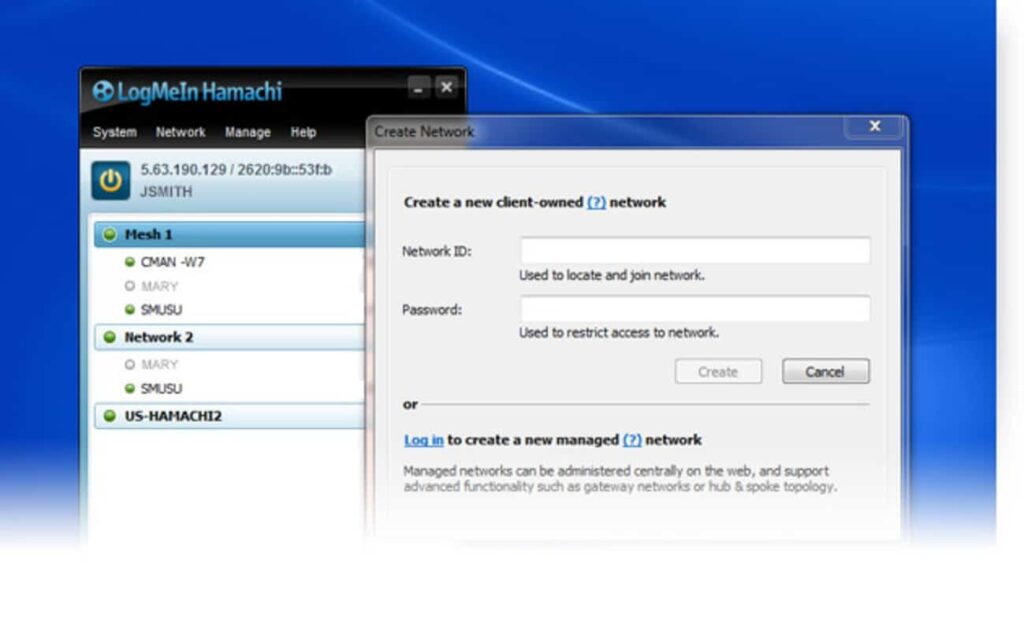
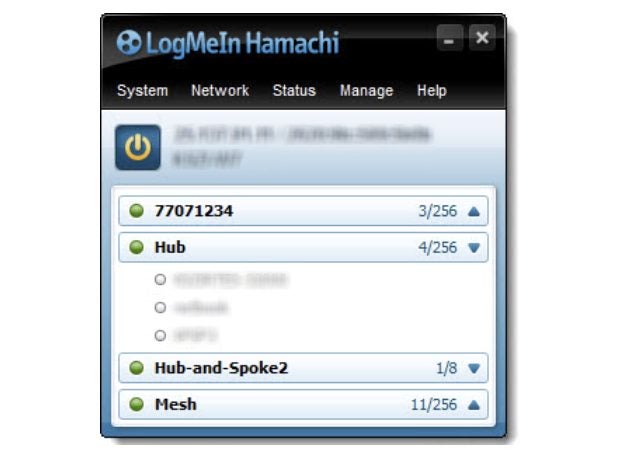
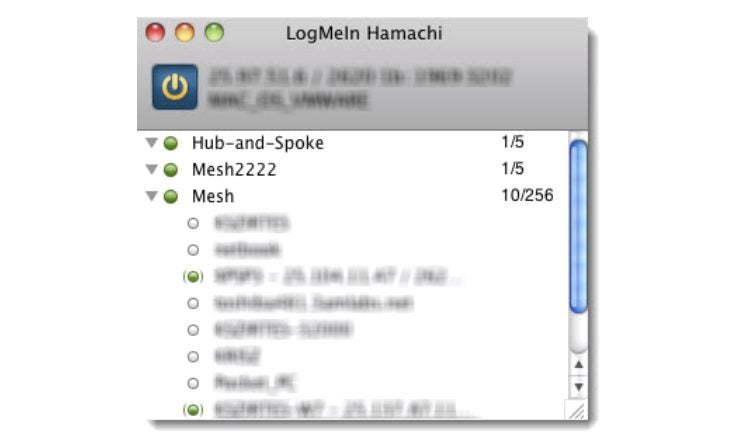
Under the Mesh network, for example, all established members remain connected, letting you create a virtual corporate LAN in the absence of a physical LAN. Mesh is the only network type that generates directly from the Hamachi interface. The Mesh network is a popular choice with gamers because online gaming applications necessarily provide individual gaming status to all participants.
The Hub-and-Spoke network differs from Mesh because one or more connected computers operate more like a gateway hub while established users represent spokes. In other words, spokes only connect to the hubs, not other spokes. The hub functions like an informational catalog, as in a centralized library terminal, for example. Individual workstations, in contrast, represent spokes connecting to the hub.
Gateway combines the features of Mesh and Hub-and-Spoke in hybrid form to provide transparent access across your entire network from a centralized Hamachi gateway. Like Hub-and-Spoke, one computer acts as the hub (or gateway) while participating members function as spokes. There exists only one gateway, usually a permanently online service connected to the LAN. Computers acting as a gateway are visible to network members, which means all network resources are available. This network is the most popular choice among digital nomads and workers who office from home.
Hamachi pricing
What’s nice about the Hamachi VPN is that it’s free for up to five computers on your network. For those who require more devices and elect to run Hamachi as a service in unattended mode, there are three different subscription packages.
The standard package pricing begins at $49 per year for every network, setting the pricing at just over $4 every month. This service covers 6-32 devices per network. There are also good options for subscribers with larger membership requirements. Hamachi’s premium package runs $199 annually per network, or $16.58 every month, for 33-256 devices per network. With the Multi-Network subscription, users can run up to 256 devices and access unlimited networks. The cost for this last package is $299 per year, or $24.92 if broken down monthly. All billing is upfront, and subscriptions can be purchased from the LogMeIn Hamachi website using credit cards, PayPal, or bitcoin.
Hamachi VPN for business
Hamachi has several practical applications for business. It is most effective for building mobile LAN-like networks that incorporate various team member devices. Since the Multi-Network provides access to unlimited networks, many outsourced managed IT service providers find this package beneficial for managing multiple networks on behalf of their customers.
Hamachi provides user-friendly apps for both Windows and Mac along with a command-line version for Linux. All approved Hamachi clients running Hamachi software on a computer or mobile device can become members of any Hamachi network. The VPN service offers reliable business support. Business owners have access to a comprehensive “Getting Started Guide,” or they can visit Hamachi’s Support center on their website for more detailed answers about security. Alternately, if you need to speak with a representative in person, you can always call to open a ticket.
Hamachi VPN for gaming
LogMeIn Hamachi offers unique features for gamers, allowing them to set up secure gaming services with specific properties that resemble LAN networks. This option promotes robust server security and enhanced functionality for popular games like Minecraft. Gamers favor Hamachi because it deploys powerful protection against DDoS attacks. In the realm of celebrity streamers and highly competitive gameplay, Hamachi subscribers appreciate this extra layer of protection against malicious cyberattacks.
LogMeIn Hamachi does a great job leveraging AES-256-bit encryption to ensure protection, but the VPN lacks a kill switch. The kill switch is a security feature that terminates your connection if the VPN stops functioning, protecting your IP from being revealed. This means you’ll have to monitor your network connection carefully to avoid exposing your IP address should it ever drop out. While this security feature may be less important in business applications, frequent gamers might find a kill switch useful for keeping their IP address information secure online.
Is Hamachi safe?
Hamachi is among the best VPNs for establishing secure connections between multiple devices. Users can easily share files or play private games with an ultra-secure peer-to-peer protocol. The Hamachi VPN also lets you deploy your home PC as a server if you want to download torrents while overseas, assuming the torrenting is permitted in your country.
All your team’s communications are secured using the AES-256-CBC cipher for data encryption and decryption and ESP-like padding as established in RFC 2406. Packet authentication utilizes the HMAC-SHA-1-96 (RFC 2404) variant of HMAC-SHA1 (RFC 2104), and the packets are numbered to safeguard them from reply attacks. In layman’s terms, this level of privacy and security places Hamachi among the safest VPN options available.
So, what’s the verdict on LogMeIn Hamachi?
Hamachi offers a unique VPN solution that operates differently from several more recognizable options, but unfortunately lacks a global server and a kill switch. Nonetheless, for businesses and gamers, it’s one of the finest VPN services for remote and multiple networks on offer. To learn more about its security features, check out the Hamachi white paper published on their site.
Gacha Club Edition is a free mod for the popular Gacha Club game by developer RyoSnow that lets you customize your gameplay in fun new ways. This addition unlocks items in your inventory to enhance your avatar with special clothing and accessories. Gacha Club Edition features 2D graphics to pair with the original game from Lunime.
Gacha Club Edition is available for free as a full mobile utility mod or as a demo on PC. You can use this mod with the prior release or as a standalone program. As a casual game, Gacha Club is ideal for fans of simple, straightforward RPGs. The mod enhances what’s arguably the best part of the game — the ability to design and modify your own character.
New ways to customize Gacha characters
Building on elements from previous Lunme games, Gacha Club is a surprisingly addictive game that has developed a strong following on social media. A main aspect of the game is character creation, and the original release offers scores of customization options as well as a Studio mode that lets users take pictures of their avatars in scenes with different backgrounds.
While the Gacha Club Edition mod does not change the gameplay, it does add more ways to customize your characters. This isn’t an essential update for new Gacha Club players. However, the mod does add some fun new dimensions that will delight devoted fans.
Gacha Club Edition is fun for children and adults alike
Like previous Gacha games, Gacha Club Edition features different modes including Training, Story, Tower, and Studio. This mod showcases original characters with your own personal customized content. You’ll be able to try on new outfits for mascots and avatars to get a sneak peek of how they will look before playing the game.
Another fun feature of the mod is that you can change the background scenery in Studio mode through unlocked designs. Players can also use new and advanced objects through the game mod with different effects from the original Gacha Club. If you’re a fan of the original games, you’ll love all the new designs options that are perfect for sharing on social media with the Gacha community.
Gacha Club Edition is a smaller version of the original game
Unlike most mods, Gacha Club Edition does not require an emulator to work. You can download the program on your PC or mobile device without the requirement of the original game. There, you will extract the files you need to play the game and choose how to customize your own Gacha Club world.
Similar to games such as The Sims, Gacha Club immerses players in a world of their own choosing. Some of the most fun comes from customizing characters with new faces, hair, and outfits. With Gacha Club Edition, you can change up the look of your avatar to go on fun adventures and explore new lands created by yourself and other players.
Ways to download and install Gacha Club Edition
If you’re playing on your computer, Gacha Club Edition must be downloaded through a ZIP drive, which only takes a few clicks but can be confusing for new users. You’ll need a program such as WinRAR to extract files and then access the Gacha Club Edition folder to launch the program.
With the mobile application, you may have to work around app restrictions and save up space on your phone. Once you’ve downloaded Gacha Club from your device’s app store, you can search for mod downloads. For extra security, run your mods through a virus program such as Avast Free Antivirus.
Troubleshooting Gacha Club Edition downloads
If you’re struggling with downloading Gacha Club Edition on your PC or mobile device, there could be a few reasons. You may have too many apps and need to free up space or figure out that the download simply does not work and features errors for being an unrecognizable file. Also, there is the possibility that your device is not compatible with the program.
When you’re determined to add Gacha Club Edition to your gaming routine and keep finding errors, it’s best to start over. Completely delete the existing file and try again – most likely, an error message will show up to say you’re out of space or the game file name is too long to be recognized. Try shortening the file name to see if that works instead.
Celebrate creativity with Gacha Club Edition for mobile or PC
Gacha Club Edition is an entertaining tool for those who want to make their gameplay more original and unique. By adjusting avatars and unlocking items, you will have access to an inventory that expands after prior games. Simple details such as hairstyles and outfits create one-of-a-kind avatars to share with your fellow players and get new hints and tricks.
This mod is exceptional when you want to start fresh on your Gacha Club progress. You can add and delete your customized results by unlocking items and clothing to help your character stand out. There are many combinations for a new experience each time you play the game which makes Gacha Club Edition a worthy mod to add to your gameplay.
Pros
Easy to modify game without additional downloads
Can customize gameplay with different avatars
Simple to extract with proper programs
Mod is perfect for fans who like posting Gacha customizations on social media
You know those games you see everywhere? You may not know what they’re called, but you’ve probably come across them at some point on social media, in forums, or somewhere else on the internet. One example is the game known as People Playground.
One of the most popular titles for streamers and YouTubers, it stands out for its crazy, fun gameplay and user-friendly format. In it, you’re in control of a gray ragdoll that resembles a crash-test dummy. Make it fly, throw it around, destroy it, etc., all in an open space where you can create anything, just like in Minecraft or Roblox. Next, we will explore more about this title and what makes it so special.
As we mentioned, the game mechanics in People Playground couldn’t be simpler. Players control a gray ragdoll that appears against a gray background with black blocks. At first glance, the map is reminiscent of video game developer tools like Unity or Unreal Engine, especially if you opt for a sidescrolling 2D game. And that’s all…literally!
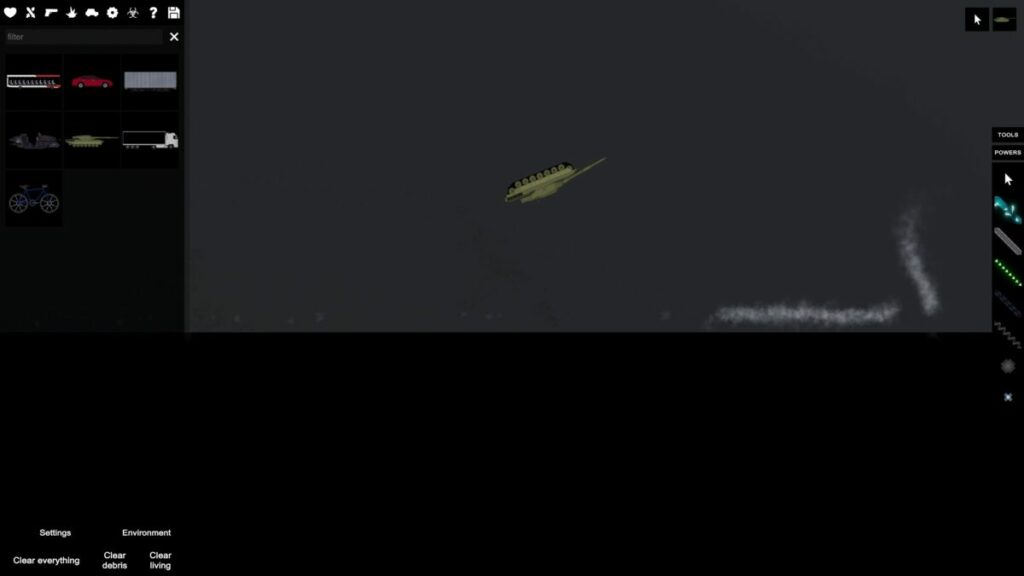
Here, the player decides how the “adventure” will continue since this is a simulator/sandbox where they set the pace. There are no rules other than those made by the user with the tools in this video game. Do you want your ragdoll to fly through the air? Make it happen. Or, do you want your ragdoll to get crushed by a tank? Well, you only have to create it and watch it happen.
Use maps as your starting point
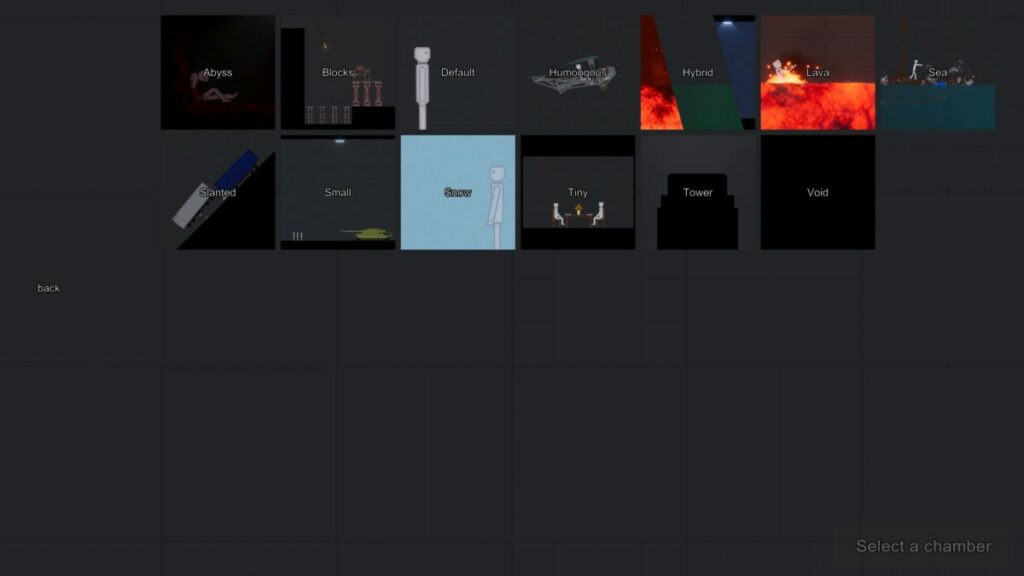
When you open People Playground on your PC, the first thing you’ll see is a window with multiple maps. Although you can do anything using the default option, the game features maps to help you achieve your goal more easily and, of course, find things faster. The maps for creating are as follows:
Abyss: This map is divided by a huge abyss that must be overcome (you can imagine how).
Blocks: A map filled with blocks to use for building insane creations with defined segments.
Default: The game’s default map, which is ideal for experimentation, and you can let your creativity do the rest (try this one first so you can master the controls, the toolbar, and everything the game has to offer).
Humongous: Big versus small, where giant takes center stage and large is powerful.
Hybrid: A combination of any maps you choose to achieve the perfect mix. Ideal for a variety of mods.
Lava: Remember that game “The floor is lava” that was popular years ago? Well it’s the same thing here: there’s lava everywhere and you’ll get burned in an instant.
Sea: While the above map is full of lava, here it’s all sea. Lots of water that you’ll have to avoid… or risk drowning.
Slanted: Going down a ramp is always rather scary (who hasn’t slipped and fallen before?) And rolling things up a ramp is pretty hard.
Small: Just as the name suggests, little takes precedence over big. The opposite of “Humungous.”
Snow: A snow-themed map where snowflakes fill the screen. Don’t forget, snow is slippery…
Tiny: In this case, small is the starting point for creations.
Tower: We created nice constructions with “Blocks,” and we can do the same with “Tower” from a massive building. Imagine jumping off the top of a skyscraper.
Void: Emptiness, the void as a concept. Nothingness. Can you picture it?
No matter which map you choose, they can all take you to the same destination. Using the toolbox, players can customize maps to end in one of these biomes. But as we mentioned, if you’re looking to create a map with fire, it’s best to go straight to that creation.
Make sure to adjust the settings
People Playground is a game where brutality is the point. The idea behind the game is to create something and use it to destroy your ragdoll. That’s all there is to it. But you can make this “character” more detailed.
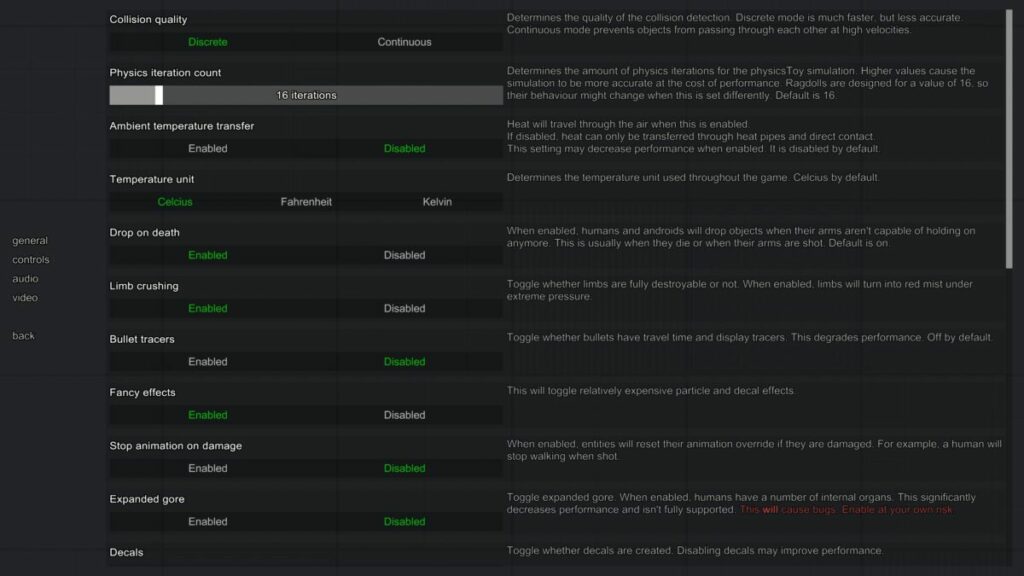
In the game settings, you can modify a number of features. For example, you can make the ragdoll collision system lighter, eliminate gravity altogether (or make it heavier), generate more intense on-screen effects, or even make characters uncrushable when they fall. There are literally dozens of options in the settings, so try experimenting with them to achieve optimal gameplay.
Game requirements
As you may imagine, People Playground is a video game that requires very few resources. Created by a single developer under the pseudonym Mestiez, this Studio Minus title runs on just about any PC from the past few years, so you’re not going to run into any problems. Here are the minimum and recommended requirements.
Minimum:
Operating system: Windows 7 SP2+
Processor: 2 GHz
Memory: 4 GB RAM
Graphics: Graphics card with DX10 (shader model 4.0)
DirectX: Version 10
Storage: 350 MB available space
Recommended:
Operating system: Windows 10
Processor: 3 GHz
Memory: 8 GB RAM
Graphics: Graphics card with DX10 (shader model 4.0)
DirectX: Version 12
Storage: 1 GB available space
In fact, the developer even includes an additional note that’s pretty clear: “This game offers enough freedom to be able to slow down any computer. The better your processor, the more you can do.” In short, the better your computer, the crazier the things you can do. (Of course, the optimization sometimes leaves something to be desired).
The community
The strong point of People Playground, in our opinion, is the community of players. This video game is similar to Minecraft in that the users make the most out of it and share their creations with others.
In People Playground we can import mods and builds from other players. That way we can explore maps that are almost impossible to solve and others where the goal is to kill all the ragdolls on the map. Just keep in mind that the map creator is the one who chooses the rules and the way to solve it.
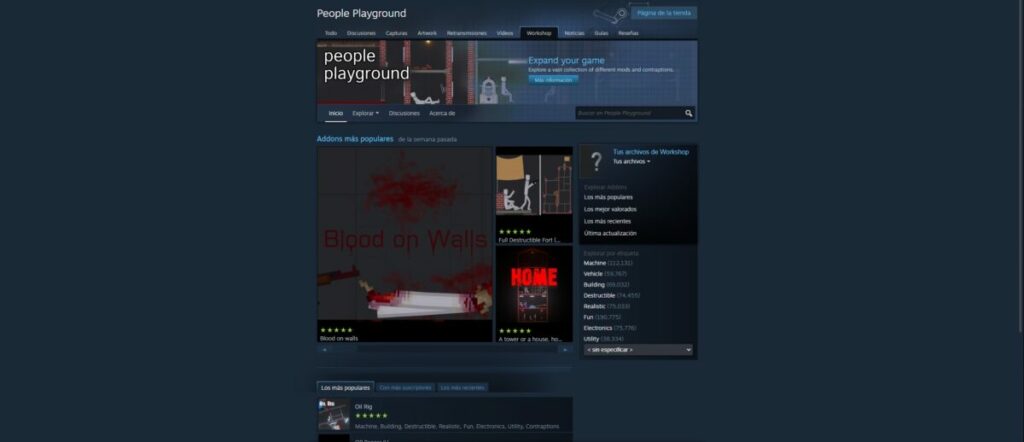
We recommend visiting the mods and creations page on the game’s Steam profile. This is the official one, validated by both the community and the platform itself. To give you an idea, there are more than half a million creations – yes, you read that correctly, more than 500,000 – grouped into different categories (including vehicles and buildings, destructible, realistic and electronic elements, and much more).
And don’t forget that you can also upload your own creations and mods to the page. If you think your map, mod, or item is worth sharing and/or playing, don’t hesitate for a second to upload it. The community will vote on how relevant it seems to them, to rank it higher or lower (yes, it will be there for anyone who wants to play it, regardless of its rank).
Wreaking havoc has never been so fun
Throwing a character off a building when the ground is covered in spikes: there’s nothing funny about this situation, but People Playground somehow makes it humorous. This simulator invites you to design the most surreal settings and elements that you can think of to torture your ragdoll.
Its mission is to make people laugh and have fun, whether playing alone or in company. Here you’ll find no story to finish or objectives to pursue, just a stick figure in the hands of an implacable God. Because that’s you: while playing this video game, you’re God, and everything belongs to you. Hmm…that could be dangerous!
PROS
Easy and effective point and click system
Gets harder with each passing night
Games are short, yet exciting and lively
Very creepy ambiance
CONS
Limited technical section (although the artistic one makes up for this)
If you quickly master the game mechanics, you’ll finish in a little over an hour
Microsoft Wordhas changed a lot over the decades since it first launched in 1989. We’ve seen many versions since then, which were usually related to a new Windows operating system. Fortunately, there’s onlyone app now that receives updates instead of a new edition every few years.
Today, you can install Microsoft Word as part of the Microsoft Office 365package. It’s a subscription service that integrates with OneDrive and Sharepoint. In this review, I’ll show you some of the basic features, following up with tips, tricks, and advanced functions.
The basics of Microsoft Word
Let’s start with the most fundamental elements of Microsoft Word. You can find similar features on apps like Google Docs, OpenOffice, and LibreOffice. However, few of them beat the processing power of the original Microsoft product.
Creating new documents
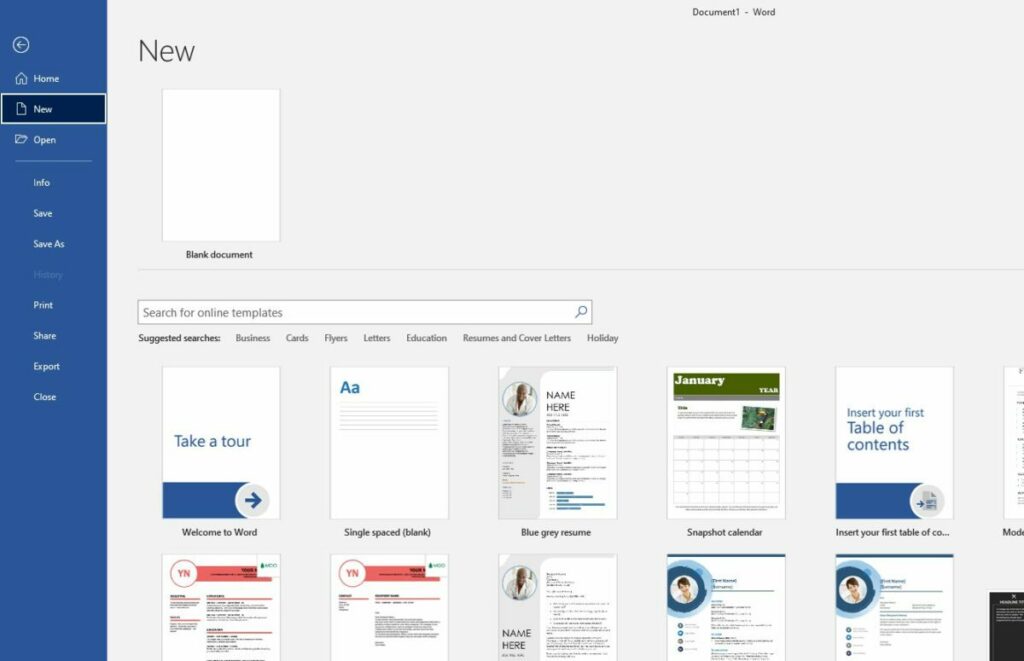
At the core of Microsoft Word is the creation of documents. You don’t simply receive a blank document when you start, as there are many suggestions and recommendations that appear on the side of the interface. They help when you have something specific in mind you want to create so you don’t have to reinvent the wheel.
I recommend you learn how to change the default language in Microsoft Word. When you install the app, it’s usually set to English. However, the are plenty of others you can change it to so you can work in your native language.
Some essential shortcuts
The next aspect you’ll want to learn is which keyboard shortcuts work best for Microsoft Word. You’ll save an incredible amount of time if you quickly press buttons together instead of moving your mouse to click on one of the tabs. Some of the shortcuts are different from other platforms, and you won’t want to become frustrated when your document does something strange. Fortunately, you can quickly undo an error with Ctrl+Z.
Change font styles
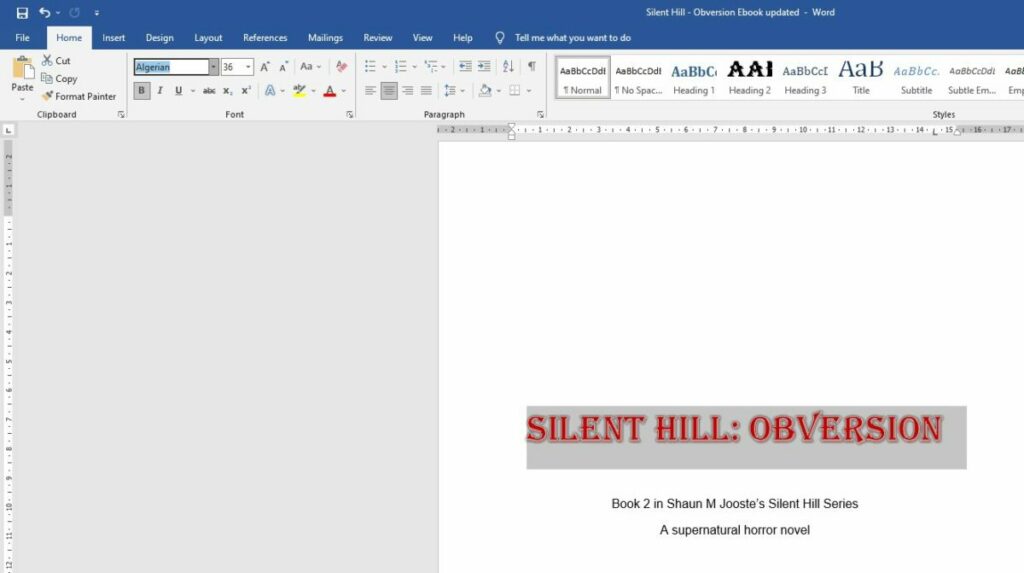
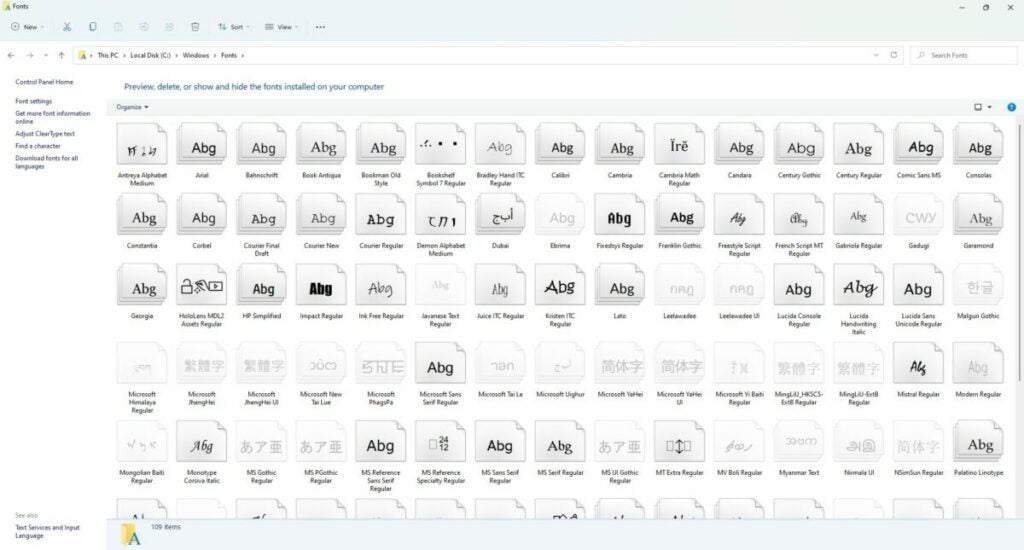
You’ll be surprised at the difference a font style can make to a document. While the default is usually Arial, you can change it to any of the listed ones on the font ribbon. However, the alteration only applies to the selected text, and you’ll have to try a different approach if you want to change the default font when opening Microsoft Word. Some of the other adjustments you can make to the font are size, color, outline, and format.
Insert tables and images
Sometimes, you’ll have to go beyond only working with text. Most companies and freelance authors enjoy inserting images and tables to show some facts or break the line of words. Other objects include charts, smart objects, screenshots, and shapes.
You can also copy and paste tables and images from other sources and platforms, but you may need to work on the formatting to make it look professional in your document. To this end, check out our guide on how to align images perfectly in Microsoft Word to avoid a jumble of pictures. There’s nothing worse than wasting an hour or more trying to get the alignment right.
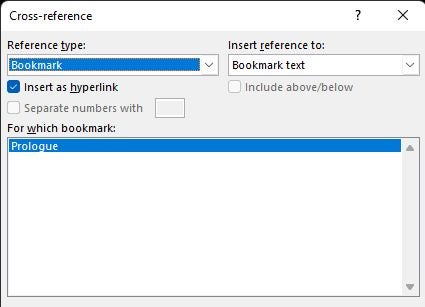
Placing bookmarks
One of the most useful features is placing a bookmark in Microsoft Word. Many people use them when creating ebooks or PDFs, which makes a cross-reference link to a different part of the article. Even if the reader is busy with the document on a tablet, they can tap on the link to quickly head to where they want to be instead of scrolling down.
Drawing on Microsoft Word
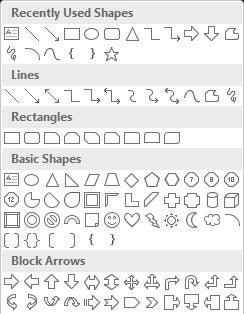
While most people might use an image editor like Photoshop or MS Paint, there’s a way you can draw in Microsoft Word too. The process mostly consists of shapes, but you can also insert flowcharts or draw freely as you please. You won’t be able to craft masterful artistic pieces, but it helps with basic designs.
Using document templates
The word processor tries to make life easier for you by supplying ready-made templates that you can adjust for your needs. You can create a restaurant menu, make tickets for events, or craft brochures in Microsoft Word. I recommend you spend some time seeing what’s available instead of making a completely new document and wasting valuable time.
Tips and tricks for Microsoft Word
The basics mentioned above are enough to get you started, but there’s so much more to Microsoft Word that will help you with more advanced documents. Here are some tips and tricks when you want to make your work look more impressive or professional.
Working with custom fonts
While Microsoft Word has a default list of fonts, you don’t need to settle for what’s available. There are many creators out there who develop new styles, especially when they’re unique for their projects. For instance, I’m busy creating content for an upcoming MMORPG where we’re crafting three new languages. To insert the script on signs and books in the game, we needed to design the fonts on a different program.
Microsoft Word makes it easy for you to add new fonts to the list. It basically works off the operating system, so you’ll need to place the font file in the default font folder. When you right-click on the file, you select “Install Font”. When you reopen or refresh your Word document, the new font will appear if it’s compatible.
Inserting headers and footers
Headers and footers are ideal if you want the same information to appear at the top or bottom of your pages. You can also indicate if you only want them to appear on odd or even pages. There are some default layouts, but you can change them to suit your company’s brand.
Authors and publishing companies usually use this method when creating paperback novels to show the book and author information or remind you what chapter you’re on. Businesses generally include contact details, but there may also be document labels to remind them of specific references. The most common use is for page numbering.
Standardize heading styles
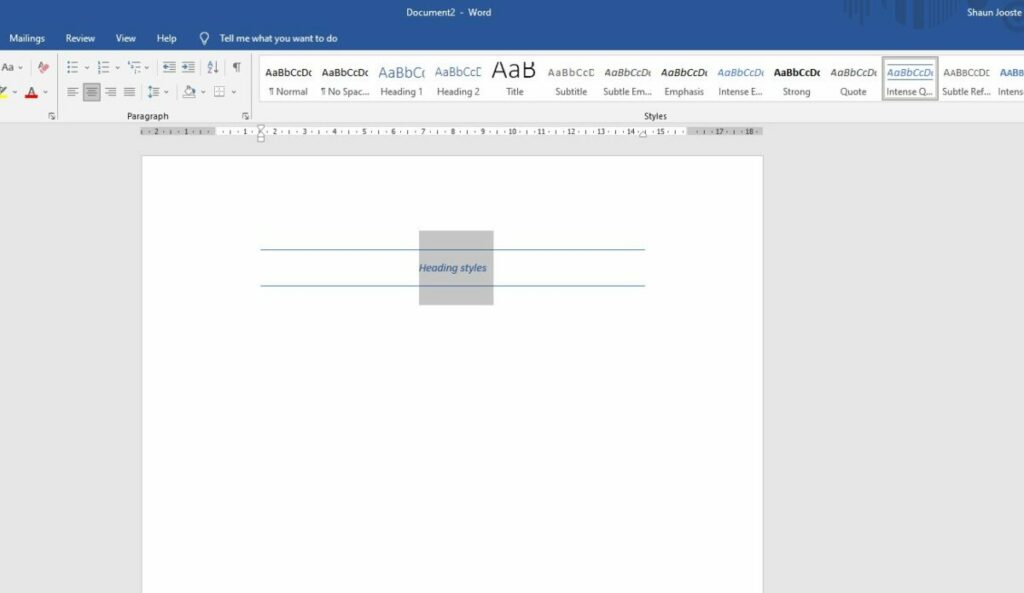
When it comes to corporate or professional documents, you’ll want various headings to remain the same throughout the content. It would look strange if a Heading 2 had a style and size in one spot, but then it looks completely different elsewhere. Fortunately, Microsoft Work offers a simple button to make all your different heading structures look the same.
Alter the color theme
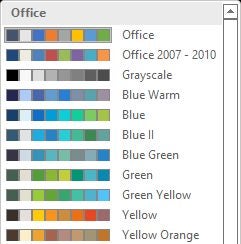
Colors can play an essential role in making your content stand out, especially when you’re busy with marketing campaigns. As part of saving you time, there’s a section in the Design ribbon where you can play with various themes and color palettes. Once you select one of them, it will change for the entire document, so choose carefully.
Adjust margins and page layouts
Microsoft Work usually opens with the standard A4 paper layout. It also has set margins that work for most industries. However, you may want to adjust them to work for your needs. For example, Amazon requires specific formatting when uploading ebooks and paperback documents. You have the option to either select one of the page layout defaults or change each setting to match what you need.
Spelling and grammar check
Proofreading is vital if you want anyone to take your work seriously. You have two options to assist you in Microsoft Word. The first one is a Spelling & Grammar function, which scans your document for errors. You also have a Thesaurus to check the spelling of complicated words.
However, I feel there are better apps for this task. For example, you can download Grammarly onto Windows and then let it integrate with Microsoft Word. Not only will it check the correct localization, but it offers suggestions for improved sentences and tone.
Converting to PDF
Saving your document as a PDF safeguards it against anyone else editing it. You can also create the document in such a way on Microsoft Word that the recipient can sign and complete fields on thePDF version. The process is as easy as saving the file as a PDF when you’re ready. However, any changes you make to the Word doc afterward won’t reflect in the PDF. You’ll need to save a new version.
Advanced Microsoft Word features for productivity and efficiency
The word processor has plenty of other features that can help you work efficiently without repeating mundane tasks. Since we have a complete guide on productivity tips for Microsoft Word, I won’t repeat it here. Suffice it to say that there’s so much you can do to make your life easier with your documents.
How to install and use Microsoft Word add-ins
Microsoft Word doesn’t need to work in isolation. Much like Google Chrome, there are plug-ins you can install to integrate other apps and functions. Let’s take a quick look at how it works.
How Microsoft Word add-ins work
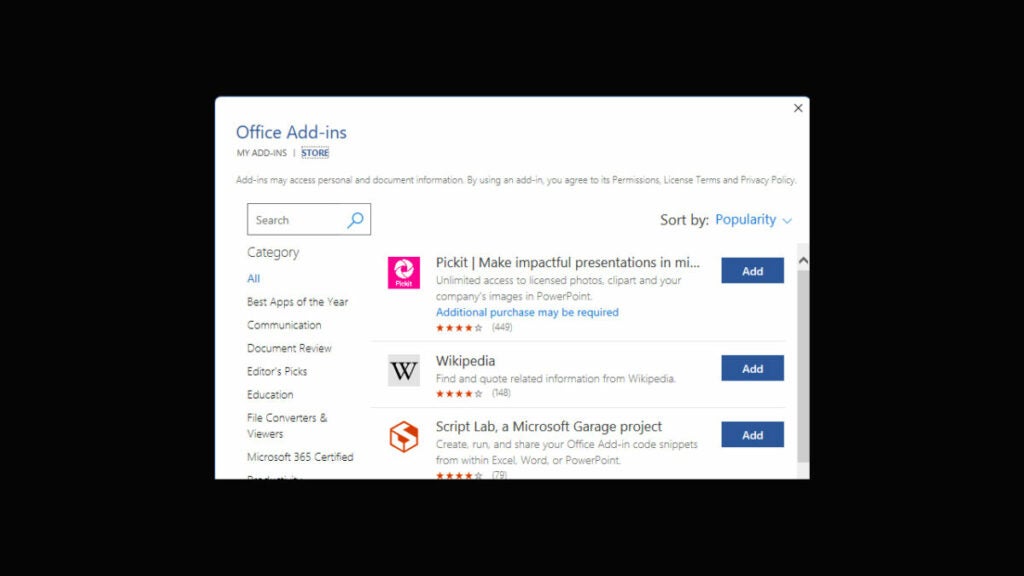
When you open the Insert menu, you’ll see the Add-ins ribbon. There are two options: get new ones or manage existing ones. When you click on the first one, a small store window opens showing you the latest plug-ins you can install. They add extra functionality to your documents, making them more powerful and professional.
The best plug-ins for Microsoft Word
There’s a wide variety of add-ins available, so take your time reading through them and seeing which one will suit your needs. We’ve also compiled a list of the best plug-ins for Microsoft Word, but you’ll need to cater it to your project. They won’t always apply to all situations or industries.
Working online with Microsoft Word documents
One final aspect I need to mention in my Microsoft Word review is the online aspect. Working offline with the app is fine, but you might want to work on a different device while you’re away from the office or home.
You should already have a Microsoft 365 account if you’ve downloaded Microsoft Word. If not, you’ll need to head to the site and create an account. It’s usually linked to the account you use on Windows, so try signing in with those credentials. Once you’re in, you’ll see a list of Microsoft icons on the left, one of which is Word.
Opening your local documents online
Whether you open a new document or an existing one you saved, you can work on it online. Most of the menu features are the same, albeit they have a slightly different appearance. There are also some extra features you can play with, such as dictating or using the design wizard.
Synchronizing with Windows 11
The online version synchronizes any documents you’re created on your desktop, as long as you’ve synchronized with the OneDrive account. You can also make a new document online, which you can open later at home from your Windows PC app. It works both ways.
Microsoft Word: Word processing at its best
Microsoft Word is excellent for creating complicated documents that you can then convert to other formats. It has basic and advanced features, but it doesn’t have as many collaboration items as some competitors. Still, it’s powerful at what it does, and many modern alternatives are based on it. Its legacy still lives on among those that prefer this platform. I definitely recommend it for creating novels or short stories, whereas it has plenty of benefits for companies too.
If you’re more interested in spreadsheets, make sure you don’t miss my Microsoft Excel review. You can also check out the opinions on Google Docs and Microsoft Outlook.
Pros
Plenty of tools and features
Install add-ins for more functionality
Helps with productivity
Integrates with other platforms
The basis for most documents
Easy to use
Many colors and themes
Includes automated functions
Cons
Formatting and image alignment can be tricky
Spelling and grammar checks not very advanced
Developer: Microsoft
Publisher: Microsoft
Top features: documents, format conversion, images, tables, colors, add-ins
Death Stranding Director’s Cut is a science fiction role-playing walking simulation game with a third-person perspective. It was developed by Kojima Productions, with 505 Games publishing it on the Steam platform. The original title was launched in 2019, while this new version releases on March 30, 2022.
There’s a long story behind how Death Stranding Director’s Cut came to be that’s almost as enticing as the game’s story itself. You’ll spend plenty of hours walking around the post-apocalyptic terrain of America, looking for a way to save it from the Beached Things (BTs). Join me as I show you my gameplay experience in this review.
The history and story of Death Stranding Director’s Cut
If there’s one aspect that shines in Death Stranding Director’s Cut, it’s the lengthy story. As a matter of fact, you’ll spend many hours simply watching the video cutscenes in between playing. There are many times you’ll wonder when you can start playing again. Let’s have a look at all the story elements.
From Silent Hill to Death Stranding
One can’t discuss Death Stranding without looking into the fascinating background that gave life to the game. As many fans know, Kojima Productions had teased the world with a new Silent Hill Playable Trailer (Silent Hill P.T.) that had the gaming world in a buzz. It was set to be the franchise’s first proper first-person horror journey with many tantalizing elements. It also starred Norman Reedus as an introduction to what was meant to become Silent Hills.
Sadly, Hideo Kojima and Konami parted ways in 2015, the reasons for which aren’t important for this review. Kojima Productions took with them Norman Reedus and Guillermo Del Toro, while adding a stellar cast for the newly announced horror adventure game, Death Stranding. It would be four years before we finally saw the original game launch.
The story of Sam Porter Bridges
While it’s a complete divergence from Silent Hill, Death Stranding Director’s Cut has a detailed story that’s the heart of the game. You play as Sam Porter Bridges, although later it seems he was a Strand at some point. The entire plot revolves around him and his ability to revive himself when he dies.
You now live in a post-apocalyptic America. As the story unfolds, it becomes clear that there was an event called Death Stranding where a gateway opened between the dead and the living. Dead bodies washed up everywhere, but now their souls haunt you from the afterlife.
When the rain touches anything, time seems to rapidly accelerate and can lead to death within a few minutes. It only seems to affect living humans and creatures, as the trees and environment seem fine. During a time void, a massive creature sucks up anyone that’s recently died and creates a massive creator when it explodes.
I won’t ruin more of the story for you, but the plot does thicken many times along the way. There are definitely many exciting twists along the way, and you can see the foreshadowing with the BB’s memories and what’s to come later when you meet one of the other main characters.
Become a glorified delivery man
While the story behind Sam in Death Stranding Director’s Cut is quite fascinating, in the end, you’re mostly a delivery man for a company called Bridges. You’ll soon learn why the connection is important, especially with your ties to the president and someone you’ll need to rescue later.
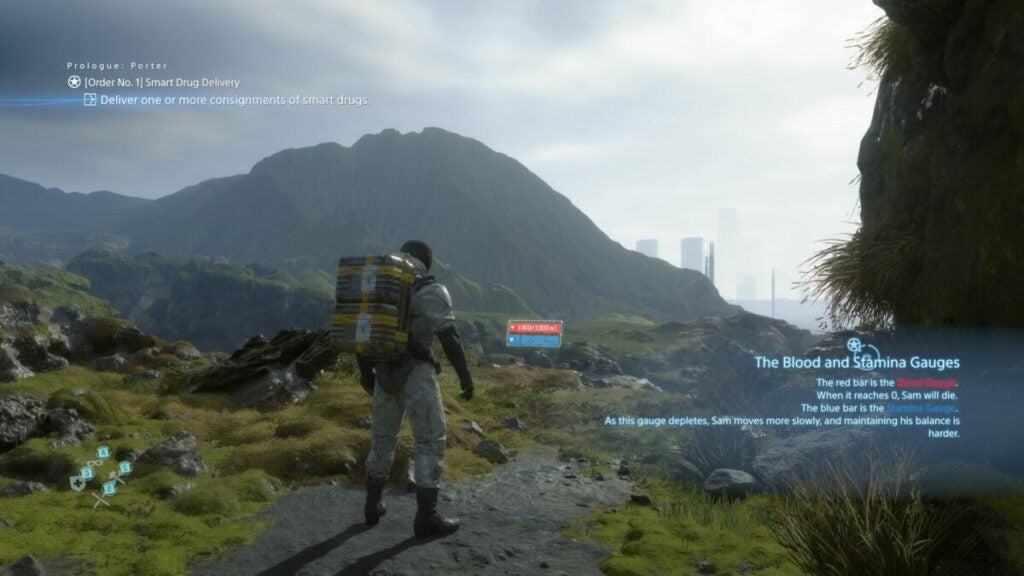
However, you’ll play most of the game as a delivery man, picking up cargo and taking them to various destinations. The plot is entwined with this mission, but that’s why so many of us gamers call it a walking simulator. Still, I love how the story points appear while you’re walking across the wasteland.
Reconstructing America
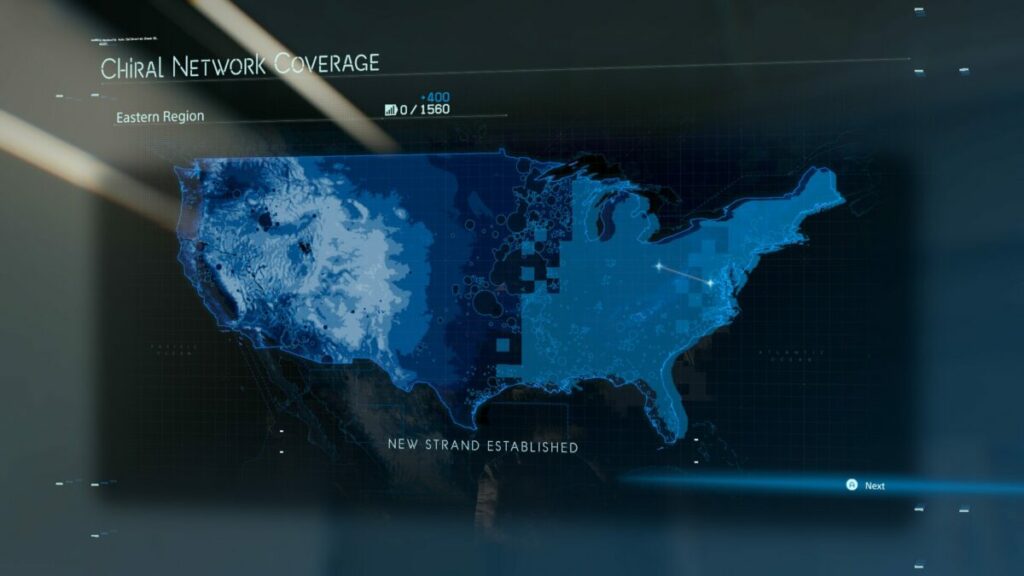
The overall mission that becomes more obvious later in Death Stranding Director’s Cut is that you need to reconstruct America. Sure, they tell you to rescue your sister on the other side of the continent. However, you’ll need to upload specific sites to the chiral network, which you’ll do while you deliver cargo to them. The bulk of the game is spent traveling across the States and reconnecting them while delivering packages.
Some missions on the side
There are also quests you can complete on the side. When you activate a terminal at a site, you have orders to accept. One of them is usually the main mission, while the others are additional objectives. Not only are they entertaining to complete, but they help you level up and obtain useful resources.
How long is Death Stranding Director’s Cut?
The length of Death Stranding Director’s Cut depends on how many missions you choose to complete. If you only want to do the main story, it will take you about 35 hours. Completionists can enjoy over 100 hours, while only focusing on some side objectives will tally about 65 hours.
Exciting gameplay features of Death Stranding Director’s Cut
What I love about Death Stranding Director’s Cut is how well it integrates the story with the gameplay. There are so many elements where you can see how well they’re fused together.
Is there a tutorial in Death Stranding Director’s Cut?
One of the best mechanics of Death Stranding Director’s Cut is that the tutorial is woven in as you play the game. When you encounter something new along the way, the game will quickly explain how it works. What’s remarkable is that it works well with the main character that’s never experienced some of the aspects, such as the cuff links that provide all the information.
There’s also an in-game manual that provides advice, but only when you unlock them. As you come across something new that needs an explanation, a notification will appear that you’re manual has a new update. It’s hard to go wrong with such detailed instructions.
Keyboard and mouse vs. controller
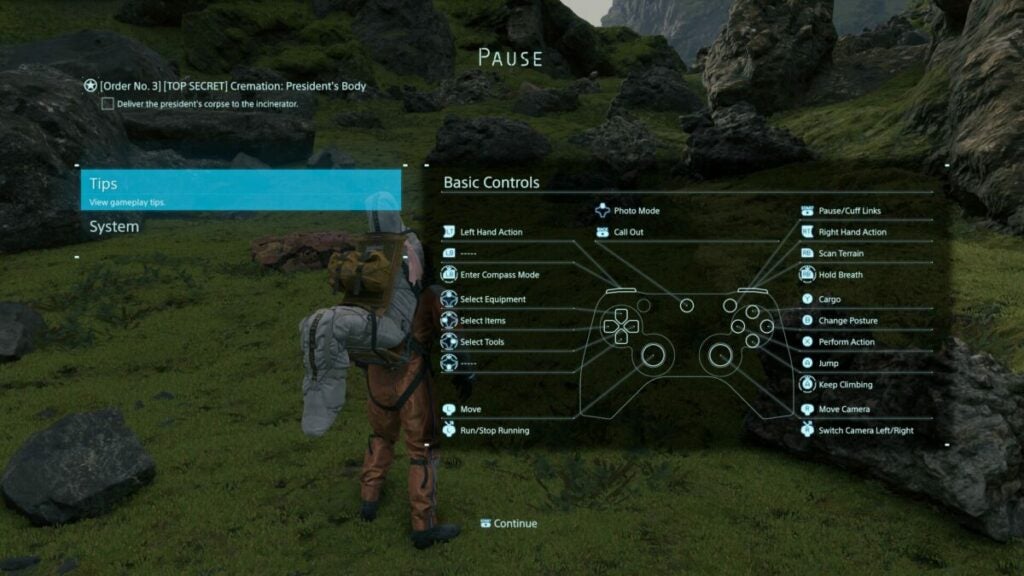
When I first started the game for my Death Stranding Director’s Cut review, I connected my Xbox controller. It was challenging at first, as the button notifications that appeared on-screen for specific actions showed keyboard controls. It meant I still had to use the keyboard in most scenarios.
As soon as I became annoyed, I switched to the keyboard for a few hours, which I don’t like playing with when gaming. It motivated me to analyze the settings until I discovered you can change to controller notifications. Sadly, it doesn’t switch automatically like most games I’ve played on PC.
Happily moving back to the controller, it’s easy to say that it’s the better option for Death Stranding Director’s Cut. You can manage your walking speed with the left stick, while the keyboard just makes Sam run all the time. The shortcuts are also easier to manage with the buttons than with the keyboard.
Collecting and packing items
As you’re a glorified delivery man, the one aspect you’ll need to master in Death Stranding Director’s Cut is picking up items and placing them in your backpack. As with games like Resident Evil 7 and Silent Hill 4, you’ll need to deal with inventory management. You can only carry so much, which is upgraded at a later point.
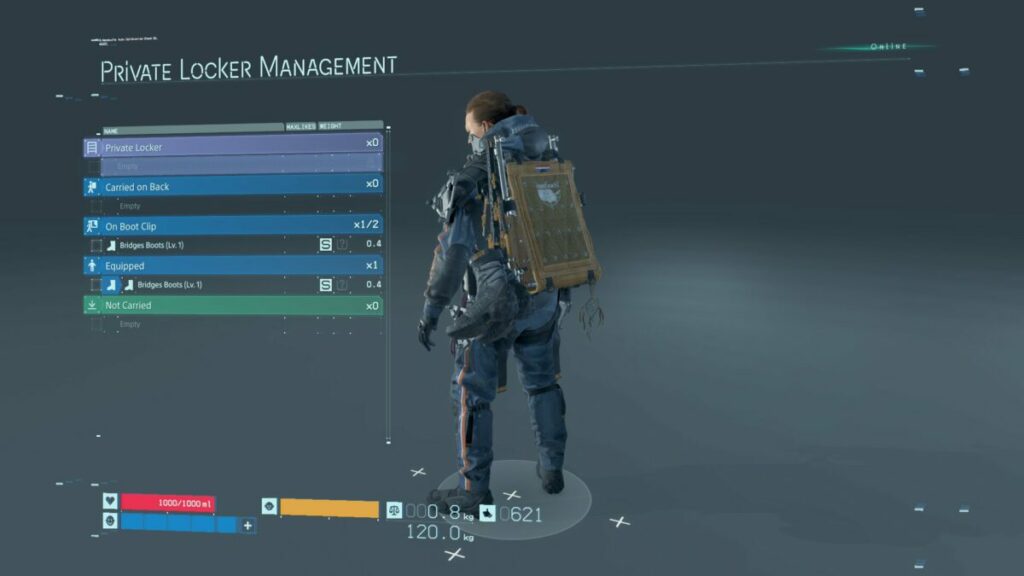
The game simplifies the process but auto-arranging items for you if you’re struggling. There are attachments to your suit for other items, but you won’t really need to worry about placement if you use this auto-pack function. As you collect lost cargo on your journey, Sam will just slot them in the next available space.
Looking after your Bridge Baby (BB)
Not long after you start Death Stranding Director’s Cut, you’ll receive a BB unit. It attaches to the front of your suit and shares emotions and memories with you. You’ll need to care for it and make sure it doesn’t become too stressed; otherwise, it won’t be able to warn you when BTs are nearby or other dangers. It reaches a point when it just shuts down and you’ll need to rejuvenate it.
Crossing the perilous terrainin Death Stranding Director’s Cut
The terrain in the new America is dangerous. The lost BT souls appear whenever there’s rain, which is when you’re in danger of being killed. However, the environment has plenty of other risks you need to watch out for.
For example, the rocks and cliffs may make you stumble and lose all your cargo, which you’ll need to collect again. Also, you’ll lose points for any damage they incur and your BB unit stresses out. The rivers and streams also pose dangers, as you’ll lose stamina and possibly your footing if you’re not careful. You’ll need to use both triggers to adjust cargo weight if the balance shifts to either side.
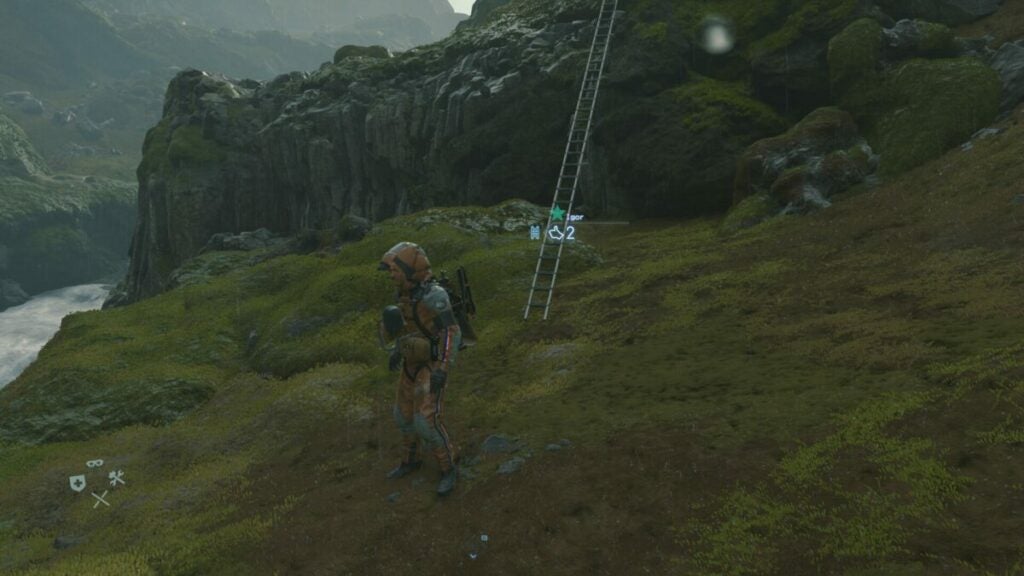
Fortunately, the online element comes into play here. Other players can leave ladders, ropes, and other helpful tools to cross rivers or climb mountains. You can also do the same, and other gamers can leave a like for you doing so when they discover it. It’s an excellent way to play a solo game with others without actually seeing them in the game. Later, you’ll unlock vehicles to travel faster.
Repatriation is the new resurrection
Sam is a repatriate with DOOMs. What that means is, that he has the ability to revive himself when he dies. You then play as your soul, drifting in the afterlife, searching for your body. When you find it, you can resurrect yourself, with a cute image of a baby giving you a thumbs up. At first, it’s a creepy experience, but it grows on you.
Accepting orders
You can’t perform deliveries without accepting orders. As you unlock new sites in Death Stranding Director’s Cut, the terminals will give you new objectives to complete. You can either accept them all or one at a time. One factor to note is that they’ll stock your backpack with what you need, so it’s best to choose one or two that are manageable.
Once you accept an order, your map is updated with where the objective is. You’ll need to study the map and terrain to see which would be the best route. You can set waypoints, which you can then view while walking using your virtual compass. It’s a system that works really well.
Improving your stats
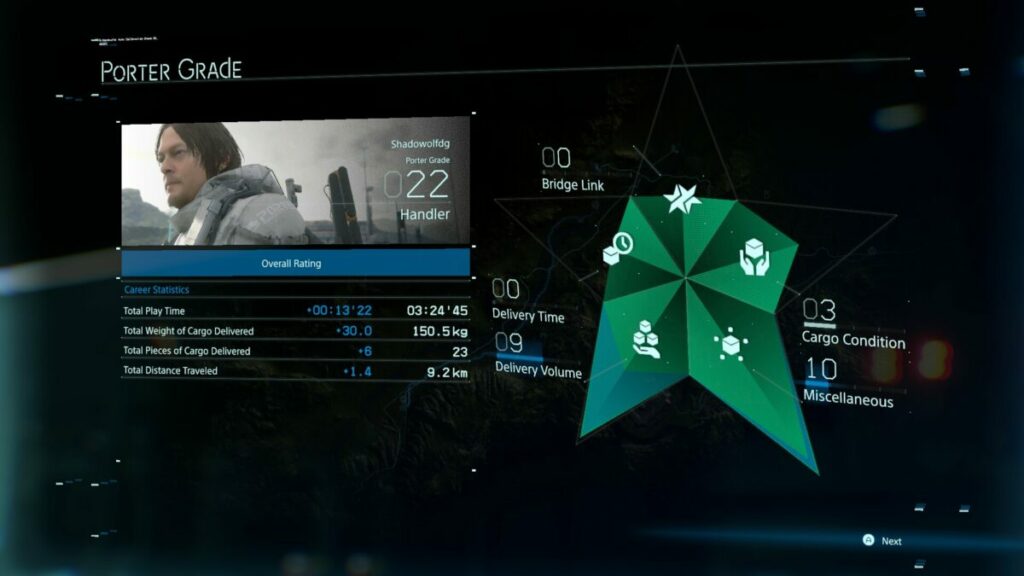
The reason you need to look after your cargo is that you’ll receive likes and points for delivering them with less damage. There are different stats that increase in levels every time you finish missions. Your character also has his own level, which updates in relation to these stats.
Some private time
When you’re not crossing treacherous terrains or battling BTs, you can spend some quiet time in your private room. When you take a shower or use the toilet, a scientist analyzes the waste to see if you have any toxins in your body. You can care for your BB, while there’s an interactive map on the wall where you can read emails and messages. It’s a safe area where you can prepare for the next journey.
What are the Death Stranding Director’s Cut PC requirements?
Once you see how immense Death Stranding Director’s Cut is, you’ll understand why the PC requirements are so high. I’ve placed the recommended hardware and software here below, as I don’t believe the minimum requirements are good enough:
While I didn’t experience any lagging or performance issues, there did seem to be a slight conflict with GeForce taking screenshots. It may just be because of the high-quality visuals, but there was definitely some lag while recording the images. Other than that, Death Stranding Director’s Cut plays beautifully.
What’s different in Death Stranding Director’s Cut?
There are a few changes and additions in Death Stranding Director’s Cut. For one, you’ll have plenty of new gear to equip. There’s also a new location you can investigate, and you’ll also see some new cargo. The most exciting alteration is the new Buddy Bot that you unlock later in the game, making it easier for you to travel across the terrain.
Death Stranding Director’s gorgeous graphics and stunning sounds
The visuals and sound effects of Death Stranding Director’s Cut are incredibly outstanding. With so many video cutscenes, it’s really impressive how much work Kojima Productions put into it. The only annoying aspect is that some narrative videos took 30 minutes, if not longer, leaving you itching to play but not wanting to miss the story.
World design and beauty
Walking through the post-apocalyptic American lands is absolutely stunning. The environment looks ultra-realistic, and you can almost feel the spray on your face from the rivers or rain. You’ll want to spend moments simply looking at the beauty around you.
There are few games that can mimic the glory of the graphics, with GTA V not even coming close. The only issue I did come across is when your character and the scenery sometimes glitched when climbing off a ladder at the top, and it takes some flicking of the controller stick to get it right.
Brilliant character and creature designs
Even the characters look immaculate. You’ll notice how many times Death Stranding Director’s Cut does close-ups of characters’ faces, just to show off. It’s hard not to praise the beauty of every visual element on their bodies, especially when wind and rain interact with them. The creatures have outstanding designs too, all from the minds of the developers. The BB is the most adorable aspect, though, despite its horrible background.
The horror effectin Death Stranding Director’s Cut
I love the way Death Stranding Director’s Cut brings suspense with many of its horror aspects. Instead of jump scares, it builds tension with rain and environmental elements. The footprints of a creature that you can’t see create foreshadowing across the story, which just adds to the mystery.
Stunning sounds and music
Finally, the sound and music of Death Stranding Director’s Cut add a wonderful ambiance to the game. As you travel across the terrain, a new song may appear that is added to your music player. You can also unlock songs by collecting them along your travels. Sound effects also create tension, and you’ll need to stop breathing so the BTs can’t hear that you’re alive.
Death Stranding Director’s Cut: Is it better than the original?
Death Stranding Director’s Cut brings many new aspects to the game. There’s some new narrative you can enjoy, plus you have a new location to visit. It offers improved gear and bots to make traveling easier, which is welcome for those who have finished the original version. Overall, it still presents outstanding gameplay, story elements, graphics, and sound that players love about it. In my opinion, it’s a better version than the original and now includes the digital artbook as part of the download.