Google Translate for Android gets Conversation Mode

There was lots of laughter at Softonic today as we tried out the coolest feature in the new version of Google Translate for Android – Conversation Mode.

It is pretty revolutionary – but for the moment it’s only available in Spanish/English. Once you have installed Google Translate (you might also need to download text-to-speech software, but if you do, the app will prompt you), hit the little microphone and speak.

Google Translate quickly analyzes what you have said, translates it into Spanish (or vice versa) and plays it back – in Spanish – to the listener. To respond to what’s been said, press the Responder en español button, and speak Spanish. The original speaker hears your answer in English, and so on. Google Translate’s Conversation Mode allows you to have conversations in languages that you don’t actually speak!
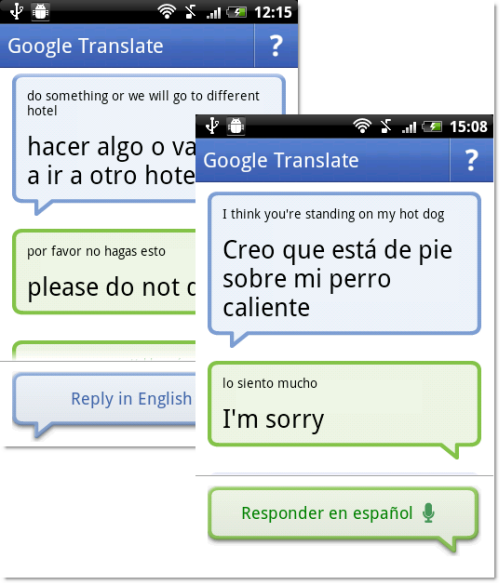


If Google Translate isn’t sure what has been said, it will ask you for confirmation before translating – but you can turn this feature on or off. Even so, the app did pretty well when we tested it, often getting the translation more or less right on the first go, especially if you speak loudly and clearly. As you can see from the screenshots – even when it’s wrong, it’s pretty funny!
Coming soon: Android and Windows tablet Kindle apps

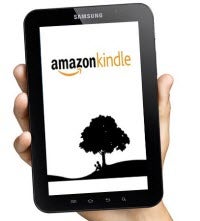
Amazon recently announced its intention to introduce tablet-specific apps for reading Kindle eBooks on devices running the Android and Windows operating systems, owned by Google and Microsoft respectively. In what looks to be the Year of the Tablet, this will expand the Kindle’s compatibility list substantially. The best part? Amazon will be offering the apps free of charge.

In its release, Amazon specifically noted that these apps are intended for upcoming tablet lines. This seems to foreshadow future technological developments in the tablet market, and soon at that. Coined as “Buy Once, Read Everywhere” apps, these new releases will give readers the ability to choose from over 775,000 Kindle eBooks. As the app name suggests, Kindle users will be able to sync their newly purchased books across a variety of popular eBook reading devices, on a number of different platforms.

Currently there are Kindle apps available for the iPhone, Windows PC, Mac, Blackberry, iPad, Android, and Windows Phone 7. With the seeming inevitability of several new tablet releases, syncing across multiple eBook reader devices and platforms promises to be easier than ever in 2011.

Controversial 1378 KM game released

The controversial game 1378 KM, which sees players play the part of an West German border guard or an East German escapee, has now been released online. The controversy erupted last October when it was revealed Karlsruhe University of Arts and Design were releasing the game via one of their students saying:

Through the personal identification as a fugitive of the republic or a border guard, and the intensive experience of the border areas, the interest of the young generation in the conflict of recent German history will be awakened.

Demand for the game has been so strong that it brought down the University’s servers according to one report from Reuters. The developer Jens Stober has issued a justification for the game saying:

In this computer game – which would not be the case in, for example, a documentary film – I personally have the control over my behavior and my reactions, which take place in real time and in changing situations. The game 1378(km) does not force someone playing the “border soldiers” to shoot the “refugees”. Players are left with the freedom of choice. You are only able to win 1378(km) when you do not shoot. The rules of the game are inspired by the situation at the former Inner German Border. Border camps, death strips, and orders to shoot are what make the game brutal. I deeply regret that the victims of the former border and their families and relatives have felt cause for injury. This was never part of my intention.

Decide for yourself what you think by playing the game here.

Google’s Nexus S to be released with Android 2.3

One of the most universally cited frustrations of Android users is the slow pace at which mobile service carriers release updates. Unlike the iPhone, it is generally up to cell phone providers to determine when their customers receive Android updates. Without much incentive to provide updates immediately, many cell phone users who have Android phones are consequently left waiting indefinitely.

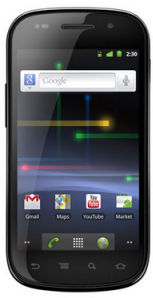
This will change when Google’s Nexus S is released next week in the U.S. and shortly thereafter in the United Kingdom. The predecessor to the Nexus One, the Nexus S is manufactured by Samsung Electronics. A service contract can be purchased in the U.S. starting on December 16 through T-Mobile.

The Nexus S will come with all the advanced features you would expect from a smartphone of its caliber. Its biggest draw though is probably that it comes pre-installed with the latest Android release: Gingerbread (2.3).

Since Google is also Android’s primary developer, the company promises to release Android updates to the Nexus S more quickly than other phones will likely receive it. This is just one part of what the company is calling the “pure Google experience” new Nexus S owners will be able to take advantage of. This additionally means that the third-party software that burdens other Android phones will not be a problem for users of the Nexus S.

For smartphone users who want the latest Android technology as quickly as it’s available, then, the Nexus S seems like a good bet.

Google launches its own ebook store

Google has announced eBookstore, the new online ebook store powered by the giant, just in time for the holiday season. It’s not just another website where you can buy ebooks; the Google eBookstore is already one of the largest ebook collections in the world, with more than three million titles available since day 1 – including the latest bestsellers from the NY Times and the classics we all should read at some point in our lives.

The Google eBookstore has been launched with quite a different perspective than similar businesses like Apple iBooks or Amazon Kindle books. “We designed Google eBooks to be open,” says Abraham Murray, Google Books Product Manager. And certainly they are. These ebooks are bought online and stored in the cloud, in a private personal library with unlimited ebook storage accessed with a password, just like you use Gmail.

Google eBooks can be read on multiple devices and synced across them, from desktop computers to netbooks, including tablets, smartphones, and ereaders. The files are downloaded in ePub/PDF format, which makes them compatible with a large number of devices – but leaves others , like the Kindle, out of the list.

You can buy new ebooks from the Google eBookstore itself or from any other of Google’s independent bookseller partners. There’s no official statement about the price, as Google will let editors decide that for themselves – together with the use of DRM in their titles.

The Google eBookstore is currently only available in the US, which leaves Europeans looking forward to the day when it works on the other side of the pond. It’s certainly an interesting third competitor in the ebook market (besides Apple and Amazon), taking a different approach and launched at a perfect time: just in the middle of the holiday shopping frenzy.

Google Earth 6 launches, now with Street View

Google Earth has reached version 6. The revolutionary satellite imagery app, with which you can comfortably travel around the globe, includes a bunch of new features that make it a more interesting – and easier to use – application. Let’s take a look at them.

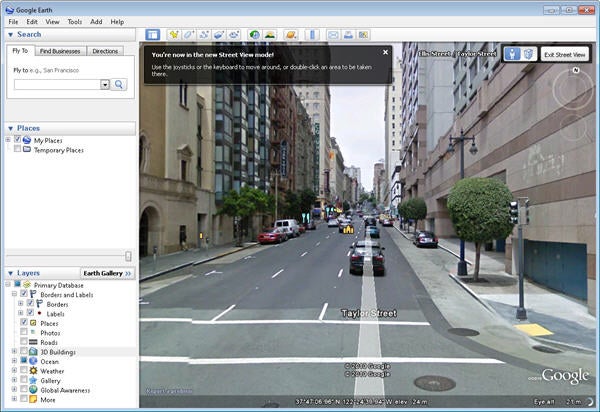
Integrated Street View. The popular Google Maps Street View functionality is now seamlessly integrated into Google Earth. You’ll see Pegman (the little orange guy from Google Maps) on the right side of the program’s interface, beside the navigation controls. To start using Street View on Google Earth, just do the same as in Google Maps: drag Pegman over the area of the map you want to visit, and Street View will be launched as usual.

3D Trees. Besides 3D buildings, Google Earth now supports three-dimensional trees to add even more realism to the environment. 3D trees prevent you from bumping into a tree when following Google Earth’s walking directions, and keep the scenery from looking like an isolated desert in the middle of nowhere.

Improved Historical Imagery. The Historical Imagery feature, added in Google Earth’s previous version, has been enhanced to make it clearer and simpler. Now every time there’s older imagery available from the area you’re browsing, Google Earth will display the date of the oldest images available in the status bar at the bottom of the screen.

Download Google Earth 6 for free here.

Final version of Opera Mobile 10.1 for Symbian released

Opera has unleashed the final version of Opera Mobile 10.1 for Symbian/Series 60 mobile phones, with a significant improvement in JavaScript performance.

The latest version of Opera’s mobile browser includes a powerful JIT optimization for the Carakan JavaScript engine, which provides a significantly faster browsing experience. In fact, results from the SunSpider JavaScript test prove that this version runs up to nine times faster than the previous Opera Mobile 10.0.

Opera Mobile 10.1 for Symbian

Another outstanding new feature is the support for geolocation – a functionality we’re finding on more and more apps. Thanks to geolocation you’ll be able to get customized, relevant content from web services such as maps, recommendation sites and travel apps, depending on your current location.

Other interesting features you’ll find in Opera Mobile 10.1 are Speed Dial, tabbed browsing, a password manager and the so called Opera Turbo compression, which can shrink websites up to 20% of their original size, thus reducing data transfer, saving you money and cranking up browsing speed.

If you can’t wait to test it, head over to m.opera.com from your mobile web browser and download your copy now.

Angry Birds: Coming soon to a game console near you

You can play it on your iPhone or Android. You can purchase a t-shirt with your favorite character emblazoned on the front. You can even buy them in plush toy versions.

Soon enough, you may be playing the popular Angry Birds mobile app on an actual game console, if Rovio’s chief executive of North American Business Development Peter Vesterbacka has anything to say about it:

The smartphone gaming platform is actually turning out to be the biggest and most played out there. [I]t’s starting to beat the traditional games on consoles and PCs.

Angry Birds will soon be available on Xbox, Wii, and PS3, but Mr. Vesterbacka has not yet confirmed a specific date. He has simply stated that the launch will hopefully take place at some point next year.

And if that wasn’t enough good news for fans, Mr. Vesterbacka also mentioned plans to develop an Angry Birds 2.  If true, it looks like we’ll be seeing a lot more birds and pigs in our respective gaming futures.

Civilization V for Mac released on Steam

capsule_467x181.jpg

Valve have officially announced that the long awaited Civilization V for Mac is now available for download on Steam. There was some debate as to whether the game would be released on Steam although it’s still not clear whether Windows owners of the game will also get Steam for Mac free via SteamPlay. It seems likely that SteamPlay users that have already purchased it on Windows will get it for free, judging by the response the developers Aspyr got when they posed this question to fans.

You can download the official HD trailer for the game here. In the meantime, here are some screenshots of what to expect from the game, rewritten from the ground-up for Mac and looking better than ever:

civ1.jpg

Continue reading “Civilization V for Mac released on Steam”

Should Civ V for Mac be released on Steam?

civ52.png

Aspyr have confirmed that the long awaited Civilization V for Mac will be released next week on 23rd of November but the big question now is whether it will be released on Steam or not. If you’re one of those that wants to see it released on the gaming platform, you can encourage Aspyr to do so here in a blog post encouraging feedback on the issue.

What’s stimulating most debate is whether users that have already purchased Civ V via Steam on PC, should also get the Mac version for free via SteamPlay or whether they’d be happy to purchase it separately to play using Boot Camp instead. Aspyr tested the water by asking:

We are still weighing the options but out of curiosity, how many of you have already purchased the PC version and expect a free Mac version? Did you purchase it on the PC to play via BootCamp in hopes you’d get the Mac version? Or did you purchase on the PC and just assumed you’d get a Mac version? Wondering what the expectation is out there.

They’ve also stressed that:

Civilization V Mac will feature SteamWorks, the DRM and playing experience will be exactly the same no matter where you purchase the game, disc or download.

As might be expected, user feedback has been overwhelmingly in favor of a free Steam release for Mac for those that have purchased the PC version. It only seems fair that is the case since that’s what happens with other games that have been released on SteamPlay, so why should Civ 5 on Mac be any different?