Microsoft launches new i’m charity service

im-msn-icon-1.pngIt’s always nice to see big corporations reaching in their pockets for charity and Microsoft’s latest Windows Live Messenger initiative gives you the chance to help worthy causes just by chatting to your pals. Every time you send a message using the new i’m service, the company will pass on a portion of the advertising revenue for the program with one of a number of charitable organisations.

As well as being good PR for the software giant (far be it for us to this is merely a publicity stunt though), the initiative might just make a difference if enough people get on board, as Microsoft has not set a cap on the amount it will donate. The causes involved include Unicef, the National AIDS Fund, stopglobalwarming.org and the National Multiple Scelorsis Society. Once you’ve joined up with the service you can nominate the charity that’s closest to your heart from the list to start giving every time you chat. Windows Live Messenger is actually proving to be one of the most innovative chat tools ever and you can read what we think of it by checking out our review.

WordPress 2.2 released with widgets

WordpressBig news for WordPress bloggers around the world – WordPress 2.2 has been released featuring widget support, enhanced Blogger integration and and over 200 bug fixes. Probably the most interesting development is widget support which will users to easily rearrange and customize areas of their blog (usually sidebars) with drag-and-drop simplicity. The developers have also made a more aggressive bid to attract Blogger users by making it much easier to import posts and comments from the software.

There are a few other really useful additions. WordPress has been optimised to speed up response time between your blog and host server which means navigating WordPress sites should feel quicker. I particularly like the fact that the developers have now made WordPress ‘idiot-proof’ – i.e. it won’t let you install extensions or plugins that could break your blog or stylesheet.

This new release signals that WordPress is attempting to make itself more user friendly in an attempt to attract those bloggers who’ve maybe spent some time using Blogger but now want to take the step-up. Many who have tried find the gap difficult to deal with but adding better Blogger integration and drag-and-drop style widgets may encourage them to have another go. It’s advisable for current users to upgrade anyway as many of the big fixes concerned security flaws that could leave your site vulnerable to attack and spamming.

Softonic launches new listings page

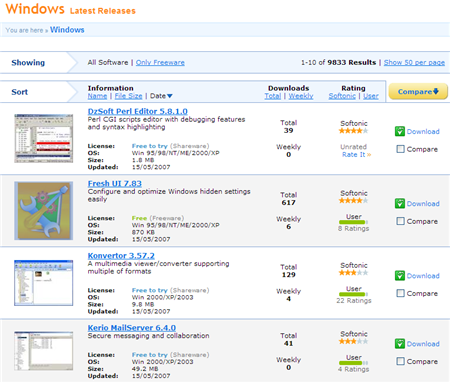
Softonic has just updated its program listings pages for a more user-friendly experience. As well as tweaking our popular Compare feature, we’ve added a cool new ‘Expert’ mode that allows you to view listings of 50 programs simultaneously. We’ve also added a ton of smaller new features (like the ‘Show only freeware’ option), all designed to make your software hunting that much easier.

windows-listing-page-1.png

So check it out and see what you think! And as usual, you can always let us know if you think we’re missing any features from the site.

New version of Google Earth released

Google Earth LogoGoogle have announced the release of a new 4.1 beta version of Google Earth featuring new views, languages and extended Mac support. The mapping program is now compatible with the SpaceNavigator 3D mouse on Macs giving superior control over viewing angles. Another major upgrade is the new ‘View in Maps’ feature which extends online and desktop integration. A small map now appears in the top right corner of your screen which when clicked, takes you to exactly the same location you are viewing in Google Earth in Google Maps. There’s also a new ‘starting location’ feature which sets itself by default according to where you are based in the world. Finally, Google Earth is available in 7 new languages – Czech, Portuguese, Dutch, Russian, Polish, Korean and Arabic.

Google Earth still remains a far more popular download that Microsoft’s equivalent Virtual Earth, and these upgrades will consolidate its position in the mapping market. However, many users would no doubt prefer to see huge swathes of the maps themselves upgraded, especially in more remote areas where detail is still relatively limited.

Blender 2.44 released – improvements and new features

blendersplash_244.pngPopular 3D modelling tool, Blender, has a new version out which includes not only the expected bug fixes but also a few interesting new features. The most significant additions are complete 64-bit compatibility and the brand new Subsurface Scattering material option which is designed to help with rendering of complex surfaces like skin or marble.

Full list of additions and updates:

  • Fully 64-bit compatible
  • New modifers were added (“Smooth” and “Cast”)
  • A couple of composite nodes were added
  • A revamp of the old mesh primitives was done
  • Blender 2.44’s new long-awaited but unexpected feature: subsurface scattering (SSS) support!
  • Bullet physics engine updated

Windows Live Hotmail to launch today

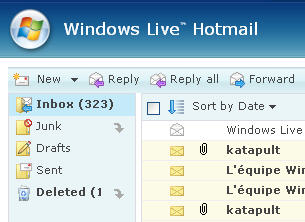
wlh1.jpgWindows Live Hotmail, the new version of Microsoft’s webmail service, is set to launch globally in 36 languages this Monday. The revamped service will offer a number of new features to recapture users that have fled to other webmail services like Yahoo! or Gmail.

Considered by Microsoft as the biggest update of Hotmail since 1996, this new release will aim to be “safer, more powerful and productive” and easier to access, whether via the net or a mobile device. The new webmail will now offer 2 Gb of storage, allows users to import and export contacts to other webmail services, and handle right-clicks and drag and drop. Just like Gmail with Google Chat, Live Hotmail will incorporate Windows Messenger and all the Live services like OneCare or Spaces from the drop down menu on the left. Outlook Connector is one of the most eagerly awaited features of the new version, as it should allow users to “view and manage their Windows Live Hotmail account from Outlook for free, with full contact, e-mail and e-mail folder synchronization.”

Microsoft also claims to have tightened security in its webmail service by providing a “safety bar” indicating the authenticity of new messages. The spam filter will also automatically delete or block junk mail: its reliability will be tested in the coming months.

Live beta testers will be familiar with the new sleeker, although slightly disappointing new interface, the new color themes and toggling between the “classic” Hotmail look and a new interface more similar to Outlook.

If you already have a Hotmail account you can update it to the new version by clicking the green “Join Windows Live Hotmail” button in your account. Microsoft will be encouraging its 280 million Hotmail users to make the switch in the coming months, but will it effectively win back users from Yahoo! or Gmail? As Techcrunch do well to point out, it’s surprising that Microsoft hasn’t integrated their latest jewel, Silverlight, with the new Live Hotmail. Instead of giving users the chance to fully customize and build on their webmail, it seems Microsoft has decided instead to give an updated, but watered down, version of Hotmail.

Yahoo! launches web messenger

yahoo-web-messenger.gifMicrosoft was the first to launch a web version of its popular Messenger client. Then, Google integrated GTalk! client into Gmail. Today, following this trend of desktop applications going online, Yahoo! launches its own service of web instant messaging.

Yahoo! Web Messenger has been fully developed in Flash 9, so you’ll need to have the Flash plugin installed. It will include all the standard basic features, as well as support for avatars and emoticons. Users will also be able to add Live Messenger contacts, as a result of the deal signed last year between Microsoft and Yahoo! to allow interoperability between their respective messaging networks. According to Yahoo!, VOIP functionalities will be added at some point in the near future.

As for now, you may as well watch the video preview that Yahoo! prepared to learn about this new online web messenger, and of course, sign in and try it out if you already have a Yahoo! ID.

Firefox 3 Alpha 4 released

mozicon128.pngA week ahead of schedule, Mozilla have announced the release of Firefox 3 Alpha 4. The project, codenamed Gran Paradiso, features several important improvements that focus on extensions. Principally, these include better integration of FUEL (Firefox User Extension Library) and a JavaScipt library designed to facilitate extension development.

Firefox 3 now also supports as standard the popular global notification system ‘Growl’ on Macs although an extension for this was already available. To embrace Web 2.0, Firefox 3 will also offer better support for offline web applications.
Some developments haven’t reached completion, however. The Mozilla team are still working on an integrated history and bookmarks system as well as enabling ‘Breakpad’ – a new crash reporting tool. These developments are expected to be included in the Alpha 5 release due at the end of May.

Please remember that this version is for testing purposes only and mainly aimed at web developers and alpha testers. You will probably find that most of the extensions you have in Firefox 2 don’t work with Firefox 3 although some can be forced to work using the potentially unstable ‘Nightly‘ extension. The actual look of this release is not much different from Firefox 2 so if you’re just a general user, you’d be best to wait until the official release.

Spb Brain Evolution 1.1 released

spb-brain-evo-blog-1.pngAnyone who owns a Windows Mobile phone or Pocket PC should know about Spb Software House. They’re one of our favourite mobile developers, producing an excellent line of programs from across the board but focusing on games and productivity tools. Their latest news is an updated version of Spb Brain Evolution, their popular brain training game for Pocket PCs and other Windows Mobile devices.

If you haven’t tried the game out yet, it’s an essential addition to your collection. It features 10 Brain Testing and Brain Marking modes which become highly addictive as you continually try to better your last score. The mini-games (which include Sudoku and Minesweeper) all feature a special combination of fun and self-improvement: a recipe for a good game, in our opinion.

The latest version includes updated quiz topics and questions, as well as support for 10 languages.

New launch for Launchy

Lunchy logoWe managed to kick the clicking habit a while ago by installing Launchy. Now the program makes it even easier to open applications and folders without so much as looking at the Windows Start menu. Now out of beta, the latest release of the program adds a new plug-in that allows you to launch commands from the utility, effectively replacing the ‘Run’ dialog.

The developers are doing their best to open up the program to the masses and you can now create your own plug-ins and share them on the Plug-in Developers Forum. There’s also a meaty selection of skins available for download so you can customize the app. If you’re still using shortcut icons or the Start menu then quite frankly you’re living in the past, as Launchy takes all the effort out of opening documents, accessing files, launching programs, and even searching Google.