Isaac Clarke, the iconic protagonist of the Dead Space saga, has made his unexpected appearance in the game Skate, through a cosmetic pack that has generated controversy among players. This collaboration, typical of Electronic Arts (EA) in an attempt to attract fans through nostalgia, allows users to customize their experience in the new Skate, a free-to-play title set in the open world of San Vansterdam. We like Isaac Clarke, but we don’t like 30 euros The Isaac Clarke pack includes several cosmetic items, such as a suit “of […]
Isaac Clarke, the iconic protagonist of the Dead Space saga, has made his unexpected appearance in the game Skate, through a cosmetic pack that has generated controversy among players. This collaboration, typical of Electronic Arts (EA) in an attempt to attract fans through nostalgia, allows users to customize their experience in the new Skate, a free-to-play title set in the open world of San Vansterdam.
We like Isaac Clarke, but we don’t like 30 euros
The Isaac Clarke pack includes several cosmetic items, such as a “cardboard” suit, a themed board, the Necro Stomp emote, stickers, and an avatar. However, the price of this content has been deemed excessive, costing between 30 and 35 euros, an amount that exceeds the cost of complete games like the recently released Dead Space Remake, available for around 15.99 euros digitally and 14.99 euros in physical format.
The gaming community has expressed its discontent on social media, reminiscing about past times when obtaining skins was much more accessible, like in Skate 3, where Isaac’s outfit was unlocked with a simple code. In contrast, the current microtransaction system imposes a pricing structure that leaves many players frustrated. With a minimum of 30-35 euros required to access the pack, players feel they are being encouraged to spend more on cosmetics than on complete games.
The debate over microtransaction prices in free-to-play titles is a recurring topic among fans, especially when comparisons with previous products highlight notable differences in terms of accessibility. As Skate continues in early access, the insistence on a more ethical monetization model could be crucial for maintaining the loyalty of its player base.
The popular video game Peak has recently received a significant patch that addresses both major and minor bugs, as well as balance issues that had affected the player experience. This patch is mainly notable for the inclusion of a new Color Blind mode, which was a highly requested feature by the community. This mode adds patterns to the game’s colored berries, making them easier to differentiate during climbs and improving gameplay for those who have difficulty with color perception. You are now welcome in Peak if you have color blindness The implementation of accessibility options is […]
The popular video game Peak has recently received a significant patch that addresses both major and minor bugs, as well as balance issues that had affected the player experience. This patch is mainly notable for the inclusion of a new Color Blindness mode, which was a highly requested feature by the community. This mode adds patterns to the game’s colored berries, making them easier to differentiate during climbs and improving gameplay for those who have difficulty with color perception.
Now you are welcome at Peak if you are colorblind
The implementation of accessibility options is a positive step towards inclusion, allowing a greater number of people to enjoy the gaming experience. These features not only benefit players with visual impairments, but it is also expected that, as has happened in other titles like Fortnite, these options will be integrated into standard gameplay, enriching the experience for all users.
Among the other fixes in the patch, issues that had frustrated players have been resolved, such as the erratic achievement known as Endurance Badge, which is essential for unlocking new aesthetic options for characters. Additionally, bugs that caused game crashes have been eliminated, such as the incident of getting stuck in a tornado that left players stranded on the loading screen.
These changes are part of an ongoing effort by the developers to improve the gaming experience, and the patch is received with enthusiasm by the community. With these improvements, Peak focuses on accessibility and more balanced gameplay, setting a standard that could inspire other developers in the industry.
Valve has recently implemented a feature long awaited by many on its Steam platform: the inclusion of accessibility details on game pages. This new function will allow users to search for specific titles based on accessibility features, thus improving the experience for players with various disabilities. Sometimes it is necessary to filter The company … Continue reading “”
Valve ha implementado recientemente una función muy esperada por muchos en su plataforma Steam: la inclusión de detalles de accesibilidad en las páginas de los juegos. Esta nueva función permitirá a los usuarios buscar títulos específicos en función de las características de accesibilidad, mejorando así la experiencia para los jugadores con diversas discapacidades.
A veces tienes que filtrar
The company has announced that more than 5,000 games have already added information about their accessibility support, thanks to the valuable feedback collected from developers and players. Among the features that can be found are options such as playable without timed input and color alternatives, elements that are especially crucial for players with visual disabilities. This improvement responds to an evident need within the gaming community, which has sometimes had to return games due to the lack of customization options, as in the case of puzzles where it is essential to distinguish colors.
The update allows users to filter games through the option narrow by accessibility feature, providing access to a range of options that reflect a serious commitment to inclusion. Baldur’s Gate 3, one of the most acclaimed titles today, exemplifies this effort, as it includes 10 accessibility features ranging from adjustable difficulty to the ability to play without input timing.
Estas inclusiones no solo son beneficiosas para los jugadores con discapacidades, sino que muchas de estas características son útiles para el público en general, como la opción de guardar en cualquier momento y el tamaño de texto ajustable. Con esta nueva iniciativa, Valve se posiciona como un líder en el movimiento hacia una experiencia de juego más inclusiva y accesible para todos.
Modern video games are increasingly focused on accessibility, aiming to accommodate a diverse audience. This change is evident in many of the latest releases, which include accessibility options from the moment the player starts the game. However, the real challenge lies in finding games that offer specific accessibility features, which can be complicated if detailed reviews on the subject have not been conducted. A system that allows developers to better inform about their game Valve has taken a significant step towards improving this situation by introducing a […]
Modern video games are increasingly focused on accessibility, aiming to accommodate a diverse audience. This shift is evident in many of the latest releases, which include accessibility options from the moment the player starts the game. However, the real challenge lies in finding games that offer specific accessibility features, which can be complicated if detailed reviews on the subject have not been conducted.
A system that allows developers to better report on their game
Valve has taken a significant step towards improving this situation by introducing an accessibility support questionnaire aimed at game developers on Steam. This new system allows creators to mark the accessibility features that their titles offer, from adjustable text options to narrated menus and settings for colorblind players. With this initiative, which is already available to developers, Valve aims to make it easier for the public to find accessible games.
At the end of this year, Steam will begin highlighting accessibility features on game pages and will also allow filtering these options during searches. Although participation in this system is highly recommended, it will not be mandatory for games to be listed in the store. This has sparked a debate about whether it would be preferable to set a deadline for all new titles on the platform to list their accessibility options.
As the video game industry moves towards inclusion, it is encouraging to see that Steam, as one of the leading digital distribution platforms, is taking these important features into account. However, it remains to be seen how developers will respond to this new measure and whether they will actually implement the questionnaire voluntarily.
Microsoft ha dado otro paso en su compromiso con la accesibilidad en los videojuegos con el lanzamiento del Joystick Adaptativo de Xbox, un nuevo controlador diseñado para facilitar la experiencia de juego para personas con discapacidades. Este dispositivo es compatible tanto con las consolas Xbox One como con las Xbox Series S/X, así como con PCs, ofreciendo una solución versátil que no requiere un controlador de Xbox para su funcionamiento. Acercando los videojuegos a millones de personas Una de las características más notables del Joystick Adaptativo de Xbox es su flexibilidad en el control direccional, lo que permite un uso eficiente con una mano, un dedo […]
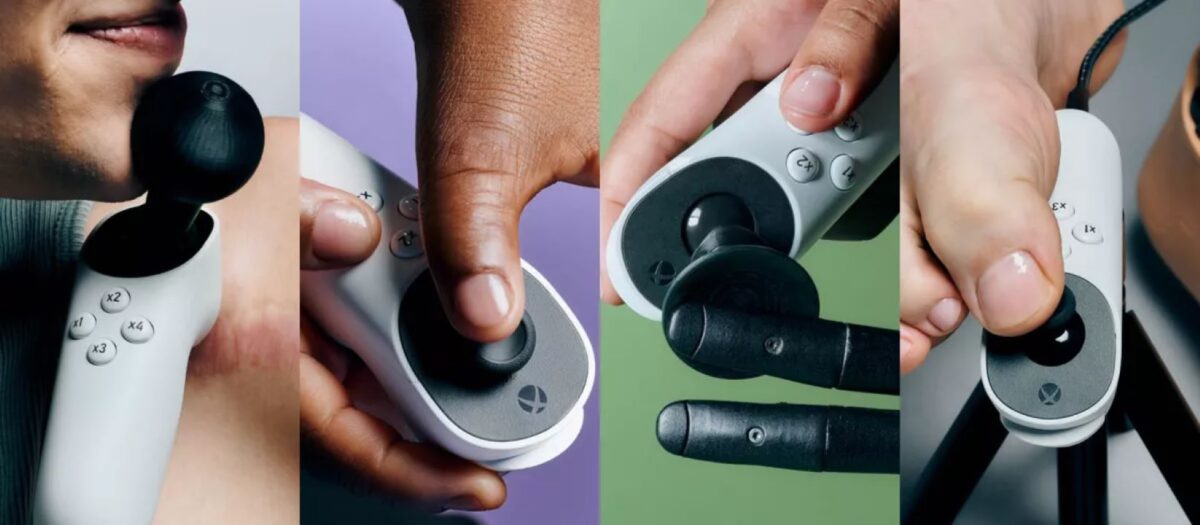
Microsoft has taken another step in its commitment to accessibility in video games with the launch of the Xbox Adaptive Joystick, a new controller designed to enhance the gaming experience for people with disabilities. This device is compatible with both Xbox One and Xbox Series S/X consoles as well as PCs, offering a versatile solution that does not require an Xbox controller for operation.
Bringing video games to millions of people
One of the most notable features of the Xbox Adaptive Joystick is its flexibility in directional control, allowing for efficient use with one hand, a finger, or even the chin. This makes it a practical alternative for those who may have difficulties with traditional controllers. Additionally, Microsoft has made the controller highly customizable, emphasizing its commitment to inclusion and accessibility in video games.
The Xbox Adaptive Joystick is not only accessible but also affordable, as the price will fit all budgets. Since its launch, it has been available for immediate purchase and has received a mostly positive response, with several comments and videos highlighting its effectiveness and usability. The company has also provided a series of printable 3D additions that users can download for free to further customize the controller to their specific needs.
Microsoft, which promotes the idea that when everyone plays, we all win, is reflected in this diligent design. The Xbox Adaptive Joystick is a testament to the company’s ongoing effort to improve the gaming experience for everyone, suggesting that accessibility in video games is a goal worth pursuing, while also providing a platform for more people to get involved in the gaming community. Well done, Microsoft!
In the first week since its release, players of Kingdom Come 2: Deliverance have already begun to explore the world of mods, seeking to customize and enrich their experience. Despite Warhorse Studios’ title being presented as a more complex and authentic RPG compared to others like Skyrim, modders have found ways to tweak various aspects of the game, offering both solutions to ease gameplay and additional challenges. Making the game more accessible: the most popular mods of Kingdom Come 2 are characterized by its more detailed combat system, interactions […]
In the first week since its release, players of Kingdom Come 2: Deliverance have already begun to explore the world of mods, seeking to customize and enrich their experience. Despite Warhorse Studios’ title being presented as a more complex and authentic RPG compared to others like Skyrim, modders have found ways to adjust various aspects of the game, offering both solutions to ease gameplay and additional challenges.
Making the Game More Accessible: The Most Popular Game Mods
Other mods focus on adjusting the carry weight, allowing players to pick up more items without needing to empty their pockets frequently. Additionally, the mod Instant Herb Picking 2 removes the tedious herb-picking animation, a detail that can make the experience more enjoyable for alchemists in the game.
For those seeking greater realism, there are also mods that remove location markers on the map and the compass, challenging players to rely on their skill and knowledge of the environment, just like in the authentic medieval era. The instructions for installing these mods are clear: it is essential to create a folder called Mods in the game directory, specifically in SteamsteamappscommonKingdomComeDeliverance2.
As the community continues to develop and share new modifications, Kingdom Come 2: Deliverance promises to be an even richer and more varied experience, adapting to the tastes of each player.
Todo el mundo va a poder jugar a Tekken 8, asegura su productor, ya que no habrá ningún impedimento para que sea accesible para todo el mundo
Accessibility is a topic that we consider very important in the world of video games. That everyone can play video games as they have been conceived, regardless of their abilities, is a task that should always be welcomed and embraced. That’s why we always try to highlight when studios make this kind of effort. Because it is something that benefits everyone, not just those who need these features.
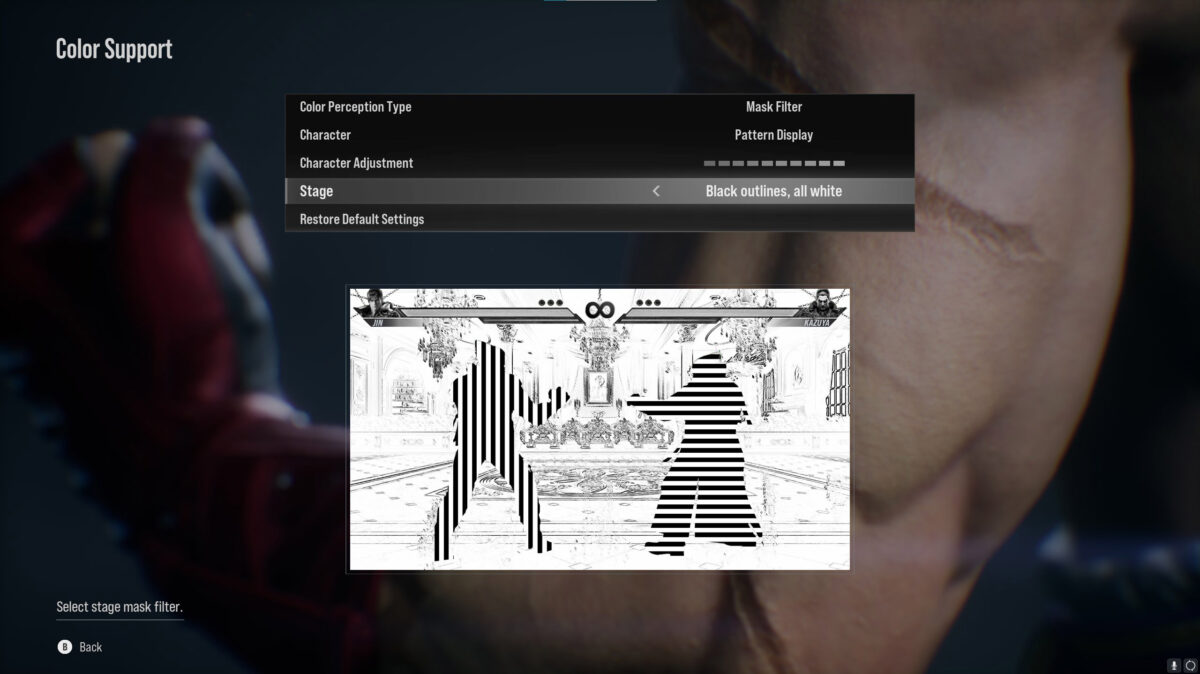
The latest game to introduce accessibility options has been Tekken 8. Although the game demo was released on December 21st, it wasn’t until recently that the news broke. The game not only had accessibility options, but they were generously deep and intelligent. With several fully optional Color Support options, the game allows you to change the aesthetics of the game so that people with visual impairments can enjoy it without any issues.
When the topic started to be discussed, one person decided to comment on it in depth: Katsuhiro Harada, producer of Tekken. Since he is someone who usually comments on game development topics, he has decided to provide some more insights into the development of these accessibility options. Because this is not something that emerged for Tekken 8. These options were previously developed for a Tekken 7 trial version that included accessibility options that were not implemented in the game. Something they decided to implement, once polished, in the next installment of the franchise.
I have developed and tested “an accessibility version of TEKKEN 7” (albeit not for sale), several years ago. Those studies have been introduced into this version of TEKKEN8.#TEKKEN8#鉄拳8https://t.co/Q00H5YIkzh
The accessibility options of this class have become much more common in the last couple of years than they were when Tekken 7 came out in 2015. This year, its direct competitor, Street Fighter 6, has added a sound-based accessibility option so that players with visual impairments can play without any problem. Therefore, it is expected that we will continue to see more news of this kind during 2024.
Tekken 8 will be released on January 26, 2024 for PlayStation 5, Xbox Series X, Xbox Series S, and PC. Meanwhile, the demo, including Color Support options, is already available on those same platforms.
With a long list of commands available and the possibility of creating the ones we want, it is a function to take into account.
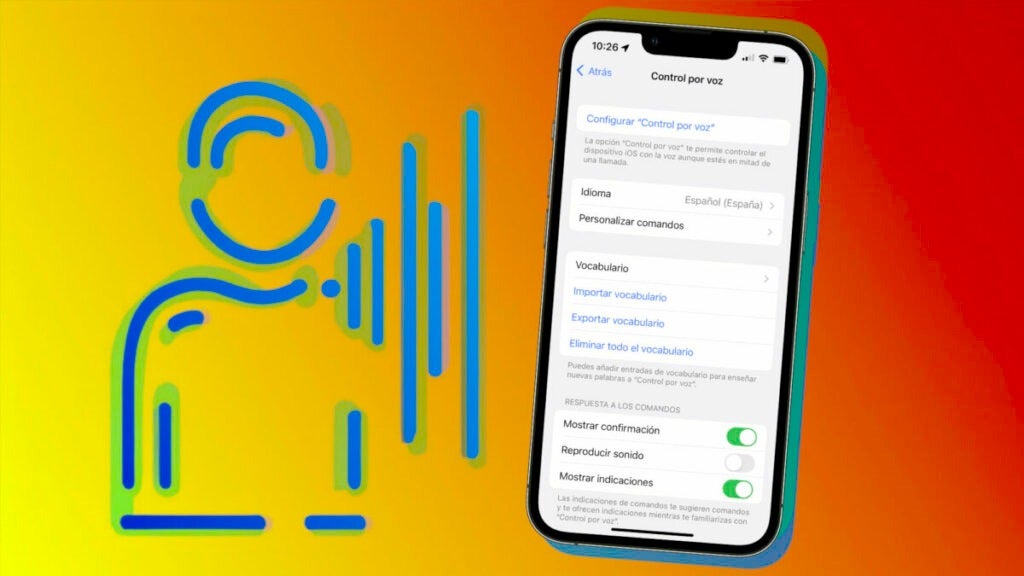
Voice control on your iPhone is an accessibility feature designed to facilitate the use of the device and make it more accessible for people with certain interaction difficulties. With this feature, we can control our phone using voice commands, allowing us to navigate through applications, adjust settings and perform various actions without touching the screen.
Activating voice control on an iPhone is very simple. The exact steps to follow are as follows:
We open the Settings app on our iPhone or iPad.
Go to Accessibility.
Tap on Voice Control.
*Tap on *Set up “Voice Control “*.
A download of the content necessary to use the functionality will start. When finished, a microphone will appear in the status bar to show that the device is listening to us.
Useful voice commands to control your iPhone
Once Voice Control is activated, you can perform actions in the same way as if you were touching the screen. Something as simple as saying “swipe down” or “long press on the Phone app” are just a few examples, but there are many more:
“Go to [app name]”: opens a specific app. For example, “Go to Safari” will open the web browser.
“Scroll up/down”: scrolls the screen up or down.
“Touch [item name]”: touches an item on the screen, such as a button or link.
“Swipe left/right”: swipe the screen left or right, useful for switching between open pages or applications in the app selector.
“Set volume to [percentage]”: change the device volume to the percentage you specify.
“Enable/Disable [feature name]”: to enable or disable a specific feature, such as Bluetooth or Wi-Fi.
“Lock screen”: to turn off the device screen.
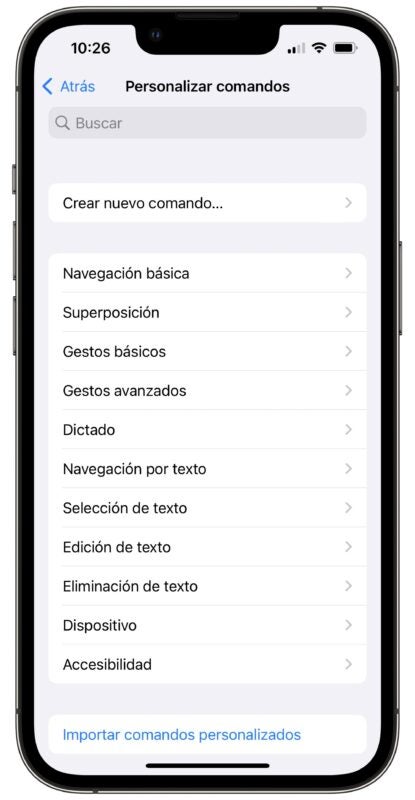
And the list could go on. All available commands can be explored in the “Voice Control” settings, under the “Customize commands” section. Also, something to keep very much in mind, is that we can turn Voice Control on and off via Siri. A simple “Hey Siri, turn Voice Control on/off” will take care of it, so there is no need to touch the device at any time.
Customize voice control on your iPhone
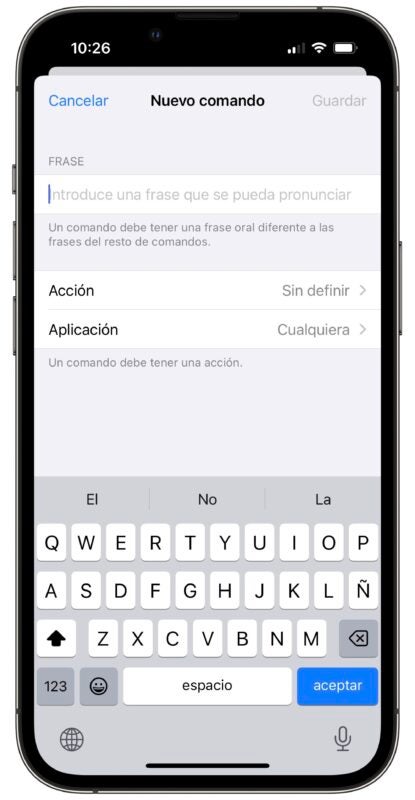
One of the advantages of voice control on the iPhone is its ability to customize commands according to one’s preferences and needs. To do this, here are the steps to follow:
We open the Settings app on our iPhone or iPad.
Go to Accessibility.
Tap on Voice Control.
Go to Customize commands.
Tap on Create new command.
Enter the phrase to pronounce.
We choose the action we want to do as Insert text, Execute custom gesture or Execute shortcut.
Choose the application in which you want the new command to be available or leave Any to make it available in the whole system.
When finished, tap Save.
Once we have created custom commands, we can use them in the same way as the default commands. This allows us to tailor voice control to our specific preferences and needs, making it even easier to use the iPhone.
Voice control is a really powerful tool when it comes to facilitating the use of the device for people with difficulties in doing so. Beyond that, it’s easy for everyone to get something out of it, especially in situations where we can’t touch the screenfor whatever reason. With a long list of commands available and the ability to create the ones we want, it’s a feature to consider.
Accessibility is something in which Apple dedicates a great amount of resources so that we can all enjoy our iPhone.
Apple has always been known for offering a tremendous amount of accessibility options in all of its operating systems. It has done, for years, a great job in incorporating a wide variety of accessibility features that allow people with visual, hearing, motor and cognitive difficulties to interact with the device and take full advantage of its functions. This is a topic that could be covered in several articles, but we will touch on the most important adjustments to get an overall view of the situation.
Our iPhone can notify us when it detects the sound of an appliance, but not everyone can distinguish between them. Let's talk about this useful feature.
Technology is advancing by leaps and bounds and our devices are offering us more and more new capabilities. In this case, we find that our iPhone can become a very useful sound detector. Thanks to the sound recognition offered by Apple, we can train our device to alert us when a specific sound is produced, such as the washing machine or microwave.