Our team is always looking for things we think our readers will value. If we make a content partnership like the one featured in this article, then we may receive compensation for publishing.
What’s the most important component of a mobile app? The user experience.
Optimizing how users interact with your app will improve how often they use it and remain active.
On the flip side, poorly optimized apps will experience higher churn rates. In fact, the average mobile app loses 77% of users within three days of it being downloaded.
How can you get around this? Through mobile deep linking.
This is the process of sending users directly to a specific page within an app versus the welcome screen. Users get where they want to be faster and ultimately have a more pleasant experience.
Deep linking also allows you to collect information to refine the user experience, discover trends, and understand your users on a deeper level.
Sounds like something you’d like to experience? Great, because ahead we’ll be teaching you how to use Appsflyer to integrate deep linking and measure mobile app campaigns.
How to use Appsflyer to measure mobile campaigns
AppsFlyer uses the OneLink system that makes deep linking easier and quicker than ever. The system looks like this:
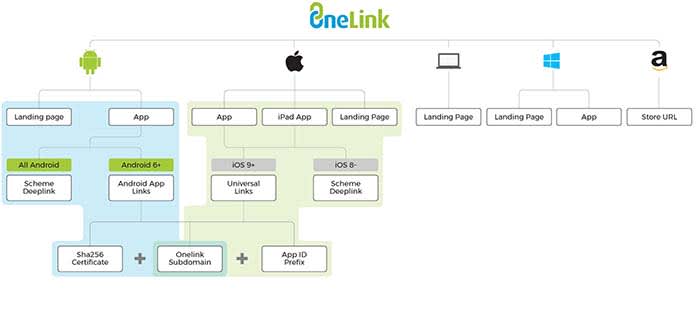
OneLink compiles data by acting as a bridge between mobile apps and advertising campaigns. It will help you personalize the user experience while also being able to retarget users.
Seeing as retargeting can boost ad response by 400%, mobile app companies could be drastically improving campaign performance with deep linking.
First, you need to understand the different types of mobile deep links before implementing them.
The two types of deep links
The first type of mobile deep links is called standard deep linking. It allows you to personalize the app journey for devices with the app already installed.
The second type, deferred deep linking, serves personalized content to users. They will be forwarded to the app installation page first if it isn’t found on their device.
The two processes look like this:
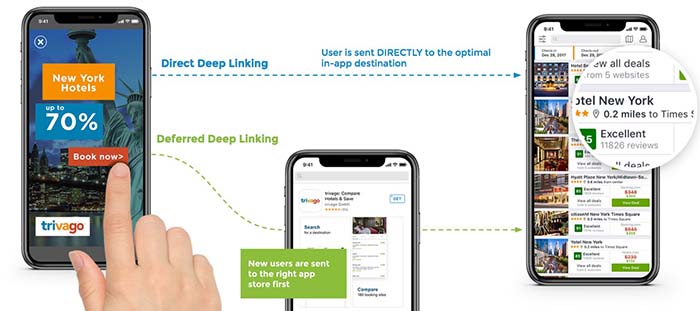
No matter if they have the app installed or download it afterward, they will be automatically forwarded to the page they intended to visit.
For example, if a user clicked on a product page found on Google, it would open the app and place them on that page.
Since apps are typically more optimized for mobile devices than browsers, sales funnels and pages will be more effective.
OneLink deep linking steps
Now that you understand how deep links work, follow the below steps to configure it correctly for the device.
URI schemes
URI stands for uniform resource identifier and is similar to the URL of a website. URIs allow developers to link to deeper activities within an app, such as a specific page or feature.
URI schemes are specific to Android, and automatically launch an app to the desired location when a user navigates to a URL with the app installed.
The first step to adding a deep link via a URI scheme is by adding an intent filter in your Android app’s manifest.xml file like so:
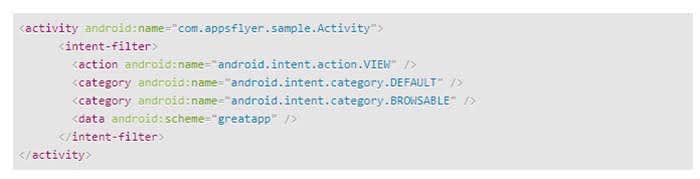
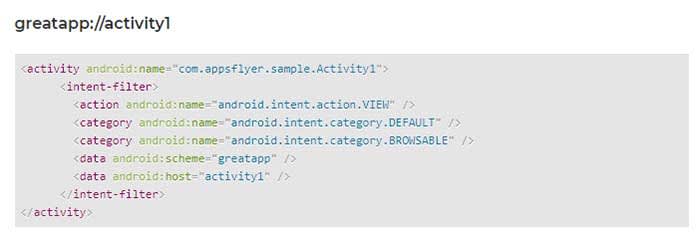
You can then add a deep link to each individual activity you would like to deep link into. Here’s an example:
Universal links
Universal links are links between an iOS mobile app and an associated website or domain.
The first step to deep linking in iOS apps is to acquire the app’s prefix ID via your Apple Developer account. You can find it by following these steps:
- Select the “Certificates, Identifiers & Profiles” menu once you’re logged in
- Click “App IDs” under the “Identifiers” sidebar menu
- Choose the app you’re developing
- Copy the Prefix code and ID. This needs to be added to a OneLink template by your marketing department
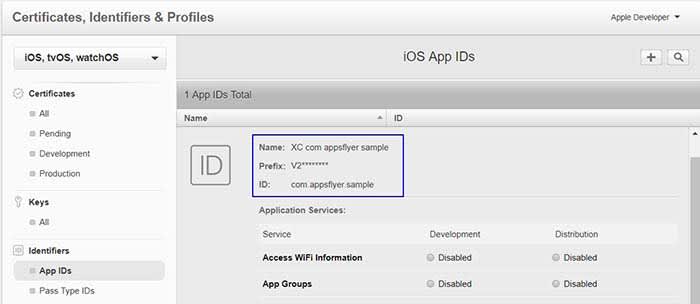
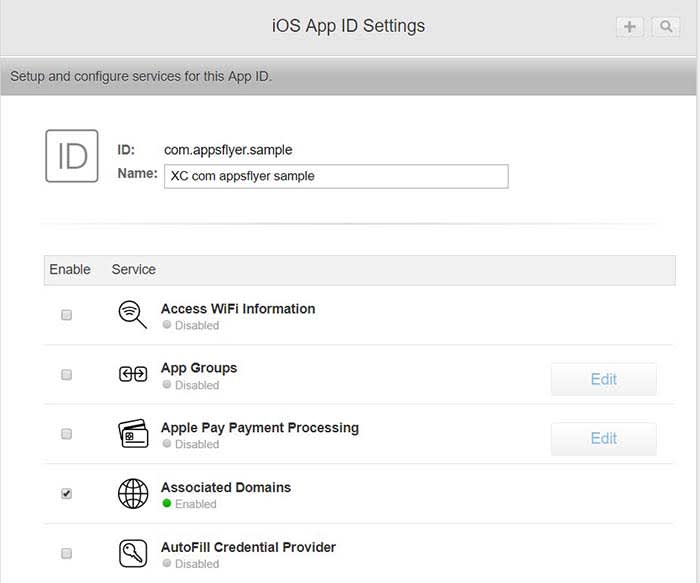
Next, navigate to the “Application Services” section of your Apple Developer account to enable associated domains.
The last step is to generate a OneLink subdomain and include it within the “Associated Domains” section of Xcode.
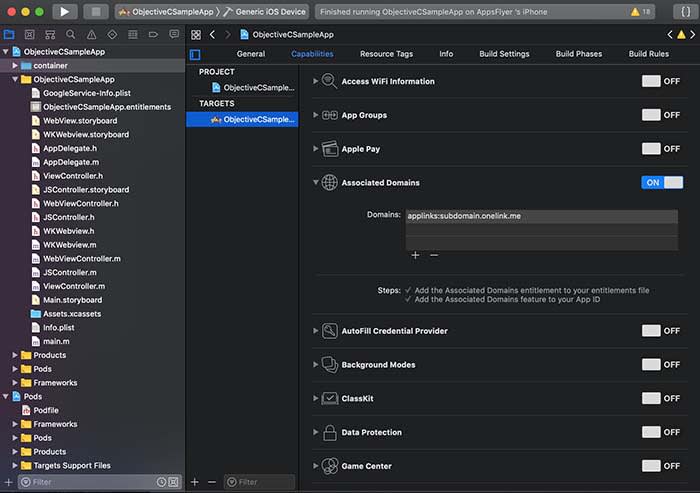
Once you have completed these steps, Apple devices will automatically launch the associated app when a user navigates to the domain(s) you set up.
Android app links
Google introduced its own version of universal linking with Android 6.0 if you wish to take that approach to deep links within a mobile app.
The first step is to generate a SHA256 fingerprint to enter during the OneLink setup. This begins by navigating to the app’s keystore which can be found on:
- Windows: C:\Users\USERNAME\.android\debug.keystore
- Linux/Mac: ~/.android/debug.keystore
Once you have located the keystore destination, run the following command:
- keytool -list -v -keystore apk-key.keystore
If it asks for a password, the default is typical “android”
The output will look like this:
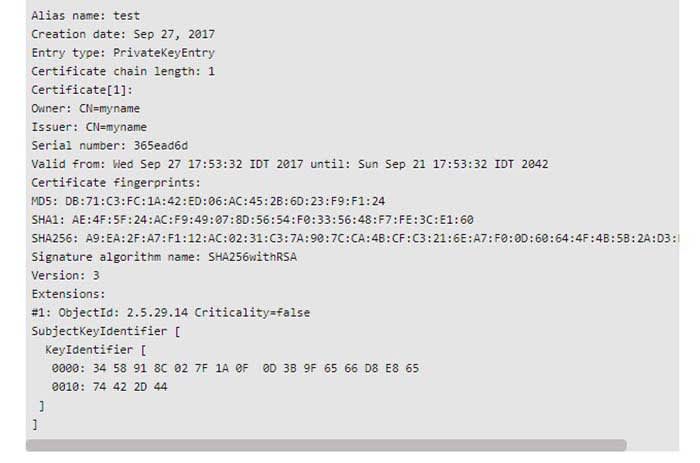
An individual in your marketing department will need to create an intent snippet through OneLink by adding the SHA256 fingerprint you generated.
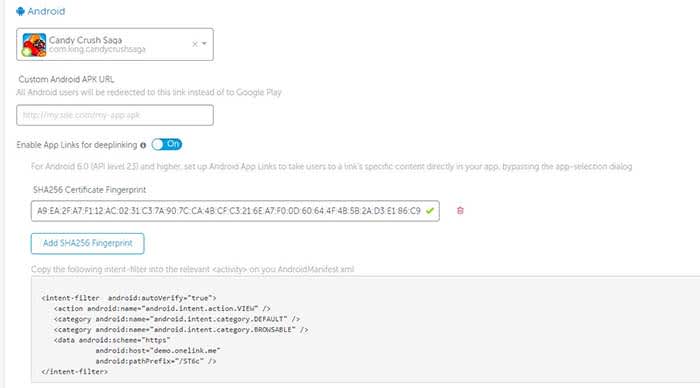
This snippet can then be pasted directly in the AndroidManifest.xml file of your Android app where you wish to deep link into.
Tracking data with AppsFlyer
Once you have successfully enabled deep linking for your app and its appropriate OS, you can begin measuring two types of data:
- Conversion data for new users
- Re-engagement data for existing users
Accessing conversion data via deferred linking can be done directly through OneLink’s system as attribution data is sent directly to the app upon use.
Re-engagement data, however, involves the following flow:
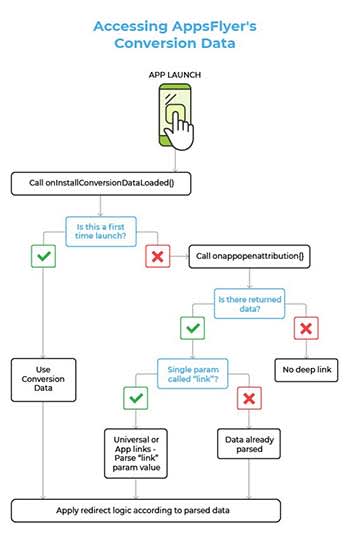
Developers can use the onAppOpenAttribution SDK function to access all of the re-engagement data parsed through the app. This function returns the data via “NSDictionary <key, value>” objects on iOS and “Map <key, value” objects on Android.
Wrapping up mobile app deep linking
Optimizing the user experience and reducing churn rate are common priorities for mobile app developers. Mobile deep linking is one way to work on both of these aspects in one fell swoop.
Deep links forward users to deeper pages within an app, making their experience more enjoyable and productive. This has been shown to increase conversion rates and increase retention at the same time.
Developers can implement deep links through URI schemes or universal links depending on the operating system.
Standard deep linking works for users with an app already installed, while deferred deep linking has the user install it first if it isn’t found on their device.
This means that deep linking also helps developers acquire more users. Furthermore, deep linking collects data on users that can be used to refine the app and its marketing.
So, what are you waiting for? Try adding deep links to your mobile app today to measure and optimize your campaign.