James Stewart will be resurrected by AI to make you sleep (and, somehow, it’s legal)

He has the approval of the family, who, by now, will be looking for another way to monetize his fame, even if it is by doing digital necromancy.

On July 2, 1997, at the age of 89, James Stewart died of a heart attack at his home in Beverly Hills. He left behind a hundred films for which he won two Oscars: one for ‘The Philadelphia Story’ and another honorary one in 1985. And now, 33 years after his last role in ‘An American Tail: Fievel Goes West’, the actor is going to come back to tell you a bedtime story.

Calm DOWNLOAD

The IAndiscreta Window

It will be on the Calm app, which has recreated the actor’s voice to narrate ‘It’s a Wonderful Sleep Story’. They haven’t done it without permission, of course: it has the family’s approval, who, at this point, will be looking for another way to monetize their fame even if it means doing digital necromancy.

“Hello. I’m James Stewart. But, well, you can call me Jimmy. Today I’m going to tell you a story. It’s a comforting story of love, loss, hope, and joy. But above all, it’s a wonderful bedtime story”. That’s how this tale between ‘Black Mirror‘ and the exacerbated capitalism by which a few are very excited and many others can’t help but grimace thinking about a rather terrifying future begins.

You can disguise yourself however you want: a tribute to the actor, made with the highest professional ethics possible, a memory of Hollywood myths… And it’s all true. And at the same time, it’s absolutely false. In any case, paying subscribers (because this, in the end, is anything but free) of the app can now enjoy James Stewart in a role he never accepted thanks to AI. Ethics, if anything, we’ll leave for another time.

Calm DOWNLOAD

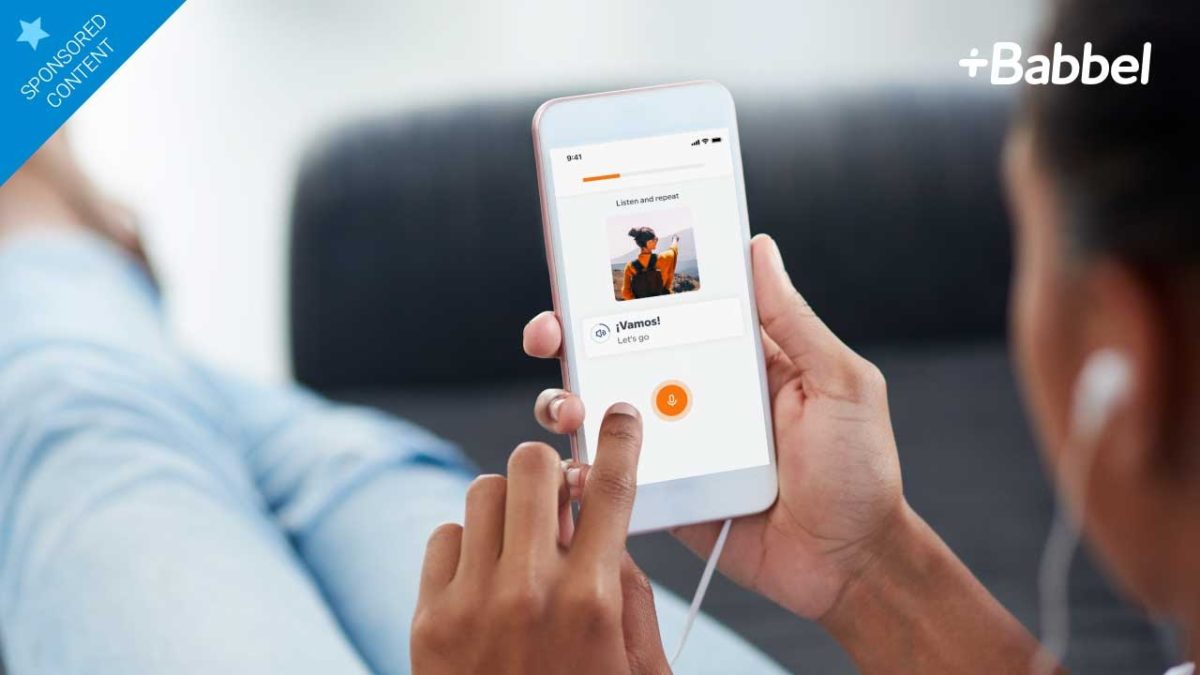
5 Reasons why Babbel is the top app to learn languages

5 Reasons why Babbel is the top app to learn languages. Download the app and try it for free!

Learning a second language can help you with everything from getting a better job to having a great vacation experience. But most of us don’t have time to sit in stuffy classrooms for hours a week using old methods to try to grasp the language basics. It’s much more fun, efficient and effective to learn a language using the one tool that’s usually by your side – your smartphone. And we’ve simply not found a better mobile language-learning app than Babbel. Here’s why.

1. Start speaking right away

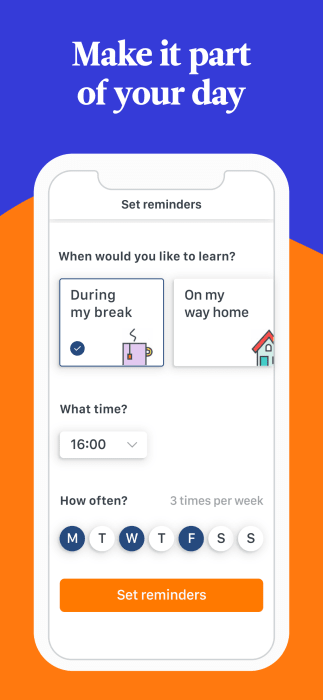
Babbel gets you speaking immediately with practical phrases and vocabulary that you’ll actually use. You’ll go from “Hello, how are you?” to “When is the next train?” quicker than you thought possible thanks to lessons tailored by native speakers. Plus, with handy reminders, you can fit lessons in whenever you have the time – whether it’s during your lunch break, on your way to work, or before you fall asleep at night.

Babbel

2. Short lessons wherever you are

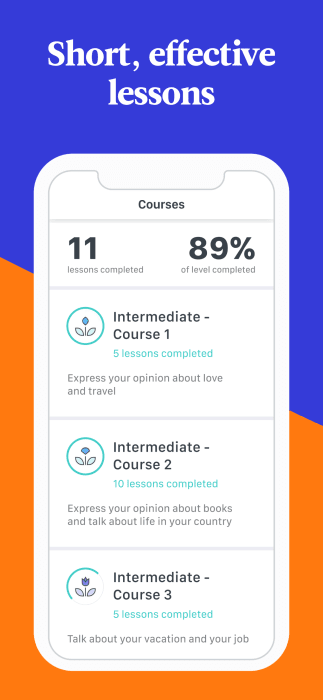
Babbel’s lessons take only 5-10 minutes and can be enjoyed on your smartphone, tablet or desktop computer. But even though the lessons are short, the method works remarkably well. In fact, according to researchers from the City University of New York and the University of South Carolina, Babbel users were able to cover the requirements of a semester-long college Spanish course in just 21 hours of study with Babbel over a two-month period

Babbel

3. Learn according to your own needs

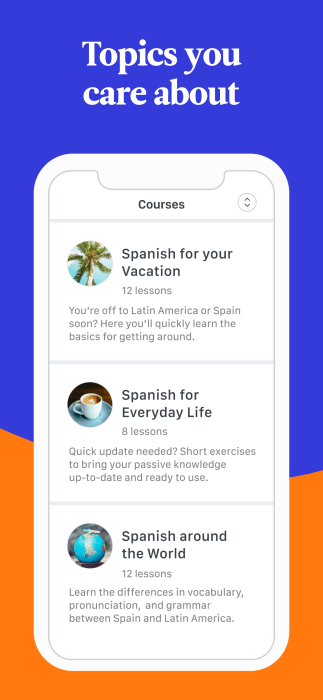
As you know, we all learn differently and have different vocabulary needs. A business traveler will need one set of terms to be successful, while a tourist will need another. Babble not only allows you to focus on the topics you need, but it also combines a mix of reading, writing, speaking, seeing and listening exercises that let you use whichever method works best for you. 

Babbel

4. Get results….for real!

According to the university studies mentioned above, 9 out of 10 Babbel users improved their Spanish proficiency in just two months. That’s partly because the app uses a specially developed learning system that reviews vocabulary words at just the right times to move them from your short-term to your long-term memory. But don’t take our word for it, check out the thousands of positive reviews our app has gotten on the Google Play and Apple stores, including this one …

“Excellent App and truly a full course to learn languages fast! There is nothing that can compete on the market and the App is worth every cent! Just start learning a common language to improve yourself, even if you don’t feel an immediate use. You’ll enjoy it! There is so much to learn about culture at the same time. The App covers it all in a very clever way.” – Sarah Bremmer

5. Free Trial

While we’re convinced that Babbel is the premiere best way to learn another language, you can find out for yourself without spending a dime by trying the app’s demo, which entitles you to a completely free lesson from any one of 14 languages. 

Once your free lesson is complete, you can sign up for a variety of packages as low as just €9,95 per month. All packages come with a 20-day money back guarantee as well, so if you find that Babbel is not right for you at any time during that period, a full refund is just a click away. You’ve got nothing to lose and the power of unlocking a second language to gain! 

Best macOS desktop apps in 2019

These apps will supercharge your Mac!

Mac with apps

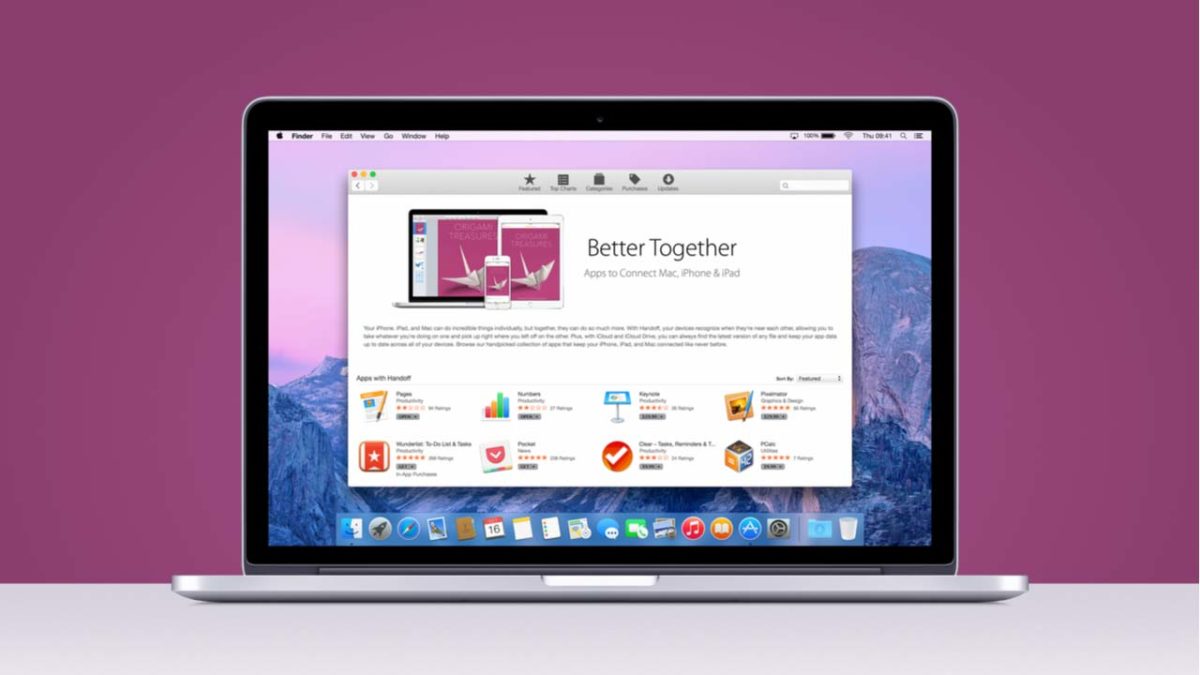
If you’re going to spend over $1,000 for a computer, you might as well load it up.

Newer MacBooks come equipped with an out-of-the-box app stack that should have you covered. 

Sure, TextEdit won’t meet your word-processing needs, but Apple News, Notes, Tasks, and more all come preloaded in your dashboard. However, it’s easy to forget that there’s a lot you can do to sweeten your setup. 

The macOS library hosts a whole lot of gems, from the tools that help you focus to those that lend a helping hand in the kitchen.

MacOS Apps to supercharge your desktop

Alfred

alfred app mac os desktop

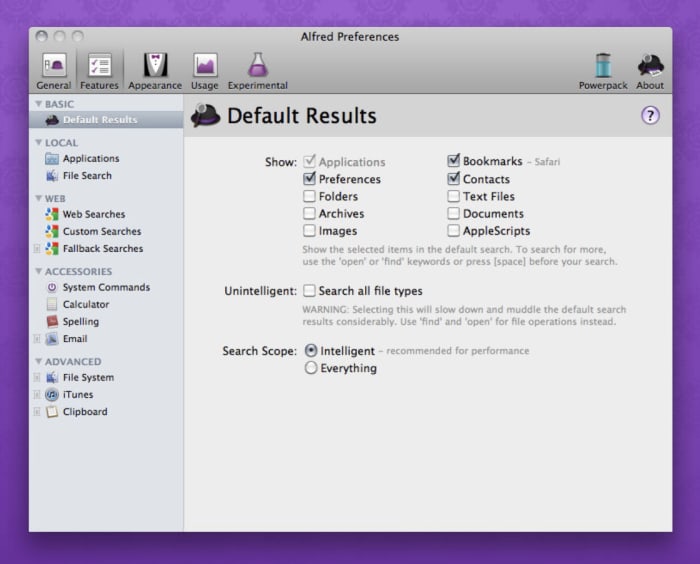
Alfred is a shortcuts app that lets you use quick keyboard commands to launch your apps, locate files, or surf the web. Use the desktop app to create your own extensions or use creations shared by the community of Alfred users.

We’ll offer a word of warning — Alfred is not an easy tool for beginners. It also isn’t for everyone. For those who thrive on shaving seconds off of tedious busywork, the upfront investment will pay off in spades. You can build workflows that automate manual tasks, control your music, link up with 1Password, and search for emails through the tool.

Alfred Download Free
8

MacPaw

If you really want to make your computer run faster, we would recommend MacPaw. Don’t be fooled by the name, MacPaw products are available for both Mac and PC. 

Amphetamine

amphetamine mac app

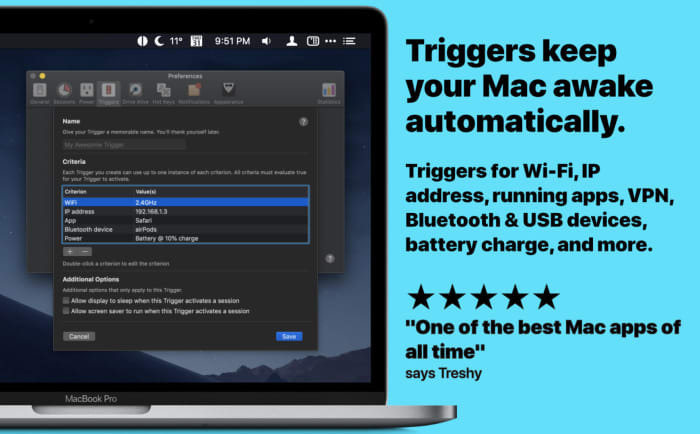
If you’re sick of adjusting the Energy Saver to keep your Mac from sleeping, Amphetamine steps in to keep your laptop awake. Install the app— and access by right-clicking the menu bar icon to turn it on. Once activated, Amphetamine keeps your Mac awake until you turn it off. 

That’s not all, though. Amphetamine settings can be updated so that it keeps your Mac awake during specific tasks or when it’s connected to a certain Wi-Fi network.

Amphetamine Download Free ►
7

Bear Notes

bear notes app

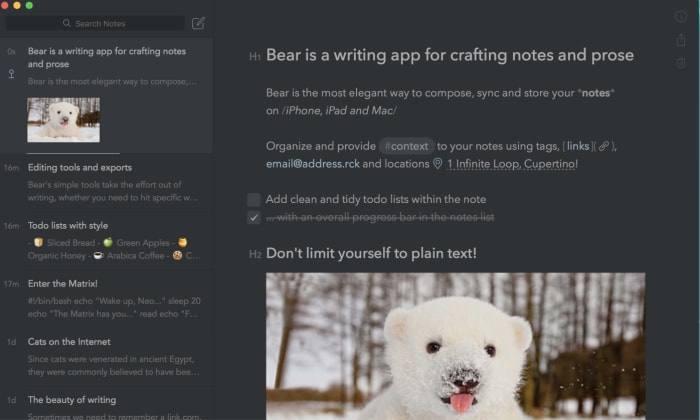
Bear Notes isn’t just another Notes app. We know, the App Store is loaded with all kinds of tools that promise to help you keep track of everything. But, if you’re naturally disorganized, even the best-designed apps can devolve into another digital trash heap. 

Bear Notes is something of an upgrade from the Notes app that comes standard with your Mac. It adds word count, read-time, paragraph count and other stats. You’ll have the option to export your notes in seven different ways including Markdown. It’s ready for WordPress, Medium, or wherever your content’s final destination happens to be.

Bear Notes Download Free ►
8

Paprika 3

Paprika app

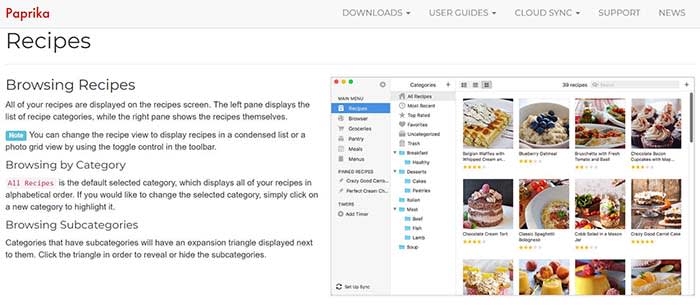
If you’re into cooking but prefer digital recipes to cookbooks, Paprika 3 is the app for you.

It costs $30 in the App Store, which seems like a lot for a tool that doesn’t promise to make you more productive or professionally edit your media. However, Paprika actually proves its worth pretty quickly.

You can download any recipe you find online and the app formats it in a way that is easy to read and easy to find. You can also create meal plans that sync up to the recipes you collect and keep track of your ingredients.

Paprika 3 Download Free ►
9

Slack

slack desktop app mac

The reason we include Slack isn’t because we love the tool so much. Rather, the app is something of a revelation for those who have been using the iOS version or chatting within the web browser. 

If you love Slack or have to use it for work, download the app. It’s free and easier to keep up with alerts from your desktop rather than trying to find the correct flashing tab in a sea of chatbots.

Franz

Franz All-in-One Messaging

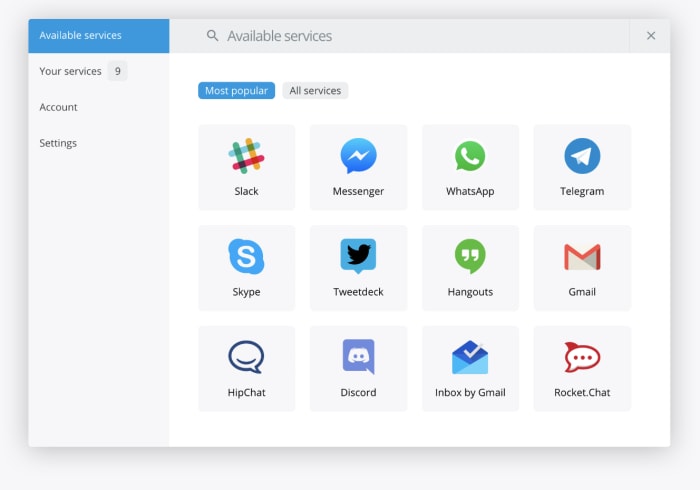
Speaking of chat apps, Franz is a tool that promises to make life a little easier if you’re a social butterfly spread across several applications. The platform brings your accounts together — Slack, WhatsApp, Facebook Messenger, and more. It brings everything together so you can respond from one place.

There’s no limit on how many accounts you can add. So, it doesn’t matter if you’re juggling multiple Facebooks or WhatsApps. 

Make it yours

Apple’s mission statement says that the Mac is the greatest personal computer in the world. Whether or not you believe Apple is up to you. However, if you’re going to spend $1,300 on a new computer that proclaims itself to be the best, you better customize it to have exactly what you want.

Try a VPN!

If you’re looking for a decent VPN service to try out on your computer, we would recommend Express VPN. By clicking this link, you can get 15 months of Express VPN for the price of 12!

How to Monitor your Mobile App Campaign Using Deeplinks

Do you have an app you’re ready to launch? Deep linking can help!

Our team is always looking for things we think our readers will value. If we make a content partnership like the one featured in this article, then we may receive compensation for publishing.

What’s the most important component of a mobile app? The user experience.

Optimizing how users interact with your app will improve how often they use it and remain active.

On the flip side, poorly optimized apps will experience higher churn rates. In fact, the average mobile app loses 77% of users within three days of it being downloaded.

How can you get around this? Through mobile deep linking.

This is the process of sending users directly to a specific page within an app versus the welcome screen. Users get where they want to be faster and ultimately have a more pleasant experience.

Deep linking also allows you to collect information to refine the user experience, discover trends, and understand your users on a deeper level.

Sounds like something you’d like to experience? Great, because ahead we’ll be teaching you how to use Appsflyer to integrate deep linking and measure mobile app campaigns.

How to use Appsflyer to measure mobile campaigns

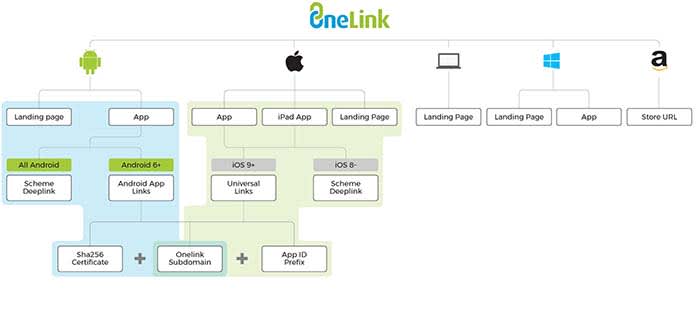
AppsFlyer uses the OneLink system that makes deep linking easier and quicker than ever. The system looks like this:
OneLink

OneLink compiles data by acting as a bridge between mobile apps and advertising campaigns. It will help you personalize the user experience while also being able to retarget users.

Seeing as retargeting can boost ad response by 400%, mobile app companies could be drastically improving campaign performance with deep linking.

First, you need to understand the different types of mobile deep links before implementing them.

The two types of deep links

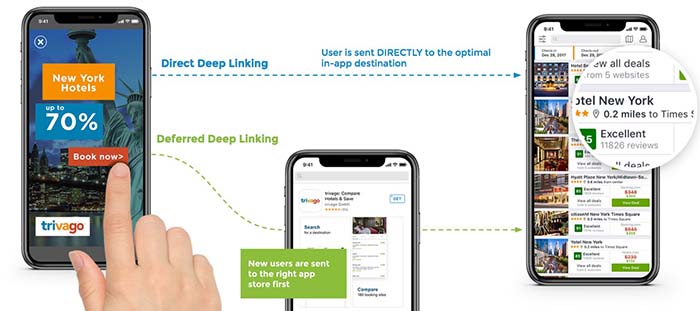
The first type of mobile deep links is called standard deep linking. It allows you to personalize the app journey for devices with the app already installed.

The second type, deferred deep linking, serves personalized content to users. They will be forwarded to the app installation page first if it isn’t found on their device.

The two processes look like this:
Direct Deep Link

No matter if they have the app installed or download it afterward, they will be automatically forwarded to the page they intended to visit.

For example, if a user clicked on a product page found on Google, it would open the app and place them on that page.

Since apps are typically more optimized for mobile devices than browsers, sales funnels and pages will be more effective.

OneLink deep linking steps

Now that you understand how deep links work, follow the below steps to configure it correctly for the device.

URI schemes

URI stands for uniform resource identifier and is similar to the URL of a website. URIs allow developers to link to deeper activities within an app, such as a specific page or feature.

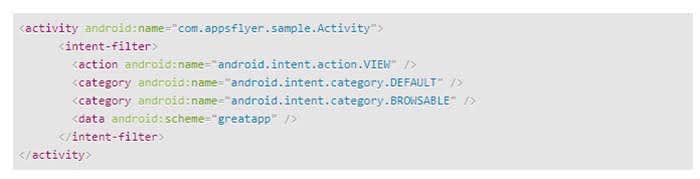
URI schemes are specific to Android, and automatically launch an app to the desired location when a user navigates to a URL with the app installed.

The first step to adding a deep link via a URI scheme is by adding an intent filter in your Android app’s manifest.xml file like so:
Code

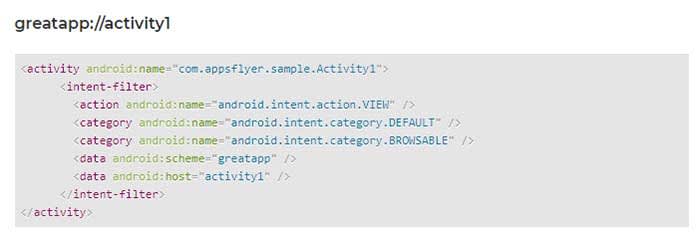
You can then add a deep link to each individual activity you would like to deep link into. Here’s an example:
GreatApp Code

Universal links

Universal links are links between an iOS mobile app and an associated website or domain.

The first step to deep linking in iOS apps is to acquire the app’s prefix ID via your Apple Developer account. You can find it by following these steps:

  1. Select the “Certificates, Identifiers & Profiles” menu once you’re logged in
  2. Click “App IDs” under the “Identifiers” sidebar menu
  3. Choose the app you’re developing
  4. Copy the Prefix code and ID. This needs to be added to a OneLink template by your marketing department
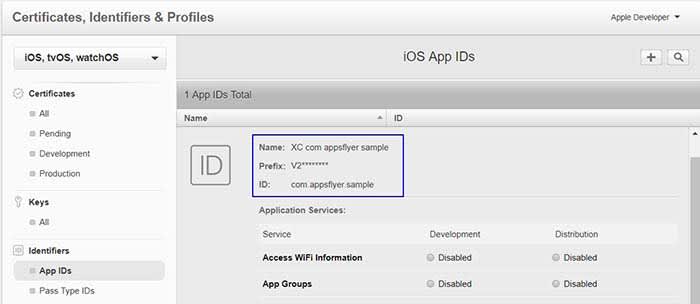
iOS

Next, navigate to the “Application Services” section of your Apple Developer account to enable associated domains.
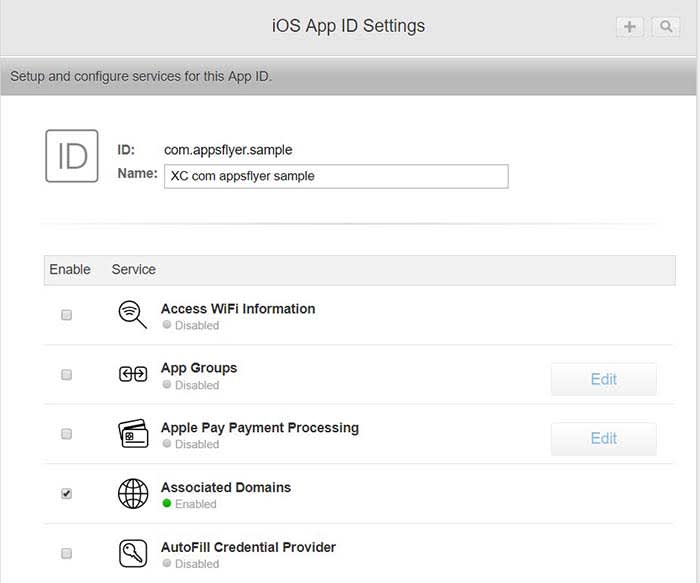
App ID

The last step is to generate a OneLink subdomain and include it within the “Associated Domains” section of Xcode.
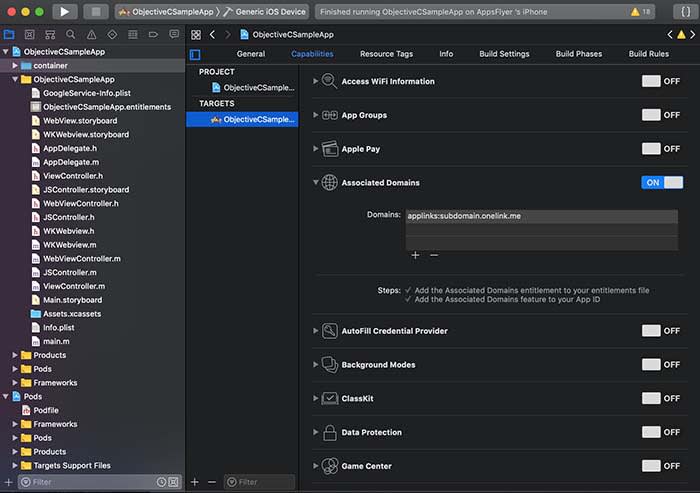
Apple ID

Once you have completed these steps, Apple devices will automatically launch the associated app when a user navigates to the domain(s) you set up.

Android app links

Google introduced its own version of universal linking with Android 6.0 if you wish to take that approach to deep links within a mobile app.

The first step is to generate a SHA256 fingerprint to enter during the OneLink setup. This begins by navigating to the app’s keystore which can be found on:

  • Windows: C:\Users\USERNAME\.android\debug.keystore
  • Linux/Mac: ~/.android/debug.keystore

Once you have located the keystore destination, run the following command:

  • keytool -list -v -keystore apk-key.keystore

If it asks for a password, the default is typical “android”

The output will look like this:
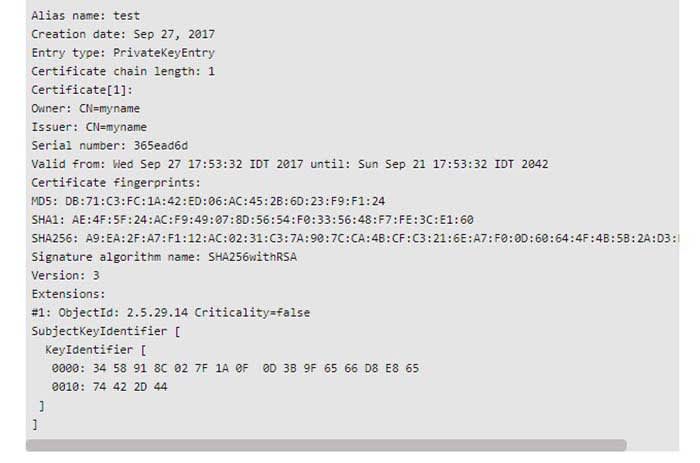
Android code

An individual in your marketing department will need to create an intent snippet through OneLink by adding the SHA256 fingerprint you generated.
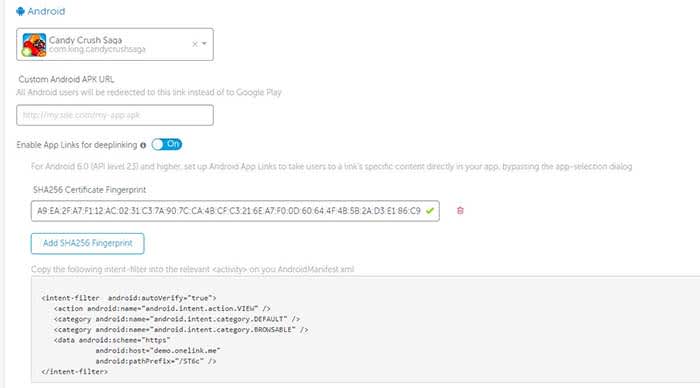
Android Code

This snippet can then be pasted directly in the AndroidManifest.xml file of your Android app where you wish to deep link into.

Tracking data with AppsFlyer

Once you have successfully enabled deep linking for your app and its appropriate OS, you can begin measuring two types of data:

  • Conversion data for new users
  • Re-engagement data for existing users

Accessing conversion data via deferred linking can be done directly through OneLink’s system as attribution data is sent directly to the app upon use.

Re-engagement data, however, involves the following flow:
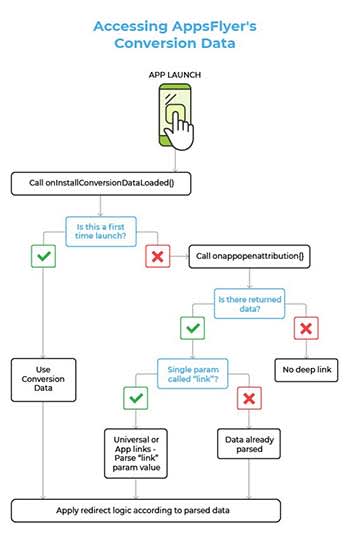
AppsFlyer

Developers can use the onAppOpenAttribution SDK function to access all of the re-engagement data parsed through the app. This function returns the data via “NSDictionary <key, value>” objects on iOS and “Map <key, value” objects on Android.

Wrapping up mobile app deep linking

Optimizing the user experience and reducing churn rate are common priorities for mobile app developers. Mobile deep linking is one way to work on both of these aspects in one fell swoop.

Deep links forward users to deeper pages within an app, making their experience more enjoyable and productive. This has been shown to increase conversion rates and increase retention at the same time.

Developers can implement deep links through URI schemes or universal links depending on the operating system.

Standard deep linking works for users with an app already installed, while deferred deep linking has the user install it first if it isn’t found on their device.

This means that deep linking also helps developers acquire more users. Furthermore, deep linking collects data on users that can be used to refine the app and its marketing.

So, what are you waiting for? Try adding deep links to your mobile app today to measure and optimize your campaign.


Insight Timer is the best app to manage your stress

Could one app help manage your stress forever?

Two months ago HCA Healthcare called stress the “health epidemic of the 21st century” and frankly we’re not surprised. Last year 6,700 Americans nationwide between the ages of 18 and 64 were surveyed about how stressful their lives were, and health experts were genuinely surprised at the resulting harm brought about by chronic stress and the general apathy towards doing anything to curb it.

Mental health stress kitchen breakdown

Whether you’re a college student up to your eyeballs in exams, a millennial managing multiple jobs, a homeowner struggling to balance kids on one hand and a checkbook on the other, or a company manager trying to corral employees, it’s the same old cyclical issue: Your hectic life makes you stressed, and when you approach life from a stressed mental state everything gets harder.

We’re not going to preach life advice to you; no two people are the same, and what works to simplify and organize one person might have little effect on someone else. So instead we’ll point you towards one handy app that’s worked wonders:

Insight Timer

Insight Timer is a free app for Android and iOS that lets you escape the chaos and anxiety of the world for a period of time (which you can custom set), meditate (if you’re into that kind of thing), and come back stronger and more level-headed. Insight Timer won Apps of the Year in both TIME magazine and Women’s Health, and more time is spent on it than on any other meditation app.

Insight Timer Free Download ►
9

What does the app do?

At its core, Insight Timer is a free meditation app, but it also helps novices (which most of us are) learn how to meditate to the best effect. The app features guided meditations and talks led by the world’s mindfulness experts, teachers, neuroscientists, and psychologists from Harvard, Oxford, and Stanford who will coach you in achieving inner peace. Not only that, they’ll teach you how to achieve it at home, at work, or on the go.

Office meditation
Use Insight Timer to take five minutes at work to center your thoughts and get back in the ring.

Insight Timer also has thousands of discussion groups, forums, and community features, as well as stats and milestones to help you track your progress and manage how often you take the time to use the app, and helping you to build a simple daily health habit.

Get started in minutes

Here’s how easy it is to use Insight Timer:

1. Download the app

Insight Timer is free and can be downloaded right here.

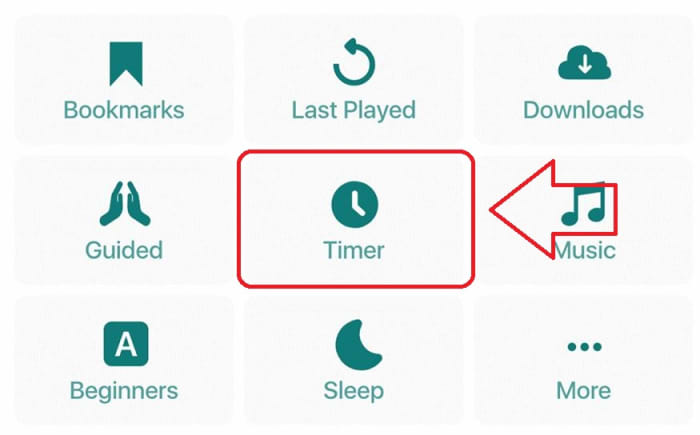
2. Select Timer

The “Timer” function is right on the app’s home page. When you’re ready to zen out, click right on it.

Insight Timer home page

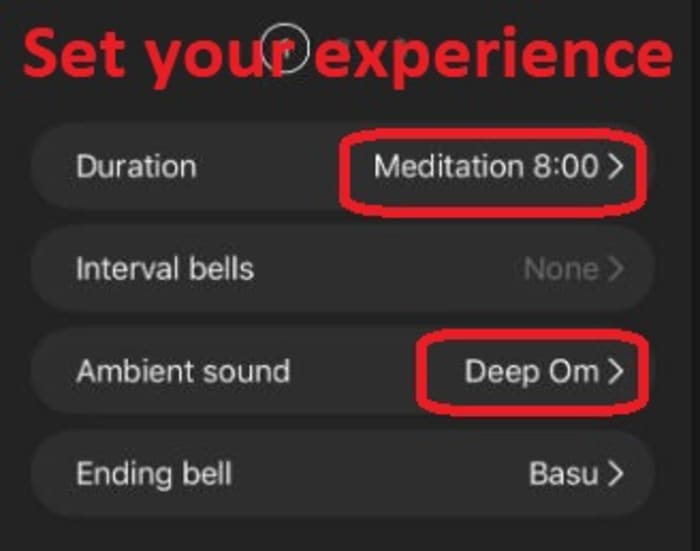
3. (Optional) Choose your settings

Under “Timer” you’re given a few simple customization options for duration and sound effects. We found that even five or 10 minutes was sufficient to clear our head and get us back in the zone. You can also choose from a variety of cool background tracks and bell sounds to play. Check out their catalog!

Insight Timer settings

4. Press “start”

Your chosen bell will ring, and your chosen background SFX will start up immediately. We recommend cranking the volume up so it really feels like you’re awash in the atmosphere. Close your eyes, get comfortable, and let the app work its magic.

How will Insight Timer help me?

Insight Timer doesn’t remove all the problems and everyday stresses of your life. Weave it into your daily life and it goes one step better: The app centers and strengthens you to face these problems with renewed energy and patience. If you let it do its job, Insight Timer is proven to reduce anxiety, calm the mind, manage stress, and even help battle insomnia (try putting it on for a few minutes while you’re trying to fall asleep)!

If any irksome, nagging responsibilities creep into your mind, acknowledge them, mentally partition them, and have the willpower not to tend to them until your timer rings. Insight Timer is like taking a deep breath before diving back into the ocean of stress.

Let us know in the comments below whether you’ll be giving Insight Timer a try. We hope it helps you experience the same rejuvenation that we found. Inhale deeply and feel the renewal!

Guide to using Zomato

Find new local restaurants and become a review lord with Zomato!

Zomato

Imagine having the food delivery features of Grubhub with the same review system of Yelp. Enter Zomato, the new food-service app that’s changing the game!

When you’re hankering for some take-out or delivery, or if you’re just looking for a new local dive, Zomato can help you!

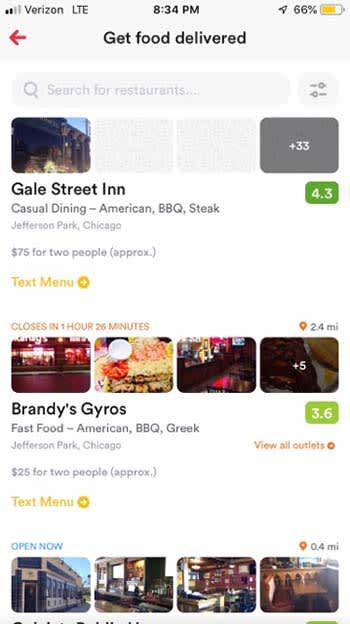
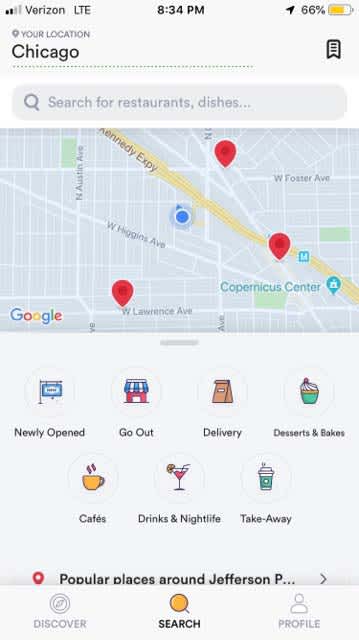
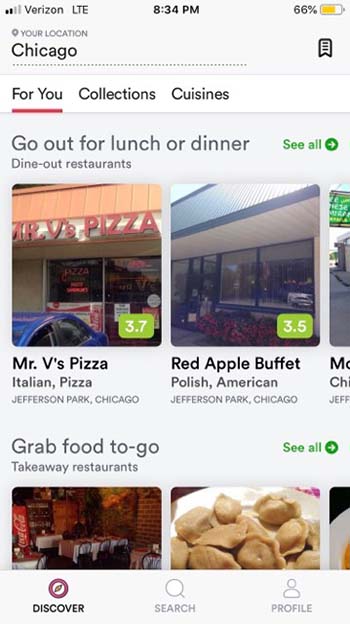
Just like with Grubhub, Zomato will provide you with a list of restaurants around you. You can narrow down your searches based on what you want to eat, if you want take-out, if you want delivery, or if you’re eating out.

Zomato delivery

However, unlike Grubhub, Zomato will get you a list of pretty much every nearby restaurant, and not just ones that opt to use the service.

find food

You don’t store credit card or specific delivery information on the app. Instead, you call the restaurant yourself to place your order. You can store your general location so the app knows to frequently search in that area. However, you don’t need to put in your specific address.

Sure, it might take a minute or two longer to place an order than if you used Grubhub, but it is still better than the dark ages of using a phone book. Plus, you don’t have to worry about your credit card and personal information being stolen in a data leak.

Zomato go out

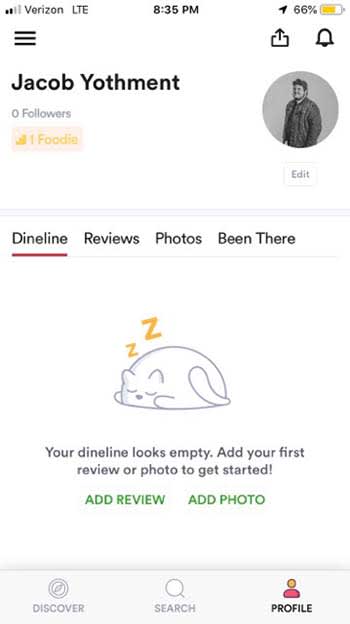
Where Zomato really stands out is in the reviews. You can build a review profile for yourself, and add photos, and reviews to the restaurants you frequent.

Zomato profile

If you order some tasty baba ganoush at your favorite Mediterranean joint, share a picture and a review for other users to see. If your sushi from a local hibachi grill made you go belly-up, give a one-star review to warn other potential patrons.

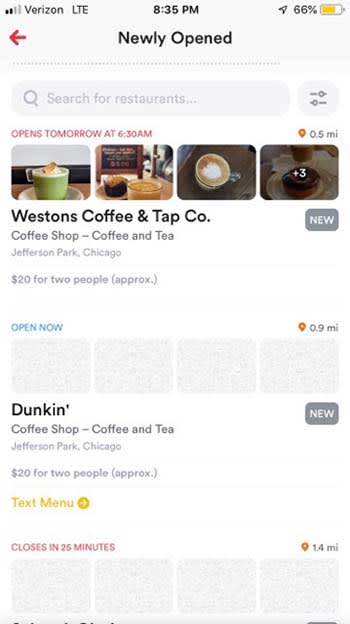
ReviewerZomato also is a great way to find new restaurants. You can search by what recently opened to find a new local hang for you and your friends. Or, better yet, find out when a new Starbucks or Dunkin Donuts opens near you so you can get a quick coffee for your morning commute.

Newly opened

We can see this app really being of service on date nights. If one of your favorite date spots is too busy or is already closed, this app can help you find a suitable plan B nearby!

If you have some favorite restaurants you want to visit again, you can bookmark them in the app, so you always have them at your fingertips.

8

Wrapping up

Zomato has taken some of the best features of our favorite food-service apps to make a truly great experience for its users. If you’re looking for the ideas of where to eat, we can’t recommend it enough!

What is YOLO: the anonymous question app?

YOLO lets your Snapchat friends send you anonymous questions.

YOLO app

YOLO is a new, free-to-download app that can help your friends get to know you better.

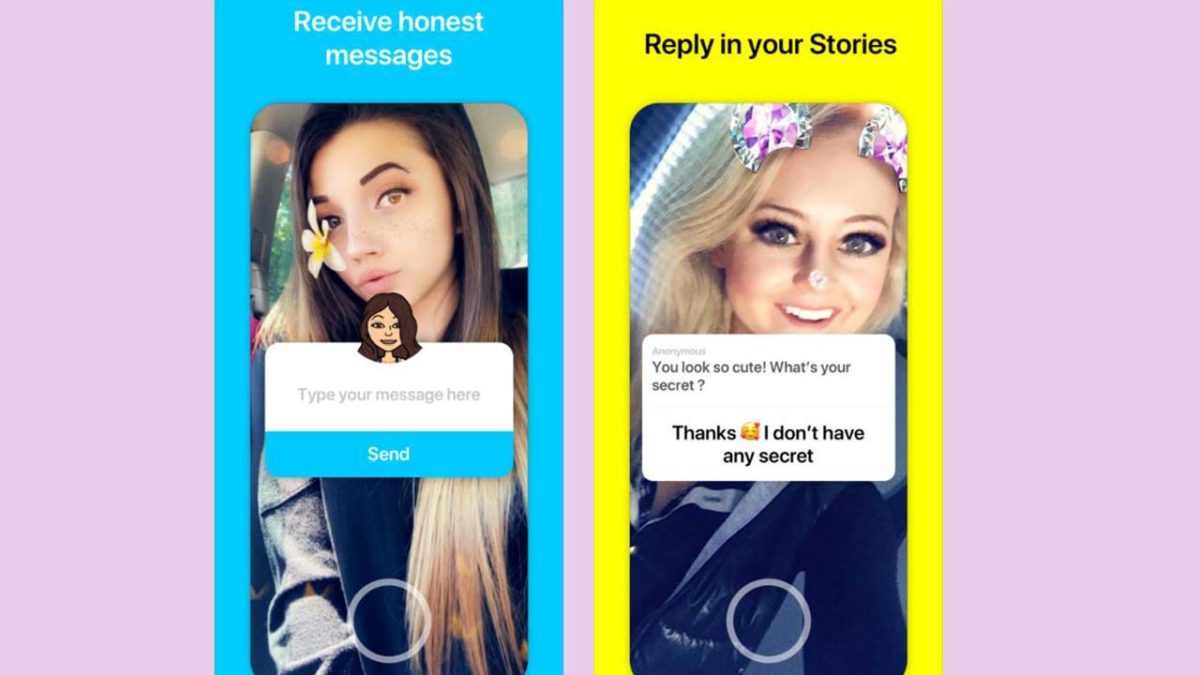
YOLO allows your Snapchat friends to anonymously ask you questions. Let’s say one of your Snapchat friends wants to know if you’re single but is too shy to ask you directly. Or, what if someone wants to know if you’re mad at them, but is worried what you might say to their face? YOLO can help you out!

YOLO is not available yet for Android. Within a week of its launch, YOLO raced to the top of the iOS app charts with about 125,000 downloads already.

8

How to use it

  1. Download YOLO here.
  2. Open the app.
  3. Agree to the terms and conditions.
  4. Link it to your Snapchat account.
  5. Click on “get anonymous messages.”
  6. Snapchat will open.
  7. Post the message to your story, letting your friends know they can anonymously send you messages.
Yolo app

According to the terms of service,  the app is allowed to collect and store personal information including your name, phone number, email address, password, photo, avatar, and location.

Cyberbullying concern

Since users can say something anonymously to someone, the app may invite cyber bullies. A cyberbully could potentially send a malicious message to a user without fear of being caught. 

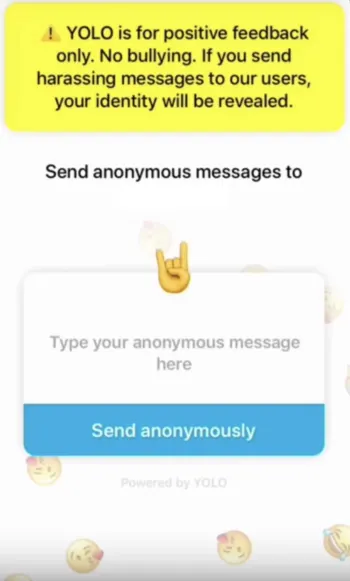
When you download the app, you agree to not use the app for malicious purposes under threat of being banned. 

YOLO also warns that if you use the app maliciously, your identity will be revealed. However, users have reported that they have not seen this happen as of yet, according to a report from Offspring. 

According to the download page, YOLO is for users 12 and up.

Should I download it?

The privacy concerns and cyberbullying concerns are definitely a cause for concern. However, these are both nothing new for social media programs, and seem pretty tame by modern standards. Do we really need to go over all the drama with Facebook?

If you are still in high school, and cyberbullying is an issue, this is probably not the right app for you. If you are older and have friends that have grown beyond petty bullying, then this can be a lot of fun.

Instagram tests video fast-forward, rewind

Finally, Instagram will let us skim to what we want to watch.

Instagram VideoFinally, we will have the ability to sift through our friends’ five-minute Instagram posts.

Instagram will be adding a seek bar to videos in an upcoming update. Similar to one you might find on YouTube, the seek bar will let users skim through videos to fast-forward and rewind to the parts they want to watch.

Instagram Download Now ►
7

The new feature was discovered by app researcher Jane Manchun Wong.

Currently, users have to go through the inconvenient process of rewatching a video from the start and waiting to get to the part they want to watch. Being able to avoid an Instagram user’s cringey video intro or a few minutes of dull content will prove very useful.

It is unknown whether or not this feature will be available in stories, but we can hope it will be. There is no set date for when the update will drop, but if we can wait this long, we can wait a bit longer.

What next?

The ability to rewind and fast-forward videos will encourage more users to post longer content. Currently, videos are typically less than a minute long due to the lack of that control. Content creators such as Twitch streamers and how-to video creators may upload some longer content to Instagram to reach out more to their audiences. This may inspire more people to try and become Insta-famous and monetize their Instagram pages.