Brave’s got speed, privacy, security, customization, and a rewards system. Brave browser lets you simply and seamlessly transfer all your stuff over in seconds. Find out how to bookmark and how to sync all your settings.
If you’re reading this article you likely already know why Brave is such an incredible browser: It saves you time and money by blocking ads, trackers, pop-ups, banners, and cookies, and keeps your web history private and secure by upgrading your HTTP to HTTPS. Brave also allows you to earn Basic Attention Tokens when you elect to watch ads, and then lets you spend them as a form of currency for preferred publishers and advertisers.
So Brave’s got speed, privacy, security, customization, and a rewards system. All this good stuff, so what’s the catch? It’s not your usual browser. All your favorite extensions, plug-ins, and bookmarks are back in Chrome or Firefox where you left them. So do you have to manually go back and punch them all into Brave?
Browse the web up to 8x faster than Chrome and SafariFree Download
Enjoy private, secure and fast browsing with Brave
Of course not. Brave lets you simply and seamlessly transfer all your stuff over in seconds. Here’s how:
Sync your old bookmarks
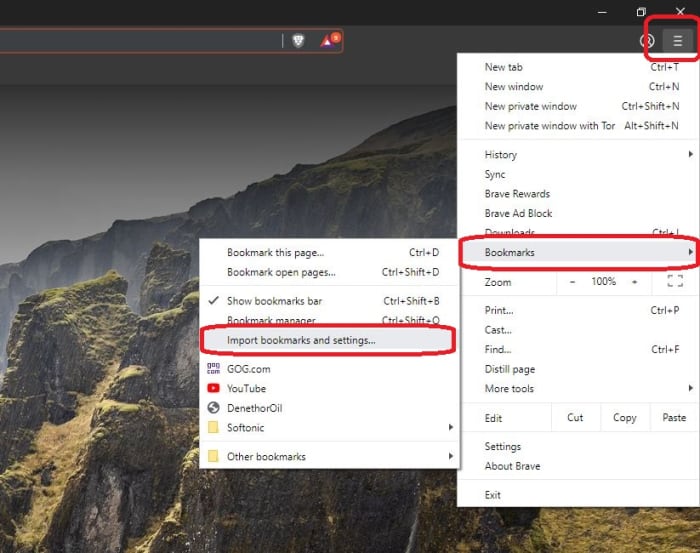
Inside the Brave browser, click the three horizontal lines in the upper right corner:
Follow the drop-down menu from bookmarks and click on Import bookmarks and settings
From here all you have to do is pick the browser you want to import from (you can import from multiple browsers too, if you wish), check the box, and click Import. A couple seconds later you should have all your old favorites in your new home. If anything is out of place, you can press Ctrl+Shift+Q to open up your Bookmark Manager and adjust any way you want.
Create new bookmarks
Making new bookmarks is even easier. All you have to do is click the bookmark symbol on top of the screen next your main search portal and there you have it – you’ve marked the page. From here you can choose to name the bookmark anything you like, and manage what folder it goes into.
So there you have it! All your past and future bookmarks living under one roof. Enjoy safer, faster, ad-free browsing with Brave!
Browse the web up to 8x faster than Chrome and SafariFree Download
Enjoy private, secure and fast browsing with Brave
Don’t leave yourself open to the latest hacking threat, completely eliminate Internet Explorer with these steps.
Internet Explorer has long been the butt of jokes and the wearer of the dunce cap in browser class. It’s no news that IE’s best days are long behind it, but now it’s not only terrible – it’s dangerous. Internet Explorer currently sports an unpatched exploit in the way it processes MHT files, the web archive format that the browser uses. Consequently, any hacker with malicious intent can easily spy on a Windows user and break into their local data. The flaw puts you at risk for doing something as harmless as opening an attachment. With so many better browsers out there, Internet Explorer is doing you more harm than good. Time to get rid of it:
But first…
Is removing IE dangerous?
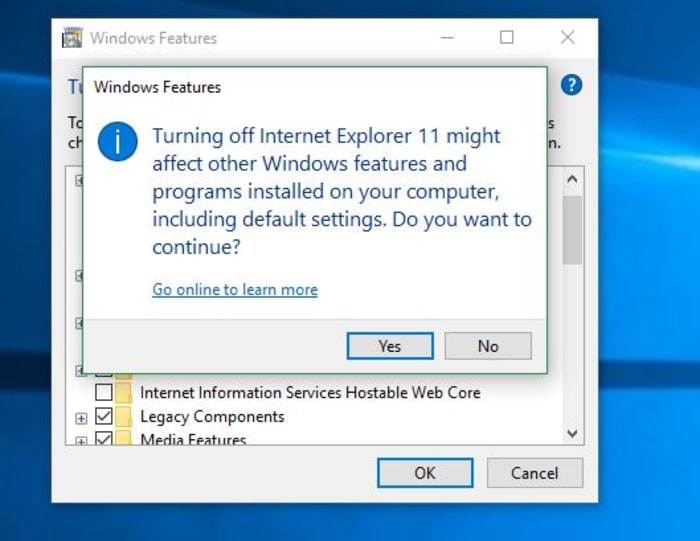
When you try to turn off IE, you’ll get a scary message from your PC, saying that removing IE might mess with your default programs or settings. Surely this means the process is dangerous, right? Is this meddling in affairs that we do not comprehend?? Honestly … it’s not that big of a deal. Removing IE will change a couple of small things:
1. Links leading to IE are removed
If you remove IE, you’ll no longer have a shortcut for it (boo hoo), and until you elect to restore it, you’ll have no conventional way to run the browser. Obviously, you should have another browser in place before you remove IE (even if it’s just Windows Edge, the other default), otherwise, when you try to open a URL web address, nothing will happen.
2. IE is no longer the default for opening HTML
You won’t be given the option to use IE as a default program for opening HTML or FTP. It won’t even be listed in your Control Panel’s Default Programs anymore. Again, we’re not going to shed a tear.
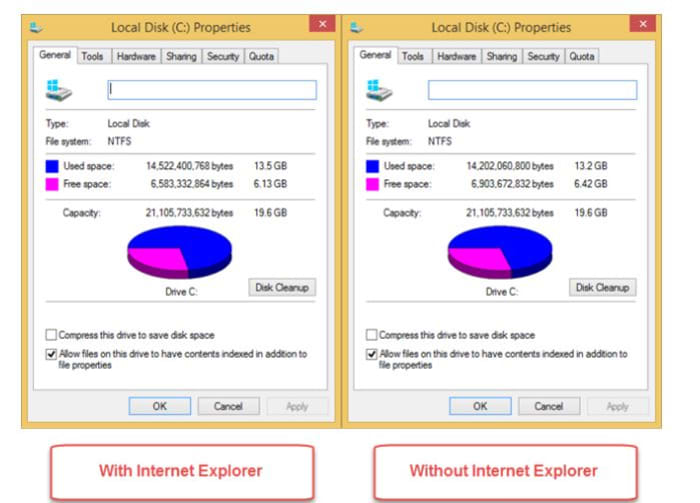
Removing IE from your device in the following manner will shuffle how certain programs get opened, but it won’t actually delete any of your files that rely on the browser. As long as you have some other browser installed, you’ll be totally fine. All of your universal Windows apps will continue to function as normal, too. You’ll even gain hundreds of MB of free space!
As we mentioned above, turning off Internet Explorer is perfectly safe, but we strongly encourage you to install some other browser first. Our recommendation is Brave, a browser that prioritizes speed, safety, and privacy. Brave was created by Brian Bondy and Brendan Eich a few years back. Like Eich’s previous baby, Firefox, Brave boasts great speed, safer connections, and more private browsing, even integrating other big names in anonymity like DuckDuckGo and Tor. In a lot of ways, Brave feels like an upgrade to Firefox, it’s default being to block any and all trackers, cookies, ads, pop-ups, and banners right out of the gate. It even automatically boosts your connections to HTTPS for the highest protection.
Fight censors and hackers with Brave’s new Private Tabs with Tor
On top of that, the browser also introduces Basic Attention Tokens, a form of e-currency that safely allows users to distribute “attention” to their favorite publishers. The token encourages a more direct relationship between user and content publisher, and is working to usher in a “web 3.0” atmosphere where users are only given ads that are relevant, and only when they elect to see them. The Brave browser is free, and can be installed in three easy steps, so our recommendation is to install Brave before you rid yourself of Internet Explorer, which we’ll walk you through right now:
How to remove Internet Explorer
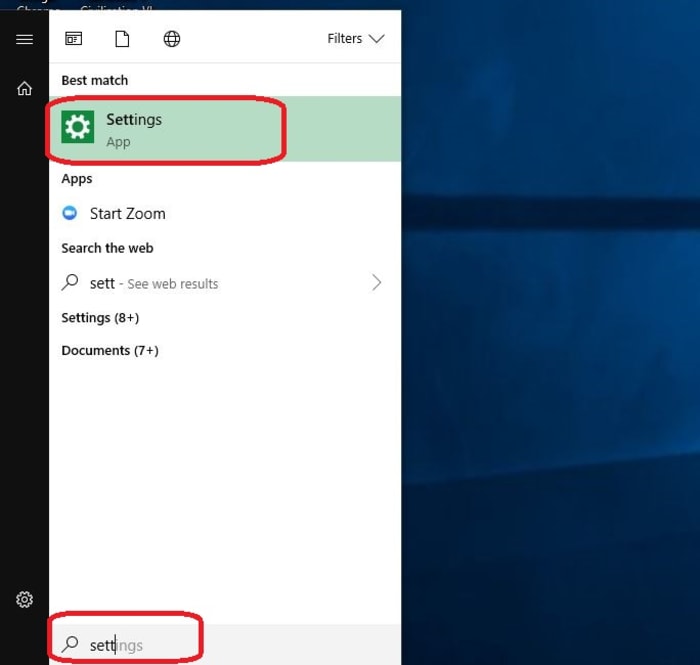
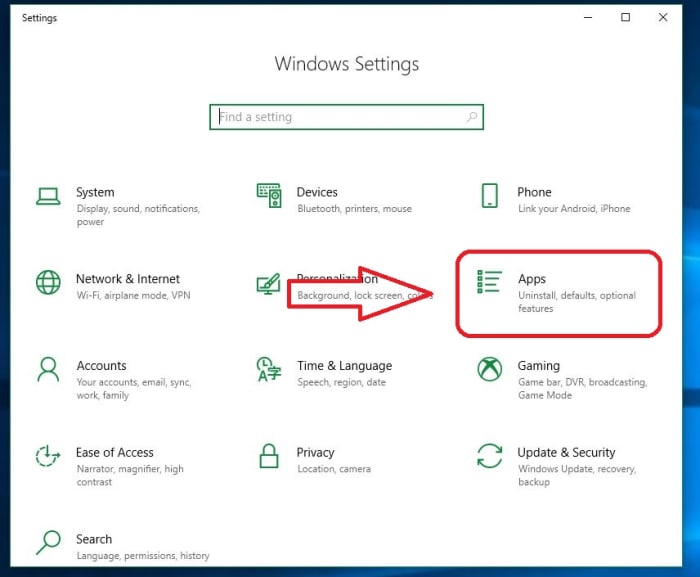
1. Open Settings
The easiest way to get to your Settings screen is to simply hit the ‘Win’ key and start typing “settings.” Once the option pops up, click on it.
2. Go to Apps
On the right of your Settings page you’ll see ‘Apps.’ Click here.
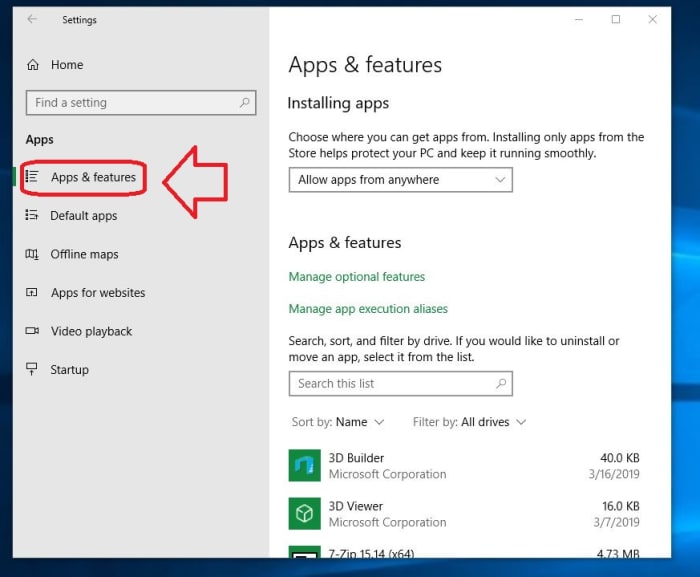
3. Open Apps and Features
On the left of the Apps page you’ll see a list of subcategories. The first one on the list is ‘Apps and Features.’ Click this and it’ll take you to them.
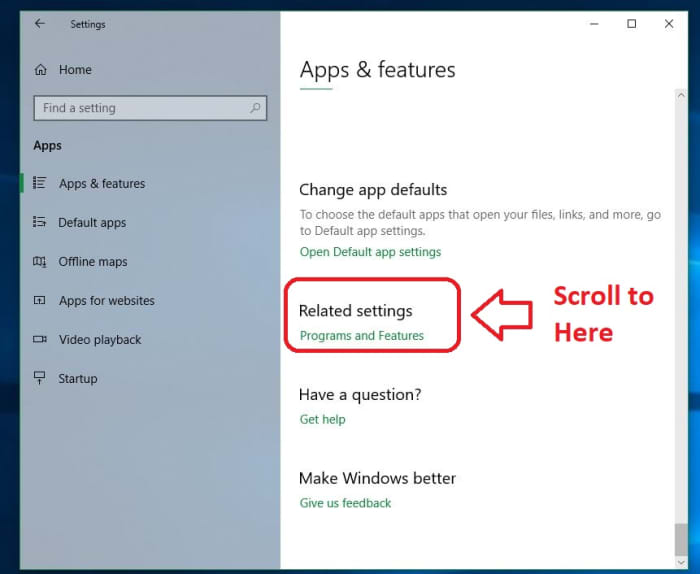
4. Open Programs and Features
The only tricky part of this whole process is finding where your Programs and Features link is located. Luckily, there are two easy ways to do this. The first is to maximize the window and you should see ‘Programs and Features’ on the right. Alternatively, you can also just scroll past all your apps and you’ll find it under the list. Typing in the search portal will not help here, so don’t let that discourage you. Eventually, you should see ‘Programs and Features’ right under ‘related settings.’
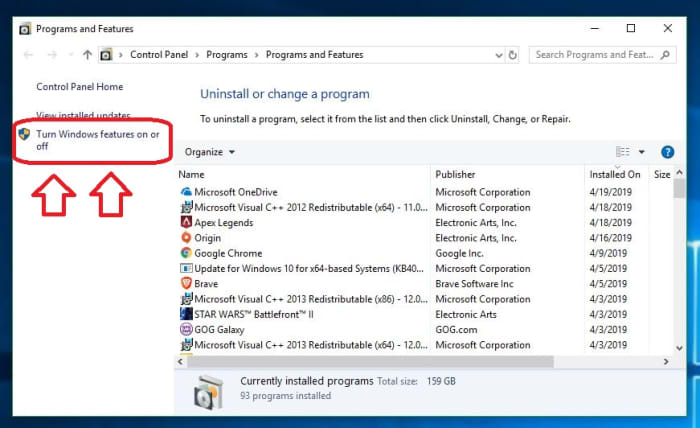
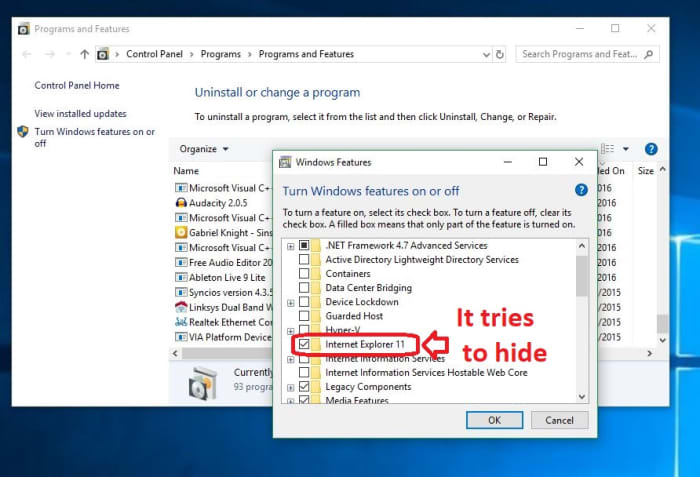
5. Toggle Windows features
On the left of this new window, you’ll see an admin option to toggle Windows features. Clicking this will bring you to a list of Windows features, one of them being the elusive IE 11.
6. Uncheck Internet Explorer
Now that you’ve found it, disabling IE is as simple as unchecking the box next to it. Do so and banish it from your realm.
Once the box is unchecked, click OK, then ‘yes’ to confirm that you want this dastardly piece of software removed from your OS. When prompted, click ‘restart now’ and enjoy your newly protected computer that’s at last free of its IE shackles. It’s also worth noting that if you want to bring the browser back (though we can’t see any reason why you would), you can just repeat the process above and when you get to step 6, re-check the Internet Explorer 11 box.
And there you have it! Your computer is safer, more efficient, and now has a bunch more space to boot. Let us know in the comments below if you have any questions with the process, and stay tuned with us for more tech tips and tricks.
Chrome may not be your best bet for privacy. Check out these alternatives.
Hackers are more prevalent than ever today. The only way you can keep your personal information and data truly private is through being proactive with a privacy-focused web browser. Here are the top three web browsers that will help you keep your information private!
3 great privacy-focused web browsers
1. Tor
Tor is one of the most notable privacy-focused web browsers out there today. The web browser is built on a collection of hidden relay servers. Basically, the way it keeps your information private is through bouncing your connection between various distributed nodes. This means that your connection will be completely private.
However, it is important to note that this is a true privacy-focused web browser, and it will not protect you from malware or viruses. The only negative aspect of this web browser is that it can slow down your browsing. We’re not saying you have something to hide… but if you want to be completely anonymous when surfing the internet, then Tor is the best on the market.
Brave is great for anyone who wants a privacy-focused web browser that’s also quick. The problem with many other web browsers is that they can be slow in order to operate at full capacity. However, Brave has great speeds and can even custom block ads and trackers.
Browse the web up to 8x faster than Chrome and Safari.DOWNLOAD NOW ►
Enjoy private, secure and fast browsing with Brave.
The only downside to this browser is that it’s relatively new and may not be as fully developed as other privacy-focused web browsers. However, there is a great team of developers always working to improve the browser to ensure you will have a great experience while using it. Want to learn more about why Brave is a great choice? Check out these articles:
Although many people may assume that Firefox is just your average browser, if you add some specific add-ons it can be great for privacy. If you add the extensions HTTPS Everywhere, NoScript, Windscribe, and uBlock Origin, they can make your Firefox browser extremely secure and private. Another great element of using Firefox as your privacy-focused web browser is that it has really good downloading speeds and won’t slow down your Internet browsing at all. In addition, Firefox’s latest version claims to use 30 percent less memory than the Chrome on Windows computers. This is a great web browser for someone who wants added privacy but isn’t an expert on browsers.
Overall, privacy is extremely important when selecting a web browser. Any of these three privacy-focused web browsers can help keep your information and personal data safe.
5 reasons why you should use Brave browser. Download and install Brave to browse safely.
Google Chrome and Safari are two of the most recognized browsers out there, but just because they’re popular doesn’t mean they’re the best. Brave is one of our favorite browsers, from the Co-Founder of Mozilla, Brendan Eich. It’s fast, private, secure, and offers a new way to reward websites without having to watch ads.
Here are five reasons you should be using it right now
Browse the web up to 8x faster on mobile and 2x faster on desktopFree Download
Enjoy private, secure and fast browsing with Brave
1. Safety
Cybercrime is a lucrative business – it’s expected to make criminals $1.5 trillion this year alone. Brave does several things to protect your security online. First, it blocks all malware, malvertising, spyware, phishing, fingerprinting, and also upgrades websites to HTTPS (a secure connection between you and a website). It also prevents scripts running on the page, so no-one can hijack your browser.
With Brave you can enjoy peace of mind without having to install countless extensions.
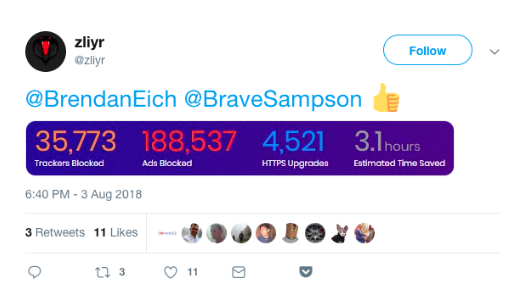
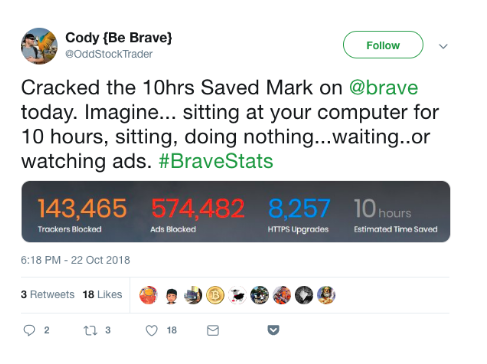
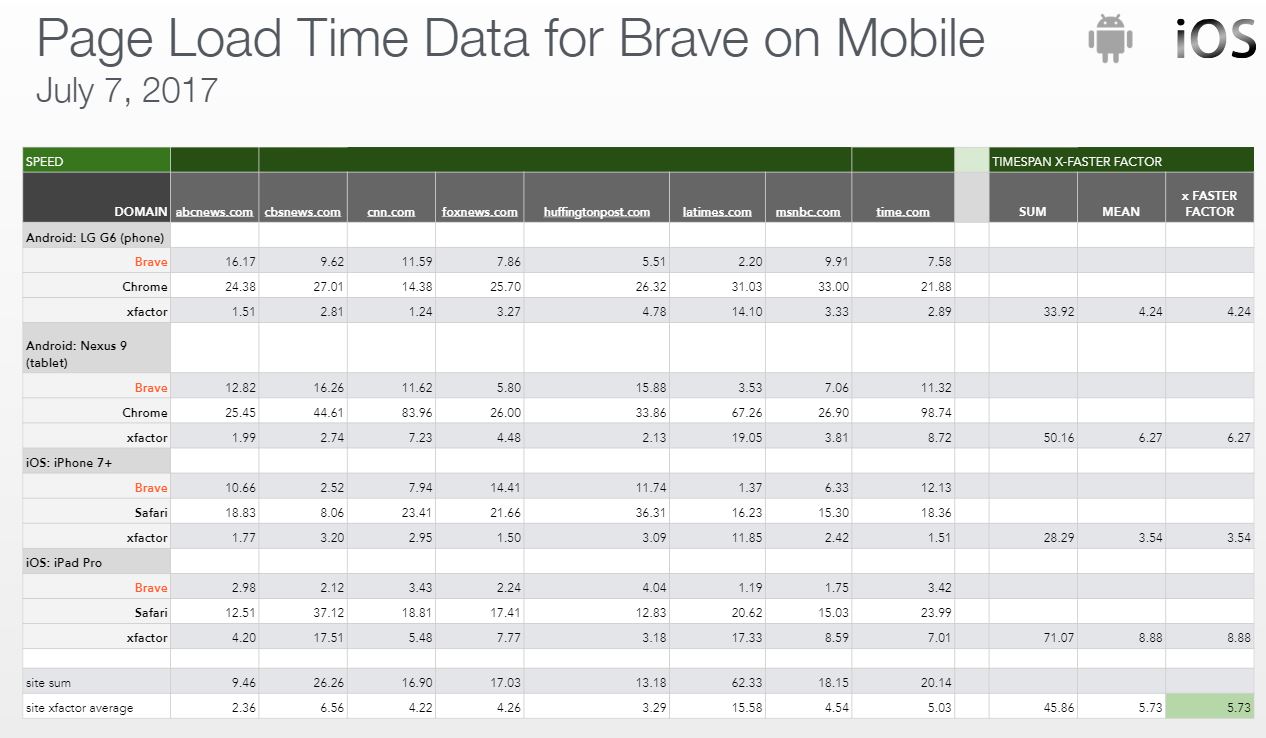
Brave is twice as fast as Chrome on desktop, and up to eight times as fast on mobile. The time you save using Brave quickly adds up. If you don’t believe us, check out these Twitter users’ stats:
Brave’s privacy and security shields also prevent a lot of unwanted or malicious content from interfering with your browsing. You get a clean page, lightning fast, every time.
3. Support your favorite sites
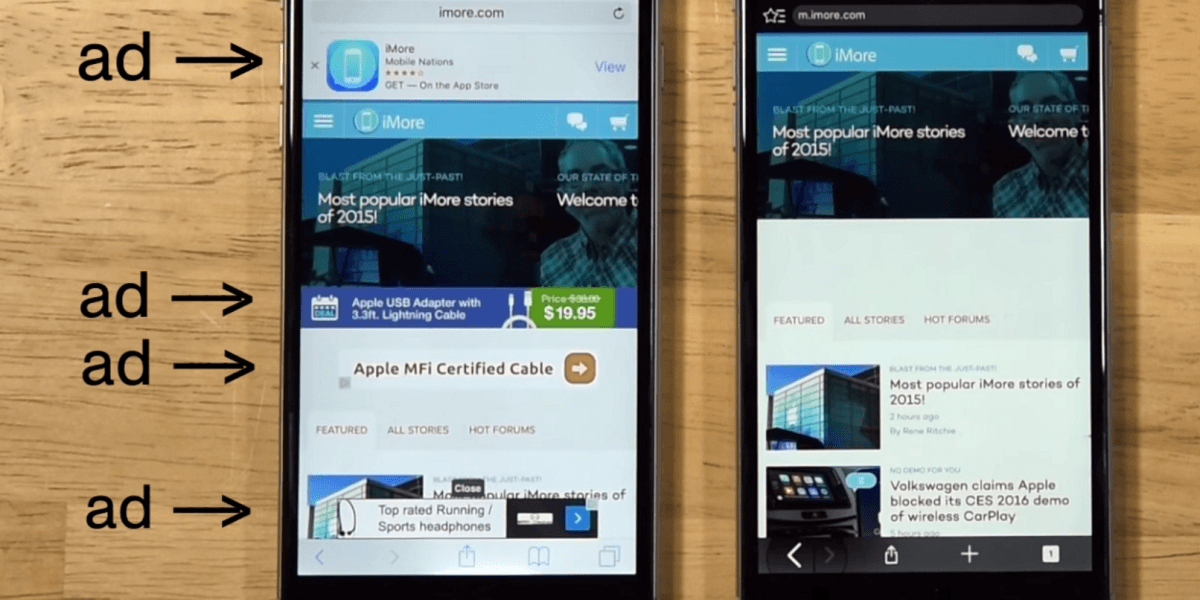
Brave blocks all ads by default, which normally harms your favorite sites since they’re no longer generating ad revenue.
Browse the web up to 8x faster on mobile and 2x faster on desktopFree Download
Enjoy private, secure and fast browsing with Brave
Brave Rewards changes all of that: Brave saves you from watching annoying ads, opting to instead let you reward websites through a cryptocurrency called the BAT (Basic Attention Token). You can buy BAT in the Brave browser using other cryptocurrencies, or you can also pay using fiat (GBP, USD, EUR, etc.) via an exchange like Uphold.
With BAT in your Brave browser wallet, you can tip any website you like. Eventually, you can even earn BAT by watching ads based on the content you enjoy the most. So load up your wallet and give back to your favorite content creators.
4. Stop corporations from spying on you
In our data-driven age, it seems every company from Facebook to Google knows where we eat, shop, and travel. Brave bucks this trend by making it extremely difficult for anyone to track you. It blocks all spyware, trackers, and third-party cookies. Brave never stores anything on its servers, so your data stays on your device until you delete it.
Brave has also partnered with Tor (The Onion Router) to give you an ultra-private browsing mode called Private Windows with Tor. Everything you do in a Private Window with Tor is relayed across the Tor network, effectively hiding your data through a complex web of servers so you can’t be traced.
If you’re concerned about your data, privacy, or simply want to reclaim control from big tech companies, Brave is your best bet.
5. Save on mobile data
Ads use as much as 79% of your data plan, according to a report from Enders Analysis. Brave estimates you lose around $23 per month on data charges, or around $276 per year. For unwanted content, that’s a steep price to pay.
Since Brave blocks all unwanted content by default – including annoying ads – you get more data for your money. That means fewer excess data charges and more money in your pocket.
Brave is fast, private, secure, and best of all, it could even save you money. So what are you waiting for? Download, install, and start using Bravetoday. We’re sure you won’t regret it.
Browse the web up to 8x faster on mobile and 2x faster on desktopFree Download
Enjoy private, secure and fast browsing with Brave
Softonic is proud to partner with Brave. When you download from us, we may earn a commission.
Brave is not only one of the fastest browsers on the market, but also offers unrivaled control over privacy, ads, and the content you see. If you don’t have Brave, you can install it right here. Once Brave is installed, take a look at these five tips to get you started off on the right foot:
1. Set Brave as your default browser (and get it on mobile)
Browse the web up to 8x faster than Chrome and SafariDownload Now
Enjoy private, secure and fast browsing with Brave
Setting Brave as your default browser will keep your emails and messages safe behind Brave’s powerful security shields. Here’s how to do it.
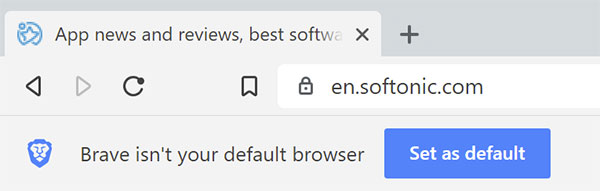
The easy way is to just click the button that appears under the address bar when you first launch the browser.
From there, the instructions vary a little bit, depending on your operating system, regardless of whether you’re in the browser:
Windows 10
Settings > System > Default apps > Web browser tab > Select Brave Browser
OSX
System Preferences > General > Default web browser > Select Brave Browser
You can also do this in-browser through the Settings menu.
Android
Brave is crazy fast (and just as secure) on mobile. Close the loop by getting Brave on all of your devices. Brave makes it really easy to sync your browser preferences between devices.
2. Import your settings
Switching over to Brave is simple and seamless. You can easily import all your settings (bookmarks, saved passwords, browsing history) right over.
Inside the Brave browser, click the three horizontal lines in the upper right corner
Click Settings
In the new window, click Import bookmarks and settings
Select one of your previous browsers
Click Import
3. Customize Brave
Access all your settings by clicking the three horizontal lines in the upper right corner of Brave’s browser window. You can customize them a number of ways:
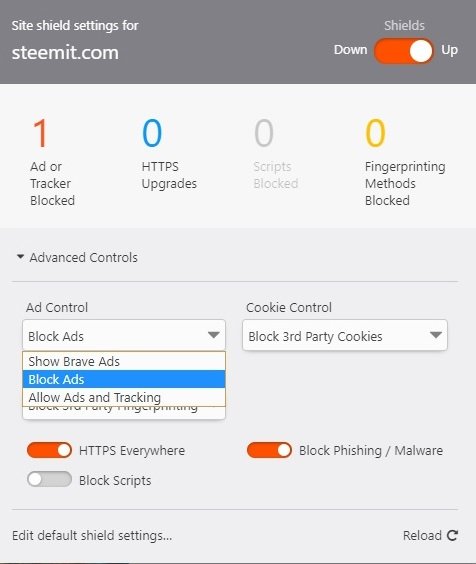
By default, Brave protects you from malware, phishing, fingerprinting, and plugins. It also upgrades all sites to HTTPS wherever possible. If you trust a site, however, you can lower the default shields. To do so, simply click the Brave icon in the URL bar and toggle settings for ads, cookies, scripts, and more. You can also access global shield settings.
4. Use Tor and DuckDuckGo for maximum privacy
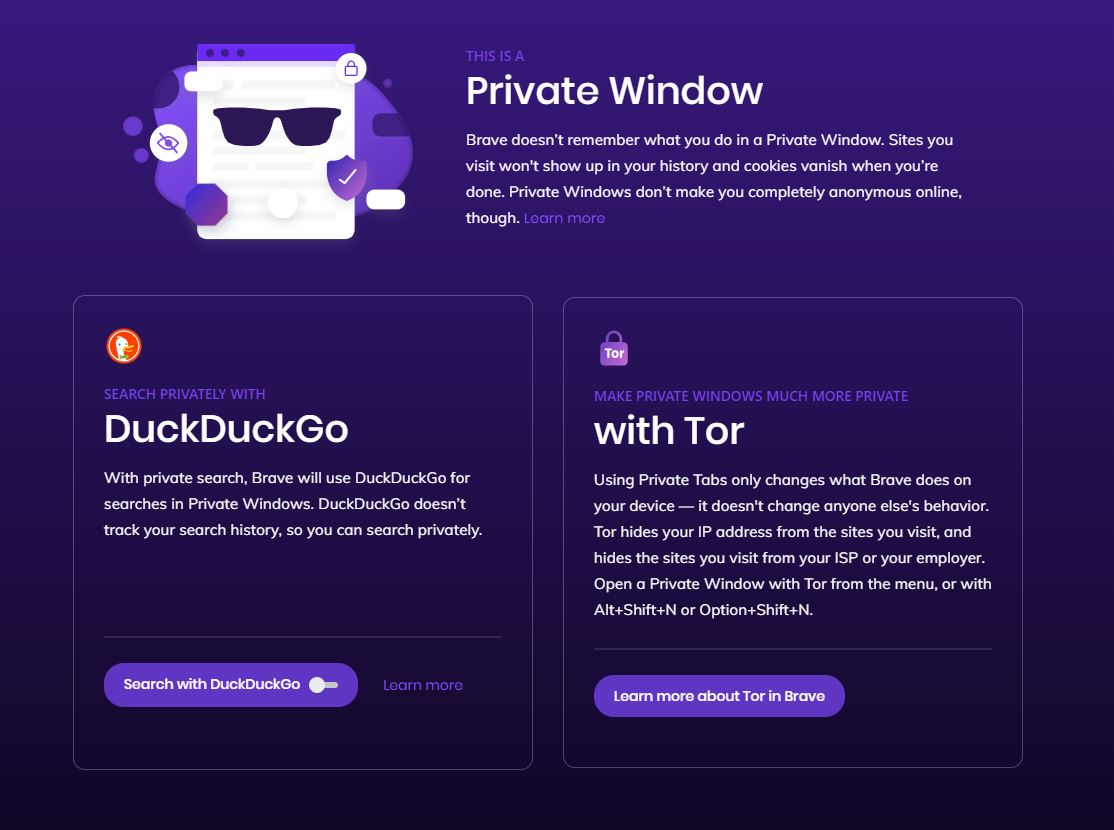
While Brave protects you from pop-ups, ads, cookies, and similar intrusions, you’re still vulnerable once you open a search engine. “Search engines such as Google record what the user enters in the search bar,”explains DuckDuckGo, an alternative search engine. Google is so entrenched in targeting and cookies that Brave can’t offer its peak strength in its murkier waters. For search sessions that you want to keep private, open a private tab and DuckDuckGo takes over. Now searches won’t be tracked.
You can also use Tor (The Onion Router) and Brave together to make it more difficult to track which websites you visit. Websites also have a much harder time identifying or tracking user IP addresses arriving via Brave’s ‘Private Tabs with Tor’.
5. Enable Brave Payments and tip your favorite sites
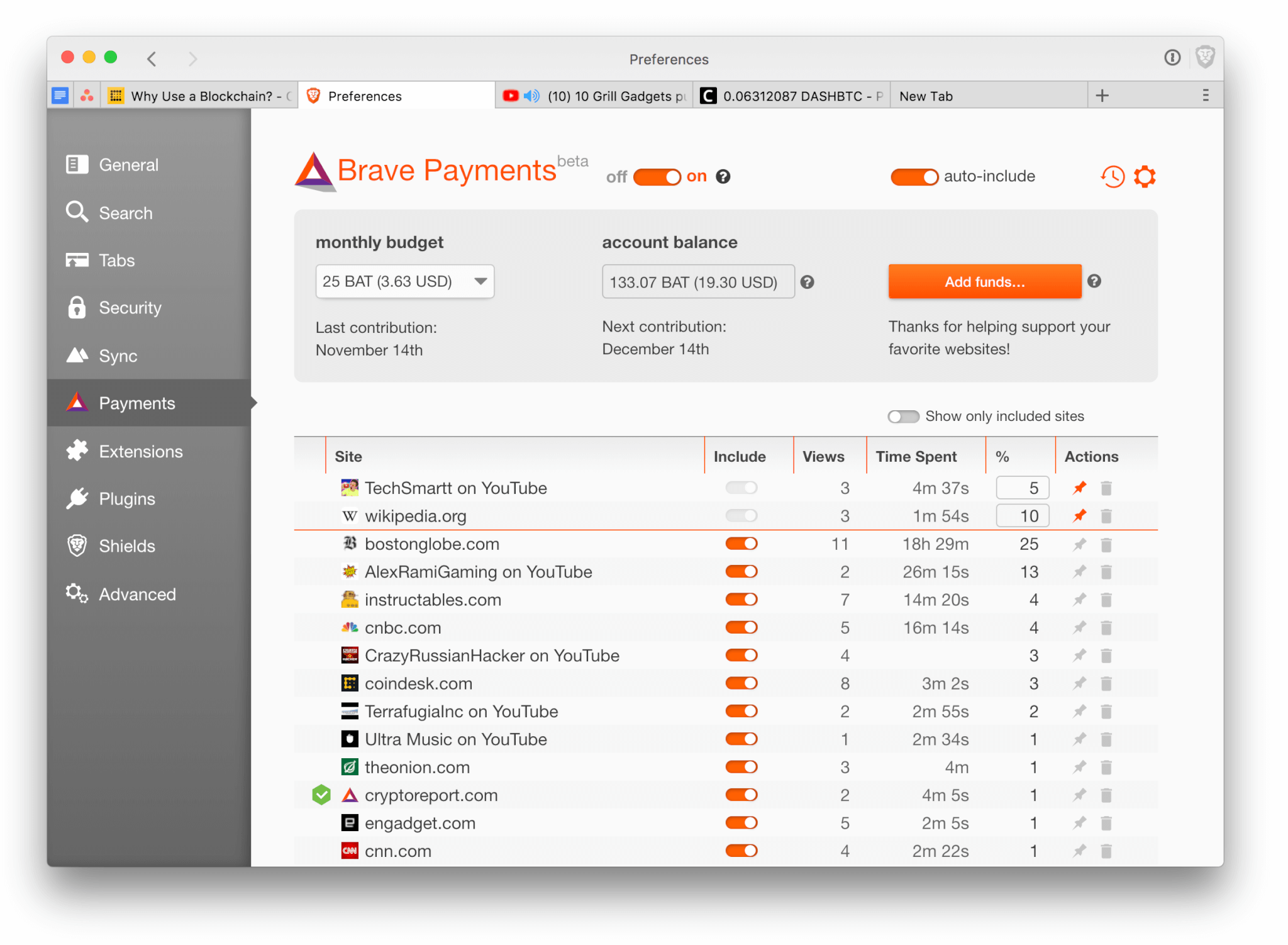
Brave Payments lets you tip your favorite sites in BAT (Basic Attention Tokens) instead of watching tiresome, irrelevant ads.
When you enable Brave Payments, the browser creates a BAT wallet which you can link to other digital assets like Bitcoin, Litecoin, or Ethereum.
You can also buy BAT from cryptocurrency exchanges like Uphold. Brave gives away BAT for special promotions, too. To enable Brave Payments, click the triangle on the upper right of the Brave browser, and then choose how you want to top up your BAT balance.
What is BAT?
BAT is a token that lets you tip the people making the content you love, giving recognition for a job well done.
Once you’ve got some BAT in your wallet, you choose whether to tip sites, or let Brave divide your BAT according to how much attention you pay to each site you visit.
We hope these tips are useful, and that you’ll discover a few cool tricks yourself. If you’ve yet to start using Brave, download and install it now and enjoy one of the fastest, most secure browsers available!
Browse the web up to 8x faster than Chrome and SafariDownload Now
Enjoy private, secure and fast browsing with Brave
Softonic is proud to partner with Brave. When you download from us, we may earn a commission.
Looking for privacy? It’s time to trade up for this browser and search engine.
“A lot of people think their searches aren’t tracked in private browsing mode,” stated DuckDuckGo Chief Executive Gabriel Weinberg. “Unfortunately, that’s not true.” This year has been rife with security breaches for Facebook and Google, and it’s starting to really hurt their business.
Facebook’s new Portal devices, which are smarter household vid chat cameras, might have received a more positive response had they been released fall of last year. Things have changed a lot since then. These days the response to Portal has been mixed at best. It’s no surprise; people are rightly concerned about security in their homes and on the Internet.
Last year, DuckDuckGo conducted a study to see whether privacy was a mainstream concern in the U.S. They found that 24% of adults cared enough about their online privacy that they would take significant action to keep it protected. 65% said that they would be motivated enough to switch search engines if they knew the new one would refrain from collecting personal data pertaining to their searches. As far back as January 2017, as many as 84% of Americans said that they would opt for a different web browser if it would encourage more online security and safer online browsing.
DDG conducted that study last year. That was before the Cambridge Analytica disaster, before the Fall 2018 breach, and before there was a new kid on the block that could stand to make a real difference:
Meet Brave
If this is the first time you’ve heard of Brave, it wouldn’t be surprising. Brave is just now getting out of its Beta release phase. Brave now offers versions for iOS, Android, macOS, Windows, and Linux. The concept of a browser that could run faster and keep users safer and more private has been in the works since May 2015. Their partnership with DuckDuckGo was established as far back as last year:
The Brave browser iOS app now offers @DuckDuckGo search in Private Tabs to improve privacy. ? ? Now you can search without the search engine collecting data about you, as DuckDuckGo never collects or shares personal information. https://t.co/5cMf6hsemQpic.twitter.com/xtoe0Deewu
Developed by Brian Bondy and Brendan Eich, formerly of Netscape and Firefox fame, Brave is an Internet browser that prioritizes safety, speed, and incorporates user-focused UI and settings. If you’re not familiar with Brendan Eich, he’s the guy who invented JavaScript back in the Netscape days and went on to co-found Mozilla. Brave is his third major browser project, and it’s looking to be his best.
Brave is a true ad-slayer, automatically blocking all trackers and shaking off unwanted cookies, pop-ups, and banners to keep your browsing session as productive and uninhibited as possible. Its default utilities will auto-upgrade existing connections to websites to HTTPS protocol, meaning your security will be even tighter still. Everything else can be dialed up or down via the settings menu. You can adjust the browser’s firewall by altering your shield preferences, meaning Brave only lets in what you want it to. You want extra privacy? Try Brave’s Tor tabs feature. In addition Brave gives users an interesting way to continue to support the publishers who have lost revenue from blocked ads–a blockchain based Brave Rewards solution.
Meet DuckDuckGo
DuckDuckGo is not a browser but a search engine. The company describes itself as “the search engine that doesn’t track you,” and that’s the backbone of their entire campaign, which began in 2008. Unlike Google, DDG never mines personal data or keeps track of a user’s browsing habits.
Browse the web up to 8x faster than Chrome and Safari.DOWNLOAD NOW
Enjoy private, secure and fast browsing with Brave.
Every time you enter a search with DuckDuckGo the search engine treats you as though it’s your first time there. You won’t be seeing any purple-highlighted links signifying that you’ve clicked here before. You’re not going to be seeing any banner ads that seem eerily pertinent to your personal life either.
“We simply don’t store anything that can tie your searches to you personally,” they assert, “or even tie them together into a search history.” They run a pretty tight ship, and have every facet of their privacy policy laid out on their website.
A likely alliance
ICYMI, we're delighted to announce we've partnered with @Brave to bring DuckDuckGo private search within Brave's private tabs on desktop (mobile soon), giving people the privacy they expect and deserve in private browsing mode. Available now!
In December 2017 Brave and DuckDuckGo saw that they shared a mutual passion for online privacy, and saw the benefits of a collaboration that fed on each other’s strengths. They agreed to partner up in an effort to elevate online browsing into becoming a more secure experience.
Isn’t this double anonymity?
If Brave is allegedly the best solution for online privacy, then what good is it to have a search engine that does the same thing? Isn’t Brave powerful enough to handle discretion on its own?
While Brave offers unparalleled protection against pop-ups, ads, cookies, and other forms of tracking, DDG explains that even when you’re using Brave as a browser, “search engines such as Google record what the user enters in the search bar.” As a search engine, Google is still so entrenched in its use of targeting and cookies that Brave can’t offer its peak strength in its murkier waters.
Incognito mode doesn’t help
Despite its name, incognito mode doesn’t actually protect your searches. In many browsers, erasing your browser history after your incognito search won’t make a difference either; that will only delete your local browsing data but won’t stop websites (like Google) from tracking you through your IP address, which is pretty scary. That’s why Brave gives you the option to swap over to DDG as a search engine when users wish to search more discreetly.
DDG integration
Switch over to a private tab, and DuckDuckGo takes over. Open an incognito window in Brave and the first thing you’ll see is a push to use DDG as a search engine. Brave puts it like this: “We already block ads and trackers that violate users’ privacy; using Private Tabs enhances privacy by not logging anything from those tabs in History or browsing data, and adding DuckDuckGo in Private Tabs further protects user privacy with anonymous searches.”
For many, there still may be times when you want to use Google or another less private search engine such as Bing or Yahoo. But if you want to fly under the radar, or just don’t like the idea of Google following you with targeted ads, then open a new window, switch on DDG as per Brave’s recommendation, and experience the fastest, safest, private search you’ve ever initiated.
“Users can now search without the search engine collecting personal data about them.” Brendan Eich proudly stated. “Users have suffered long enough from the current broken online ecosystem, and with the right tools they can reclaim their privacy and take a stand against the intermediaries that exploit their personal data.”
Browse the web up to 8x faster than Chrome and Safari.DOWNLOAD NOW
Enjoy private, secure and fast browsing with Brave.
DuckDuckGo is currently incorporated as Brave’s preferred incognito search engine, and works on iOS, macOS, Windows, and Linux. Download the browser now and see what it’s like to search without Google hovering over your shoulder.
The BAT could revolutionize the online content world and get rid of annoying ads.
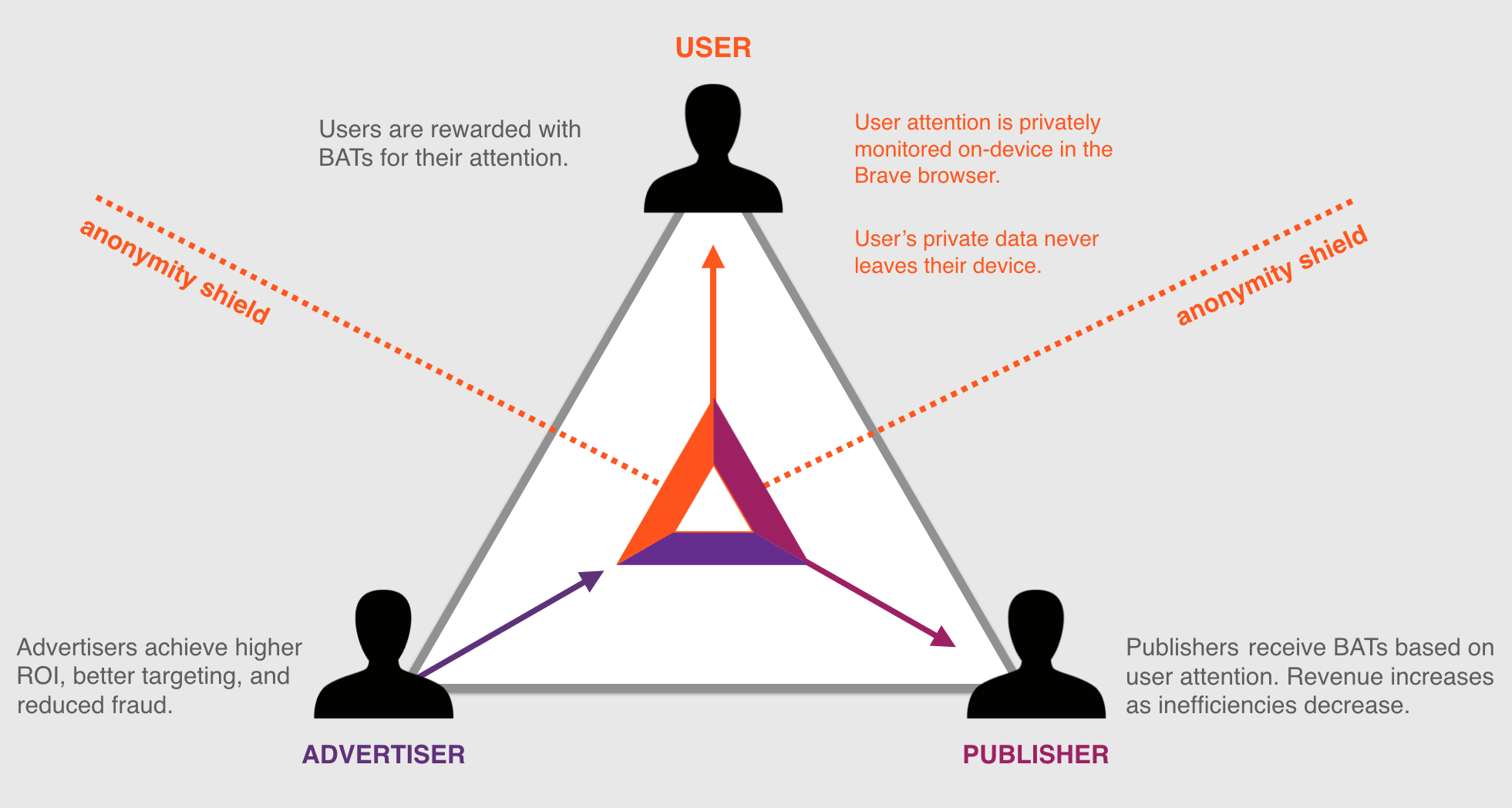
Brave believes the current online ecosystem is broken. The relationship is comprised of three parties: The publishers of content, the advertising and marketing companies, and everyday consumers. Brave’s Ben Livshits calls it “the Bermuda Triangle of advertising,” and it’s a scenario in which none of those three parties are happy. “This is an ecosystem that is ultimately suffering and is not sustainable,” says Livshits. “We’re trying to build something else using our browser; we’re using Brave as the cornerstone.”
Browse the web up to 8x faster than Chrome and Safari.DOWNLOAD NOW
Enjoy private, secure and fast browsing with Brave.
How do users suffer?
“Users suffer from ad overload and tracker overload,” says Brendan Eich, CEO and co-founder of Brave. And he’s not wrong. Popular media sites can have as many as 70 trackers, all vying for your attention at once, taking your bandwidth, costing you money you spend on that bandwidth, and drastically slowing down the loading times of websites. Malware has gone up by 132% in just one year. Users “feel like they’re stalked by ads, they’re tracked by ads, they’re spending more on data plans just to download the ad tracker scripts.”
As it turns out, underlying ad technology can result in up to 60% of a page’s loading time. If that statistic doesn’t phase you, the frightening truth is that upwards of 20% of that loading time is for websites to learn more about you and report that information to the creators of the content, and the advertisers who pay for it.
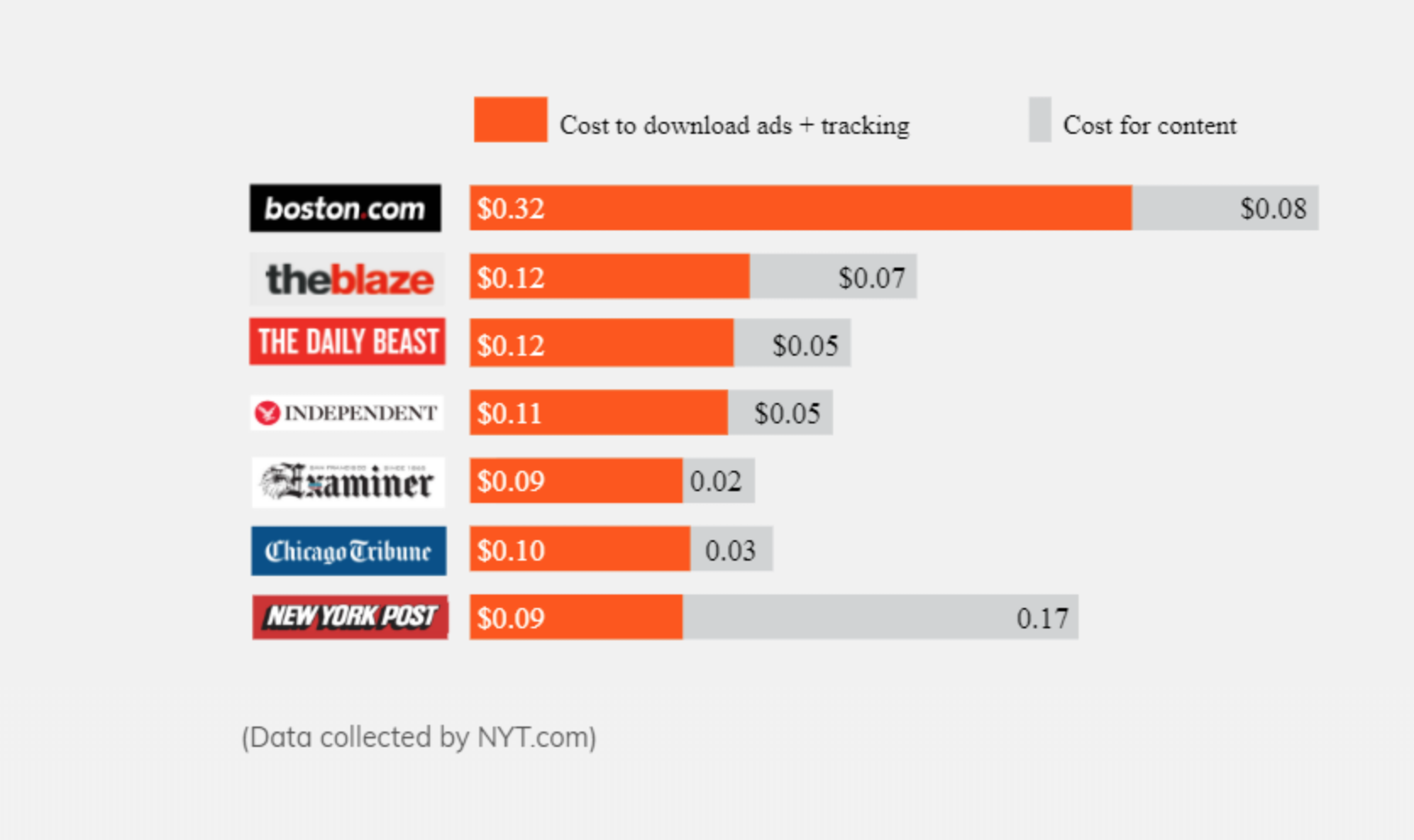
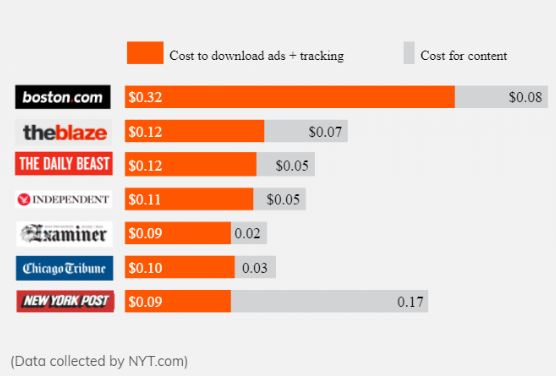
Remember, you’re paying for that bandwidth and it’s being spent on ads, which you never asked for and likely do not want taking up your bandwidth. “It’s hard to believe,” says Eich, “but we’re paying to be bothered by ads!” As much as 50% of the average user’s mobile data is for ads and trackers. According to the New York Times, that sum amounts to about $23 a month – $276 a year! – that’s for your browser to load minutiae that you didn’t want to see anyway. It’s also bogging down your loading times and takes around five extra seconds per page on mobile devices – costing you data and draining as much as 21% of a phone’s battery life.
How do publishers suffer?
Monopoly companies and titanic mergers dominating the global market are sadly not news in 2018, so it probably won’t come as a surprise that the same one-sided battle is hurting the online economy as well. The extent to which it’s happening may surprise you, however: Google and Facebook take 73% of all ad dollars … and experience 99% of all growth. All the small start-ups online may be gaining traction and momentum at their own pace, but their successes fuel the big guys too, and it’s hurting everyone else. Revenue for online publishers has gone down by a demoralizing 66%.
Users may not care right now, but ad blockers could ultimately affect the amount of free content available from places like news sites, forums, or blogs. Why? If companies aren’t generating revenue from ads anymore (due to ad blocking, for example), they need to get that money some other way. That means users will have to start paying for more base content.
Or many of these publisher likely will just go out of business. Over 600 million phones and desktops already run ad blocking and that number is only climbing. It’s leading us to an online economy in which publishers can no longer easily monetize value-added services, and that’s going to affect everyone.
Badly.
How do advertisers suffer?
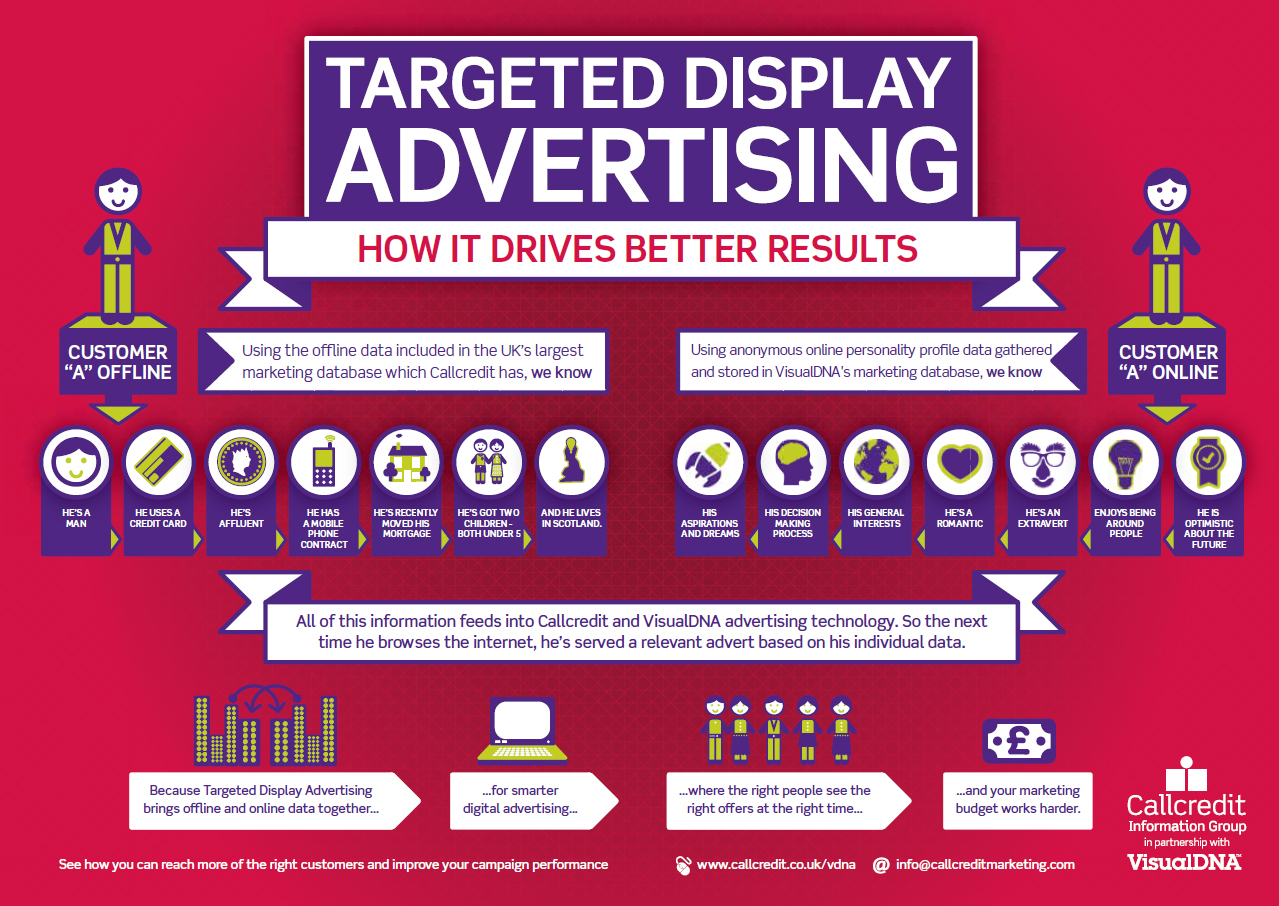
Fraud advertising is an ongoing issue, and AI inflicted over $7.2 billion in fraud just last year. Online, it becomes an expensive guessing game for ad companies to determine where their money is best spent; what exactly they’re choosing to pay for. The reason is that ad targeting is inaccurate and, when it works, comes off as creepy to the user. Users don’t want targeted ads that know your location and demographics, or that know the kind of people you talk to or relationships you keep. When an ad company hits a user in this way it looks really bad for the ad company, too, and certainly doesn’t help their business.
The reason this happens is because marketers are often fooled by fake websites and fraudulent AI that doesn’t hit the mark, often mis-targeting its demographic or targeting it way too close to the mark. “Some of the estimates claim that half of the money that companies spend on ads goes nowhere,” says Livshits. “They’re not seen by anybody, they’re below the fold, and they’re just dropped on the floor.” The result is that ad targeting is not functioning nearly as effectively as it should, and it’s making consumers mistrust or ignore 80% of advertisements they see.
Browse the web up to 8x faster than Chrome and Safari.DOWNLOAD NOW
Enjoy private, secure and fast browsing with Brave.
The answer: Basic Attention Tokens
Basic Attention Tokens, or BATs, are utility tokens based on Ethereum technology that serve as Brave’s units of currency between advertisers, publishers, and users. “The token is derived from, and therefore denominates, user attention,” explains Eich. It’s a new blockchain-based digital advertising and services platform where owning and spending these tokens allows users to earn unique services via the BAT platform, enabling special interactions with the platform.
In layman’s terms, it’s a means for users to be able to collect and use time they spend looking at ads in a positive, constructive way that benefits in equal parts the publisher of content, the advertiser on the page, and ultimately themselves as well; users will have the power to distribute their BAT to companies they support, creating a “web 3.0” atmosphere in which you’ll be able to choose who is financially rewarded by your attention. Users can also opt to directly fund or replenish their Brave Rewards wallet to tip content creators.
Basic Attention Tokens don’t connote any official ownership right or stake, Brave explains, and are not refundable nor intended to be a digital currency. This way, all the Brave Rewards analysis is done without disclosing your identity, keeping the browser as anonymous and secure as they have promised.
Rather, the analysis enters the network by way of the open source Anonize protocol, ensuring that neither Brave nor any other entity can match your web browsing habits with your BAT contributions. “That’s really just focused mental engagement,” says Eich proudly, “on an advertisement, on great content, on whatever the user is looking at.”
With Brave, users can choose to either go ad-free, or switch them back on at the drop of a hat. Users who choose to view ads will be paid to do so, will benefit from better ad-matching, and the data will stay private. Thirty percent of the ‘revenue’ gained from watching the ads goes to Brave, while the other 70% goes directly to the user. How is that kept private? The answer is simple:
Brave integrates an anonymous ledger system which allows for your funding to be made available to your chosen site owners. But the browser still keeps specifics like bookmarks and history completely anonymous.
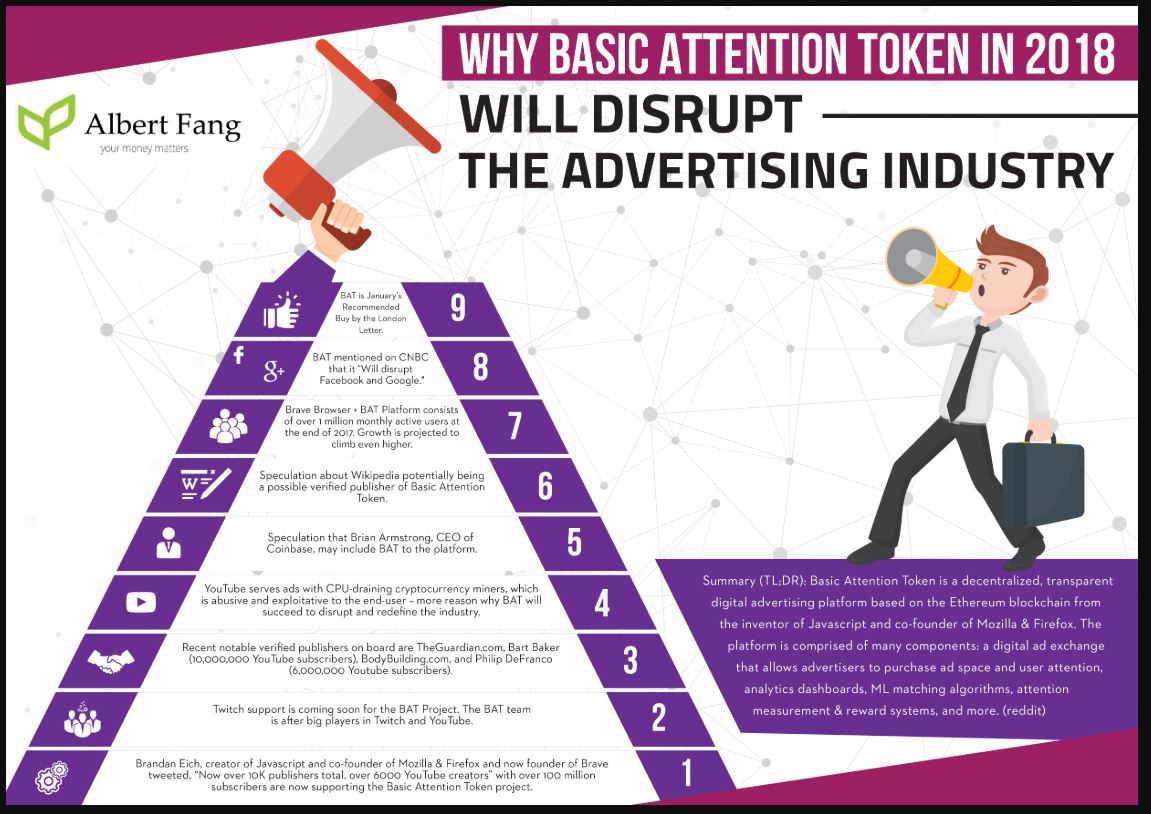
Should you choose to browse with Brave Rewards you’ll remain completely unidentifiable, while still benefiting from more accurate ad-matching and reception of Basic Attention Tokens. If this sounds like a feature you’d be interested in, you’ll be happy to know over 10,000 content creators and publishers have already registered to receive Brave Rewards.
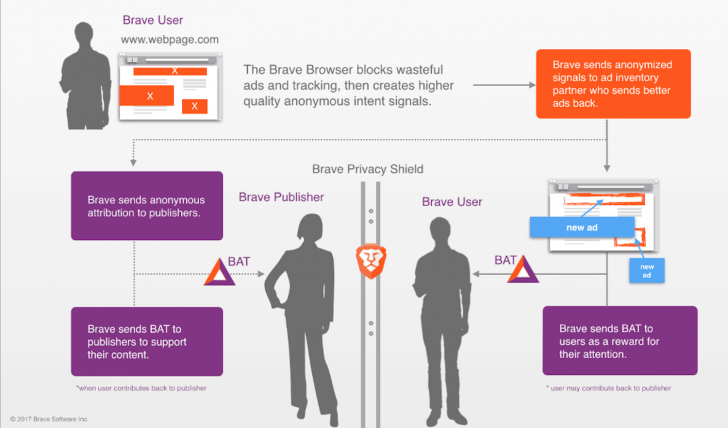
There will be some instances where the BAT revenue goes to the publishers as well, in which case the user and Brave split their 30% evenly (15% each) and the rest will go to the publisher. This effectively cuts out the middleman while still ensuring privacy to the viewer.
How soon will we see this?
At a recent Web3 Summit Ben Livshits announced that they are looking to ship the first phase of the BAT system in the next couple of months. “This is something we have been experimenting with quite a while,” he said. The most recent beta to be released is said to already be 22% faster than the Brave that’s currently available, and can be downloaded right here. From the looks of it, progress is speeding along pretty encouragingly.
Our new desktop browser has a 22% faster load time on average than our exiting Brave Muon version. That's as much as 8-second faster page loads on certain sites. Details here: https://t.co/d6FYHEmqIi
In the meantime, if you haven’t checked out Brave yet, we encourage you to give it a look! Download it for free right here and we’ll keep you up-to-date with the rest!
Browse the web up to 8x faster than Chrome and Safari.DOWNLOAD NOW
Enjoy private, secure and fast browsing with Brave.
Softonic is proud to partner with Brave. When you download from us, we may earn a commission.
A simple browser switch can have huge benefits for your data plan.
With 2018’s rising number of data breaches, there’s an increasing demand for a way to browse the internet in a more secure environment – one that doesn’t track users, excessively bombard with advertisements, use a plethora of cookies to document user actions, or force people to spend their bandwidth money to watch pop-ups that they didn’t ask for in the first place.
Browse the web up to 8x faster than Chrome and Safari.DOWNLOAD NOW
Enjoy private, secure and fast browsing with Brave.
“Three of the four top browsers in the U.S. have been captured by – or are owned outright by – advertising companies,” explains Brave co-founder and CEO Brendan Eich. If that name rings a bell it’s because he’s the guy who not only created JavaScript while at Netscape, but also gave us Mozilla and Firefox. “This means they will not block advertisements or invisible scripts (JavaScripts) that ads rely on. Therefore their users suffer from ad overload and tracker overload. They feel like they’re stalked by ads, they’re tracked by ads, they’re spending more on data plans just to download the ad tracker scripts.”
Brave is an internet browser that’s been under construction as far back as spring 2015. The browser’s definitive feature is the blocking of ads, trackers, cookies, scripts, and pop-ups. It will even automatically upgrade connections to HTTPS protocol, giving users the highest level of security possible.
“Brave is addressing a pain point for users by building ad blocking and tracking protection into the browser,” explains Eich, “and that differentiates us from almost every other big browser in the west.” Yes, security is Brave’s primary objective, but we’re pretty thrilled about what else that means for those of us on the user end: Fewer ads, banners, cookies, and pop-ups mean load times are up to 60% faster.
A new browser for our desktop or laptop is all well and good (provided you’re willing to try something new), but today more than 50% of web browsing is done over mobile devices. Safari for iPhone, Dolphin for Android, and of course the elephant in the room – Google Chrome – have been the go-to mobile browsers of choice for years. What’s the chance that an upstart like Brave will dethrone any of these behemoths?
Why Brave is the best mobile browser
Let’s start by asking why you use your default browser (if you do): It’s convenient. It does the job quickly and without too much hassle, and for people who aren’t constantly using their mobile device for internet browsing it’s often enough. For those who want a faster, smoother approach, Google Chrome is the most popular mobile browser.
It’s got speed, runs all the scripts correctly, offers lots of extensions, and after ten years in the market it’s got a cozy familiarity. Brave was built on Chromium, an open-source project that literally serves as the basis of Chrome. Boot up Brave and you’ll see a few core similarities with its look and feel. Most importantly you’ll be able to use all your favorite Chrome extensions.
But is Chrome a secure, private browser? No, it’s definitely not. Brave, on the other hand, champions user security, privacy, and user attention going where it’s supposed to. Like we said at the start, safety and privacy are growing concerns, and they’re making platforms like Brave awfully enticing.
Privacy and ad prevention are the main reasons people switch over to Brave; they’re looking for a faster, safer browsing experience. Brave’s ability to ward off ads, trackers, and cookies is the cornerstone of the browser, and both their desktop and mobile UI is indicative of that design. Brave’s mobile interface makes accessing the browser’s shields and blocking parameters easy and intuitive. It’s as simple as opening the settings menu:
Browse the web up to 8x faster than Chrome and Safari.DOWNLOAD NOW
Enjoy private, secure and fast browsing with Brave.
Chrome’s got speed, but when the page is loaded, you’re still faced with numerous ads, banners, and pop-ups. And that’s only what you’re seeing. What you’re not seeing are the, in some cases, hundreds of trackers, cookies, and scripts keeping tabs on your location, demographic, clicks, double-clicks, and how long you spend on the site. This makes for a bloated browsing experience, and Brave’s shielding mechanism essentially bypasses all of that, giving the user what they asked for plain and simple.
As far back as 2017, Fossbytes ranked Brave 4th place in its list of top 10 browsers for Android. They praised it for its tracker blocking and privacy, particularly valuing that Brave has high-quality protection as is its default: Brave requires no additional ad blockers, extensions, password managers, or privacy plugins to do what it’s famous for; it’s all there already. Besides the stellar security, Brave’s mobile browser still has all the usual features you would expect, including bookmarks, easy accessibility, and password management. And if you want true incognito browsing, it has a Tor tabs feature.
Brave mobile is faster than Chrome, safer than Firefox, and sports a more intuitive UI than Safari. Make the switch.
So to recap
1. Brave mobile is fast
Lightning fast. Surprisingly, Brave on mobile is actually marginally faster than Brave on desktop. On PC, major news sites will load twice as fast as Chrome or Safari, and that bumps up to a whopping eight times faster on mobile.
2. Brave will save you money and time
You don’t have to pay a cent to give it a try. In fact, you’re actually saving money since you’re no longer paying extra bandwidth just to load ads and pop-ups.
3. It’s got all the settings you’re familiar with
Brave has extensive bookmarks, a local browsing history (that is never shared or mined!), private tabs, multiple window functionality, and dark theme – all the facets you’ve come to expect. Additionally Brave also offers still more features regarding global privacy settings and settings per site. And since it’s based on Chromium, it will support all your favorite extensions.
4. Brave shields you from pesky ads
If we haven’t said it enough already, this is really the browser’s calling card. It goes double for mobile, though, as the last thing you want when you’re checking the Internet on the go is a site that can’t load fast enough because it’s plagued by pop-ups, banners and trackers. And soon Brave promises to bring to mobile a feature already available on its desktop browser, Brave Rewards. Brave Rewards gives users an interesting way to continue to support the publishers who have lost revenue from blocked ads–a blockchain based solution for tipping your favorite content.
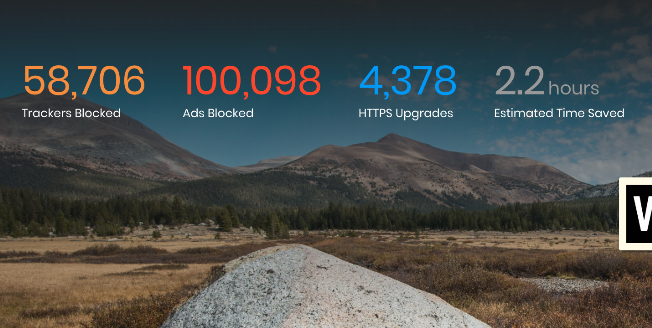
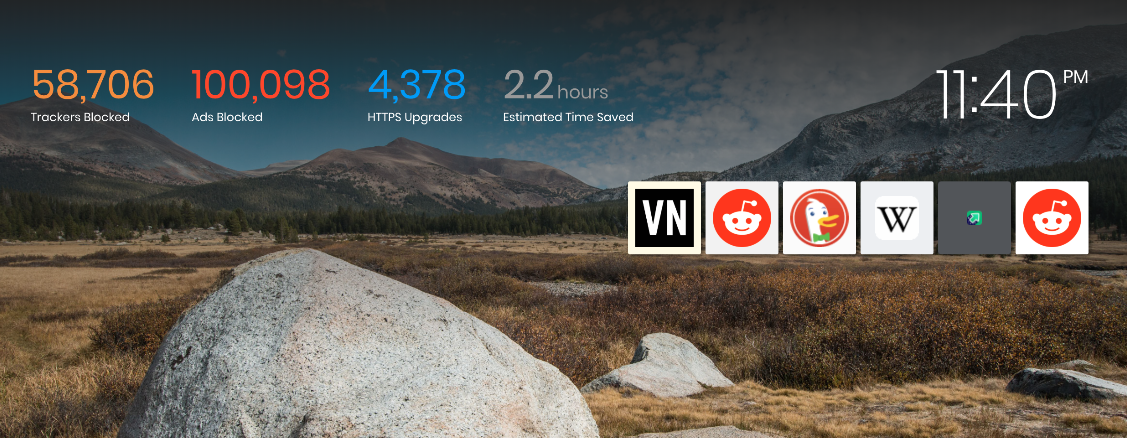
As with the desktop and laptop versions of Brave, the mobile variant allows you to see how many ads and trackers it has blocked, how many times it’s upgraded to HTTPS, how many scripts it’s blocked, and phishing attempts evaded.
5. Brave is less taxing on your battery life and data
Brave works to load web content, not ads. As such you’ll find your mobile device’s battery life is chugging along much more steadily than with other browsers. That means more battery life is available for you to use on other apps that matter, and fewer trips to recharge your phone.
Brave exceeded one million downloads via the Google Play store as far back as November 2017. That number is still climbing, and “user growth remains strong,” said Brave in a blog post in April 2018. “We anticipate millions more by the end of 2018.” Will you be one of them?
Browse the web up to 8x faster than Chrome and Safari.DOWNLOAD NOW
Enjoy private, secure and fast browsing with Brave.
The Internet is a vast sea of information, social media, news, downloadable content, forums, bloggers and yes, cat videos, from all across the globe. So if the Internet is the sea, then your browser is your sailing vessel. Much like choosing a good boat, your browser’s got to be reliable, safe, fast, and versatile.
If you haven’t heard of Brave before, it’s probably because the first stable release hit the internet for iOS back in early August. Now it’s available on iOS, Android, macOS, Windows, and Linux. Despite its only-recent foray, the software was actually developed (by Brave Software) and founded as far back as May 2015. The coolest part? It was founded by Brian Bondy and Brendan Eich, Eich being the inventor of JavaScript and the co-founder of Mozilla Firefox.
Brave is open source and has been built by a team that’s focused on privacy and performance. “It’s more than a browser;” says Eich, “it’s a new system for properly valuing user attention.” How does it accomplish this? Let’s dive in.
Browse the web up to 8x faster than Chrome and Safari.DOWNLOAD NOW
Enjoy private, secure and fast browsing with Brave.
Protection and privacy are paramount
Right off the bat, Brave automatically blocks any and all trackers. That means anything that could cramp your browsing style like cookies, pop-ups, ads, demographic targets, and location settings – none of that even makes it past the first line of defense. After that first line of defense, the rest is up to the user:
Brave’s shield customization and firewall settings allow for extensive fine-tuning of what gets through the net. If you want to block cookies, you got it. If you want to allow them, that’s fine too. If you only want to block third-party cookies, that’s an option as well.
The same level of highly organic protection applies to Brave’s script blocking, fingerprinting protection, payment methods, addresses, passwords, trackers, and practically everything else. There’s even an innate function that automatically upgrades your existing connection to an HTTPS protocol, making sure you get the highest level of security that a site can offer.
If this sounds like a lot of ruckus about pop-up ads, you’re not seeing the bigger picture. This is about so much more than just blocking ads or getting faster load times.
The problem with ads on sites
If you own a smartphone and you use it to browse the internet, a chunk of that bandwidth that you’re paying to receive is being spent on loading a bunch of superfluous garbage that you never asked for and would never want. It’s waved in front of you in the form of cookies, trackers, and ads. “It’s hard to believe,” says Eich, “but we’re paying to be bothered by ads!” According to the New York Times even as far back as 2015 that sum amounts to about $23 a month – $276 a year! – for your browser to load minutiae that you didn’t want to see anyway.
Browse the web up to 8x faster than Chrome and Safari.DOWNLOAD NOW
Enjoy private, secure and fast browsing with Brave.
Popular media sites can have as many as 70 trackers, all vying for your attention at once, taking your bandwidth, costing you the money you spend on bandwidth, and drastically slowing down the loading times of websites. We started using Brave as soon as we heard about it, and it honestly feels like driving with an EZ Pass, seeing all the poor souls stuck on a congested highway while you zip along to your destination.
Brave loads freakishly fast
Google Chrome is possibly the fastest browser around, but it accomplishes this by drawing upon more of your desktop’s RAM. Chrome’s ad filtering has gotten harsher this year, and is a welcome improvement. Slap an ad blocker on Chrome and you’ll have less harassment from pop-ups and trackers, but you might also accidentally block more than just ads:
YouTube and Intercom, for example, are often erroneously blocked. Additionally, there’s also the chance that you’re hurting the livelihood and income of fledgling sites and business that are dependent on those ads to generate income. While the average user may not care, it could ultimately affect the amount of free content available from places like news sites, forums, or blogs.
Brave loads fast. How fast? On a laptop or desktop, you’ll see load times anywhere from 50% to 100% faster. It’s even more noticeable on mobile devices, and you could be seeing pages load up to eight times faster than on your smartphone’s default browser (i.e. Safari or Chrome).
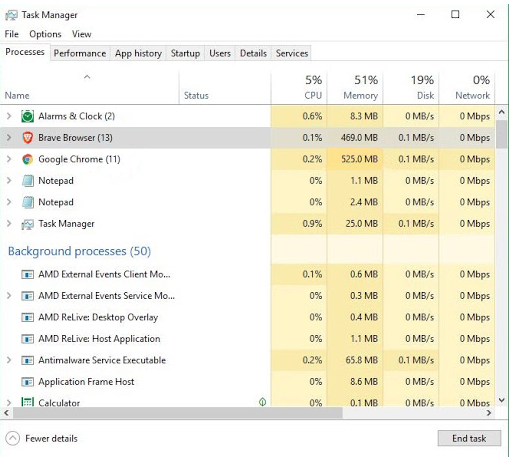
What’s so astonishing about this, though, is that Brave is able to accomplish this without being more taxing on your computer. Brave does not eat up as much RAM as Chrome, and requires less CPU and less memory. It’s not as bloated, and still matches (and even surpasses) the speed of Chrome. And it does this without adding cumbersome or faulty ad blockers; it’s all there by default.
Blockchain advertising
That still doesn’t solve the problem of ad blocking being harmful to a website’s economy. Brave thought of this, too, and proposed a radical idea: Brave employs a ledger system that rewards sites based on user attention. It then attempts to decentralize ad exchange, meaning that should you accept advertisement from a publisher, that relationship (and subsequent profit) will remain between the two of you; none of it goes to third-party sources or middlemen.
In layman’s terms, it works like this: You never have to look at push banners, pop-ups, or advertisements with Brave. Period. But if you choose to, then both the user and the publisher of the content are appropriately rewarded. This concept called for a new form of currency – Brave’s new Basic Attention Token.
Browse the web up to 8x faster than Chrome and Safari.DOWNLOAD NOW
Enjoy private, secure and fast browsing with Brave.
Basic Attention Tokens
If you choose to accept advertisements (and again you never have to with Brave), then you’ll receive Basic Attention Tokens (BATs) each time you choose to view them. “The token is derived from, and therefore denominates, user attention,” explains Eich.
Brave will monitor your attention as you view pages and tabs, and does so both accurately and privately. It then compiles the time (and attention) you gave these ads, and rewards you with digital tokens. “That’s really just focused mental engagement – on an advertisement, on great content, on whatever the user is looking at.” The result is far fewer instances of fraudulent marketing and malvertising.
Your data (like search history or bookmarks) is all local. Brave’s servers never see or store any of it. That information stays on your own device until you decide to delete it. Brave never sells your personal data to third parties.
So then where do these tokens go?
Short answer: To the publishers of the content.
When an ad is viewed, tokens are given to both you and the publishers. As a user, you have the power to pay BATs to a publisher you support. It’s a way to more reliably and directly engage with them, and more accurately distribute your ‘monetized attention’ toward your chosen candidates.
The result is that you essentially now get to choose who receives your attention. It’s certainly better than being forced to watch the same commercial for something you don’t want dozens of times in a row; your bandwidth money is going towards it either way.
The neat part about the BAT system is that when you pay a publisher with these tokens, they can then reward users in various ways – ads more tailored to your preference, or even discounts for that publisher’s products. Sites can also elect to charge BATs for premium content, which means that you’re effectively getting rewarded for your attention.
Give back to the sites you frequent
Brave has an integrated (but completely optional) Brave Rewards system. With this engaged, you can choose a contribution amount that works for you – something like a few dollars a month to divide among your favorite sites and content creators. It’s a way to promote the sites and publishers that you like. If that sounds like too much micro-managing you can choose for Brave to do it for you – distributing your contributions automatically, based on the sites you spend the most time on.
If you choose to use Brave Rewards, know that your browsing history will still always be private. Brave’s anonymous ledger system allows your funding to be made available to your chosen site owners, but still keeps you unidentifiable. If this sounds like a feature you’d be interested in, you’ll be happy to know over 10 thousand content creators and publishers have already registered to receive Brave Rewards.
If all this doesn’t sound like a feature you’d like, no worries! Simply browsing on Brave is 100% free, and you can always elect to do so without any ads at all. It’s really all up to your preference.
If you’re unsure whether Brave is the right browser for you, we recommend installing it and seeing for yourself. The download and installation is completely free, and we’ll walk you through it right here.
Browse the web up to 8x faster than Chrome and Safari.DOWNLOAD NOW
Enjoy private, secure and fast browsing with Brave.
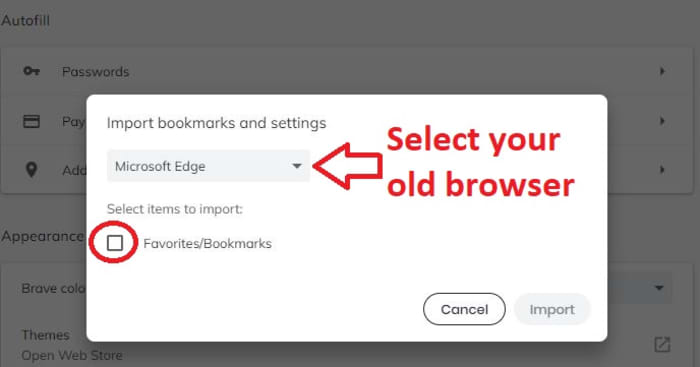 From here all you have to do is pick the browser you want to import from (you can import from multiple browsers too, if you wish), check the box, and click Import. A couple seconds later you should have all your old favorites in your new home. If anything is out of place, you can press Ctrl+Shift+Q to open up your Bookmark Manager and adjust any way you want.