How to add your own music to Skyrim in 5 easy steps

It’s not hard to switch your Skyrim soundtrack. Here’s how!

skyrim music

Jeremy Soule made some of the best music to ever grace an open-world RPG when he composed the soundtrack for Elder Scrolls V: Skyrim. After nine years and hundreds of in-game hours, however, even the greatest soundtrack can get a little stale. Now there’s a way to add your own tracks to the game – tracks that follow the same rules for trigger events as Soule’s original music.

The best thing about it?

The process is very easy and requires zero coding knowledge. In fact, you don’t even need to use the Creation Kit. Here’s how to do it in 5 easy steps:

The Elder Scrolls V: Skyrim Special Edition Free Download
8

5 easy steps to add your own music to Skyrim

1. Download this mod

No_Aardvarks_Allowed created this Personalized Music mod for Skyrim back in March 2012 and was still treating it with updates four years later. This top-notch work is available both for the original version of Skyrim and for Skyrim: Special Edition which came out in October 2016.

This mod is the crux of the process, so it’s a good thing that, as with all Skyrim mods, it’s 100% free to download. As such, we encourage you to support and sponsor No_Aardvarks_Allowed for his hard work making Skyrim an even more unique experience for you. We also recommend installing Nexus Mod Manager to make the download process as streamlined as possible.

There’s also an option to download this mod while simultaneously removing all the default music from Skyrim. Click the first file on the page if this is your preference.
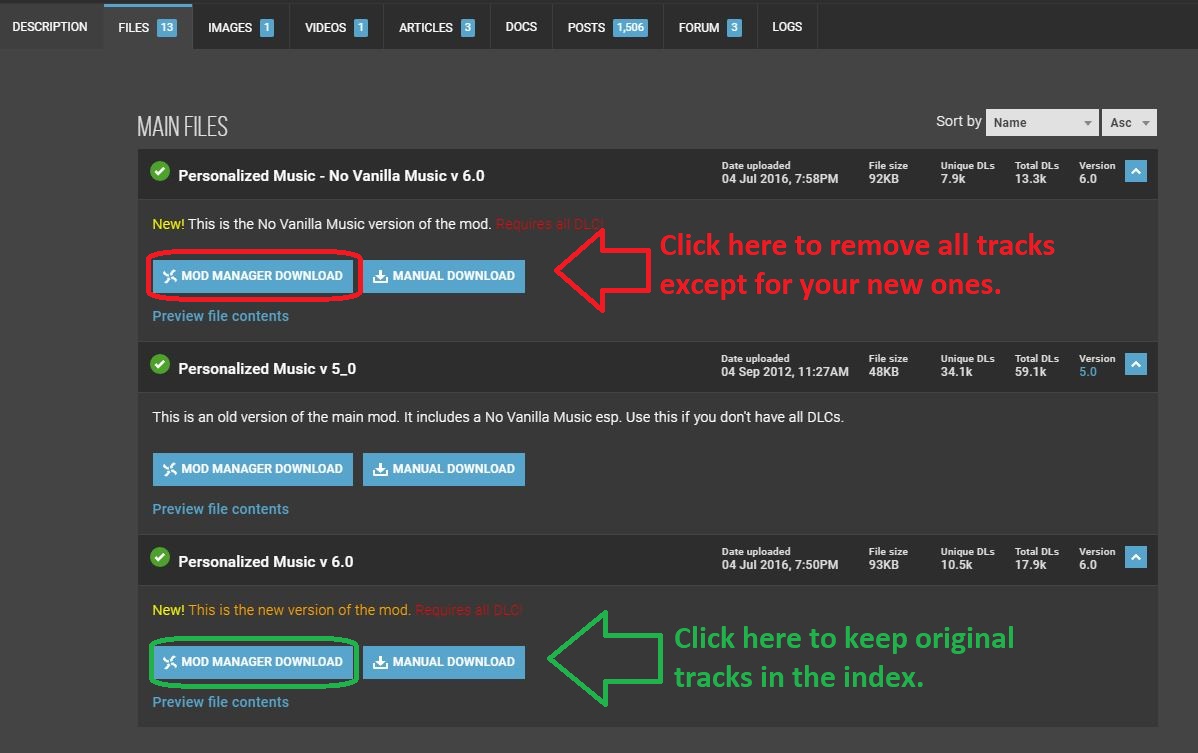
We like to keep them in; they're great, just a little overused by 2019!
Choose whether you want the original Skyrim tracks to remain in rotation.

2. Download this program to convert your music files
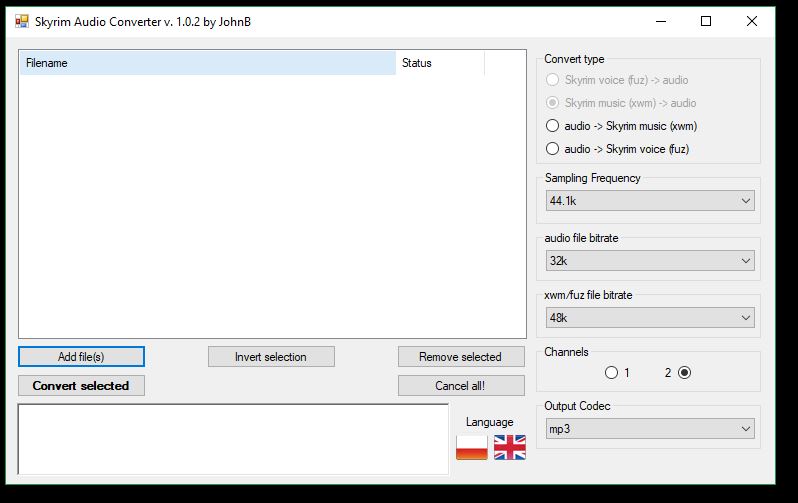
You can use .wav files too, but they're heavier and take more space.
Skyrim Audio Converter makes swapping files to .xwm as easy as possible.

Skyrim only recognizes audio files with a .xwm extension. This handy mod created by JohnBSkyrim is a lightweight package that’s easily installed and easier still to use. Grab it here, unzip the file using your favorite extractor and run the super quick install.

WinRAR Download
8

3. Convert your audio file

Once you have your audio file (whether it’s .mp3 or .wav doesn’t matter), open the Skyrim Audio Converter program that you just downloaded in the previous step. You might also want to copy the path where your audio track is so that you can easily paste it; Skyrim Audio Converter is going to ask for that path in just a sec. Click ‘Add file‘ and paste in that path. Then select the audio file you want the program to convert.
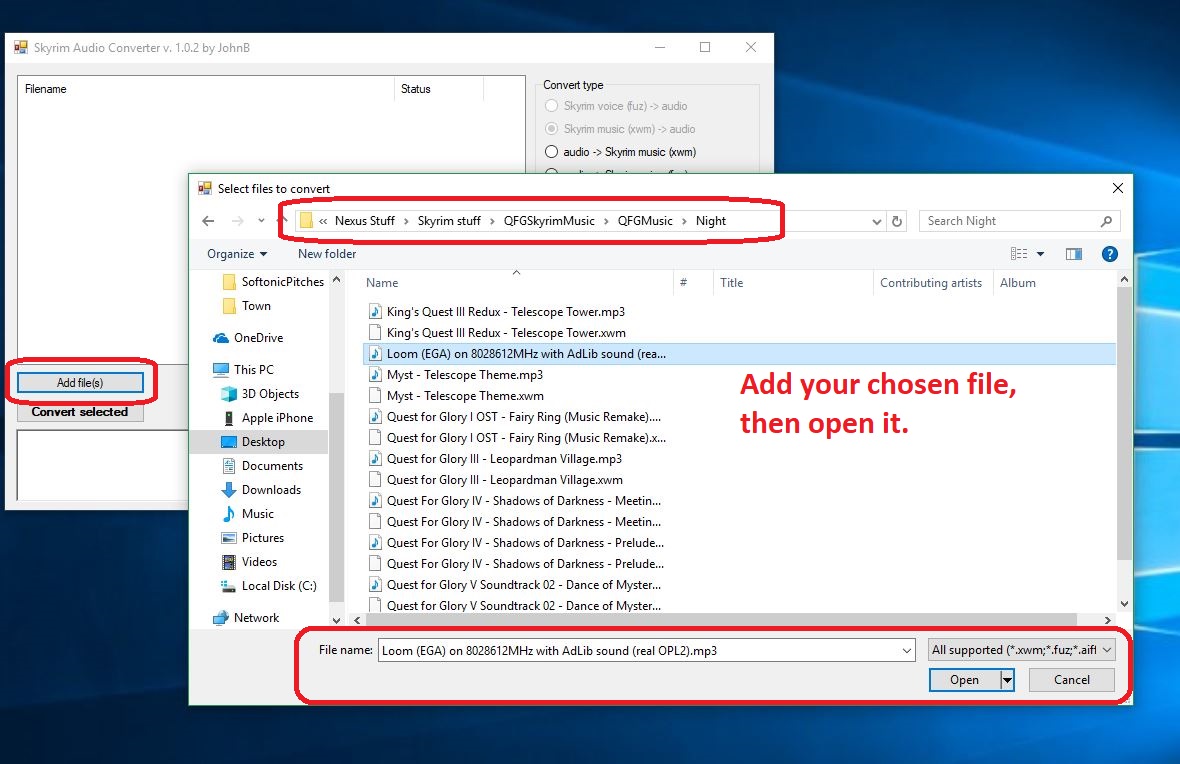
Then you convert it in the next step.
Click ‘Add file,’ locate it, then open it.

Click ‘Convert selected‘ and the audio file will convert (should take about 2-3 seconds) and magically appear in the same folder where the original audio file, now with a shiny new .xwm extension.
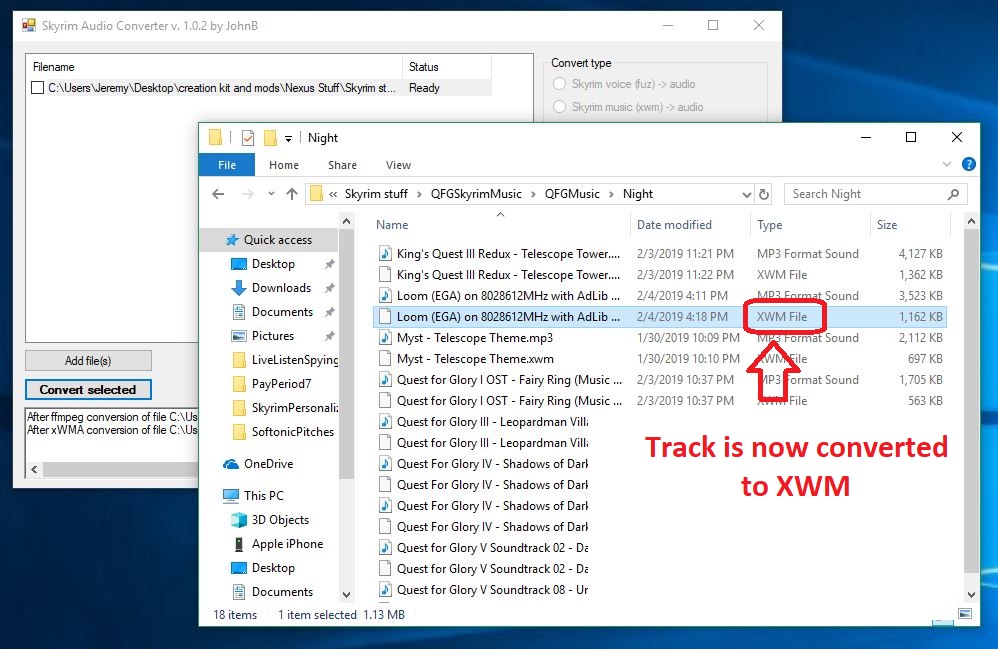
Now on to the fun part!
Now the audio file can be recognized by Skyrim’s engine.

4. Place the .xwm file in your chosen folder

Now all you have to do is put that soundtrack file in the folder of your choice. The options are laid out in front of you right here. Just paste this path into your File Explorer:

For original Skyrim:

C:\Program Files (x86)\Steam\steamapps\common\Skyrim\Data\Music

For Skyrim: SE:

C:\Program Files (x86)\Steam\steamapps\common\Skyrim Special Edition\Data\Music

Want it to play during combat? Maybe in an icy cave? In the Soul Cairn? There’s a folder for pretty much every event trigger, so the choice is yours. Check here for a description of when each folder will play. Simply open the folder and paste your newly-converted audio file right inside. Most folders can hold 20+ tracks so there’s tons of space for you to add as many tracks as you like!
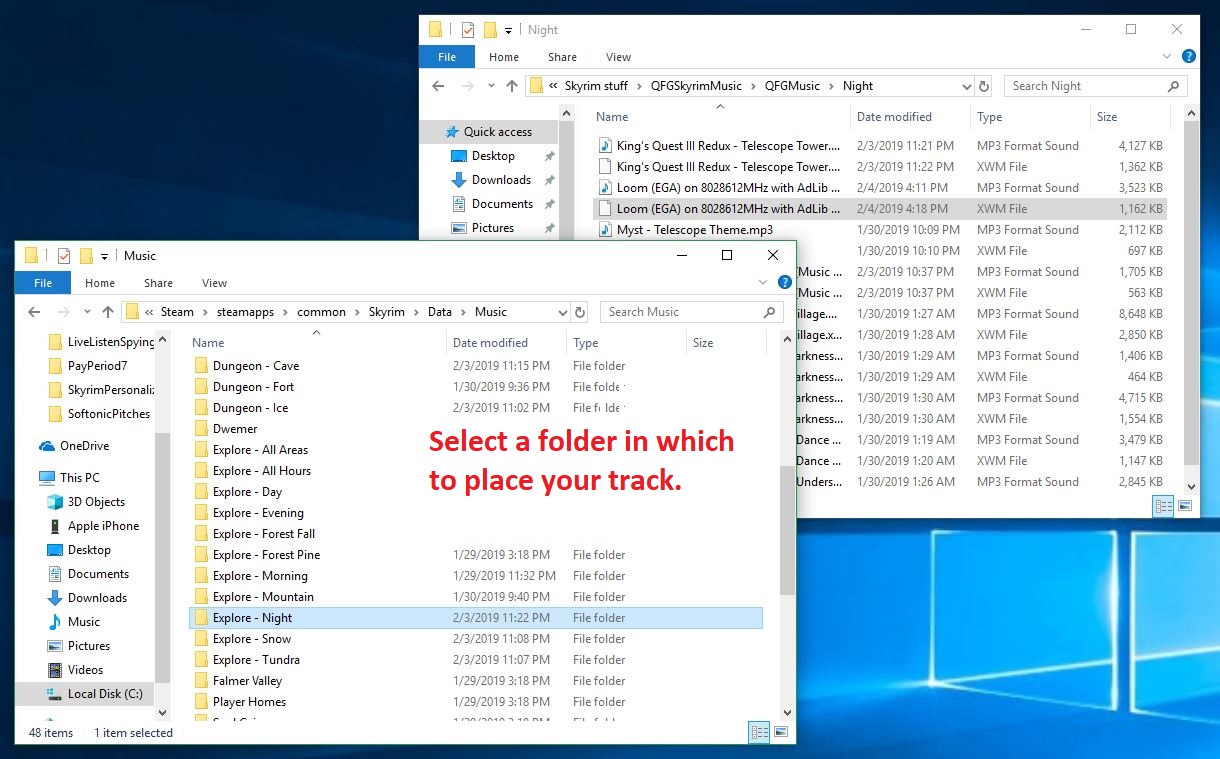
You can also place the same track in multiple folders.
Drop the xwm file into whichever folder you like; each folder is a trigger event in-game.

5. Re-name the audio file

The last step of the process is the easiest. Inside the folder that you chose in the previous step is a .txt file that explains how you need to re-name your new .xwm file so that Skyrim can read it. The names usually start with ‘MM’ and end up being pretty intuitive, such as ‘MMCombatAll03.’
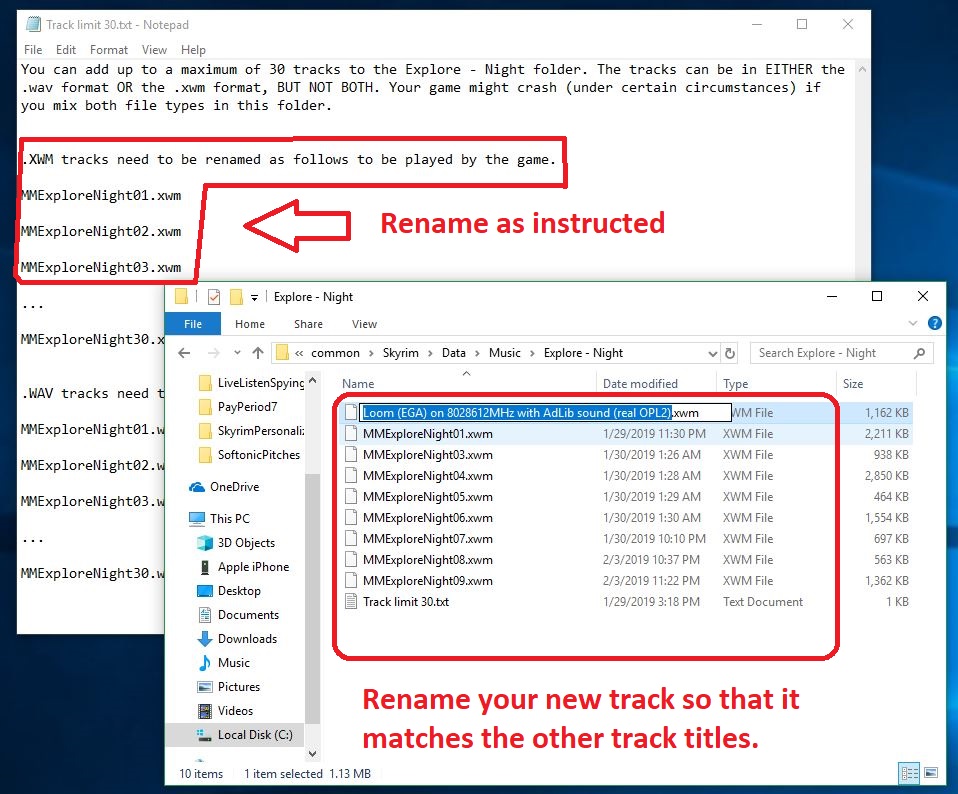
Then you should be all done!
Select the file and press F2 to rename it as the embedded .txt instructs.

After that, boot up the game and test to see if it works! If you’ve followed our above steps carefully, you should now be able to roam the snowy landscape of Skyrim and slay dragons to the beat of your favorite music! Comment below with your favorite choice for custom battle music, and stay tuned for more great Skyrim mods.

Listen: this is the oldest song in recorded history

Is this 3,400-year-old song worth a slot on your Spotify playlist?

“Let’s all get up and dance to a song that was a hit before your mother was born,” the Beatles wrote back in 1967, “though she was born a long, long time ago.” Music has been around for millennia, and while much of it has been cataloged (mostly religious music, the further back you go), it’s tragic to think of the history that we have no record of – some that were lost to time, or others that were passed on solely through oral tradition and never written down. So what is the oldest song in recorded history?

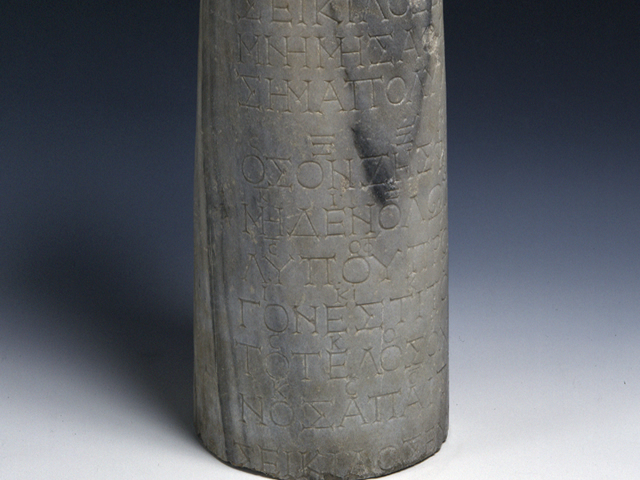
Epitaph of Seikilos

It probably won’t come as much surprise that the oldest complete composition dates back to ancient Greece. In 1883, Sir W. M. Ramsay discovered the epitaph in Tralleis, a small town near modern day Turkey. The stele tombstone dates back as far as the 1st or 2nd century and was inscribed with both an epitaph … and with song lyrics. The lyrics were underscored with the ancient Greek musical notation used from the 6th century BC until approximately the 4th century AD, a style of music writing that was discontinued around the time of the decline of the western Roman Empire.

Epitaph of Seikilos on original stele
The original epitaph of Seikilos, carved into a stone slab

The epitaph itself reads “I am a tombstone, an image. Seikilos placed me here as a long-lasting sign of deathless remembrance.” The last two words on the tombstone itself are “Seikilos Euterpe,” which has led scholars to believe that Euterpe was either Seikilos’ lover or his mother. Either way, the lyrics of the following song were written in her memory:

“While you live, shine. Have no grief at all. Life exists only for a short while, and Time demands his due.”

The short melody has a peaceful simplicity and a bittersweet emptiness, reinforced by the lack of melodic resolution and ephemeral tonality. Like much ancient music, the Epitaph of Seikilos was not written in a major or minor key; keys as we understand them now had not been invented yet!

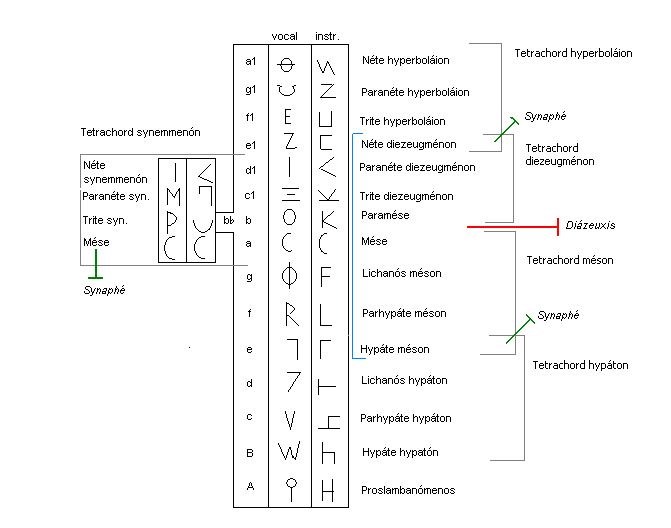
An overview of the Systema ametabolon
This is a peek at the musical notation of the ancient Greeks

Rather, the precise modality of piece is up for debate. University of Chicago Musicology Professor Don Randel points out that “the harmoniai had no finals, dominants, or internal relationships that would establish a hierarchy of tensions and points of rest. Although the epitaph’s melody is clearly structured around a single octave, the melody emphasizes the mese by position rather than the mese by function.”

While the reasons behind the melodic concept have been lost to time, the lyrics are reflective of a modern ‘seize the day’ mentality, very much in line with the typical ancient Greek mentality – to quote Alexander the Great, “I would rather live a short life of glory than a long one of obscurity.”

Alexander the Great
Alexander the Great epitomizes the “short life of glory” immortalized on Seikilos’ epitaph

The Seikilos epitaph is the oldest complete musical composition in recorded history … but we can find written music that’s older still:

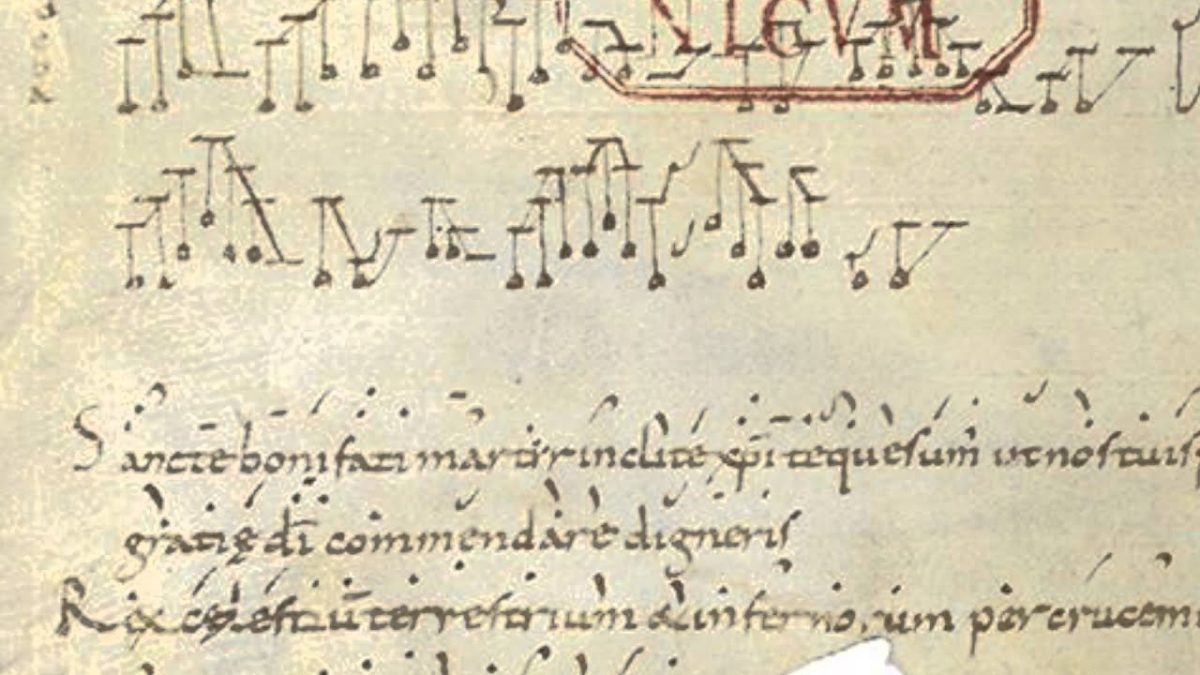
Hurrian Hymn no. 6

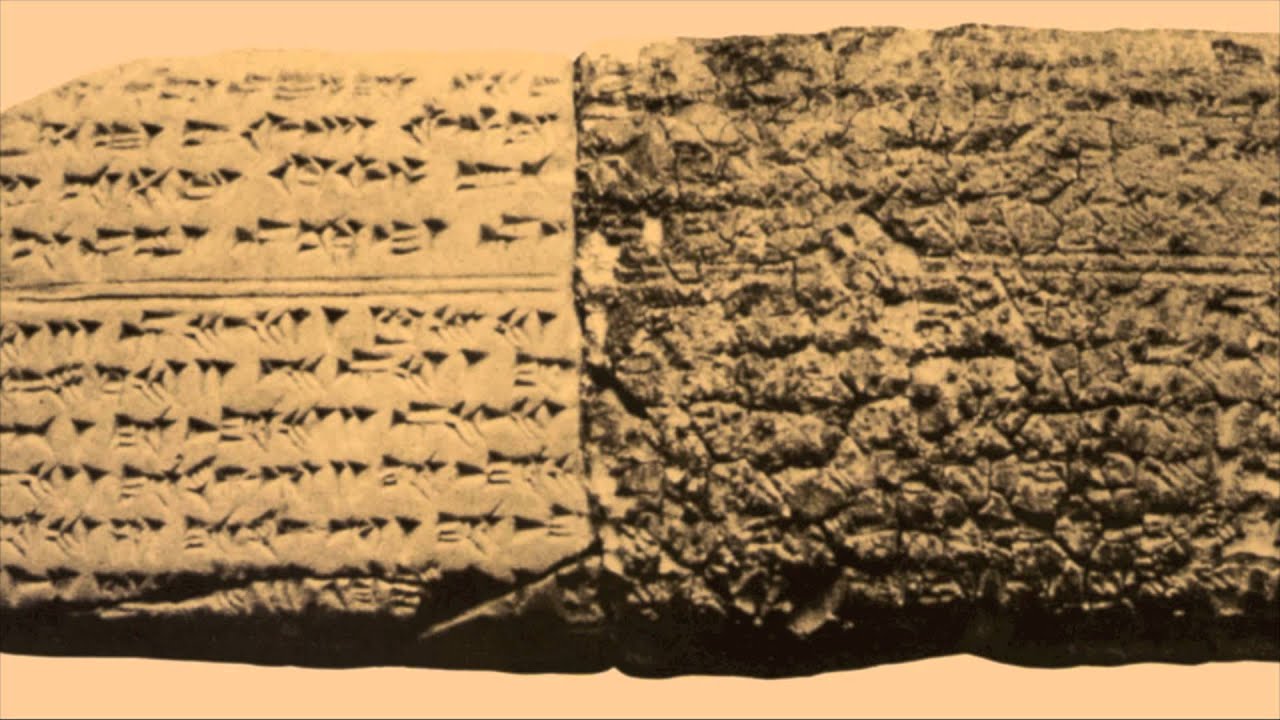
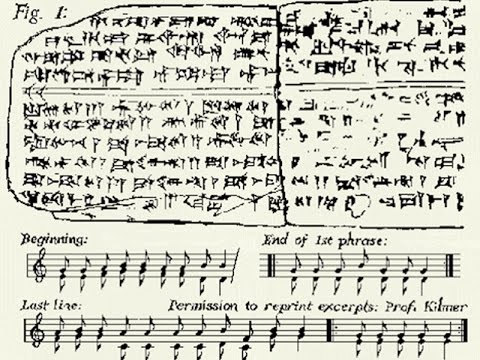
In what is modern Iraq, we found a cuneiform tablet created in what was once the ancient Sumerian city of Nippur. The tablet represents fragmentary instructions for performing music and dates as far back as 1400 BC. The music actually utilizes the standard diatonic scale, and is composed of harmonies of thirds. Another tablet from 1250 BC offers us insight on a more perfected variant of the same notation:

Stone tablet of Hurrian Hymn no. 6
It may look indecipherable to us, but there’s actually music here.

The notation system dates back so far that modern interpretations are widely controversial. The interpretation of the musical notation is still controversial, though the words written upon it are purportedly a Hurrian hymn concerning offerings to the goddess Nikkal, wife of the moon god. The notation does indicate the names of strings on a lyre, the tuning of which is described in other tablets. Though we only understand fragments of what was written on this tablet, there have been attempts to musically recreate the structure of the song:

Though other tablets in the Hurrian songs bear the names of their composer, this largely complete fragment is an anonymous work, even the text of which is not perfectly understood. It does use the Ugarit dialect, albeit a more local variant than the ones previously encountered, but the discovery and translation of these tablets is honestly miracle enough after being lost for over 3,400 years.

Ugarit translated from Hurrian Hymn 6

Stay tuned with us for more interesting historical tidbits, and let us know in the comments below if you learned something about music today!

Best music app alternatives to Spotify

Find more music with these great apps.

Spotify

Spotify has dominated the music streaming industry over the last few years, and it’s no surprise why. It has one of the largest collections of music of any streaming app, and a lot of options on how to play this music. Despite this, its popularity lets it outshine some of its competitors that are actually better in some ways.

Best music app alternatives to Spotify

SoundCloud Free Download ►
8
SoundCloud is basically the social media version of music streaming, similar to what MySpace was back in the day. You can upload and share music easily for free, while also following many other users as well. The app is also not very ad heavy, and you have the option to pay to remove the ads altogether.
Pandora Radio Free Download ►
7
The second most popular music app after Spotify, Pandora is perfect for anyone who doesn’t want to make a playlist, and instead wants to listen to a radio station tailored directly to their music tastes. It’s great for choosing a radio station based on your mood, since you decide what kind of music each station plays.
Apple Music Free Download ►
8
With a huge selection of songs, and very little limitation in downloading any song you want to listen to, Apple Music is a great alternative if you are paying for your Spotify. It’s roughly the same price, but with more customizability when it comes to how you play your music offline.
iHeartRadio: Top Radio & Music Free Download ►
10
Similar to Pandora, iHeartRadio lets you listen to customize your own radio stations, as well as providing its own live radio stations.
Essentially the same concept of Spotify but with a different business model. While Spotify caters to record labels, Tidal caters to artists directly. This allows them to get some more indie artists, who potentially wouldn’t be on Spotify. It is worth checking out the free trial if you’re currently unsatisfied with your Spotify experience. Tidal was also created by Jay-Z, as an attempt to create a music streaming software that works well for both the consumers who use it, and the artists they sponsor.

For more great options, check out our Softonic Solutions page where our community suggests even more streaming services to choose from.